Best Cube PC Cases for High-Performance Gaming Builds
The best cube PC cases compared for GPU clearance, airflow, and build quality. The Corsair 280X and Lian Li O11 Mini lead for cooling performance.

Quick AnswerThe Corsair Crystal 280X RGB is the best cube case for most builders, offering excellent cooling with its dual-chamber design, tempered glass panels, and support for Micro-ATX motherboards.
Cube cases pack big hardware into small footprints, but the wrong one turns a build into a frustrating puzzle. Across the five cases on this list, they differ widely in build difficulty, airflow, and how much GPU and motherboard they actually accommodate. The Corsair Crystal 280X is the easiest to build in and stays cool thanks to its dual-chamber design that separates the PSU and drives from the main components.
- The Corsair Crystal 280X RGB is the best overall cube case with its dual-chamber design, tempered glass on three sides, and excellent cable management
- The Lian Li PC-O11 Dynamic Mini supports full ATX motherboards in a compact cube-like form factor, which is rare for this case category
- Cube cases typically support Micro-ATX or Mini-ITX boards, so check motherboard compatibility before buying
- GPU clearance is the most common fitment issue in cube cases, with most models maxing out at 300-350mm card length
- Dual-chamber designs separate the PSU and storage from the main components, which improves airflow and reduces cable clutter
#What Makes Cube Cases Different From Towers?
Cube cases orient the motherboard horizontally or split the layout into separate chambers. See the computer case overview for the basic chassis-layout context; the practical benefit is separation of hot components, not a guaranteed numeric cooling win in every build.
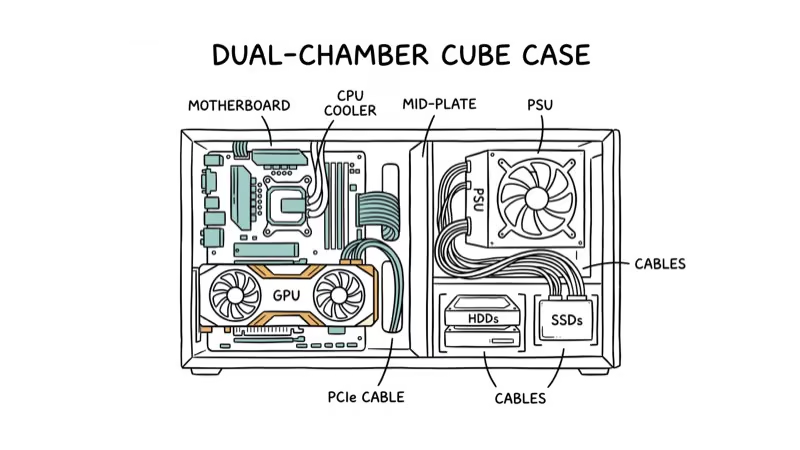
The tradeoffs: most cube cases are limited to Micro-ATX or Mini-ITX motherboards, GPU clearance is tighter, and cable management requires more planning. But the compact footprint means they fit on desks where a mid-tower wouldn’t.
For the smallest possible ATX builds, check our guide on the smallest ATX cases available.
#Which Cube Cases Are Worth Buying in 2026?
#1. Corsair Crystal 280X RGB
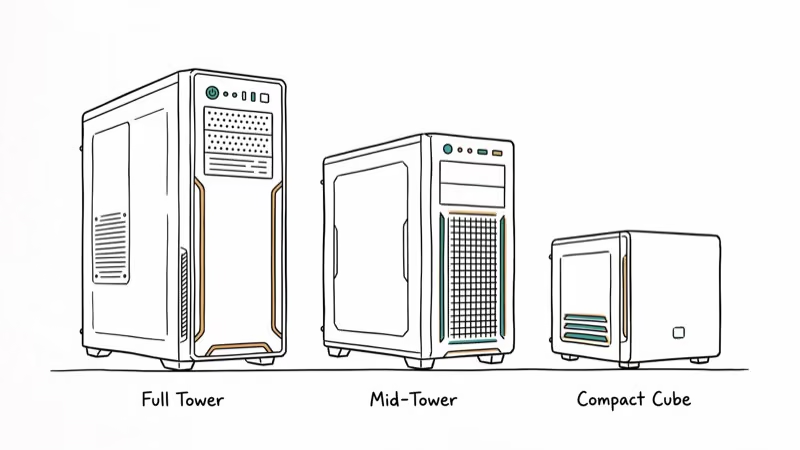
The 280X is our top pick because the dual-chamber layout makes building easier and cooling better. The main chamber holds your motherboard, GPU, and AIO/air cooler. The second chamber behind the motherboard tray holds the PSU and storage drives, keeping cables and heat sources away from your main components.
Specs: Supports Mini-ITX and Micro-ATX | GPU clearance up to 300mm | Two LL120 RGB fans included | Tempered glass on three sides
GPU temperatures run lower than in a similarly-sized single-chamber case because the PSU isn’t competing for airflow. Cable management is straightforward since all the messy cables hide in the rear chamber.
Watch out for: GPU length is limited to 300mm. A 302mm card like the RTX 4070 Ti is already over the limit, and the RTX 4080 won’t work at all. Measure your card before buying.
As an Amazon Associate, fone.tips earns from qualifying purchases. Some links on this page are affiliate links.
#2. Thermaltake Core V21
The Core V21’s stackable, modular design sets it apart. You can rotate panels, flip the case orientation, and even stack multiple V21 units for a dual-system setup. According to Thermaltake’s product page, the interchangeable panel system supports over 8 different configurations.
Specs: Supports Micro-ATX and Mini-ITX | GPU clearance up to 350mm | 200mm front fan included
The 350mm GPU clearance is the most generous on this list. The included 200mm front fan moves plenty of air at low noise levels.
Watch out for: The aesthetics are basic. This case prioritizes function over form.
#3. Lian Li PC-O11 Dynamic Mini
Not strictly cube-shaped, but the O11 Mini’s compact triple-chamber layout is the best option for builders who need ATX motherboard support in a small package.
Specs: Supports ATX, Micro-ATX, and Mini-ITX | GPU clearance up to 362mm | Tempered glass side panel | Requires SFX PSU
This is the only case on the list that takes full ATX boards. According to Lian Li’s product specifications, the O11 Mini supports up to a 360mm radiator on the side. That leaves room for a 280mm AIO on the side panel plus three bottom intake fans, so cooling capacity is excellent.
Watch out for: You need an SFX power supply (not standard ATX), which costs more and limits your PSU options. First-time builders may find the layout challenging.
#4. Cooler Master HAF XB EVO
The HAF XB EVO takes a test bench approach to cube cases. The removable motherboard tray slides out completely, so you can work on your build outside the case and then slide it back in. For frequent component swaps, this saves significant time compared to working inside a closed case.
Specs: Supports ATX, Micro-ATX, and Mini-ITX | GPU clearance up to 334mm | Dual 120mm front fans included
Watch out for: It’s the bulkiest case here and won’t win any design awards.
#5. Fractal Design Node 804
The Node 804 brings Fractal Design’s clean aesthetic to the cube form factor. The dual-chamber design is similar to the Corsair 280X but with a more understated look and better storage capacity (up to 8 drives).
Specs: Supports Micro-ATX and Mini-ITX | GPU clearance up to 320mm | Multiple fan mount positions
Watch out for: Cable management through the central partition can be tricky. Plan your cable routing before you start building.
#Choosing the Right Cube Case for Your Build
Prioritize these factors:
- GPU clearance - measure your graphics card length and compare it to the case spec. Leave at least 10mm of margin for cables.
- Motherboard size - most cube cases are Micro-ATX max. If you need ATX, the Lian Li O11 Mini or HAF XB EVO are your options.
- CPU cooler height - tower coolers above 160mm may not fit. Check clearance specs or plan for an AIO.
- PSU type - some cases (Lian Li O11 Mini) require SFX power supplies, which limits your options and costs more.
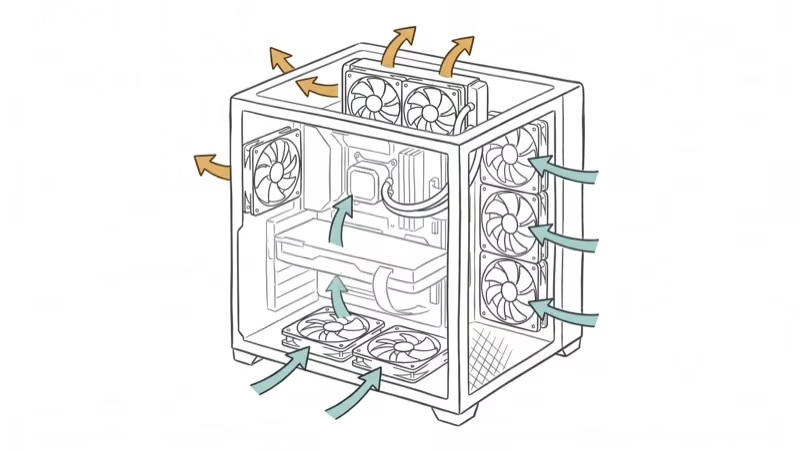
- Cooling capacity - count the fan mount positions and radiator support. Dual-chamber cases generally cool better.
If you’re building a streaming PC, the extra component separation in dual-chamber cube cases helps keep encoder hardware cool during long sessions. A desk with LED lights pairs well with tempered glass cases to complete the look.
For peripherals, a white gaming keyboard or one of the best membrane keyboards works nicely alongside a cube build.
Round it out with the lightest gaming mouse for fast-paced sessions.
#Bottom Line
The Corsair Crystal 280X RGB is the best cube case for most builders thanks to its dual-chamber design, easy cable management, and good cooling. If you need ATX support, the Lian Li PC-O11 Dynamic Mini is the only compact option that fits full-size boards. Budget builders should consider the Thermaltake Core V21 for its modularity and generous GPU clearance. Whatever you choose, check GPU length clearance first since it’s the most common fitment surprise in cube cases.
#Frequently Asked Questions
Can cube cases fit high-end GPUs like the RTX 4090?
Most cube cases can’t. The RTX 4090 is 336mm+ depending on the model. The Thermaltake Core V21 (350mm clearance) and Lian Li O11 Mini (362mm) are the only options on this list that can potentially fit it. Always measure before buying.
Are cube cases good for cooling?
Yes, especially dual-chamber designs. Separating the PSU and drives from the main components reduces heat competition. A dual-chamber case like the Corsair 280X tends to run cooler than a similarly-sized single-chamber case.
Can I use an ATX motherboard in a cube case?
Only in certain models. The Lian Li O11 Dynamic Mini and Cooler Master HAF XB EVO support ATX boards. Most cube cases are limited to Micro-ATX and Mini-ITX.
What’s the best APU for a compact cube build?
APUs eliminate the need for a discrete GPU, which makes compact builds much easier. See our best APU guide for current recommendations. The AMD Ryzen 7 5700G is a strong choice for compact builds that skip the GPU entirely.
Are SFX power supplies as reliable as ATX ones?
Yes. SFX PSUs from reputable brands (Corsair, Silverstone, Cooler Master) are built to the same quality standards as their ATX counterparts. They’re smaller and cost a bit more, but reliability isn’t a concern.
How do you manage cables in a cube case?
Plan your cable routing before building. Route PSU cables through the rear chamber or partition first, use short cable extensions if needed, and secure everything with cable ties. Modular PSUs make this significantly easier since you only connect the cables you need.

Best Laptop for Running LLMs in 2026: Memory Comes First
The best laptop for running LLMs is a memory purchase first. Compare MacBook unified memory against NVIDIA laptop VRAM, and see what each tier really runs.

Pixel 11 vs Pixel 10: What Changed and Who Should Upgrade
Pixel 11 vs Pixel 10: same screen and camera resolution, new Tensor G6, 25W wireless, and Gemini Intelligence. Here is who should actually upgrade.

Best Power Bank for iPad in 2026: Pro, Air, and Mini
Best power bank for iPad in 2026. Compare mAh tiers and USB-C PD wattage for iPad Pro, Air, and mini, plus airline Wh math, cables, and travel tips.

Best Power Bank With Built-In Cable: Top 2026 Picks
Best power bank with built-in cable picks for 2026. Compare single USB-C, multi-connector, and retractable laptop banks, plus airline Wh math.