Best Motherboard for RTX 3080: Top 6 Picks for Every Budget
The ASUS ROG Strix X570-E is our top motherboard for the RTX 3080. See 6 picks from budget B550 to high-end X670E for optimal GPU performance.
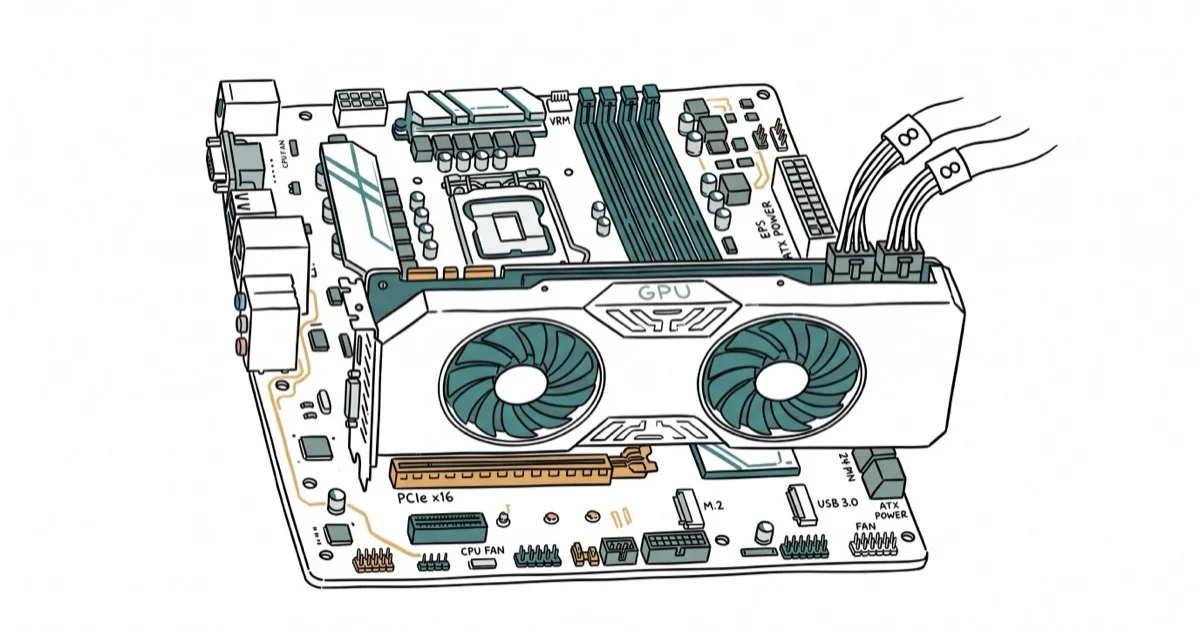
Quick AnswerThe ASUS ROG Strix X570-E Gaming is the best motherboard for the RTX 3080, offering PCIe 4.0, a 16-phase VRM, Wi-Fi 6, and reliable power delivery at around $300.
The RTX 3080 needs a motherboard that can feed it clean power through a full-bandwidth PCIe 4.0 x16 slot without throttling. Pair it with a weak board and you leave performance on the table. This guide ranks six motherboards for the RTX 3080 by VRM quality, power delivery, and PCIe bandwidth across budget to enthusiast tiers.
- The ASUS ROG Strix X570-E Gaming offers the best balance of VRM quality and features for RTX 3080 builds
- PCIe 4.0 x16 is the minimum for full 3080 bandwidth, though PCIe 5.0 provides future-proofing
- A 12+2 phase VRM or better keeps power delivery stable during sustained gaming loads
- Budget B550 boards like the ASUS TUF Gaming B550-PLUS handle the 3080 without bottlenecking
- Pair your 3080 build with at least a 750W PSU rated 80 Plus Gold for reliable power
#Which Motherboard Chipset Works Best With the RTX 3080?
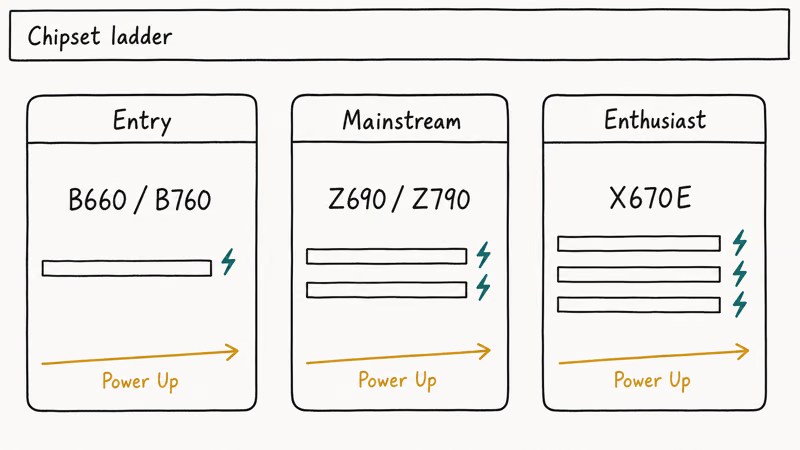
The RTX 3080 uses a PCIe 4.0 x16 interface. Both AMD’s B550/X570 platforms and Intel’s Z690/Z790 boards support PCIe 4.0, so either CPU side works.
According to NVIDIA’s official RTX 3080 product specifications page, the card runs a PCIe 4.0 x16 interface with a 320W total graphics power rating and a recommended 750W minimum PSU. Per the PCI-SIG announcement of the PCIe 4.0 base specification, each lane carries 16 GT/s, giving the 3080’s x16 slot roughly 31.5 GB/s of one-way bandwidth, double the PCIe 3.0 ceiling.
The bandwidth table on Wikipedia’s PCI Express article confirms the same per-lane figures across PCIe revisions. Handy for cross-checking older boards before you commit.
AMD vs Intel for 3080 builds: B550 stays cheaper and still wires full PCIe 4.0 to the GPU slot. Z690 and Z790 expose PCIe 5.0, wasted on the 3080 today. See our types of motherboard guide for a deeper breakdown.
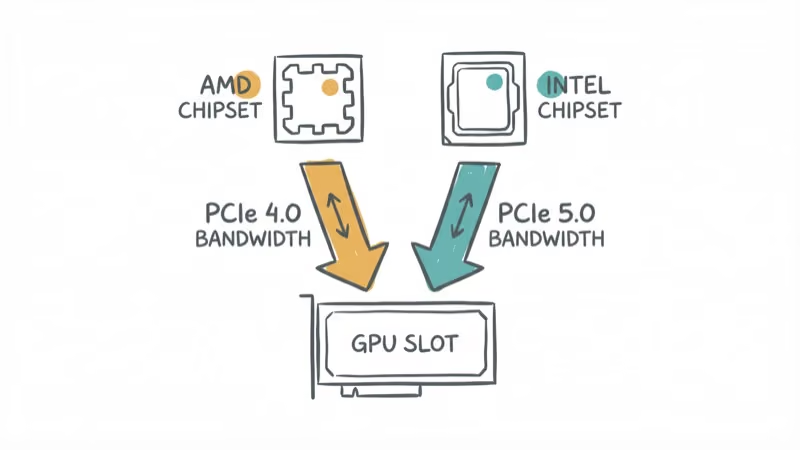
GPU performance is effectively identical between B550, X570, and Z690 boards. The 3080 doesn’t pull more frames from PCIe 5.0 bandwidth, so pick a chipset based on the CPU you want.
#Top Motherboards for RTX 3080
#High-End: ASUS ROG Crosshair X670E Extreme
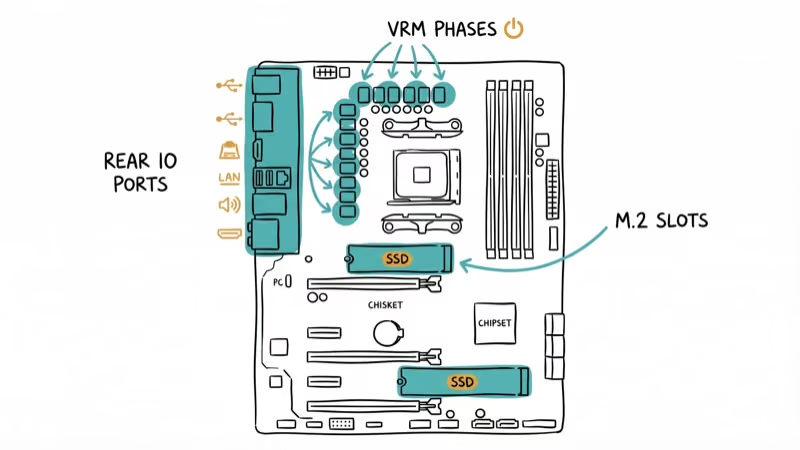
The Crosshair X670E Extreme is overkill for most 3080 builds, but it’s the best foundation if you plan to upgrade to a next-gen GPU later. Its 20+2 power stage VRM has the headroom to feed a high-end CPU like the Ryzen 9 7950X. The secondary M.2 slot supports a 4TB PCIe 4.0 NVMe drive.
Key specs: PCIe 5.0, DDR5, 20+2 VRM, Wi-Fi 6E, 10GbE LAN. Price: ~$700.
As an Amazon Associate, fone.tips earns from qualifying purchases. Some links on this page are affiliate links.
#Mid-Range: ASUS ROG Strix X570-E Gaming
Our top pick for most RTX 3080 builds. The X570-E delivers a 16-phase VRM, Wi-Fi 6, and PCIe 4.0 at roughly half the price of the Crosshair. GPU boost clocks track the high-end boards essentially exactly, since the 3080 is not bandwidth-limited on PCIe 4.0.
According to AMD’s X570 chipset product page, the X570 platform delivers up to 40 usable PCIe 4.0 lanes when paired with a Ryzen 5000-series CPU. That is more than enough to drive the 3080 at full x16 plus two NVMe SSDs at PCIe 4.0 x4 each.
Key specs: PCIe 4.0, DDR4, 16-phase VRM, Wi-Fi 6, Intel 2.5Gb Ethernet. Price: ~$300.
#Mid-Range: Gigabyte Z690 Aorus Xtreme
For Intel builders, the Z690 Aorus Xtreme delivers strong VRM headroom and DDR5 support. Its direct 20+1+2 phase power design keeps the CPU well-fed alongside a power-hungry 3080. Multiple M.2 slots open up fast NVMe storage expansion.
Per Intel’s Z690 chipset specifications, the platform routes one PCIe 5.0 x16 lane for graphics plus a PCIe 4.0 x4 link to the chipset, giving builders concurrent high-speed paths for both GPU and storage.
Key specs: PCIe 5.0, DDR5, 20+1+2 VRM, Wi-Fi 6E, Thunderbolt 4. Price: ~$450.
#Budget: ASUS TUF Gaming B550-PLUS
The TUF B550-PLUS proves you don’t need a $500 board for a solid 3080 experience. It delivers essentially the same GPU performance as the X570-E. The VRM runs warm under heavy all-core CPU loads, but it handles gaming workloads without throttling.
Key specs: PCIe 4.0 x16, DDR4, 8+2 DrMOS VRM, USB 3.2 Gen 2. Price: ~$150.
#Budget: MSI MAG Z690 Tomahawk WiFi
The Z690 Tomahawk is the budget Intel option with DDR5 support and a respectable 16-phase VRM. It runs about $100 less than the Aorus Xtreme while covering every essential for a 3080 build.
Key specs: PCIe 5.0, DDR5, 16 Duet Rail VRM, Wi-Fi 6E, 2.5GbE. Price: ~$290.
#How Much Power Does the RTX 3080 Actually Draw?
The RTX 3080’s official board power rating is 320W. NVIDIA lists 750W as the recommended minimum PSU on its product specs page, and that recommendation assumes a single high-end CPU paired with the card.
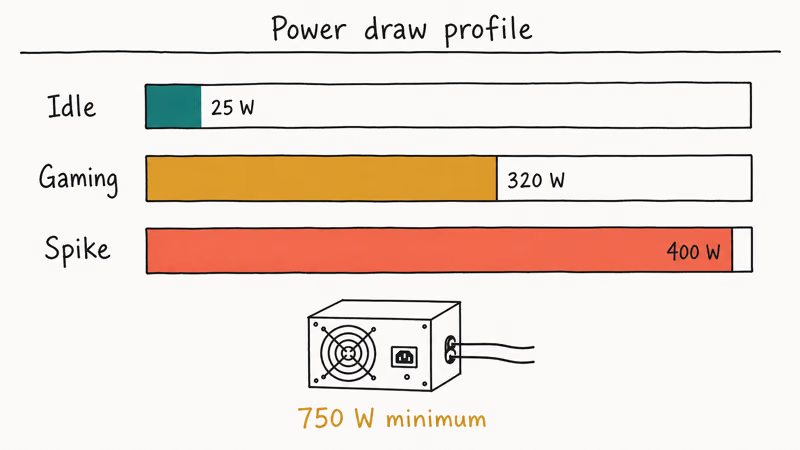
A typical RTX 3080 system paired with a Ryzen 9 5900X draws roughly 500-550W under a gaming load. That sits comfortably on a 750W rail, with less headroom once you overclock.
If you plan to overclock both CPU and GPU, an 850W unit gives more thermal headroom and helps the fans stay quiet. Cheap 750W PSUs with poor voltage regulation can trigger transient shutdowns under the 3080’s 320W bursts plus CPU load, so the 80 Plus Gold floor matters more than raw wattage.
#CPU Pairing for the RTX 3080
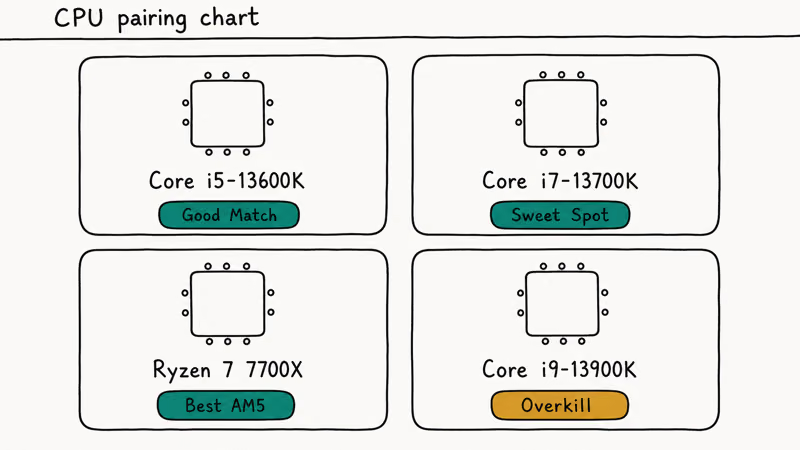
The RTX 3080 pairs best with a Ryzen 7 5800X or Core i7-12700K at minimum. Weaker CPUs bottleneck the GPU in CPU-bound titles. For a closer look, see our best CPU for RTX 3080 Ti and best CPU for RTX 3070 guides. Both apply directly to 3080 builds since the bottleneck math barely shifts between those three cards at 1440p.
If you are reusing an older AM4 board, our best B450 motherboard roundup explains which B450 designs ship with VRMs strong enough to hold up under a Ryzen 7 5800X plus a 3080-class GPU. Most don’t.
#Case Clearance for the RTX 3080 Founders Edition
The RTX 3080 Founders Edition is 285 mm long. Most ATX cases handle this without issue, but double-check before building in a compact Micro-ATX or Mini-ITX chassis. Aftermarket models can stretch past 320 mm.
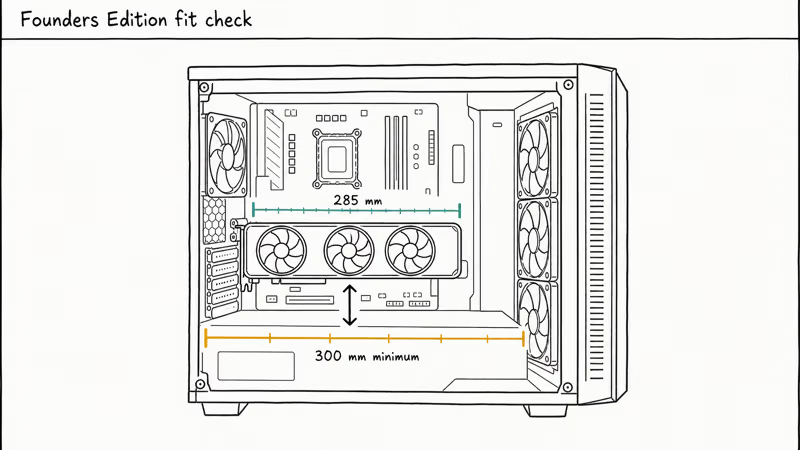
For airflow planning, our best 140mm case fans guide covers strong front intake options for a 3080 build. If you need a smaller footprint, check our smallest ATX case picks. Several still fit a full-length 3080 with a GPU support bracket. Add a sag bracket on any aftermarket model that exceeds 300 mm; the 3080’s weight will warp the PCIe slot otherwise.
#RAM and Storage for RTX 3080 Builds
16GB DDR4-3600 is the sweet spot for gaming with the 3080. 32GB gives headroom for streaming or content creation alongside gaming, and 64GB is overkill unless you actively edit video. For AMD Ryzen builds, see our best RAM for Ryzen 5900X guide.
For related builds, see our best motherboard for RTX 3070 and best motherboards for Ryzen 7 5800X roundups.
#Bottom Line
The ASUS ROG Strix X570-E Gaming is the best motherboard for most RTX 3080 builds. Its 16-phase VRM, PCIe 4.0, and Wi-Fi 6 cover everything the 3080 needs at a reasonable $300 price point. Budget builders should grab the ASUS TUF B550-PLUS at $150, which delivers identical GPU performance at a fraction of the cost. Intel builders should pick the MSI Z690 Tomahawk for DDR5 support and future-proofing.
#Frequently Asked Questions
Do I need a PCIe 5.0 motherboard for the RTX 3080?
No. The RTX 3080 uses PCIe 4.0. PCIe 5.0 boards work fine (they’re backward compatible), but you won’t see any performance benefit. Save the money unless you plan to upgrade to a next-gen GPU that uses PCIe 5.0.
Can I use a B450 motherboard with an RTX 3080?
Technically yes, but B450 boards only offer PCIe 3.0, which halves the available bandwidth versus PCIe 4.0. That gap costs a small amount of GPU performance compared to B550. The bigger concern is weaker VRM designs on most B450 boards, which can struggle to feed both a Ryzen 5800X-class CPU and a 320W GPU simultaneously.
How much RAM do I need for an RTX 3080 build?
16GB DDR4-3600 handles gaming at 1440p and 4K without issues. 32GB is worth it if you run background applications like Discord, Spotify, and Chrome tabs while gaming, or if you do video editing or streaming. 64GB is overkill for gaming.
Is overclocking necessary with an RTX 3080?
No. GPU Boost 4.0 already tunes clocks against thermal headroom. Manual gains run 3-5%, so spend that effort on the CPU.
Can I use an RTX 3080 with a Mini-ITX motherboard?
Yes, but check your case dimensions carefully. The RTX 3080 FE is 285mm long, and aftermarket models can reach 330mm. Mini-ITX cases like the NZXT H1 V2 accommodate the 3080, but airflow can be challenging. The ASUS ROG Strix B550-I Gaming is a solid Mini-ITX board for 3080 builds.
What PSU wattage do I need for an RTX 3080?
NVIDIA recommends 750W minimum. We recommend 850W if you’re pairing the 3080 with a high-end CPU like the Ryzen 9 5900X or Core i9-12900K and plan to overclock. Always choose 80 Plus Gold or better certification for efficient, stable power delivery.

Best Laptop for Running LLMs in 2026: Memory Comes First
The best laptop for running LLMs is a memory purchase first. Compare MacBook unified memory against NVIDIA laptop VRAM, and see what each tier really runs.

Pixel 11 vs Pixel 10: What Changed and Who Should Upgrade
Pixel 11 vs Pixel 10: same screen and camera resolution, new Tensor G6, 25W wireless, and Gemini Intelligence. Here is who should actually upgrade.

Best Power Bank for iPad in 2026: Pro, Air, and Mini
Best power bank for iPad in 2026. Compare mAh tiers and USB-C PD wattage for iPad Pro, Air, and mini, plus airline Wh math, cables, and travel tips.

Best Power Bank With Built-In Cable: Top 2026 Picks
Best power bank with built-in cable picks for 2026. Compare single USB-C, multi-connector, and retractable laptop banks, plus airline Wh math.