PCI vs PCI Express: What Changed and Which Slot You Need
PCI vs PCI Express explained: lane speeds, slot sizes, compatibility, legacy PCI limits, and how to choose the right expansion slot for PC upgrades.
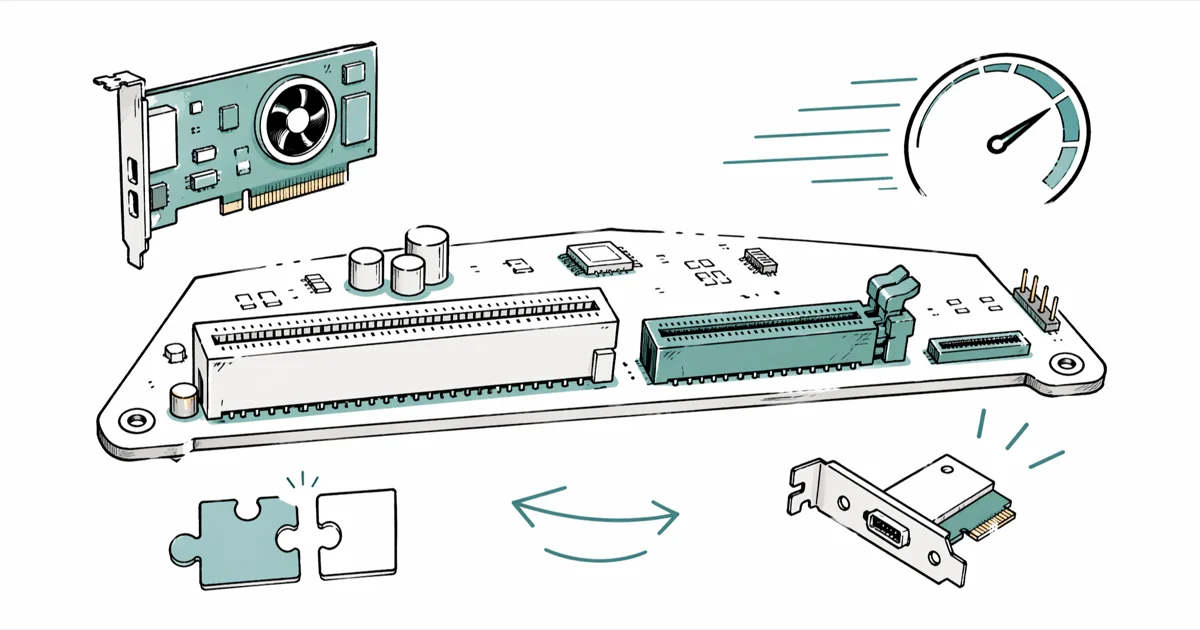
Quick AnswerPCI Express replaces PCI with serial point-to-point lanes instead of a shared parallel bus, so a single PCIe 4.0 x16 slot moves about 32 GB/s versus 533 MB/s for 64-bit PCI. Use PCIe for any modern graphics card, NVMe SSD, or capture card; PCI is legacy hardware that lives only on pre-2010 motherboards.
PCI and PCI Express look like cousins, but they’re different buses with different wiring. PCI is a legacy shared parallel bus, while PCI Express uses serial point-to-point lanes. The gap in throughput, slot layout, and compatibility shows up the moment you choose an expansion card.
This guide assumes you own the PC or have permission to open it, since pulling cards from a workstation that isn’t yours can void warranties or break IT policy.
- PCI is a parallel shared bus from 1992 capped near 533 MB/s; PCI Express is a serial point-to-point bus where each PCIe 5.0 lane delivers about 3.94 GB/s.
- Cards aren’t cross-compatible. PCI cards don’t fit PCIe slots and vice versa, even though both sit on the motherboard.
- PCIe slot sizes (x1, x4, x8, x16) describe lane count, not generation. A modern x16 slot is roughly 89 mm long and uses 164 pins.
- PCIe is forward and backward compatible across generations. A PCIe 3.0 card runs in a PCIe 5.0 slot at PCIe 3.0 speeds.
- Conventional PCI is now mostly a legacy slot. Modern consumer boards generally ship PCIe for expansion cards.
#A Quick Look at PCI and Where It Still Lives
PCI stands for Peripheral Component Interconnect. Intel introduced it in 1992 as a parallel local bus that ties expansion cards into the southbridge chip on the motherboard. Cards share the bus. Two devices transferring at peak speed contend for bandwidth, and that contention is the bottleneck PCIe was built to solve.
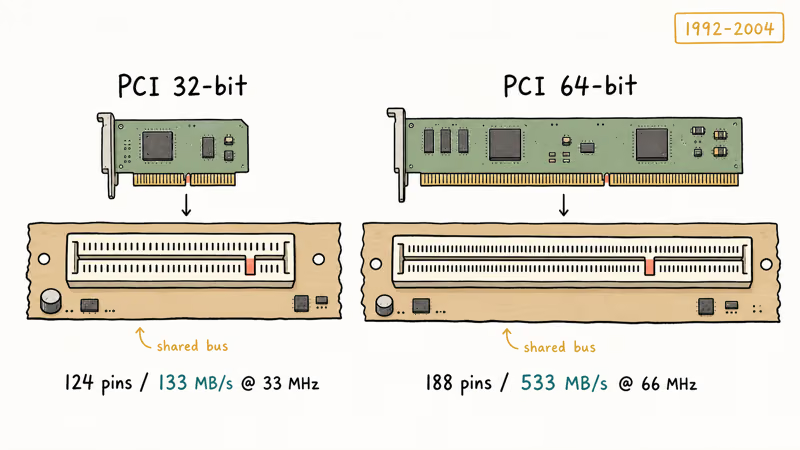
Two slot flavors shipped.
The 32-bit version uses 124 pins and tops out around 133 MB/s at 33 MHz. The 64-bit server variant adds 64 pins (188 total) and reaches roughly 533 MB/s at 66 MHz. According to the PCI-SIG specification archive, conventional PCI 3.0 was the last revision before the standard froze in 2004.
Legacy PCI network cards can still be useful for office-era hardware, but the shared bus is hopeless for modern NVMe storage.
The bus survives in narrow corners.
Conventional PCI hangs on in two places: industrial PCs that ship with bridge-chip motherboards from Supermicro or Advantech, and old workstations that still drive a parallel-port label printer or a 100BASE-TX network card with no PCIe equivalent. Everywhere else the slot is gone. If you’re upgrading an older build, our guide to motherboard form factors covers which boards still expose PCI alongside PCIe.
#What PCI Express Brings Over the Old Bus
PCI Express (PCIe, sometimes written PCI-E) launched in 2003. The big shift: parallel bus out, point-to-point serial links called lanes in. Each lane is a dedicated full-duplex pair, so a graphics card in an x16 slot doesn’t lose bandwidth when an NVMe SSD on a different slot starts a transfer.
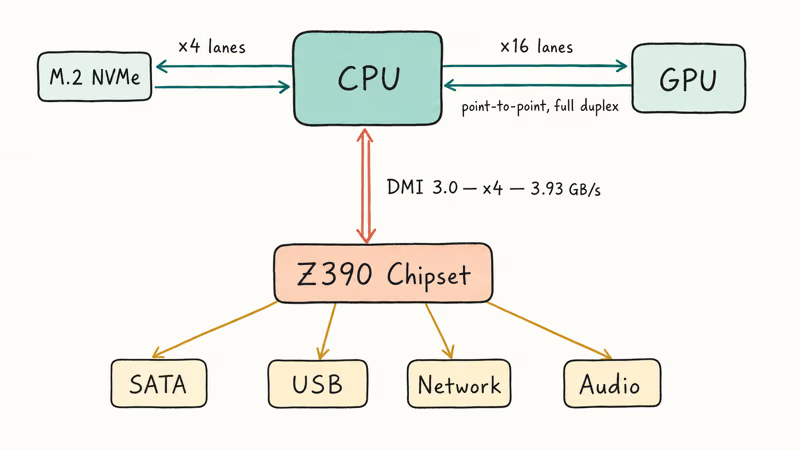
Topology changed too.
On a typical desktop platform, the CPU connects directly to the primary PCIe x16 graphics slot and one or more high-speed storage links, while the chipset handles additional PCIe lanes for SATA, USB, network, and audio. Intel’s Z390 chipset datasheet confirms that DMI 3.0 (the link between CPU and chipset) is itself a PCIe 3.0 x4 channel running at about 3.93 GB/s.
Lanes scale cleanly.
PCIe 5.0 doubles PCIe 4.0 again, hitting about 3.94 GB/s per lane (or 63 GB/s on an x16 slot) without changing the physical connector. According to the PCI-SIG PCIe 5.0 announcement, the standard hit final form in 2019 and started shipping on Intel Z690 boards in late 2021. AMD followed with X670E and B650E in 2022.
#How Big Is the Speed Gap Between PCI and PCIe?
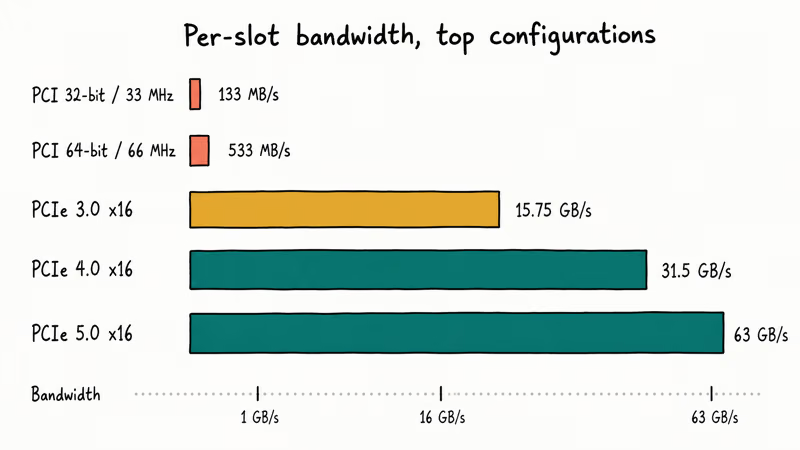
Speed is where the two buses split hardest. The published specs show the scale of the gap:
| Bus | Per-lane bandwidth | Typical configuration | Total throughput |
|---|---|---|---|
| PCI 32-bit/33MHz | n/a (shared) | shared bus | 133 MB/s |
| PCI 64-bit/66MHz | n/a (shared) | shared bus | 533 MB/s |
| PCIe 3.0 | 985 MB/s | x16 | 15.75 GB/s |
| PCIe 4.0 | 1.97 GB/s | x16 | 31.5 GB/s |
| PCIe 5.0 | 3.94 GB/s | x16 | 63 GB/s |
A PCIe 3.0 x1 slot, the shortest PCIe connector on a modern board, already moves roughly 985 MB/s. That alone beats 64-bit PCI by almost 2x. Samsung advertises sequential read speeds of up to 3,500 MB/s for the 970 EVO Plus, which is why drives in that class need PCIe rather than conventional PCI.
Latency tells the same story.
The serial protocol cuts round-trip times because each device owns its lane and doesn’t arbitrate for the bus. That’s why PCIe powered the move from SATA SSDs (about 550 MB/s ceiling) to NVMe, and why our SSD not showing up troubleshooting guide is mostly an NVMe and PCIe-lane story now.
#Are PCI and PCIe Slots Compatible?
Short answer: no.
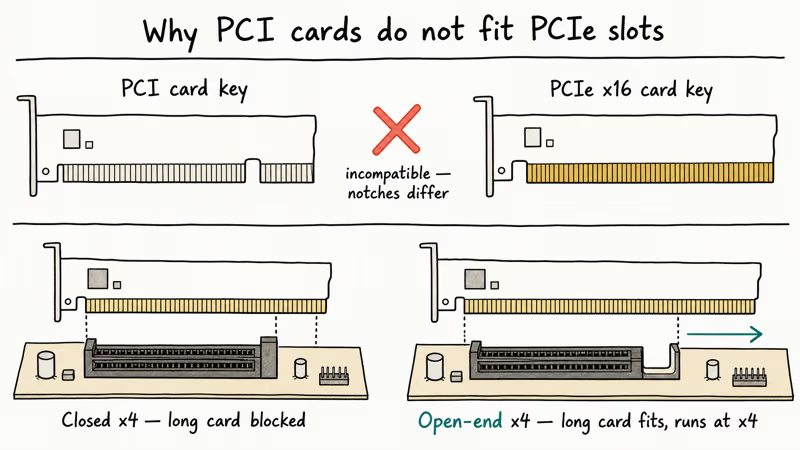
The connectors are physically different and the signaling is incompatible. A PCI card won’t fit a PCIe slot, and a PCIe card won’t fit a PCI slot. The notch positions on each card key prevent the wrong combination from seating at all.
Within the PCIe family, compatibility is generous. A PCIe 4.0 graphics card runs in a PCIe 3.0 x16 slot at PCIe 3.0 speeds. A PCIe x4 NVMe adapter slots into a PCIe x16 connector and uses four of the sixteen lanes. The card and slot negotiate the lowest common generation and lane count automatically.
Two physical traps still bite people:
- Open-ended vs closed slots. Some manufacturers cut the back of an x4 slot open so longer cards (x8, x16) physically fit. Others leave it closed, which blocks the card. Check the slot before buying a longer card.
- Lane sharing on the chipset. When you populate an M.2 PCIe slot or a secondary PCIe slot, the board may steal lanes from the primary x16 slot. ASUS and MSI publish lane-sharing tables in their motherboard manuals, so read them before installing a second NVMe drive next to your GPU.
If you’re juggling a discrete GPU plus extra NVMe storage, our laptop overheating while gaming guide is also relevant: dense PCIe layouts trap heat around the M.2 slots, and that throttles drive performance long before it warps the board.
#Why PCIe Replaced PCI: Parallel vs Serial Architecture
PCI sends bits across many wires in parallel, all clocked together. That works at low frequencies. At higher clock rates, the wires fall out of sync, because different trace lengths cause different propagation delays, and the bus has to wait for the slowest wire. The architecture hit a wall around 533 MB/s.
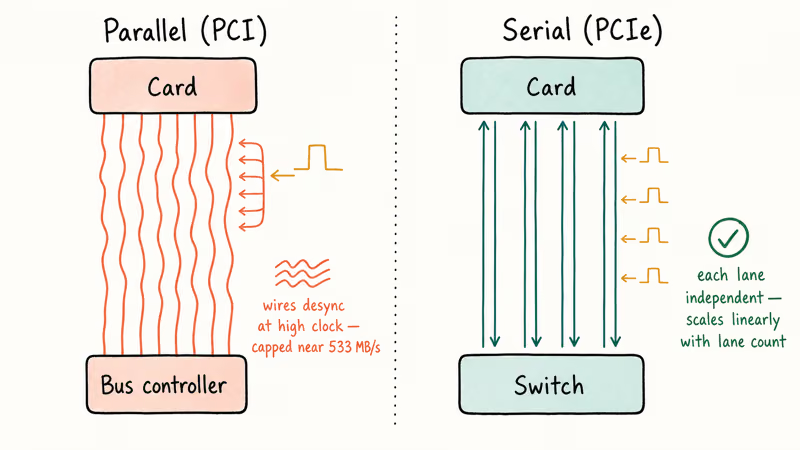
PCIe sends bits one after another on each lane. It also runs many lanes in parallel. Each lane is an independent serial channel with its own clock recovery, so adding more lanes scales bandwidth linearly without the timing problem. Intel’s Tech Brief on PCIe frames it as the same shift Ethernet made when it abandoned shared coaxial cable for switched twisted pair: every device gets its own connection back to the switch, and aggregate bandwidth grows with the port count.
The serial design also enables hot-plug, low-power link states (L0s, L1, L2), and per-lane error correction. Conventional PCI had none of those.
Once 10 Gigabit Ethernet, NVMe, and modern GPUs needed more than 533 MB/s, the parallel bus was finished. Intel’s H67/Z68 in 2011 was the last consumer chipset with native PCI. After that, boards relied on third-party bridge chips like the ASMedia ASM1083 to keep a single legacy slot alive.
#Picking the Right Generation for Your Build
Generation matters more than slot size for most upgrades. A PCIe 5.0 NVMe drive in a PCIe 4.0 slot runs at half its rated speed.
Here is a practical buy-it-now matrix. PCIe 3.0 boards still cover any current GPU plus any SATA-class workload. PCIe 4.0 is the sweet spot for high-end NVMe SSDs and any current discrete graphics card. Anything else is overspending unless your workload is storage-bound.
PCIe 5.0 only earns its keep if you’re buying a 14 GB/s class drive or planning a four-year build window.
For a budget gaming rig with a Ryzen 5 7600 or a Core i5-13400, PCIe 4.0 leaves zero performance on the table today.
#Bottom Line: Which Slot Should You Use?
If your motherboard was built after 2015, you have PCIe. Use it. Match the card’s lane requirement to the slot’s lane count: a graphics card needs PCIe x16, an NVMe SSD needs PCIe x4, a sound or capture card usually needs PCIe x1.
Keep conventional PCI only if you depend on legacy hardware that has no PCIe replacement. Industrial control cards, some old audio interfaces, and specific scientific instruments still ship as PCI. For those builds, look for an industrial motherboard from Supermicro or Advantech.
The calculus for everyone else is one line.
PCI is dead on consumer hardware, PCIe is the bus, and the only interesting choice left is which generation your CPU and motherboard support. If you’re planning a build around a CPU with integrated graphics, our best APUs guide lays out which platforms ship PCIe 4.0 versus PCIe 5.0. And if you’re stress-testing the GPU side of that build, our Nvidia backend process explainer covers a common driver service that often spikes during PCIe link training.
#Frequently Asked Questions
Can I install a PCI card in a PCIe slot?
No. The slots are physically and electrically incompatible. The notches on PCI and PCIe cards are different, so a PCI card won’t seat in a PCIe slot. If you have a critical PCI card, you need a board with a real PCI slot or an external PCI-to-PCIe bridge enclosure.
Are all PCIe slots the same size?
No.
PCIe slots come in x1, x4, x8, and x16 lengths, named for the number of lanes. An x1 slot is about 25 mm long with 36 pins. An x16 slot is about 89 mm with 164 pins. The longer the slot, the more lanes, and the higher the maximum bandwidth.
Can I install a PCIe x16 card in a PCIe x1 slot?
Only if the x1 slot is open at the back end. Most x1 slots are closed, so a longer card won’t fit. Even when it does fit, the card runs at x1 speeds.
Which is faster, PCIe 3.0 or PCIe 4.0?
PCIe 4.0 is about twice as fast as PCIe 3.0 per lane. PCIe 3.0 delivers roughly 985 MB/s per lane; PCIe 4.0 delivers about 1.97 GB/s. On an x16 slot that means 15.75 GB/s versus 31.5 GB/s. NVMe SSDs see the full doubling.
Can I mix PCI and PCIe cards in the same system?
Yes, if your motherboard has both kinds of slots. Boards from roughly 2004 to 2013 commonly shipped with two or three PCIe slots and one or two legacy PCI slots side by side. The two buses operate independently, so a PCI sound card and a PCIe graphics card don’t interfere.
Does PCIe lane count affect gaming performance?
For most current GPUs, PCIe lane count matters most when bandwidth is severely constrained. The PCI Express overview is the durable baseline for generations and lane-width terminology before you compare benchmark deltas.
Why does my PCIe x16 slot run at x8 when I add an NVMe SSD?
The chipset is sharing lanes. Many boards split the CPU’s 16 PCIe lanes between the primary x16 slot and a secondary PCIe device, usually a second M.2 slot or a second x16 slot. The motherboard manual lists the lane-sharing rules in a table near the M.2 section.
Is PCIe replacing SATA for storage?
Yes, slowly. NVMe over PCIe has dominated new SSD sales since about 2020, and SATA SSDs persist mainly as cheap secondary storage and as drop-in upgrades for older laptops. Crucial’s NVMe SSD catalog shows that SATA III has stayed at 600 MB/s since 2009 while PCIe 5.0 NVMe drives now push past 12,000 MB/s.