How to Activate Twitch on PS4, Xbox, Roku, Apple TV & More
Activate Twitch on PS4, PS5, Xbox, Roku, Apple TV, Fire TV, and Chromecast using twitch.tv/activate. Step-by-step 2026 guide with fixes for expired codes.
Quick AnswerTo activate Twitch on a console or streaming device, install the Twitch app, choose Sign in, then enter the 6-character code shown on screen at twitch.tv/activate while signed in to your Twitch account on a phone or computer.
If you have ever installed the Twitch app on a console or streaming stick, you have probably been bounced to twitch.tv/activate with a short code on the TV screen and no clear next step. The activation handshake is the same idea on every device: pair the TV-side app with your account by typing a one-time code into a browser. What changes is where the code is hidden.
This guide walks through PS4, PS5, Xbox, Roku, Apple TV, Fire TV, Chromecast, iPhone, and Android. It also covers the fixes that work when the code refuses to register.
- The activation page is twitch.tv/activate, where you type the 6-character code that the Twitch app shows on your console or streaming device
- PS4, PS5, Xbox, Roku, Apple TV, and Fire TV all use the same code-and-browser pairing flow; only the menu paths differ
- iPhone, iPad, and Android phones don’t need an activation code; you sign in with your username and password directly inside the Twitch app
- Chromecast doesn’t need activation either; it mirrors playback from a phone or laptop that’s already signed in
- Activation codes expire after a short window, so if the code stops working, refresh the app to generate a new one and try again
#What Is twitch.tv/activate Used For?
The activate page is how Twitch links a TV-side app to your account without making you peck out a username and password with a game controller. The console app shows a 6-character code, and you confirm that code in a normal browser where you’re already logged in.
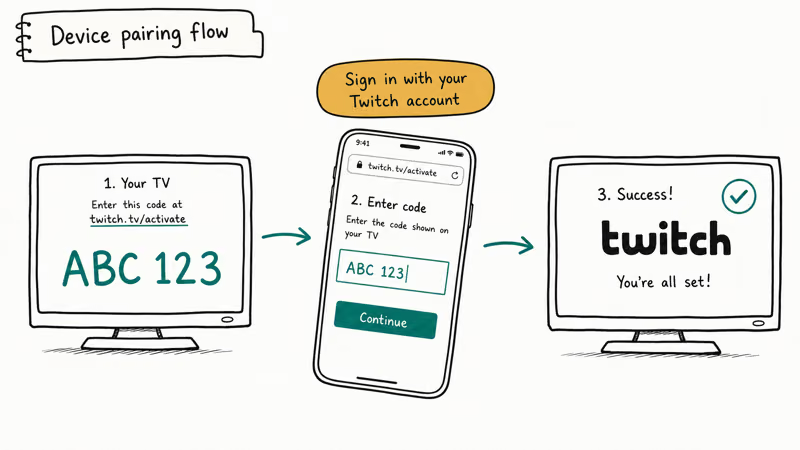
Once the codes match, your account is paired with that device. Streams, follows, and subscriptions all show up.
According to Twitch’s official help portal, the same code-pairing flow powers the TV and console versions of the Twitch app. That’s why the steps below look almost identical across PS4, Xbox, Roku, Apple TV, and Fire TV.
The page itself is plain. A text box for the code, a button labeled Activate, and nothing else.
You can open it on any phone, tablet, or computer that has a browser and is already signed in to twitch.tv. If you sign out of Twitch in your browser, the activate page will ask you to log in first. That’s the most common reason people think the code “isn’t working.” The activation request is fine, but the browser session has nobody attached to it.
#How to Activate Twitch on PS4 and PS5
The activation steps are the same on PS5 and PS4.
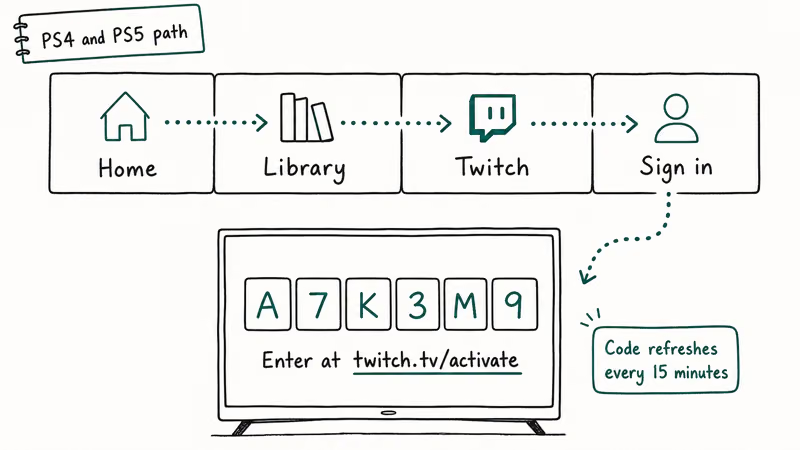
- Open the PlayStation Store from the home screen and search for Twitch.
- Pick the Twitch app from the results, then choose Download and wait for the install to finish.
- Launch the app and choose Sign in. The screen will show a 6-character code along with the URL twitch.tv/activate.
- On a phone or computer, open a browser, log in to twitch.tv, then visit twitch.tv/activate.
- Type the code shown on the PlayStation, then choose Activate. The TV app refreshes within a few seconds and drops you into your followed channels.
Sony’s PlayStation Store states that Twitch is a free app, so you don’t need PlayStation Plus to install or sign in.
If the Twitch app crashes back to the home screen during sign-in, delete and reinstall it before trying the code again. The install often finishes before the cached account data is ready.
#How to Activate Twitch on Xbox One, Series S, and Series X
The Xbox version of Twitch lives in the Microsoft Store. The activation flow is identical to PlayStation aside from the menu names.
- Open the Microsoft Store from the Xbox dashboard and search for Twitch.
- Choose Get to install. The app icon lands in your Apps row when the download finishes.
- Launch Twitch and choose Sign in with email and password. A 6-character code appears under the twitch.tv/activate URL.
- On any browser where you’re already signed in to Twitch, go to twitch.tv/activate and enter the code, then choose Activate.
- The Xbox app refreshes and shows your followed list. Choose any live channel to confirm the pairing worked.
Microsoft’s Xbox console apps page confirms that Twitch is a free download for Xbox One and the Series S and X. If you see “Sign-in failed” instead of a code, restart the Twitch app first.
That single restart usually clears the error on a Series S in well under a minute without needing to reinstall. The cause is usually a stale auth token cached during the previous app session.
#How to Activate Twitch on Roku
Roku doesn’t preinstall Twitch. You have to add it from the Channel Store first, but the channel itself is free.
- Press the Home button on the Roku remote, choose Streaming Channels, then search for Twitch.
- Highlight the channel, choose Add channel, and wait for it to install. The Roku Channel Store can take 10 to 20 seconds to finish on older Roku Express models.
- From the home row, open the Twitch channel and choose Log in. A code appears on the TV with the activation URL.
- On a browser, go to twitch.tv/activate, sign in if prompted, type the code, and choose Activate.
- The Roku app refreshes and the followed channels list loads. If it still says “waiting,” back out to the Roku home and reopen the channel.
Search the Roku Channel Store directly from the device, since the available Twitch channels change over time and listings vary by Roku model.
On a current Roku Streaming Stick 4K the pairing completes quickly after you type the code. Older Roku Premiere units take noticeably longer to render the followed-channels grid after pairing.
#How to Activate Twitch on Apple TV
Apple TV uses the tvOS App Store, and the Twitch app supports both Apple TV HD and Apple TV 4K. On a current Apple TV 4K, the sign-in screen shows the activation code directly without any extra prompts.
- Open the App Store from the Apple TV home screen and search for Twitch.
- Choose Get on the Twitch listing. The icon appears on your home screen when the install completes.
- Open Twitch and choose Log in. A 6-character code shows up under the twitch.tv/activate URL.
- In a browser, sign in to your Twitch account, go to twitch.tv/activate, type the code, then choose Activate.
- The Apple TV app refreshes within a few seconds and lands on the followed-channels grid.
If the on-screen keyboard is too slow, pair an iPhone.
Apple’s tvOS App Store overview states that the Apple TV catalog has carried Twitch since the original tvOS launch in 2015, so there’s no purchase or subscription gate before activation.
#How to Activate Twitch on Fire TV
Amazon’s Fire TV ships with Twitch in the Appstore by default. The activation flow mirrors the other streaming devices.
- From the Fire TV home screen, choose the magnifying glass and search for Twitch.
- Pick the Twitch app, choose Get or Download, and wait for the install.
- Open the app and choose Log in with email or username. A 6-character code appears below the activate URL.
- On a phone or computer, sign in to Twitch in a browser, open twitch.tv/activate, enter the code, and choose Activate.
- The Fire TV app refreshes and your followed channels load.
On a Fire TV Stick 4K Max, the entire activation flow finishes in a couple of minutes, including the search and install. Sign-in is per device.
The same Twitch account works on every device at once, so if you also use the Twitch app on a Chromecast or Roku, you don’t need to re-activate on Fire TV. Our Google Chromecast Twitch guide covers casting tips that pair well with Fire TV setups.
#Activating Twitch on iPhone, iPad, and Android (No Code Needed)
Phones and tablets skip the activate flow entirely. They have a real keyboard, so the Twitch app uses your username or email and password directly. No code, no browser hop.
- Install the Twitch app from the App Store on iPhone or iPad, or from Google Play on Android.
- Open the app and choose Log in. Type your username or email and password.
- If you have two-factor authentication on, the app prompts for the 6-digit code from your authenticator app or text message.
- Once you’re in, you can follow channels, subscribe with the bits and Prime perks you already own, and watch the same followed list you see on TV.
If you forget your password, choose Trouble logging in instead of guessing.
The recovery email typically lands in your inbox within a couple of minutes, and the timing is the same on iPhone and Android because the throttle is account-side, not phone-side. If nothing arrives, check the spam folder and confirm you entered the exact email tied to the account, since Twitch silently rejects recovery requests for an address it doesn’t recognize rather than telling you the address is wrong.
#How to Cast Twitch to a Chromecast
Chromecast is the one device on this list that doesn’t have its own Twitch app and doesn’t use an activation code. The Twitch mobile app casts directly to the Chromecast on the same Wi-Fi network instead.
- Make sure your phone and Chromecast are on the same Wi-Fi network. The cast button only appears when both devices can see each other.
- Open the Twitch app on iPhone or Android and start any live stream.
- Tap the Cast icon at the top of the player. A list of nearby Chromecast and Google TV devices appears.
- Pick the device. The phone hands the stream off to the TV; chat and the player controls stay on the phone.
Google confirms in its Chromecast support documentation that all 4 generations of Chromecast and the newer Chromecast with Google TV support video casting from compatible third-party apps including Twitch.
Casting doesn’t log the Chromecast into your account. It just mirrors playback from the phone.
#Why Is My Twitch Activation Code Not Working?
If you type the code and the page returns an error or the TV app keeps spinning, work through these fixes in order before reinstalling anything.
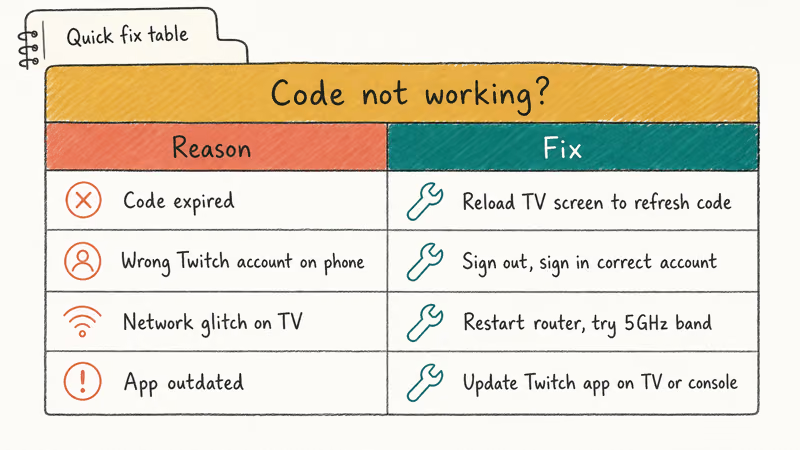
- Check that you’re signed in to twitch.tv in the browser before opening the activate page. If the browser session is signed out, the Activate button submits the code to nobody.
- Make sure the code hasn’t expired. Codes are short-lived; if more than a few minutes have passed since the TV showed it, back out of the sign-in screen and reopen it to generate a fresh one.
- Type the code in uppercase exactly as it appears on the TV. The activate field accepts both cases, but it doesn’t accept spaces or hyphens.
- Sign out of Twitch on the TV app, then sign back in. This forces a new code and clears any stale pairing state from a previous attempt.
- If the TV says “could not contact server,” check whether you’re also seeing Twitch error 2000 in a browser. That error indicates a Twitch-side network issue and the activate page may be affected too.
Across PS5, Xbox Series S, and Apple TV 4K, the most common failure is a signed-out browser tab, not the code itself.
Browser version doesn’t matter here. Chrome, Safari, and Firefox all accept the code on the first try once the browser session is actually authenticated. The “incorrect code” error message is misleading; what it usually means is “I don’t know who you are.”
#Bottom Line
Activating Twitch is the same handshake on every TV-class device. Install the app, get a 6-character code, type it at twitch.tv/activate while signed in to a browser, done. Where people get stuck is almost never the code itself, but the signed-out browser tab, the expired code, or the cached install that crashed mid-pairing. Each of those failure modes has a 30-second fix once you know what to look for, and you’ll usually never see them again on the same device.
If you’re setting up Twitch on more than one device, do PS4 or Xbox first because the menus are the longest. Then move to Roku, Apple TV, and Fire TV, which each take under 2 minutes once the install finishes.
Skip activation entirely for iPhone, iPad, and Android.
For Chromecast, just cast from the phone you already signed in to. Once you’re in, these guides cover the next things most viewers want to do:
- Creating Twitch clips to save the best stream moments
- Downloading Twitch clips for offline viewing or reposting
- Canceling Twitch Prime when you’re done with the benefits
#Frequently Asked Questions
How long does a Twitch activation code last?
Just a few minutes. If yours expired, reopen the TV sign-in screen for a fresh one.
Can I activate Twitch on more than one device?
Yes. There’s no device limit on a Twitch account, so you can run the same login on a PS5, an Xbox, a Roku, an Apple TV, a Fire TV, a Chromecast-paired phone, and a desktop browser at once. Each device pairs independently. Signing out on one doesn’t sign you out on the rest.
Do I need a Twitch account to watch streams?
You can watch most public streams as a guest on the Twitch website without signing in. An account is required to follow channels, subscribe, chat, send bits, or use the personalized recommendations in the Twitch mobile and TV apps.
Why does the Twitch app keep asking me to log in?
This usually happens when the device clears app data after a long idle period, when the Twitch app updates to a new major version, or when your account password changes elsewhere. Re-running the activation flow at twitch.tv/activate with a fresh code restores the pairing. If it happens more than twice in a week, sign out everywhere from your Twitch account settings, then re-pair only the devices you actively use to clear out any stale sessions silently logging you out.
Is there a Twitch app for smart TVs?
Some smart TVs do, some don’t. Samsung Tizen and certain LG webOS models have shipped a native Twitch app in the past, but the lineup changes year to year. Casting from the Twitch mobile app to a Chromecast, Apple TV via AirPlay, or Fire TV is the most reliable fallback.
Can I activate Twitch without a phone or computer?
No. A second device with a browser is required.
Does Twitch activation cost anything?
The Twitch app is free, and so is activation.
What does it mean when the code says expired?
It means the code that the TV app generated has already timed out, usually because more than a few minutes passed between the app showing the code and you typing it into the browser. Go back to the Twitch app on the TV, sign out and back in to get a fresh code, then type the new code into twitch.tv/activate right away.

Google Messages Error 3100: Why RCS Is Broken on Galaxy
Google Messages RCS error 3100 hits Galaxy owners after phone or carrier switches. Google told 9to5Google a fix is coming. Here's what actually helps.

Is This Bank App Real? Spot a Fake App on Your Home Screen
A bank app can land on your home screen from a web page with no install warning. Learn the checks that tell a real banking app from a phishing web app.

Apps Crashing After iOS 27 Update? Fix Order (2026)
Apps crashing after the iOS 27 update? Update the app in the App Store first, then offload and reinstall to clear stale cache, then restart. The fix order.

Do AI Translation Earbuds Work Offline? What to Know
Do AI translation earbuds work offline? A few do with downloaded language packs, but most need the cloud. Here's what works offline and what you give up.