Fix "There Was an Issue Signing You Into YouTube" Error
Fix the YouTube sign-in error fast. Clear cookies, disable extensions, refresh your Google account token, and rule out VPN or DNS conflicts step by step.
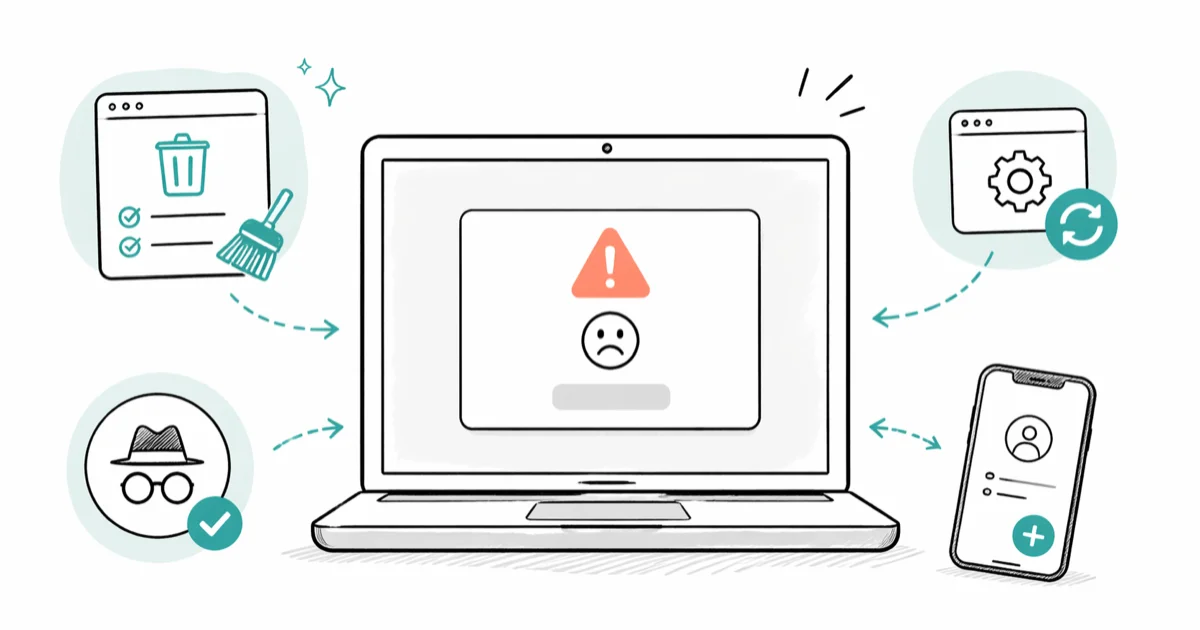
Quick AnswerClear your browser cookies and cache for google.com and youtube.com, then restart the browser and sign in again. On Android, clear the YouTube app cache from Settings; on iPhone, delete and reinstall the app.
The “There was an issue signing you into YouTube” error almost always traces back to one of three culprits: a corrupted browser cookie, a misbehaving extension, or a stale Google account token on your phone. Most cases clear with a handful of targeted fixes across the desktop browser and the YouTube app on Android and iPhone.
If YouTube refuses to load at all, work through our YouTube not working guide first and come back here once the sign-in screen is the only blocker left.
- Clearing cookies and cache for google.com and youtube.com fixes the error on the first try in most desktop browsers
- Privacy extensions and ad blockers like uBlock Origin and Privacy Badger are the most common cause when sign-in fails outside Incognito
- The YouTube app on Android keeps a separate auth cache under
Settings>Apps>YouTube>Storagethat desktop fixes don’t touch - Removing and re-adding your Google account on Android forces a fresh authentication token in about 3 minutes
- VPNs, custom DNS resolvers like Pi-hole, and corporate firewalls can trip Google’s bot detection during sign-in even when the rest of YouTube works
#Why Does the YouTube Sign-In Error Happen?
YouTube hands authentication off to Google, and the handshake bounces between three domains: accounts.google.com, youtube.com, and googleusercontent.com. Anything that interrupts that chain shows up as the same generic error message. The actual cause is usually one of four things: cookies that have aged out or gotten mangled, a browser extension that strips third-party scripts, an outdated YouTube app missing a recent security patch, or a stale auth token cached on your phone.
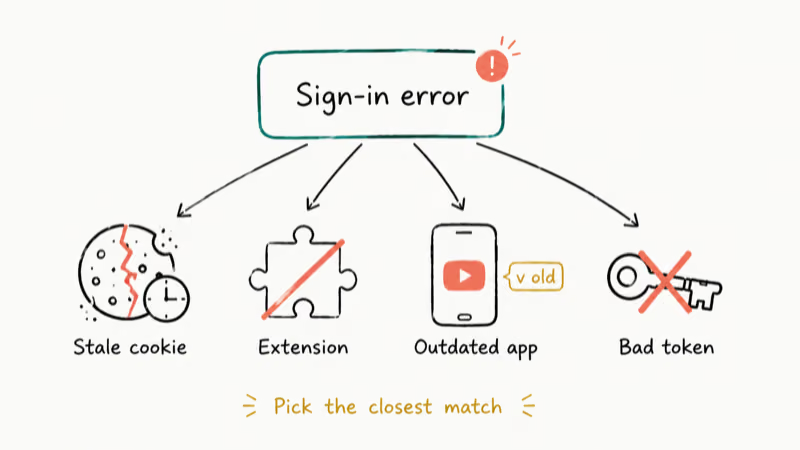
According to Google’s YouTube Help community thread on this error, users hit it most often after browser updates or with 3 or more Google accounts active in one Chrome profile. Signing out of the extra accounts and leaving only the one you use for YouTube often clears it on its own.
Mobile is different.
Android stores Google account tokens in the system account manager, separate from the YouTube app’s own cache, so a token that goes bad survives a normal app restart. iOS doesn’t let you wipe the YouTube cache through Settings, which is why most iPhone fixes loop back to a full reinstall.
Samsung One UI also hides the Storage submenu deeper than stock Android does, so Galaxy users have one extra tap to reach the cache button.
#Clear Cookies and Cache First, Here Is How
Stale cookies cause the bulk of these errors, and clearing them only takes about a minute. You don’t have to wipe everything either. You can target just google.com and youtube.com if you want to stay signed into your other sites.
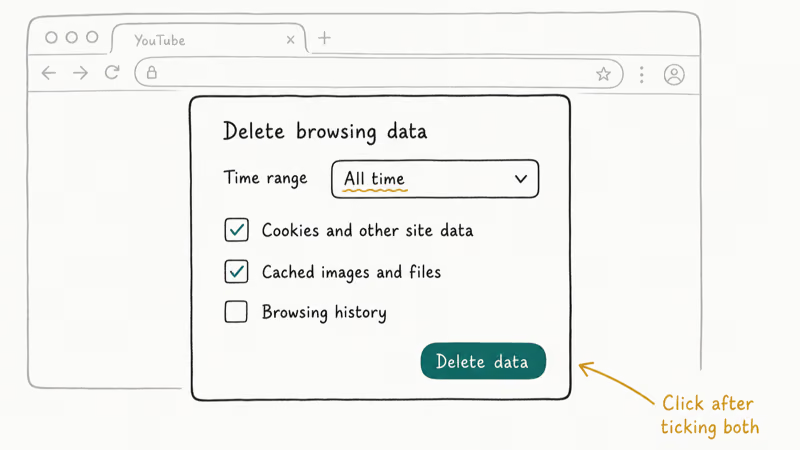
Google Chrome (desktop):
- Press
Ctrl + Shift + Deleteon Windows orCmd + Shift + Deleteon Mac - Set the time range to “All time”
- Tick both “Cookies and other site data” and “Cached images and files,” then click “Delete data”
Firefox:
- Press
Ctrl + Shift + Deleteto open the Clear Recent History panel - Choose “Everything” from the time range dropdown
- Tick “Cookies” and “Cache,” then click “OK”
Safari (Mac):
Open Safari>Settings>Privacy- Click “Manage Website Data”
- Search for “google” and “youtube” and remove every entry that comes up
Google’s official support page on slow loading and sign-in problems confirms that clearing cache and cookies resolves most issues. After clearing, close every browser tab, quit the browser fully, and reopen it before retrying sign-in.
The full clear-and-restart cycle takes only a minute or two and usually signs you back in on the first attempt. If you’re on the YouTube app, the cache lives somewhere else. Android and iPhone have their own sections below.
#Use Incognito Mode to Pin Down a Bad Extension
Open an Incognito or Private window and try signing in there. Incognito starts clean: no cookies, no extensions, and a fresh session every time.
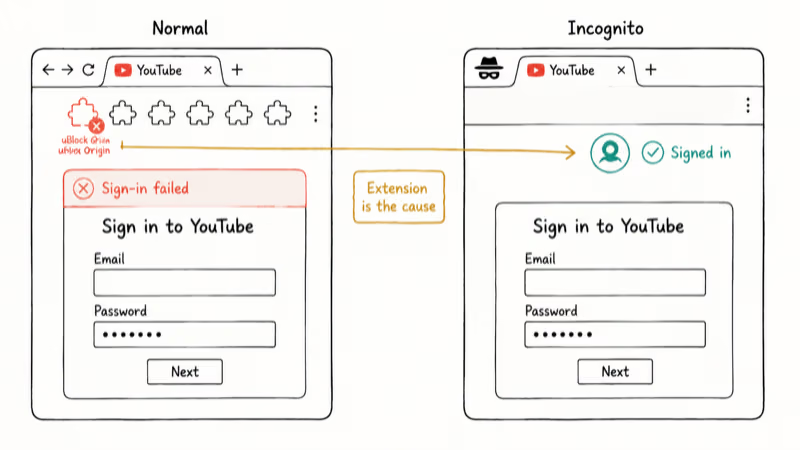
If sign-in works in Incognito but fails in your normal window, an extension is the cause. The fix is to disable them one at a time in your regular browser until the error stops.
uBlock Origin is a frequent offender, with Privacy Badger and DuckDuckGo Privacy Essentials close behind. Start with those if you have them installed.
Any extension that blocks third-party cookies or auth scripts is a candidate, including password managers.
Whitelisting beats uninstalling.
You don’t need to remove the offending extension. Most ad blockers let you whitelist specific domains. Add accounts.google.com and youtube.com to your ad blocker’s allowlist and the sign-in flow will go through. If your YouTube comments are not showing either, the same extension is almost certainly the culprit there too.
Brave is a special case because Shields is a built-in privacy layer, not an extension you can disable from the toolbar. Based on Brave Community guidance for this exact error, click the Shields lion icon in the address bar, lower Shields for both youtube.com and accounts.google.com, then refresh the page before signing in.
#How Do You Fix the Sign-In Error on Android?
Android keeps a Google authentication token in the system account manager that survives most app-level fixes. Clearing the YouTube app cache is step one because it’s fast and non-destructive.
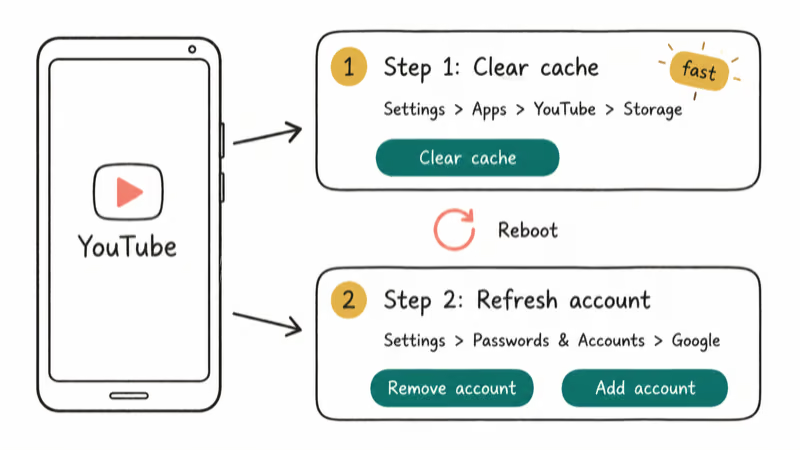
- Go to
Settings>Apps>YouTube>Storage - Tap “Clear cache” first
- Try signing in; if it still fails, come back and tap “Clear data” (this resets the app to first-launch state)
When that doesn’t work, the token itself is bad and you have to refresh it.
- Go to
Settings>Passwords & Accounts(orSettings>Accountson older Samsung builds) - Tap your Google account, then tap “Remove account”
- Restart the phone fully
Reopen Settings>Passwords & Accounts>Addaccount > Google and sign in again
This usually takes about 3 minutes including the reboot. The first pass clears the YouTube app cache, and the second pass refreshes the token if the cache clear alone didn’t do it.
While you’re there, open the Play Store and update YouTube. Outdated app versions miss security patches that Google requires for authentication, and the Play Store doesn’t always auto-update apps in the background if your data saver is on. If unwanted account interactions triggered a security review in the first place, our guide on how to block someone on YouTube walks through the prevention side.
#Reset YouTube on iPhone and iPad
iOS doesn’t expose a per-app cache wipe like Android does, which is why the iPhone fix is more aggressive. The fastest path is a full reinstall.
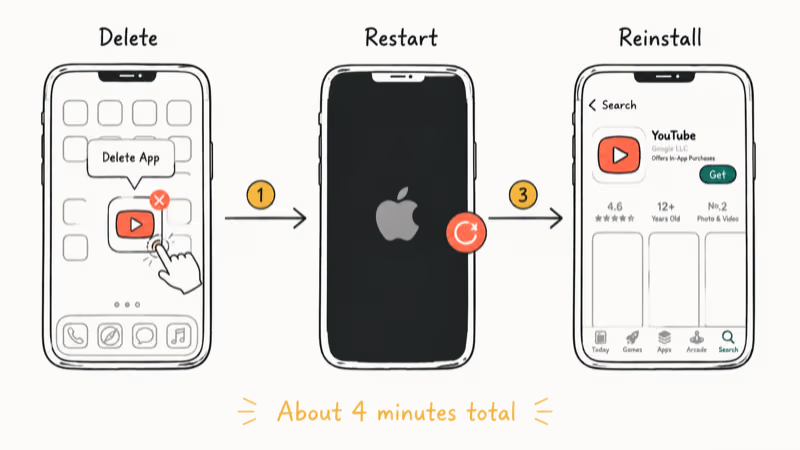
- Long-press the YouTube icon on your home screen and tap “Remove App,” then “Delete App”
- Restart the iPhone (hold the side button and either volume button, then drag the slider)
- Reopen the App Store, search for YouTube, and reinstall it
- Sign in fresh
For sign-in errors that hit Safari rather than the app, go to Settings > Safari > Clear History and Website Data.
Apple states that Safari syncs its cookie store across iCloud-linked devices, so wiping data on your iPhone may also sign you out on your Mac and iPad. If you’d rather avoid that ripple effect, you can clear cookies just for google.com and youtube.com using the per-site approach we describe in the FAQ below.
If neither approach works on iOS, sign into your Google account through Settings > Calendar > Accounts > Add Account > Google first. That seeds a fresh system token, after which the YouTube app will pull from it instead of building one from scratch.
#Check Your Google Account for Security Holds
Sometimes the problem isn’t on your device.
Google can put a temporary security hold on your account if it sees a suspicious sign-in pattern, and that hold blocks the YouTube handshake until you clear it. The hold can fire after travel to a new country, after you sign in from a brand-new browser fingerprint, or after a third-party site you logged in with Google a year ago gets breached.
Go to myaccount.google.com/security and look for:
- A “Critical security alert” banner, usually red or yellow at the top
- Recent security events you haven’t yet reviewed (sign-ins from new devices, password change attempts)
- 2-Step Verification problems where your authenticator app’s clock has drifted
Google recommends running its Security Checkup tool when you can’t sign into any of its services. The Security Checkup walks through password strength, recovery options, and active sessions in about 90 seconds and surfaces any holds the system has placed on the account.
If multiple Google accounts are signed in, sign out of all but the one you use for YouTube.
Mixing several personal accounts with a Workspace account in the same browser is a common trigger for this hold. While you’re troubleshooting, our guide on YouTube error 503 covers what to do when the issue is server-side rather than account-side.
#Sort Out Network, VPN, and DNS Conflicts
Network-layer problems are the last category to check because they’re the rarest, but they’re also the hardest to spot. Google’s bot detection looks at IP reputation, DNS resolution, and connection latency, and a VPN or custom DNS server can fail any of those checks.
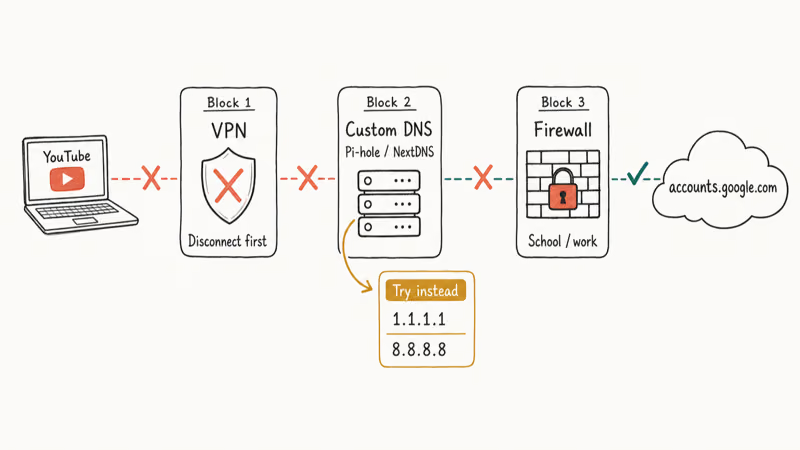
Run through these in order:
- Disconnect any active VPN and try signing in again
- Switch networks if the VPN is off and sign-in still fails (mobile data instead of Wi-Fi, or a different Wi-Fi network if you have one)
- Check your DNS settings. Pi-hole, NextDNS, and similar custom resolvers can blackhole Google’s auth endpoints along with ad domains. Temporarily switch to 1.1.1.1 or 8.8.8.8 to rule this out.
Flushing the DNS cache often helps after a network switch. On Windows, open Command Prompt as administrator and run ipconfig /flushdns. On a Mac, open Terminal and run sudo dscacheutil -flushcache; sudo killall -HUP mDNSResponder. Each command finishes almost instantly and clears a stuck resolver entry that may be sending google.com requests to a stale IP.
If you’re on a school, work, or library network, the administrator may have restricted YouTube or Google sign-in entirely. Google’s official documentation on YouTube on managed networks confirms that Workspace and education admins can apply this restriction at the account level, and the only fix is to either contact your IT department or get off the managed network.
Buffering on top of sign-in problems? Our guide on YouTube buffering issues covers the bandwidth side.
#Bottom Line
Clear cookies and cache for google.com and youtube.com first. That single fix clears this error on most desktop browsers, and it takes about 90 seconds end to end. If sign-in still fails after a full browser restart, open Incognito to rule out an extension, then look at uBlock Origin and Privacy Badger first because those are the two most common offenders.
On Android, clear the YouTube app cache, then if needed remove and re-add your Google account. On iPhone, delete the app, restart, and reinstall.
If none of that works and you can’t sign into other Google services either, check myaccount.google.com/security for a hold. If you can sign into Gmail but not YouTube, you’re looking at a network or DNS issue.
For other YouTube oddities, see our guides on YouTube filters not working and no sound on YouTube.
#Frequently Asked Questions
Why does YouTube keep signing me out randomly?
Your session cookie is dropping. Browsers store a long-lived cookie that tells YouTube you’re still signed in, and that cookie can expire early or get corrupted by privacy extensions, third-party cookie blocking, or aggressive cleanup tools like CCleaner.
Clear cookies once, sign back in, and check that your browser isn’t configured to delete cookies on exit. Shared computers and locked-down work profiles often have that setting turned on without the user realizing it, especially after IT pushes a new browser policy.
Can a VPN cause the YouTube sign-in error?
Yes. Google flags shared VPN exit IPs as suspicious. Disconnect the VPN, sign in, then reconnect once you’re inside.
Does this error mean my Google account got hacked?
Almost never. The error is usually local: corrupted cookies, an extension, or a stale token. Google sends a separate “Critical security alert” email when it actually detects a breach attempt. If you got that email, follow the link in the email instead of trying to sign in normally; otherwise, treat this as a routine browser or app issue and move on with the cookie clear.
Why does sign-in work in Incognito but not in my regular browser?
Either an extension or a corrupted cookie in your normal profile.
Incognito loads with no cookies and most extensions disabled by default, which is what makes it useful as a diagnostic. If sign-in works there, the offender is sitting in your normal profile. Disable extensions one at a time, or wipe cookies for google.com and youtube.com. uBlock Origin, Privacy Badger, and DuckDuckGo Privacy Essentials are the three most common offenders.
How do I fix the YouTube sign-in error on iPhone without reinstalling?
Try Settings > Calendar > Accounts > Add Account > Google first. That seeds a fresh system token the YouTube app can pick up on launch.
Will clearing cookies sign me out of every other website?
If you wipe everything, yes. Per-site cookie clearing avoids that.
In Chrome, go to Settings > Privacy and security > Cookies and other site data > See all site data and permissions, search for google.com and youtube.com, and delete only those two entries. Firefox and Safari have similar per-site cookie controls in their privacy settings, so you don’t have to nuke every login to fix one site.
What if none of these fixes work?
Try signing in from a different device on a different network. If the same error follows you, the problem is on Google’s end or with your account specifically; check the YouTube Help community for active reports. If sign-in works on the second device, you’ve isolated the problem to your original device, and a Windows or macOS user profile reset is the next step.
Does updating my browser help fix the sign-in error?
Often, yes. In Chrome, click the three-dot menu, choose Help, then About Google Chrome to trigger an update check.

Google Messages Error 3100: Why RCS Is Broken on Galaxy
Google Messages RCS error 3100 hits Galaxy owners after phone or carrier switches. Google told 9to5Google a fix is coming. Here's what actually helps.

Is This Bank App Real? Spot a Fake App on Your Home Screen
A bank app can land on your home screen from a web page with no install warning. Learn the checks that tell a real banking app from a phishing web app.

Apps Crashing After iOS 27 Update? Fix Order (2026)
Apps crashing after the iOS 27 update? Update the app in the App Store first, then offload and reinstall to clear stale cache, then restart. The fix order.

Do AI Translation Earbuds Work Offline? What to Know
Do AI translation earbuds work offline? A few do with downloaded language packs, but most need the cloud. Here's what works offline and what you give up.