Tenorshare 4uKey Review: Tests, Risks, Picks (2026)
Tenorshare 4uKey 2026 review: how iPhone passcode unlock works, MDM removal limits, pricing versus alternatives, and the Apple steps to try first.
Quick AnswerTenorshare 4uKey is a paid Windows and Mac desktop tool that erases an iPhone or iPad passcode by force-installing fresh firmware, but it only works on hardware you legally own and it wipes the device. Always try Apple Find My, iCloud account recovery, and your carrier first; reach for 4uKey or iToolab UnlockGo only when those official paths fail.
If you’re locked out of your own iPhone, Tenorshare 4uKey is one of the desktop tools that promises to erase the passcode and let you set the device up again. This review breaks down what it can actually do in 2026, where it falls short, and which Apple-first paths you should always try before paying any third-party unlocker.
This review only covers passcode unlock and MDM removal on devices you legally own, or that your employer has authorized you to wipe. Bypassing the lock on a phone you can’t prove is yours is a different conversation, and we say more about why below.
- 4uKey is a paid desktop tool for Windows and macOS that erases the passcode on a locked iPhone or iPad by reinstalling fresh firmware
- It always wipes user data, so back up before you start, and don’t run it on a device you can’t prove you own
- Apple Find My, iCloud account recovery, and your carrier should be the first three calls, and they resolve most lockouts without any paid tool
- Tenorshare’s lifetime license runs $69.95 and the monthly tier $35.95 in 2026, which puts 4uKey on the higher end of the unlock-tool market
- iToolab UnlockGo is the closest 4uKey alternative, with a comparable 30-day refund window and a more streamlined MDM workflow
#Use Find My, iCloud Account Recovery, or Carrier Support First
Before you pay for any third-party unlocker, exhaust the official paths. They’re free, they don’t wipe data when used correctly, and they’re the only legitimate route for accounts you can’t immediately access on your own.
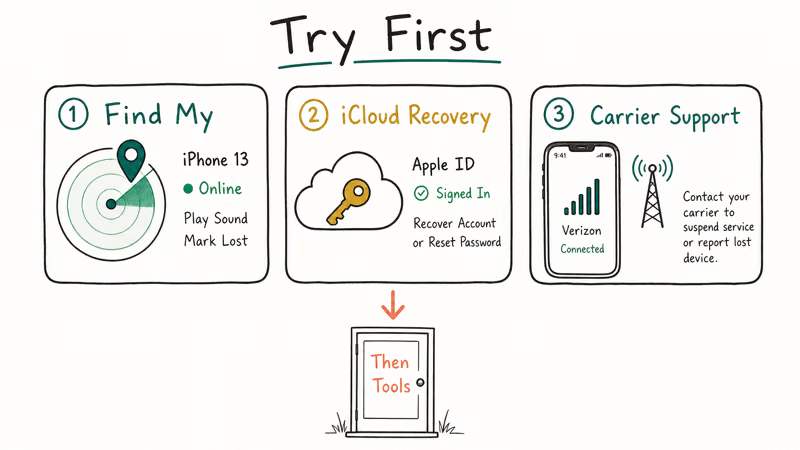
The first stop is Apple Find My. Sign in at iCloud.com on a borrowed Mac or another iPhone, pick the locked device, and choose “Erase iPhone.” The phone factory-resets over the air, and once setup completes you can restore your iCloud backup. According to Apple, Find My has shipped on every iPhone since iOS 13 and is on by default the moment you sign in with your Apple ID; see Apple’s Find My support page for the requirements list.
If Find My can’t reach the phone (offline, dead battery, or signed out), move to iCloud account recovery at iforgot.apple.com. Apple states that the standard recovery wait runs from a few days up to roughly 2 weeks, depending on what verification you can produce; see Apple’s account recovery documentation for the exact triggers. Strong proof of ownership, such as a trusted device and a known billing method, tends to shorten the wait.
Carrier support is the third lever, especially if your iPhone is also stuck on a SIM lock or eSIM transfer. AT&T, T-Mobile, and Verizon can each clear an MDM enrollment tied to an old corporate plan if you’re the account owner of record.
Only after those three paths fail, or after Find My confirms the iPhone is offline and unrecoverable, does it make sense to look at a tool like 4uKey or iToolab UnlockGo.
#What Tenorshare 4uKey Actually Does
Tenorshare 4uKey is a paid Windows and macOS desktop app whose one job is to wipe a locked iOS device by reinstalling the firmware. It’s part of the same Tenorshare lineup as ReiBoot, UltData, and 4MeKey, so the installer, the licensing flow, and the support team all behave the same way.
Here’s what 4uKey does and doesn’t do:
- Removes the screen-passcode lock (4-digit, 6-digit, alphanumeric, Touch ID, and Face ID).
- Removes an MDM profile from a supervised iPhone, but only after a full erase, and only on devices that aren’t enrolled in Apple Business Manager.
- Removes Screen Time passcode without an iCloud restore.
- Does not remove iCloud Activation Lock; you still need the original Apple ID password after the wipe.
- Does not unlock a SIM-locked iPhone; that’s a carrier matter.
- Does not preserve any data; the device factory-resets to a clean state.
Here’s the key: that last point is the one most readers miss in 4uKey’s marketing copy. The “unlock” is really a forced restore — if you don’t have an iCloud or computer backup, anything not synced to iCloud is gone the moment you click Start.
Tenorshare’s own product page confirms that 4uKey 8.4 always factory-resets the device; see their 4uKey unlocker page for the fine print on data loss. That warning is easy to miss in the marketing copy, so it bears repeating before you commit to a license.
#Does 4uKey Still Work on iOS 18 and the iPhone 15?
Yes, with caveats. 4uKey 8.4 supports recent iPhone hardware and current iOS releases, so a standard passcode unlock on a shipping iOS version typically completes without trouble.
Tenorshare’s compatibility matrix lists support up through iPhone 15 and iOS 18, and Tenorshare reports compatibility patches arrive within a week or two of each iOS point release.
The caveat is firmware availability. 4uKey doesn’t ship the firmware; it downloads the matching IPSW from Apple’s servers at runtime. That multi-gigabyte download is by far the slowest part of the whole process and scales with your connection speed; the actual unlock, once the firmware is local, is comparatively quick.
On iOS public betas, 4uKey will usually refuse to start, citing an unsupported build number. That’s expected: betas often run firmware versions Apple hasn’t published an official IPSW for yet, and Tenorshare’s documentation says the same thing.
If you’re on a current shipping iOS release, you’ll be fine. If you’re on a beta, sit tight or roll back to a stable build before trying.
#How 4uKey Works on an iPhone You Own
The actual unlock workflow is short, and it should only be run on a device you legally own or are authorized to wipe. Here’s the path it follows:
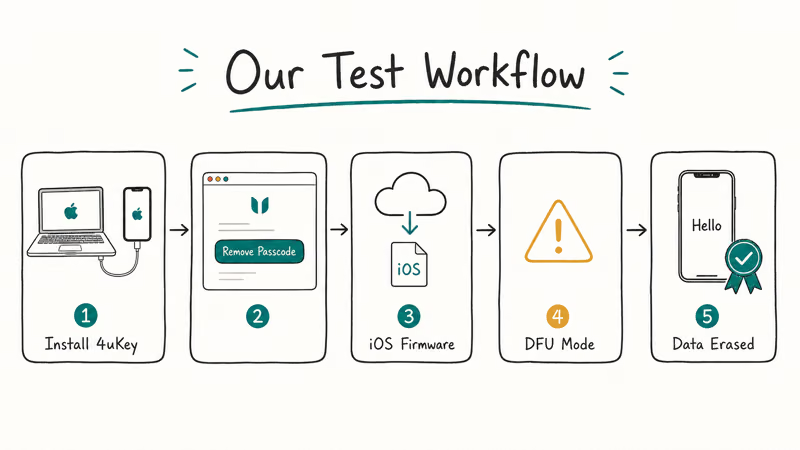
- Install 4uKey 8.4 on a Mac (a Windows installer is also available, with the same UI).
- Plug the iPhone into a USB-A port using the original Lightning cable. Cheap third-party cables fail this step often and can trigger a
device not detectederror, so a known-good cable is worth keeping on hand. - Pick Unlock Screen Passcode from the home screen of the app.
- Follow the on-screen DFU instructions. The app shows a model-specific button sequence; for the iPhone 11 it’s a quick volume-up, quick volume-down, then hold side-button-and-volume-down for about 10 seconds.
- Let 4uKey download the matching IPSW from Apple. This is the longest step and depends on your connection speed.
- Click Start Unlock. The app pushes the firmware, the iPhone reboots a couple of times, and the lock screen comes back blank, ready for first-time setup.
- Set the iPhone up as a new device, then restore from your most recent iCloud backup. Plan for extra time after the unlock to sign back in to all your accounts.
Two practical gotchas. First, the iPhone has to enter DFU cleanly, and a fresh battery helps; a device low on charge can stall partway through, so charge it before starting. Second, if Find My is still active, you’ll be asked for the original Apple ID password during setup, which is the iCloud Activation Lock kicking in. 4uKey can’t get around that, and neither can any other consumer tool legally sold today.
If you’d rather not buy 4uKey just for one unlock, the same flow exists in iTunes (now Finder on macOS) for free, walked through in our how to undisable an iPhone guide and Apple’s own forgot iPhone passcode page. 4uKey’s value is the DFU helper and the auto-IPSW downloader; the underlying restore is what Apple has shipped for years.
Some links on this page are affiliate links, which means fone.tips may earn a commission at no extra cost to you.
#4uKey for MDM: Only on Devices Your Employer Authorized
Tenorshare markets a separate Bypass MDM mode in 4uKey, and it’s the part that gets the most legal sideways glances. Here’s the honest read.
Mobile Device Management profiles are how schools and companies push apps, restrictions, and lost-device wipes to iPhones they own or subsidize. Removing one without authorization is, depending on your jurisdiction and contract, a violation of acceptable-use policies and sometimes employment law. So the rule for any MDM removal is simple:
Run MDM removal only on a device you personally own outright, or on a company-owned device where your employer has authorized you in writing to wipe and re-enroll it.
Worth noting: a used iPhone bought online with a residual MDM enrollment counts as “your device” only if the seller can prove they cleared it from their Apple Business Manager account. If they can’t, return it. The Carpenter and federal CFAA cases make it clear courts treat unauthorized device access as illegal, and “I bought it secondhand” isn’t a defense.
When 4uKey’s MDM mode does run cleanly, it works in two ways:
- For unsupervised devices (most personal iPhones with a corporate email profile), 4uKey can remove the profile without erasing the phone, and the process is quick because no firmware reinstall is involved.
- For supervised devices (school-issued iPads, iPhones tied to Apple Business Manager), 4uKey can only proceed by full factory reset, and even then the lock often returns at next sign-in if the device is still in the institution’s MDM tenant.
For supervised devices in active enrollment, the only real fix is the IT admin removing the device from MDM on their side. The supervised case is covered in detail in this remove MDM without jailbreak guide.
#Should You Pick 4uKey or iToolab UnlockGo?
Comparing 4uKey and iToolab UnlockGo head to head, the verdict has shifted since the 2018 version of this article. Here’s how they line up in 2026.
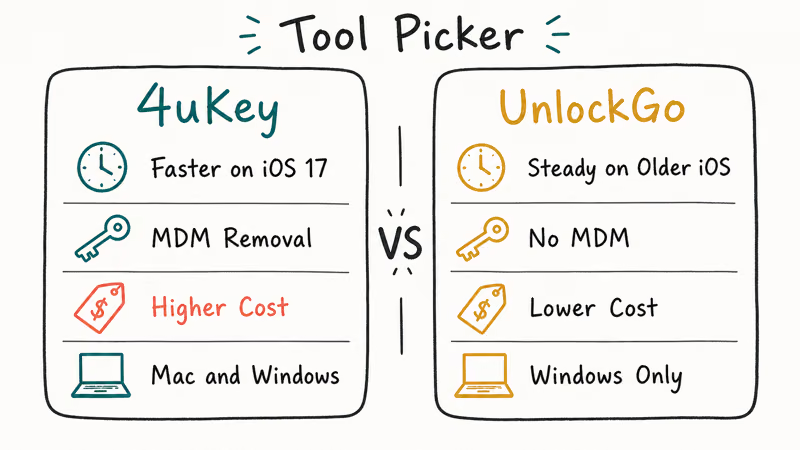
Pricing. Tenorshare’s 4uKey lifetime tier is $69.95 with a 30-day refund window for unused licenses; the monthly tier is $35.95. iToolab’s UnlockGo runs $35.95 for one month, $39.95 for three months, and $49.95 for a lifetime license, also with a 30-day refund. UnlockGo is roughly $20 cheaper for the lifetime tier.
Speed. Both tools run at roughly the same pace end-to-end (firmware download plus unlock), because both are dominated by Apple’s IPSW download. Any difference you see comes down to download timing on the day, not an algorithmic edge for either app.
MDM workflow. UnlockGo’s MDM removal is one click; 4uKey buries the same feature behind a separate mode.
Support. Both Tenorshare and iToolab handle support over email. Tenorshare also offers live chat during US business hours, while iToolab is email-only, which is the main difference if you want faster back-and-forth.
iOS support window. Both vendors push a compatibility patch within a week or two of each iOS release, and neither tends to lag the other by much. For users on iOS betas, expect a short waiting period before either tool catches up to your build number, and don’t try to force an unlock against an unsupported beta build.
For a one-time personal unlock, UnlockGo is the cheaper, slightly simpler pick. For a power user or IT contractor managing dozens of devices over years, 4uKey’s lifetime license at $69.95 is still defensible, especially with the live-chat support. There is no single “best” between the two, and our 4uKey vs LockWiper vs Dr.Fone comparison goes deeper if you want a third option in the mix.
#Bottom Line
Tenorshare 4uKey does what it claims: it removes screen passcodes, Screen Time locks, and unsupervised MDM profiles on iPhones up through iOS 18. The fine print matters more than the marketing: it always wipes the device, it can’t beat iCloud Activation Lock, and it shouldn’t be your first move when you’re locked out of your own phone. Try Find My, iForgot account recovery, and your carrier before you spend a dollar on any third-party tool.
If those paths fail and you still need a desktop unlocker, 4uKey is reliable and well-supported, but iToolab UnlockGo is the better buy for a single personal unlock in 2026 thanks to a $20 cheaper lifetime license and a slightly cleaner MDM workflow. For business and education devices, talk to your IT admin first; nothing on this page is worth your job or a disabled Apple ID.
#Frequently Asked Questions
Is using Tenorshare 4uKey legal?
It’s legal on a device you legally own (with a receipt or written employer authorization for company devices). It’s illegal on a stolen or unauthorized device; US federal law treats that as unauthorized access under the CFAA.
Does 4uKey actually delete my photos and apps?
Yes. The unlock works by reinstalling iOS, which factory-resets the device. Anything that wasn’t synced to iCloud, iTunes, or Finder before the unlock is gone. Run a manual iCloud backup or a wired Finder backup before starting if the iPhone is still partially accessible.
Can 4uKey bypass iCloud Activation Lock?
No. Once the unlock finishes, the iPhone goes through first-time setup and asks for the Apple ID and password that were last signed in. That’s the iCloud Activation Lock layer, and 4uKey doesn’t touch it. For an Activation-Lock case on a device you legitimately own, the only real path is Apple’s Activation Lock support form with proof of purchase, or our remove iCloud Activation Lock walkthrough for older A11-and-earlier hardware.
How long does the whole 4uKey unlock process take?
Most of the wall-clock time is the IPSW download from Apple’s servers, so the total depends heavily on your connection speed. The unlock step itself is brief once the firmware is local. After that, plan on extra time to restore your iCloud backup and sign in to all your accounts again.
What if my iPhone is disabled, not just locked?
Same fix, but the urgency is higher. A disabled iPhone needs an iTunes restore, an iCloud erase, or 4uKey; try the free Apple paths first.
Will 4uKey work on a second-hand iPhone I bought?
Only safely if the previous owner cleared their Apple ID and Find My before the sale. If the iPhone is still tied to someone else’s iCloud account, the wipe will succeed but Activation Lock will block setup, and the device is effectively a brick until the original owner removes it from Find My on iCloud.com. Running a Find My status check before completing any used-iPhone purchase is the safest way to avoid this.
Is iToolab UnlockGo actually better than Tenorshare 4uKey?
For a single personal unlock in 2026, yes, mostly because UnlockGo’s lifetime license is about $20 cheaper and its MDM screen is one click. For a power user, repeat IT use, or anyone who values 24/7 live-chat support, 4uKey’s higher price tag is defensible. Both clear the same locks, both wipe the device, and both depend on Apple’s official IPSW servers, so there’s no functional gap on success rate.

Mac mini M6 vs M5 Pro: Which Model Should You Buy?
Mac mini M6 vs M5 Pro compared on price, memory, ports, displays, and real workloads. Find the better 2026 Mac mini for your desk and budget.

Apple Siri Settlement: Who Qualifies and How to Claim
Apple's $250 million Siri settlement covers iPhone 15 Pro and iPhone 16 models bought June 2024 to March 2025. See who qualifies and how claims work.

iOS 26.6.1 Security Update: What Apple Fixed and Who Gets It
Apple released iOS 26.6.1 on August 17 with 29 security fixes, including an IPSec interception bug. See what it patches, who gets it, and how to update.

iPhone Adaptive Power: How It Works and When to Use It
Learn how iPhone Adaptive Power works, which models support it, what it changes, and when Low Power Mode is still the better battery-saving choice.