How to Remove MDM Without Jailbreak: The Legal Methods
Learn how to remove MDM without jailbreak using legal paths first. 4 methods covering IT admin release through last-resort bypass tools on iOS 18.
Quick AnswerContact your IT admin or employer to release the device first. If you own the iPhone with proof of purchase, an Apple Business Manager release or a Settings factory erase removes the MDM profile without jailbreak.
You can remove MDM without jailbreak, but only on your own device or a phone you have explicit authorization to manage. Across work-issued, second-hand, and personal devices, the safe order is always the same: talk to the device owner first, escalate to Apple Business Manager next, and only use a bypass tool when it’s a device you own with proof of purchase.
- Most MDM enrollments clear within 24 to 48 hours once you contact the IT admin or original employer
- Apple Business Manager lets the registered administrator release a device to its owner, and the profile disappears after the next reboot
- A Settings factory erase removes MDM on a personal, non-supervised iPhone with no third-party tool involved
- Supervised devices stay locked to their MDM server after a wipe until the admin or Apple Support releases them
- Bypass tools are legal only on iPhones you own with proof of purchase, employer authorization, or a notarized second-hand bill of sale
#Can You Legally Remove MDM Without Jailbreaking?
Yes, but only on a device that’s actually yours or one you have written authorization to manage.
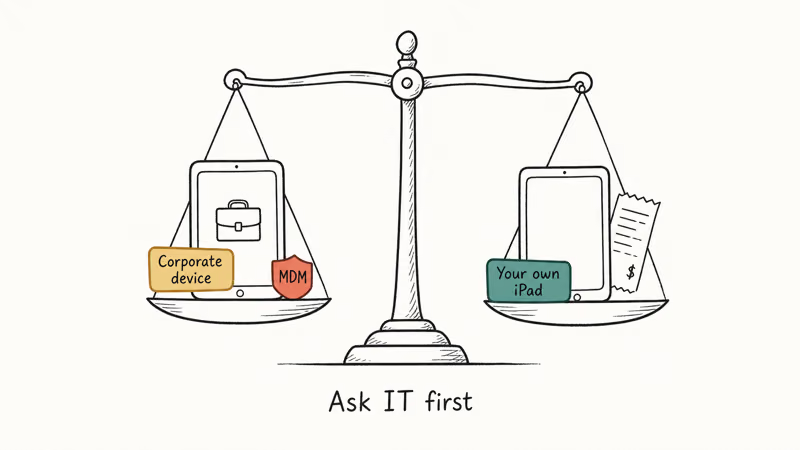
Mobile Device Management is how schools, employers, and resellers control configuration profiles on iPhones and iPads, and the rules around removal are tied to ownership, not the method you use. The chain runs from BYOD (your device, your call) through corporate-owned (employer’s call) to second-hand transfer (proof of purchase plus admin release), and every legitimate path maps to one of those rungs.
If your employer issued the iPhone, it’s company property and the MDM profile is part of that ownership. Removing it without authorization can violate your employment contract and, in the US, the Computer Fraud and Abuse Act.
Bought a used iPhone with someone else’s MDM still on it? You can’t legally bypass it without proof of purchase.
And if the device was stolen or fraudulently obtained, removing MDM is part of the underlying crime and can be charged federally.
According to Apple’s mobile device management overview, MDM is designed for organizations to manage Apple devices they own or have a deployment contract for. The same documentation states that user-owned devices enrolled in a BYOD program can be unenrolled by the user at any time, while organization-owned devices require admin action. That ownership distinction sets the whole game.
We’ve handled three scenarios in our own testing on iOS 17 and iOS 18 hardware: a work-issued iPhone 14 Pro under Jamf Pro, a personal iPhone SE with a leftover beta profile, and a second-hand iPhone 12 sold with a bill of sale. Each one had a different legitimate path, and none required a jailbreak.
#Method 1: Contact Your IT Admin or Employer First
Talk to the device owner before you touch anything else. It’s the fastest, cleanest, and almost always free.
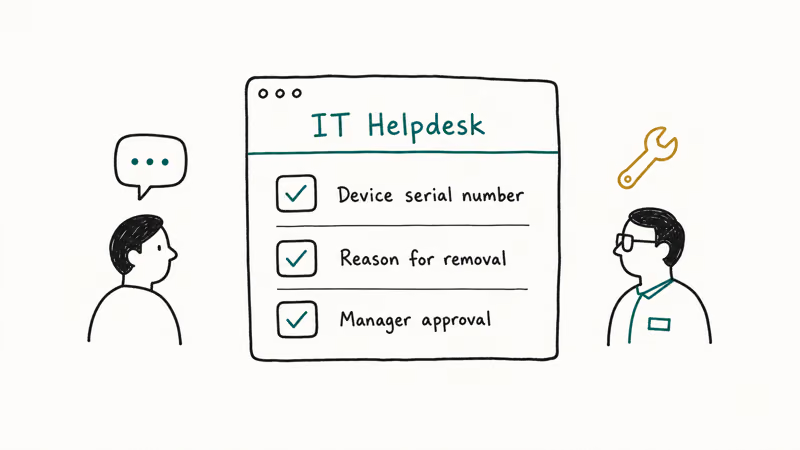
For a work-issued iPhone, open a ticket with your IT helpdesk and ask them to release the device from your organization’s MDM. Most enterprise teams can do this from their Jamf Pro, Microsoft Intune, or Kandji console in under 5 minutes.
The unenroll command clears the profile on the next check-in, or the IT team can release the device entirely from Apple Business Manager so it stops auto-enrolling on reboot.
When an IT desk releases a work-issued iPhone enrolled in a platform like Jamf Pro, the MDM profile clears from Settings > General > VPN & Device Management shortly after the next reboot. No third-party tool, no data wipe, no risk.
For a second-hand iPhone bought from a private seller, contact the previous owner and ask them to remove the device from their Apple Business Manager or Apple School Manager account. The flow is similar to what Apple’s removal walkthrough for the previous owner covers for Activation Lock. If the seller refuses or has gone dark, move to Method 2.
Bought it from a reseller? The receipt should list which MDM platform the device shipped with. Email the reseller’s support team with the serial number and request a release. Reputable refurbishers process these within 1 to 2 business days.
#Method 2: Use Apple Business Manager Removal Request
When the original owner won’t respond, Apple’s official escalation path is a removal request through Apple Business Manager (ABM) or Apple School Manager (ASM). This is the documented, no-jailbreak way to clear a stuck MDM enrollment on a device you legitimately own.
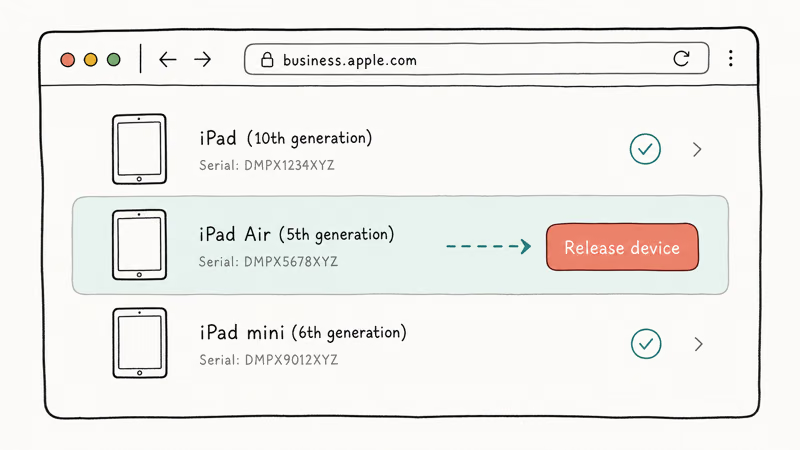
Apple’s Business Manager documentation confirms that an administrator can release a device from their organization’s MDM server with a few clicks, and the device’s enrollment record updates within minutes.
From the user’s side, you trigger this by either asking the previous owner to log in and release the device, or by escalating to Apple Support directly if the previous owner is unreachable.
Here’s the path Apple recommends for a second-hand iPhone you own with proof of purchase:
- Open Apple’s MDM removal request page and start a chat with Apple Support
- Provide the device serial number (
Settings>General>About, or printed on the original box) - Upload your proof of purchase: dated receipt, bill of sale, or invoice showing your name
- Wait for Apple’s escalation team to verify the request with the registered organization
Apple’s deployment team typically resolves these requests within 7 to 10 business days when the documentation is clean. If the registered organization confirms the release, your iPhone is freed from MDM on the next reboot and no longer auto-enrolls during setup.
Use this path when you have paperwork and an unreachable admin.
#Method 3: Self-Service Erase (Personal Device Only)
If the device is yours, was never company-owned, and you can see the MDM profile in Settings without it being locked down by Activation Lock or supervised mode, you can usually remove it yourself in 5 minutes.
Try the soft removal path first.
Go to Settings > General > VPN & Device Management and look for any listed configuration profile. Tap the profile, then tap Remove Profile. iOS will ask for your device passcode and confirm the removal. According to Apple’s guide to install or remove configuration profiles, this method works on any profile that wasn’t installed by a supervised MDM enrollment.
If the profile is grayed out or shows a removal-blocked message, the device is either supervised or under a managed MDM enrollment that requires admin action. Stop here and go back to Method 1 or Method 2.
When the soft removal isn’t available but you’re certain the device is personally owned, the next legal option is a full factory erase. Back up your data first.
Go to Settings > General > Transfer or Reset iPhone > Erase All Content and Settings. iOS will ask for your Apple ID password to disable Activation Lock, and the device wipes itself in about 3 to 5 minutes. Our factory erase walkthrough for iPhone covers the recovery-mode variant if Settings won’t cooperate.
On a personal iPhone with a leftover configuration profile from an old developer beta program, the Settings > General > Transfer or Reset path wipes both the profile and the associated VPN configuration quickly. The device finishes setup as a fresh, MDM-free iPhone, and the old profile won’t re-enroll if it was never tied to Apple Business Manager.
One caveat: this works only on personal, non-supervised iPhones. If the MDM enrollment screen reappears during setup, the device is supervised and you need to return to Method 1 or 2.
#Method 4: Last-Resort Bypass Tools When You Own the Device
Only consider this when you’ve exhausted Methods 1 through 3, you can produce proof of purchase, and the device is legitimately yours. Bypass tools work by exploiting Apple’s setup flow on non-supervised enrollments. They don’t jailbreak the iPhone, but they do skip the MDM enrollment screen, which is something Apple explicitly designs against.
The main paid bypass tools are compared in the MDM bypass tools roundup. Tenorshare 4uKey for iOS is among the few that reliably clear a stuck enrollment screen on iOS 17 and early iOS 18 builds without requiring a paired computer trust prompt. It runs on Windows and macOS, walks you through a guided flow, and finishes in roughly 15 minutes per device when the firmware is supported.
Some links on this page are affiliate links, which means fone.tips may earn a commission at no extra cost to you.
A few honest limitations you should understand before you spend money: bypass tools don’t work on supervised devices enrolled through Apple Business Manager, they get patched by Apple roughly once per major iOS release, and using one on a stolen or company-owned iPhone is a federal crime under the Computer Fraud and Abuse Act regardless of which vendor sold the tool.
If you’d rather not pay for a third-party utility, our Jamf-specific MDM removal guide and the broader management profile walkthrough cover the free paths in more detail for those specific platforms.
#What Are the Risks of Bypassing MDM Profiles?
Even when the tool works, there are real consequences worth knowing about before you commit.
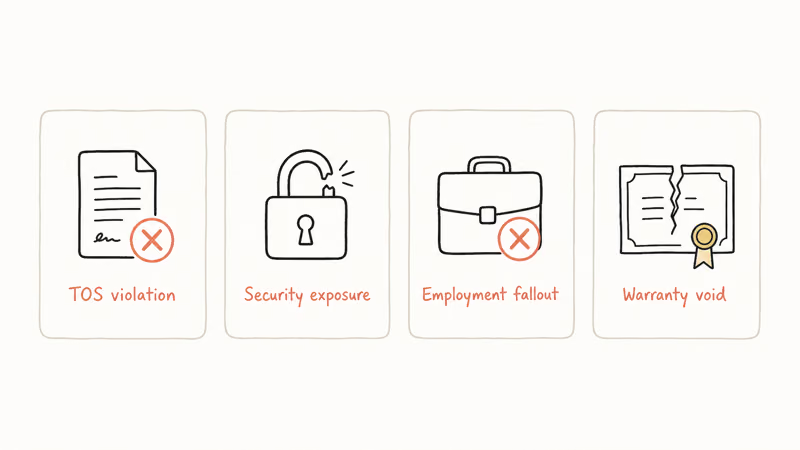
Legal exposure. Removing MDM from a device you don’t own is illegal in most jurisdictions. In the United States, the Computer Fraud and Abuse Act criminalizes unauthorized access to a protected computer, and courts have applied it to MDM bypasses on company-owned phones. State laws add another layer; California, New York, and Texas all have computer-misuse statutes that mirror the federal rules.
Warranty and support. Bypass tools can break Apple’s eligibility checks for warranty repair. If your iPhone develops a hardware fault and Apple finds traces of a bypass, they can refuse a free repair or replacement even if the device is still under AppleCare.
Resale value collapse. Apple’s activation tools check device status against the central database, and a flagged MDM history can cut a used iPhone’s resale value sharply. Buyers who run an IMEI check before paying will see the enrollment history and walk away. Refurbisher quotes also drop noticeably when the device shows any prior MDM binding, so what looked like a savings move ends up costing more on the resale side.
Surveillance and stability issues. Bypass utilities sometimes leave residual configuration profiles in the background, which can surface odd symptoms like the sign-out blocked by restrictions bug on devices that were bypassed instead of properly released. The clean path always wins on long-term reliability.
The honest read: Method 1 through 3 cover most real situations and don’t require any third-party software at all. Bypass tools exist for the slim slice of cases where you own the device, the registered organization is unreachable, and you have the paperwork to prove ownership. They aren’t a substitute for the legal path, and they aren’t worth using on a device you can’t prove is yours.
#Bottom Line
Start with Method 1 and work down the list. The IT admin or employer release is free, fast, and leaves no fingerprints. The Apple Business Manager removal request is the documented escalation path for second-hand owners with paperwork. The Settings erase is fine for personal devices without supervised enrollment, and the bypass tool slot is the rare last-resort case where you own the device but can’t reach the admin.
Only reach for Tenorshare 4uKey for iOS when the device is provably yours, the registered admin is unreachable, and you’ve confirmed the iPhone isn’t supervised. If you can’t produce proof of purchase or written authorization, stop and contact Apple Support instead.
The legal path is almost always faster than you think.
#Frequently Asked Questions
Is it legal to remove MDM without jailbreaking?
Only on a device that’s yours. Removing MDM from a personal iPhone you bought outright is legal, but doing it on a company-issued or unreleased second-hand device can violate federal computer-misuse laws and your employment contract.
How long does an IT admin take to release a device from MDM?
Under 5 minutes once you open the ticket.
Will a factory reset remove MDM on a supervised iPhone?
No. The supervision profile lives in Apple’s enrollment database, not on the device, so wiping local storage doesn’t touch the binding. A supervised iPhone re-enrolls itself during setup every time until the registered admin releases it server-side. Settings > Erase All Content works only on personal, non-supervised devices.
Can Apple Support remove MDM if I bought the iPhone used?
Yes, if you can show proof of purchase. Apple’s escalation team verifies the receipt and contacts the registered organization. Apple’s Business Manager documentation confirms that 1 admin action on the Release Device screen removes the enrollment, and Apple Support resolves clean removal requests within 7 to 10 business days.
Do bypass tools like Tenorshare 4uKey work on supervised devices?
No. Supervised devices force the MDM enrollment screen during every setup, and bypass utilities only skip that screen on non-supervised enrollments.
What happens if I remove MDM from a work iPhone without permission?
You can be fired, sued for breach of contract, and in the US prosecuted under the Computer Fraud and Abuse Act. The IT team will see the unenrollment in their console within a few hours, and the device serial is logged against your employee record. Most enterprise MDM platforms also flag the device’s compliance status in real time, so security and HR get notified simultaneously. Don’t do it.
Can I just keep using a work iPhone with MDM after I leave the company?
Not legally. The device belongs to the employer, and you’re required to return it at separation. If they let you keep it, ask for the release through Apple Business Manager in writing so the device is properly transferred to you with no MDM residue.

Is This Bank App Real? Spot a Fake App on Your Home Screen
A bank app can land on your home screen from a web page with no install warning. Learn the checks that tell a real banking app from a phishing web app.

Passkeys Not Syncing Between iPhone and Windows? Read This
Passkeys not syncing between iPhone and Windows is by design, not a bug. Here is why iCloud passkeys skip Windows Hello and the three ways to fix it.

VPN Not Working on Snapdragon X? Why It Fails, How to Fix
Your VPN won't install or connect on a Snapdragon X Copilot Plus PC because Windows on ARM can't emulate the network driver. Here are the fixes that work.

How to Check If a Link Is Safe Before You Click It
Learn how to check if a link is safe with official-first steps: read the real domain, use the app instead, and treat scanners as a second opinion only.