Discord vs Skype: Which Is Better for Voice and Video Calls?
Compare Discord vs Skype for voice and video calls, screen sharing, file uploads, and business features to find the best communication app for your needs.
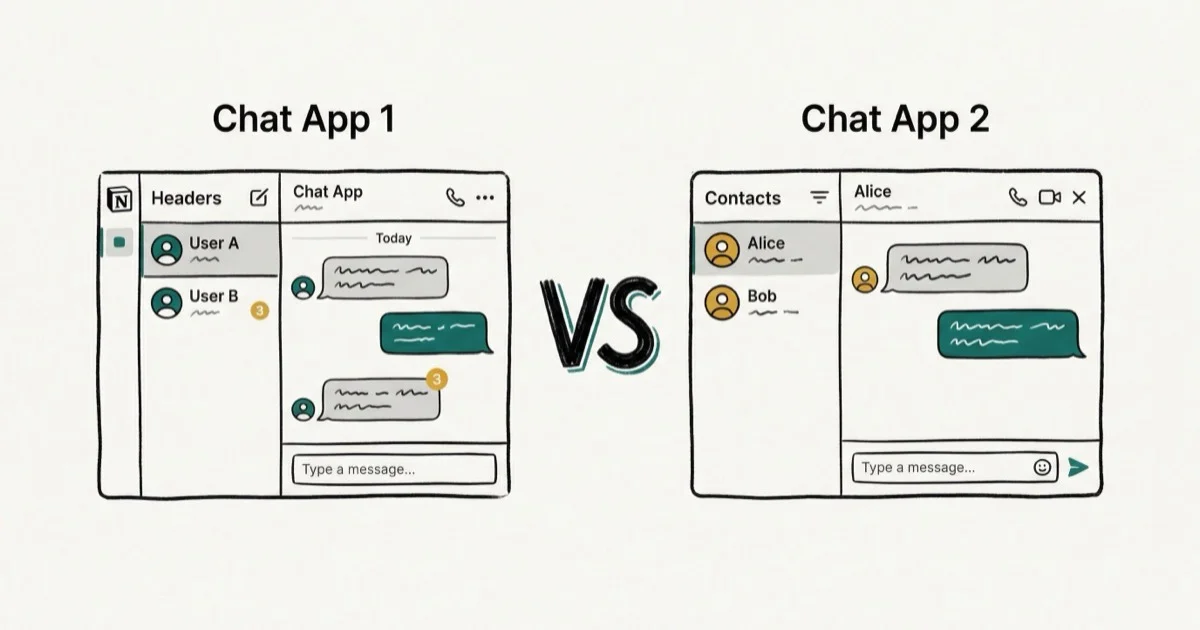
Quick AnswerDiscord is better for gaming communities and group voice chat with persistent channels, while Skype is better for business calls with HD video, larger file sharing (up to 300MB), and Microsoft Office integration.
Voice and video calling apps are essential for daily communication. This Discord vs Skype comparison breaks down how the two apps stack up across gaming sessions, business calls, and casual group chats so you can see which one fits each scenario better.
- Discord centers around persistent servers and voice channels; Skype uses a contacts-and-direct-call model with no persistent group spaces
- Discord dominates for gaming with overlay support and always-on voice channels; Skype excels in business with Office 365 integration and call recording
- Skype supports HD video up to 1080p with consistent quality; Discord’s video quality varies based on user hardware and connection
- Skype allows file uploads up to 300 MB; Discord caps free users at 8 MB and Nitro subscribers at 100 MB
- Both platforms are free at the core — Discord’s paid Nitro tier costs $9.99/month; Skype subscriptions start at $2.99/month
#Overview of Discord and Skype
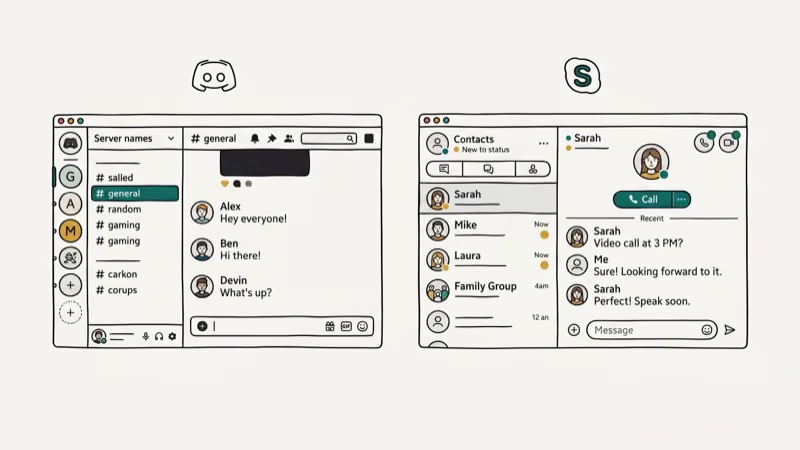
Discord is a free voice, video and text chat app that’s hugely popular in the gaming community. Servers provide spaces for groups and communities to interact via chat channels focused on specific topics.

In addition to text chats, Discord allows users to communicate by voice in chat rooms, as well as make direct voice and video calls. Screen sharing is another useful feature for collaboration.
Skype, owned by Microsoft, is one of the longest running and most well-known video calling apps. It offers features like instant messaging, voice and video calls, screen sharing and file sharing.
While predominantly focused on consumer use cases, Skype also provides options tailored towards business needs like scheduling meetings and integrating with Office apps.
According to Wikipedia’s Discord page, Discord was publicly released in May 2015 and reported about 150 million monthly active users by 2024. According to Wikipedia’s Skype page, Skype launched in 2003 and was acquired by Microsoft in 2011 for $8.5 billion, making it one of the largest tech acquisitions at that time.
For more comparisons, see Discord vs Telegram.
#How Do Discord and Skype Differ?
Here’s a quick look at some of the main ways Discord and Skype differ:
- Purpose – Discord is focused on gaming communities while Skype caters more towards personal and business use.
- Servers vs Contacts – Discord is built around servers while Skype connects contacts.
- Voice Channels – Discord features persistent voice channels vs Skype’s one-on-one calls.
- Business Features – Skype has more built-in features for business use like appointments, calendars and CRM integration.
- Video Quality – Skype offers HD video while Discord tops out at 1080p/source quality.
- Customization – Discord provides more customization options for users.
- File Sharing – Skype allows larger file uploads up to 300MB vs Discord’s 8-50MB limits.
Let’s take a deeper look at how these differences impact the user experience when evaluating Discord vs Skype.
#Discord vs Skype for Different Use Cases
#For Gaming
Discord is the clear winner when it comes to gaming. The platform is designed specifically with gamers in mind, providing tools to bring together communities around specific games and topics.
Some key advantages Discord has for gamers:
- Persistent voice channels – Discord’s always-on voice channels are perfect for hanging out and talking with fellow gamers.
- Active communities – Large gaming communities on Discord have channels focused on discussion, play tips, finding teammates, and more.
- Overlay support – Discord’s in-game overlay allows gamers to easily see notifications and coordinate with teammates.
- Cross-platform – Discord is available across mobile, desktop and web with full feature parity.
- Streaming integration – Stream your gameplay directly to Discord and engage with viewers in real-time.
In contrast, Skype is not designed for gaming or building communities. While you can use it for voice chat while playing, Discord is far superior in the gaming context. For more insights on streaming, see our Discord vs Twitch guide.
Discord’s voice processing is lightweight on a typical mid-range PC, so a busy gaming session stays low-latency even on a shared network without hogging system resources.
#For Personal Use
For personal voice and video calls with family and friends, both Skype and Discord work well.
Skype’s biggest advantage for consumer use is its simplicity. With just an email or phone number, your contacts can reach you without needing to join servers or add usernames. Video quality is also reliable for most connections.
However, Discord’s voice channels provide a more casual way for groups of friends or family members to hang out remotely. The ability to pop in and out of voice channels makes it easy to connect without the formality of a direct call.
Overall, Skype gets a slight edge for one-on-one calls with its interface familiarity, while Discord excels at group connections.
However, is Discord used for dating? Explore more about it here.
#For Business Use
Skype pulls ahead of Discord when it comes to business needs for a few key reasons:
- Integration with Office apps – Schedule Skype calls directly from Outlook calendar. Share Office documents and collaborative editing during calls.
- CRM integration – Skype integrates directly with business platforms like Salesforce for easy access during calls.
- Higher video quality – Skype offers full HD video quality for professional meetings and presentations.
- Call recording – Skype enables recording of both video and audio calls.
- Scheduling – Skype makes it easy to schedule meetings and send calendar invitations.
- Mobile messaging – Skype’s business plans include SMS messaging.
- Account management – Skype for Business offers centralized admin controls for multiple users.
Discord allows screen sharing and has Go Live streaming for business-adjacent use cases. However, Skype has significantly more features built specifically for business needs like call recording and CRM integration.
The only exception would be for niche professional communities that center around Discord. In those cases, the platform’s chat servers may provide more targeted tools.
Let’s take a deeper look at how these differences impact the user experience when evaluating Discord vs Skype, and how it compares to other platforms like WhatsApp.
#Comparing Key Features
Now let’s take a detailed feature-by-feature look at how Discord and Skype stack up in important categories.
#Group Size Limits
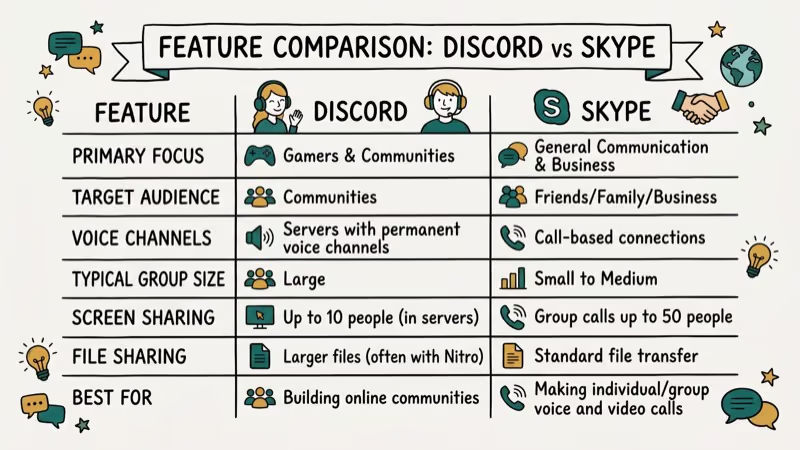
Both apps allow fairly large groups for voice and video calls, with Discord coming out on top.
- Discord
- Voice channels – Up to 250 users
- Video calls – Up to 50 users
- Skype
- Group video calls – Up to 100 participants
- Group voice calls – Up to 25 participants
For personal use, these generous limits accommodate everything from game night with friends to large family gatherings. For business, Discord can potentially host an all-hands meeting with a few hundred employees.
#Video and Audio Quality
Skype generally provides better video call quality while Discord offers more flexibility.
- Skype
- HD video up to 1920 x 1080 pixels
- Consistently clear audio
- Discord
- Variable video up to source quality
- Audio quality depends on connection; usually good
Discord allows servers to boost audio quality for an improved experience. For video, performance is largely dependent on each user’s hardware and internet capabilities.
Skype’s video smooths out that variability, making it preferable for presentations or events where consistent quality is important. With a 1080p webcam on a fast connection, Skype tends to hold steady video quality, while Discord can fluctuate when other network activity increases. For casual calls, both platforms perform well.
#Screen Sharing
Both apps support screen sharing during calls, with Discord offering more customization options.
The ability to broadcast your screen is essential for activities like collaboration, tech support, presentations and gaming.
- Discord
- Share entire screen, specific app window, or portion of screen
- Hides personal information when gaming
- Skype
- Share full screen
- Provides simple annotation tools
Discord’s fragmented screen sharing gives users more control over what they display. Skype is better suited for quickly sharing your full desktop.
#Customization and Themes
One major advantage Discord has over Skype is customization, with far more options to personalize your experience.
- Discord
- Change server and user profile themes
- Animated avatars and server icons
- Custom user statuses
- Organize channels and roles
- Bot integration
- Skype
- Limited profile theming
- Basic status messages
- No other customization options
Discord encourages community-building with profile personalization. Skype maintains its familiar interface with minimal tweaks available.
#File Sharing
Both apps allow file transfers, with Skype accommodating much larger attachments.
- Skype
- File sharing up to 300MB
- Larger files via OneDrive integration
- Discord
- File size limited to 8MB for free users
- Up to 100MB for Nitro subscribers
Discord’s file limits are quite restrictive and make it challenging to share large images, videos or documents. Skype easily supports most typical attachments.
#Mobile Experience
Discord and Skype are both available on iOS and Android mobile devices. The core features translate smoothly cross-platform.
Discord provides more flexibility for mobile users thanks to its voice channel model. You can switch between text and voice chat without initiating a new call.
Skype allows video calling over mobile data, which is useful when Wi-Fi is unavailable. The mobile experience is solid on both platforms.
#Chat Features and Capabilities
Beyond voice and video, both Discord and Skype offer text chat capabilities. Discord has more options tailored towards community interaction.
- Discord
- Organized chat channels
- Persistent chat history
- Webhooks for bots and alerts
- Embed media and links
- Code snippet formatting
- Slash commands
- Skype
- Basic individual & group chats
- Share messages, files, photos
- Add emojis and stickers
- Format text bold/italics
Discord provides more tools for engaging community members, integrating third-party apps and customizing chats. For simple communication Skype fills the need.
#Security
Both Discord and Skype implement standard security measures like encryption to protect chats and calls. Each platform has faced some criticism for privacy concerns in the past.
For the most privacy:
- Discord – Use a VPN and turn off data collection settings
- Skype – Disable call recording feature and limit shared info
Overall, exercise caution when sharing sensitive personal information on any internet-based communication platform.
In addition to text chats, Discord allows users to communicate by voice in chat rooms, as well as make direct voice and video calls. It’s also possible to recover a deleted Discord account, providing peace of mind to users.
#Pricing and Plans
Discord’s core features are completely free. The record on Wikipedia confirms that Discord had at least 350 million registered users by 2021, with the free tier accounting for the vast majority of accounts. Skype offers free personal use, with paid subscriptions unlocking advanced features.
#Discord
- Free – Full access to servers, messaging, voice chat
- Nitro – $9.99/month premium subscription with extra perks like higher quality screen sharing, larger file uploads and custom emoji
#Skype
- Free – Messaging, voice and video calls with individuals and groups
- Subscription – starting at $2.99/month for extras like group video calling, call recording and SMS messaging
For most personal needs, the free tiers of both apps will suffice. Paid plans provide quality of life improvements but are not essential.
#The Verdict: Which Is Better for You?
When considering Discord vs Skype, think about your use case and which platform’s strengths match your needs.
? For connecting with gaming communities, Discord is far superior. The platform is purpose-built with gamers in mind.
???? For casual group hangouts with friends or family members, Discord’s persistent chat rooms make it our top pick.
? For business meetings and presentations requiring high video fidelity and integration with work apps, Skype is preferable.
? For straightforward one-on-one calls, either tool can provide solid voice and video capabilities. Skype carries more brand familiarity while Discord fosters more informal community interaction.
At the end of the day, the right choice depends on your priorities. Evaluating the key differences in features, functionality and use cases explored in this guide will clarify which solution best fits your needs and preferences.
#Bottom Line
Discord is the better choice for gaming communities, casual group chats, and any situation where persistent voice channels add value. Skype is the better choice for business calls, presentations, and teams that rely on Microsoft Office integration. For most personal use cases, Discord’s free tier covers everything you need. For professional settings requiring HD video and scheduled meetings, Skype wins. If your organization already uses Microsoft 365, Skype’s direct Outlook integration makes it the natural fit.
#Frequently Asked Questions
Does Discord have video calling?
Yes, Discord supports video calling in both one-on-one and group calls. The maximum number of users in a Discord video call is 50.
Can you call phone numbers with Skype?
Yes, with Skype you can call phone numbers like landlines and mobiles. This requires purchasing Skype Credit or getting a subscription. Calling other Skype users is free.
Can businesses use Discord?
Discord does offer certain features like screen sharing that can facilitate business collaboration. However, Skype tends to be more suitable with purpose-built tools for enterprise.
Does Skype have an advantage as a Microsoft product?
Since Microsoft owns Skype, it integrates directly with Microsoft 365, Teams, and Outlook. Skype calls can be initiated from inside Outlook calendar invites without switching apps.
Is Discord actually free?
Yes, Discord’s core features are completely free including messaging, voice chat and streaming. The Nitro subscription provides some additional perks but is not necessary to use Discord.
How many users can be in a Skype call?
A Skype group video call can support up to 100 participants while group voice calls are limited to 25 participants maximum.
Can you use Discord on multiple devices?
Yes, Discord syncs across mobile and desktop apps. You can switch between devices mid-session and your message history stays intact on all platforms.
Is Skype still popular?
Skype maintained a substantial user base, particularly in international calling and business contexts. According to Wikipedia’s Skype page, Skype was used by 100 million people at least once a month as of March 2020 before Microsoft Teams began absorbing some of its business use cases.

Google Messages Error 3100: Why RCS Is Broken on Galaxy
Google Messages RCS error 3100 hits Galaxy owners after phone or carrier switches. Google told 9to5Google a fix is coming. Here's what actually helps.

Is This Bank App Real? Spot a Fake App on Your Home Screen
A bank app can land on your home screen from a web page with no install warning. Learn the checks that tell a real banking app from a phishing web app.

Apps Crashing After iOS 27 Update? Fix Order (2026)
Apps crashing after the iOS 27 update? Update the app in the App Store first, then offload and reinstall to clear stale cache, then restart. The fix order.

Do AI Translation Earbuds Work Offline? What to Know
Do AI translation earbuds work offline? A few do with downloaded language packs, but most need the cloud. Here's what works offline and what you give up.