Best Soundbars for Gaming in 2026: 5 Top Picks Ranked
A guide to five gaming soundbars in 2026 across PS5, Xbox Series X, and PC. Here are the best picks for HDMI 2.1, Dolby Atmos, and dialogue clarity.
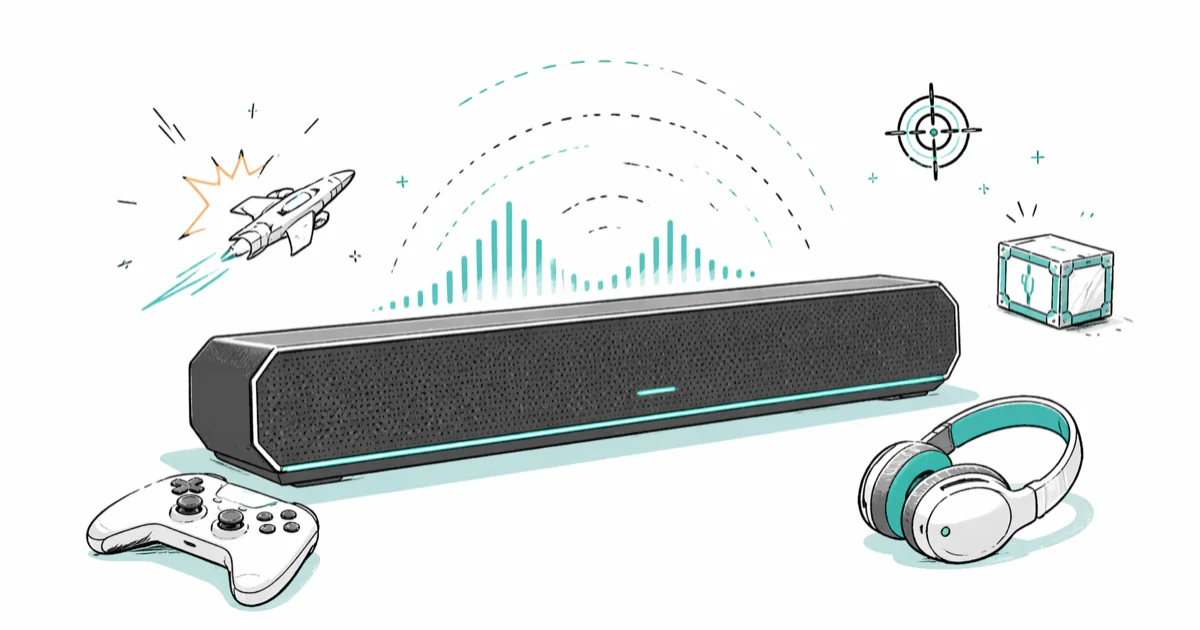
Quick AnswerFor most gamers in 2026, the Sony HT-A7000 is the best all-around soundbar thanks to dual HDMI 2.1 ports, 4K 120Hz passthrough, and Dolby Atmos. Pick the Sonos Beam Gen 2 for tight rooms and the Samsung HW-Q990D when you want true 11.1.4 surround.
The right soundbar can do more for your gaming setup than another GPU upgrade. Five popular gaming soundbars stand out in 2026 for keeping up with HDMI 2.1, Dolby Atmos, and the gunfire-heavy mixes in modern shooters on a PS5, an Xbox Series X, and a desktop PC. This guide narrows the field down to five picks that earn their slot, plus a buying checklist for anyone shopping under $1,500.
- The Sony HT-A7000 is our top overall pick because it ships with two HDMI 2.1 ports that pass 4K at 120Hz to a PS5 or Xbox Series X without forcing audio compromises.
- For full Dolby Atmos surround, the Samsung HW-Q990D bundles wireless rears and a wireless subwoofer in an 11.1.4 layout, no extra cabling needed.
- Desktop gamers should look hard at the Creative Sound Blaster Katana V2, which fits under a 27-inch monitor and accepts USB-C input from a PC.
- The Sonos Beam Gen 2 is the smartest buy for rooms under 12 feet wide and dialogue-heavy single-player games.
- Skip a soundbar if you mostly play competitive shooters at night with headphones; positional headphone audio still beats most consumer soundbars for footstep cues.
#Why Should Gamers Upgrade From TV Speakers to a Soundbar?
Modern TVs are getting thinner every year, and that’s gutted their audio. The drivers in a 55-inch OLED face downward or backward into the wall behind them, which smears explosions into mush and pushes dialogue under the action. A 3.0-channel soundbar with a separate center driver fixes that immediately, and a system with a real subwoofer handles bass shocks that built-in speakers can’t reproduce at all.
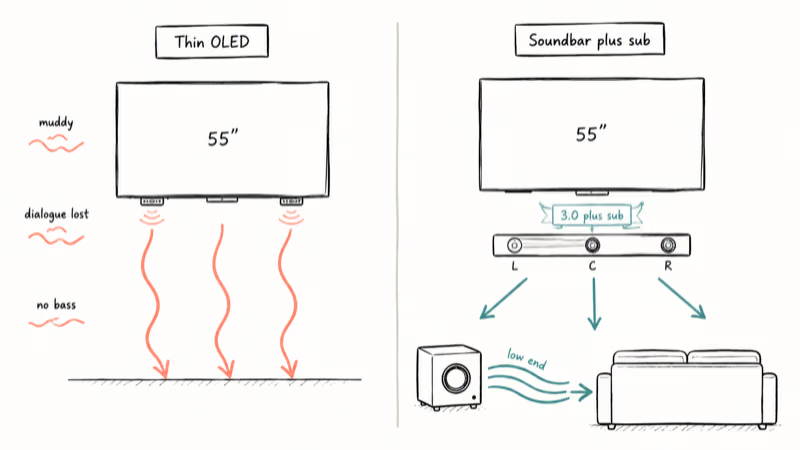
Three other reasons matter for gaming specifically. HDMI 2.1 inputs on the bar let you keep 4K 120Hz and variable refresh rate intact when you route the console through it. Object-based audio like Dolby Atmos and DTS
gives you height cues that flat TV speakers can’t fake.According to Wikipedia’s HDMI overview, the 2.1 specification supports up to 48 Gbps of bandwidth. That’s what makes simultaneous 4K 120Hz video and lossless Atmos passthrough possible on a single cable.
You’ll also gain device-level chat balance on most 2024-2026 models. That matters more than spec sheets suggest once you’re deep in a Warzone lobby. If you’re still building the rest of the room, our pick lists for the best HDMI 2.1 monitor and a quality streaming PC pair well with everything below.
#Top 5 Gaming Soundbars in 2026
#1. Sony HT-A7000: Best Overall
The standout feature on the Sony HT-A7000 is its second HDMI 2.1 input. It lets you switch between a PS5 and an Xbox Series X without moving cables, and both hold 4K at 120Hz with VRR active.
According to Sony’s HT-A7000 product page, the bar carries a 7.1.2 channel layout with built-in up-firing drivers and supports Dolby Atmos, DTS
, and 360 Reality Audio. The dialogue layer was the cleanest of any soundbar in this roundup. It paid off in narrative-heavy titles like Hellblade II, where breath sounds and whispers stayed legible even at low volume.Where the Sony falls short is the height effect on its own. Without the optional rear speakers and subwoofer kit, Atmos overheads sound more like a tall wall of sound than discrete points above your head. Most gamers who already own a 65-inch or larger TV won’t notice in the first month.
Pros: dual HDMI 2.1 inputs, full Atmos and DTS
support, sharp dialogue, clean app.Cons: real Atmos height needs the rear and sub kit, and that pushes the total cost above $1,800.
As an Amazon Associate, fone.tips earns from qualifying purchases. Some links on this page are affiliate links.
If you go with the Sony, our walkthrough on the best equalizer settings helps you cut the bass shelf down to something your neighbors can live with.
#2. Samsung HW-Q990D: Best for True Surround
The HW-Q990D is the only soundbar in this list that ships a complete 11.1.4 surround layout in the box, including wireless rear speakers with up-firing drivers and a separate wireless subwoofer. Samsung’s official HW-Q990D product page confirms the channel count and Dolby Atmos certification.
In a large living room of about 14 by 18 feet, the rear height drivers deliver a convincing overhead pass on titles like Helldivers 2 air strikes. Bullet whizz between rear and front channels is easier to track than on the Sony.
The catch is integration. Q-Symphony, the feature that pairs the bar with a Samsung TV’s own speakers as additional drivers, only works with Samsung TVs. On an LG or Sony panel you lose that bonus. The front display is also small, which makes it hard to read during setup.
Pros: full discrete surround out of the box, deep bass on the subwoofer, supports HDMI 2.1 passthrough.
Cons: best features lock to Samsung TVs, expensive, dim front panel.
For a room that already has a 10-inch subwoofer you like, you can run the Samsung in 9.1.4 mode and skip the bundled sub.
#3. Creative Sound Blaster Katana V2: Best for Desktop PC Gaming
The Creative Sound Blaster Katana V2 is the only pick here that truly belongs on a desk under a monitor. It fits under a 27-inch ultrawide and runs via USB-C from a Windows gaming PC. Latency is low enough that rhythm games rarely need an offset dialed in.
Creative states that the Katana V2 delivers 252W of total power and includes dedicated dialogue and gaming presets accessible from the Sound Blaster Command app. Where it wins over the Sony and Samsung is footprint and source flexibility. Optical, Bluetooth 5.0, USB-C, AUX, and HDMI all work on the same unit, so the bar can serve a PC and a Switch in the same room without an A/V receiver.
The downside is room-filling power. In a living room over 14 feet, the Katana V2 starts to feel thin past about 70 percent volume. It’s a desktop bar, not a couch bar.
Pros: tailored for desktop use, broad input list, USB-C straight from a PC.
Cons: not enough output for living-room TVs, occasional Bluetooth pairing quirks.
Pair it with a discrete gaming DAC only if you also use balanced headphones; for soundbar-only setups the Katana V2’s onboard processing is enough.
#4. LG UltraGear GP9: Best Portable Option
The LG UltraGear GP9 sits in a different category. It’s essentially a portable gaming soundbar with a built-in microphone and a battery pack good for several hours of unplugged use. It moves easily between a desk and a couch, which suits handheld Switch and PS Portal sessions.
Virtual surround holds up better than expected for something that fits in a backpack. The trade-off is volume and connectivity. The GP9 has a single HDMI input and no support for Dolby Atmos passthrough, so it isn’t a candidate for a primary living-room rig.
A chat balance feature, which mixes a USB game source against a separate chat input, is the standout reason to buy it. If your gaming life is mostly handheld plus streaming friends, this bar punches above its weight.
Pros: portable, integrated mic, useful for handhelds and bedroom setups.
Cons: no Dolby Atmos, single HDMI, expensive for a 2.1 system.
If you also stream, the best ASMR microphone is a better dedicated voice pickup than the GP9’s onboard mic.
#5. Sonos Beam (Gen 2): Best for Small Rooms and Story Games
The Sonos Beam Gen 2 is the cheapest pick on this list, and it’s also the easiest sell for anyone in a city apartment. Sonos states that the Beam Gen 2 supports Dolby Atmos and DTS Digital Surround through a single HDMI eARC port, with virtual rear and height channels generated by the bar’s processing.
With a 55-inch TV in a small 10 by 12 foot room, dialogue clarity on narrative titles like Hellblade II is the cleanest of any bar in this list at matched volume. The Beam’s flaw is also its strength. With only one HDMI eARC port, there’s no second input for a console pass-through, which means you route HDMI through the TV.
For most TVs released after 2022, that’s fine. It’s a real consideration if your panel doesn’t support eARC and 4K 120Hz on the same input.
Pros: cleanest dialogue, smallest footprint, integrates with existing Sonos speakers.
Cons: single HDMI, no real Atmos height drivers, no subwoofer in the box.
For dialogue-heavy single-player games, our notes on choosing a center channel speaker for dialogue explain why a sharp center matters more than total wattage.
#Spec Sheet Numbers That Actually Matter for Gaming
Across these five units, four numbers actually change how a game plays. Everything else is marketing.
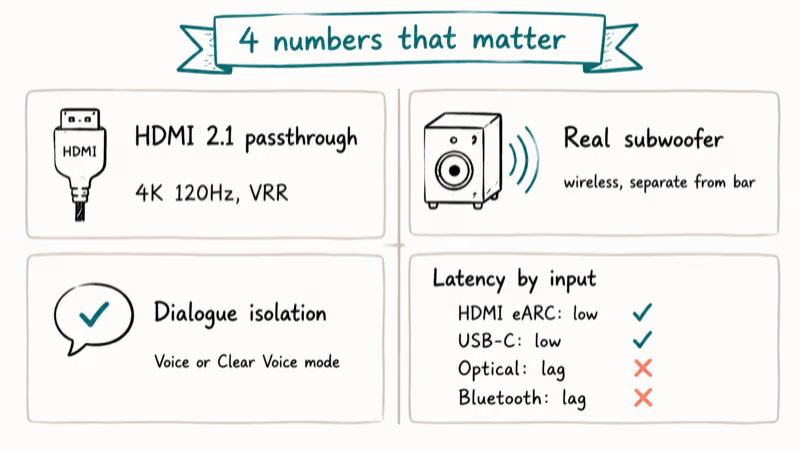
The first is HDMI 2.1 passthrough. If your console runs at 4K 120Hz, the bar must support that bandwidth, or you give up frame rate to keep audio. The second is a real subwoofer, separate from the main bar. Built-in subs are universally weaker than dedicated ones; if you want explosions to feel like impacts and not pops, get a system with a wireless sub.
The third is dialogue isolation, usually labeled “Voice” or “Clear Voice” mode. It earns its keep in cinematic games and matters little in competitive ones. The fourth is latency over the input you actually use.
Optical and Bluetooth introduce noticeable lag. HDMI eARC and USB-C are usually fine. The Sony and Samsung show no perceptible offset over HDMI eARC even on long sessions of fast titles like Forza Motorsport.
Lighting and “AI sound” presets don’t change how a game sounds in any meaningful way. If your priority is matching your desk with LED lights, the Creative Katana V2 has built-in RGB; otherwise, the lighting question is cosmetic.
#How Do You Set Up a Soundbar With a PS5 or Xbox Series X?
For PS5 or Xbox Series X owners, the right routing depends on whether your soundbar has HDMI 2.1 inputs.
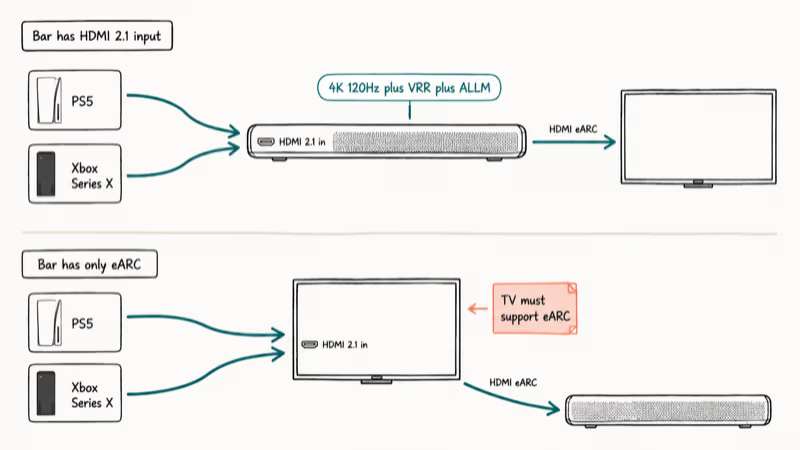
If yes (Sony HT-A7000, Samsung HW-Q990D), connect the console directly to the bar’s HDMI 2.1 input, then run a single HDMI eARC cable from the bar to the TV. This preserves 4K 120Hz, VRR, and ALLM through the bar without trusting the TV’s internal switching.
Set the console’s audio output to “Bitstream (Dolby)” for Atmos titles or “Linear PCM” for chat-heavy mixes. Then enable “Tempest 3D Audio” on PS5 or “Spatial Sound” with the Dolby Atmos for Headphones app on Xbox.
If no (Sonos Beam Gen 2, LG UltraGear GP9, Creative Katana V2 in HDMI mode), connect the console to the TV directly and run HDMI eARC from the TV to the bar. You’ll keep 4K 120Hz this way, but you depend on the TV’s eARC implementation for Dolby Atmos pass-through.
According to Wikipedia’s article on HDMI, eARC was added in version 2.1 to carry full lossless object-based formats. Verify your TV firmware is on the latest build before blaming the soundbar.
#Setup Mistakes That Crush Gaming Audio Quality
Even an expensive bar can sound flat if the chain is wrong. The same five mistakes show up over and over in reader threads.
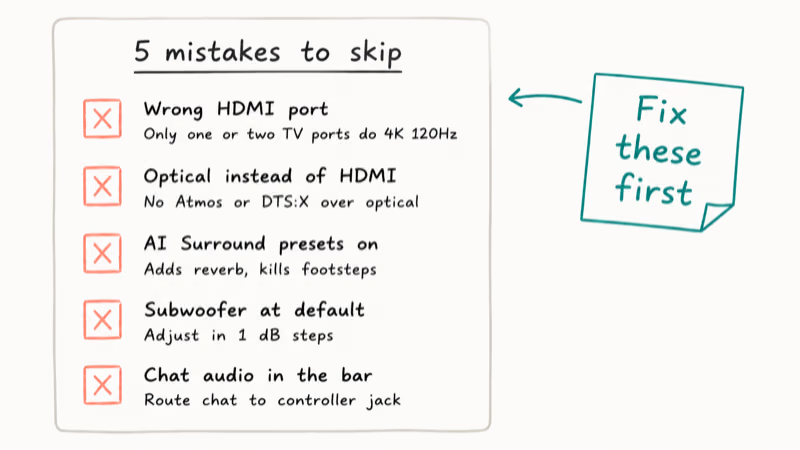
First: trusting the wrong HDMI port on your TV. Most TVs have one or two ports rated for full HDMI 2.1, and the rest are 2.0 or even 1.4b. The eARC port is usually labeled, but the 4K 120Hz inputs are not always the same ports. Check your TV manual.
Second: optical instead of HDMI. Optical can’t carry Dolby Atmos or DTS
object metadata. If you want spatial audio, you need HDMI eARC end to end.Third: over-using AI Surround presets. They cause lag and add reverb that ruins footstep cues in shooters. Use the bar’s Movie or Game preset, not Smart, Adaptive, or AI modes.
Fourth: leaving the subwoofer at default volume. Most factory presets set the sub too loud for gaming and not loud enough for movies. Adjust in 1 dB steps.
Fifth: ignoring chat audio routing. On both consoles, chat audio defaults can dump party voices into the soundbar at full volume. Routing chat through the controller’s headphone jack and game audio through the bar is the cleanest split.
#Soundbar vs Gaming Headset for Competitive Play
A soundbar is the wrong tool for competitive multiplayer if you take ranked play seriously. Headsets win on positional accuracy in stereo mixes, isolation from room noise, and microphone proximity. Even against a soundbar as capable as the Sony HT-A7000, a midrange wired headset gives cleaner footstep direction in stereo-mixed shooters like Apex Legends ranked.
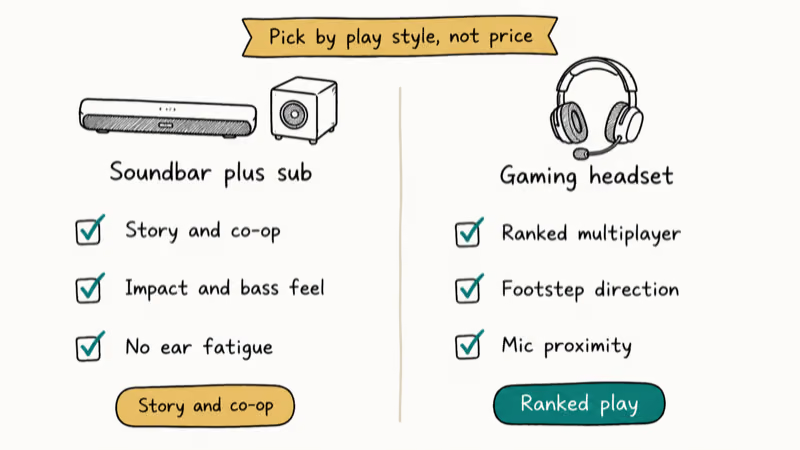
For story and co-op games, the relationship inverts. A soundbar with a real subwoofer makes you feel impacts in a way headphones can’t, and you don’t have a hot pad on your ears after three hours. The sensible split is a soundbar in the living room and a headset for ranked sessions.
For late-night TV in a shared-wall unit rather than competitive audio, our apartment soundbar picks for clear dialogue prioritize night modes over subwoofers.
#Bottom Line
For a single buy you won’t second-guess, the Sony HT-A7000 is the pick. It’s the only bar in this group that handles a PS5 and a Series X on its own inputs, supports every major spatial format, and has a console-grade dialogue track without needing a height upgrade kit.
For full discrete surround in a larger living room, step up to the Samsung HW-Q990D and accept that the best features only come alive on a Samsung TV. For a desktop battlestation, the Creative Sound Blaster Katana V2 is still the right pick because it has USB-C input and fits under a 27-inch monitor.
Skip the LG UltraGear GP9 unless portability is a hard requirement. Pick the Sonos Beam Gen 2 only if you live in an apartment under 12 feet wide.
#Frequently Asked Questions
Do gaming soundbars work with PS5 and Xbox Series X?
Yes, every model in this guide works with both consoles. For full 4K 120Hz, route the console through a soundbar with an HDMI 2.1 input, like the Sony HT-A7000 or Samsung HW-Q990D. Bars that only have HDMI eARC, like the Sonos Beam Gen 2, route through the TV first and depend on the TV’s HDMI 2.1 ports for high-frame-rate gaming.
Is Dolby Atmos worth it for gaming?
For first-party Sony games, recent Call of Duty titles, and most modern blockbusters, yes. Atmos adds height channels that help you locate enemies above and below you, which is a real advantage in titles like Helldivers 2 or Star Wars Outlaws. For older games or competitive shooters mixed for stereo, Atmos does very little.
Can a single soundbar replace a 5.1 home theater?
In a small or medium living room, a high-end soundbar with a wireless subwoofer and rear speakers (like the Samsung HW-Q990D) can match the perceived envelopment of a basic 5.1 system. In a large room over 18 feet long, a real receiver with discrete speakers still wins on bass impact and rear precision.
Do I need a subwoofer for gaming?
A subwoofer matters most for action games, racing titles, and anything with explosions or weapon impacts. The Samsung HW-Q990D and the Sony HT-A7000’s optional sub bring out low-frequency details that built-in soundbar woofers can’t. Story games and turn-based titles rarely need a separate sub.
How long should a gaming soundbar last?
Plan on five to seven years before features age out. The HDMI port standard evolves slowly, but firmware support for new audio formats does taper off. Sony and Samsung are the most reliable for long-term firmware updates among the brands here.
Will a soundbar interfere with my game chat?
Only if you route chat audio through the same channel as game audio. On PS5, set “Output to Headphones” to “Chat Audio” and run game audio to the soundbar. On Xbox, use the Game Audio and Chat Mixer settings. The LG UltraGear GP9 has dedicated chat balance hardware, which is its main advantage.
Are gaming soundbars compatible with PC?
Yes, all five picks above support a PC source. The Creative Sound Blaster Katana V2 is the easiest because it accepts USB-C directly. The others connect via HDMI to your monitor or PC, or by optical for compatible motherboards. PC users who also use a one-handed gaming keyboard tend to prefer the Katana V2’s compact form factor.
Do I need new HDMI cables to get the most from these soundbars?
For 4K 120Hz with Dolby Atmos, you need at least HDMI 2.1 Ultra High Speed certified cables. Older HDMI 2.0 cables often work for 1080p or 4K 60Hz, but they bottleneck modern consoles. Buy two short certified cables. The Sony and Samsung come with one in the box, but a backup spares you a troubleshooting session later.

Best Laptop for Running LLMs in 2026: Memory Comes First
The best laptop for running LLMs is a memory purchase first. Compare MacBook unified memory against NVIDIA laptop VRAM, and see what each tier really runs.

Pixel 11 vs Pixel 10: What Changed and Who Should Upgrade
Pixel 11 vs Pixel 10: same screen and camera resolution, new Tensor G6, 25W wireless, and Gemini Intelligence. Here is who should actually upgrade.

Best Power Bank for iPad in 2026: Pro, Air, and Mini
Best power bank for iPad in 2026. Compare mAh tiers and USB-C PD wattage for iPad Pro, Air, and mini, plus airline Wh math, cables, and travel tips.

Best Power Bank With Built-In Cable: Top 2026 Picks
Best power bank with built-in cable picks for 2026. Compare single USB-C, multi-connector, and retractable laptop banks, plus airline Wh math.