Best One-Handed Gaming Keyboards: 5 Top Picks for 2026
Pick a one-handed gaming keyboard by layout, switches, palm-rest comfort, and macro needs. Compare 5 keypad options for FPS, MMO, and MOBA play.
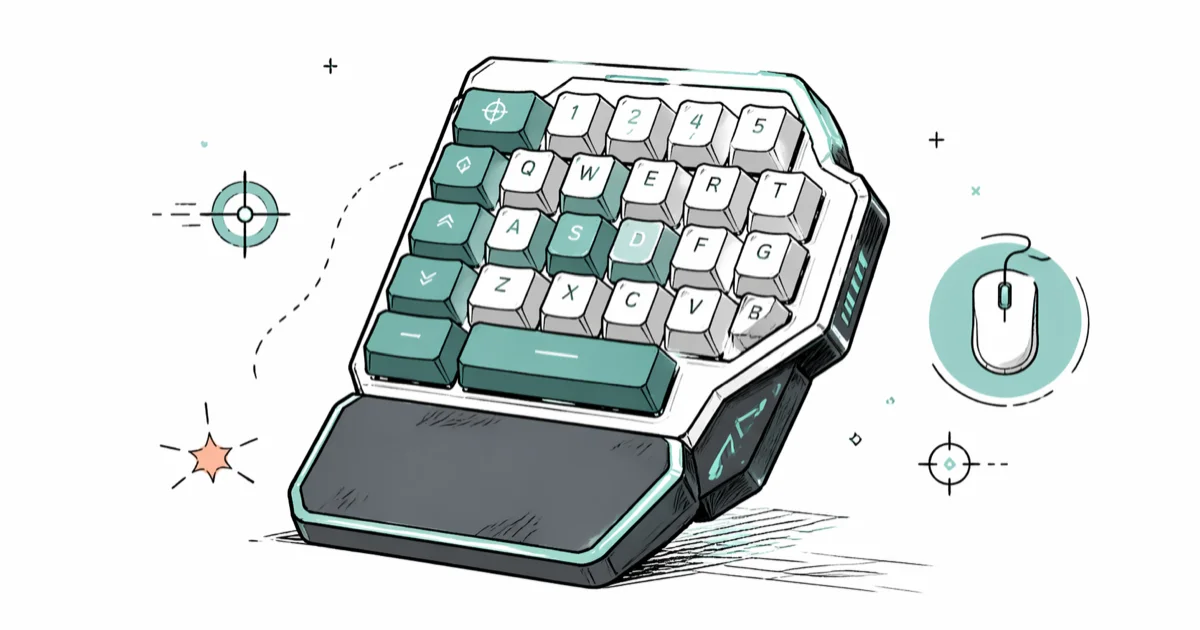
Quick AnswerFor most gamers, the Razer Tartarus Pro is the strongest one-handed gaming keyboard right now thanks to 32 analog optical switches and a tilting palm rest. Budget players get more value from the Redragon K585 DITI.
A one-handed gaming keyboard puts the keys you actually press during a match into a compact pad your left hand can reach without sliding across a full layout. The right pick depends on your genre, hand size, and whether you want analog input or just lots of macros.
- Analog optical switches like those on the Razer Tartarus Pro read partial key presses, useful for fine-grained movement control in FPS games
- Cherry MX-style mechanical switches give the tactile feedback most gamers prefer for action and MMO play
- A detachable or tilting palm rest matters more than RGB lighting for sessions over an hour
- Budget keypads in the $40 to $70 range cover MMO-style macro layouts without paying for analog switches
- Plan a 1 to 2 week adjustment window to rebuild muscle memory for your most-played game
#What Is a One-Handed Gaming Keyboard?
A one-handed gaming keyboard, sometimes called a gaming keypad, is a compact controller with the WASD-area keys, modifiers, and macro buttons clustered for a single hand. Most ship in left-handed orientation for right-handed mouse users, and they replace roughly the left third of a full keyboard. The form factor is covered in Wikipedia’s gaming keypad entry, which groups these devices alongside macro pads and dedicated game controllers.
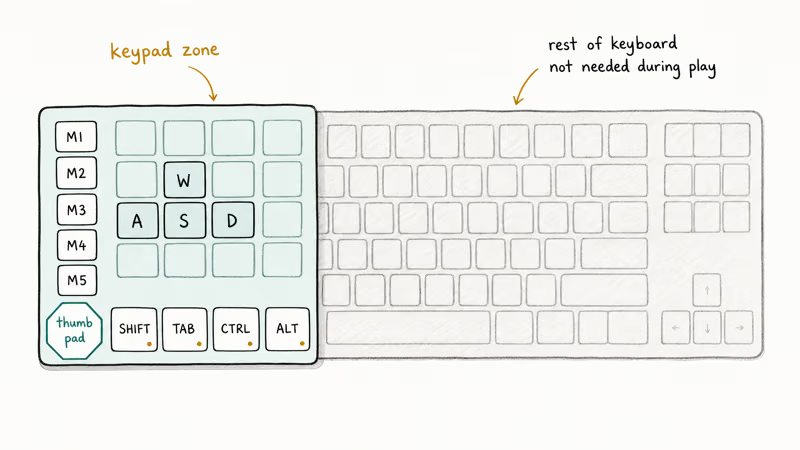
Pro players adopt them for two reasons. The compact footprint frees desk space for low-DPI mouse swings in shooters, and the dedicated macro keys flatten complex MMO rotations onto a single thumb. According to Razer’s Tartarus Pro product page, the keypad packs 32 fully programmable keys and an 8-way thumb pad into a footprint smaller than a tenkeyless keyboard’s left third.
Streamers also use them as a hotkey deck for OBS scenes, mute toggles, and chat commands without alt-tabbing between windows.
#Features That Actually Matter
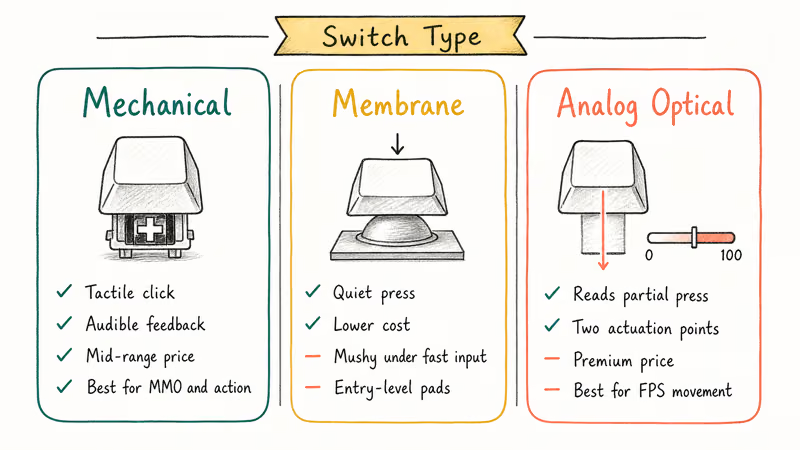
Switch type does most of the work. Mechanical switches give a clear actuation point and audible click, useful when you need to know a press registered. Membrane keypads are quieter and less expensive but mush together under fast input. Analog optical switches, found on the Razer Tartarus Pro, read how far you press a key, which lets shooters apply gradual movement instead of binary on or off.
Programmable key count ranges from 20 on minimal pads up to 43 on the Koolertron mechanical board. More keys help MMO players who run 8-plus ability rotations. FPS players rarely use more than 15.
A few extras separate good pads from great ones:
- Palm rest: tilting or detachable rests prevent wrist fatigue during long matches. Pair the keypad with one of our recommended keyboard wrist rests if your pad ships flat.
- Software profiles: game-specific layouts that swap automatically when a title launches save remap time.
- N-key rollover: every key on a quality keypad should register independently, even when you mash four at once.
- RGB: useful for spotting key clusters in a dark room, less so for performance. Many players also wear gaming gloves to reduce sweat-related slip on textured keycaps during long FPS sessions.
#Five One-Handed Keyboards Worth Buying in 2026
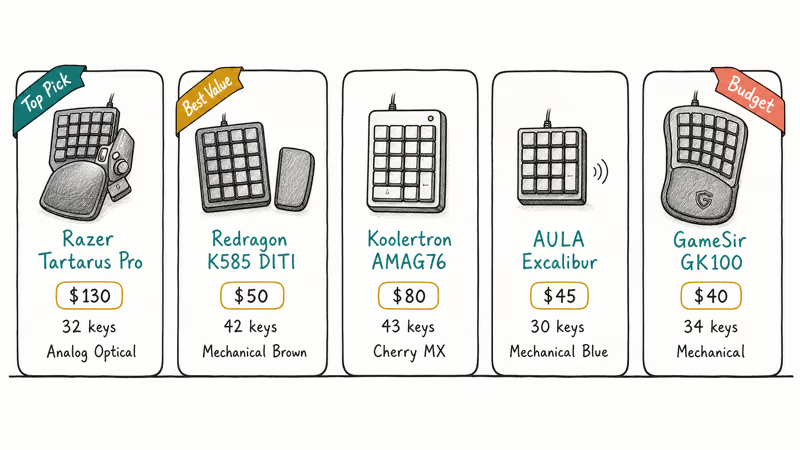
The five keypads below cover analog, mechanical, and budget-friendly tiers.
#1. Razer Tartarus Pro
Razer’s flagship keypad pairs analog optical switches with two actuation points per key, programmable independently. That dual-actuation setup can map a half-press to walk and a full-press to sprint, giving compatible games more nuance than a binary keyboard press.
The tilting palm rest adjusts in three positions, and Razer’s Synapse software supports per-game profiles. The 32-key layout includes an 8-way thumb pad that doubles as a directional input.
Trade-offs: the analog switches push the price into the $130 range, and Synapse can feel heavy compared to leaner keypad software.
#2. Redragon K585 DITI
The K585 DITI is the value pick at around $50. Redragon’s K585 DITI product page confirms that the keypad ships with 42 programmable keys, brown mechanical switches, 7 RGB backlight modes, and a detachable wrist rest. The dedicated software lets you record macros across every key.
It’s heavier than the Tartarus and the keycaps feel less premium, but for under one-third the price you get a true mechanical feel and a wrist rest in the box.
#3. Koolertron Mechanical Keypad
If you want a fully programmable Cherry MX board without Razer’s price, the Koolertron AMAG76 (and its 43-key sibling) is the closest match. It supports four layers of key bindings stored on the device, so the same keypad can swap profiles between PCs without software.
The trade-off is no backlighting and a basic black plastic shell. The layered macros are the main reason to consider it for MMO play, where reducing mouse trips can be worth the setup time.
#4. AULA Excalibur
AULA’s Excalibur uses blue mechanical switches and packs 30 programmable keys into one of the smallest footprints on this list. There’s no dedicated software, so remapping happens through the on-board layer system. Blue switches are loud, so consider it only if you game alone or in a closed room.
#5. GameSir GK100
The GK100 is the budget curved-ergonomic option, often under $40. The 34-key layout follows the natural spread of a relaxed left hand, and the wrist rest is fixed in place. RGB is limited to one color zone, but for a first one-handed pad it lowers the price barrier without feeling cheap.
#How Do You Pick the Right Layout for Your Game?
Match the keypad to how your main game uses keys.
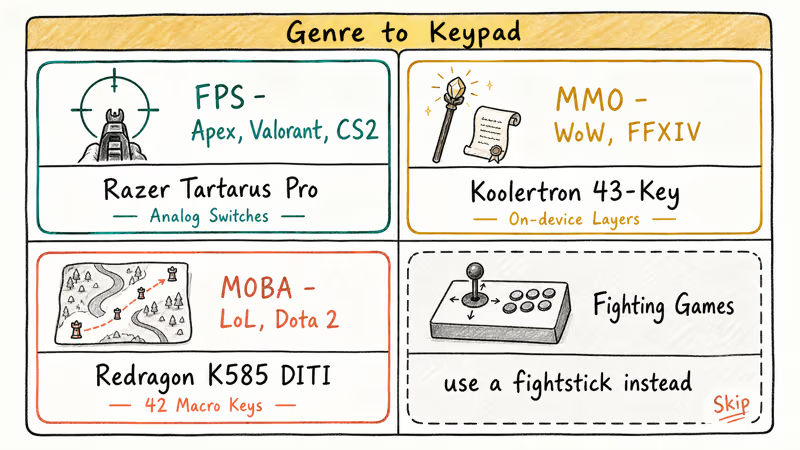
- FPS (Apex, Valorant, CS2): prioritize switch responsiveness and a tight key cluster. Analog switches add a real edge for movement, but a regular mechanical keypad like the AULA Excalibur works fine if you pair it with a lightweight gaming mouse.
- MMO (WoW, FFXIV): prioritize key count and software profiles. The Koolertron’s 43 keys plus on-device layers handle most rotations without needing modifiers.
- MOBA (LoL, Dota 2): middle ground. The Redragon K585 DITI’s 42 keys cover ability binds, smart-cast, and ping shortcuts.
- Fighting games: a one-handed keypad is rarely the right tool. A dedicated fighting game controller gives better diagonals and motion-input reliability.
If you also use the same desk for typing-heavy work, keep a standard membrane keyboard within reach for prose and chat. The keypad handles only the game.
#Setting Up and Building Muscle Memory
Plan a one-week onboarding period. The first two days will feel slower than your old keyboard.
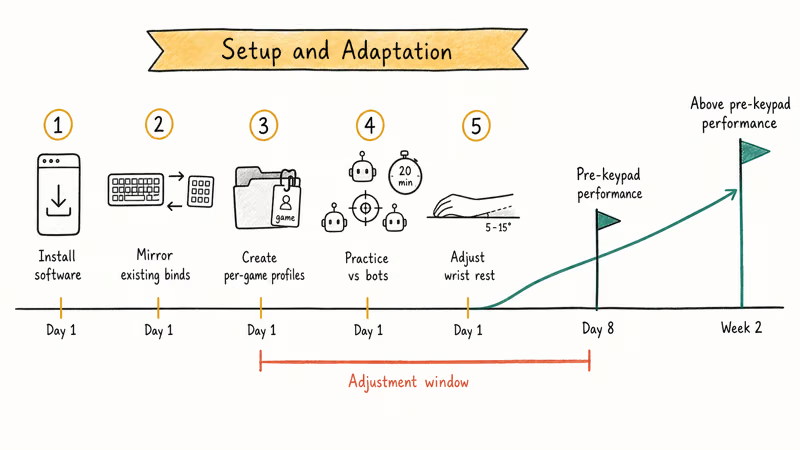
- Install the manufacturer’s software (Razer Synapse, Redragon software, or Koolertron’s USB programmer).
- Mirror your current keyboard binds onto the keypad first. Don’t redesign your control scheme on day one.
- Create one game profile per title and let the software auto-load it.
- Practice for 20 minutes against bots or in a custom lobby before jumping into ranked.
- Adjust the wrist rest angle until your forearm sits parallel to the desk.
Most players should expect a 1 to 2 week adjustment window before the keypad feels natural. According to Razer’s Synapse 3 overview, the software supports per-game profile switching and cloud-synced configurations, which removes the manual remap step every time you change titles.
#Maintenance and Long-Term Care
A keypad lives closer to sweat, spilled coffee, and finger oil than a regular keyboard because your hand never leaves it during a session. Treat it accordingly.
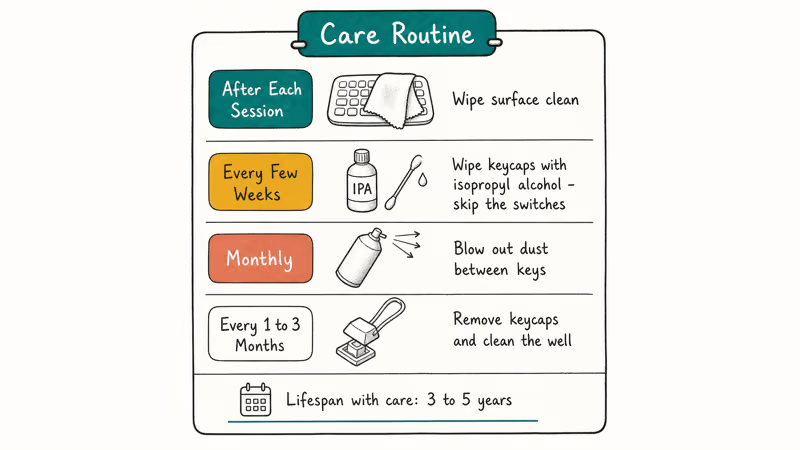
Wipe the surface with a microfiber cloth after long sessions. For mechanical pads, use a small amount of isopropyl alcohol on the keycaps every few weeks; skip the switches themselves. Compressed air clears dust from between the keys, and pulling keycaps with a wire puller every 1 to 3 months gives access to the well underneath.
Store the keypad on the desk rather than inside a drawer, since flexing the cable repeatedly is the most common failure point. If you travel with it, coil the cable loosely and keep it in a small zipped pouch. With basic care, mechanical keypads commonly last 3 to 5 years of daily use.
#Bottom Line
The Razer Tartarus Pro is the right pick if you play competitive FPS and want analog input plus an adjustable palm rest, even at the higher price. Choose the Redragon K585 DITI if your budget tops out near $60 and you want full mechanical feel with a wrist rest in the box. The Koolertron is the better long-term buy for MMO players who value Cherry MX longevity and on-device profile storage over software polish.
#Frequently Asked Questions
Can you use a one-handed gaming keyboard for typing?
Not effectively. Most layouts are missing the letter rows and modifiers needed for prose. Keep a regular keyboard within reach for chat, browser typing, and email.
Are one-handed keyboards good for all game genres?
They shine in FPS, MMO, MOBA, and ARPG titles where the left hand only touches a fixed cluster of keys. They add little value in turn-based strategy, simulators that need numpad input, or fighting games. Try the keypad with your most-played title before committing to it as your main input.
Do pro gamers actually use one-handed keyboards?
Some MMO and MOBA pros use them for the macro density. Most pro FPS players still use full keyboards because they want flexibility outside of match play. Adoption depends more on the player than the genre.
Can left-handed gamers use these keypads?
Yes. A few older models like the Razer Orbweaver Chroma offered a mirrored layout, and the Koolertron is fully programmable so you can flip the binds in software regardless of hand. Check the manufacturer’s product listing before you buy if a left-handed orientation is critical.
How long does it take to adapt to a one-handed gaming keyboard?
Most users report a 1 to 2 week adjustment window. Rebuilding muscle memory is faster if you keep the same key positions you used on your old keyboard for the first few days, then optimize from there.
Are wireless one-handed keyboards worth it?
For desktop play, wired is still the safer bet because of zero input lag and no charging. Wireless keypads make sense for couch gaming on a sofa or for streamers who need a clean cable run.
What is the difference between a gaming keypad and a macro pad?
A gaming keypad is shaped to sit under a relaxed gaming hand and includes a thumb cluster plus a palm rest. A macro pad is a smaller deck of 6 to 15 keys designed to sit beside a full keyboard for app shortcuts. Keypads cover game input; macro pads cover software and creative shortcuts.

Best Laptop for Running LLMs in 2026: Memory Comes First
The best laptop for running LLMs is a memory purchase first. Compare MacBook unified memory against NVIDIA laptop VRAM, and see what each tier really runs.

Pixel 11 vs Pixel 10: What Changed and Who Should Upgrade
Pixel 11 vs Pixel 10: same screen and camera resolution, new Tensor G6, 25W wireless, and Gemini Intelligence. Here is who should actually upgrade.

Best Power Bank for iPad in 2026: Pro, Air, and Mini
Best power bank for iPad in 2026. Compare mAh tiers and USB-C PD wattage for iPad Pro, Air, and mini, plus airline Wh math, cables, and travel tips.

Best Power Bank With Built-In Cable: Top 2026 Picks
Best power bank with built-in cable picks for 2026. Compare single USB-C, multi-connector, and retractable laptop banks, plus airline Wh math.