Snapchat Subscribe vs Add: How to Enable for Your Account
Enable Subscribe on your Snapchat account for public audience growth. Eligibility, setup steps, and how messaging works with subscribers explained.
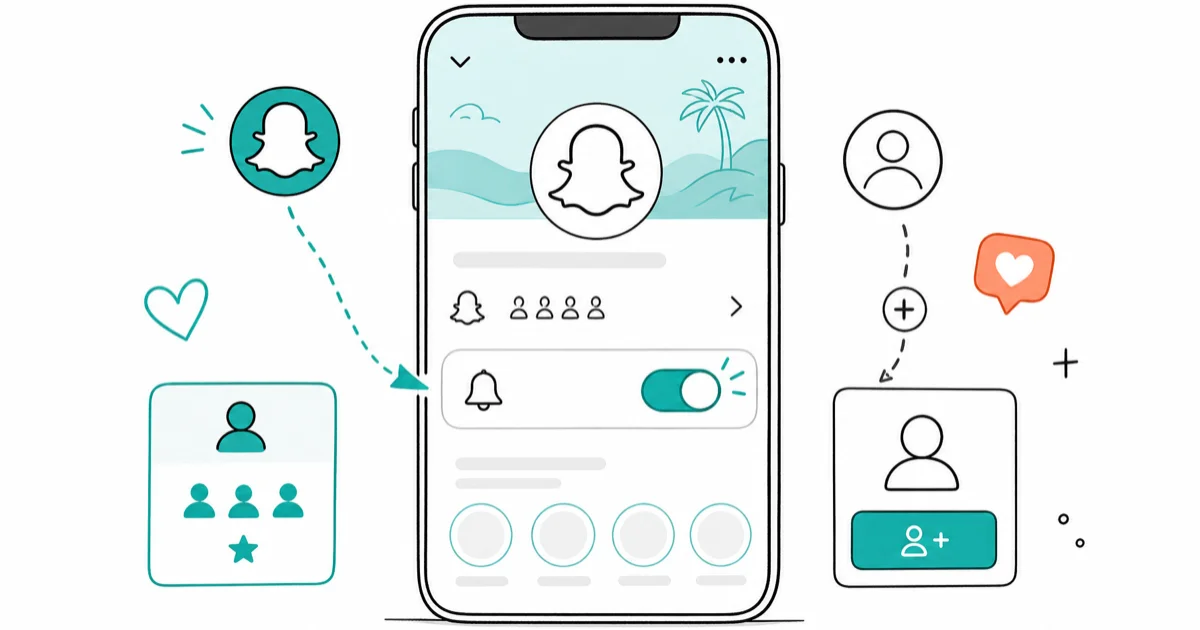
Quick AnswerSubscribe lets people follow your public profile without sending a friend request. To enable it, tap your Bitmoji, open Public Profiles, toggle Show Subscriber Count, and confirm you meet five rules: age 18+, 400 to 1,000 followers, account 2+ months old, one mutual friend, and privacy set to Everyone.
Snapchat Subscribe is a public-profile feature that lets viewers follow your stories without sending a friend request. When someone visits your profile, they tap Subscribe instead of Add and your public content lands in their feed instantly. Subscribe is one-way and one-tap; a regular friend request is mutual and waits for acceptance.
Once eligibility is confirmed, the Subscribe setup flow runs from the Bitmoji menu to the public-profile editor.
Subscribers can see your public stories without becoming friends, and the public subscriber count is managed from the profile editor. This guide walks through who can enable Subscribe, the setup steps, how messaging changes once people follow you, and the privacy trade-offs of going public.
- Subscribe is available only to accounts that meet all five rules: age 18+, 400 to 1,000 followers, at least 2 months old, one mutual friend, and Contact Me plus Notifications set to Everyone.
- Snapchat’s public-profile setup runs through Bitmoji icon, Create Public Profile, then the Show Subscriber Count toggle.
- Subscribers who aren’t yet your friends can only message you through the Pending folder, which doesn’t push a notification.
- A public-profile username is permanent once created, so test the spelling and capitalization you actually want before tapping confirm.
- Disabling Subscribe is reversible: toggle off Show Subscriber Count to hide the button without erasing existing subscribers, then turn it back on whenever you want.
#The Difference Between Subscribe and Add
Subscribe is one-way. A friend request is mutual.
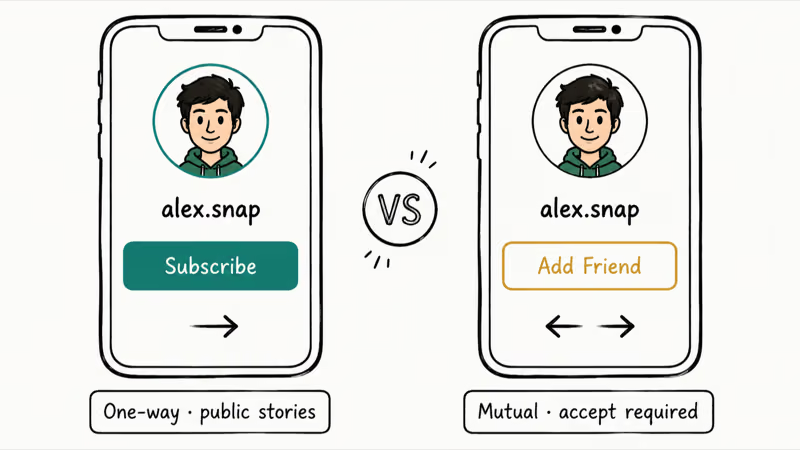
With Add, both people have to accept before stories cross over into each feed. With Subscribe, the viewer taps once, your public stories land in their Stories tab, and you keep your private content locked down. There’s no acceptance queue and no friend-list bloat on either side.
Subscribe is also free for everyone. Snapchat doesn’t charge viewers to follow a public profile and doesn’t charge creators to enable one. There’s no premium tier, no paywall, and no revenue-share gate, which is why Subscribe behaves more like a free YouTube subscription than a Patreon membership.
When someone subscribes, your public stories show up in their Stories feed exactly the way a friend’s stories would. They never appear inside your friend count, and they can’t view your private story audience because that audience is hand-picked. The subscriber and the creator stay strangers in every way that matters for direct contact: no auto-add, no shared snap score, no friend emoji.
According to Snapchat’s public profile help center, the Subscribe model exists so creators can grow audiences without friend-request friction blocking discovery. The feature is built for content publishers who want organic reach without forcing every viewer through a private friend graph.
#What Eligibility Requirements Do You Need for Subscribe?
Five rules stand between you and an active Subscribe button. Miss one and Snapchat hides Create Public Profile entirely.
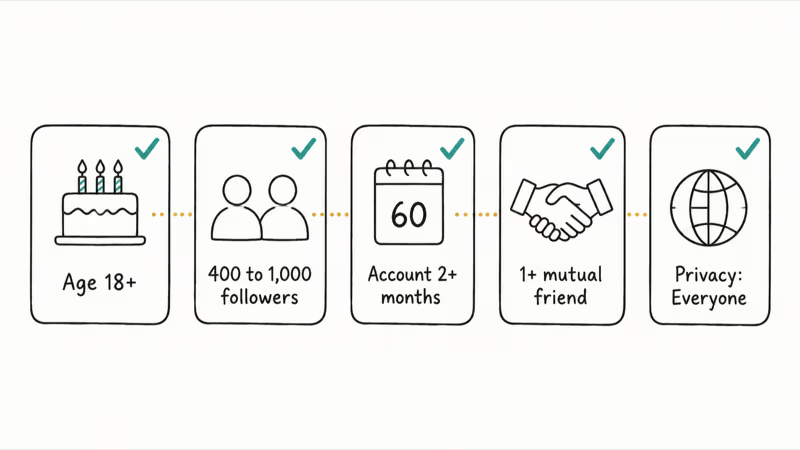
Hit all five and the option appears the next time you reopen the Bitmoji menu.
1. You must be 18 or older. This is non-negotiable. Snapchat blocks every account flagged as under 18 from creating a public profile or enabling Subscribe, regardless of follower count or history.
2. Your account must be 2+ months old. Snapchat counts 60 days from your account creation date before unlocking the public-profile flow. The wait filters out throwaway accounts and bots, and Create Public Profile may stay hidden until the age gate is met.
3. You need 400 to 1,000 followers. Entry starts at 400 mutual friends. Once you cross 1,000, the cap disappears and subscriber growth becomes unlimited.
4. At least one mutual friend is required. Mutual means both of you sent and accepted a friend request. One-sided adds (someone added you, but you never tapped Accept) don’t count.
Cross-check your friends list and mutual count before you start, so you aren’t blocked at the last screen.
5. Privacy must be set to Everyone. Both Contact Me and Notifications inside Snapchat Settings have to allow Everyone, not just friends. Snapchat’s public-profile setup documentation confirms that the Everyone setting is what stops your profile from being filtered out by friends-only privacy logic.
If any of these five fail when you tap Create Public Profile, Snapchat returns a single line of text explaining which rule blocked you, then drops you back to Bitmoji. There’s no progress bar.
#How Do You Set Up Subscribe on Your Account?
Once eligibility clears, the rest takes about three minutes.
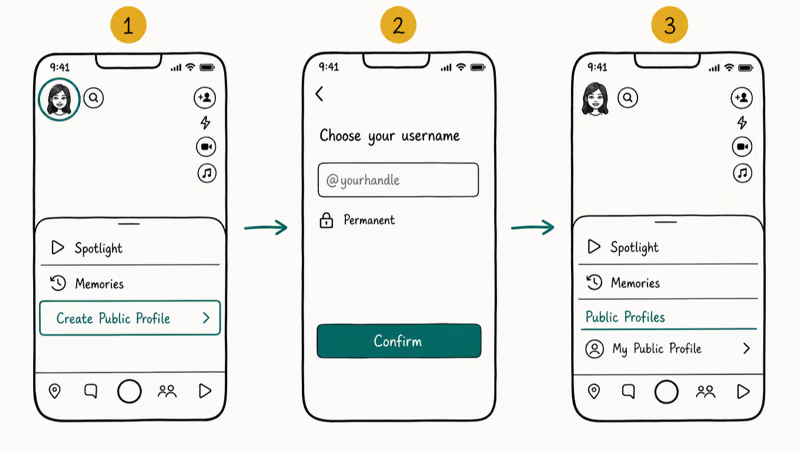
Open the Bitmoji menu. Tap your Bitmoji icon at the top-left of the home screen, scroll down to Create Public Profile, and tap it. Snapchat asks you to confirm your age and accept the public-profile terms.
Pick a permanent username. Your public-profile name can’t be changed after creation, so type it carefully. Choose a handle that lines up with your content theme and that viewers can spell from memory. Test it once before confirming.
Enter the profile editor. Reopen your Bitmoji menu and tap My Public Profile under the new Public Profiles section.
That puts you on the screen where the Subscribe toggle lives. The Subscribe button is technically already enabled at this point, but it isn’t visible to viewers yet. The next step is what makes you discoverable.
#Making Your Profile Discoverable
Inside My Public Profile, find the dropdown labeled Show Subscriber Count and turn it on.
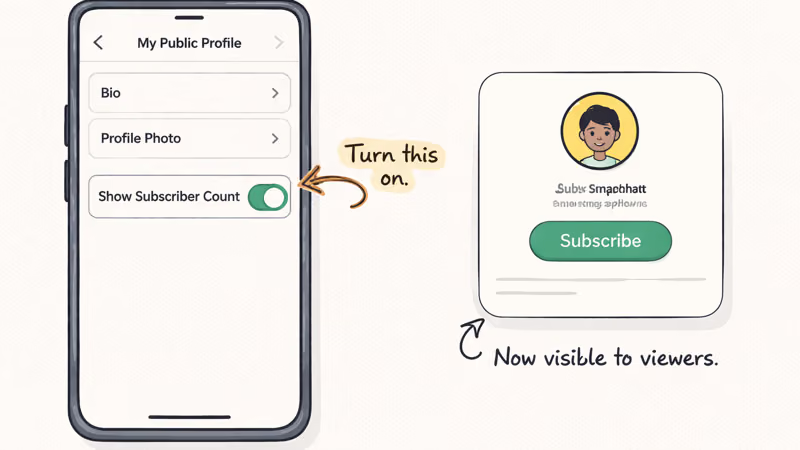
Without that toggle, the Subscribe button stays hidden. Plenty of new creators finish every other step, expect their profile to be live, and then wonder why visitors still see Add. The reason is almost always that this single toggle was missed.
After flipping it on, finish the cosmetic side. Keep your bio under 150 characters so it doesn’t truncate on the profile card, add a profile photo that reads at thumbnail size, and tap Preview Profile to see exactly what a stranger sees when they land on your handle. Confirm to launch.
From that moment, visitors see Subscribe instead of Add. New subscribers get your public stories instantly, unlike Snapchat’s Quick Add suggestions which wait for the algorithm.
#How Messaging Works With Your Subscribers
Messaging rules change based on whether you and the other person are friends or just subscriber-and-creator.
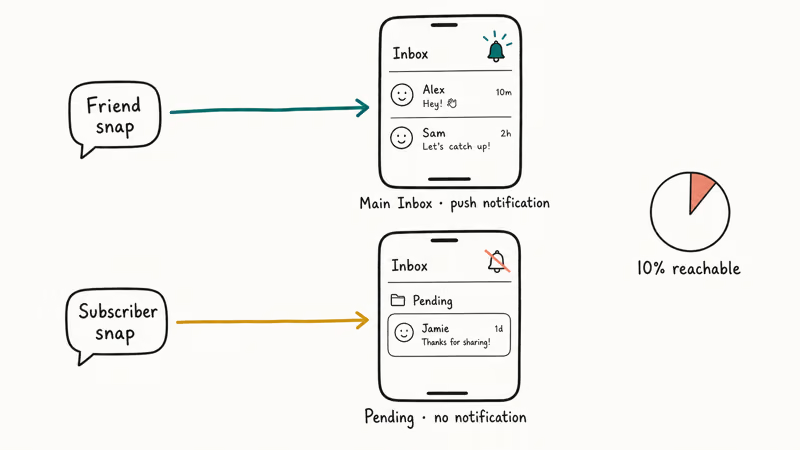
If you’re both already added as friends (mutual), direct messages work the way they always have. Their snap or chat lands in your main inbox, you get a push notification, and you can reply right away.
If someone is only a subscriber and you haven’t added them back, their messages skip the main inbox and drop into the Pending folder. They can still send messages and you can read them, but Snapchat doesn’t push a notification when one arrives. The chat sits there silently until you open Pending.
That gap creates a real workflow problem at scale.
With a large subscriber count and a smaller mutual-friends list, you can only reliably push notifications to a small fraction of your audience through Snapchat itself. According to Snapchat’s Creator community guidance, most successful creators route audience contact through external channels (a Discord server, an email list, a link-in-bio page) rather than the in-app Pending folder.
Pending messages are designed to be lower-priority than friend messages, so don’t treat them like a guaranteed notification channel.
Treat Pending like a low-priority folder you check once a day, not a real inbox. Anything truly time-sensitive needs to live outside Snapchat.
#Privacy and Safety Considerations for Public Profiles
Going public on Snapchat means your handle is now searchable. Anyone who knows or guesses your username can pull up your public stories and your subscriber count without ever requesting friendship. Treat the public profile like a tiny landing page, not like a private chat space.
Never put sensitive details in the bio. Phone numbers, home addresses, school locations, work shifts, and real-time location check-ins all belong off the profile.
According to Wikipedia’s Snapchat entry, the platform has been the subject of FTC settlements dating back to 2014 over data-handling practices, and content posted on a public profile can be screenshotted, forwarded, or scraped just like any other public web page. Your safety bar should match a public Twitter or Instagram bio, not a private text thread.
Snapchat doesn’t offer a per-user block for public profiles. To stop one viewer permanently, you’d have to delete the entire public profile and revert to friends-only stories. There’s no middle ground today.
#Bottom Line: When to Enable Subscribe
Enable Subscribe the day all five eligibility rules clear. The 400-follower floor and the 60-day wait already filter out throwaway accounts, so the audience that arrives through Subscribe is materially cleaner than what most platforms hand you. If you’re running a content account specifically (not a personal one), Subscribe is the cheapest discovery lever Snapchat offers.
Two specific moves to make as you go live: turn on Show Subscriber Count even if your number feels embarrassing, because viewers can’t see the Subscribe button until you do; and treat your public-profile username as load-bearing, since it can’t be edited later.
If your goal is closer to growing the subscriber count itself, Subscribe is a hard prerequisite, not a nice-to-have.
Changed your mind? Toggle Show Subscriber Count off and the button vanishes from your profile while your subscriber list stays intact. To wipe the public profile completely, open the three-dot menu inside My Public Profile and tap Delete Public Profile. The friend graph on your private account isn’t affected by either action.
#Frequently Asked Questions
Do you have to be friends with someone to subscribe to them on Snapchat?
No. That’s the entire point of Subscribe. The viewer taps Subscribe once, your public stories show up in their feed, and no friendship is created on either side.
Can you see who subscribed to you?
You can see your total subscriber count if Show Subscriber Count is toggled on, but Snapchat doesn’t give creators a list of individual subscriber names. The closest you get is profile photos of recent followers when you preview your own public profile.
What happens when you unsubscribe from someone?
Their stories stop appearing in your Stories feed. They get no notification, no flag, and no count change visible to them, so unsubscribing is silent on both ends.
Can you hide your subscriber count from others?
Yes. Leaving Show Subscriber Count toggled off keeps the button visible without exposing the count. New creators do this until the number feels presentable.
Is your public profile visible to everyone on the internet?
Your public profile is visible to anyone who knows your username or finds you through Snapchat search, and your stories on it are public. Treat the bio like a public Twitter bio: never include phone numbers, work addresses, home location, or your school. Search engines can also surface public profiles, so once content is up, assume it’s permanent.
Can you have a public profile and block specific people?
Snapchat doesn’t offer a per-user block for public profiles. The only way to stop one person is to delete the entire public profile and switch back to friends-only stories. There’s no middle option.
Does enabling Subscribe affect your private friends list?
No. Your private friend graph and your public subscriber list are tracked separately. Adding Subscribe doesn’t expose your friend list to subscribers, change your snap score, or reset any existing friend relationships. If you also run a second Snapchat account, each account has its own public-profile state.

Google Messages Error 3100: Why RCS Is Broken on Galaxy
Google Messages RCS error 3100 hits Galaxy owners after phone or carrier switches. Google told 9to5Google a fix is coming. Here's what actually helps.

Is This Bank App Real? Spot a Fake App on Your Home Screen
A bank app can land on your home screen from a web page with no install warning. Learn the checks that tell a real banking app from a phishing web app.

Apps Crashing After iOS 27 Update? Fix Order (2026)
Apps crashing after the iOS 27 update? Update the app in the App Store first, then offload and reinstall to clear stale cache, then restart. The fix order.

Do AI Translation Earbuds Work Offline? What to Know
Do AI translation earbuds work offline? A few do with downloaded language packs, but most need the cloud. Here's what works offline and what you give up.