Snapchat Emoji Ideas: 10 Best Friend Themes for 2026
Customize Snapchat friend emojis with 10 themed sets: aesthetic, seasonal, color-coded, ocean, cute. Step-by-step guide for iPhone and Android in 2026.
Quick AnswerOpen Snapchat, tap the Chat tab, then tap the three-dot menu and pick Customize Best Friends Emojis. Choose a preset pack (Aesthetic, Cute, Holiday, Ocean) or build your own combinations to swap the emoji that shows next to each friend's name.
Snapchat lets you swap the tiny emoji next to each friend’s name in your Chat list. Custom friend emojis are tied to your own account, so your picks can follow you across logged-in devices. This guide assumes you are customizing your own Snapchat account and gives you 10 themed Snapchat emoji ideas you can copy or remix.
- Snapchat friend emojis are personal to your account: only you see the emoji you assign, and your friends never know you changed theirs
- The customization menu sits under Chat, the three-dot menu, then Customize Best Friends Emojis, and changes save instantly
- Snapchat ships about 10 preset emoji packs (Aesthetic, Cute, Holiday seasonal sets, Ocean, plus single-color packs in Pink, Blue, Green, Purple) you can swap with one tap
- Default relationship emojis like the gold heart, fire, and 100 are calculated by Snapchat from snap frequency and Snapstreak count, and they reset when you stop snapping
- You can mix preset themes across friends or assign every friend a custom combination, with no cap on how many themes coexist on one account
#What Do the Default Snapchat Friend Emojis Mean?
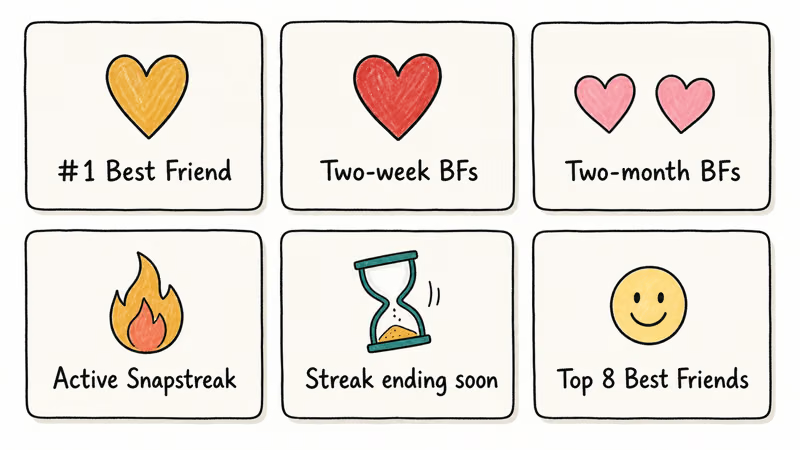
Snapchat assigns relationship emojis automatically based on how often you snap each friend and whether you share a Snapstreak. According to Snapchat’s friend emojis support article, the gold heart appears when you and a friend are each other’s number-one Best Friend. The red heart shows up after that mutual top-spot streak holds for two weeks. Two pink hearts replace the red heart at the two-month mark.
Streak emojis tell a different story.
The fire marks an active Snapstreak with a number indicating consecutive days, and the hourglass warns the streak is about to expire. Snapchat’s Snapstreaks help page confirms that you and a friend must both send a non-Chat snap within 24 hours every day to keep the streak alive, and that the hourglass appears with roughly four hours left before the streak breaks.
Snapchat reserves the smile for one of your top eight Best Friends. Sunglasses means you share a close mutual friend on each other’s Best Friends list, while the grimace indicates that your number-one Best Friend is the same person as theirs, which means each emoji is calculated for you privately and the grimace your friend sees beside your name might be totally different from the one you see beside theirs.
#How to Customize Your Snapchat Friend Emojis
The customization menu lives inside Snapchat’s settings, but the fastest path is through the chat list itself. The same basic flow applies on iPhone and Android.
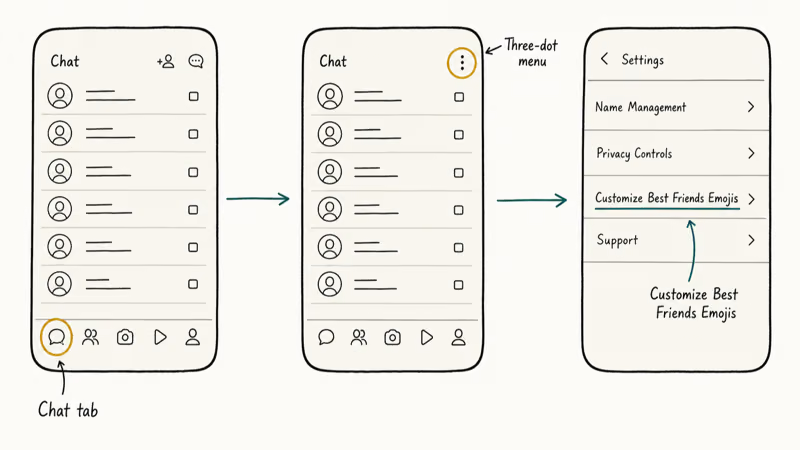
- Open Snapchat and tap the Chat icon at the bottom of the screen.
- Tap the three-dot menu in the top right corner of the Chat tab.
- Scroll to Customize Best Friends Emojis under Chat & Calls Settings.
- Pick a preset pack from the top row, or tap any individual emoji slot to choose a replacement from the full keyboard picker.
- Tap Save if prompted; otherwise the change applies immediately.
The change is instant.
To reset everything, open the same menu and tap Reset to Default at the bottom. That restores the gold heart, smile, fire, and other automated emojis, and your previous custom picks are wiped clean.
To replace a single emoji without touching the rest, long-press the emoji slot and pick a new one from the keyboard picker. The same Settings panel hosts other privacy-related toggles, so this is also where you can review related options like Snapchat Quick Add visibility or who can post to your Snapchat private story lists.
#Aesthetic Emoji Themes for Soft Visual Vibes
Aesthetic packs lean into muted palettes and minimalist shapes such as soft sparkles, half-moons, daisies, gradient blocks, pastel hearts, and small stars. Pick this style if your friend group cares about a clean, Pinterest-leaning chat list. Aesthetic works well as a starter pack because the symbols stay readable without making the chat list feel crowded.
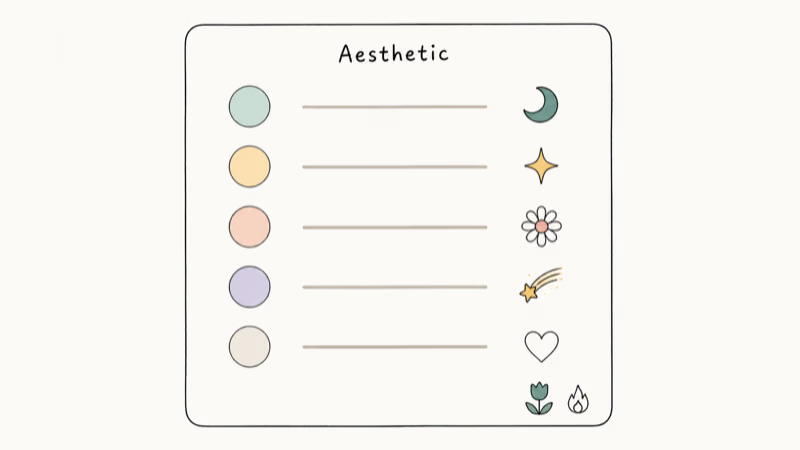
A common Aesthetic combination looks like a half-moon for Best Friend, a sparkle for BFs, a daisy for two-week BFs, a comet for two-month BFs, a white heart for mutual BFs, and a tulip in place of the streak fire.
The whole pack feels intentional, not busy.
#Cute and Playful Emoji Sets
Cute themes use animals, hearts, and dessert symbols.
Think kittens, bunnies, ducklings, cupcakes, strawberries, and tiny teddy bears. Pick this if your chats are mostly inside jokes and silly photo dumps.
A playful pack might pair a cat face with a bunny for top friends, a cupcake for two-week BFs, a strawberry for two-month BFs, a teddy bear for mutual BFs, and a baby chick in place of the smile, with a paw print on the streak slot for the fire replacement.
Cute packs work especially well if you jump between two profiles, since the visual contrast helps you instantly know which list you are looking at. Our guide on running two Snapchat accounts on iPhone walks through that setup.
#Seasonal Emoji Combinations Worth Cycling Through
Seasonal emoji ideas refresh your chat list every few months and keep things from feeling stale.
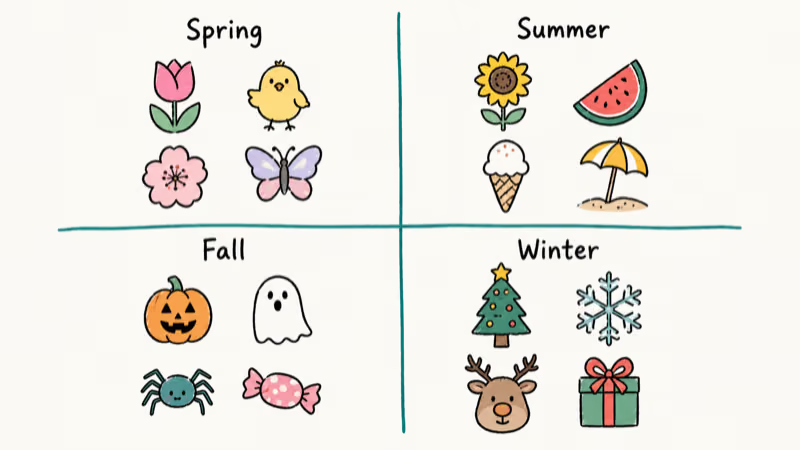
Halloween calls for a jack-o-lantern, ghost, spider, witch, bat, and candy, swapped onto your top friend slots from late September through October. Winter holidays favor a Christmas tree, snowflake, reindeer, snowman, gift, and cookie for the December stretch. Spring leans into tulips, baby chicks, cherry blossoms, butterflies, light rain, and small leaves from March through May.
Summer pulls sunflowers, watermelon slices, ice cream cones, beach umbrellas, ocean waves, and shells into the rotation for June through August. Cycling these every few months keeps your chat list fresh without breaking your tap muscle memory, since each pack still maps to the same friend slots, and if your seasonal AR effects suddenly stop loading after a swap, our Snapchat filters not working guide walks through the fix path.
#Color-Coordinated Themes: Pink, Blue, Green, Purple
Single-color packs trade variety for a tightly themed look across the whole chat list.
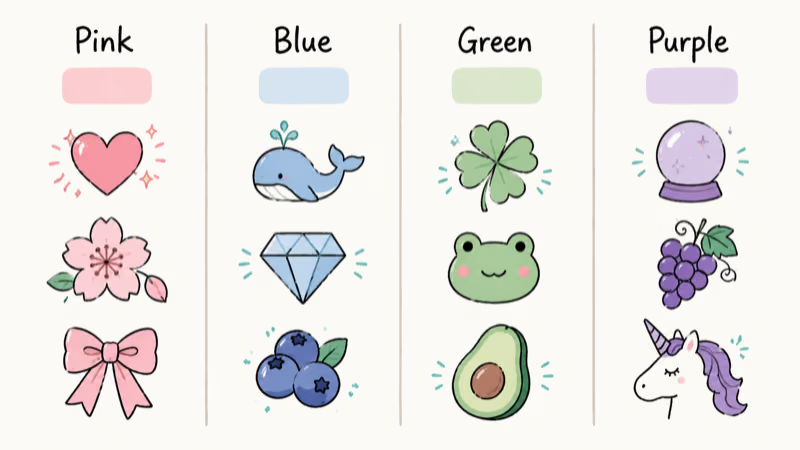
Pink uses sparkly hearts, cherry blossoms, pigs, ribbons, tulips, and pink hearts. Blue centers on blue hearts, whales, cyclones, gemstones, frozen faces, and blueberries for an icy palette. Green pulls green hearts, four-leaf clovers, turtles, frogs, avocados, and cucumbers into a leafy garden combination. Purple goes with purple hearts, crystal balls, grapes, unicorns, purple circles, and irises for a more mystical feel that works well for users who lean into astrology or witchy aesthetics.
Mixed palettes usually feel livelier than strict single-color packs.
There is no functional difference between picking a Snapchat preset and assigning each emoji manually, because the app saves both the same way and syncs them across logged-in devices.
#Ocean, Beach, and Travel Emoji Sets
Ocean and travel themes work well for friend groups bonded by shared trips, surf days, or beach hangouts. A coastal pack uses ocean waves, beach umbrellas, surfers, dolphins, shells, and sailboats across the friend slots, while a pure travel pack swaps in a globe, airplane, world map, mountains, tropical island, and luggage for friends you mostly see on group vacations.
Pair travel emojis with location-based features for a cohesive theme.
According to Snapchat’s Snap Map privacy article, only friends with location-sharing turned on appear on the Snap Map. Match the emoji to the relationship: surf crew gets a surfer, road trip friends get luggage, and your one weather-obsessed friend gets a sun-behind-cloud.
#Why Did My Custom Emojis Reset Overnight?
The most common reason custom emojis disappear is that the relationship state changed. Snapchat recalculates the gold heart, red heart, smile, sunglasses, and grimace every time you or your friend snaps someone new for at least 24 hours, so a single quiet day can shuffle the standings, and streak emojis reset the moment the fire ends since the fire slot is reserved for active streaks only.
A full app reinstall also wipes some local emoji preferences, even though the rest of your account state survives.
Your custom emoji pack is tied to your account, not the app install, so reinstalling Snapchat keeps your themed sets intact once you log back in. Snapchat’s account help documentation confirms that your settings and preferences sync to your account rather than the device, and Wikipedia’s overview of Snapchat notes that the service stores account data on its own servers.
If your streak just expired and you want it back, see our Snapchat streak recovery guide for the in-app restore badge and the support form fallback.
#Bottom Line
Pick the Aesthetic preset if you want the cleanest starting point with the smallest amount of work, then switch to a seasonal pack four times a year to keep your chat list feeling current without redoing every slot.
If you want maximum personality, build a custom Cute pack and swap a single accent emoji per friend so the chat list reads like a private mood board. Skip color-only themes unless you actually want the discipline of one hue across every slot.
#Frequently Asked Questions
What happens if I don’t snap someone for 24 hours?
Your streak emoji disappears when the fire ends. Custom emojis stay locked to the friend you assigned them to.
Can I set different emojis for different friend groups?
Yes, you can. The customization menu lets you assign emojis per individual friend, not per group, so you can give your beach friends ocean emojis, your work friends aesthetic emojis, and your siblings cute animal emojis. The choices are visible only to you.
Do my custom emoji assignments sync across devices?
Yes. Any emoji change you make on iPhone should show up on your Android device as long as you are logged into the same Snapchat account and the app has synced your latest settings.
How many emoji themes can I use at once?
There is no cap.
Can friends see which emoji I assigned to them?
No. You see the emoji you picked, and they see the one they picked. Snapchat keeps custom emoji assignments private to each account.
What’s the difference between Snapchat emojis and Snapstreaks?
Snapchat friend emojis are visual labels next to a friend’s name, and most of them are decorative. Snapstreaks are the consecutive-day counter shown by the fire icon and a number, so you can have a streak without changing anyone’s emoji, and you can pick a custom emoji for someone you have never had a streak with. They run on independent rules.
Can I customize the streak fire emoji?
Yes, the streak slot accepts any emoji, but the replacement only shows when the streak is actually active. If your fire ends, the slot disappears entirely until you and that friend rebuild the streak. For a longer view of how streaks work, see our breakdown of the longest Snapchat streak on record.

Is This Bank App Real? Spot a Fake App on Your Home Screen
A bank app can land on your home screen from a web page with no install warning. Learn the checks that tell a real banking app from a phishing web app.

Apps Crashing After iOS 27 Update? Fix Order (2026)
Apps crashing after the iOS 27 update? Update the app in the App Store first, then offload and reinstall to clear stale cache, then restart. The fix order.

Do AI Translation Earbuds Work Offline? What to Know
Do AI translation earbuds work offline? A few do with downloaded language packs, but most need the cloud. Here's what works offline and what you give up.
How to Set Up Translation Earbuds (Pairing and Modes)
How to set up translation earbuds: charge, install the app, pair over Bluetooth, pick two languages, and choose a mode. A step-by-step first-use guide.