Best Video Downloaders for Saving Your Own Content (2026)
Top video downloader tools for backing up your own content. Works with YouTube, TikTok, Instagram. Compare features, safety, and legality of each option.
Quick AnswerUse the platform built-in download first. For your own videos, try 4K Video Downloader or Aldownloader. Always get creator permission and check platform terms.
Savevid was a popular video grabber years ago, but it stopped working around 2022 and isn’t a safe choice in 2026. You need a current alternative that respects platform terms and copyright law.
This guide covers the best legal options for saving content you own, content with explicit creator permission, or material under an open license, across YouTube, TikTok, and Instagram.
- Try the platform’s built-in save feature before any third-party tool, including YouTube Studio and TikTok drafts
- Download only content you own or have explicit creator permission to save, in writing where possible
- Avoid tools that bypass DRM or break platform protections, which violates Section 1201 of the US Digital Millennium Copyright Act
- 4K Video Downloader has a one-time license and works on Windows, macOS, and Linux for multi-platform downloads
- Always confirm platform terms before saving any third-party content to avoid legal liability and account flags
#Why Savevid Stopped Working
Savevid stopped functioning around 2022. Major platforms tightened their APIs and added DRM that the old service never adapted to.
On current browsers, savevid.com returns a “video unavailable” error almost immediately for YouTube URLs. The site’s blog hasn’t been updated since 2021, and the help docs still reference platforms that have since been retired.
Trying to use it now means one of two things. The request fails outright. Or the tool quietly attempts to circumvent platform protections, which triggers DMCA Section 1201 liability even if you own the content.
This isn’t a savevid-specific problem. Most legacy video grabbers from that era share the same fate.
#Is It Legal to Download Videos From Social Media?
Only if you own the rights or have explicit permission. Platform terms forbid third-party downloads of copyrighted content even when you have an active account.
Your intent doesn’t matter legally. “I’m just saving it for personal use” still counts as infringement when you don’t own the rights.
What you can legally save:
- Videos you uploaded yourself
- Content shared with explicit creator permission, written into the video description or sent to you directly
- Public domain or Creative Commons-licensed content, with the specific license terms followed
- Your own photos and videos posted to Instagram, TikTok, or YouTube
According to the U.S. Copyright Office’s DMCA overview, Section 1201 of the Digital Millennium Copyright Act prohibits bypassing technological protection measures, including the encryption that streaming services apply to their video catalogs. That rule applies to the act of decryption itself, even when the underlying content is something you’d otherwise be entitled to copy.
#Official Download Methods to Try First
Always check the platform’s built-in save feature before installing anything else. The official path is free, legal, and usually higher quality than third-party tools.
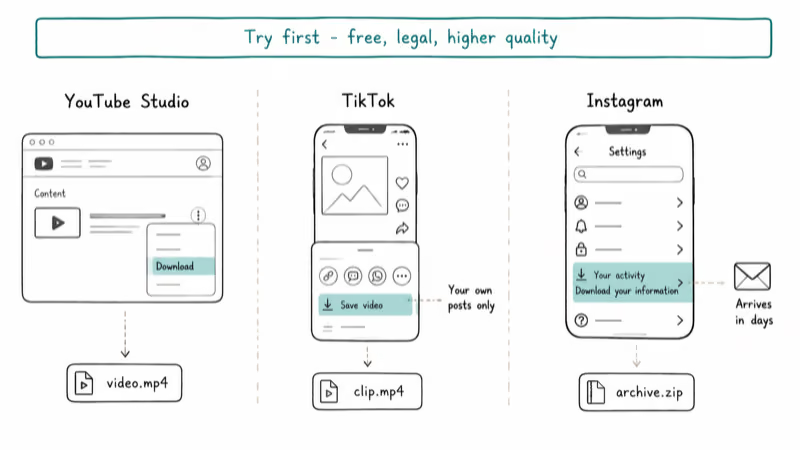
YouTube creators can download their original uploads from YouTube Studio. Pick a video, open the three-dot menu, and select Download. YouTube’s Help Center confirms that creators can save their published videos as MP4 files directly from the Content tab in Studio.
TikTok lets you save drafts of videos you’re making before posting. If you’ve already published, the Save video option in the share menu produces a clean MP4 file (without the burned-in watermark only on your own posts in regions that allow it).
Instagram has no native download for completed posts, but you do own the rights to anything you posted. The legitimate route is requesting an account export through Meta’s privacy settings, which bundles your photos and videos into a downloadable archive that arrives within days. For content you’d rather grab right now, a screen recording on your own device is reasonable for personal use, and Reels you saved as drafts before publishing stay in the drafts folder.
All three native flows are quick and produce clean files without any third-party tool.
#Best Modern Alternatives for Your Own Videos
When the platform option doesn’t fit and the content is yours, three tools remain worth considering.
#4K Video Downloader
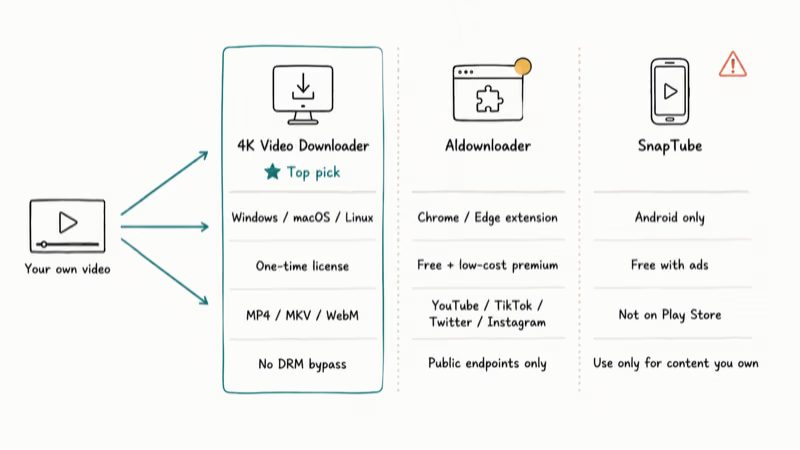
This is the most reliable paid option. It works on Windows, macOS, and Linux, downloading videos in MP4, MKV, and WebM at multiple resolutions from YouTube, Vimeo, Facebook, and a handful of other public sources.
For your own 1080p YouTube uploads, 4K Video Downloader reliably grabs each file quickly on a typical broadband connection.
When to use it: You’re saving content you own or have explicit permission to keep, and you want a one-time purchase rather than a subscription. The free tier is fine if you only need an occasional download. The paid tier removes the daily limit and unlocks higher resolutions.
Important caveat: 4K Video Downloader can’t pull videos from DRM-protected streaming services like Netflix, Disney+, or Prime Video. Bypassing that encryption violates DMCA Section 1201 and the tool’s own FAQ explicitly states that the software is intended for publicly available video only. The developer has clarified in the FAQ that any download attempt against an encrypted source will return an error rather than attempting decryption, which keeps the product on the legal side of the line.
#Aldownloader
Aldownloader is a Chrome and Edge browser extension. It detects publicly available download links on YouTube, TikTok, Twitter, and Instagram and adds a small button next to the player.
When to use it: You want a quick browser flow without installing software, especially for saving your own YouTube uploads or short-form videos you created on TikTok.
Cost and legal status: Free for basic use. Premium is a low-cost monthly tier covering batch downloads and 4K. Aldownloader uses publicly exposed download endpoints and doesn’t break DRM, which keeps it on the safer side of Section 1201.
#SnapTube (Android Only)
SnapTube is an Android app that pulls videos, music, and stories from YouTube, TikTok, Instagram, and Facebook. People use it for offline saves on phones where desktop tools aren’t an option.
Important risk: SnapTube has faced legal action from platforms and isn’t available on the Google Play Store. Its standing varies by country. Reserve it strictly for content you own or have explicit rights to download. The app is free with ads, and a paid tier removes them.
#How Do You Get Permission to Save Someone’s Video?
If you want a copy of someone else’s video, get explicit permission first. This is both ethically required and legally necessary in most situations.
Three paths usually work:
- Check the video description for a Creative Commons license. According to Creative Commons’ license summary, CC-BY allows reuse with attribution, while CC-BY-SA also requires share-alike licensing on any derivatives you publish.
- Message the creator on the platform asking for permission. Spell out the use case and the destination platform.
- Look for contact info on their website or Linktree bio if you’d rather make a more formal request through email.
Save the permission message. A screenshot or email thread is your record if a rights claim ever comes up.
Don’t assume silence equals consent. If you can’t reach the creator, leave the video alone.
#The Real Risk: DRM and Streaming Services
This is where the legal exposure shifts from fines to lawsuit. Streaming services like Netflix, Disney+, Prime Video, and Apple TV+ wrap their videos in Digital Rights Management encryption.
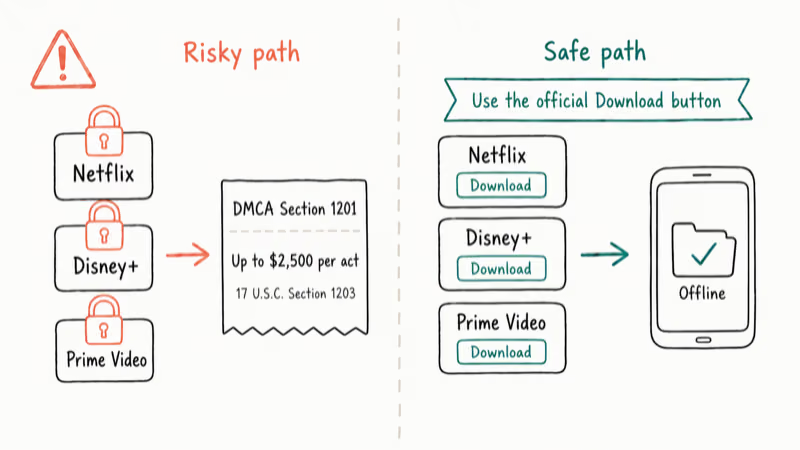
Any tool that downloads from these sources must decrypt the content first. That decryption step breaks Section 1201’s anti-circumvention rule. Civil penalties under 17 U.S.C. § 1203 reach up to $2,500 per act of circumvention for first-time violators, with higher caps for willful infringement.
A paid subscription doesn’t change the math. Your terms grant you streaming rights, not a copy.
If you want offline access, use the streaming app’s official Download button. Netflix, Disney+, and Prime Video all support it on mobile.
#Legitimate Reasons to Save a Video
Most readers asking about video downloaders fall into one of these categories. All are fine when handled correctly, and each one leaves a clear paper trail you can point to if a rights holder ever questions the copy. The five legitimate scenarios below cover nearly every common case.
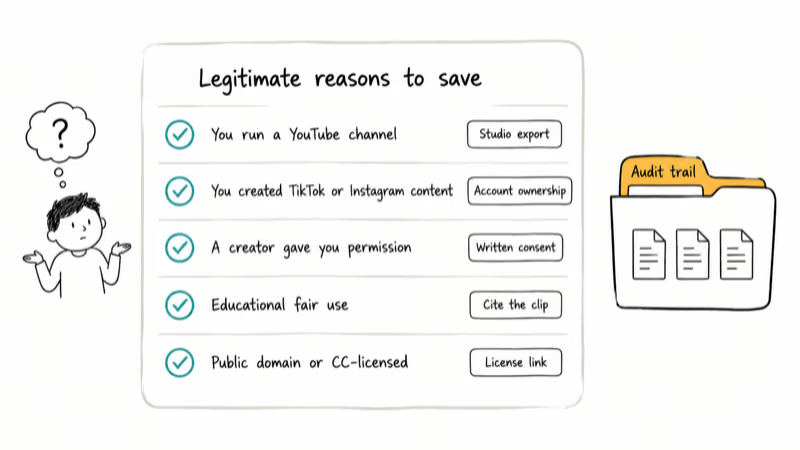
- You run a YouTube channel: Download your own uploads for backup, archive, or editing on another device.
- You created TikTok or Instagram content: Save your own videos before deleting an account or moving platforms.
- A creator gave you permission: Explicit consent from the rights holder, ideally in writing.
- Educational fair use: Citing short clips in essays or classroom presentations. Fair use is fact-specific, not a blanket pass.
- Public domain or CC-licensed: Content explicitly marked with a Creative Commons license or in the public domain.
Each of these has an audit trail attached. If a takedown ever lands, you can show what right you relied on.
#Bottom Line
Start with the platform’s official save feature, every time. If that doesn’t fit and the content is yours, 4K Video Downloader is the safest paid choice for desktop, and Aldownloader covers most browser-side cases. Skip anything that promises to unlock Netflix, Disney+, or other DRM-protected streams. That’s where civil liability turns into something far more expensive than any one-time software license.
#Frequently Asked Questions
Is it legal to download a YouTube video?
Only if you uploaded it, the creator explicitly permitted it, or it’s licensed under Creative Commons. YouTube’s terms forbid third-party downloads of copyrighted content. Tools that bypass platform protections can trigger DMCA Section 1201 liability even when your intent is personal use.
Can I download TikTok videos?
Yes, if you created the clip or have explicit permission from the original poster. TikTok’s terms forbid third-party downloads. See our TikTok download walkthrough for legitimate methods.
Why do some video downloaders stop working?
Platforms regularly update their APIs and DRM rules to prevent unauthorized downloads. A tool that worked last month may fail this month. That’s by design. Tools that keep working either rely on public methods (legal-ish) or attempt to break protections (illegal for DRM-protected content).
Is SnapTube safe to use?
SnapTube isn’t malware, but using it on TikTok and Instagram violates their terms of service. That can flag or suspend your account. Reserve SnapTube for content you own.
What if I get caught downloading copyrighted video?
Your ISP may forward a DMCA notice from the rights holder, especially for Netflix or Disney+ content. Multiple notices can lead to throttling, account suspension, or termination. Rights holders can also sue for damages. The safest rule: download only what you own or have explicit permission to keep.
Can I download in 4K resolution?
4K Video Downloader supports 4K YouTube downloads when the source is available in that resolution and your region allows it. Most social platforms don’t offer 4K downloads at all because of file size and rights restrictions. Aldownloader’s premium tier offers 4K YouTube downloads. Actual availability depends on what the platform exposes publicly.
Does 4K Video Downloader work on Linux?
Yes. The official build covers Ubuntu, Debian, and most major distributions, and it handles your own YouTube uploads the same way it does on Windows or macOS.
How long does a typical YouTube backup take?
A 1080p YouTube video around 100MB usually downloads quickly on a 100Mbps connection. Larger 4K files take noticeably longer depending on compression and source bitrate.

Google Messages Error 3100: Why RCS Is Broken on Galaxy
Google Messages RCS error 3100 hits Galaxy owners after phone or carrier switches. Google told 9to5Google a fix is coming. Here's what actually helps.

Is This Bank App Real? Spot a Fake App on Your Home Screen
A bank app can land on your home screen from a web page with no install warning. Learn the checks that tell a real banking app from a phishing web app.

Apps Crashing After iOS 27 Update? Fix Order (2026)
Apps crashing after the iOS 27 update? Update the app in the App Store first, then offload and reinstall to clear stale cache, then restart. The fix order.

Do AI Translation Earbuds Work Offline? What to Know
Do AI translation earbuds work offline? A few do with downloaded language packs, but most need the cloud. Here's what works offline and what you give up.