How to Save a GIF From Twitter (X): 5 Free Methods
Save a GIF from Twitter (X) on PC, Android, and iPhone with 5 free methods in 2026. Plus, how to choose between MP4 and a real GIF that loops.
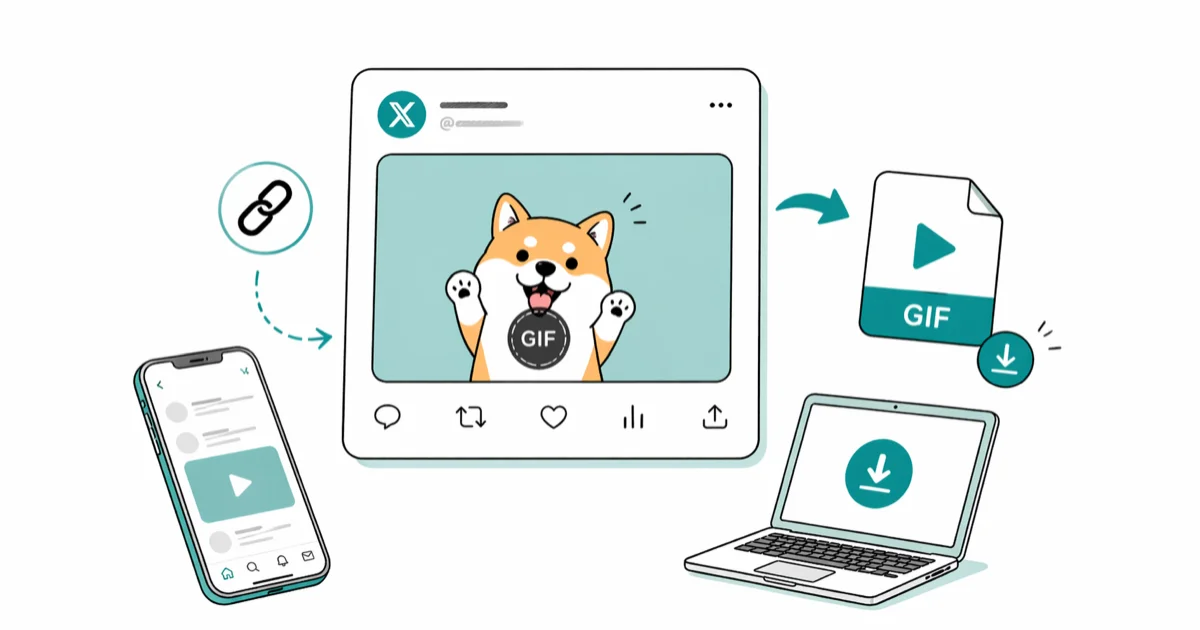
Quick AnswerCopy the tweet URL, paste it into a free downloader like TWDownload or Convertico, and download the file as MP4 or GIF. The same flow works in Chrome on a PC, in any browser on Android, and on iPhone with GIFwrapped or Apple Shortcuts.
Twitter (now X) doesn’t have a save button on GIFs because it doesn’t actually store them as GIFs. Every GIF you upload gets re-encoded into a looped MP4, so the trick is to grab that MP4 and decide whether to keep it as video or convert it back.
There are five free methods that cover desktop browsers, Android, and iPhone, and they all share the same copy-paste flow: grab the tweet link, hand it to a tool, save the file.
- Twitter and X re-encode every uploaded GIF into a looped MP4, so the saved file is always a video first
- Web tools like TWDownload and Convertico need no installs and work in any browser on any operating system
- Tweet2GIF is the fastest option on Android because it reads the URL straight from the share sheet
- iPhone has two solid paths: the GIFwrapped app for one-tap saves and the free Tvdl Apple Shortcut for tap-to-share workflows
- Keep the MP4 unless you specifically need a true GIF for Slack, Discord, or older platforms that block video previews
#Why Does Twitter Convert Every GIF to MP4?
Twitter, and now X, replaces uploaded GIFs with looped video to keep timeline payloads small. According to X’s help page on posting GIFs and pictures, the platform accepts uploaded GIFs up to 5 MB on mobile and 15 MB on the web, but the file you actually see in the timeline is an MP4 with autoplay disabled by default.
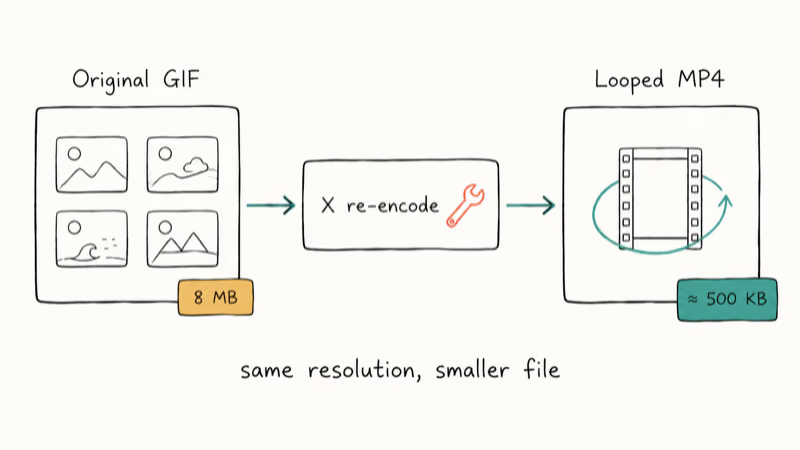
The size difference is the reason. An 8 MB hand-drawn loop often shrinks to roughly 500 KB once Twitter re-encodes it as MP4 at the same resolution.
According to the W3C GIF89a specification, every frame in a GIF is locked to a 256-color palette, so the format wastes bytes on repeated frame data that modern video codecs compress away. H.264, the codec X uses for these clips, only stores the differences between frames, which is why a looping cartoon can shrink by 80% or more without a visible quality drop.
This is also why right-click “Save Image As” never works on a Twitter GIF. The browser sees a <video> element, not an <img>. Every method below copies the tweet URL into a tool that pulls the MP4 source URL directly, then optionally re-renders the frames as a real GIF.
#What Is the Fastest Way to Save a Twitter GIF?
Pick the tool that matches the device you are already on. Here is how the methods map by device:
| You are on | Fastest path | Typical time | When to use it |
|---|---|---|---|
| Windows / Mac | TWDownload in Chrome | About 45 seconds | Any tweet, any browser |
| Android | Tweet2GIF app from the share sheet | Under 15 seconds | Saving GIFs more than once a week |
| iPhone | GIFwrapped app | Under 90 seconds | Want the file in Camera Roll |
| iPhone | Tvdl Apple Shortcut | Under 30 seconds | Already a Shortcuts user |
| Any device | EZGIF (download then convert) | About 2 minutes | Need precise GIF settings |
If you only save a Twitter GIF once a year, skip the apps and go straight to a web tool. The desktop walkthrough below is the version most readers ask about.
#How to Save a GIF From Twitter on Desktop
This works in any modern browser on Windows, macOS, ChromeOS, or Linux. No extension, no account.
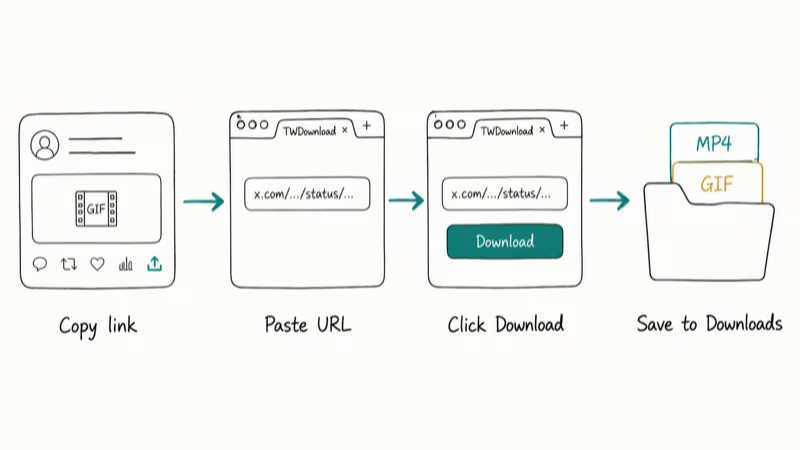
Step 1. Open the tweet that has the GIF. Click the share icon under the tweet (the arrow pointing up) and pick Copy link.
Step 2. Open TWDownload.com in a new tab. If TWDownload is offline, Convertico’s Twitter GIF tool is a near-identical drop-in.
Step 3. Paste the tweet URL into the input box and click Download.
Step 4. Pick a format. According to Google’s Chrome supported file types page, MP4 plays in the browser without any extra plugin, so MP4 is the highest-quality option you can save. Pick GIF only if you specifically need that format.
The whole flow is quick on any modern browser, from open tweet to file in Downloads. If you want extra control, EZGIF’s video-to-GIF tool lets you set the frame rate after you download the MP4. A frame rate around 20-25 fps tends to give the smoothest looking GIF without bloating the file.
If you also pull clips from other social platforms, our guide to video grabber tools covers the same copy-paste pattern for TikTok, Reddit, and Vimeo.
#How to Save a GIF From Twitter on Android
Android handles file downloads more loosely than iOS, which gives you two reliable paths.
#Option 1: Web tool, no install
Open the tweet inside the X app, tap the share icon, and pick Copy link. Open Chrome, go to TWDownload.com, paste the URL, and tap Download. The MP4 or GIF lands in your Downloads folder, where you can move it into the Photos app or share it from any keyboard with a media picker.
#Option 2: Tweet2GIF app
Tweet2GIF reads the URL directly from the X share sheet, which removes the copy-paste step entirely. According to Google’s Android API level documentation, Android 5.0 covers practically every active phone, but the old Google Play listing is no longer live.
- Install Tweet2GIF from the Play Store.
- In X, tap the share icon on a tweet with a GIF and pick Tweet2GIF from the share menu.
- Tap Download GIF and choose GIF or MP4.
Tweet2GIF saves a short clip in a few seconds on a current Android phone. The app is free with banner ads, and it doesn’t need a Twitter or X login.
To download TikTok videos, the same flow works with a different tool.
#How to Save a GIF From Twitter on iPhone
iOS blocks generic file downloads from Safari, so you need either a dedicated app or a Shortcut. Both are free.
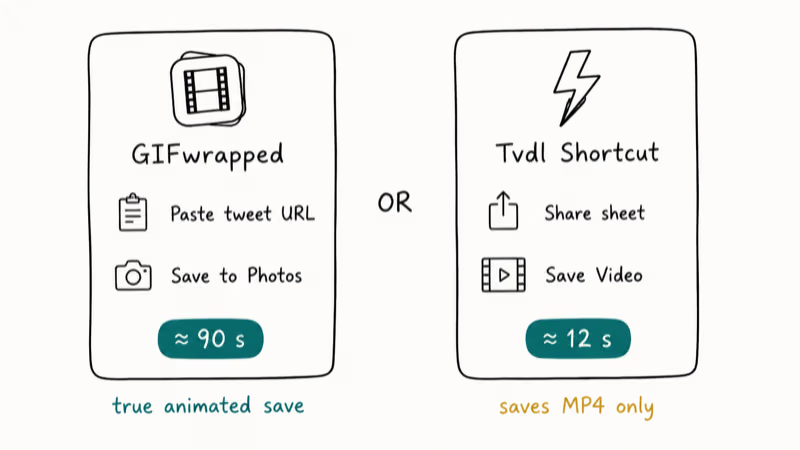
#Option 1: GIFwrapped (one-tap saves)
GIFwrapped is a free GIF library app that accepts a tweet URL and turns it into a saveable animation. After you copy the tweet link, paste it into GIFwrapped, tap the result, then tap Save to Photos. The file shows up in Camera Roll as an animated image, not a still frame. On a current iPhone, the round trip is quick.
#Option 2: Tvdl Apple Shortcut
If you already use Shortcuts, the free Tvdl shortcut is faster than any app. Apple’s Shortcuts user guide confirms that custom shortcuts can run from the Share sheet without writing any code, and Tvdl uses that hook to pull the tweet’s MP4.
- Search “Tvdl” on RoutineHub and add it through the Shortcuts app.
- In X, tap the share icon on a GIF tweet and pick Tvdl from the share sheet.
- Pick Save Video. The MP4 lands in Photos.
With Tvdl, the file lands in Photos almost immediately. The catch is that this path always saves an MP4, never a true GIF. If you need an actual GIF, run the file through EZGIF’s video-to-GIF tool afterward.
#MP4 vs GIF: Picking the Right Format
Most people should keep the MP4. It’s smaller, sharper, and supported everywhere modern. The exception is when a target platform refuses to render video previews.
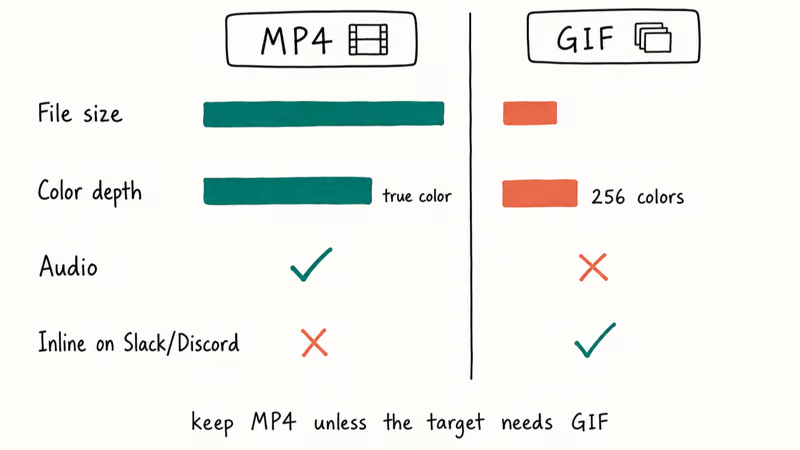
Save as MP4 when you want:
- The smallest file size at the same quality
- Sound support (some Twitter clips have audio even when posted as a “GIF”)
- Universal compatibility across iMessage, WhatsApp, and modern web
Save as GIF when you need:
- A loop that auto-plays inline on Slack, Discord, or older forums
- A drop-in replacement in a doc that already uses GIFs
- Compatibility with sites that strip video tags from posts
The same constraints from the W3C GIF89a specification we cited earlier explain the quality drop. With only 256 colors per frame, gradients band, skin tones go blotchy, and detail that the MP4 preserved with smooth motion vectors gets baked into chunky frames. If you need to clean things up after conversion, our guide to GIF speed changers walks through frame-rate cleanup tools.
#Saving GIFs From Private or Locked Tweets
Third-party downloaders can only fetch what is publicly visible, so they fail on protected accounts, deleted tweets, and DMs. Three workarounds usually solve it:
- Screen record. On iPhone, swipe down from the top right and tap the screen recording button. On Android, pull down the notification shade and tap Screen record. This works for any visible video, public or not.
- Ask the person. A direct message asking them to send the GIF as a file is the cleanest fix and avoids quality loss.
- Find the original. Most popular Twitter GIFs come from GIPHY or Tenor and you can grab them at the source in the original quality.
If a tweet has been deleted before you got to it, our piece on seeing deleted tweets covers cache and Wayback Machine workflows that occasionally bring the file back.
#Troubleshooting Common Save Errors
Five common problems, plus the fix for each.
“Tweet not found.” The downloader needs the full tweet URL with the /status/ segment, like https://x.com/username/status/123456789. A profile URL or a search URL won’t work. If the tweet has been removed, no tool can recover it.
The download is silent video. Some Twitter “GIFs” actually arrive with audio. Convert to GIF if you want silence.
The file saves as a still image. The X app’s built-in Save image option captures a single frame because, from its point of view, the GIF preview is a thumbnail. Use a third-party downloader instead.
The downloaded GIF looks blurry. Convert from the MP4 source, not from a re-recorded version. Frame rate also matters: output stays clean around 20 fps and starts to judder below 12 fps.
The download tool refuses an x.com URL. Some older tools still expect twitter.com. Replace the domain in the URL bar before pasting. If that fails, swap to Convertico, which accepts both. According to Filmora’s guide on saving Twitter GIFs, the pasted URL strategy is the most reliable across the major free downloaders.
If the X app itself is misbehaving, our Twitter video not playing guide covers cache, cellular data, and DRM-related fixes.
#Bottom Line
For a one-off save, paste the tweet URL into TWDownload, pick MP4, and you are done in under a minute. If you save GIFs from X every week, install Tweet2GIF on Android or set up the Tvdl Shortcut on iPhone so the share sheet does the work for you. Skip the GIF format unless the destination platform actually requires it.
#Frequently Asked Questions
Can you save a GIF from any tweet?
Only public ones. Protected accounts, locked tweets, and DM attachments don’t have a public URL the downloader can read, so you have to screen record or ask the poster directly.
Does Twitter or X notify the original poster when you download a GIF?
No. Saving a GIF, video, or photo from a tweet sends no notification. The same is true whether you use the in-app share menu, a web downloader, an Android app, or a Shortcut.
Are the saved files actually GIFs?
Not by default. X stores every uploaded GIF as a looped MP4, so the original download is always video. Most downloaders include a one-click “Convert to GIF” option that re-encodes the MP4 into a true GIF, but quality drops because the format only supports 256 colors per frame.
Is downloading a Twitter GIF legal?
Personal use is generally fine in most jurisdictions. Reposting another creator’s original work without credit, or using it in commercial material, can run into copyright and X’s terms of service. GIFs sourced from GIPHY or Tenor are usually licensed for sharing, which is a safer pick if you plan to redistribute.
Do these methods still work on x.com URLs?
Yes. Every major downloader accepts both twitter.com and x.com URLs. If a tool errors out on one domain, swap to the other in the address bar before pasting.
Why are downloaded GIFs so much larger than the MP4 version?
GIF stores each frame as its own image with a fixed 256-color palette and no inter-frame compression, so a five-second clip can balloon to 10 MB. The same clip as MP4 typically stays under 1 MB because modern video codecs reuse pixels between frames.
Can you save a GIF from a Twitter or X DM?
Not with a downloader. DM media has no public URL, so screen recording is the only path on either platform.
Do these methods work on Chromebook?
Yes. Chromebooks run Chrome and full Linux media support, so every web-based tool in this guide behaves the same as on Windows or macOS. If your Chromebook also runs Android apps, Tweet2GIF works there as well.

Google Messages Error 3100: Why RCS Is Broken on Galaxy
Google Messages RCS error 3100 hits Galaxy owners after phone or carrier switches. Google told 9to5Google a fix is coming. Here's what actually helps.

Is This Bank App Real? Spot a Fake App on Your Home Screen
A bank app can land on your home screen from a web page with no install warning. Learn the checks that tell a real banking app from a phishing web app.

Apps Crashing After iOS 27 Update? Fix Order (2026)
Apps crashing after the iOS 27 update? Update the app in the App Store first, then offload and reinstall to clear stale cache, then restart. The fix order.

Do AI Translation Earbuds Work Offline? What to Know
Do AI translation earbuds work offline? A few do with downloaded language packs, but most need the cloud. Here's what works offline and what you give up.