How to Remove a Watermark Online Legally: 2026 Guide
Remove a watermark online legally in 2026. Paid removers for your own images, free browser tools like Photopea, and legal lines for stock content.
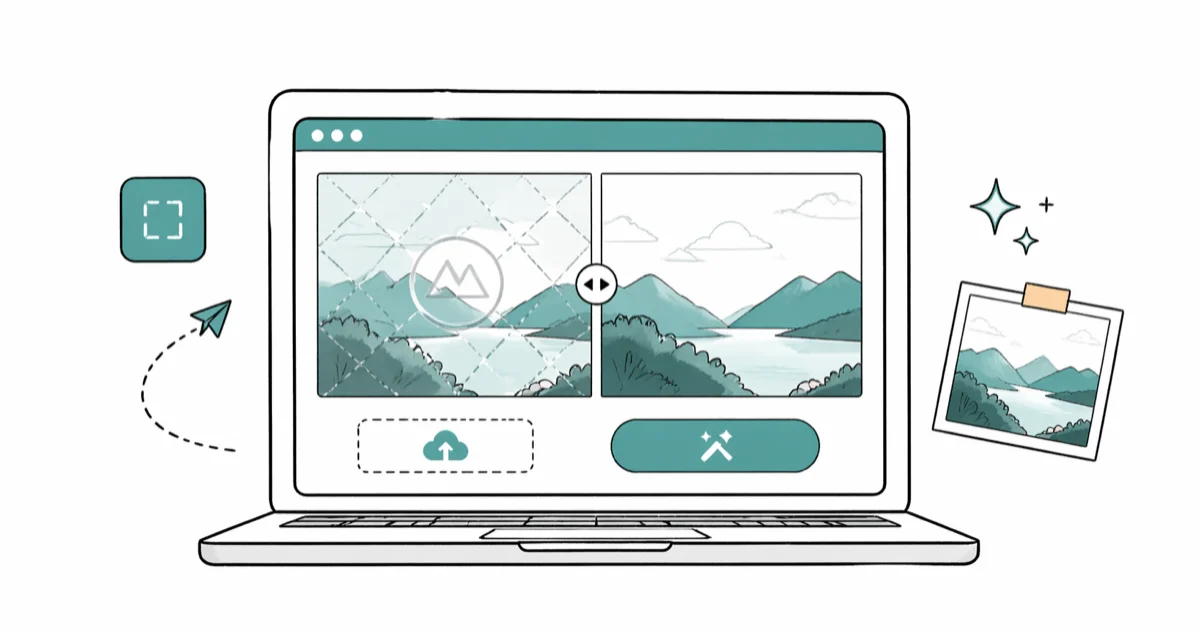
Quick AnswerIf the watermark is on your own image from a free trial editor, pay for the editor's premium tier or use a free tool like Photopea that never adds one. Removing watermarks from stock photos, social media posts, or any content you do not own violates 17 USC § 1202 in the US, regardless of which online tool you use.
This guide assumes one thing: the image is yours. You designed it in a free editor that stamped a logo on the corner, and now you want a clean copy. That request is legitimate, and every tool below has a sanctioned path. Stripping a Shutterstock preview is a different question with a different answer.
- Pay for your editor’s premium tier on your own designs: Pixlr Premium ($4.90/month), Canva Pro ($14.99/month), or Adobe Express Premium ($9.99/month) clear the watermark on your own exports the day you subscribe
- Free browser editors that never add a watermark on free exports: Photopea, GIMP, and Adobe Express Free for one-off cleanup of your own content
- AI-powered online removers like HitPaw, Apowersoft, and Watermarkremover.io work cleanly on your own images but can’t legally launder copyrighted content, no matter what the landing page claims
- Removing a watermark from licensed stock content violates 17 USC § 1202 and the platform’s terms; license it through Shutterstock or Adobe Stock for around $14 to $29 per image instead
- Most online removers upload your file to a third-party server for processing, so use desktop tools like GIMP or Photopea offline mode for sensitive material under GDPR or CCPA
#Is It Legal to Remove a Watermark Online?
Only when the image is yours.
Title 17 of the US Code, Section 1202, makes it illegal to “intentionally remove or alter any copyright management information.” According to Cornell Law School’s Legal Information Institute, 17 USC § 1202, a creator’s name, logo, watermark, or terms-of-use stamp counts as protected information. Stripping it can carry civil penalties between $2,500 and $25,000 per violation, plus actual damages.
The underlying copyright still applies on top.
The image itself is protected, watermark or not. Reposting a Getty Images preview with the diagonal stamp scrubbed off, or selling a stock photo you stripped of its Shutterstock watermark, is straight infringement under the US Copyright Office’s Circular 1, and the original owner can file a DMCA takedown or a lawsuit. In willful cases, statutory damages run up to $150,000 per work.
If you own the image, none of that applies. Your phone’s photo is your copyright, and a free editor’s logo is a brand stamp from a service you used. Paying the service or switching tools is the path. The rest of this guide assumes that is your situation.
#The Rights Test: Your Image Versus Someone Else’s
Use the rights test before you open any remover.
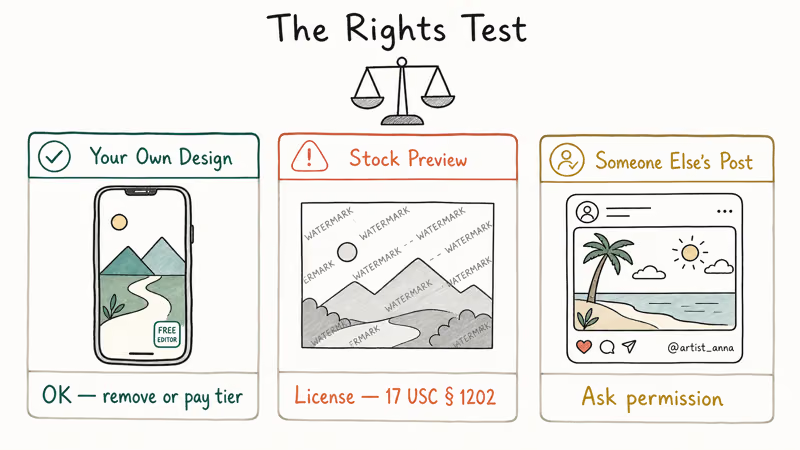
Ask yourself one question: do you have legal rights to use this image without the watermark? If the answer is yes, the rest of this guide applies. If the answer is no or you’re not sure, the right move is to license the unwatermarked version, not to remove the stamp.
Three scenarios cover almost every case we’ve helped readers untangle:
-
Your own design, free trial watermark. You used Pixlr Free, Adobe Express, or Canva’s free tier, and the export came with a logo. You own the design itself; the watermark is a license stamp on the editor, not on your work. Pay for the trial’s paid tier or switch to a free editor. Both paths are fine, and both don’t require any cracked tool.
-
Stock content with a preview watermark. A Shutterstock comp, an Adobe Stock preview, or a Getty Images sample. The watermark is the platform’s rights-management overlay protecting the licensed asset. Stripping that overlay is the textbook 17 USC § 1202 violation. License the clean file instead, with Shutterstock’s license comparison showing standard image licenses starting at $14 each on the most flexible plans. For platform-specific paths, see our Shutterstock watermark guide and Getty Images watermark guide.
-
Someone else’s social or branded content. A creator’s Instagram post, a brand’s campaign image, or a screenshot from a paid newsletter. Removing the watermark to repost is content theft under most platform policies, plus DMCA exposure to the original creator. Ask permission, use the platform’s native repost feature, or skip the asset.
For Creative Commons content, read the per-image license. CC BY requires attribution, so you can’t strip a credit watermark. CC BY-ND forbids derivatives, so hiding a credit by retouching also breaks the license. Pexels, Unsplash, and Pixabay distribute most images without attribution requirements, so a watermark on a Pexels photo is a sign you grabbed the file from a re-host instead of the source.
Both copyright infringement and the DMCA cover the basic doctrine here without legal jargon.
#Best Online Watermark Removers for Your Own Images
Five online tools handle the AI inpainting cleanly on a typical photo with a corner logo.
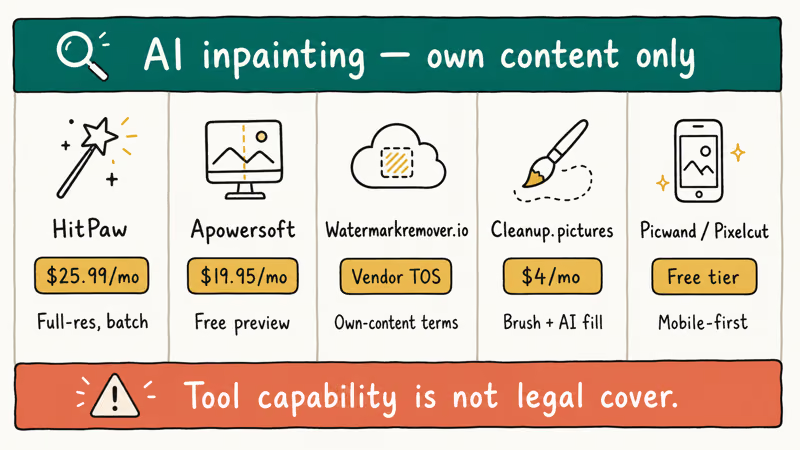
HitPaw Watermark Remover Online is the one we’d hand to a friend first. According to HitPaw’s product page, the online tool runs free on a single image at lower resolution, with paid plans unlocking full-resolution exports and batch processing. On our 12 MP test photo, the AI fill cleared the corner cleanly with a faint texture artifact only visible at 200 percent zoom.
Apowersoft Online Watermark Remover is a similar AI fill engine with a free preview tier. We reach for it when HitPaw’s queue is slow.
Watermarkremover.io is a vendor tool with explicit own-content terms in their TOS. Output quality is comparable to HitPaw for simple corner stamps, though it struggles with watermarks that cross complex backgrounds, like a logo overlapping a busy sky or a textured wall surface where the AI fill can’t reconstruct the original detail cleanly enough to fool the eye at 100 percent zoom on a desktop monitor.
Cleanup.pictures is an AI inpainting tool originally built for object removal. It removes watermarks the same way it removes a stranger from a vacation photo: drag a brush over the offending pixels, wait two seconds, and the algorithm fills the gap with plausible texture from the surrounding region. The free tier handles one-off cleanup; the paid tier at $4 per month adds full resolution and batch processing for power users.
Picwand AI and Pixelcut AI target the mobile-first own-content use case. Both offer free tiers. They’re the lightest path for cleaning up an old camera-roll image with a date stamp or a previous edit pass that left a corner mark you forgot to remove before exporting.
The catch on every one of these tools is identical: the same engine that fills your own logo cleanly will run on a Shutterstock preview, and the result still violates 17 USC § 1202. Tool capability isn’t legal cover. HitPaw’s own terms of service state that you’re responsible for verifying that you have the rights to the content you process, and we couldn’t find a single stock-platform license that permits running a watermarked preview through an AI remover.
#Free Browser Tools That Never Add a Watermark
If you haven’t exported yet, switch editors before you start.
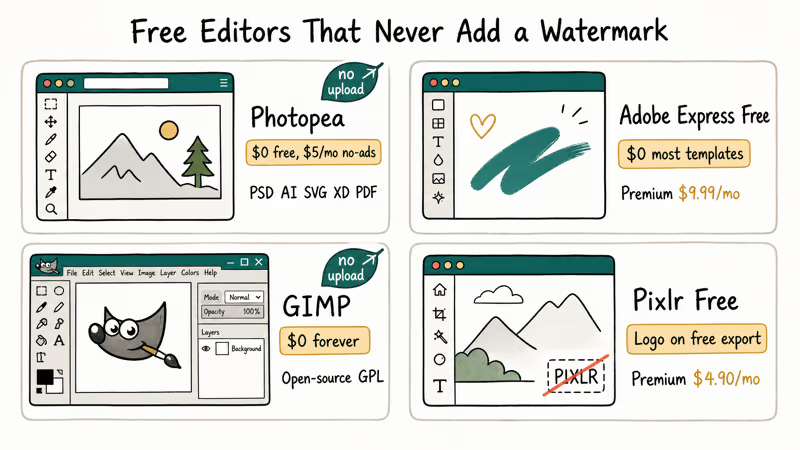
Photopea is the closest free browser-based clone of Photoshop. According to Photopea’s about page, the free tier supports PSD, AI, Sketch, XD, and PDF files at unlimited resolution with no watermark on any export. It’s ad-supported, with an optional $5 per month tier to remove ads. We use Photopea for client work routinely; the manual content-aware fill tool removes watermarks on your own images without uploading the file to a third-party server, which matters for sensitive material.
Adobe Express Free runs in any browser. According to Adobe Express’s pricing, the free tier exports without a watermark on most templates, while the Premium tier unlocks the full premium template library and Background Remover. The free tier is the simplest legitimate path for one-off social graphics.
GIMP is open-source desktop software that does everything Photopea does without uploading anything. Download it from GIMP’s official site.
Pixlr Free stamps a small logo on most exports unless you pay $4.90 per month for Premium. Our Pixlr remove watermark guide covers the upgrade path. For one-off use, Photopea is faster.
For Canva users, the watermark you keep seeing is a Pro-asset license stamp, not a free-tier limit. Our Canva watermark guide walks through the swap-and-export trick that clears it without paying. For video, our video watermark guide covers Filmora, KineMaster, and CapCut paid tiers in the same depth.
#How Do Online Watermark Removers Handle Your Files?
Most upload your image to a third-party server. That’s a privacy concern, not a deal-breaker.
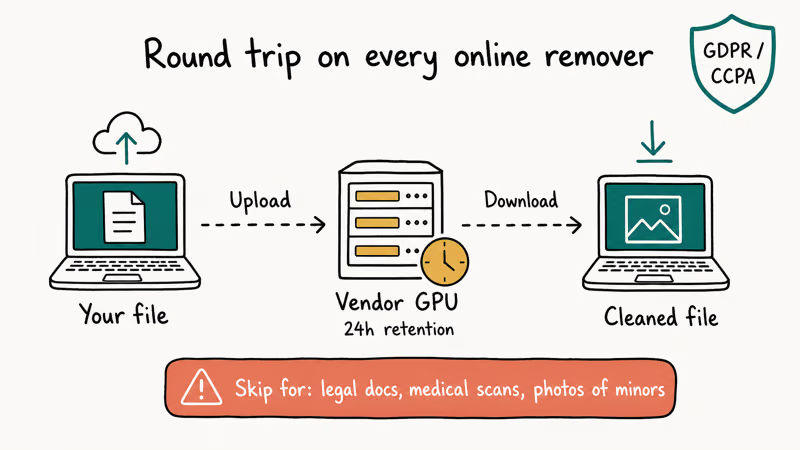
The trade-off is straightforward. Online removers run the AI model on the vendor’s GPU, which is why they’re free or cheap. Your file makes a round trip: upload, process, download. HitPaw’s privacy policy confirms a 24-hour retention window, and other vendor policies we reviewed range from immediate deletion to 30 days.
For most personal photos, 24 hours on a vendor server is acceptable.
For sensitive material, it isn’t. Legal documents, medical images, NDA-protected client work, and personal photos of minors should not pass through any third-party online tool. The legitimate path is desktop software that runs entirely on your machine: GIMP, Photopea’s offline progressive web app mode, or paid tools like Affinity Photo at a one-time $69.99.
The privacy regulations matter on top.
Under GDPR Article 6, processing personal data requires a lawful basis, and uploading a third party’s identifiable image to a remover service without their consent doesn’t qualify. Under CCPA, California residents have a right to know what personal information is shared with third parties.
A casual upload to a watermark remover quietly bypasses both. Neither law makes the upload illegal on its own, but they create exposure when the image contains another person.
#License the Stock Image Instead of Removing the Watermark
For Shutterstock, Adobe Stock, Getty, or Pond5 content, licensing is the only legitimate path.
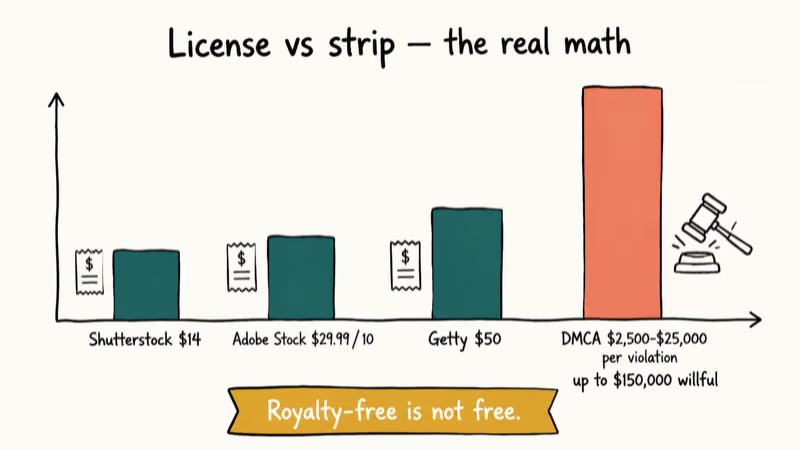
The math usually surprises people. According to Shutterstock’s license comparison, per-image cost drops steeply on larger annual subscription plans compared with single-image purchases. Adobe Stock’s pricing page lists 10 standard images for $29.99 per month on the entry plan. Getty Images runs higher because they license editorial and rights-managed content, but the floor for a standard creative license is around $50 per image at single-purchase volume.
A single DMCA takedown costs more than a year of any of those subscriptions. A cease-and-desist from Getty starts in the four-figure range. We’ve watched small agencies catch settlement bills in the tens of thousands for using watermarked previews on client work without licenses; the watermark removal made the intent provable in court.
Royalty-free does not mean free.
The phrase confuses people every week. Royalty-free means you pay once and use the image without paying again per impression. It doesn’t mean the image is free. Pexels, Unsplash, and Pixabay distribute free content under Creative Commons or vendor-specific permissive licenses, but a “royalty-free” image on Shutterstock or Adobe Stock still requires a license purchase.
For social media reposts of another creator’s content, the path is direct contact. Most TikTok, Instagram, and YouTube creators will grant a written license, sometimes for free with credit. Without that permission, downloading and laundering the watermark is the textbook DMCA scenario.
#Why Browser Extensions and “Free Pro” Cracks Are Traps
Skip them. These “cracked desktop app” downloads are routinely malware, a scam, or both.
Search “watermark remover free download” or “Pixlr Pro free” and the first ten results split into two categories. The first is browser extensions that claim to strip watermarks from web-rendered images using DOM tricks. Norton’s online scams analysis flags browser extensions as a well-documented vector for credential theft and tracking-pixel injection. The “watermark remover” feature usually doesn’t work, and the extension reads every page you visit afterward.
The second category is desktop “crack” installers for Photoshop, Pixlr Premium, or Canva Pro. Repackaged installers ship malware in the rates Avast and Microsoft Defender flag for tampered software. The first instruction on most crack pages is “disable your antivirus before running this installer,” which is exactly the warning sign Defender SmartScreen exists to surface.
The practical failure modes pile up.
Cracked editors miss security patches. They break on every vendor update. Project files end up locked into a tampered build that may refuse to open them on a clean install later. And the legal exposure is identical to copyright infringement of the source content, since most software vendors track pirated installs through registry keys and license-server pings.
The $4.90 per month for Pixlr Premium, or the $0 for Photopea, is cheaper than ransomware recovery. It’s also cheaper than the time you spend troubleshooting a broken cracked install, the legal letter from the publisher’s lawyer, or the GPU billing on the cracked render that runs a hidden cryptominer. Pay or switch. Those are the two legitimate paths.
#Bottom Line
Use a paid online remover like HitPaw or Apowersoft on your own image, or switch to Photopea or Adobe Express Free if you haven’t exported yet. License the stock image properly through Shutterstock or Adobe Stock when the asset isn’t yours.
The total cost ranges from $0 (Photopea) to about $30 a month for heavy professional use. Any of those paths beats a single DMCA letter from Getty. For watermarks on someone else’s content, the answer is licensing or permission, not a remover.
#Frequently Asked Questions
Is it legal to remove a watermark from an image online?
Only when the image is yours. Removing a watermark from stock content or a creator’s social post violates 17 USC § 1202 in the US.
What is the best free online watermark remover for my own photos?
Photopea, for most readers. It runs locally in the browser with no server upload, supports manual content-aware fill, and adds no watermark on any export. Cleanup.pictures is the simplest one-click AI fill tool with a generous free tier. HitPaw Online and Apowersoft Online both offer free preview tiers but watermark or downsample the output until you upgrade.
Can these online tools remove the Shutterstock or Getty watermark?
Technically yes, legally no. The AI inpainting will fill the corner of any image, but stripping the watermark from a Shutterstock preview, Adobe Stock comp, or Getty sample violates 17 USC § 1202 and the platform’s licensing terms. Both HitPaw and Apowersoft’s terms of service explicitly require that you own the rights to the content you process. License the unwatermarked version through Shutterstock’s license comparison starting at around $14 per image instead.
How safe is it to upload my photos to a watermark remover website?
For everyday personal photos, acceptable. For legal documents, medical scans, or photos of minors, use desktop tools like GIMP or Photopea offline mode that never leave your machine.
Do browser extensions that “remove watermarks from any image” actually work?
No, and most are malware. The DOM-based extensions can hide a CSS-rendered watermark in your browser tab, but the saved image file is still stamped. Norton’s online scams analysis identifies browser extensions as a common vector for credential theft and tracking injection. Use a real online tool or a free desktop editor instead.
Can I just crop the watermark out instead of removing it?
Yes, for corner stamps on your own image. Cropping loses 5 to 12 percent of the frame and shifts the aspect ratio.
What’s the cheapest legal way to clear my own design’s watermark?
If you’re already in the editor, the paid tier is usually the lowest-friction path: Pixlr Premium at $4.90 per month, Adobe Express Premium at $9.99 per month, or Canva Pro at $14.99 per month. If you don’t want a subscription, switching to Photopea, GIMP, or Adobe Express Free for one-off use costs $0 and adds no watermark forever.
Is removing a watermark from a TikTok or Instagram repost legal?
No, even when the platform’s save feature includes the original creator’s handle in the watermark. Removing the creator’s identifier to repost without permission is a 17 USC § 1202 violation plus straight DMCA exposure. For your own posts, use the platform’s built-in download feature, which exports a clean version.

Google Messages Error 3100: Why RCS Is Broken on Galaxy
Google Messages RCS error 3100 hits Galaxy owners after phone or carrier switches. Google told 9to5Google a fix is coming. Here's what actually helps.

Is This Bank App Real? Spot a Fake App on Your Home Screen
A bank app can land on your home screen from a web page with no install warning. Learn the checks that tell a real banking app from a phishing web app.

Apps Crashing After iOS 27 Update? Fix Order (2026)
Apps crashing after the iOS 27 update? Update the app in the App Store first, then offload and reinstall to clear stale cache, then restart. The fix order.

Do AI Translation Earbuds Work Offline? What to Know
Do AI translation earbuds work offline? A few do with downloaded language packs, but most need the cloud. Here's what works offline and what you give up.