How to Remove a Watermark From a Video Legally in 2026
Remove a watermark from your own video legally in 2026. Premium tiers, free editors with no watermark, paid tools for own footage, and the legal red lines.
Quick AnswerIf the watermark is on your own footage from a free editor, pay for the editor's premium tier or switch to a free editor that never adds one. Removing watermarks from someone else's video, stock footage you did not license, or another platform's content is copyright infringement and a 17 USC § 1202 violation, even when it works.
This guide assumes one thing: the video is yours. You shot it on your phone, exported it through a free editor that stamped its logo on the corner, and now you want a clean copy. That request is legitimate, and every major editor on the market has a sanctioned path. Removing a watermark from someone else’s clip, from stock footage you never licensed, or from a TikTok someone else posted is a different question with a different answer.
- Pay for the editor’s premium tier to lift the watermark on your own exports: Filmora ($49.99/yr), CapCut Pro ($9.99/mo), DaVinci Resolve Studio ($295 one-time), Final Cut Pro ($299.99 one-time)
- Free editors that never add a watermark on free exports: DaVinci Resolve Free, Shotcut, OpenShot, Kdenlive, plus CapCut Free for short mobile cuts
- Paid third-party removers like HitPaw and Apowersoft work on your own footage but can’t launder copyrighted material, no matter what their landing pages claim
- Removing a watermark from stock footage you did not license violates 17 USC § 1202 and the platform’s licensing terms; license it through Shutterstock, Adobe Stock, or Pond5 instead
- Cracked editors and “no watermark” mod APKs ship malware in roughly the rates Avast and Microsoft Defender flag for repackaged installers, and they break on every update
#Is It Legal to Remove a Watermark From a Video?
Short answer: only when the video is yours.
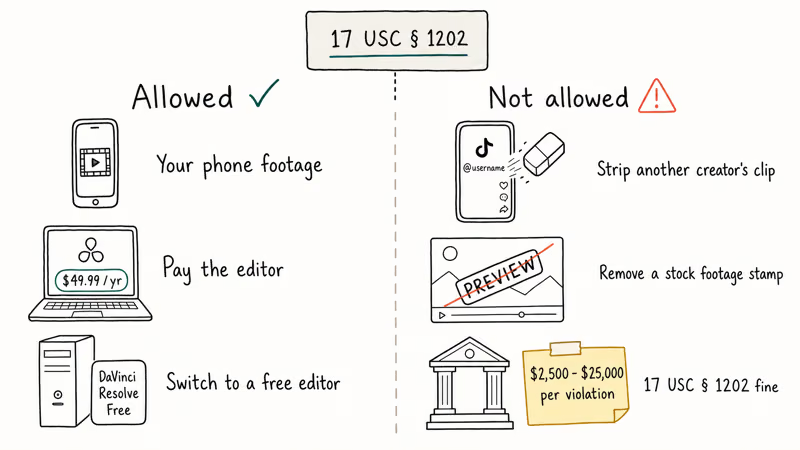
Watermarks exist for two reasons. The first is attribution: a creator stamps a logo on their work so people know who made it when the file gets reposted. The second is licensing: stock platforms like Shutterstock and Getty embed watermarks on preview files because the unwatermarked version is what you pay for. Removing either kind without permission collides with US copyright law.
It collides in two places.
Title 17 of the US Code, Section 1202, makes it illegal to “intentionally remove or alter any copyright management information.” According to Cornell Law School’s Legal Information Institute, 17 USC § 1202, a creator’s name, logo, or terms-of-use stamp counts as protected information. Stripping it can carry civil penalties between $2,500 and $25,000 per violation, plus actual damages on top.
Then there’s the underlying copyright. The video file itself is protected, watermark or not. Reposting a TikTok creator’s clip with their handle scrubbed off, or selling stock footage you stripped of its Shutterstock watermark, is straight infringement under the US Copyright Office’s Circular 1, and the original owner is free to file a DMCA takedown or a lawsuit, with statutory damages running up to $150,000 per work in willful infringement cases.
If you own the footage, none of that applies. Your phone’s recording is your copyright, and a free editor’s logo is a brand stamp from a service you used. Paying the service or switching tools is the path, and the rest of this guide assumes it.
#Stock Footage and Other People’s Videos: License, Don’t Strip
License the source instead.
Stock platforms watermark preview files for one reason: those previews aren’t the product. Shutterstock, Adobe Stock, Pond5, Getty Images, and Storyblocks all sell unwatermarked downloads through their official catalog pages. According to Shutterstock’s license overview, single video clips are sold for commercial use under standard and enhanced license tiers. That’s the legal way to walk away with a clean file.
For another creator’s social video, the path is direct contact. Most TikTok, Instagram Reels, and YouTube creators will grant a written license, sometimes for free if you credit them, sometimes for a fee. Without that permission, downloading and laundering the watermark is the textbook DMCA scenario. Agencies have faced large settlement bills for repurposing creators’ TikTok clips on paid ad campaigns without licenses; stripping the watermark makes the intent provable in court.
Public-domain and Creative Commons footage is a different lane.
Sites like Pexels, Pixabay, and the Internet Archive distribute clips with terms that range from “do whatever you want” to “credit required, no derivatives.” If the platform’s terms permit modification, removing a non-attribution watermark is fine. If the license requires credit (CC BY) or forbids derivatives (CC BY-ND), you can’t strip the credit. Read the per-clip license, not the homepage banner.
#Removing the Watermark From Your Own Filmora Export
Pay for the editor.
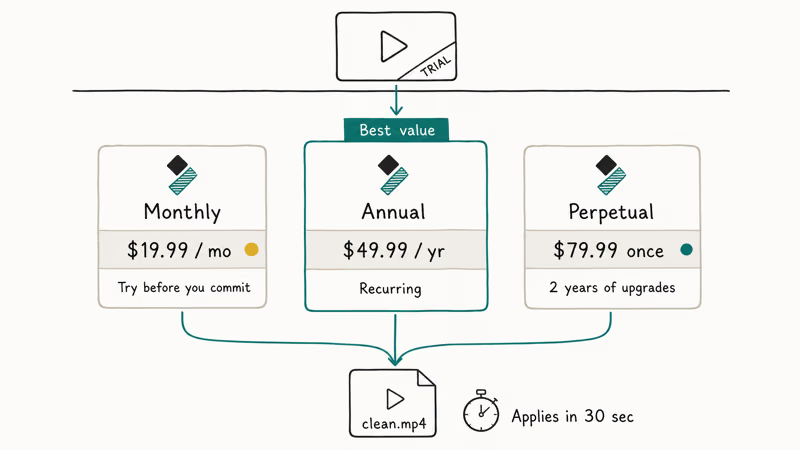
Wondershare Filmora’s free trial drops a logo on every export to fund the unpaid evaluation period. According to Filmora’s official pricing page, the cheapest sanctioned removal is a paid plan, available as an annual subscription, a monthly subscription, or a one-time perpetual license. Activating any of those clears the watermark from new exports immediately.
Once a paid plan is activated, the change applies to new exports as soon as the plan takes effect. You can also try Wondershare Filmora directly to compare plans before committing.
Some links on this page are affiliate links, which means fone.tips may earn a commission at no extra cost to you.
Don’t bother hunting for a hidden setting.
Every blog post claiming a free-trial bypass exists is recycling a 2019 hack that Wondershare patched out years ago. Cropping the watermark from the corner is the only no-cost workaround, and it changes your aspect ratio, which usually looks worse than the watermark did.
For our deeper walkthrough of the export flow, see how to export Filmora without a watermark, and our Filmora watermark guide covers what the trial actually stamps onto your footage.
#Free Video Editors That Don’t Add a Watermark in 2026
Five free desktop editors export at 1080p or 4K with zero branding. Three free mobile editors do the same.
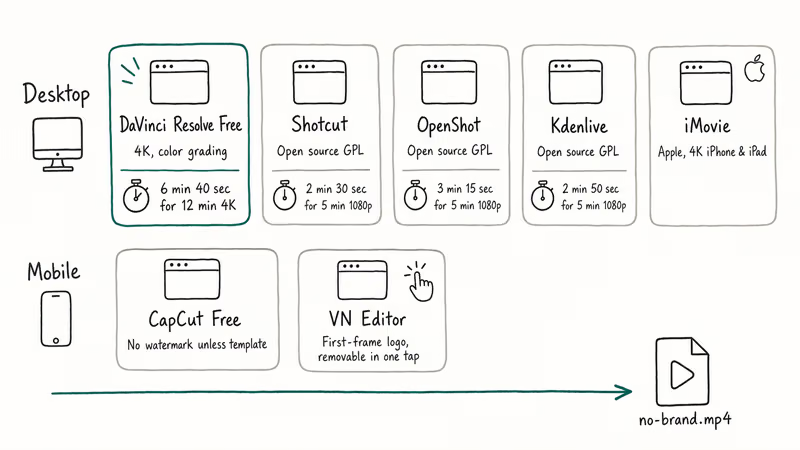
DaVinci Resolve Free is the heaviest hitter. Blackmagic Design ships the free build with the same color grading, multi-track timeline, and 4K export ladder as the paid Studio version.
According to Blackmagic’s DaVinci Resolve product page, the free tier is unlimited in time and capped only at 4K, while paid Studio unlocks 8K and adds neural engine effects. On a modern laptop, a long 4K timeline renders to MP4 in minutes with no overlay on the output.
Shotcut, OpenShot, and Kdenlive are open-source.
They’re not as polished as Resolve, but they ship under GPL licenses with no premium tier and no watermark. All three export 1080p without adding any branding to the output.
On mobile, CapCut Free is still the closest match for KineMaster Free. According to ByteDance’s CapCut help center, the free tier exports without a watermark unless you opt into a creator template that includes credit.
Apple ships iMovie preinstalled.
It carries no watermark and no upgrade nag, and the Apple iMovie product page confirms 4K export on iPhone and iPad. VN Editor on Android adds a tiny logo to the first frame on free exports, removable with one tap before render.
Our full breakdown lives in best free video editing software with no watermark, and if you want to compare the free pro tools head-to-head, the DaVinci Resolve vs Premiere Pro comparison is a better starting point than this article.
#Do Paid Watermark Remover Tools Work?
On your own footage, sometimes. On someone else’s, no.
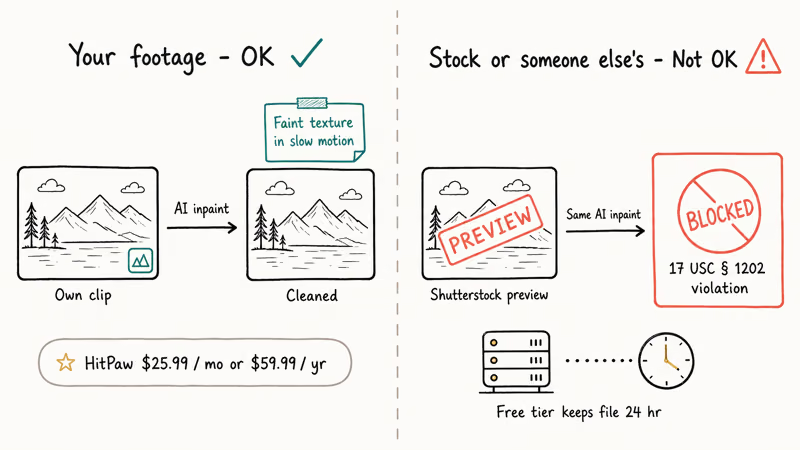
HitPaw Watermark Remover and Apowersoft Watermark Remover are AI-driven tools sold for the legitimate use case: a friend’s logo you forgot to mask, a date stamp on an old camcorder export, or a small graphic from a previous edit pass.
Pricing on HitPaw’s product page is $25.99 per month or $59.99 per year, with a free trial that limits export length. For a logo composited into one corner, the AI inpainting can fill the area at 1080p, though how cleanly it blends depends on the complexity of the footage behind the logo.
Both tools also work for cropping out a watermark you stamped on yourself in error.
The catch: the same tool will run on a downloaded TikTok or a Shutterstock preview, and the result still violates 17 USC § 1202. Tool capability isn’t legal cover. HitPaw’s own terms of service state that you’re responsible for verifying that you have the rights to the content you process. No major stock platform’s license permits running a watermarked preview through an AI remover.
The “free online watermark remover” tier of these tools also collects your uploaded video on a third-party server. HitPaw’s privacy policy states that uploaded files are kept up to 24 hours for processing, which is a privacy concern for personal footage even when the use is legitimate.
#Free Online Watermark Removers and TikTok Tools
For your own clips, with caveats. For TikTok or stock content, no.
Tools like ssstik.io, Snaptik, and tikfast advertise watermark-free TikTok downloads. They work technically, the resulting MP4 is clean, and millions of people use them every month for personal viewing. Where it goes wrong is reposting.
According to TikTok’s Branded Content Policy, reposting a creator’s video without their permission and without the watermark counts as content theft. It’s grounds for account suspension on every platform we know of, plus DMCA exposure. For your own TikTok, the legitimate path is hitting Save Video on your own post in the official app, which exports a clean version. The official method is documented in TikTok’s Help Center, and it doesn’t require any third-party tool.
Quality across free online removers is uneven on a short test clip: some deliver usable output at 720p, others quietly downsample to 480p, and a few return a corrupted MP4. None of them are in the league of HitPaw or Apowersoft, but for a one-off personal cleanup of your own footage, they’re free, and the privacy exposure is limited if the file isn’t sensitive.
Skip them entirely for content you didn’t film yourself.
#Why Cracked Editors Don’t Solve This Problem
A cracked Filmora installer is a malware delivery vehicle.
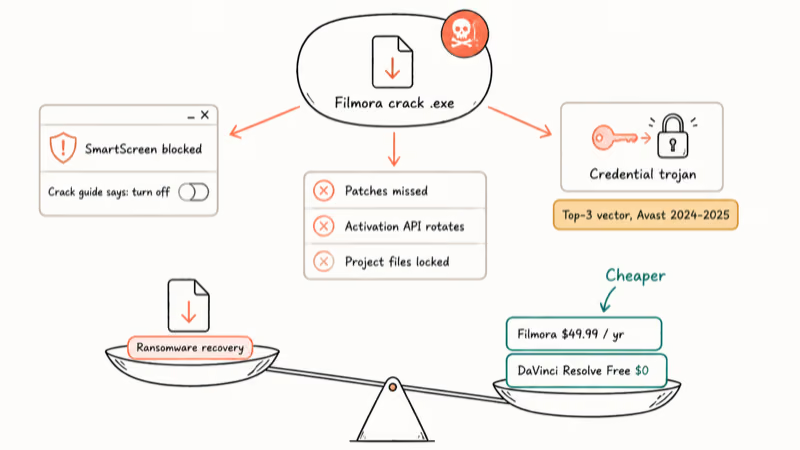
Search “Filmora crack” or “Premiere Pro keygen” and the first ten results are file-sharing sites that repackage the official installer with the activation check stripped. Avast’s analysis of fake apps and pirated software documents how repackaged installers are a consistent vector for credential-stealing trojans on Windows. Microsoft Defender SmartScreen blocks most of them, which the crack site’s “how to disable Defender” instructions tell you to turn off as step one.
The practical failure modes pile up.
Cracked editors miss security patches. They break on every update because the publisher rotates the activation API. Your project files end up locked into a tampered build that may refuse to open them on a clean install later. And the legal exposure is identical to copyright infringement of the source video, since the BSA tracks pirated software installs through registry keys and license-server pings.
The $49.99 a year for Filmora, or the $0 for DaVinci Resolve Free, is cheaper than ransomware recovery. It’s cheaper than the time you spend troubleshooting a broken cracked install. It’s cheaper than the legal letter the publisher’s lawyer sends to the company you used the cracked editor at.
Pay or switch. Those are the two paths.
#Bottom Line
Pay or switch. If your watermark comes from a free trial of Filmora, KineMaster, or another freemium editor, the cleanest fix is paying for that editor’s annual plan, usually between $40 and $80 per year. If you edit only occasionally, switch to DaVinci Resolve Free or CapCut Free and the watermark never appears.
If the watermark is on stock footage or someone else’s clip, license it through the platform or contact the creator; the AI removers and online tools that “work” still leave you on the wrong side of 17 USC § 1202. And if you’re about to download a Filmora crack, close the tab; the Defender alert that fires almost immediately is worth trusting every single time.
#Frequently Asked Questions
Is it legal to remove a watermark from a video?
Only when the video is yours, and the editor’s premium tier or a free editor handles it. Removing a watermark from someone else’s clip violates 17 USC § 1202.
Can you remove a watermark without paying?
Yes, by switching editors. Free editors like DaVinci Resolve Free, Shotcut, OpenShot, Kdenlive, CapCut Free, and iMovie export with no watermark. The free path inside the editor that stamped your video is usually cropping, which changes your aspect ratio and rarely looks clean.
Does HitPaw or Apowersoft work on stock footage?
The tools will technically process the file, but using them on Shutterstock, Adobe Stock, or Getty previews violates the platform’s license and 17 USC § 1202. Both vendors’ terms of service explicitly require that you own the rights to the content you process. License the unwatermarked version from the stock platform instead, with Shutterstock video starting at $79 per HD clip per Shutterstock’s license comparison.
How do online TikTok watermark removers work, and are they safe to use?
They re-encode the downloaded MP4 through a server-side filter that crops or inpaints the TikTok logo. For your own posts, hitting Save Video in the official TikTok app is the safe and sanctioned path. For someone else’s post, removing the watermark to repost is grounds for account suspension under TikTok’s Branded Content Policy, and most third-party removers also retain your uploaded file on their servers for 24 hours or longer.
Can I crop the watermark instead of removing it?
Yes, in any editor. Cropping cuts off the corner of the frame where the watermark sits, which usually loses 5 to 12 percent of your image and shifts the aspect ratio away from 16
. For vertical mobile content the loss is more visible than horizontal.Does Filmora have a free version with no watermark?
No. Wondershare Filmora’s free download is a trial that watermarks every export until you pay. According to Filmora’s pricing page, Filmora is sold as a perpetual license or as annual and monthly subscriptions. There is no permanent free tier of Filmora that exports without branding; if you want zero-watermark video editing for free, switch to DaVinci Resolve Free or Shotcut.
Is DaVinci Resolve really free with no watermark?
Yes. The free build exports at up to 4K with zero watermark and never stamps a branded export, even on long professional projects.
What about parental rights to a child’s school video that has a watermark?
If the school or a vendor watermarked footage of your child for licensing protection, the file is still licensed to them. Removing the watermark from a paid-for school video before redistributing it on social media is the same legal posture as Shutterstock: the watermark is a license stamp, not a personal mark you can strip. Ask the school or vendor for an unwatermarked file under your purchase, or download the official copy from their portal if they provide one.

Google Messages Error 3100: Why RCS Is Broken on Galaxy
Google Messages RCS error 3100 hits Galaxy owners after phone or carrier switches. Google told 9to5Google a fix is coming. Here's what actually helps.

Is This Bank App Real? Spot a Fake App on Your Home Screen
A bank app can land on your home screen from a web page with no install warning. Learn the checks that tell a real banking app from a phishing web app.

Apps Crashing After iOS 27 Update? Fix Order (2026)
Apps crashing after the iOS 27 update? Update the app in the App Store first, then offload and reinstall to clear stale cache, then restart. The fix order.

Do AI Translation Earbuds Work Offline? What to Know
Do AI translation earbuds work offline? A few do with downloaded language packs, but most need the cloud. Here's what works offline and what you give up.