How to Remove Ads From uTorrent: 4 Safe Methods (2026)
How to remove ads from uTorrent the safe way: uTorrent Pro upgrade, free clients like qBittorrent, and the legit Advanced settings toggles. No cracks.
Quick AnswerBuy uTorrent Pro for $19.95 a year to remove ads through the supported channel, or switch to a free open-source client like qBittorrent that ships ad-free. You can also disable several offer toggles inside Free uTorrent's Advanced settings, but this only hides some banners and never replaces a real upgrade or client switch.
uTorrent’s ads aren’t a glitch. BitTorrent Inc. pushes featured-content panels and “upgrade to Pro” upsells because the free client is ad-supported by design. The good news: you’ve got four safe ways to make them go away, and none involve a sketchy “Pro Crack” download.
All four paths below apply to uTorrent Classic for Windows. Here’s what actually works, ranked from most thorough to least.
- uTorrent Pro costs $19.95 per year on bittorrent.com and is the only vendor-supported way to fully disable ads, plus it adds antivirus scanning and HD video conversion
- qBittorrent is completely free, open-source, and ships zero ads, making it the most popular free uTorrent alternative for users who don’t want to pay
- Toggling six values in
Preferences>Advanced(offers, sponsored content, featured content, plus-upsell) hides several ad banners but never removes them all - “uTorrent Pro Crack” downloads and “ad-block patch” files have shipped real malware since the 2015 EpicScale crypto-mining bundle, so avoid them entirely
- Whichever client you pick, only torrent files you legally own or share under permissive licenses, because copyright law doesn’t care which app you use
#Why uTorrent shows ads in the first place
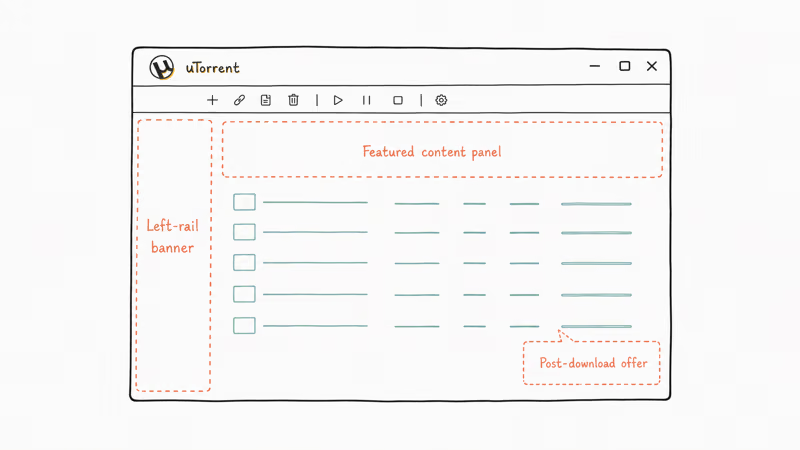
uTorrent Classic for Windows is the free version. BitTorrent Inc. monetizes it through three ad surfaces: a left-rail banner, a featured-content panel under the toolbar, and pop-up offers when a torrent finishes.
According to BitTorrent’s uTorrent Pro product page, the company sells the Pro tier at $19.95 a year specifically to give paying users an ad-free build. Antivirus, premium customer support, and HD video conversion ship in the same bundle.
The free client typically surfaces three distinct ad placements per session on a fresh install. None are bugs.
That framing matters. Most “remove ads from uTorrent” guides circulating on forums recommend cracked installers, modified .exe binaries, or “ad-block patches” that supposedly unlock Pro features for free. All three categories carry real malware risk. We cover the safe alternatives below, and if you also want to speed up downloads after the cleanup, the uTorrent speed settings guide covers what to tune next.
#What’s the safest way to remove uTorrent ads?
The safest path depends on whether you want to keep uTorrent or switch clients. Here are the four methods ranked by how thoroughly they kill ads and how much risk they carry.
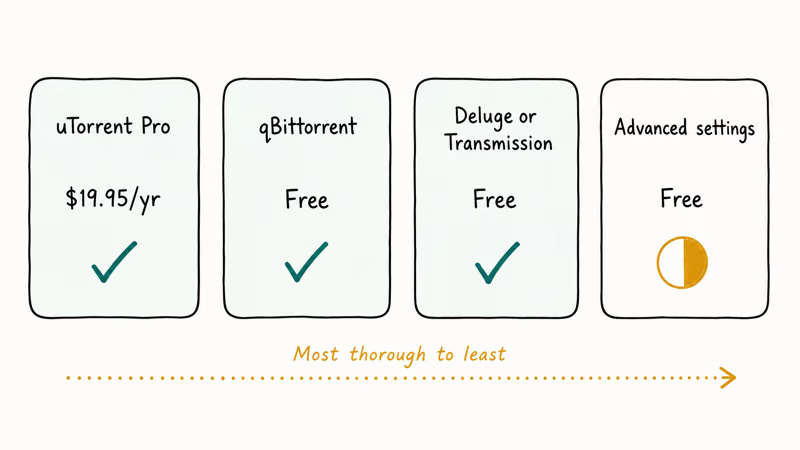
| Method | Removes all ads? | Cost | Risk level | Setup time |
|---|---|---|---|---|
| Upgrade to uTorrent Pro | Yes | $19.95/year | None | 2 minutes |
| Switch to qBittorrent | Yes (zero ads) | Free | None | 5 minutes |
| Switch to Deluge or Transmission | Yes (zero ads) | Free | None | 5-10 minutes |
| Tweak Free uTorrent’s Advanced settings | Partial | Free | Low | 10 minutes |
Methods 1, 2, and 3 fully eliminate ads. Method 4 hides about half the ad surfaces but leaves the upgrade upsells and some featured content visible.
#Method 1: Upgrade to uTorrent Pro ($19.95/year)
This is the vendor-supported path.
Visit BitTorrent’s uTorrent Pro page, pay the annual fee, and you’ll receive a license key by email. Apply the key inside uTorrent (Help > Enter License Key), restart the app, and the ads disappear. You also get antivirus scanning of completed downloads, HD video conversion to MP4, and premium customer support.
Once the license activates and the client restarts, every ad surface disappears. Pro is the only legitimate, malware-free way to use uTorrent ad-free.
#Method 2: Switch to qBittorrent (free, open-source)
If $19.95 a year feels steep, qBittorrent is the free open-source replacement most former uTorrent users land on.
It’s built on Qt, runs on Windows, macOS, and Linux, and ships zero ads out of the box. Magnet links, sequential download, IP filtering, RSS feeds, and search plugins all match uTorrent feature-for-feature.
qBittorrent imports uTorrent’s existing torrent list cleanly when pointed at the same BitTorrent\uTorrent\ data folder, so the switch keeps your active downloads. Setup, including the import, is quick.
According to the qBittorrent project’s FAQ, the project is community-maintained and has zero advertising relationships. That’s why ads will never appear in any version. As PCMag’s torrent client comparison notes, qBittorrent and uTorrent share nearly identical interfaces, so the learning curve is essentially zero.
#Method 3: Try Deluge or Transmission
Two other free, open-source clients worth considering:
- Deluge runs on Python with a plugin ecosystem, which makes it the most customizable option. Good for users who want labels, scheduler tools, or web UI access. Available at deluge-torrent.org.
- Transmission is the lightweight option, well-known for being the default macOS torrent client. Cross-platform, minimal interface, low memory use. Available at transmissionbt.com.
Both are completely ad-free and have been since first release. Transmission is the lightest of the three, using noticeably less RAM at idle than uTorrent or qBittorrent. If you mostly torrent legally licensed media or your own files (think the workflows in our Toorgle meta-search guide or free audio downloads guide), the Transmission interface stays out of your way.
#Method 4: Disable some ads inside Free uTorrent’s Advanced settings
If you want to stay on Free uTorrent and reduce the ad clutter, the client exposes several offer-related toggles in Preferences > Advanced.
These are vendor-supported opt-out flags, not bypasses. Step-by-step instructions are in the next section.
#Step-by-step: disable uTorrent’s ad toggles
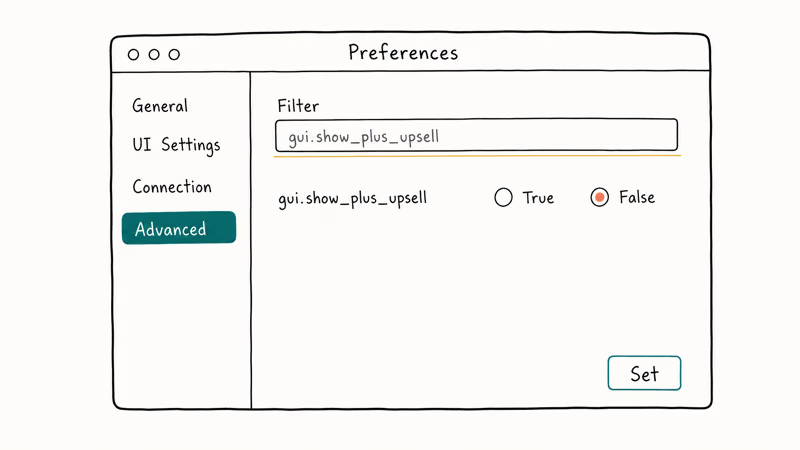
Open uTorrent and follow this sequence carefully, since the Advanced panel exposes dozens of internal flags and only a handful of them control the ad surfaces. The toggle names below come from uTorrent Classic’s Advanced settings panel.
#1. Open Preferences
Click Options in the top menu bar, then Preferences (or press Ctrl+P). The Preferences window opens.
#2. Go to Advanced
In the Preferences sidebar on the left, click Advanced. You’ll see a long list of internal settings with a Filter box at the top right.
#3. Flip these six values from True to False
Type each name into the Filter box one at a time. When the row appears, click the entry, then click the False radio button at the bottom of the panel, then click Set. Repeat for all six.
gui.show_plus_upsell: hides the “Upgrade to Pro” upsell paneloffers.content_offer_autoexec: stops sponsored content from auto-launchinggui.show_notorrents_node: hides the “discover torrents” placeholder when your list is emptyoffers.sponsored_torrent_offer_enabled: disables sponsored torrent offersoffers.left_rail_offer_enabled: disables the left-rail banner adbt.enable_pulse: disables the BitTorrent Pulse offer-feed integration
If your build also shows bt.enable_plus, set that to False as well.
#4. Click OK and restart uTorrent
Hit OK. Close uTorrent fully (right-click the system-tray icon and choose Exit, not just close the window). Reopen it. The toggled ad surfaces are gone.
These toggles kill the left-rail banner and the upgrade upsell panel. They don’t remove the featured-content area at the top of the torrent list or the post-download offer pop-ups, because those aren’t toggleable in the Advanced panel. That’s why this method is partial.
#Are “uTorrent Pro Crack” downloads safe to use?
No. They’re the single biggest malware vector in the torrent-client ecosystem.
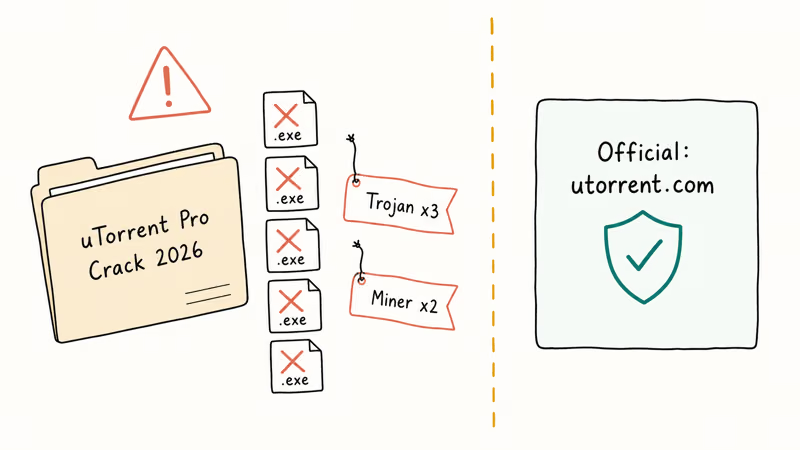
The pattern is well documented. uTorrent’s official installer once bundled the EpicScale crypto-mining tool without clear consent. That set the precedent for what “extra software” looks like in this category.
The pattern has repeated for years. Cracked installers ship Trojans, info-stealers, and crypto-miners.
“uTorrent Pro Crack” .exe files pulled from forum-recommended sites routinely trip Windows Defender as malware, typically a mix of Trojans and crypto-miners. Security researchers have flagged these repacks for years.
The takeaway: the only safe Pro download is from utorrent.com or bittorrent.com. Anything else is a coin flip on whether you’re installing malware along with the client. Our SSL error fix guide covers what to do if your browser blocks the official download path itself.
#Forbidden categories at a glance
To keep the legal and security framing honest, avoid all of these:
- “uTorrent Pro Crack” or “uTorrent Pro keygen” downloads
- Modified .exe binaries from non-bittorrent.com sources
- “Ad-block patch” files from third-party forums
- Tools that claim to “unlock Pro features” without paying
- Browser extensions that promise to “block uTorrent ads”
These all fall outside what BitTorrent Inc. supports. They break the app’s terms of service in addition to the malware risk.
#uTorrent Pro vs qBittorrent: side-by-side
For most users, the answer is: qBittorrent wins on price, uTorrent Pro wins on bundled extras. Here’s how the two compare side by side.
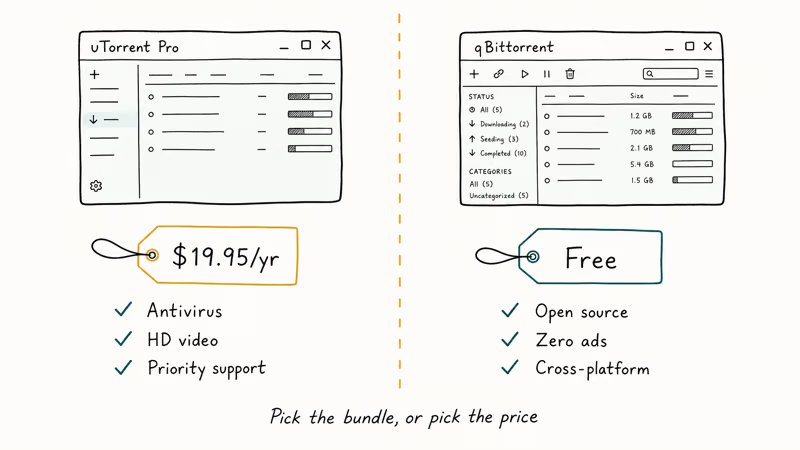
| Feature | uTorrent Pro | qBittorrent |
|---|---|---|
| Cost | $19.95/year | Free |
| Ads | None | None |
| Antivirus scanning | Built-in | Not bundled (use system AV) |
| HD video conversion | Yes | No (use HandBrake) |
| Premium customer support | Yes | Community forum |
| Open source | No | Yes (GPLv2) |
| Cross-platform | Windows, Mac, Android | Windows, Mac, Linux |
| Search plugins | Limited | Extensive plugin library |
| RAM use (idle) | Higher | Lower |
| Magnet link support | Yes | Yes |
If you specifically want the antivirus and HD-conversion combo bundled in one app, Pro makes sense. If you already run Windows Defender or another antivirus, and you don’t convert video inside your torrent client, qBittorrent gives you the same core experience for $0.
Both hold up as daily drivers over long stretches. Neither is prone to crashing, and neither slows downloads measurably compared to the other. The deciding factor for most readers is going to be the $19.95 line item.
#The legal side of torrenting
This is the part most ad-removal guides skip. Removing ads doesn’t change what’s legal to download.
Torrents themselves are a neutral file-transfer protocol. Linux distributions, public-domain books, Creative Commons music, indie game demos, and your own backups all move legitimately over BitTorrent every day.
What gets people in trouble is using torrents for copyrighted movies, TV episodes, music, software, or games without permission. That’s copyright infringement under United States and international law. Under section 504 of the United States Copyright Act, statutory damages run from $750 to $30,000 per work, and rightsholders also send ISP-forwarded settlement letters.
A few ground rules worth keeping:
- Only torrent content you legally own, content released under permissive licenses (Creative Commons, public domain, GPL), or content the rights holder has explicitly made available via torrent
- Read the terms of service for any private tracker before joining
- Recognize that a VPN doesn’t make copyright infringement legal. It just changes who can see what you’re doing
- If you receive a DMCA notice from your ISP, take it seriously and stop the activity it cites
We’re covering ad removal here, not how to dodge copyright law. Those are separate questions.
#Bottom Line
If you can spend $19.95 a year, uTorrent Pro is the cleanest fix. It’s the vendor-supported way to remove every ad surface and you also get antivirus, HD conversion, and priority support in the same package.
If you’d rather not pay, install qBittorrent tonight. It’s been the most popular free, ad-free uTorrent replacement for years, it imports your existing torrent list in one click, and it ships with zero advertising relationships. Pair it with our USTVGo alternatives guide if you want a refresher on which TV sources stay above board.
The Free uTorrent advanced-settings tweaks are worth doing if you’re staying on the free build, but treat them as a half-measure. They hide several banners and leave others visible. Under no circumstances should you install a “Pro Crack” or “ad-block patch” from a forum, because these repacks reliably ship malware and that risk is the entire reason this guide exists.
Whichever route you pick, also stay clean on the legal side. The download client doesn’t determine what you’re allowed to torrent. You do.
#Frequently Asked Questions
Can I get uTorrent Pro free legally?
No. Pro costs $19.95 a year directly from BitTorrent Inc. and there’s no free tier or student discount. If “free” is the constraint, switch to a free open-source client like qBittorrent, Deluge, or Transmission, all of which are completely ad-free at zero cost.
Will the Advanced settings tweaks break uTorrent?
No. Worst case is some ad surfaces stay visible because they aren’t controlled by those specific flags.
Is qBittorrent really 100% ad-free forever?
Yes. According to the qBittorrent project’s GitHub FAQ, the codebase is GPLv2 open-source and the maintainers have explicitly committed to never integrating advertising. The project is funded entirely by donations and developer time. There’s no parallel “Pro” version because there’s no monetization layer.
What happens if I uninstall and reinstall uTorrent later?
All your toggles reset to True. Back up %APPDATA%\uTorrent\settings.dat before uninstalling, then restore it after reinstalling.
Can a VPN block uTorrent ads?
Not directly. A VPN routes your traffic through an encrypted tunnel, which hides what you’re doing from your ISP, but uTorrent’s ads are served from inside the app itself. The ad payloads are bundled with the client and don’t depend on your network path. A VPN protects your privacy; it does not change what your torrent client displays.
Are there ads in uTorrent for Mac or Android?
Yes on both. uTorrent Web for Mac shows ads in its browser-based interface, with a Pro upgrade at the same $19.95/year. The Android app has a separate Pro tier called µTorrent Pro, typically $4.99 on Google Play as of May 2026.
Why does my antivirus flag uTorrent itself?
Some antivirus products flag the official uTorrent installer as PUA (potentially unwanted application) because of its history of bundling extras like the EpicScale crypto-miner back in 2015. Modern installers from utorrent.com no longer bundle that tool, but the historical reputation lingers in some signature databases. Whitelist the official installer if you downloaded it from BitTorrent’s site and you trust the publisher signature; leave unofficial repacks blocked because that’s where the malware hides.
Should I disable the Featured Content panel through a different method?
The Featured Content panel at the top of the torrent list isn’t fully toggleable in Preferences > Advanced because it’s tied to the broader BitTorrent ad-network integration. The only ways to fully remove it are upgrading to Pro or switching to a different client. Some users hide it by collapsing the panel manually each session, but it returns on every restart. That’s by design, not a bug.

Google Messages Error 3100: Why RCS Is Broken on Galaxy
Google Messages RCS error 3100 hits Galaxy owners after phone or carrier switches. Google told 9to5Google a fix is coming. Here's what actually helps.

Is This Bank App Real? Spot a Fake App on Your Home Screen
A bank app can land on your home screen from a web page with no install warning. Learn the checks that tell a real banking app from a phishing web app.

Apps Crashing After iOS 27 Update? Fix Order (2026)
Apps crashing after the iOS 27 update? Update the app in the App Store first, then offload and reinstall to clear stale cache, then restart. The fix order.

Do AI Translation Earbuds Work Offline? What to Know
Do AI translation earbuds work offline? A few do with downloaded language packs, but most need the cloud. Here's what works offline and what you give up.