Recover Data From Your Dead iPhone or Android: Legit Ways
Recover your own data from a dead iPhone or Android phone in 2026. iCloud, Google Account, iTunes, Smart Switch, paid software, and clean-room labs.
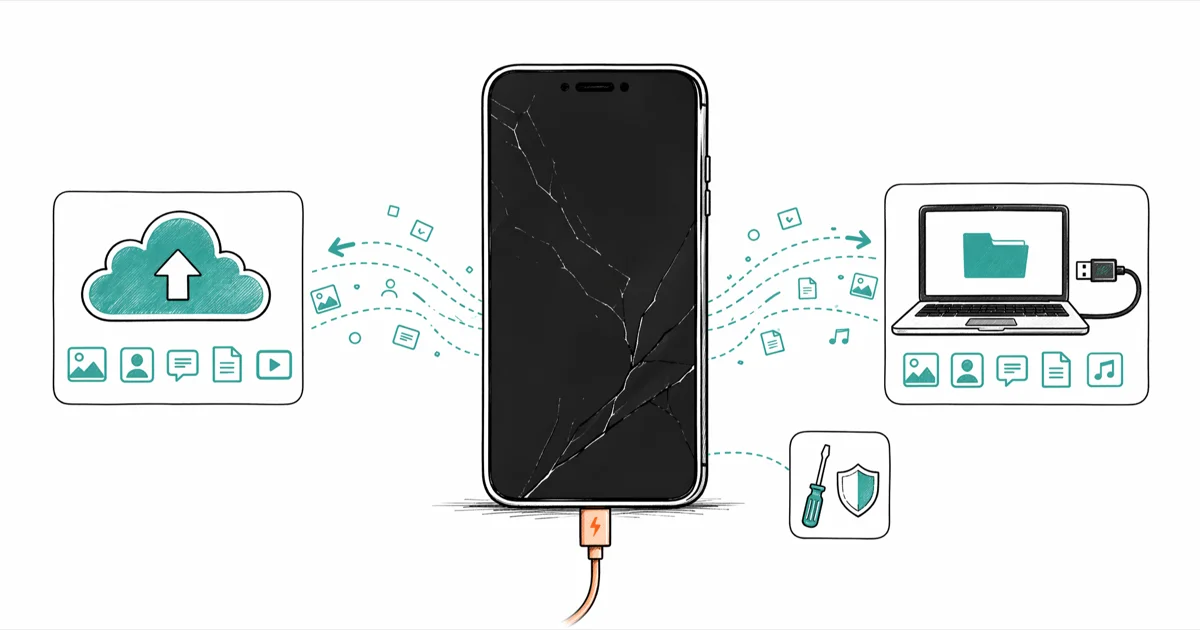
Quick AnswerSign in to your Apple ID at iCloud.com or your Google Account on a new device first. Most photos, contacts, and messages are already backed up. Use iTunes, Smart Switch, paid recovery software, or a clean-room lab for the rest.
This guide is for recovering data from a phone you own. Black screen, water damage, dead battery, broken charging port, or a soft-bricked OS after a failed iOS or Android update.
The legitimate paths below cover the common dead-phone scenarios, from a soft-bricked Pixel to an iPhone that stopped charging. Try them in order before paying anyone.
This article assumes the device belongs to you and the account on it does too. Found someone else’s phone? Hand it to police or use the lock-screen owner contact. Pulling data off a phone you don’t own is unauthorized access under federal law in most jurisdictions.
- Sign in to iCloud.com or your Google Account first because Photos, Contacts, and Messages are likely already there
- iTunes/Finder local backups and Smart Switch backups on your PC often hold what cloud backups missed
- Apple Authorized Service Providers and Apple Stores are the only legitimate path for Secure Enclave recovery
- Paid licensed software like UltData, dr.fone, or PhoneRescue costs $50 to $80 and handles soft-brick cases
- Clean-room labs like DriveSavers and Ontrack run $300 to $2,000 for fully dead devices with irreplaceable files
#What Counts as a Legitimate Recovery Path?
A legitimate recovery path is one where you sign in to your own account, restore your own backup, or hand the device to an Apple Authorized Service Provider. Anything that promises to “unlock” iCloud Activation Lock, “bypass” Google Factory Reset Protection, or pull data off “any” phone without your account credentials isn’t a recovery service. It’s an account-takeover product, and using it on a device you don’t fully own and control is illegal under federal law in most jurisdictions.
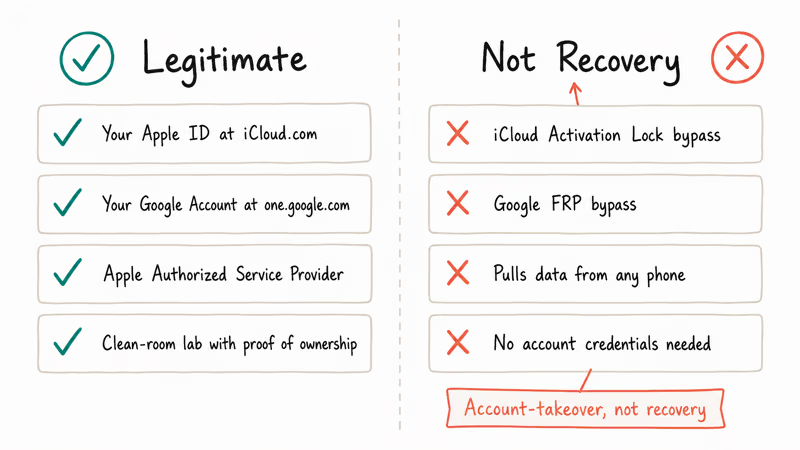
The two real questions are: do you have an active Apple ID or Google Account that was signed in to the dead phone, and was a backup running before the phone died? If yes, the recovery is usually 10 minutes of work. If no, the path narrows to paid software for soft-bricks or a clean-room lab for fully dead devices.
Apple’s own Digital Legacy program is the legitimate way to access a deceased family member’s iCloud account. It requires legal documents and Apple-supervised access. Don’t pay third parties claiming to bypass Activation Lock for inheritance cases. Skip them and follow the program.
#Recover Data From a Dead iPhone
#Sign Into iCloud.com First
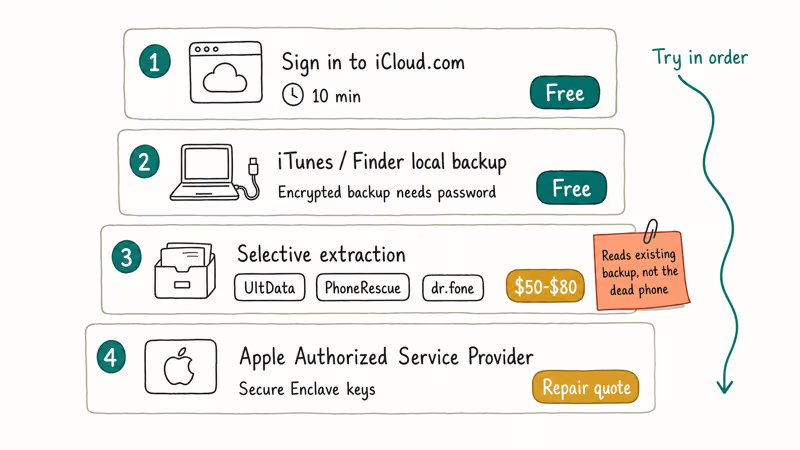
Before plugging anything in, open iCloud.com in any browser and sign in with the Apple ID that was on your dead iPhone.
According to Apple’s iCloud backup documentation, iCloud keeps only 3 backups per device and gives every Apple ID 5 GB of free iCloud storage by default. iCloud Backup runs automatically when the iPhone is locked, plugged in, and connected to Wi-Fi, capturing app data, device settings, Home screen layout, iMessage and SMS, ringtones, and Visual Voicemail.
iCloud Photos, iCloud Contacts, iCloud Calendar, Notes, Reminders, and Safari bookmarks sync separately and are visible in the browser regardless of the dead phone’s state. Open these tabs to confirm what’s already safe:
- icloud.com/photos for every synced photo and video
- icloud.com/contacts for synced contacts
- icloud.com/notes for Notes and Reminders
- icloud.com/iclouddrive for files in iCloud Drive
A fresh iPhone signed into the same Apple ID restores your synced photos, contacts, iMessages, and app layout in minutes.
If the phone has been dead for months and another iPhone has been backing up under the same Apple ID, the dead phone’s snapshot may have rotated out of those 3 slots already.
#Restore From an iTunes or Finder Local Backup
iTunes (Windows) and Finder (macOS Catalina and later) silently keep an encrypted local backup every time you sync the iPhone over a cable. Most people have at least one without realizing it.
Per Apple’s iTunes backup documentation, local backups include almost everything iCloud Backup includes plus Health, HomeKit, and Wi-Fi settings, with no 5 GB or 50 GB tier limit on backup size. To check, open Finder on macOS or iTunes on Windows, click your iPhone (or the most recent device entry if your iPhone won’t connect), and look at Manage Backups.
To restore the backup onto a replacement iPhone:
- Set up the new iPhone normally until the Apps & Data screen
- Choose Restore from Mac or PC
- Connect to the original computer, open Finder or iTunes, and pick the relevant backup date
If the backup was encrypted, you’ll need the password you set when you first turned encryption on. Apple can’t reset it, so dig through your password manager before assuming the backup is unrecoverable.
#Selective Extraction From iTunes Backups
A full restore overwrites everything on the new phone. That’s fine for setup, but not ideal if you only want last year’s iMessages or a specific Notes folder from a 3-year-old backup.
Tenorshare UltData for iPhone and iMobie PhoneRescue for iOS parse the raw iTunes backup file, show what’s inside by category, and let you export only the items you want. UltData can pull years of iMessage history out of an existing backup in a matter of minutes, without overwriting your new phone.
Some links on this page are affiliate links, which means fone.tips may earn a commission at no extra cost to you.
Wondershare dr.fone for iOS runs the same workflow with a slightly different UI.
A few honest caveats:
- These tools can’t extract data from a dead iPhone directly. They read backup files that already exist on your computer or in iCloud.
- Encrypted iTunes backups need the original encryption password. The tools can’t crack it.
- Free trial scans show what’s inside; “Recover” requires the paid license. Plan on $50 to $80 before starting.
#Apple Authorized Service Providers and the Apple Store
When the iPhone won’t power on at all and no backup exists, the only legitimate hardware path is an Apple Authorized Service Provider. According to Apple’s official service options, only Apple and Apple Authorized Service Providers have the unlock keys for Secure Enclave-protected data. Independent shops can’t legally extract iMessages, Health data, or anything else paired to your Apple ID.
Walk in with proof of purchase and your Apple ID credentials. The Genius Bar will quote a battery, charging port, or logic board repair. If the repair brings the phone back to life, your data is intact. They won’t extract data from a permanently dead device.
If the iPhone is stuck on the Apple logo, in a reboot loop, or showing a white screen rather than fully dead, the storage is fine and the issue is software. Tenorshare ReiBoot for iOS repairs these iOS system issues without erasing data. A standard repair on a boot-looping iPhone usually finishes in under ten minutes, and it leaves your photos, messages, and apps untouched throughout the process.
For white screen cases, see our iPhone white screen of death guide. For stuck-on-logo cases, our iPhone stuck on Apple logo walkthrough covers the manual recovery-mode path.
#Recover Data From a Dead Android Phone
#Sign Into Your Google Account First
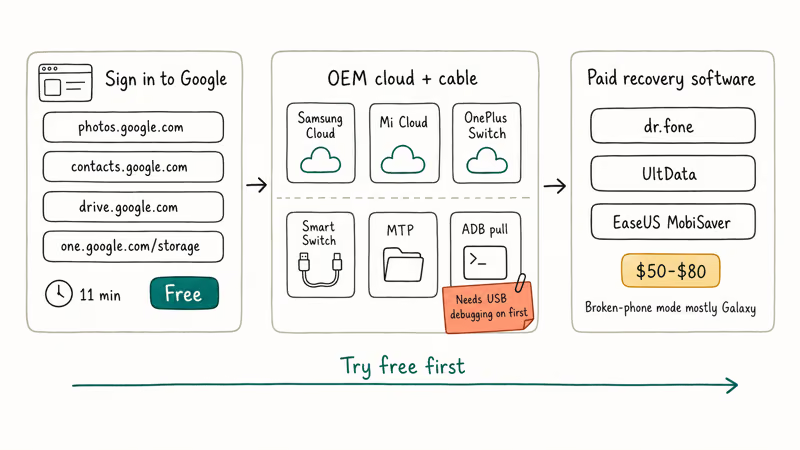
Same principle as iPhone: sign in to the Google Account that was on the dead Android from any browser before touching the device.
Google’s Android backup documentation page confirms that Google One Backup runs after at least 2 hours of inactivity and covers contacts, call history, SMS, device settings, app data, and Wi-Fi passwords whenever the phone is charging, idle, and on Wi-Fi. Google Photos handles photos and videos through its own sync at photos.google.com, viewable on any browser regardless of the dead phone’s state.
Check these four pages:
- photos.google.com for every backed-up photo and video
- contacts.google.com for synced contacts
- drive.google.com for files saved to Drive
- one.google.com/storage for full backup history per device
Signing into a fresh Android phone with the same Google Account restores your backed-up photos, contacts, and the Wi-Fi list within minutes. The usual gaps are recent WhatsApp chats and SMS that hadn’t synced before the break. If your photo backup was paused at the time of the break, our Google Photos not backing up guide covers fixing it on the new device.
#Manufacturer Cloud and Cable Backup
Most major OEMs run a parallel backup that captures things Google doesn’t.
Samsung Galaxy owners get Samsung Cloud, which holds Notes, Calendar, Samsung Internet bookmarks, Reminder, Samsung Health, and a separate Photos vault. Sign into account.samsung.com and check My Page > Cloud. Xiaomi devices use Mi Cloud for contacts, gallery, notes, recordings, and SMS on a 5 GB free tier. Huawei HMS phones use Huawei Cloud, and OnePlus ships an OnePlus Account with a Switch app that holds contacts, app list, and home-screen layout.
If the dead Android still powers on enough to show a charging icon or boot logo, three legitimate cable methods often work:
| Method | Best For | What You Need |
|---|---|---|
| Samsung Smart Switch (cable) | Galaxy phones, blank display | Smart Switch on PC, USB-C cable |
| Android File Transfer / MTP | Any Android, photos and downloads | USB cable, file manager on PC |
| ADB pull | Any Android with USB debugging on | Android SDK Platform Tools |
Smart Switch’s cable mode pulls contacts, messages, photos, and app data off a Galaxy device even when the screen never turns on. Samsung’s Smart Switch overview confirms the desktop client supports phone-to-PC backups in addition to phone-to-phone transfers. If transfer hangs mid-process, our Smart Switch stuck guide covers the common timeouts.
ADB only works if you turned on USB debugging before the phone broke. You can’t enable it remotely. Our enable USB debugging on a broken screen guide covers the OTG-mouse workaround for cracked-touchscreen cases.
#When Should You Pay for Android Recovery Software?
Pay only when the phone won’t fully boot but a PC still detects it as a device, and only after free options have already pulled what they can.
Wondershare dr.fone Android Data Recovery has a “Recover from Broken Phone” mode that walks you through Download Mode with hardware buttons only. On a water-damaged Galaxy with a dead display, it can pull photos, contacts, and call history in well under an hour.
Our dr.fone Android review compares modes side by side.
Tenorshare UltData for Android follows the same pattern. Tenorshare states UltData supports 6,000+ Android models, with the broken-phone mode currently limited to Samsung Galaxy series. EaseUS MobiSaver is a third licensed option in the same $50 to $80 price band, and unlike the first two, MobiSaver runs from a Windows-only installer.
Buy the proper license. Cracked or torrented copies are a common malware vector. For Samsung-specific deeper integration, our recover Samsung Galaxy guide covers the Knox-aware paths.
#Should You Pay for Clean-Room Recovery?
When the phone won’t power on at all (no charging icon, no vibration, no PC detection), DIY ends. The legitimate option is a clean-room data recovery service that physically removes the storage chip and reads it on specialized equipment.
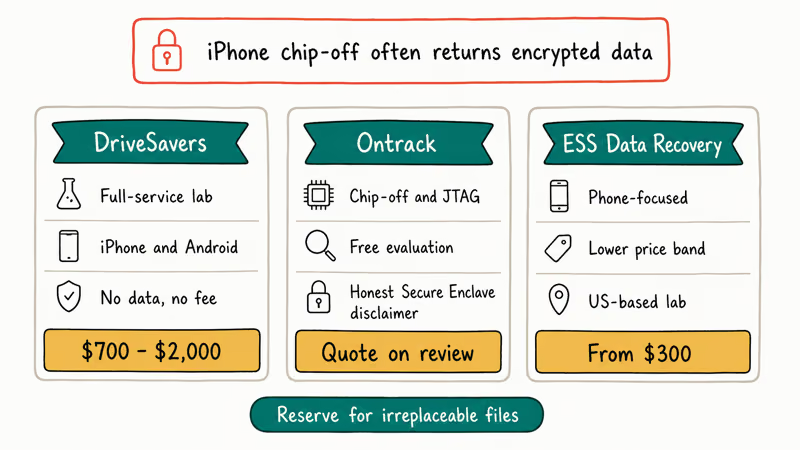
Three established providers handle both iPhone and Android:
- DriveSavers (drivesaversdatarecovery.com), full-service lab with a no-data-no-fee policy, $700 to $2,000 typical range
- Ontrack (ontrack.com), chip-off and JTAG capable, free evaluation
- ESS Data Recovery (essdatarecovery.com), phone-focused, generally lower price band starting around $300
iPhone chip-off is harder than Android chip-off because Apple’s Secure Enclave keys are paired to specific board components, so a successful chip read often returns encrypted data the lab can’t decrypt without the original logic board (DriveSavers and Ontrack both publish honest disclaimers about this limit). Android phones running modern file-based encryption have similar but slightly different limits. Reserve clean-room recovery for irreplaceable data, and confirm the no-data-no-fee policy in writing before authorizing the work.
#How to Avoid Losing Data Next Time
Before the next phone dies, set up two automatic backups so future-you doesn’t have to read this article again. On iPhone, open Settings > Apple ID > iCloud > iCloud Backup and toggle it on. iPhone backups run nightly when the phone is plugged in, locked, and on Wi-Fi.
On Android, open Settings > Google > Backup and turn on Google One Backup. The same screen shows the date of the last successful backup. If the phone is a Galaxy, also turn on Samsung Cloud under Settings > Samsung Account > Cloud for the Samsung Notes and Health data Google doesn’t capture.
#Recovery by Data Type
Match the data you actually need against this list before deciding which method to invest time in.
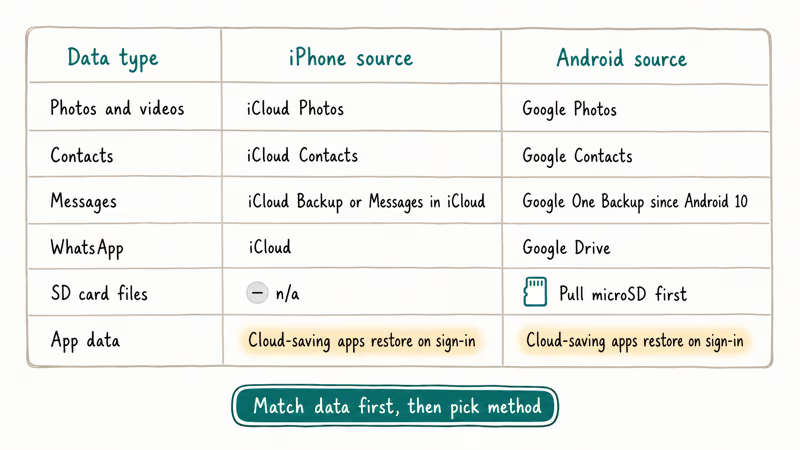
Photos and videos. iCloud Photos for iPhone, Google Photos for Android. Both are usually already in the cloud. For Android specifically, our Android photo recovery covers the post-factory-reset case.
Contacts. iCloud Contacts and Google Contacts both default-sync. Sign into the same account on a new phone and they restore automatically. Phone-only contacts saved locally need our Android contacts recovery walkthrough.
iMessage and SMS. iMessage restores from iCloud Backup or Messages in iCloud. Both controlled in Settings > Apple ID > iCloud.
Android SMS has been backed up by Google One Backup since Android 10, only when the phone met the conditions. Check one.google.com/storage > Backups for the most recent backup date.
WhatsApp. Restores from iCloud (iPhone) or Google Drive (Android) if WhatsApp’s in-app backup was on (Settings > Chats > Chat backup). Our WhatsApp data recovery guide covers both paths.
SD card files. If your dead Android had a microSD card, pull it out first. The data is independent of the phone. Insert into a card reader or another Android. Our free SD card recovery guide covers cards that have themselves become corrupted.
App data. Mixed bag. Cloud-saving games like Pokémon GO restore on sign-in. Banking apps store nothing locally; sign in fresh on the new device after re-downloading from the App Store or Play Store and re-enrolling biometric or two-factor methods.
For the broader Android-specific walkthrough with deeper OEM coverage, see our companion recover data from broken Android devices guide.
#Bottom Line
Sign in to iCloud.com or your Google Account in a browser before doing anything else. That single step recovers most data on most dead phones in 15 minutes flat. Only pay for UltData for iPhone or dr.fone for Android once you’ve confirmed the cloud isn’t enough, and reserve a $1,000+ clean-room job for files you can’t afford to lose.
#Frequently Asked Questions
Can I recover data from an iPhone that won’t power on at all?
Not with any DIY tool. Take the iPhone to an Apple Authorized Service Provider first.
If a battery or charging-port repair brings it back to life, your data is intact. If the logic board itself is destroyed, restore from your most recent iCloud or iTunes backup onto a replacement device. Apple’s Secure Enclave keys are paired to the original logic board, so even a clean-room chip read often returns encrypted data the lab can’t decrypt.
What if I find someone else’s dead phone?
Don’t try to extract data from it. Accessing data on a device you don’t own is unauthorized access under the US Computer Fraud and Abuse Act, the UK Computer Misuse Act 1990, and similar laws elsewhere. Hand the phone to local police or return it through the lock-screen owner-contact info that most iPhones and Android phones display when locked.
Are “iCloud unlock” services legitimate recovery options?
No. Never pay one.
These services claim to bypass iCloud Activation Lock or Google Factory Reset Protection. They’re circumventing security mechanisms protected by the DMCA and the CFAA, and typically work by exploiting stolen Apple IDs or pushing fraudulent device-ownership claims to Apple support. The legitimate path for an Activation Lock you can prove is yours is to sign into appleid.apple.com with the original Apple ID, or to walk into an Apple Store with proof of purchase.
Can I recover data from a deceased family member’s iPhone?
Yes, through Apple’s Digital Legacy program. The account owner needs to add Legacy Contacts before death, or you need a court order plus a death certificate to request access afterward. Apple supervises the access.
For Android, Google offers an Inactive Account Manager that lets account owners pre-authorize trusted contacts. Some US states require formal probate before extracting any data, so check with a probate attorney before paying for clean-room work.
Does iCloud Backup actually contain my iMessages?
Yes, when iCloud Backup is enabled and Messages in iCloud is also on. The two settings interact: Messages in iCloud syncs the live message database across devices, and iCloud Backup snapshots the encryption key needed to decrypt that database on the new phone. Open Settings > Apple ID > iCloud on a working iPhone signed into the same account to confirm both are on.
Is it safe to charge a water-damaged phone before trying recovery?
No. Power it off and air-dry for 48 hours minimum. Don’t put it in rice. Then try a normal cable connection.
Do paid recovery tools like UltData work without the original passcode?
For iPhone, no. The encrypted iTunes or iCloud backup still needs the device passcode (for iCloud) or the backup encryption password (for iTunes). The tools can’t crack either; Apple’s official documentation explicitly tells you to remember the password because Apple itself can’t reset it for you.
Android is more permissive over MTP, but app-protected data and SMS stores still need USB debugging to have been on before the phone broke.
Can my employer’s IT team recover data from a dead work iPhone or Android?
For employer-owned BYOD devices the answer depends on the enrollment. If the phone is enrolled in MDM (Mobile Device Management), IT can usually restore the managed-app backup and the corporate mailbox to a replacement device, but the path varies a lot between Microsoft Intune, Jamf, VMware Workspace ONE, and the smaller players.
Personal data on a BYOD phone often falls outside that managed backup. Talk to your IT team first; some MDM profiles trigger a remote wipe on tampering attempts.

Mac mini M6 vs M5 Pro: Which Model Should You Buy?
Mac mini M6 vs M5 Pro compared on price, memory, ports, displays, and real workloads. Find the better 2026 Mac mini for your desk and budget.

Apple Siri Settlement: Who Qualifies and How to Claim
Apple's $250 million Siri settlement covers iPhone 15 Pro and iPhone 16 models bought June 2024 to March 2025. See who qualifies and how claims work.

iOS 26.6.1 Security Update: What Apple Fixed and Who Gets It
Apple released iOS 26.6.1 on August 17 with 29 security fixes, including an IPSec interception bug. See what it patches, who gets it, and how to update.

iPhone Adaptive Power: How It Works and When to Use It
Learn how iPhone Adaptive Power works, which models support it, what it changes, and when Low Power Mode is still the better battery-saving choice.