Recover Data From Your Broken Android Phone: 5 Legit Ways
Recover your own data from a broken Android phone in 2026. Google Account, Samsung Cloud, ADB, paid software, and clean-room services compared.
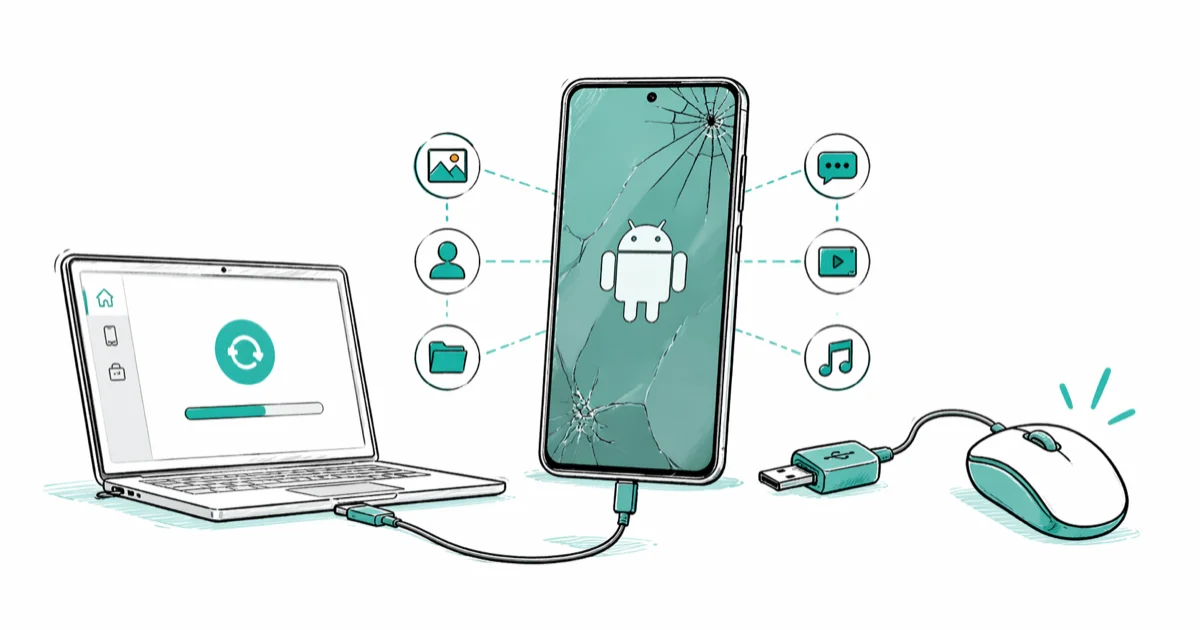
Quick AnswerSign in to your Google Account on a new device or any browser first. Most photos, contacts, and messages are already backed up. Use Samsung Cloud, Mi Cloud, or paid recovery software for what's missing.
This guide is for recovering data from an Android phone you own. Cracked screen, water damage, dead battery, or a soft-bricked OS after a failed update.
The five paths below work for cracked-screen, water-damaged, dead-battery, and soft-bricked cases. Try them in order.
This article assumes the phone is yours. Pulling data off a device that isn’t yours, even one you found on a sidewalk, is unauthorized access under the US Computer Fraud and Abuse Act and the UK Computer Misuse Act 1990. Return found phones via the lock-screen owner contact or hand them to local police.
- Sign in to your Google Account first because Photos, Contacts, Drive, and Backup are likely already there
- Samsung Cloud, Mi Cloud, Huawei Cloud, and OnePlus Account hold a second copy on most OEM devices
- ADB pull or Smart Switch over USB works if the phone still boots and USB debugging was on
- Paid software like dr.fone or UltData costs $50 to $80 and handles boot-loop or soft-brick cases
- Clean-room services run $300 to $2,000 and are reserved for fully dead devices with irreplaceable files
#Start With Your Google Account
Before plugging anything in, sign in to the Google Account that was on the broken phone from any browser.
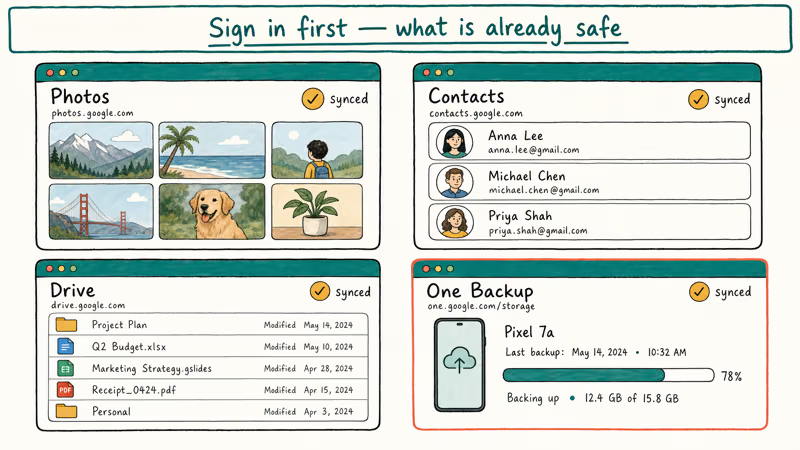
According to Google’s Android backup documentation, Google One Backup automatically covers contacts, call history, SMS, device settings, app data, and Wi-Fi passwords whenever the phone is charging, idle, and connected to Wi-Fi. Google Photos handles photos and videos separately through its own sync setting, which you can confirm at photos.google.com on any browser regardless of the broken phone’s state.
Open these four pages in order and you’ll know exactly what’s already safe:
- photos.google.com for every backed-up photo and video
- contacts.google.com for synced contacts
- drive.google.com for files saved to Drive
- one.google.com/storage for full backup history per device
Signing into the same account on a fresh phone restores your synced photos, contacts, and Wi-Fi list automatically, usually within minutes. The common gaps are recent WhatsApp chats and any SMS from the hours just before the break. If your photo backup was paused at the time of the break, our Google Photos not backing up guide walks through fixing it on the new device.
#What If You Use Samsung, Xiaomi, or Another Brand-Specific Cloud?
Most major OEMs run a parallel backup that captures things Google doesn’t. Sign into the manufacturer account on any browser to surface them.
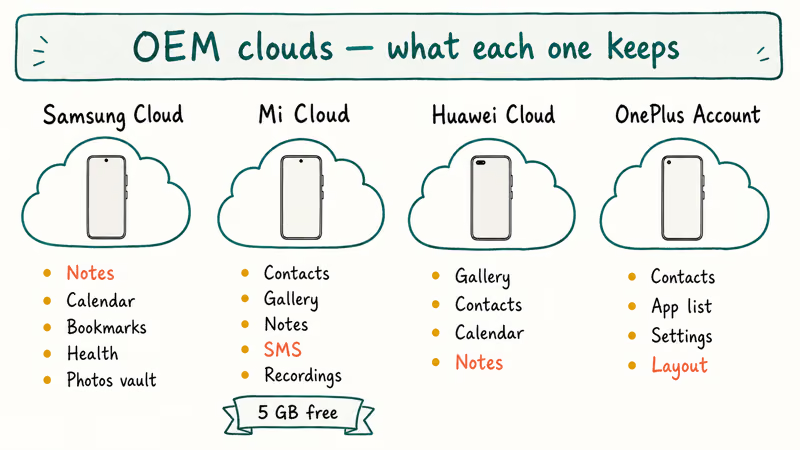
Samsung Galaxy owners get Samsung Cloud, which holds Notes, Calendar, Samsung Internet bookmarks, Reminder, Samsung Health, and a separate Photos vault. Sign into your Samsung Account at account.samsung.com and check My Page > Cloud.
Xiaomi devices use Mi Cloud, which mirrors contacts, gallery, notes, recordings, and SMS on a 5 GB free tier.
Huawei HMS devices use Huawei Cloud (cloud.huawei.com) for gallery, contacts, calendar, and notes; OnePlus ships an OnePlus Account with a Switch app that holds contacts, app list, system settings, alarms, ringtone choices, and home-screen layout, all of which restore on first sign-in to a new OnePlus device with the same account.
On Galaxy phones, Samsung Cloud restores Samsung Notes that Google Keep never touches, and it keeps the original-resolution copy of every Samsung Camera shot.
#Pull Files Over USB if the Phone Still Boots
If the phone powers on and the screen displays anything, even just a charging icon or a stuck boot logo, there’s a good chance you can extract files over USB without touching the broken display.
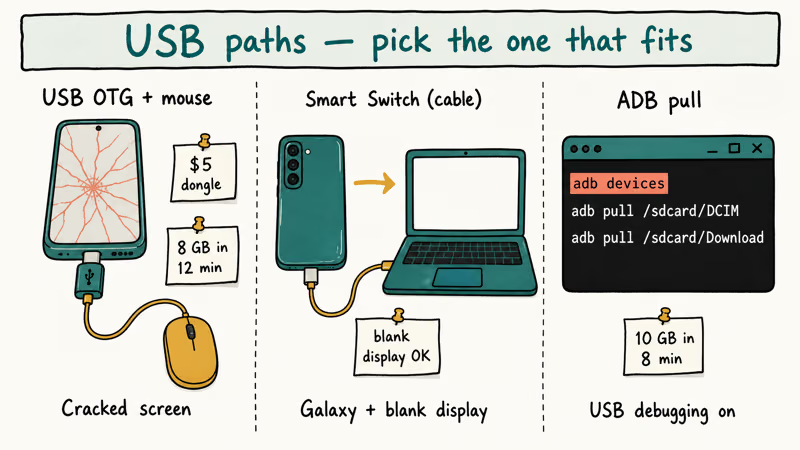
A USB OTG (On-The-Go) adapter solves the cracked-touchscreen case for about $5. Plug it into the phone’s USB-C port, connect a regular wired mouse, and a cursor appears so you can drive the Files app. From there you can copy photos to a flash drive even with a shattered front panel. Our enable USB debugging on a broken screen guide covers what to do when even the cursor route fails.
For black-screen but still-powering phones, three legitimate cable methods work:
| Method | Best For | What You Need |
|---|---|---|
| Samsung Smart Switch (cable) | Galaxy phones, blank display | Smart Switch on PC, USB-C cable |
| Android File Transfer / MTP | Any Android, photos and downloads | USB cable, file manager on PC |
| ADB pull | Any Android with USB debugging on | Android SDK Platform Tools |
Smart Switch’s cable mode pulls contacts, messages, photos, and app data off a Galaxy device even when the screen never turns on. According to Samsung’s Smart Switch overview, the desktop client supports phone-to-PC backups in addition to phone-to-phone transfers. If the process gets stuck mid-transfer, our Smart Switch stuck guide covers the common timeouts.
ADB requires that you turned on USB debugging before the phone broke. You can’t enable it remotely. If it was on, install Android SDK Platform Tools, connect via USB, accept the RSA prompt if it shows, and run:
adb devices
adb pull /sdcard/DCIM ./recovered-photos
adb pull /sdcard/Download ./recovered-downloads
adb pull /sdcard/WhatsApp ./recovered-whatsapp
A large photo library transfers in a few minutes over a USB 3.0 connection.
#When Should You Pay for Recovery Software?
Pay for recovery software only when the phone won’t fully boot but a PC still detects it as a device, and only after free options have already pulled what they can. The legitimate paid tools cost $50 to $80 for a single-device license. Buying the proper license matters: cracked or torrented copies of these tools are a common malware vector.
dr.fone Android Data Recovery has a “Recover from Broken Phone” mode that walks you through Download Mode with hardware buttons only. A standard scan pulls photos, contacts, and call history fairly quickly, while a longer deep scan adds SMS, contact photos, and deleted-file recovery over a couple more hours. Our dr.fone Android review compares the recovery and repair modes side by side.
Some links on this page are affiliate links, which means fone.tips may earn a commission at no extra cost to you.
Tenorshare UltData for Android follows the same pattern. Tenorshare states that UltData supports 6,000+ Android models, with the broken-phone mode currently limited to Samsung Galaxy series in their software. EaseUS MobiSaver and iMobie PhoneRescue are two other licensed options in the same price bracket.
If the free Google, OEM cloud, and USB routes didn’t recover what you need, DroidKit is another desktop scan option for a phone that still powers on and connects over USB.
A few honest caveats:
- These tools can’t resurrect a phone that won’t power on. They communicate with the phone over USB, which needs working power and a working USB controller.
- Manufacturer-specific encryption (Samsung Knox, modern Pixel encryption) often blocks app-specific data even when the tool runs.
- Free trial scans usually work; “Recover” almost always requires the paid license. Plan on the $50 to $80 spend before starting.
For SMS specifically, our Android SMS recovery guide covers which tools actually pull readable text databases versus the ones that report “found” messages but can’t extract them.
#Professional Clean-Room Recovery for Fully Dead Devices
When the phone won’t power on at all (no charging icon, no vibration, no PC detection), DIY ends. The remaining option is a clean-room data recovery service that physically removes the eMMC or UFS storage chip and reads it on specialized equipment.
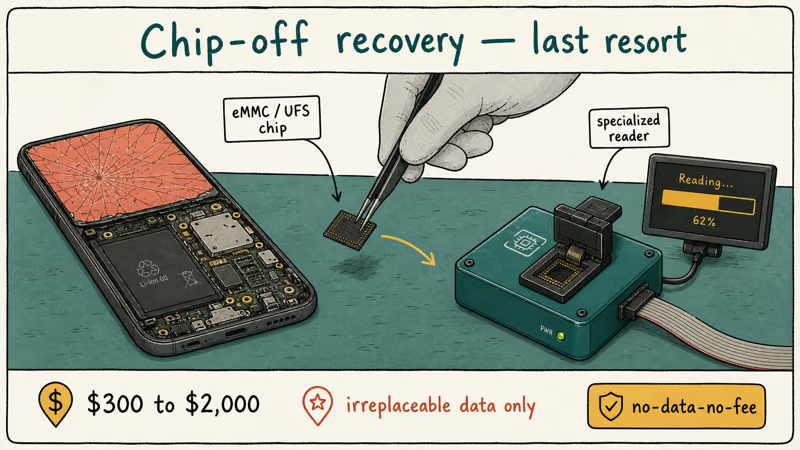
Three established providers handle Android phones:
- DriveSavers (drivesaversdatarecovery.com), a full-service lab with a no-data-no-fee policy and a $700 to $2,000 typical range for phones
- Ontrack (ontrack.com), chip-off and JTAG capable, with a free evaluation
- ESS Data Recovery (essdatarecovery.com), phone-focused, generally lower price band starting around $300
Based on iFixit’s Android phone teardowns, the storage chip can survive intact even when the screen, battery, board, or USB port are destroyed. That’s why chip-off recovery succeeds on phones that look completely dead.
Reserve this option for irreplaceable data only. Examples include only-copy photos of someone who has died, unbacked business records, or evidence files. For routine data loss where the alternative is just “rebuy the phone and accept the gap,” the math rarely favors a $1,000 recovery bill that might still come back empty-handed depending on the storage chip’s physical state and whether the device used full-disk encryption with keys living only in a destroyed secure element.
#Recovery by Data Type
Different data types have different recovery paths and different odds. Match the data you actually need against this list before deciding which method to invest time in.
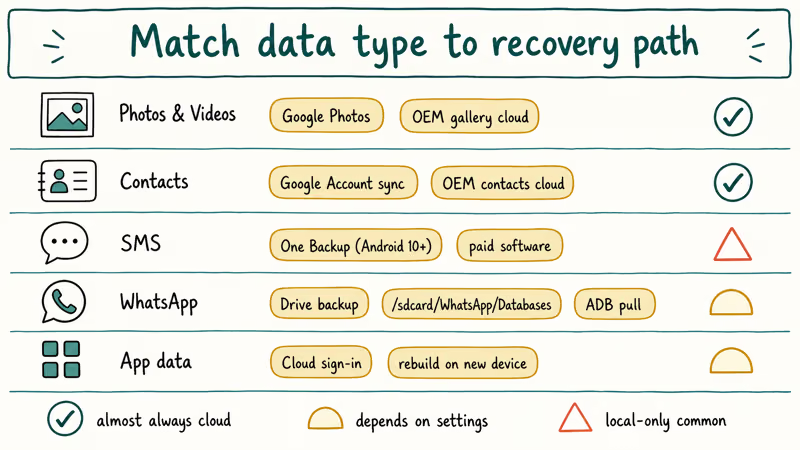
Photos and videos are almost always already in Google Photos. Check photos.google.com first; if missing, see our Android photo recovery guide.
Contacts default-sync to Google. Sign into the same Google Account on a new phone and they restore automatically. Phone-only contacts (saved to “Phone” rather than “Google”) need our Android contacts recovery walkthrough.
SMS / Text messages have been backed up by Google One Backup since Android 10, but only when the phone met the conditions (Wi-Fi + idle + charging). Check one.google.com/storage > Backups for the most recent backup date. For older messages or local-only databases, recovery software is the path.
WhatsApp restores from Google Drive if WhatsApp’s in-app backup was on (Settings > Chats > Chat backup). Local-only chat databases live at /sdcard/WhatsApp/Databases/ and can be ADB-pulled or recovered with software. Our WhatsApp data recovery guide covers both paths.
App data is mixed. Cloud-saving games like Pokémon GO restore on sign-in. Banking apps store nothing locally, so just sign in fresh on the new device after downloading them again from the Play Store and re-enrolling any biometric or two-factor methods that the bank requires for first-time device activation, which often includes a one-time SMS or email code that the previous broken phone might have intercepted.
#Bottom Line
Try the cheap paths first. Sign into Google, check Samsung Cloud or Mi Cloud, plug in over USB or Smart Switch, then pay for software only if the phone still half-boots. Never pay $1,000+ for clean-room recovery before checking what’s already in Google’s data centers.
#Frequently Asked Questions
Can I recover data from an Android phone that won’t power on at all?
Not with any DIY method, since every software tool needs the phone to present a USB connection. Professional clean-room services like DriveSavers and Ontrack can desolder the storage chip and read it directly. Pricing runs $300 to $2,000 with no-data-no-fee policies, so reserve this option for truly irreplaceable files.
What if I find someone else’s broken Android phone?
Don’t try to extract data from it. Even with the best intentions, accessing data on a device you don’t own is unauthorized access under the US Computer Fraud and Abuse Act, the UK Computer Misuse Act 1990, and equivalent laws elsewhere. Hand the phone to local police or attempt to return it through the lock-screen owner contact info that most Android phones display when locked.
Does Google Backup actually contain my SMS messages?
Since Android 10, yes, if the phone met the backup conditions. Open one.google.com/storage > Backups to see the most recent backup date for each device.
Is it safe to charge a water-damaged Android before trying recovery?
No. Charging a wet phone shorts the board. Power it off and air-dry for 48 hours.
Can my employer’s IT team recover data from a work BYOD Android?
For employer-owned BYOD devices, the answer depends on your enrollment. If the phone is enrolled in MDM (Mobile Device Management), IT can usually pull a managed-app backup, while personal data on a BYOD phone often falls outside that backup. Talk to your IT team before attempting personal recovery, since some MDM profiles wipe the device on tampering attempts.
Do paid recovery tools work without USB debugging being enabled?
For photos, downloads, and music in standard folders, yes. Most tools access those over MTP without debugging. For app-protected data, system databases, or app-specific SMS stores, debugging usually had to be on before the phone broke. The paid tools advertise “no debugging needed” modes, but those modes have lower success rates and depend on the specific Samsung or LG model.
What’s the difference between dr.fone and Tenorshare UltData?
Both cost $50 to $80 and run similar USB scans. dr.fone has the more polished broken-phone walkthrough; UltData supports a wider model list. Run both free trial scans before paying for either.
Can I recover data from a deceased family member’s Android phone?
Even with family permission, this gets legally tricky. Some courts have ruled against next-of-kin extracting data without explicit estate authorization, and several US states require formal probate before accessing the deceased’s accounts. Google offers an Inactive Account Manager that lets account owners pre-authorize trusted contacts. For phones already locked, contact a probate attorney before investing in clean-room recovery.

Pixel 11 vs Pixel 10: What Changed and Who Should Upgrade
Pixel 11 vs Pixel 10: same screen and camera resolution, new Tensor G6, 25W wireless, and Gemini Intelligence. Here is who should actually upgrade.

Verizon Not Receiving Texts? How to Fix It in 9 Steps
Verizon not receiving texts? Fix it in 9 steps: check Message Blocking in My Verizon, reset network settings, deregister iMessage, and call support.

Pixel Battery Drain: What Google's July Fix Really Covers
Google marked the Pixel idle battery drain bug fixed in July, but only some phones got the patch. Here is who is covered, who is not, and what to try.

iPhone Stuck on EDGE? How to Get 5G or LTE Back (2026)
iPhone stuck on EDGE with crawling data? Here's why the E icon appears, which settings force 5G or LTE back, and when the problem is your carrier.