Random People Adding You on Snapchat? Stop It in 7 Steps
Random strangers adding you on Snapchat? Lock down Quick Add, phone-number discovery, Story visibility, Snap Map, and fake-account reports step by step.
Quick AnswerOpen Settings, tap Privacy Controls, and switch Contact Me, View My Story, and See My Location to "Friends Only." Disable mobile-number visibility, turn on Ghost Mode, and report any account that keeps friending you after you block it.
Random strangers adding you on Snapchat almost always trace back to one of four sources: Quick Add suggestions, leaked contact lists, Discover ad targeting, or fake-account spam waves. The fixes below lock down the discovery settings that expose your profile to people you don’t know.
- Quick Add (now called Find Friends) is responsible for most “I don’t know this person” adds; turn its visibility toggle off in Privacy Controls
- Anyone who has your phone number saved can find you on Snapchat even if you never uploaded your contacts; disable Mobile Number from Settings to break that link
- Family Center is Snapchat’s official parental dashboard, showing a teen’s friend list and chats from the past 7 days without revealing message content
- Block plus Report is the one-two punch: blocking alone hides you, reporting feeds Snapchat’s Trust and Safety queue and pulls fake accounts faster
- If your email or phone leaked in a breach, random adds usually spike for 2 to 4 weeks; tighten privacy and rotate exposed credentials
#Why Are Random People Adding Me on Snapchat?
Most unwanted friend requests come from one of four sources. Knowing which source explains why your inbox keeps filling up.
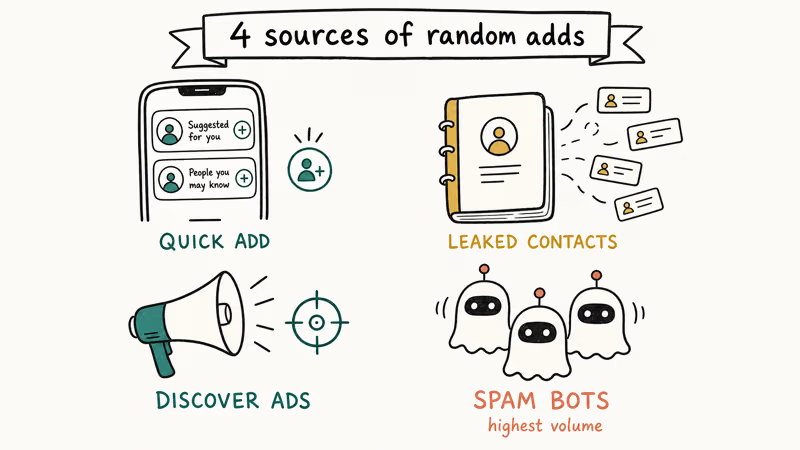
Quick Add suggestions push your profile to friends-of-friends, contacts, and people in similar location clusters. According to Snapchat’s Find Friends help page, the algorithm weighs mutual friends, phone contacts, age range, and “reputation” signals to decide who sees you. If even one acquaintance has your number saved on their phone, you can surface in their Quick Add list, and theirs in yours.
Leaked contact lists are the second pipeline. When somebody else’s address book gets scraped, or a third-party app syncs contacts upstream, your number ends up tied to a Snapchat profile that strangers can search. A breach-monitoring tool like Have I Been Pwned confirms whether your email or phone is part of a known breach.
Discover ad targeting sometimes funnels users toward “follower swap” gimmicks that pull in random friend requests. Fake-account spam waves are the loudest source of all. Bot networks blast out hundreds of friend requests per hour, often spiking around major news events or celebrity scandals.
Find Friends visibility is the first setting to disable because it controls whether Snapchat recommends your profile to people who may not know you.
#How to Lock Down Snapchat Privacy in 7 Steps
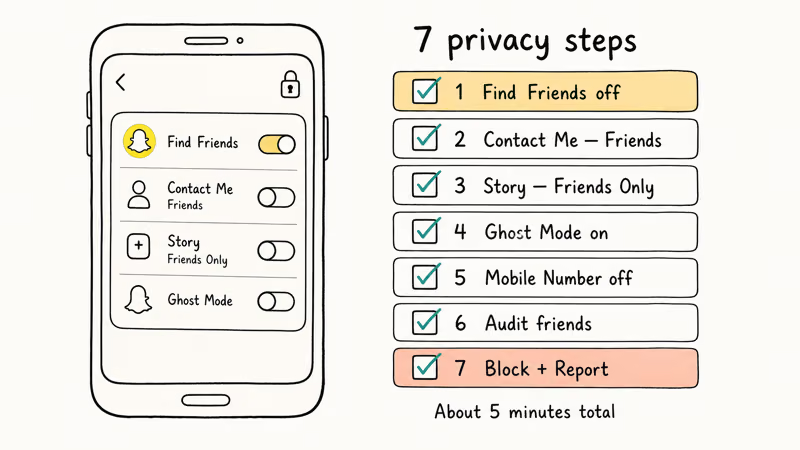
These seven changes take about five minutes total. Apply them on the device you own, signed into your own account.
#1. Turn Off Find Friends Visibility
Open Snapchat, tap your profile icon in the top left, then the gear icon. Scroll to Privacy Controls > See Me in Quick Add and switch the toggle off. Snapchat warns the change can take up to 72 hours to fully propagate, so expect a few residual requests during that window.
#2. Restrict Contact Me to Friends
In Privacy Controls > Contact Me, switch from “Everyone” to “Friends.” Strangers can still send a request, but they can’t message or call you until you accept. This single change cuts unsolicited DMs to zero overnight.
#3. Limit Story Visibility
Tap View My Story and pick Friends Only, or use Custom to exclude specific accounts. Public Stories leak location clues that scrapers grab to build profile fingerprints. Coffee shops, school logos, license plates, mall signage: all of it ends up indexed.
#4. Enable Ghost Mode on Snap Map
Open the Map, tap the gear icon, and toggle Ghost Mode on. Snapchat’s Snap Map privacy guide confirms Ghost Mode hides your Bitmoji from every other user on the map, including current friends.
#5. Disable Mobile Number Discovery
Go to Settings > Mobile Number and uncheck Let others find me using my mobile number. This severs the contact-list pipeline that feeds most random adds. The toggle is opt-out by default, so leaving it on means anyone who saves your number can match it to your handle.
#6. Audit and Remove Unknown Friends
Tap the profile icon, then My Friends. Long-press anyone you don’t recognize, choose Manage Friendship, and tap Remove Friend. They aren’t notified.
#7. Block Plus Report Repeat Offenders
If the same handle keeps requesting after a remove, long-press the name and tap Block, then immediately Report. Snapchat’s Trust and Safety team handles reports 24/7 and often pulls flagged fake accounts within a few hours. Blocking alone hides you, but reporting helps protect everyone else from the same account.
#What Family Center Does for Parents of Teen Users
Family Center is Snapchat’s official parental dashboard, built specifically for parents of minor children aged 13 to 17. It’s not a spy tool. It’s a consent-based supervision feature that requires both the parent and the teen to opt in from their own accounts.
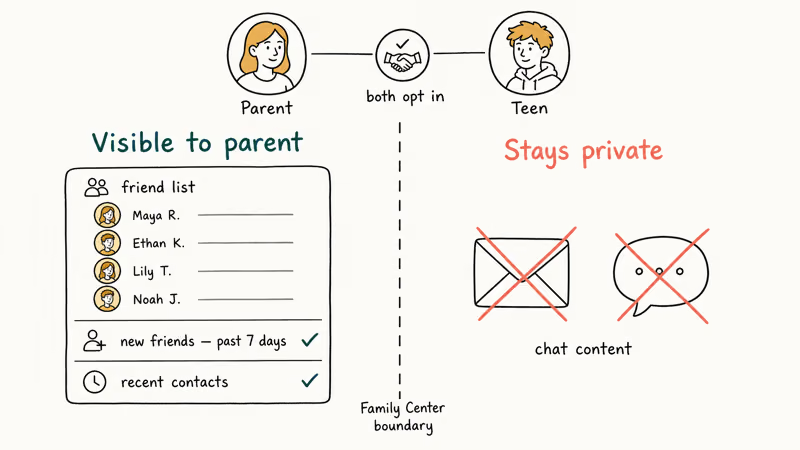
Once paired, you can see your teen’s complete friend list, the accounts they messaged in the past 7 days, and any new friends they added during that window. The actual chat content stays private. Family Center shows who, not what.
According to Snapchat’s Family Center guide, parents can also report concerning accounts directly from the dashboard, which routes the report straight to Trust and Safety with the teen’s account context attached. To set it up, both you and your teen open Snapchat, search the Family Center profile in the search bar, and accept the linking invitation.
If your teen is under 13, Snapchat blocks account creation entirely. For broader Snapchat oversight beyond the in-app dashboard, our guide on how to monitor Snapchat for free walks through the legitimate options for parents of minors.
#Are Random Snapchat Adds Dangerous?
Most are harmless curiosity or bots. A small slice are genuine threats, and that slice is what privacy controls exist to filter out.
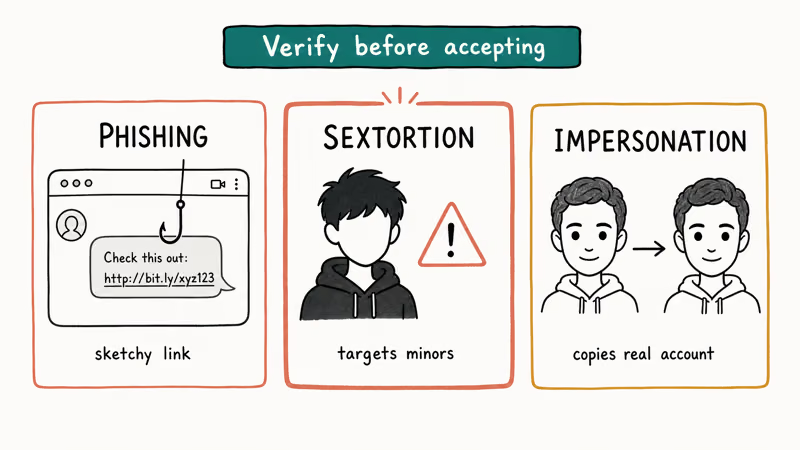
The real threats fall into three categories. Phishing accounts send a friend request, then drop a sketchy link the moment you accept. Sextortion scams target teens specifically, posing as peers to extract images and then demand payment.
The FBI’s 2024 alert on financial sextortion reported that minors are the primary targets and that perpetrators routinely use Snapchat and Instagram. Impersonation accounts copy a real person’s name and Bitmoji to trick that person’s friends into sharing personal information.
Verify before accepting. Real accounts have a Snap score above zero, public Bitmoji, and at least one Story or memory in their history. A brand-new profile with no activity is almost always a bot or a throwaway.
If you suspect somebody is impersonating a friend, run a social media search by phone number or check whether you can see mutual friends on Snapchat to confirm the connection is real. Both methods are free and take under a minute.
#What to Do If Your Snapchat Info Was in a Data Breach
Breach exposure is the underrated reason random adds spike. When your phone number or email leaks, scrapers tie it to your Snapchat handle and either sell the list or feed it directly into spam bot networks.
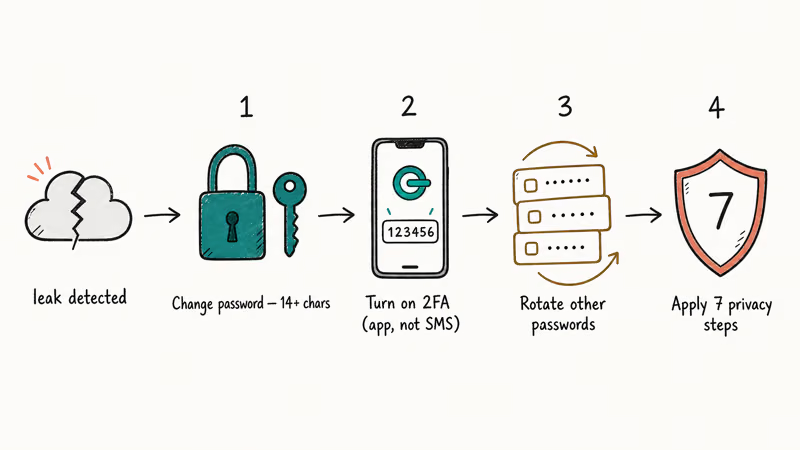
Check your status at Have I Been Pwned, which indexes credentials exposed across thousands of known data breaches. Type your email and your phone number separately. If either appears in a known breach, follow these four moves in order.
First, change your Snapchat password to something at least 14 characters long with mixed symbols. Second, turn on two-factor authentication under Settings > Two-Factor Authentication, picking the authenticator-app option rather than SMS. SIM-swap attacks bypass SMS codes routinely.
The FCC’s 2024 SIM-swap rules require carriers to add layered verification before SIM transfers. Third, rotate the password on every other account that shared the leaked credential. Fourth, apply the seven privacy steps above to dampen the inevitable add wave.
Expect random adds to keep trickling in for 2 to 4 weeks after a breach as bot networks process the leaked list. The privacy controls won’t stop the requests from being sent, but they will stop strangers from finding you organically once the bot list ages out. Resetting your handle is a nuclear option that works, but you’ll lose Snap streaks and existing chat history.
#How to Report a Fake Snapchat Account
Reporting is the only way to get a fake or impersonating account taken down. Snapchat’s Community Guidelines prohibit impersonation, harassment, and coordinated spam, and the company removes flagged accounts that violate them. Account takedowns are not automatic. Somebody has to flag the account first.
To report, tap and hold the profile, choose Manage Friendship, then Report. Pick the most accurate category: Pretending to be someone else for impersonation, Harassment or hateful content for abusive behavior, Spam for friend-request bombardment. Add a short description if the form lets you.
For impersonation of yourself or a public figure, Snapchat has a dedicated impersonation report form that asks for proof of identity. Submitting through this form usually gets a response within 48 hours, faster than the in-app report queue.
If the impersonation is causing real-world harm such as extortion, threats, or harassment escalating offline, report it to local law enforcement as well. Online harassment may violate state cyberstalking laws depending on jurisdiction, and federal cyberstalking statutes apply when threats cross state lines. The FBI’s Internet Crime Complaint Center (IC3) accepts reports for the federal layer.
#Common Mistakes That Invite More Random Adds
Three habits keep the friend-request flood going even after you tighten privacy.
Sharing your Snapcode or Bitmoji on public TikTok, Instagram, or X profiles defeats every privacy control on this page. Bots scrape those platforms hourly and feed the codes into automated friend-request scripts. Keep your Snapcode off any public bio.
Joining “follow trains” or “add me” subreddits drops your username into shared lists that circulate for years. The lists often resurface in spam tools long after the original thread dies. The same goes for third-party “directory” sites that promise to grow your friend count.
Leaving old, unused Snapchat accounts logged in on shared devices invites somebody else to add random people from your profile. If you no longer use a secondary account, learn how to log out of Snapchat on every device, or delete the account entirely from Settings > Account Actions > Delete My Account.
If you’re juggling multiple legitimate accounts, our guide on running two Snapchat accounts on iPhone covers the safe ways to do it without exposing either profile to extra random adds.
Apple’s iOS-level privacy tools also matter. According to Apple’s privacy and security overview, apps that request your contacts must declare a clear purpose, and you can revoke contact access for Snapchat from Settings > Snapchat > Contacts at any time. Revoking access stops Snapchat from re-uploading your address book, a small but useful belt-and-suspenders fix.
#Bottom Line
Flip Find Friends visibility off first. Then disable mobile-number discovery, switch Contact Me to Friends, and turn on Ghost Mode. Block plus Report any account that survives those four changes, and check Have I Been Pwned if requests keep arriving in waves.
#Frequently Asked Questions
Why do strangers keep adding me on Snapchat even after I tighten privacy?
Settings changes can take up to 72 hours to fully propagate, so requests already in flight will still arrive. If the trickle continues past three days, your phone number or email is probably in a leaked contact list, and bots are pinging the username they tied to those credentials.
Is it illegal for someone to add me on Snapchat without knowing me?
Sending a friend request is not illegal on its own. Harassment, threats, sextortion, and impersonation that cause real-world harm violate state and federal laws in many jurisdictions, and Snapchat’s own Community Guidelines treat them as removable offenses. Report any account that crosses that line through Snapchat plus your local police if it escalates offline.
Does blocking somebody on Snapchat notify them?
No. The blocked account simply stops seeing your profile, story, and Snap Map presence. They might notice indirectly when your username no longer appears in mutual chats, but Snapchat does not push a “you’ve been blocked” alert.
How can parents see who is adding their teen on Snapchat?
Snapchat’s official Family Center dashboard shows a teen’s complete friend list and recent contacts, but only after both the parent and the teen opt in from their own accounts. It does not reveal chat content. Parents who want broader oversight should pair Family Center with a network-level parental control router on home Wi-Fi.
What does Ghost Mode actually hide?
Ghost Mode hides your Bitmoji and live location from every other Snapchat user on Snap Map, including existing friends. It does not hide your profile from search, your Stories from approved viewers, or your username from Quick Add suggestions. Each of those needs a separate toggle.
Will deleting and reinstalling Snapchat stop random adds?
Reinstalling alone won’t stop them, because your account, contact list, and Quick Add visibility persist on Snapchat’s servers. Privacy controls follow your account, not the app install. Apply the seven settings changes above first.
How do I know if a Snapchat friend request is from a bot?
Bot accounts usually have a Snap score of zero or very low, no Bitmoji, no public Story, and a username that mixes random numbers and letters. Real people almost always have at least one Story, a customized Bitmoji, and a Snap score above 1,000 within a week of signup.
Can someone find my Snapchat using only my phone number?
Yes, by default. Anyone who saves your number to their phone contacts can match it to your Snapchat handle. Disable this in Settings > Mobile Number by unchecking Let others find me using my mobile number. The change applies to new searches but doesn’t retroactively remove you from existing contact-match lists.

Google Messages Error 3100: Why RCS Is Broken on Galaxy
Google Messages RCS error 3100 hits Galaxy owners after phone or carrier switches. Google told 9to5Google a fix is coming. Here's what actually helps.

Is This Bank App Real? Spot a Fake App on Your Home Screen
A bank app can land on your home screen from a web page with no install warning. Learn the checks that tell a real banking app from a phishing web app.

Apps Crashing After iOS 27 Update? Fix Order (2026)
Apps crashing after the iOS 27 update? Update the app in the App Store first, then offload and reinstall to clear stale cache, then restart. The fix order.

Do AI Translation Earbuds Work Offline? What to Know
Do AI translation earbuds work offline? A few do with downloaded language packs, but most need the cloud. Here's what works offline and what you give up.