How to Monitor Snapchat for Free: Family Center Guide
Set up Snapchat Family Center for free to oversee a minor's friends, chats, and content limits. Includes legal warnings and self-protection signs.
Quick AnswerSnapchat's free Family Center is the official way to oversee a minor child's account: link your parent account, accept the invite from your teen, and review their friends list, recent chats, and content controls without reading any private messages. Monitoring another adult's Snapchat without consent is illegal under federal wiretap and stalking laws in all 50 states.
If you want to monitor Snapchat for free without paying for spy software or installing tracking apps on your child’s phone, Snapchat’s official Family Center is the only legitimate path. This guide maps out what parents actually see, where Family Center stops, and which legal lines no app on either device can let you cross.
- Snapchat Family Center is free and built into the Snapchat app, so no third-party spyware is needed for parents who want to oversee a minor child’s account.
- Family Center shows a teen’s full friends list, the accounts they’ve messaged in the last 7 days, and lets parents enforce content filters, but never the contents of any chat.
- Both the parent and the teen must have Snapchat accounts and meet Snapchat’s minimum age rules, and the teen has to accept the parent’s invite before any data appears.
- Monitoring another adult’s Snapchat without consent can violate federal wiretap law under 18 U.S.C. § 2511 and state stalking statutes in all 50 states, with penalties up to 5 years in federal prison.
- If you’re worried about your own Snapchat being monitored, open
Settings>Account Actions>Sessions, sign out any unknown device, then turn on two-factor authentication.
#What Family Center Shows Parents (and What It Doesn’t)
Snapchat built Family Center as a deliberate compromise between parental oversight and teen privacy. It’s the only first-party Snapchat tool that lets parents see anything about a teen’s account, and it shows less than most parents expect.
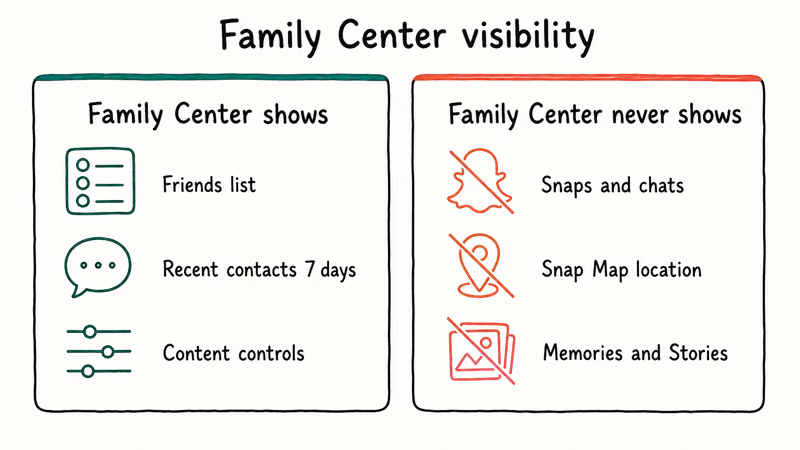
According to Snapchat’s Family Center help page, a linked parent can view their teen’s friends list and the accounts the teen has communicated with in the last 7 days. The page states that Family Center never exposes the contents of any Snap, chat, story, or saved Memory, and Snap Map location history stays private as well.
Once the invite is accepted, the parent account sees the teen’s full friends list and recent contacts in the linked dashboard. The dashboard lists display names and Bitmoji avatars, but tapping a contact never opens a thread.
What Family Center includes:
- The teen’s friends list, with each Snapchat display name and Bitmoji
- Every account the teen has messaged with in the last 7 days (one-way and two-way)
- Content control toggles to filter sensitive content from Stories and Spotlight
- A built-in reporting flow that forwards a friend or piece of content to Snapchat’s Trust & Safety team
What Family Center never exposes:
- Snap, chat, voice, or video content of any kind
- Snap Map location history or live location
- Story views, who viewed the teen’s Story, or Spotlight history
- Snap Score breakdown, Memories, or My Eyes Only content
That trade-off matters. Snapchat states that the design is intentional and that no covert reading-the-messages feature is planned. Parents who hoped for message visibility won’t find it inside Snapchat, and any third-party tool that claims to deliver such access is operating outside Snapchat’s terms.
#How Do You Set Up Snapchat Family Center Step by Step?
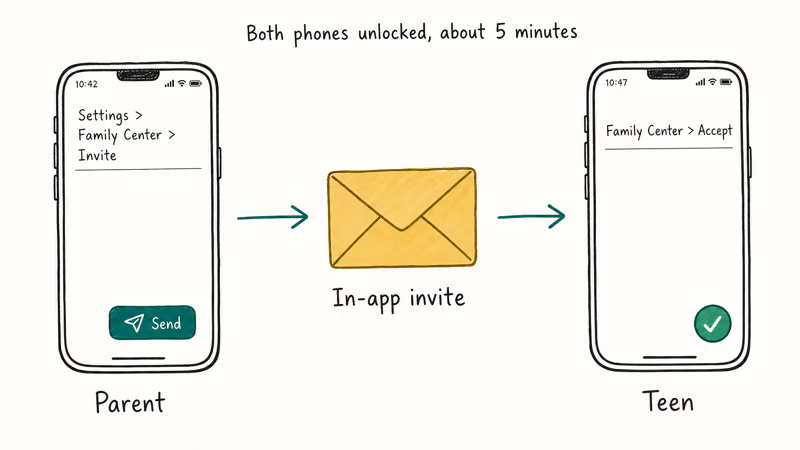
Setup takes about 5 minutes if you and your teen are in the same room with both phones unlocked. Family Center won’t activate from your side alone, so coordinate before you start.
- Verify ages first. Both accounts must meet Snapchat’s minimum age rules per its Family Center policy. The same help page also confirms the parent account has to meet a higher age threshold to invite a teen between 13 and 17.
- Open Snapchat on your phone, tap your Bitmoji icon in the top-left corner, then tap the gear icon to open Settings.
- Scroll to Family Center under the Privacy Controls section, then tap Set Up.
- Search for your teen’s username and tap Invite to Family Center. The invite arrives in their chat tab as an in-app message.
- Have your teen accept the invite from their own
Snapchat>Settings>Family Centerscreen. The link forms only after the teen taps Accept. - Review the linked dashboard to see the friends list, recent contacts, and the content control toggles you can flip without further consent.
The end-to-end flow takes only a few minutes when both phones are on the same Wi-Fi network, and the invite arrives on the teen’s phone almost immediately. If your teen ignores or hides the invite, no link forms and the dashboard stays empty, so an honest conversation matters more than the technical steps.
#Free Parental Tools That Pair Well With Family Center
Family Center handles the messaging side of Snapchat oversight. Three other free layers handle the time-and-app side, and combining them is more effective than any paid spy app:
- iOS Screen Time. When the parent’s Apple ID manages the teen’s iPhone through Family Sharing, you can set a daily limit for Snapchat under
Settings>Screen Time>App Limits, then require a passcode for changes. Screen Time syncs the cap to the teen’s iPhone within seconds, and our round-up of the best screen time apps compares the built-in tool against third-party options. - Google Family Link. Install Family Link on both the parent’s and teen’s Android devices, then set Snapchat-specific time limits, app approval, and bedtime locks. The daily cap takes effect on the teen’s phone within seconds of crossing the threshold.
- Carrier-level Family Mode. Most US carriers offer free family controls (Verizon Smart Family and AT&T Secure Family both have free tiers) that let you pause internet access for a specific device line.
If you also want to cover other apps your teen uses, these companion walkthroughs apply the same Family Center-style approach to neighboring platforms:
- Our TikTok parental controls guide covers Family Pairing and restricted mode setup.
- The Instagram parental controls walkthrough explains supervised accounts and time limits.
- For device-level Android controls, the Samsung parental controls guide explains Kids Mode and the Find My Mobile lock features.
- Parents who want to understand which dating apps appear in teen circles can also read our breakdown of teen dating apps to know about.
Combining Family Center (who your teen talks to) with Screen Time or Family Link (when and how often) gives you both the relationship view and the usage view. Spyware doesn’t add anything these free tools can’t do legitimately.
#How Can You Tell If Your Own Snapchat Was Compromised?
Self-protection matters as much as parental oversight. If you suspect someone else is reading your Snapchat, three quick checks surface most stalker-grade tools and rogue logins.
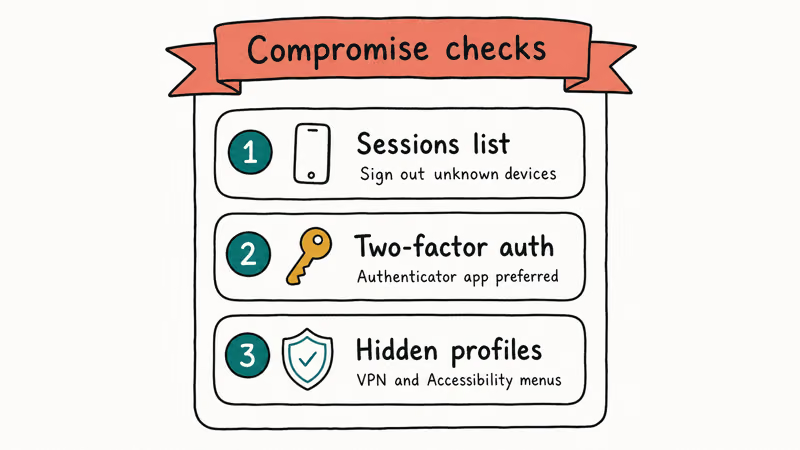
Check active login sessions. Open Snapchat > Settings > Account Actions > Sessions. The list shows every device currently signed in, with the device model, the city it’s connecting from, and the last-active timestamp. Sign out anything you don’t recognise, then change your password from the Account section. Our walkthrough on how to log out of Snapchat across iPhone, Android, and the web covers the cleanest full reset.
Turn on two-factor authentication. Go to Settings > Two-Factor Authentication and pick either an SMS code or an authenticator app. Authenticator apps like Google Authenticator and Authy resist SIM-swap attacks better than SMS. With 2FA on, a stolen password alone can’t open your account on a new device.
Check for hidden monitoring profiles on your phone. On iPhone, open Settings > General > VPN & Device Management and remove any profile you didn’t install yourself. On Android, open Settings > Accessibility and disable any service whose name you don’t recognise. Commercial monitoring software almost always relies on one of these two paths, so a clean profile list and a clean Accessibility list together rule out most desktop-grade tools.
On a clean account, the Sessions list shows only devices you recognise. If someone else has signed in, that unfamiliar device shows up here with its model and location, which is the single strongest signal that something is wrong with the account.
#When Snapchat Monitoring Crosses Legal Lines
Parental monitoring of a minor child you have legal custody of is generally lawful in the United States. Monitoring another adult’s Snapchat without their consent is not, and the penalties are serious.
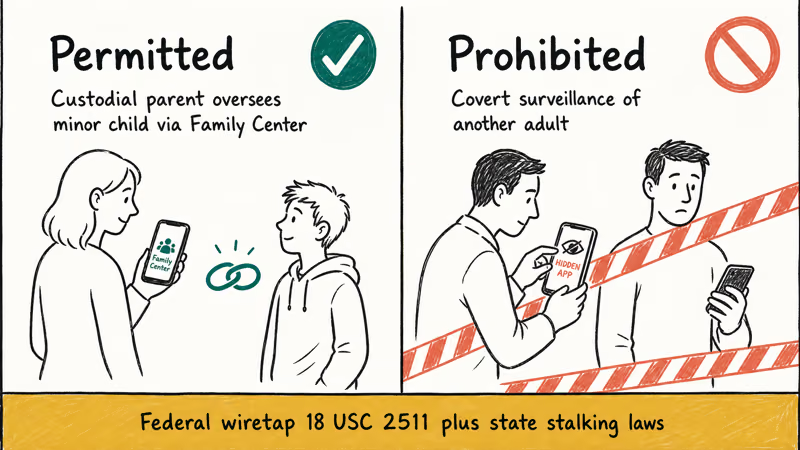
According to the US Department of Justice’s stalking page, federal law under 18 U.S.C. § 2261A makes repeated conduct intended to cause fear or substantial emotional distress a federal crime, and all 50 states have parallel stalking statutes. Installing covert software on a partner’s phone, reading their Snapchat messages without permission, or tracking their location through a hidden app can all trigger these laws.
The federal wiretap statute also applies. According to the Electronic Communications Privacy Act of 1986 (ECPA), codified at 18 U.S.C. § 2511, intentionally intercepting another person’s electronic communications without consent is a felony.
The statute provides for up to 5 years in federal prison plus civil damages owed to the person whose communications were intercepted. Snapchat messages count as electronic communications under that framework.
State stalking laws add their own teeth.
California Penal Code § 646.9, New York Penal Law § 120.45, and Texas Penal Code § 42.072 each criminalise repeated surveillance. Penalties range from misdemeanor to felony depending on the conduct and any prior offences.
The FTC has also weighed in on parental monitoring of minors. The FTC’s Protecting Your Child’s Privacy Online page recommends that parents have an honest conversation with their child about what is being monitored before installing any tool, and confirms that COPPA requires verifiable parental consent for sites that collect data from children under 13.
If your only goal is to surveil another adult, this guide can’t help you. Skip the spyware aisle entirely.
#Why Free Spyware Apps Aren’t a Real Substitute
The “free Snapchat monitor” ads that dominate Google’s first page tend to share a familiar pattern: install a hidden app, pay nothing upfront, and read every chat.
These apps share a common pattern: many demand that you disable Google Play Protect before installation finishes, and some try to install an accessibility service they never disclose in the app description.
A handful of practical reasons make these tools the wrong choice even when the legal questions are clear:
- The “free” tier almost always blocks the features the ad promised, then pushes a 30-day paid plan once setup completes.
- Many of these apps quietly forward target-phone data to overseas servers with no published privacy policy.
- Antivirus engines flag the installers, which means warranty and security support disappear on the target phone.
- The FTC has filed enforcement actions against several stalkerware vendors for marketing illegal surveillance as legitimate parental software.
Family Center plus iOS Screen Time or Google Family Link gives a parent more useful information than any of these tools, with none of the legal or device-integrity downside.
#Bottom Line
Snapchat Family Center is the right answer for free Snapchat monitoring in 2026. It costs nothing, runs inside the official Snapchat app, and gives parents enough visibility to spot risky contacts and enforce content filters without crossing into reading private messages. Pair it with iOS Screen Time or Google Family Link for time-and-app limits, and you cover the same ground that paid spyware claims to cover, at zero cost and with no legal risk.
For self-protection, the Sessions list plus two-factor authentication catch most monitoring attempts on your own account within minutes. For surveillance of another adult, the answer is always no. Federal wiretap and stalking statutes carry felony penalties, and no app inside Snapchat can shield you from those.
#Frequently Asked Questions
Is Snapchat Family Center really free?
Yes. Family Center is built into the Snapchat app at no extra cost, with no premium tier and no trial that expires.
Can I read my teen’s Snapchat messages with Family Center?
No. Family Center never exposes message content. You can see who your teen has messaged in the last 7 days and who’s on their friends list, but not what was said inside any thread.
Is it legal to monitor my partner’s Snapchat without telling them?
No, in most cases.
Intercepting another adult’s electronic communications without consent can violate the federal wiretap statute at 18 U.S.C. § 2511 and state stalking laws in all 50 states. Penalties include up to 5 years in federal prison plus civil damages owed to the person you monitored.
What do I do if I think someone is monitoring my Snapchat?
Open Snapchat > Settings > Account Actions > Sessions and sign out any device you don’t recognise. Change your password from the Account section, then turn on two-factor authentication. Finally, check your phone for unknown profiles (iPhone: Settings > General > VPN & Device Management; Android: Settings > Accessibility) and remove anything you didn’t install yourself.
Does Snapchat notify my teen when I’m linked through Family Center?
Yes. Family Center is fully consent-based, so your teen sees the invite, must accept it, and can see whenever you view their Family Center dashboard.
What does the Family Center dashboard actually show?
The dashboard shows three categories: a full friends list with Snapchat display names, every account your teen has messaged with in the last 7 days, and the set of content control toggles for Stories and Spotlight. It does not show snaps, chats, Snap Map history, Story viewers, Snap Score, or Memories.
Are free third-party Snapchat spy apps safe?
No.
Most apps that advertise free Snapchat monitoring either fail to deliver what they promise, expose the installer to malware bundled with the download, or require disabling security settings on the target phone in ways that void the device warranty. The FTC has taken enforcement action against several stalkerware vendors for deceptive practices and for enabling illegal surveillance, so the legal risk lands on both the seller and the installer.
What if my teen refuses the Family Center invite?
The link won’t form, and the dashboard stays empty until they accept. Snapchat’s policy is consent-based on the teen side as well, so there’s no workaround inside the app. The productive path is a direct conversation about why you want the link, what it shows you (only friends and recent contacts, never messages), and what it doesn’t, since framing the tool accurately tends to lower the resistance.

Google Messages Error 3100: Why RCS Is Broken on Galaxy
Google Messages RCS error 3100 hits Galaxy owners after phone or carrier switches. Google told 9to5Google a fix is coming. Here's what actually helps.

Is This Bank App Real? Spot a Fake App on Your Home Screen
A bank app can land on your home screen from a web page with no install warning. Learn the checks that tell a real banking app from a phishing web app.

Apps Crashing After iOS 27 Update? Fix Order (2026)
Apps crashing after the iOS 27 update? Update the app in the App Store first, then offload and reinstall to clear stale cache, then restart. The fix order.

Do AI Translation Earbuds Work Offline? What to Know
Do AI translation earbuds work offline? A few do with downloaded language packs, but most need the cloud. Here's what works offline and what you give up.