Pokemon GO GPS Signal Not Found: 7 Proven Fixes (2026)
Pokemon GO GPS signal not found? Seven ordered fixes for Android and iPhone covering precise location, permissions, mock-location, and more.
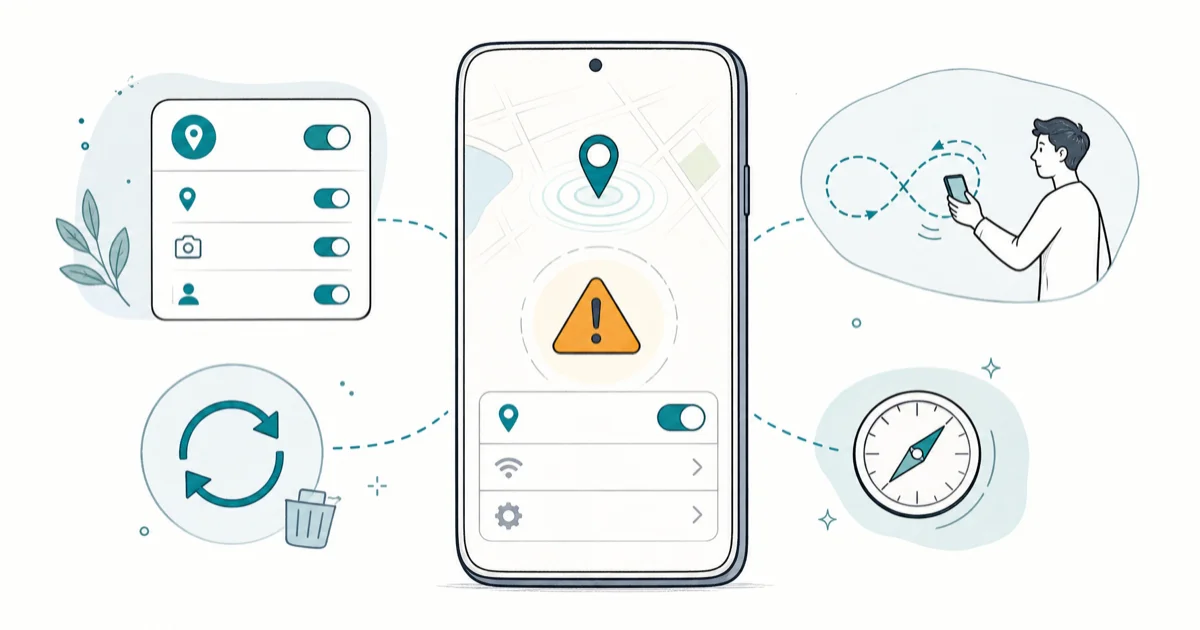
Quick AnswerEnable Precise Location for Pokemon GO, grant always-on access, then toggle Location Services off and on. If the error stays, recalibrate the compass with a figure-8 motion outdoors and clear the cache.
Pokemon GO showing “GPS signal not found” almost always points to a phone-side location problem, not a Niantic outage. The fix sequence below starts with permissions, moves through location-service resets, and ends with account-safe escalation paths.
This guide assumes you’re troubleshooting your own phone and your own Pokemon Trainer account. We don’t endorse fake-GPS apps, joystick tweaks, or anything Niantic’s Terms of Service prohibit.
- The error is a device-side GPS timeout, not a server outage on Niantic’s side
- Precise Location must be ON for Pokemon GO on both Android and iOS, or the app can’t get a fix
- A figure-8 compass recalibration outdoors clears the error in under 60 seconds on a phone with a clear sky
- Mock-location must be OFF; Niantic’s anti-cheat penalizes phones that have it enabled even when no spoofing app is running
- If the error persists with a clear sky for two minutes, escalate to Niantic Help Center rather than reaching for a third-party tool
#Why Is Pokemon GO Saying GPS Signal Not Found?
The overlay appears when Pokemon GO waits longer than its timeout for a usable satellite fix. The app has no GPS chip; it reads coordinates from Android’s Fused Location Provider or iOS Location Services and gives up after a few seconds. The cause is usually one of four things: location permission is wrong, Precise Location is off, the chip is cold-starting indoors, or the compass drifted out of calibration.
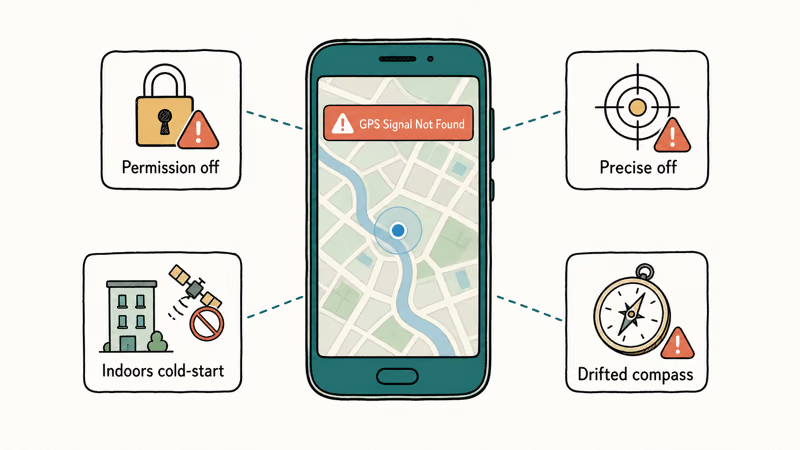
A few cases are different errors in disguise. If your overlay says “GPS Signal Not Found 11”, see our GPS Signal Not Found 11 guide for the specific timeout variant. If it says “Failed to detect location” instead, our failed to detect location walkthrough covers the network-side checks.
According to Niantic’s Pokemon GO Help Center, the general “GPS signal not found” message is the umbrella case the steps below address.
Outdoor fixes usually work faster than indoor fixes because GPS chips need a clear view of the sky. Parking garages, metal roofs, and dense walls can keep the phone from getting a fresh lock.
#Turn On Precise Location for Pokemon GO
Precise Location is the single most common cause on phones running iOS 14 or newer and Android 12 or newer. Both operating systems let users grant only an approximate location, and Pokemon GO can’t work with an approximate fix. The setting is per-app, so a phone with location services globally on can still hand Pokemon GO a coarse coordinate.
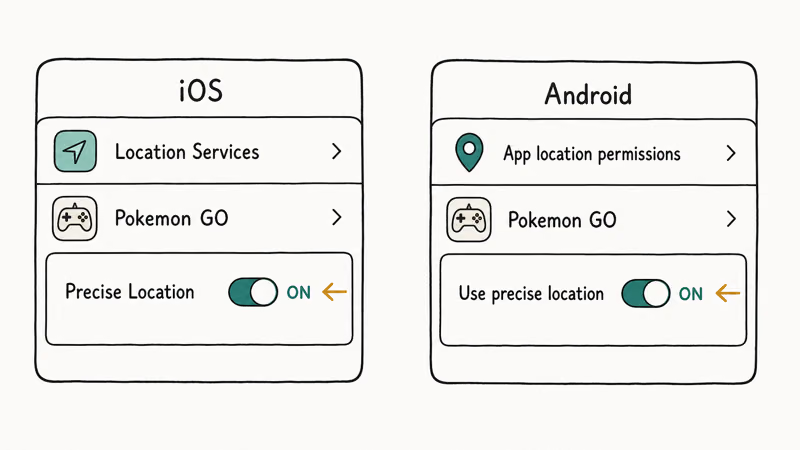
On iPhone, open Settings, tap Privacy & Security, choose Location Services, scroll to Pokemon GO, and confirm Precise Location is on. Apple’s Location Services support page states that the Precise Location toggle is per-app and arrived in iOS 14, so you have to flip it explicitly. It’s independent of the Allow Location Access choice above it.
Android handlers differ by manufacturer.
On Android the path varies by skin. Pixel running Android 15 uses Settings, Location, App location permissions, Pokemon GO, then Use precise location. Samsung’s One UI 6.1 calls the same toggle Location accuracy inside the Pokemon GO permission panel. Both do the same thing.
#Grant Pokemon GO Always-On Location Permission
While Using The App is enough for active play, but Pokemon GO uses Adventure Sync to track distance in the background. If you only granted While Using, the app loses the GPS handle the moment the screen sleeps.
Switch the permission to Always Allow on iOS or Allow all the time on Android.
If Adventure Sync itself misbehaves, our Adventure Sync not working guide covers the background-sync settings. Always-on permission keeps Pokemon GO from losing its location handle the moment the screen sleeps.
#Toggle Location Services Off and On
A simple toggle of location services flushes the cached GPS state and forces the chip to re-acquire satellites. It’s also the fastest test for whether the problem is Pokemon GO specifically or your phone’s location service in general.
On iPhone, open Control Center, tap and hold the connectivity tile, then turn Airplane Mode on for 10 seconds before turning it back off. This hard-resets cellular, Wi-Fi, and GPS together. Alternatively, open Settings, Privacy & Security, Location Services, and toggle the top switch. On Android, pull down quick settings and tap the Location tile off and on, or use the master toggle in Settings, Location.
If only Pokemon GO times out while Google Maps, Apple Maps, and Waze get a fix, the issue is per-app and the next two sections apply. If every app shows a GPS error, the issue is system-wide and our broader iPhone GPS issues write-up covers the hardware and Wi-Fi-assist checks.
#Recalibrate the In-Game Compass
Pokemon GO uses the phone’s compass and accelerometer to anchor your avatar’s facing direction. As noted in Niantic’s Pokemon GO Help Center, an uncalibrated compass can cause the GPS overlay because the app sees inconsistent heading data and treats the lock as untrustworthy.
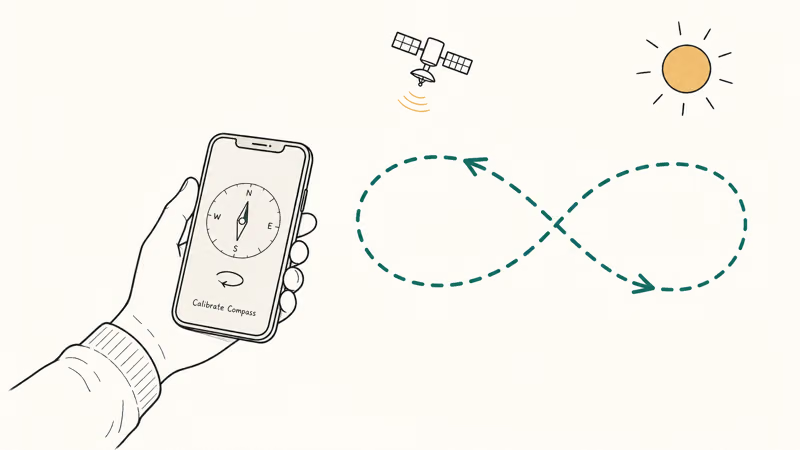
Do this outdoors; indoor recalibration can fail without a fresh satellite fix.
#Clear the Pokemon GO Cache and Update System Services
A corrupted cache or outdated location-service package keeps the broken state across permission toggles.
On Android, open Settings, Apps, Pokemon GO, Storage & cache, Clear cache. Don’t clear data; that signs you out. Then open Play Store, search for Google Play services, and tap Update if offered. Google’s location settings documentation states that Google Play services brokers location data to all apps on Android, so an outdated build can produce per-app timeouts that survive every other fix.
iPhone uses a different mechanism.
On iPhone, the equivalent is offloading the app. Open Settings, General, iPhone Storage, scroll to Pokemon GO, tap Offload App, then reinstall. Your progress lives on Niantic’s servers, so an offload is safe. If you’re a year behind on iOS, install pending system updates too.
One last device-side check matters.
#Is Mock Location Why Your GPS Signal Is Failing?
Mock-location is the Android developer-options setting that lets a phone hand a fake GPS coordinate to apps. Niantic’s anti-cheat treats any phone with the mock locations setting enabled as suspicious. As described in our Pokemon GO soft ban reference, soft bans for suspected spoofing can last anywhere from a few hours to a full week.
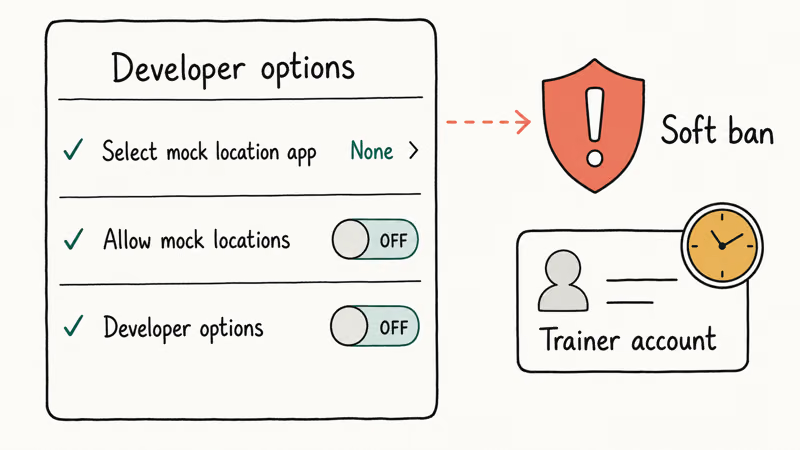
Open Settings, About phone, and tap Build number seven times to confirm Developer options is enabled. If so, open Settings, System, Developer options, and check that Select mock location app shows None and Allow mock locations is off. Even if you’ve never spoofed, the developer-options toggle alone can flag your account. If you don’t need developer options for anything else, toggle the master switch off.
A direct policy note follows.
We’re explicit: Pokemon GO’s Terms of Service prohibit GPS spoofing. Fake-GPS apps, joystick tools, and teleport tweaks are off the table as fixes. They don’t solve the signal problem; they replace your real location with a fake one and risk a permanent ban. This guide is the Niantic-compliant path, full stop.
That brings us to the bottom line.
#Bottom Line
The fastest legitimate fix order is the same on every modern phone: enable Precise Location, grant Always-On access, toggle Location Services, recalibrate the compass with the figure-8 motion outdoors, then clear the cache and update Google Play services or iOS. Work through those five steps in order, and verify mock-location is OFF as a precondition rather than a fix.
If the sequence fails outdoors with a clear sky for two full minutes, the issue is either hardware (an older GPS chip on a phone over four years old) or a Niantic outage, and the next step is the official Niantic Help Center. Spoofing apps are not on this list.
A few common questions come up next.
Pokémon GO Guide
#Frequently Asked Questions
Will Pokemon GO ban me if mock location was on by mistake?
A one-time accidental toggle is unlikely to trigger a permanent ban, but it can cause a temporary soft ban that limits gameplay for a few hours. Turn the setting off, restart Pokemon GO, and step outside for two minutes to let the GPS lock fresh. If the soft ban persists, wait out the cooldown rather than reinstalling, which can extend the flag.
Why does the error come back the moment I step indoors?
GPS chips need line of sight to satellites, and walls, metal roofs, and parking garages all block the signal. Pokemon GO keeps working for a few seconds on the last-known fix, then throws the overlay when it times out. This is expected behavior.
Does turning on a VPN cause Pokemon GO GPS errors?
Indirectly, yes.
A VPN does not change your GPS coordinate, but Niantic’s servers compare your network exit IP against your reported location. A datacenter VPN exit in a different country can trigger the same overlay because Niantic refuses to serve the session. Turn the VPN off before launching the app.
Is it safe to clear the Pokemon GO cache without losing progress?
Yes. Clearing the cache on Android or offloading the app on iPhone removes only temporary files. Your trainer account, Pokemon storage, and inventory live on Niantic’s servers and reload when you sign in. Don’t tap Clear data on Android; that signs you out and can require account recovery.
Why does my iPhone show the GPS error more than my Android?
The cause is Wi-Fi-assisted location.
iPhones rely more heavily on Wi-Fi-assisted location for the initial fix, so a phone with Wi-Fi off or a corrupted network state can take longer to lock a real GPS coordinate. Resetting network settings (Settings, General, Transfer or Reset iPhone, Reset, Reset Network Settings) usually fixes the pattern. You’ll need to re-enter Wi-Fi passwords afterward.
Should I uninstall and reinstall Pokemon GO as a last resort?
Only after the earlier steps fail.
Reinstalling is reasonable after the seven fixes above have failed for two days. The fresh install rebuilds the local cache and resets the Adventure Sync handshake. Sign in with the same Trainer Club, Google, or Apple ID account; your progress reloads from Niantic’s servers within a minute.
Can a weak GPS chip in older phones cause permanent issues?
Phones older than four years often have GPS chips that perform poorly outdoors, but a true hardware failure is rare. If every GPS app times out for days even outdoors with a clear sky, book a diagnostic with the manufacturer before assuming Pokemon GO is the cause.
TweakBox Pokemon GO Review: Does It Still Work in 2026?
TweakBox Pokemon GO no longer works for most users. Learn why it fails, what Niantic's ban policy means for your account, and 3 safer alternatives.
How to Auto Walk in Pokemon GO Without Getting Banned
Auto walk in Pokemon GO using Adventure Sync or GPS tools. Compare safe methods vs ban-risky ones and learn how Niantic enforces its three-strike policy.
How to Find Magikarp Nests in Pokemon GO (2026 Guide)
Find Magikarp nests in Pokemon GO using community maps, water biomes, and rainy weather boosts. Plus candy farming tips to evolve Gyarados fast.

How to Get Arceus in Pokemon GO: Stats, Forms, Tips
Arceus is not yet in Pokemon GO. Learn its projected stats, 18 type forms, best counters, and how to prepare for its eventual Special Research debut.