Pokemon Go Adventure Sync Not Working? 7 Quick Fixes
Fix Pokemon Go Adventure Sync not working with 7 proven steps for Android and iOS. Covers Health Connect, Apple Health, GPS, battery exemptions, and reset.
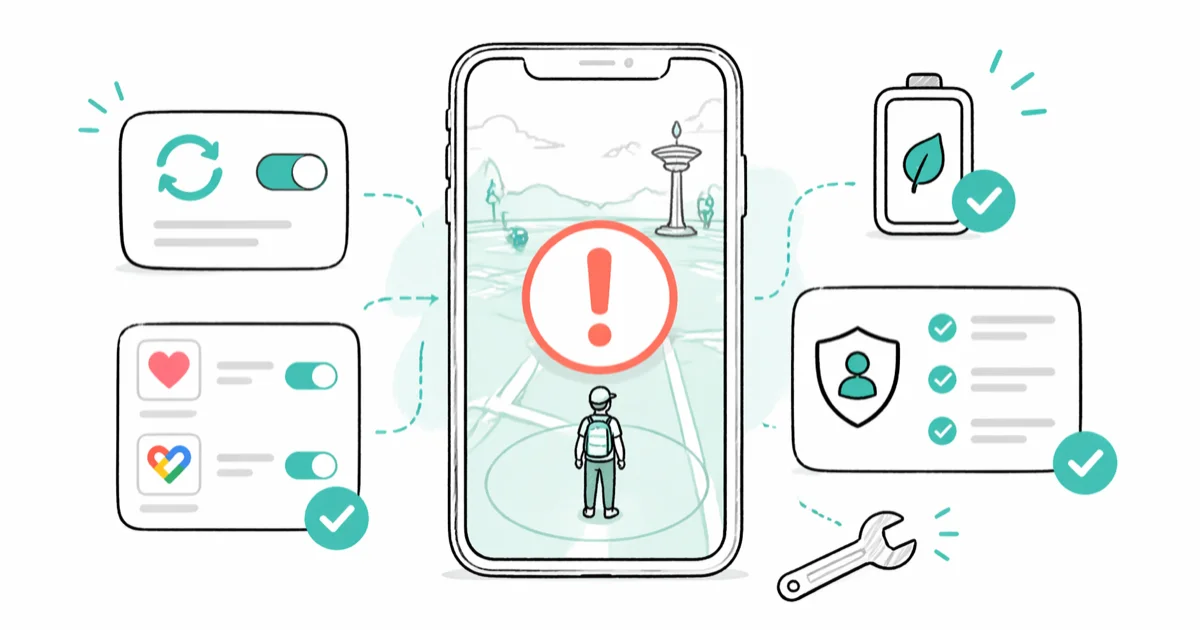
Quick AnswerAdventure Sync stops counting steps when Pokemon Go can't read your fitness data. Toggle it off and on inside Settings, grant Health Connect or Apple Health full permissions, then exempt Pokemon Go from battery optimization. Most Android 12+ and iOS 16+ players are tracking again in under five minutes.
Adventure Sync is the Niantic-endorsed way to count steps for egg hatching and Buddy Candy while Pokemon Go sits in the background. When it stalls, your weekly 50 km reward and that 10 km egg both freeze. The seven steps below cover Pixel, Samsung Galaxy, and iPhone hardware on current Android and iOS, and they clear the common causes one by one.
This guide covers fixes for your own phone and your own Pokemon Trainer account, using settings Niantic exposes inside the app.
- Adventure Sync needs Health Connect on Android 14+ or Apple Health on iOS, with Steps and Distance both granted
- Battery optimization on Android often stops tracking even with the toggle on, so exempt the app first
- Pokemon Go must be fully closed (or running in the background) for Adventure Sync to count from the fitness app
- A wrong time zone or denied location permission silently breaks the daily sync
- Contact Niantic support or use Pokemon GO Plus + when no fix sticks after the seven steps below
#Why Did Adventure Sync Stop Working?
Adventure Sync reads steps from your phone’s pedometer through a fitness platform, not from GPS. On Android 14 and newer that platform is Health Connect. On older Android it’s still Google Fit, though Google retired the standalone Fit app on June 30, 2025. On iPhone the source is always Apple Health.
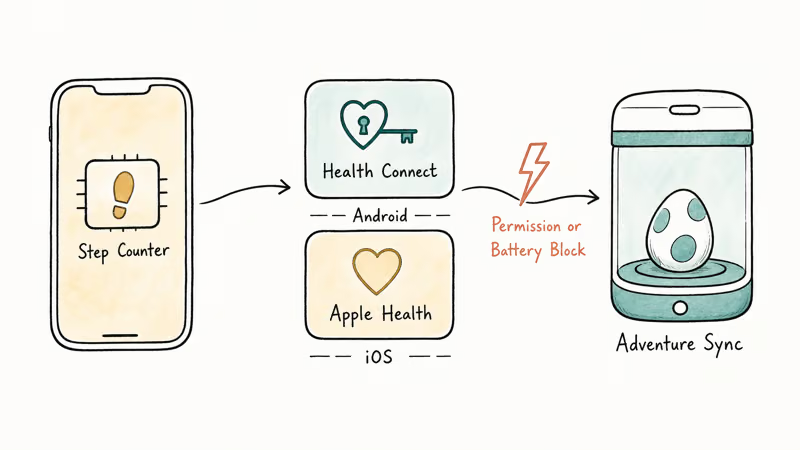
According to Niantic’s Adventure Sync help article, the feature needs a compatible fitness app, the right permissions, and a phone with a hardware step counter. Three things break that chain most often.
An OS update can reset Pokemon Go’s Physical Activity permission overnight on Android 14 and 15. An aggressive battery saver can kill the background fetch on idle phones. The Health Connect migration that Google rolled out across Android 14+ changed which app holds your step data, which can leave Pokemon Go reading from an empty pipe.
All three can hit the same phone in a single stretch. Each time, Adventure Sync looks enabled but the egg distance stays flat.
#How to Fix Adventure Sync on Android
Start with the toggle. It clears the most common failure in about 30 seconds. If steps still don’t appear within an hour of walking, work down the list.
#Re-Enable Adventure Sync in Pokemon Go
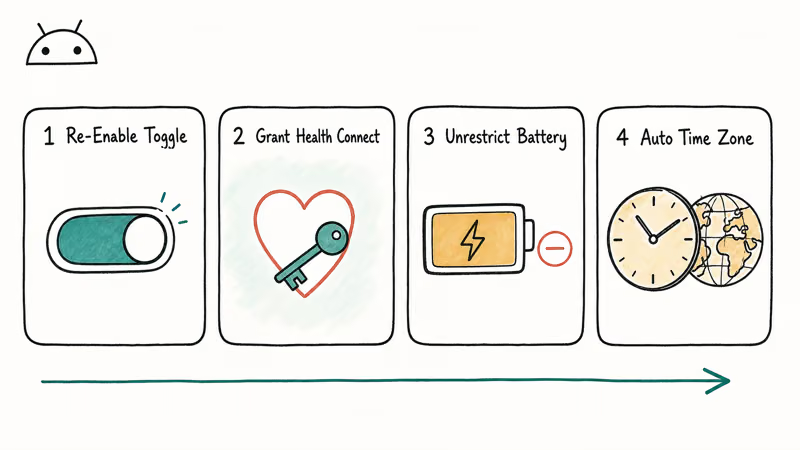
Open Pokemon Go, tap the Poke Ball, then tap Settings and scroll to Adventure Sync. Toggle it off, wait 10 seconds, then toggle it back on. The app will prompt you to confirm the Google Fit or Health Connect link and ask for Physical Activity again.
That single toggle often fixes the stall in about 30 seconds, especially the morning after an OS patch lands. Walk around the block, then check egg distance.
#Grant Health Connect or Google Fit Full Permissions
On Android 14 and newer, Health Connect is the broker. Pokemon Go reads from it; the OS or a wearable writes to it.
- Go to
Settings>Security & Privacy>Privacy>Health Connect(orSettings>Apps>Health Connecton Pixel) - Tap App Permissions, find Pokemon Go, and grant both Steps and Distance
- Tap Data and Access, and confirm a source app (Google Fit, Samsung Health, Fitbit) is writing Steps
Then exit and grant Pokemon Go itself the Physical Activity permission under Settings > Apps > Pokemon Go > Permissions. According to Google’s Health Connect documentation, without an active write source and a granted read app, the data pipe stays empty even when the toggle reads on.
#Exempt Pokemon Go From Battery Optimization
This is the fix the toggle alone misses. Adaptive Battery and Doze keep Pokemon Go from waking up to fetch step counts.
Settings>Apps>Pokemon Go>Battery- Set the usage policy to Unrestricted (Pixel) or Allow background activity (Samsung)
- Repeat for Health Connect and your step source app
On Samsung Galaxy phones also open Settings > Battery > Background Usage Limits and remove Pokemon Go from Sleeping Apps and Deep Sleeping Apps. Samsung recommends turning off these restrictions for any app that needs to run in the background. Lifting the Sleeping Apps flag typically lets Adventure Sync resume by the next morning.
#Set Time Zone and Date to Automatic
A wrong time zone makes the daily distance reset land in the wrong window, and Adventure Sync drops anything outside the current 24-hour bucket. Your phone’s GPS location stack also reads the system clock during fix calculation, which is why this setting matters more than people expect.
Settings>System>Date & Time- Turn on Set Time Automatically
- Turn on Set Time Zone Automatically
Restart the phone. Switching from a manually pinned time zone back to automatic often restores Adventure Sync within a single walk.
#Samsung-Specific Battery Tweaks
Samsung’s One UI battery layer is more aggressive than stock Android, which is why Galaxy phones dominate the “Adventure Sync not counting” threads on r/pokemongo.
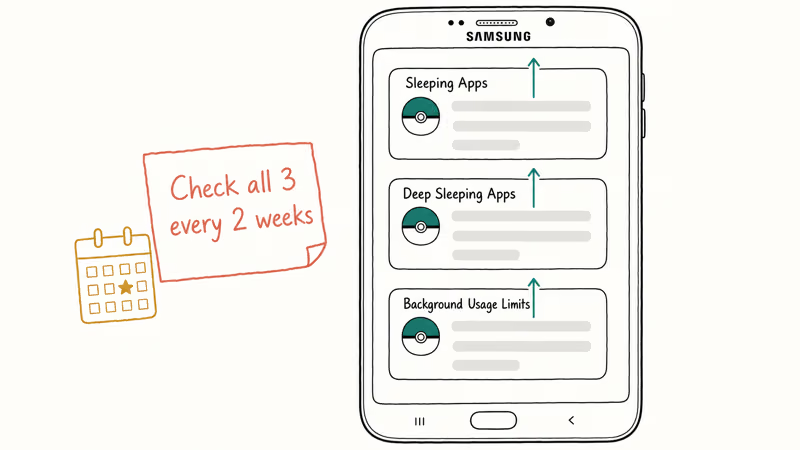
Open Settings > Battery > Background Usage Limits and remove both Pokemon Go and your step source from every restricted list. Turn off Adaptive Battery for 48 hours under Settings > Battery > More Battery Settings while you confirm the fix.
Samsung’s battery optimization guidance confirms that 3 separate sleep lists — Sleeping Apps, Deep Sleeping Apps, and Background Usage Limits — can each throttle a background app independently, so check all three every couple of weeks.
#Fixing Adventure Sync on iPhone
iOS uses Apple Health as the broker. The principles match Android, but the menus are different.
#Check Apple Health Permissions
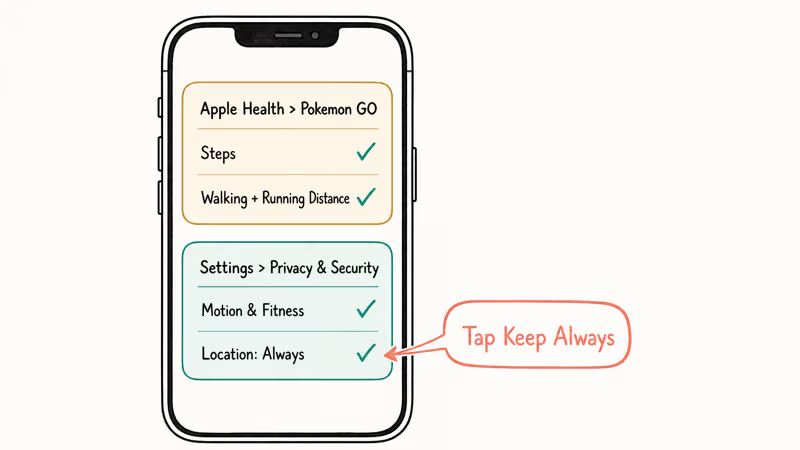
Open the Health app. Tap your profile picture in the top right. Tap Apps and Services, then Pokemon GO. Turn on every permission, with Steps and Walking + Running Distance as the two non-negotiable ones.
Then go to Settings > Privacy & Security > Motion & Fitness and confirm Fitness Tracking is on plus Pokemon GO is enabled. According to Apple’s Health data sharing guide, each data type is granted independently, so a partial grant will leave Adventure Sync seeing zeros for the categories you missed.
#Set Pokemon Go Location Permission to Always
Background tracking needs Always. Go to Settings > Privacy & Security > Location Services > Pokemon GO and pick Always. iOS may pop up “Pokemon GO has used your location 47 times in the background” later and offer to switch you back to While Using; tap Keep Always.
If you accidentally change it, Adventure Sync will count steps for that walk but skip the next morning’s roll-over.
#Force Quit and Reopen Pokemon Go
iOS sometimes leaves Pokemon Go in a half-suspended state where the Health bridge is severed. Swipe up from the bottom (or double-press Home on older models), find Pokemon GO, and swipe its card up. Wait five seconds, reopen, and walk a short loop.
This often clears a stuck sync, especially after a major iOS update installs overnight.
#What If Adventure Sync Still Won’t Track?
If you’ve worked through Android and iOS steps and the step counter still won’t move, try the heavier resets below before giving up.
Unlink and relink your fitness app. On Android, open Health Connect > Data and Access > Pokemon GO > Remove all permissions, then re-enable Adventure Sync inside Pokemon Go to trigger a fresh prompt. On iOS, open Apple Health > Apps > Pokemon GO and toggle every permission off, wait 30 seconds, then back on.
Reinstall Pokemon Go. Uninstall Pokemon Go, reboot, then reinstall. Sign in, walk through the Adventure Sync prompts again, and grant every permission. Your in-game progress is tied to your trainer account, so nothing is lost. A clean reinstall takes under 10 minutes and often fixes a sync that has been stuck for days.
Check for outages. Niantic posts active issues on their known issues page. Cross-reference with r/pokemongo’s daily megathread before assuming your phone is the problem.
Contact Niantic support. When nothing above works on supported hardware, file a ticket through Settings > Get Support inside Pokemon Go. Include screenshots of your Adventure Sync screen and your fitness app’s daily step count for the same day; Niantic’s support team uses the mismatch to confirm the broker is empty.
#Smartwatches and Pokemon GO Plus + as Backups
When the phone fix list still leaves you at zero, feed steps from a different device. Apple Watch writes to Apple Health automatically, so an iPhone paired to a Watch keeps counting even when the phone’s own pedometer path breaks. Wear OS, Fitbit, Garmin, and Samsung Galaxy Watch all write to their own companion app, which you can set as the source for Health Connect on Android. The watch becomes the step source while the phone reads from the broker.
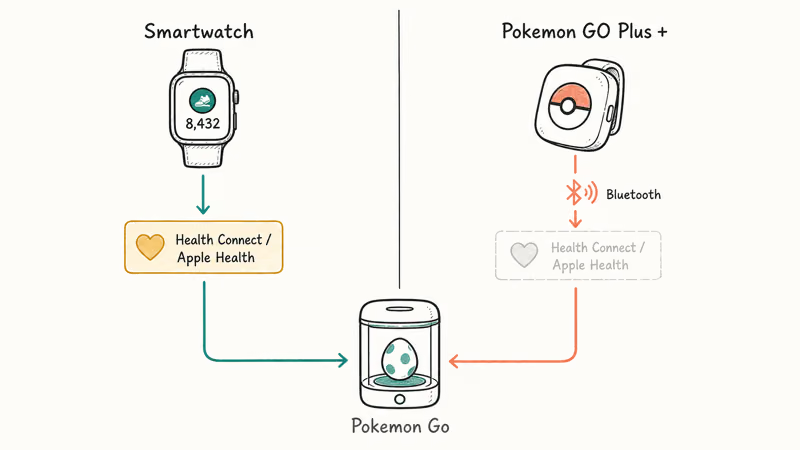
Pokemon GO Plus + is the other route. The Pokemon GO Plus + accessory is a paired Bluetooth device that counts steps on its own, sidestepping Health Connect and Apple Health entirely. The trade-off is hardware cost.
#Bottom Line
Toggle Adventure Sync off and on inside Pokemon Go, then exempt the app from battery optimization. Those two steps clear the large majority of stalls on their own.
If you’re still stuck, the order to try is: Health Connect or Apple Health permissions, location set to Always, time zone automatic, and finally a clean reinstall. When supported hardware still won’t track, contact Niantic support. The whole pipeline takes about 5 minutes, and it sticks longest after Android or iOS feature updates if you re-check Pokemon Go’s permissions afterward.
Pokémon GO Guide
#Frequently Asked Questions
Why is Adventure Sync not counting my steps?
Battery optimization or a missing Physical Activity permission is the cause most of the time. Lift the optimization for Pokemon Go and your fitness app, then confirm Steps and Distance are granted inside Health Connect or Apple Health. On Samsung phones, also drop Pokemon Go from Sleeping Apps and Deep Sleeping Apps. One UI re-adds idle apps to those lists on its own schedule, so a fix that worked last month can quietly stop working.
Does Adventure Sync work while Pokemon Go is open?
No. Adventure Sync only counts when Pokemon Go is closed or in the background. In the foreground the distance comes from GPS instead.
How many kilometers does Adventure Sync track per week?
Adventure Sync caps weekly rewards at 25 km and 50 km. Daily step tracking has no fixed limit, but the rewards stop scaling beyond 50 km, so 50 km per week is the practical ceiling.
Can a fitness tracker or smartwatch feed Adventure Sync?
Yes, if your wearable writes Steps to Health Connect on Android or Apple Health on iOS. Apple Watch syncs automatically. Fitbit, Garmin, and Wear OS watches need their companion app set as the data source in the broker app, and once it’s set the steps flow through to Pokemon Go without you doing anything else. With a Galaxy Watch feeding Health Connect, the steps reach the egg counter shortly after a walk ends.
Why did Adventure Sync stop working after a phone update?
OS updates regularly reset app permissions and battery exemptions. Re-grant Pokemon Go the Physical Activity or Motion & Fitness permission and re-add it to the unrestricted battery list. This is also the trigger for the broader GPS and location detection problem.
Does Adventure Sync drain the battery?
Barely. The pedometer chip uses a fraction of a watt, so the extra drain from Adventure Sync stays in the low single digits of daily battery use.
How long does Adventure Sync take to update?
Usually 5 to 15 minutes after you reopen Pokemon Go. Sit on the map screen and watch the egg distance roll up. During Niantic event weekends or peak server hours the sync can take 30 minutes. If it’s longer than that, the issue is on your phone, not the server.
Is Adventure Sync available on every phone?
It works on Android 8.0 and newer with Health Connect or Google Fit, and iOS 13 and newer with Apple Health. Older phones without a hardware pedometer can’t run it. Some budget Android phones from smaller brands also ship without the sensor. Pokemon Go’s Adventure Sync screen displays “Not supported” if your hardware doesn’t report a step count.
Pokemon GO GPS Signal Not Found: 7 Proven Fixes (2026)
Pokemon GO GPS signal not found? Seven ordered fixes for Android and iPhone covering precise location, permissions, mock-location, and more.
TweakBox Pokemon GO Review: Does It Still Work in 2026?
TweakBox Pokemon GO usually fails. Learn why, what Niantic's ban policy means for your account, and which official alternatives to use instead.
How to Auto Walk in Pokemon GO: Safe and Risky Methods
Learn how Pokemon GO Adventure Sync credits real activity, why fake-step and GPS tools risk account strikes, and which official options to use.
How to Find Magikarp Nests in Pokemon GO (2026 Guide)
Find Magikarp nests in Pokemon GO using community maps, water biomes, and rainy weather boosts. Plus candy farming tips to evolve Gyarados fast.