OnlyFans Refund Policy: When You Can Get Your Money Back
OnlyFans refund policy explained: when refunds apply for fraud or duplicate charges, plus the steps to file a bank chargeback within 60 days.
Quick AnswerOnlyFans does not refund subscriptions, tips, or pay-per-view content under its Terms of Service, except for confirmed fraud, duplicate charges, or unauthorized account access. Contact OnlyFans support first, and if the request is denied, file a chargeback through your bank within 60 days of the charge.
Getting an OnlyFans refund is rare, and the platform’s billing system is built around the assumption that every payment is final the moment it clears. The published policy lists only three situations where money can come back to your card: confirmed fraud, duplicate billing, or unauthorized access to your own account. This guide walks through the official policy, the cancellation flow that stops future charges, the support ticket route, and the bank chargeback path.
Use these steps only on your own OnlyFans account or with the explicit permission of the account holder.
- OnlyFans treats every subscription, tip, and pay-per-view purchase as final under its Terms of Service; refunds happen only for fraud, duplicate billing, or account compromise.
- Cancelling a creator subscription stops the next renewal but does not refund the current month, and you keep access until the billing period ends.
- Turning off the Subscribed toggle on a creator profile is the only way to halt auto-renewal; closing the app does not pause billing.
- A bank chargeback is the fallback when OnlyFans denies a refund, but US card networks require you to file the dispute within 60 days of the statement date.
- A successful chargeback usually triggers OnlyFans to suspend or terminate the account permanently, so reserve it for genuine billing disputes.
#Does OnlyFans Refund Subscriptions?
In nearly every case the answer is no. OnlyFans operates on a creator-first revenue model where the bulk of every subscription payment goes to the creator and a smaller cut goes to the platform, and that money is paid out to creators on a rolling schedule. Reversing it after content has been viewed creates an obvious chargeback risk for the company, so the default policy is “all sales final.”
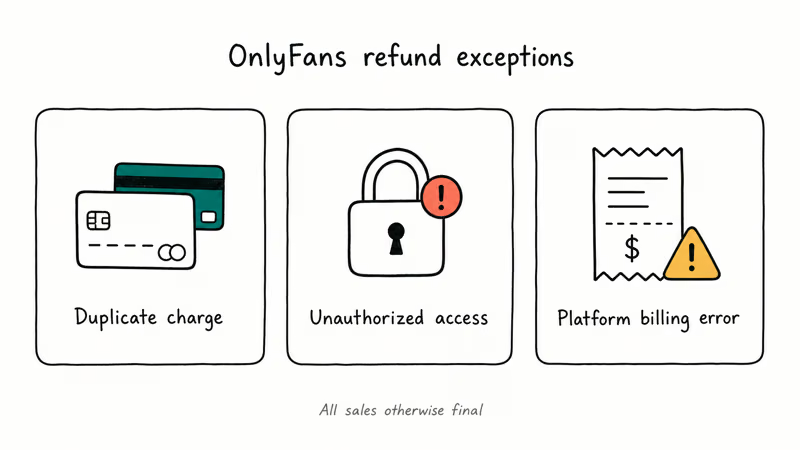
The narrow exceptions documented across the OnlyFans help pages are:
- A duplicate charge for the same subscription or tip in the same billing cycle.
- A charge made after your account was accessed without your permission.
- A clear platform billing error, such as being charged after you cancelled or being charged twice the listed price.
Wanting a refund because the creator stopped posting, the content was lower quality than expected, or you simply changed your mind is not on that list. Those situations sit firmly inside the “non-refundable digital content” category and will be denied by support every time.
#What the OnlyFans Terms of Service Say About Refunds
The OnlyFans Terms of Service confirms that all payments to creators, including subscriptions, paid messages, and tips, are final and non-refundable except where required by applicable consumer protection law. The same document says OnlyFans uses third-party payment processors and that disputes about a specific charge should first be raised with the OnlyFans support team rather than the processor.
Two practical points come out of the policy:
- Pay-per-view (PPV) messages are non-refundable the moment they unlock. Once the photo or video plays in the chat, the platform considers the content delivered and the transaction closed.
- Tips are non-refundable in every region. Even if the tip was sent by mistake or to the wrong creator, the policy treats it as a completed transfer to the creator’s account.
EU and UK users sometimes ask whether the standard 14-day right of withdrawal for digital content applies. The OnlyFans Terms confirms that subscribers waive this right at signup because the digital content begins delivering immediately, which is the standard “consumed digital content” exception every subscription platform relies on. In short, the EU 14-day rule does not unlock OnlyFans refunds in practice.
#How to Cancel an OnlyFans Subscription to Stop Future Charges
Cancelling doesn’t refund the current month, but it stops the next renewal so you don’t keep paying for content you no longer want. Use the same browser or app where you originally subscribed.
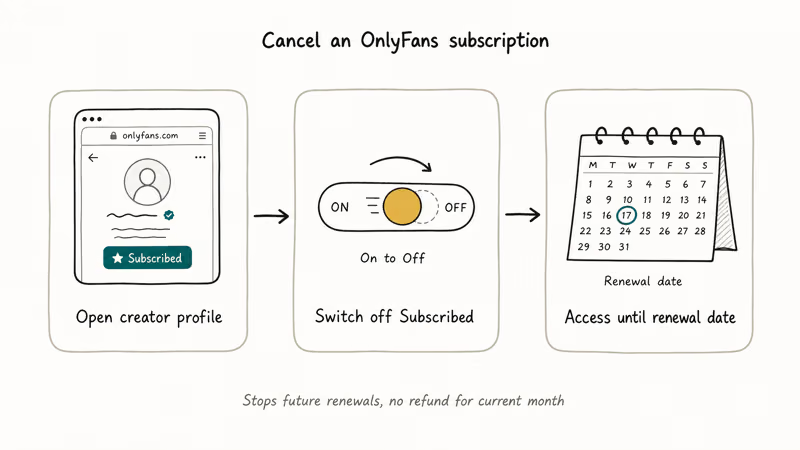
#1. Open the Creator Profile
Sign in at onlyfans.com or in the OnlyFans app, then go to the profile of the creator you want to unsubscribe from. The active subscriptions are also listed under your profile menu, in the Following section. If you have not visited this page before, you might be surprised at how many active billing relationships are still listed there from short trial subscriptions you forgot about.
#2. Switch Off the Subscribed Toggle
On the creator’s profile, tap or click the Subscribed button. A confirmation dialog asks whether to disable auto-renewal. Confirm it. The button label changes to Following, and the profile shows the date your current access ends.
#3. Verify on Every Active Subscription
Repeat the toggle for every other creator listed under Following. The bill on your next statement only drops to zero once every active subscription is set to expire. If you want to walk away completely, our guide on how to delete your OnlyFans account covers the full account-removal flow once all subscriptions have ended.
In the OnlyFans web interface, toggling off Subscribed on a creator profile turns off auto-renewal immediately and updates the profile to show “Following” with the access expiry date listed, so the change is visible without leaving the page. For a step-by-step companion that includes the mobile app screens, see our walkthrough on how to cancel an OnlyFans subscription.
#When to Contact OnlyFans Support for a Refund
If your case fits a documented exception, contact OnlyFans support first. Card networks expect proof you tried this step before they side with you on a chargeback.
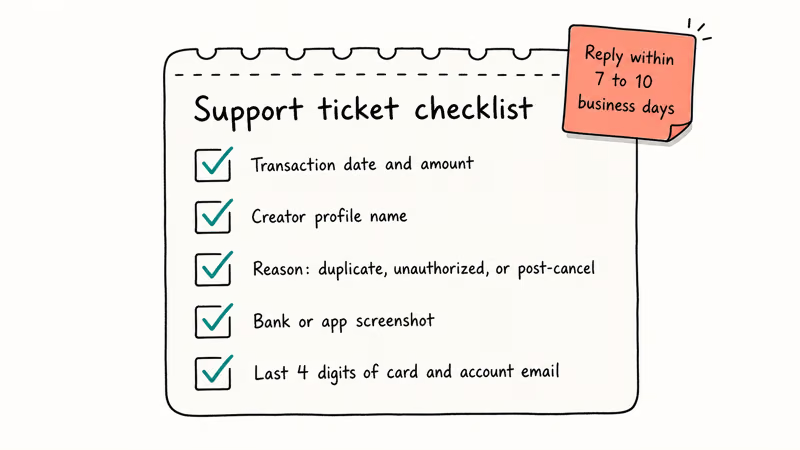
Use the official support form at the OnlyFans contact page and include:
- The transaction date, exact charge amount, and the creator’s profile name.
- A short explanation of why the charge is wrong: duplicate billing, unauthorized access, or a charge after cancellation.
- Screenshots of the bank statement or app billing history showing the disputed line item.
- The last four digits of the card and the email associated with the OnlyFans account.
Don’t write a long story. The support agent needs the transaction ID and the reason code, not your subscription history. Refund decisions usually arrive by email within 7 to 10 business days, and the response either issues the credit, asks for more evidence, or denies the case with a written reason. Keep every reply because you may need to forward the denial to your bank.
If you suspect someone else used your account, change the password and enable two-step verification first, then file the support ticket. Trying to recover funds before you secure the account often results in further unauthorized charges while the dispute is in progress, which weakens the case.
#How Do You File a Chargeback With Your Bank?
A chargeback is a formal billing dispute filed with your card issuer. It’s the standard fallback when a merchant refuses a refund you believe you are owed, and it works for OnlyFans the same way it does for any other recurring subscription.
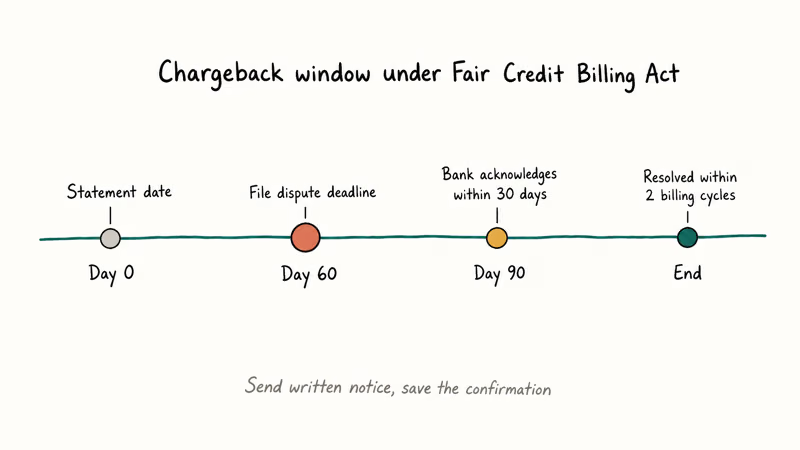
The Federal Trade Commission confirms that consumers have 60 days from the statement date to dispute a billing error in writing under the Fair Credit Billing Act. See the FTC consumer guide on disputing credit card charges for the full procedure. The issuer must then acknowledge the dispute within 30 days and resolve it within two billing cycles, which works out to roughly 90 days from the day the bank receives your written notice.
The Consumer Financial Protection Bureau recommends sending the dispute in writing to the billing inquiries address on your statement, not just calling the bank, because the written notice is what triggers the formal protections under federal law. Most major US banks now accept the same dispute through their mobile app, which counts as written notice as long as you save the confirmation screen.
To file the dispute, gather:
- The merchant name on the statement (it usually shows as OnlyFans or OF with the parent entity Fenix International Limited).
- The exact transaction date and amount.
- The reason code: unauthorized transaction, duplicate charge, services not received, or cancelled subscription billed.
- Any email replies from OnlyFans support showing the refund was requested and denied.
Major bank dispute portals like Chase and Capital One typically require the merchant name, the transaction date, the dispute reason, and a written explanation before a case can be opened, and they often flag the case as “merchant credit pending” within a business day.
The bank then issues a provisional credit while it investigates, and the merchant has roughly 30 days to respond. If OnlyFans can’t prove the charge was authorized and the content was delivered, the credit becomes permanent.
For perspective on how subscription chargebacks compare with related disputes, our guide on the Oculus refund process explains how a different platform with a documented refund window handles the same kind of buyer-remorse case, and the Adobe subscription cancellation guide shows how official cancellation evidence can support a dispute when a recurring charge slips through after you tried to cancel.
#What Happens to Your Account When You File a Chargeback
This is the trade-off most people miss. A chargeback recovers the money, but the merchant side of the dispute almost always ends with the OnlyFans account being suspended or permanently terminated. The platform treats a chargeback as a breach of its Terms of Service because the funds claw back from the creator first, not from the platform.
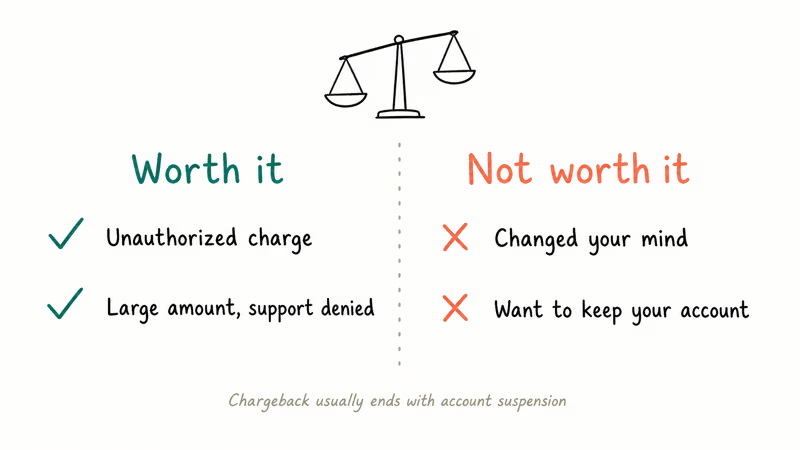
According to user reports compiled in the OnlyFans subreddit and the OnlyFans help center, accounts that file a chargeback are typically locked, all active subscriptions are cancelled without refund, and the email address is added to a no-resub list.
Two situations where the trade-off is still worth it:
- You did not make the charge at all. Any unauthorized transaction should be disputed regardless of account status, and the FTC and CFPB explicitly recommend filing the dispute in writing.
- The charge is several hundred dollars and OnlyFans has refused. A chargeback is the only realistic way to recover the money once support has formally denied the case.
Two situations where the trade-off usually is not:
- You changed your mind about a single subscription or tip. The chargeback will almost certainly fail because the merchant can show the content was delivered, and the account will still be flagged.
- You want to keep using OnlyFans. Once the account is on the chargeback list, recreating it under a new email is also against the Terms and risks the new account.
If you are not sure whether the account will survive the dispute, weigh that before filing. You can’t withdraw a chargeback once your bank has issued the provisional credit and notified the merchant.
#Bottom Line
OnlyFans refunds happen, but only for the three documented cases: duplicate billing, fraudulent charges on your own account, and a clear platform error. For every other situation, the practical playbook is to cancel the subscription immediately so the next renewal doesn’t hit, file the official support ticket with proof of the issue, and only escalate to a bank chargeback if the support team denies a case that clearly fits one of the documented exceptions.
Treat the chargeback as a one-way door: the money usually comes back, but the OnlyFans account doesn’t. If you only want to stop the bleeding, cancellation alone protects your future charges without putting the account at risk, while a full account closure is the cleaner exit if you are done with the platform entirely.
#Frequently Asked Questions
Does OnlyFans give refunds for unused subscription time?
No. The OnlyFans Terms of Service treats subscriptions as access to a billing window, not a per-day rate, so cancelling halfway through the month leaves you with access until the renewal date and no prorated credit back to your card.
Can I get an OnlyFans refund if my account was hacked?
Yes, this is one of the documented refund exceptions. File the support ticket with the dates of the unauthorized transactions, proof you secured the account, and a screenshot of the disputed charges. The platform usually acknowledges the ticket within 48 hours and resolves confirmed compromise cases within 7 to 14 business days. If support denies the request, you can still use the chargeback path with your bank because unauthorized transactions are protected under the Fair Credit Billing Act.
Will OnlyFans refund a tip I sent by mistake?
Tips clear immediately and become a final transfer to the creator. The platform won’t refund them, so the only realistic path is to message the creator directly and ask for a refund.
How long does an OnlyFans chargeback take to resolve?
US card networks resolve most disputes within two billing cycles, which works out to about 30 to 60 days from when you file. Your bank issues a provisional credit early in the process, but the credit only becomes final once the merchant either accepts the dispute or fails to respond within the network deadline. If the merchant responds with evidence that the charge was authorized, the bank reviews both sides before reversing or upholding the credit.
Can I dispute an OnlyFans charge through PayPal?
OnlyFans does not accept PayPal as a payment method, so this question almost always traces back to a third-party site posing as OnlyFans. If a PayPal charge is labelled as OnlyFans, dispute it as an unauthorized transaction through PayPal’s resolution centre and report the merchant to PayPal. Treating it as a PayPal dispute, not an OnlyFans refund, gives you the right reason code and the strongest case for recovery.
What happens to my creator subscriptions if I file a chargeback?
The chargeback usually triggers OnlyFans to suspend or permanently terminate the account, cancel every active subscription, and block the linked email from future signups. Any pay-per-view content already paid for is lost too.
Is it safe to use a third-party “OnlyFans refund service”?
No. Services that promise to recover OnlyFans payments for a fee are not affiliated with the platform and have no special access to its dispute system. They use the same chargeback mechanism you can use for free through your bank, and many ask for your account credentials, which is a Terms of Service violation that can get the account banned regardless of whether the dispute succeeds.
Can I find an OnlyFans creator to ask for a refund directly?
Asking the creator is the only realistic path for tips that fall outside the support team’s exceptions, and many creators will at least respond to a polite request even if they decline. If you no longer have the profile link, our guide on how to find someone on OnlyFans covers the legitimate search routes, including the OnlyFinder directory and the official creator URL pattern.

Google Messages Error 3100: Why RCS Is Broken on Galaxy
Google Messages RCS error 3100 hits Galaxy owners after phone or carrier switches. Google told 9to5Google a fix is coming. Here's what actually helps.

Is This Bank App Real? Spot a Fake App on Your Home Screen
A bank app can land on your home screen from a web page with no install warning. Learn the checks that tell a real banking app from a phishing web app.

Apps Crashing After iOS 27 Update? Fix Order (2026)
Apps crashing after the iOS 27 update? Update the app in the App Store first, then offload and reinstall to clear stale cache, then restart. The fix order.

Do AI Translation Earbuds Work Offline? What to Know
Do AI translation earbuds work offline? A few do with downloaded language packs, but most need the cloud. Here's what works offline and what you give up.