How to Delete Your OnlyFans Account in 2026 (Step-by-Step)
Delete your OnlyFans account in 4 steps: cancel subscriptions, drain your wallet, log in to onlyfans.com, then click Delete Account in Settings.
Quick AnswerTo delete your OnlyFans account, log in at onlyfans.com on a desktop or mobile browser, open Settings > Account > Delete Account, type the captcha, and confirm. Cancel active subscriptions and spend your wallet balance first, because those funds are not refundable after closure.
Deleting an OnlyFans account is a 5-minute web flow. The order matters: cancel active subscriptions, spend your wallet balance, then click Delete Account under Settings on a desktop browser. Mobile apps strip down the menu, and wallet funds left behind can’t move to your bank or PayPal. The closure path lives under Settings > Account for both subscriber and creator accounts, with creators getting two extra confirmations.
- Account closure happens under
Settings>Account>Delete Accounton onlyfans.com; the captcha is the only hard gate before the red button activates. - Wallet balance is non-refundable and can’t move back to your bank, PayPal, or another OnlyFans account, so spend it before deletion.
- Active subscriptions need to be turned off separately under
Settings>Subscriptions, otherwise auto-renewals fire from your stored payment method even after closure. - Creator accounts deactivate first to stop new subscribers, then close fully once all current monthly subscriptions expire, which can take up to 30 days.
- Apple App Store and Google Play subscriptions cancel through the platform store, not through onlyfans.com, so handle that step inside iOS Settings or the Play Store.
#How to Delete Your OnlyFans Account on Desktop
Plan on about five minutes start to finish. On Chrome and Safari with a paid subscriber account, the closure flow lives in exactly one place: the Settings drawer behind your profile photo, then Account, then Delete Account at the bottom. The same path works on the mobile site if you switch Safari or Chrome to “Request Desktop Website.”
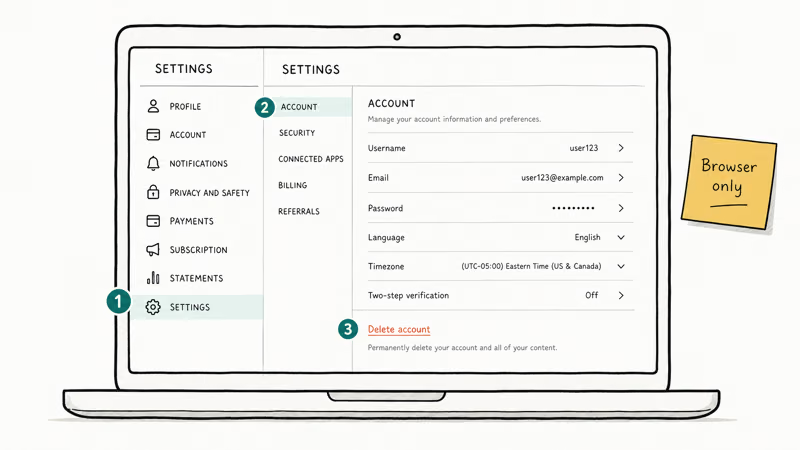
The full deletion path runs on the web, not in either native app.
- Go to onlyfans.com and sign in with the email and password tied to the account.
- Click your profile photo in the top-right, then choose Settings from the drop-down.
- Open Account in the left rail, scroll to the bottom, and click Delete Account.
- Type the captcha letters into the verification box, then click the red Delete Account button.
- Watch for the closure email from
noreply@onlyfans.com; save it because the timestamp is the only proof the request fired before your next billing cycle.
If the Delete Account button stays greyed out, the captcha didn’t register; refresh the captcha image and re-enter the letters. This often happens on Safari when it blocks the captcha cookie, and switching to Chrome usually clears it.
Wikipedia’s OnlyFans entry states that the platform was founded in 2016 by Tim Stokely in London, and the closure flow has stayed under Settings > Account through every redesign since.
#Can You Delete Your OnlyFans Account From the Mobile App?
Partially. On the mobile web, the Delete Account button is there, but on smaller iPhone viewports the captcha can render off-screen and block the final confirmation. On larger Android screens through Chrome, the captcha usually renders correctly and the deletion completes quickly. The safest approach is to switch the mobile browser to “Request Desktop Website,” which restores the full-size captcha and the wallet history page that the narrow layout tends to clip.
The mobile web flow lets you:
- Hide your profile from the public search.
- Cancel renewals for creators you subscribe to.
- Open the captcha and confirm the final deletion.
The mobile web struggles with the wallet history page, and that’s the screen where you confirm there’s no balance left before closure. Switch to a desktop browser for that step. Our walkthrough on how to delete an eHarmony account hits the same wall: mobile handles the toggle, not the audit trail. Bumble works the same in our how to delete a Bumble account guide.
#What Should You Do Before Closing Your Account?
Three pre-closure steps. Miss any of them and you’ll either keep getting charged, lose money you can’t claw back, or trigger a chargeback flag that locks you out before the deletion completes.
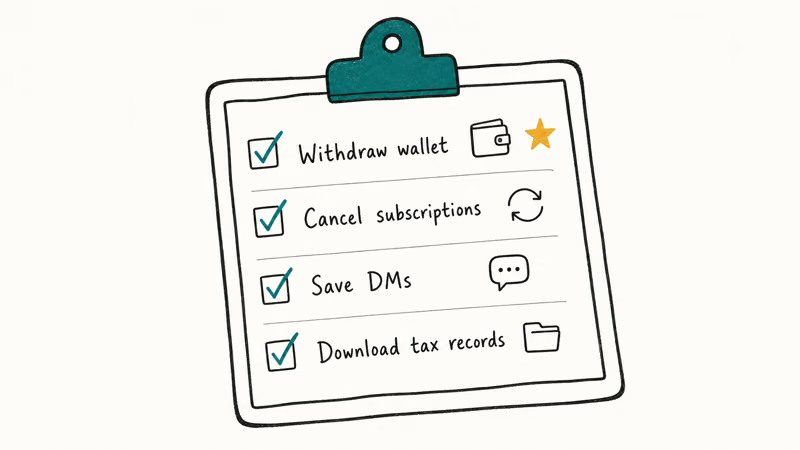
First, cancel every active subscription under Settings > Subscriptions. Auto-renewals fire on your stored card after closure if you skip this. Our walkthrough on how to cancel an OnlyFans subscription breaks down the toggle per creator.
Second, drain your wallet balance. Funds in the OnlyFans wallet are platform credit, not cash, and the platform’s payment policy states that they can’t pay out to your bank, PayPal, or any other wallet on closure. Spend the credit on subscriptions or tips, or apply it to existing renewals before you start the deletion flow. Moving a wallet balance onto new monthly subscriptions clears the credit instantly.
Third, back up your content if you’re a creator. OnlyFans stores posts in their CDN, not on your device, and the platform deletes uploads on closure with no archive export tool. Use the Vault to bulk-download your photos and videos through a desktop browser before you confirm. Our PayPal chargebacks guide covers what to do without lighting up your buyer profile.
#Closing an OnlyFans Creator Account: Extra Steps for Payouts
Creator accounts have one extra wrinkle. According to the platform’s Help & Support center, deletion deactivates the account immediately so new subscribers can’t join, but existing monthly subscribers keep their access until their cycle ends. That billing tail can run up to 30 days.
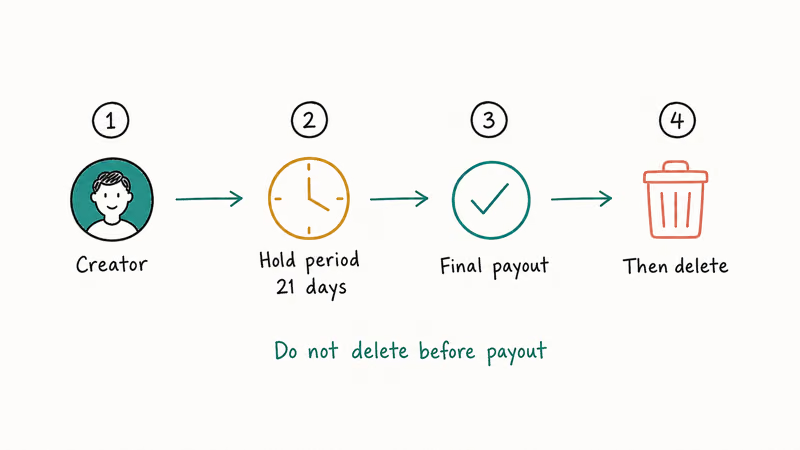
In order:
- Trigger a manual payout through
Settings>Bankingbefore initiating closure, so you don’t leave pending earnings stranded. The minimum payout threshold is $20 on the standard schedule. - Disable Auto-Tweets and any integrations under
Settings>Notificationsso the deletion doesn’t fire a stale post on linked X (Twitter) or Reddit accounts. - Hide or delete pinned posts that link to other social profiles, especially if you want a clean closure without backlinks pointing to a dead profile page.
- Submit the deletion request under
Settings>Account>Delete Account, type the captcha, then confirm with your password on the secondary modal that pops up only for creator accounts. - Watch the dashboard for the next 30 days. New subscriptions are blocked, but existing ones bill on their anniversary date and credit your final payout, which arrives by the 1st of the following month.
If you’re closing because of a refund issue rather than a clean exit, our OnlyFans refund process guide explains what does and doesn’t qualify under the platform’s refund policy. The 30-day creator tail also matters because a re-signup before the tail closes can reactivate the original profile under the same email; if you want a permanent break, wait the full 30 days plus one before re-registering.
#Hide Your Profile vs. Delete Your Account: Picking the Right Option
Both options take your profile out of circulation, but they aren’t interchangeable. The table below lays them out side-by-side so you can pick once and not bounce back and forth.
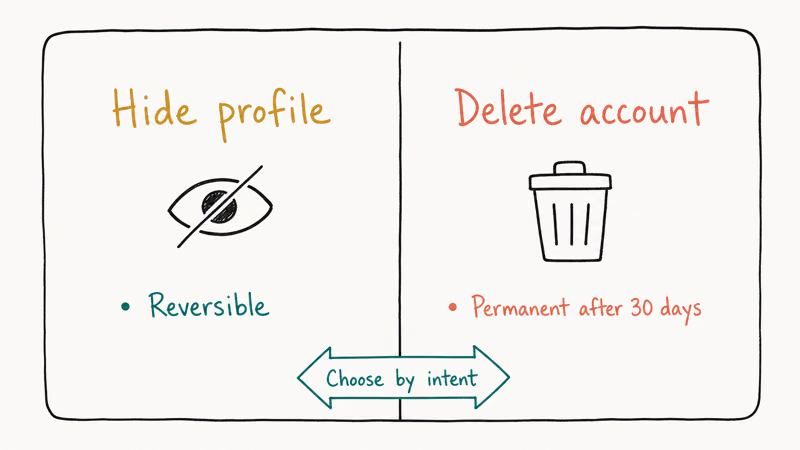
| Action | Profile visible to subscribers? | Billing continues? | Reversible? |
|---|---|---|---|
| **Hide profile** | No (public search hides it) | Yes (renewals fire) | Yes (any time) |
| **Cancel subscriptions only** | Yes | No (after current term ends) | Yes (resubscribe) |
| **Delete account** | No (gone within 24 hours) | No (after deactivation tail) | No (final, no reactivation) |
Pick Hide if you’re taking a break and might come back. Pick Cancel if you just want to stop paying creators but keep the account active. Pick Delete if you’re done with the platform. The same three-state pattern shows up in our guide on how to cancel a DoorDash order when you’re juggling whether to pause, cancel, or chargeback; the safer move is always to cancel first, then escalate.
#What Happens to Your Wallet, Subscriptions, and Data After Deletion
Closure is mostly silent on the platform. There’s no notification to creators you’ve subscribed to, no broadcast to your subscriber list if you were a creator, and no “deleted account” tombstone left behind. The profile page typically returns a 404 within a day or so, and the username becomes available again to other users a while later.
Specifically:
- Wallet balance: deleted with the account; non-refundable and non-transferable.
- Active fan subscriptions: cancelled at the next billing date for credit-card payments; for App Store or Play Store subscriptions, you still need to cancel inside the platform store.
- Sent messages: stay in the recipient’s inbox even after your account is gone. Closure doesn’t recall delivered DMs.
- Personal data: deleted within 30 days for U.S. accounts, per the platform’s privacy notice; EU users can file a separate GDPR request that the company has to honor within 30 days.
- Tax records: kept on file longer because U.S. payouts trigger 1099 reporting; creators stay in the IRS retention window even after deletion.
If your subscription was bought through Apple, Apple’s subscription support article confirms that you have to cancel inside iOS Settings > Apple ID > Subscriptions before the next bill, because the App Store keeps charging until you opt out at the OS level. Google Play’s subscription cancellation guide describes the same flow inside the Play Store > Payments and Subscriptions > Subscriptions screen.
#Bottom Line
Close OnlyFans in this exact order: cancel every active subscription under Settings > Subscriptions, spend your wallet balance on a final subscription, then open Settings > Account > Delete Account on a desktop browser, type the captcha, and click the red Delete Account button. Save the closure email; for App Store or Play Store subscriptions, cancel a second time inside iOS Settings or the Play Store, because OnlyFans can’t stop those charges on its own.
#Frequently Asked Questions
Can I reactivate my deleted OnlyFans account?
No. Once the closure email fires, the account is gone. If you only wanted a break, pick Hide under Settings > Privacy.
Will my OnlyFans content be permanently deleted?
Yes, posts, photos, and videos are removed from the platform’s servers during closure. Sent DMs stay in the recipient’s inbox because the message is on their side of the conversation, not yours. Creators should download anything they want to keep through the Vault before clicking Delete Account; there’s no archive export afterwards.
How long does it take to delete an OnlyFans account?
Subscriber closure is near-instant once the captcha confirms; the profile returns a 404 within about 24 hours, and the username opens up again roughly 30 days later. Creator accounts deactivate immediately, but the full closure runs through a 30-day tail until existing monthly subscriptions expire. On the creator dashboard, new follower requests block from minute one, older billing cycles still complete on schedule, and the final payout lands after the last cycle closes.
What happens to my OnlyFans wallet balance when I delete my account?
The balance is forfeit. Wallet credit can’t pay out to your bank, PayPal, or another OnlyFans account on closure, so spend it on a final monthly subscription, tip a creator, or apply it to a renewal before you start the deletion flow. Moving a small balance into new subscriptions clears the credit within seconds.
Can I delete my OnlyFans account if I have an active subscription billed through Apple or Google?
Yes, but cancel the App Store or Play Store charge separately. The OnlyFans closure handles your profile; the platform store handles the recurring bill.
Why is the Delete Account button greyed out for me?
The captcha hasn’t validated yet. Refresh the captcha image, type the letters exactly as shown (case-sensitive on some accounts), and the red button activates. If the captcha keeps failing in Safari, switch to Chrome or Firefox; Safari Private mode has a cookie-block bug that can prevent the captcha from clearing. Disabling content blockers for onlyfans.com fixes most repeat failures, and a hard refresh with Cmd-Shift-R clears the cached captcha script.
Will OnlyFans refund any remaining subscription days when I close my account?
No, partial-month refunds aren’t offered for subscriber accounts. The platform’s refund policy is narrow and tied to specific dispute categories rather than voluntary closure. Cancel before the renewal date so you finish out the month you already paid for, then delete the account once the access expires.

Google Messages Error 3100: Why RCS Is Broken on Galaxy
Google Messages RCS error 3100 hits Galaxy owners after phone or carrier switches. Google told 9to5Google a fix is coming. Here's what actually helps.

Is This Bank App Real? Spot a Fake App on Your Home Screen
A bank app can land on your home screen from a web page with no install warning. Learn the checks that tell a real banking app from a phishing web app.

Apps Crashing After iOS 27 Update? Fix Order (2026)
Apps crashing after the iOS 27 update? Update the app in the App Store first, then offload and reinstall to clear stale cache, then restart. The fix order.

Do AI Translation Earbuds Work Offline? What to Know
Do AI translation earbuds work offline? A few do with downloaded language packs, but most need the cloud. Here's what works offline and what you give up.