How to Refund a Game on Meta Quest 2, 3, and 3S (2026)
Refund a Meta Quest game in about 2 minutes using the Horizon app, web, or headset. Covers eligibility, denied requests, and Quest Cash payouts.
Quick AnswerYou can refund a Meta Quest game within 14 days of purchase if your total play time is under 2 hours. Submit the request from the Meta Horizon app, the meta.com purchase history page, or directly inside your headset, and use the same flow whether the title was tagged Oculus or Meta Quest.
You bought a Meta Quest game, opened it once, and already know it isn’t right. Maybe locomotion makes you queasy. Maybe the listing oversold what’s actually in the headset. Either way, Meta keeps a self-service refund flow that finishes in about two minutes from your phone, your laptop, or the headset itself, and older “Oculus” titles still in your library push the same buttons.
Three paths. Same outcome.
All three paths work on the Quest 2, 3, and 3S. Each one approves an eligible sub-2-hour purchase within minutes, and a denied request can still be overturned through Meta Support when you attach evidence like a screen-recording of a launch crash. The full breakdown sits below, including what the automated tool will reject and how to escalate when it does.
- The two refund conditions are firm: under 14 days from purchase and under two hours of total play time, both verified inside your Meta account.
- The Meta Horizon app is the fastest path on a phone, while the headset method is the only one that works mid-session without removing the headset.
- Quest Cash payouts land in your wallet within a few minutes; original-payment refunds to a card or PayPal take several business days while the bank processes them.
- Hardware returns for a Quest 2, 3, 3S, or Pro headset run on a separate 30-day window through the meta.com store, not this in-app refund tool.
- Sideloaded App Lab titles bought from third-party stores like SideQuest are outside Meta’s refund flow and need to go to the developer.
#Meta’s Refund Conditions: 14 Days, 2 Hours
Meta keeps the policy short, which is unusual for a storefront this size.
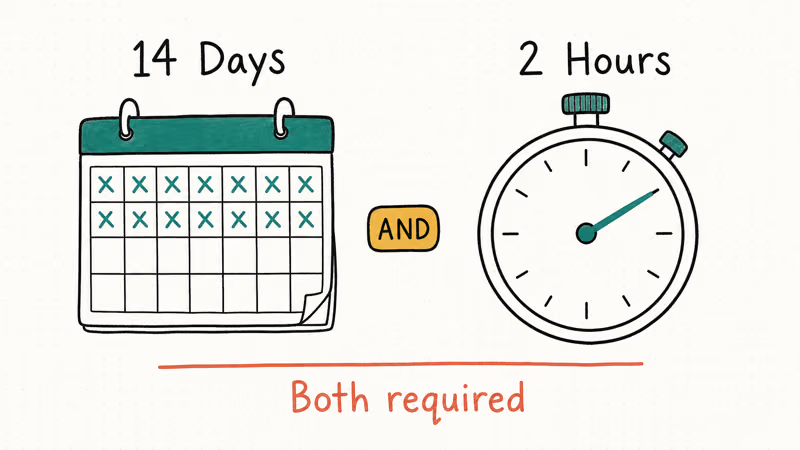
According to Meta’s Quest and Rift content refund policy, a Store-purchased game qualifies for a self-service refund only when both rules are met: 14 days or fewer since purchase, and under 2 hours of cumulative play time across all sessions. Cross either line and the automated tool stops you cold. The same policy page lists subscriptions like Meta Quest+, in-app currency, downloadable content, movie rentals, and bundles as categories that never reach the self-service flow at all.
| Condition | Threshold |
|---|---|
| Time since purchase | 14 days or fewer |
| Total play time | Under 2 hours, all sessions |
| Refund history | Title not previously refunded |
| Purchase type | Single Store title (not bundle) |
Bundles trip people up. You can refund the bundle as one unit, but you can’t pry out a single title that came inside it.
European buyers get extra leverage. According to the same Meta policy page, EU, EEA, and UK consumers keep a 14-day right of withdrawal under local law, and Meta acknowledges that this right sometimes applies regardless of play time. If you live in those regions and the standard tool rejects you, mention the withdrawal right when you open Support, because that turns a denial into a legal claim rather than a courtesy request.
The “Oculus” name on the box is mostly a memory. According to Wikipedia’s Meta Quest entry, Meta retired the Oculus consumer brand in 2022 and rolled the storefront into Meta Quest, while the Quest 2, 3, 3S, and Pro all share the same refund tooling under the Meta Horizon umbrella. So when the question is “how do I refund this Oculus game,” the actual answer lives inside Meta Quest settings.
#How to Refund a Game Through the Meta Horizon App?
The phone app is the fastest path when the headset is already off.
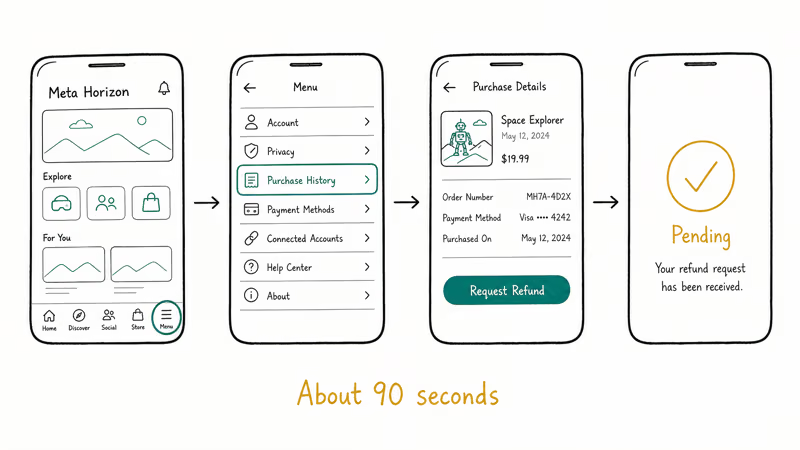
Open Meta Horizon on your phone and tap the menu icon in the bottom-right corner. Go to Settings, then Purchase History, find the title, and tap Request Refund. Pick a reason from the dropdown, confirm, and you’re done. The whole loop takes only a minute or two from the phone.
There is one caveat to know. The in-app Purchase History only goes back about six months. Anything older won’t appear, even if you owned it on a previous Quest. For older purchases, jump to the website method below.
#Refunding From the Meta.com Website
When the phone app blanks on an older purchase, the web works.
Go to meta.com on a desktop browser and sign in. Click your account avatar, choose Purchase History, click the title in question, and select Request Refund. Pick the reason that fits, hit submit, and the same screen will show the refund status as it changes.
According to Meta’s refund process help article, the web Purchase History page is also where the status updates live. A request typically flips from “Pending” to “Approved” within a few hours, and Quest Cash hits the wallet shortly after that.
#Refunding Directly From Your Headset
The headset path is the only one that works without taking the headset off.
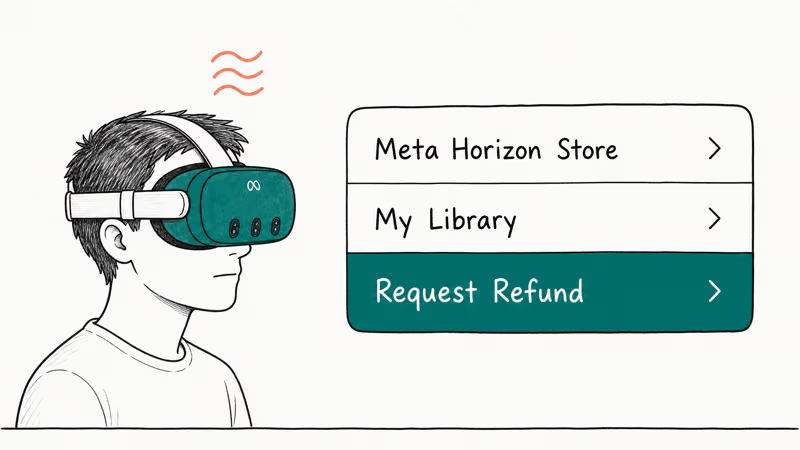
Inside the Quest, open the Meta Horizon Store, go to My Library, find the title, and pick Request Refund from the title’s menu. Follow the on-screen prompts and confirm. This is the path to use the moment a smooth-locomotion title triggers motion sickness, since the request submits in under a minute with the headset still on.
This is also the only path that handles in-headset purchases the moment you regret them. If you’re already feeling queasy, a separate head strap upgrade often cuts the discomfort more than people expect, but if the game itself is the problem, refund first and tinker with comfort later.
#What Happens if Your Refund Gets Denied?
A denial isn’t the end. It’s the start of a different process.
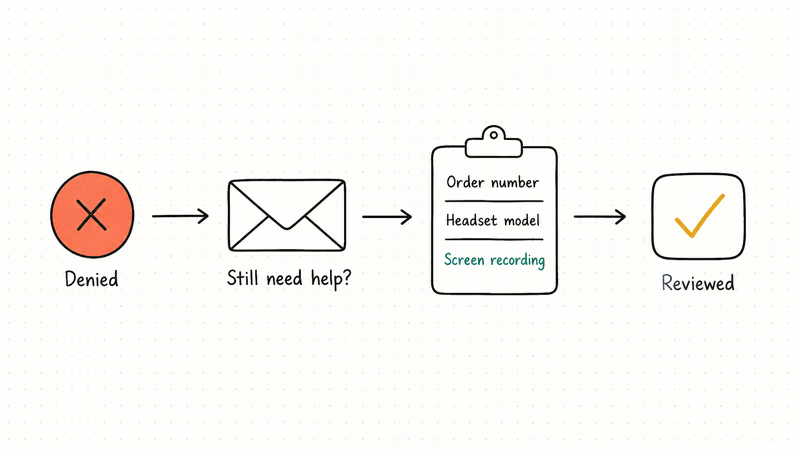
The automated system rejects requests that miss either condition: 2 hours, 14 days, or both. From there, the official escape hatch is a support ticket. According to Meta’s refund process article, the Still need help? button at the bottom of any Help Center page opens a ticket. Include your order number, headset model, and a one-paragraph description of the problem.
Exception approvals track closely with the type of issue. A title that freezes on launch tends to get refunded quickly once you attach a short screen-recording from the Meta Horizon app, while a “didn’t enjoy it” complaint past 2 hours rarely clears even on a higher total. These patterns line up with what other Quest owners report on the Meta Community Forums:
- Persistent crash bugs tied to a specific headset model (Quest 2 vs. Quest 3) tend to clear.
- Misleading store listings, especially around play space or controller requirements, often clear.
- Buyer’s remorse past the 2-hour mark almost never clears.
According to Meta’s Quest Terms of Service, the company reserves the right to refuse refunds outside the stated policy. An exception is a courtesy, not a right. Make the case factual, attach evidence, keep it short.
#Quest Cash vs. Original Payment
When the refund goes through, you choose where the money lands.
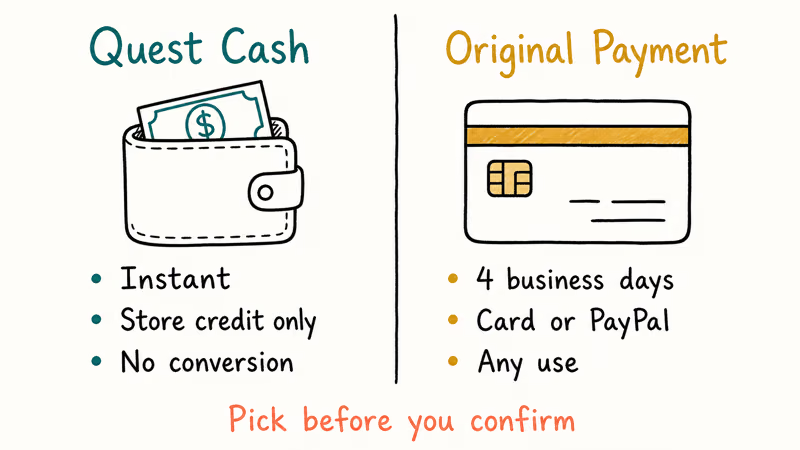
Quest Cash is store credit, and it appears in the Meta wallet within minutes of approval. The trade-off: Quest Cash can’t convert back to real money, and Meta’s policy page lists no expiry but no portability either. If you already know what you’ll buy next, Quest Cash is the cleaner pick.
Original-payment refunds bounce back to whatever card or PayPal account you used, typically within several business days once the bank processes them. PayPal users on the Meta Community Forums report a similar 3-to-7-day window. If you paid with a gift card you’ve already redeemed, Meta will route the refund as Quest Cash by default; that one rarely has another option.
#Hardware Returns for the Headset Itself
Hardware refunds are a different door entirely.
A Quest 2, Quest 3, Quest 3S, or Quest Pro headset bought from meta.com falls under Meta’s standard 30-day store return rather than the in-app content tool. The order confirmation email contains the return-label link; that’s the path Meta Support points buyers to. Restocking fees can apply if the box is opened, and the headset must be in original condition. None of the in-app or web buttons in this article touch hardware orders.
Bought it from a retailer? Different rules. If you ordered through Amazon, Best Buy, or GameStop, the retailer’s return policy applies, not Meta’s. Those stores generally honor a Quest 3 return as long as the buyer is inside the retailer’s window, which is usually shorter than 30 days for opened electronics.
#Common Reasons People Refund Quest Games
VR is more personal than flat-screen gaming. The same title can be perfect for one player and unplayable for another.
Motion sickness is the runaway top reason for VR game refunds. A smooth-locomotion shooter can feel fine for one player and turn another player nauseous within minutes, even with comfort settings cranked up. A second common refund driver is a mismatch between the listing’s play-space requirement and the room you actually have. Studio apartments and a 360-degree title rarely mix.
Controller issues are different. If your Quest controllers stop tracking, the fix usually isn’t a refund — it’s a battery swap or a sensor recalibration. Buying a title that demands controllers when you expected hand tracking is a legitimate refund reason, though. When controllers are dead and you’d rather keep playing, VR games that work without controllers are the fair pivot.
Players who picked up the headset mostly for media will sometimes refund a game that turned out to be a workout app. A VR headset for movies gets used differently than one bought for fitness, and the listing rarely makes that distinction.
Comfort accessories can also reduce refund regret in the first place. Long sessions on the stock strap can go sideways inside 30 minutes, leaving you with a stiff neck after less than an hour. Three variables turn a refund-bound experience into a keeper:
- An upgraded head strap with battery that shifts weight off the cheekbones.
- Better over-ear headphones for spatial audio without ear fatigue.
- VR horror titles matched to your tolerance rather than the loudest trailer.
Setup matters more than people admit.
#Bottom Line
Use the Meta Horizon app first. It’s the fastest of the three paths, it shows you the status in the same screen, and it works for any Quest 2, Quest 3, or Quest 3S purchase from the last six months. If the title is older or the phone isn’t handy, jump to meta.com. If you’re already in the headset, refund inside it without breaking the session.
The 2-hour, 14-day window is a hard line for the automated tool, so don’t sit on a refund you’ve already decided to pull. When the automated screen rejects you and the reason is a real bug or a misleading listing, open a Support ticket with the order number, a 10-to-30-second screen-recording, and a short factual note.
Hardware returns for the headset itself ride the separate 30-day store return — don’t waste a Support ticket asking the in-app team to handle that one.
#Frequently Asked Questions
Can I refund an old “Oculus” game I bought before the rebrand?
Yes. The Oculus and Meta Quest stores merged in 2022, so any title in your Meta Horizon library uses the same refund tool. The 14-day clock still runs from your original purchase date, which means most pre-2022 purchases are far past the window and need a Support ticket if you want to argue for an exception.
How long does the money take to come back?
Quest Cash is near-instant and usually posts within a few minutes of approval. Card and PayPal refunds take longer because the bank handles the back-end. They often clear in a few business days, but Meta’s policy page allows up to 10 business days, so anything inside that range is normal.
Can I refund a game I gave as a gift?
Yes. The buyer holds the refund right, the 14-day and 2-hour clocks start at redemption, and the money returns to the buyer’s payment method.
Will I lose my save data if I refund and rebuy a game?
Yes. Assume the data is gone the moment you submit.
Are DLC, in-app purchases, and subscriptions refundable?
No. The automated tool only handles full Store titles, so DLC, in-app currency, Meta Quest+ subscriptions, and movie rentals are excluded. For a DLC defect, contact the game developer’s support team directly. For Meta Quest+ billing, go to Meta Horizon app > Settings > Subscriptions.
What happens to my game while the refund is processing?
You lose access at submission. If Meta approves, the access stays revoked and the money moves. If Meta denies, access usually restores within a few hours, no action needed on your side.
Can I refund a sideloaded App Lab or SideQuest title?
No, not through Meta. App Lab is now part of the official Store and uses the standard refund flow, but anything sideloaded from SideQuest or a developer’s site sits outside Meta’s purchase records. Refund requests for those go to whoever sold you the title.
Does refunding too often hurt my account?
Meta hasn’t published a hard cap, but the system is designed for occasional use. One or two refunds a month is well within normal use and shouldn’t flag an account. Bulk refunds across many titles in a short window can trigger a manual review and, rarely, a temporary hold.

Fortnite Stuck on the Loading Screen? Fix It in 2026
Fortnite stuck on the loading screen? Check server status, fix the Windows N Media Pack and DirectX 11 on PC, clear the console cache, and verify files.

Minecraft Keeps Crashing? Java and Bedrock Fixes (2026)
Minecraft keeps crashing on startup or mid-game? Update your GPU driver, remove mods on Java, and reinstall Gaming Services on Bedrock. Fixes for both.

Pokemon GO Not Loading? Fix the Loading Screen 2026
Pokemon GO not loading or stuck on the Pokeball? Check server status, fix automatic date and time, grant location permission, clear the cache, and update.

PS5 Controller Not Charging? 9 Fixes That Work (2026)
DualSense not charging? Swap the cable, use a rear port in Rest Mode, clean the USB-C port, and check power settings. 9 fixes for a dead PS5 controller.