Meta Quest Controller Not Working? 8 Proven Fixes (2026)
Fix your Meta Quest controller with 8 practical methods for drift, tracking loss, pairing failures, and unresponsive buttons on Quest 2, 3, and 3S.
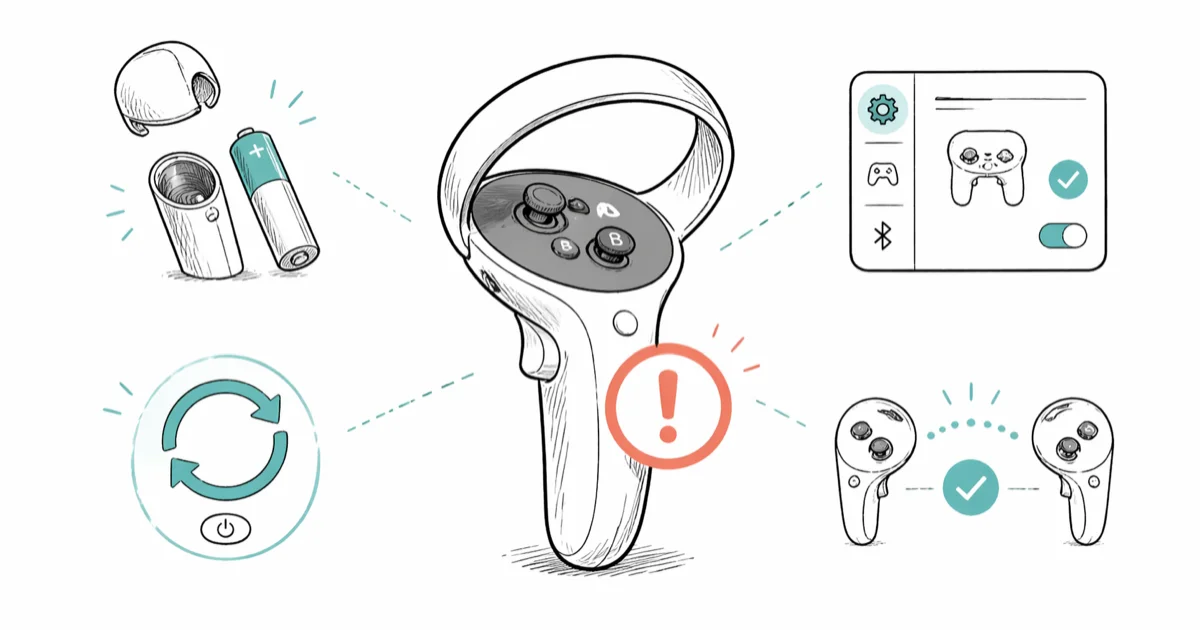
Quick AnswerReplace the AA battery, then hold the power button for 30 seconds to reset the controller. If that fails, unpair and re-pair through Settings > Devices > Controllers on your headset.
Your Meta Quest controller froze mid-game and now you’re waving a useless plastic ring at the menu. The fixes below cover the usual battery, Bluetooth, firmware, drift, and tracking problems.
Most controller failures come down to three causes: a dying AA, a Bluetooth desync after a firmware push, or smudged tracking cameras on the headset. Seven of the eight fixes here take under five minutes.
- A fresh alkaline AA fixes the majority of unresponsive controller cases on Quest 2, Quest 3, and Quest 3S
- Pulling the battery for 30 seconds forces a clean Bluetooth handshake without wiping any game data
- Stick drift usually clears after recalibrating Thumbstick Range and Deadzone in the Devices menu
- Tracking jitter almost always traces back to direct sun, mirrors, or a fingerprint on a headset camera
- Hardware damage to the white tracking ring is warranty-eligible for two years from purchase
#Why Did Your Meta Quest Controller Stop Working?
Controllers fail for a small set of identifiable reasons. Naming the cause first saves you from running through every fix in random order.
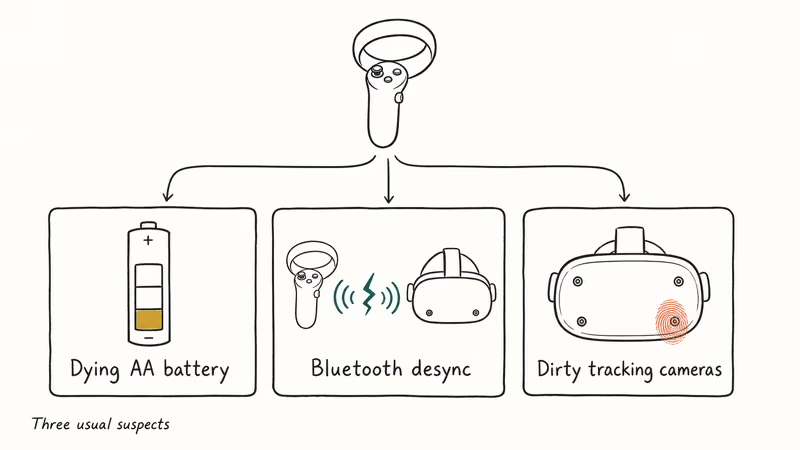
Dying AA battery is the most common offender. Each Touch controller takes a single AA, and haptic-heavy titles like Beat Saber drain that cell faster than passive games. Once the cell drops near 10 percent, buttons start ghosting and the controller can disconnect for a beat between menu clicks.
Bluetooth desync is the next regular cause, and it usually shows up right after a firmware push or when another 2.4 GHz device starts transmitting nearby. Meta states that 30 seconds with the battery out is enough to force a clean Bluetooth handshake, as their controller troubleshooting page confirms.
Reseating the battery can bring a controller back without a full unpair when the issue is a temporary Bluetooth desync.
Dirty tracking cameras are the third regular culprit. The four cameras on the headset read the infrared LEDs around each controller ring, and a single fingerprint smudge is enough to introduce jitter or short tracking dropouts, especially in a dim room.
#How to Fix an Unresponsive Meta Quest Controller
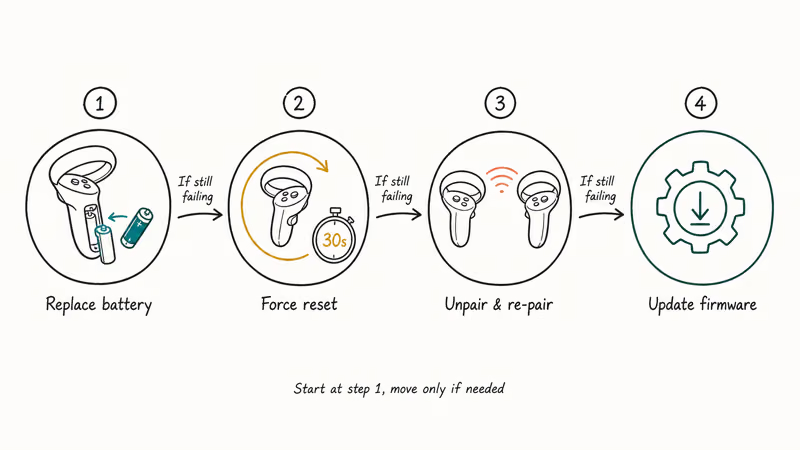
Start with Method 1. It clears the majority of cases on its own.
#Method 1: Replace the Battery
Slide off the battery cover and drop in a fresh alkaline AA.
Rechargeable NiMH cells work but run at 1.2 volts instead of the 1.5 volts the controller expects, which can make Quest controllers misread the lower voltage as critically low. Lithium AAs hold voltage longer in cold rooms too, which matters if you play VR in a basement, garage, or unheated spare room.
If you play daily, a battery pack for your Quest 2 is cheaper long term than buying alkalines by the case.
#Method 2: Force Reset the Controller
- Remove the battery from the affected controller
- Wait 30 seconds, then reinsert the same battery
- Press any button to wake the controller and check the LED
This clears the Bluetooth pairing cache without touching the headset and often brings a disconnected controller back quickly.
#Method 3: Unpair and Re-Pair
If the reset isn’t enough, break the pairing entirely and rebuild it.
- Open
Settings>Devices>Controllersand tap Unpair on the affected controller - Hold the Menu button (left controller) or the Meta button (right controller) until the LED blinks white
- Tap Pair New Controller and follow the on-screen prompts
Re-pairing tends to clear connection drops that show up after a firmware update, which is why Meta lists it as the next step after a battery reset.
#Method 4: Update Firmware
Outdated firmware causes mismatches between the headset and the controllers, which often shows up as buttons working sometimes and ignoring you the rest of the time.
- Put on your headset and open
Settings>System>Software Update - Install any pending updates
- Restart the headset after the update finishes
Controllers update automatically while paired to a refreshing headset. There’s no separate controller firmware screen.
#How Do You Fix Controller Drift on Meta Quest?
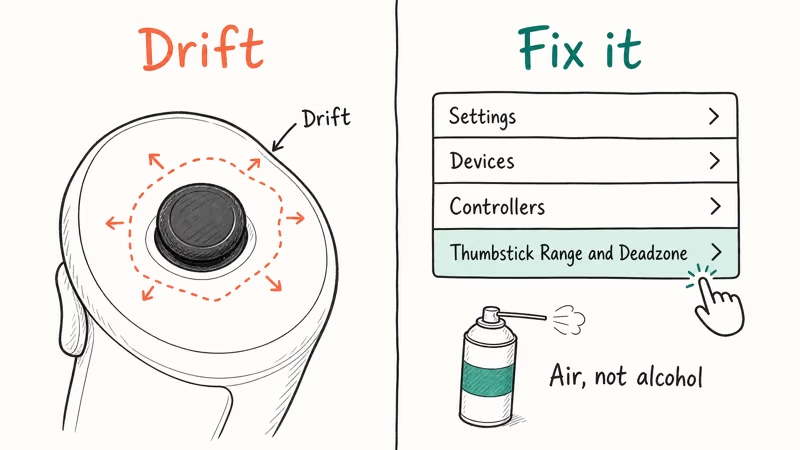
Stick drift means your character keeps walking or your cursor keeps sliding when you aren’t touching the thumbstick. It hits Quest 2, Quest 3, and Quest 3S controllers and usually shows up after several months of regular use.
#Recalibrate the Thumbstick Deadzone
Meta’s drift troubleshooting guide confirms that calibrating the deadzone is the recommended first step before any teardown.
- Open
Settings>Devices>Controllersand select Thumbstick Range and Deadzone - Pick the affected thumbstick and follow the on-screen prompts
- Bump the deadzone size up a notch if drift returns after calibration
Recalibration can clear light drift when the stick hardware is still intact. If drift returns, raise the deadzone slightly or move on to cleaning.
#Clean Under the Thumbstick
Dust trapped under the rubber thumbstick cap causes physical drift that no software fix will catch.
- Power off the controller and rotate the thumbstick in slow full circles 10 times
- Blow short bursts of compressed air around the base of the stick
- Reinsert the battery and test in a menu
Skip rubbing alcohol directly on the stick. It can seep past the cap and damage the Hall effect sensor underneath. The iFixit teardown guide walks through deeper disassembly when air isn’t enough, but opening the controller body voids your warranty.
#Solving Tracking and Connection Problems
Tracking failures look different from button failures. The controller still pairs and the LED still glows, but the in-VR avatar floats to the wrong spot, snaps sideways, or freezes a foot above your hand.
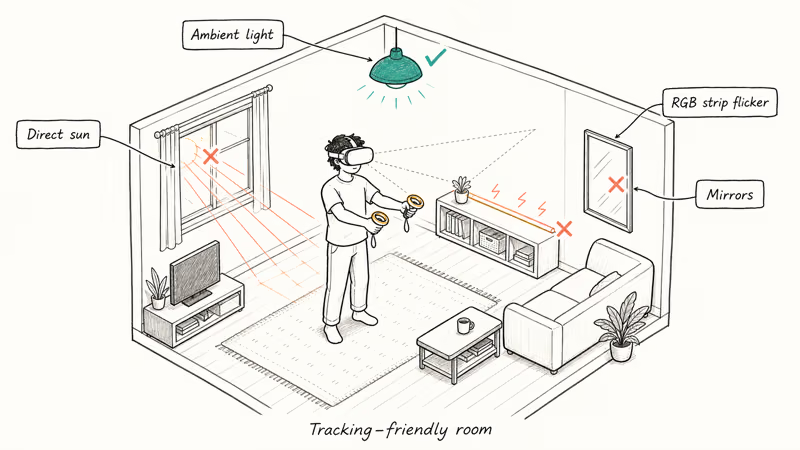
#Fix Your Play Environment
Quest headsets use inside-out tracking with four cameras, and those cameras need specific lighting conditions to map your room correctly.
| Problem | Fix | Why |
|---|---|---|
| Direct sun | Close curtains | Sun IR overwhelms tracking sensors |
| Mirrors/glass | Cover them | Cameras see duplicate IR reflections |
| Dim room | Turn on lights | Cameras need ambient light to map |
| LED strips | Turn them off | Flicker disrupts IR detection |
If you enjoy VR horror games in the dark, leave at least one lamp on. Total darkness collapses inside-out tracking entirely.
#Remove Third-Party Accessories
Silicone grips, oversized controller rings, and aftermarket head straps that bulge over the tracking ring can block the infrared LEDs. Meta’s support page is clear: unsupported accessories are a known cause of tracking dropout. Pop them off, run the same scene without them, and see if the avatar locks back onto your hand.
#Factory Reset as a Last Resort
A factory reset wipes everything on the headset and reinstalls the OS. Save it for after the other methods.
- Power off the headset, then hold Power plus Volume Down together
- Use the volume buttons to highlight Factory Reset
- Press the Power button to confirm
You’ll need to redownload your library and re-pair both controllers. Cloud-saved progress like Beat Saber leaderboards survives the wipe. If you have games you no longer want, check whether you qualify for a Meta Quest game refund before resetting, since the 14-day refund window is easy to miss.
#Keeping Your Controllers in Good Shape
Prevention takes less time than troubleshooting. The habits below extend controller life.
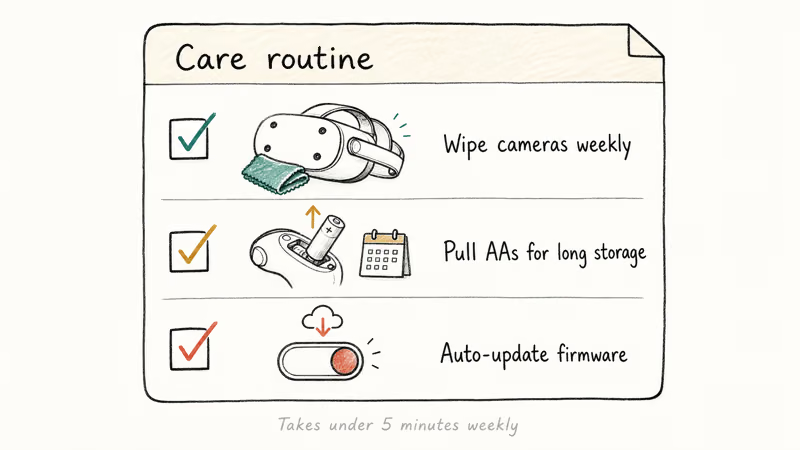
Wipe the headset cameras weekly. A dry microfiber cloth is all you need. The four tracking cameras on Quest 3 sit in recessed housings that trap dust faster than the Quest 2 design.
Pull the AAs during long storage. If you aren’t going to play for a week or more, take the batteries out. Alkaline cells can leak and corrode the contact springs over time. If you spot white powder on the terminals, scrub it gently with a cotton swab dipped in white vinegar, then dry the compartment fully before dropping in a fresh battery.
Leave firmware on auto-update. Open Settings > System > Software Update and flip the toggle. The controllers ride along with each headset patch.
Quality headphones for Quest 2 help here too. Better in-game audio means fewer mid-session menu trips to fight with volume sliders, which means fewer accidental controller drops.
#When to Contact Meta Support
Not every problem has a DIY fix. Three patterns mean it’s time to call Meta.
Visible damage on the white tracking ring puts the IR LEDs out of alignment, and no software step will repair it. Meta confirms that 2 years of warranty coverage applies to manufacturing defects, as detailed on their Quest support page, so don’t try to glue or sand a cracked ring.
Persistent drift that keeps coming back after recalibration and physical cleaning points to a worn Hall effect sensor. That is a hardware swap, not a settings tweak.
One controller working and the other completely dead, even after a fresh battery and a full re-pair, is also a hardware fault. Open a support ticket with your serial number rather than buying a third-party replacement.
#Bottom Line
For most Quest 2 and Quest 3 controller failures, the fastest path is a fresh alkaline AA, a 30-second battery pull, and a re-pair through Settings.
If the issue is stick drift, run the Thumbstick Range and Deadzone calibration first, then clean under the cap with compressed air before any teardown. For tracking glitches, wipe the headset cameras and audit your room for direct sun or mirrors before blaming the controller. Save factory reset and a Meta support ticket for cases where every other step has failed.
#Frequently Asked Questions
Do Meta Quest controllers work with all Quest headsets?
No. Quest 2 controllers only pair with Quest 2 headsets, and Quest 3 Touch Plus controllers only pair with Quest 3 and Quest 3S. The tracking ring shape and infrared LED layout are different across generations, so cross-model pairing is blocked at the firmware level. Upgrading from Quest 2 to Quest 3 means buying the matching Touch Plus pair.
How long do Meta Quest controller batteries last?
Roughly 30 to 40 hours per AA on Quest 3 controllers under normal mixed use. Haptic-heavy games like Beat Saber and Synth Riders cut that to about 20 to 25 hours.
Can you use your Quest headset without controllers?
Yes. Every current Quest headset supports hand tracking. Open Settings > Movement Tracking > Hand Tracking to turn it on. Many VR games work without controllers, although action titles still benefit from full Touch input as you can see in our list of VR games with controller support.
What causes stick drift on Meta Quest controllers?
Dust trapped under the thumbstick cap is the most common cause. The thumbstick uses a Hall effect sensor, and tiny particles distort the magnetic field readings. Heavy daily play across 6 to 12 months can also wear the sensor’s resting position, which produces drift even on a clean controller.
Does a factory reset fix controller issues?
Sometimes. A factory reset clears software-side problems like pairing bugs and firmware glitches, but it won’t repair physical damage. Back up cloud saves first, since the reset wipes every local file on the headset.
How do you know if your controller needs replacement?
If you’ve already replaced the battery, re-paired, recalibrated, and factory-reset the headset and the controller still misbehaves, the cause is almost certainly hardware. Visible damage on the tracking ring, persistent drift after a full clean, or zero LED response on a fresh battery all point the same direction. Check warranty status in the Meta app under Devices > Warranty Info before you buy a replacement.
Are there kid-friendly games that go easy on controllers?
Yes. Puzzle and exploration titles wear thumbsticks and triggers slower than fast-paced action games. There are several Quest games designed for kids that lean on gentle hand movements rather than aggressive stick whips, which keeps the controllers in better shape.
Can a Bluetooth adapter interfere with Quest controllers?
A nearby Bluetooth adapter on a PC or phone usually causes no problem during normal use. A Bluetooth adapter for PC actively scanning or pairing can briefly crowd the 2.4 GHz band. Move actively-pairing devices at least 3 meters from your play area when controllers start dropping connection.

Fortnite Stuck on the Loading Screen? Fix It in 2026
Fortnite stuck on the loading screen? Check server status, fix the Windows N Media Pack and DirectX 11 on PC, clear the console cache, and verify files.

Minecraft Keeps Crashing? Java and Bedrock Fixes (2026)
Minecraft keeps crashing on startup or mid-game? Update your GPU driver, remove mods on Java, and reinstall Gaming Services on Bedrock. Fixes for both.

Pokemon GO Not Loading? Fix the Loading Screen 2026
Pokemon GO not loading or stuck on the Pokeball? Check server status, fix automatic date and time, grant location permission, clear the cache, and update.

PS5 Controller Not Charging? 9 Fixes That Work (2026)
DualSense not charging? Swap the cable, use a rear port in Rest Mode, clean the USB-C port, and check power settings. 9 fixes for a dead PS5 controller.