MP3 vs MP4: Audio, Container, and Quality Differences
MP3 is audio only. MP4 is a container holding audio, video, and subtitles. We compare quality, file size, and device support to help you pick.
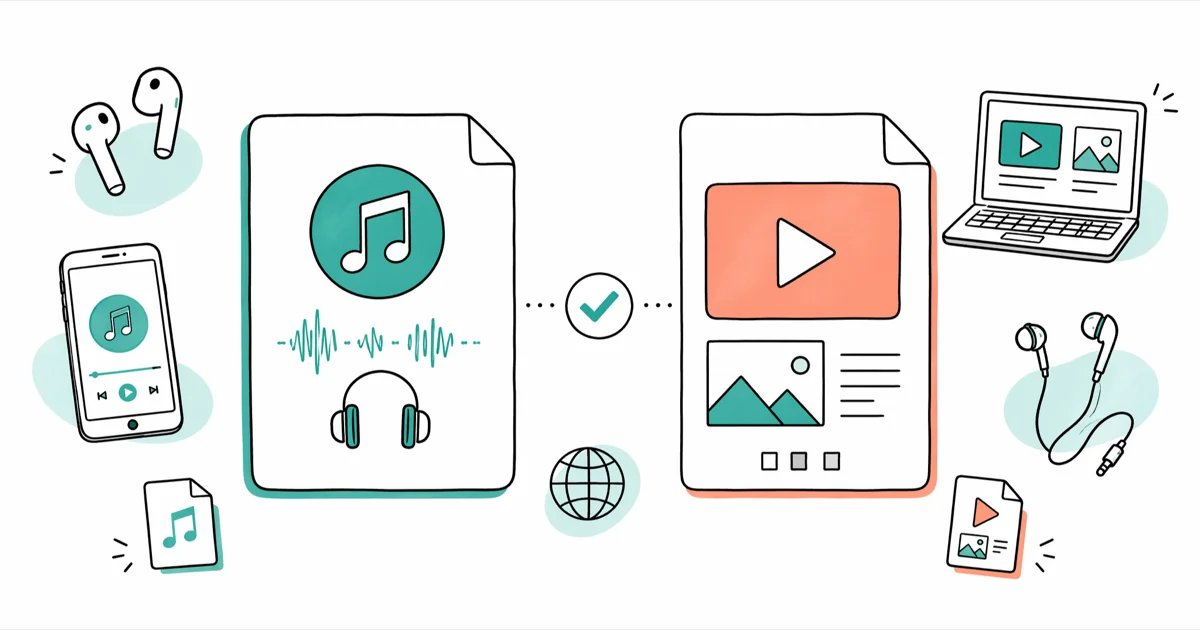
Quick AnswerMP3 is an audio-only format that uses lossy compression to shrink file sizes. MP4 is a multimedia container that can hold audio, video, subtitles, and still images, so they are not different versions of the same thing.
MP3 vs MP4 sounds like a version comparison, but the two formats work in completely different ways. MP3 stores audio. MP4 is a container that holds audio, video, subtitles, and metadata in one package. If you’re choosing in 2026, focus on content type, codec support, and how old the playback device is.
- MP3 stores only audio; MP4 is a container that can hold audio, video, subtitles, and still images
- MP3 uses lossy compression at bitrates from 8 kbps to 320 kbps, with 192 kbps the practical floor for music
- MP4 supports lossy AAC and lossless ALAC audio codecs alongside H.264 and H.265 video
- Higher MP3 bitrates preserve more detail but increase file size quickly
- MP3 plays on virtually every device made since the late 1990s; MP4 is nearly universal but can fail on older car stereos
#The MP3 Format Explained
MP3 stands for MPEG-1 Audio Layer 3, released to the public in 1993. It became the standard for digital music because lossy compression shrinks audio files to roughly one-tenth the size of uncompressed CD audio.
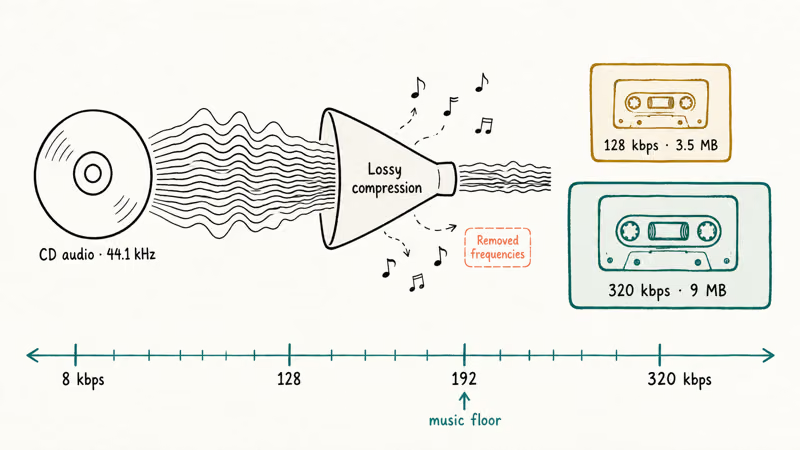
Lossy compression removes audio frequencies that most human ears can’t detect. According to Fraunhofer IIS, the research institute that developed MP3, the format was designed to deliver near-CD quality at a fraction of the file size. Higher bitrates keep more audio detail but increase the file size.
Two settings determine MP3 quality: sample rate and bitrate. Most files use a 44.1 kHz sample rate, the same as a CD. Bitrate ranges from 8 kbps to 320 kbps. Anything below 128 kbps sounds noticeably degraded on decent headphones.
At 320 kbps, most listeners can’t tell the difference between an MP3 and the original CD source.
#The MP4 Format Explained
MP4 stands for MPEG-4 Part 14, released in 2003. Unlike MP3, it isn’t a codec. It’s a container. An MP4 file can hold audio, video, subtitles, still images, and metadata all in one package.
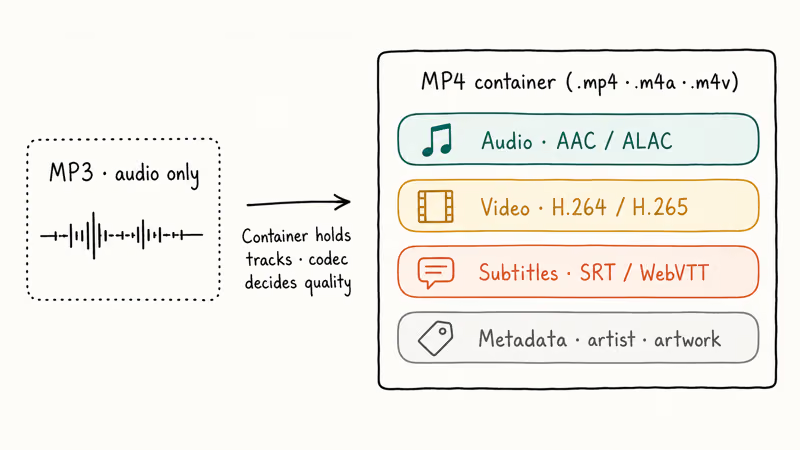
Think of it like a box. The container itself doesn’t determine quality. The codec inside does.
For audio, the most common codec inside MP4 is AAC (Advanced Audio Coding), which delivers better sound at the same bitrate than MP3. Apple’s audio encoding documentation confirms that AAC is the default audio codec across iPhone, iPad, Mac, and the iTunes Store. MP4 also supports ALAC (Apple Lossless Audio Codec), which compresses audio to about half the original CD size without losing any data.
For video, MP4 typically uses H.264 or the newer H.265 codec. Both deliver high quality at file sizes that streaming services can actually push over consumer broadband.
#How Does Audio Quality Compare?
At the same file size, MP4 with AAC sounds better than MP3. That’s the short answer.
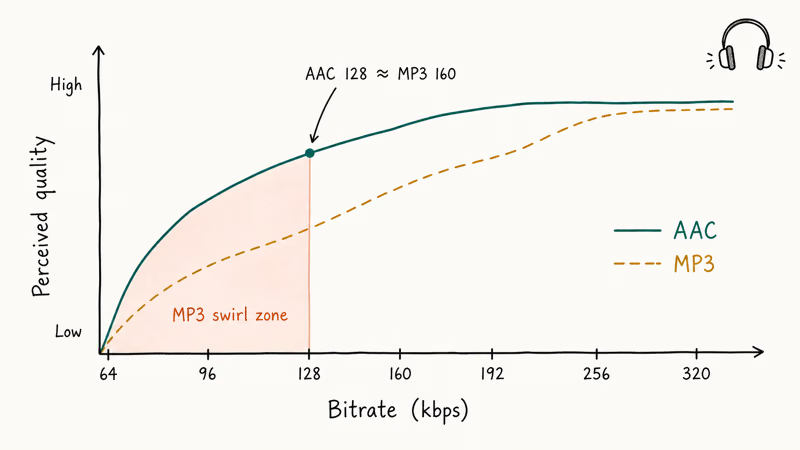
AAC was developed as the successor to MP3. It handles compression more efficiently, especially at lower bitrates. A 128 kbps AAC file sounds roughly equivalent to a 160 kbps MP3, and AAC generally preserves highs and midrange detail better at the same file size.
For casual listening through phone speakers or basic earbuds, the difference is minimal. Where it matters most is at lower bitrates (below 192 kbps) or with music that has complex instrumentation. The gap widens sharply once bitrate drops below 128 kbps, where AAC stays listenable while MP3 compression artifacts become audible.
If maximum quality matters, FLAC or ALAC inside an MP4 container preserves every detail from the original recording without any compression artifacts.
#MP3 vs MP4: Side-by-Side Comparison
Here is how the two formats stack up across the specs that matter most.
| Feature | MP3 | MP4 |
|---|---|---|
| Full name | MPEG-1 Audio Layer 3 | MPEG-4 Part 14 |
| Released | 1993 | 2003 |
| Content | Audio only | Audio, video, subtitles |
| Type | Codec + format | Container |
| Audio codec | MP3 | AAC, ALAC |
| Compression | Lossy | Lossy or lossless |
| Extensions | .mp3 | .mp4, .m4a, .m4v |
#Best Use Cases for MP3
MP3 still earns its place when compatibility matters more than fidelity. Older music players, some car stereos, and budget Bluetooth speakers don’t support AAC or MP4 containers at all. MP3 plays on pretty much everything from a 2005 iPod Nano to a 2026 Galaxy phone, which makes it the safest choice when you don’t know what device will play the file.
Already have a big MP3 library at 256 kbps or higher? Keep it as is. Converting lossy files to another lossy format only degrades the audio further, since every re-encode loses data.
MP3 remains the standard for podcast distribution because of its near-universal player support across phones, smart speakers, and car infotainment systems. The YouTube podcast RSS guidelines page states that MP3 is an accepted audio format. For anyone looking to convert Spotify music to MP3, the format’s broad compatibility is the main draw.
#Best Use Cases for MP4
Pick MP4 when you need video and audio together. Streaming services, downloaded movies, and screen recordings all default to MP4.
For audio-only files, MP4 with AAC is the better pick if your devices support it. Most modern phones and computers do. You’ll get noticeably better sound at the same file size compared to MP3, especially at bitrates below 192 kbps where MP3 compression artifacts become obvious.
Go with ALAC inside MP4 if you’re digitizing vinyl records or CDs and want zero quality loss. That lossless file can always be converted to other formats later without starting from a degraded source.
MP4 is also the right container when you need to compress video files while keeping reasonable quality, since it supports efficient codecs like H.264 and H.265.
#Which Format Has Better Device Support?
MP3 wins this round. Every music app, media player, car stereo, and smart speaker built in the last two decades supports MP3 playback without question.
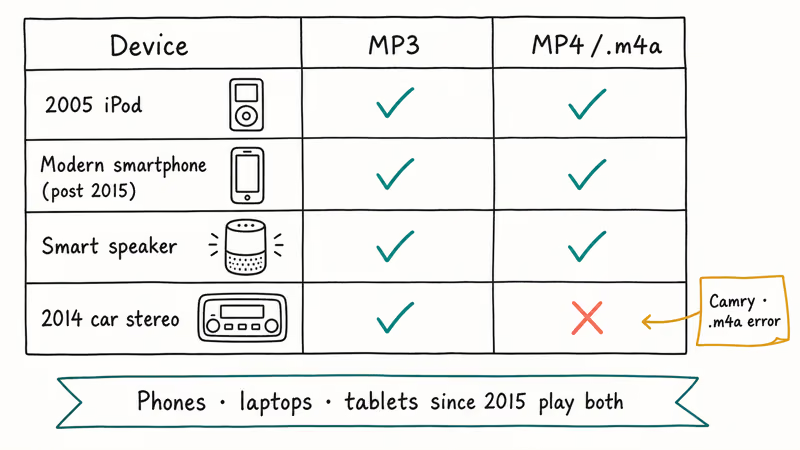
MP4 compatibility is wide but not universal. Some older dedicated music players and certain car audio systems won’t recognize .m4a files (the audio-only MP4 extension). If you run into an audio codec not supported message on a smart TV, car stereo, or older receiver, the device probably can’t decode AAC.
On any phone, laptop, or tablet made after 2015, both formats play without issues. You are likely already listening to AAC-encoded audio through Spotify or Apple Music without realizing it.
#Bottom Line
For pure audio, MP4 with AAC sounds better at the same file size. For video, MP4 is the only option between the two. For maximum compatibility on older hardware, MP3 still wins.
Pick MP3 if compatibility is the priority, especially for podcasts, car audio, or anything older than a 2015 device. Pick MP4 with AAC if you have modern playback gear and care about sound at smaller file sizes. If you are starting from a lossless source, save it as ALAC inside MP4 first, then export to MP3 only when a specific device demands it.
#Frequently Asked Questions
Can you convert MP3 to MP4 without losing quality?
No, since MP3 is already a lossy format and data was permanently removed during the original compression. Converting an MP3 to MP4/AAC re-encodes the audio through another round of lossy compression, which degrades quality further. You’d need the original uncompressed source (CD rip, WAV, or FLAC) to create a high-quality MP4 file. For audio-only conversion paths between modern formats, the Opus and OGG sections of the MP4 to WAV guide linked above cover the details.
Is MP4 just MP3 with video?
No. They’re fundamentally different. MP4 is a container format that holds audio, video, subtitles, and images, while MP3 is both a codec and a file format limited to audio. The audio inside an MP4 typically uses AAC, not MP3 compression.
Why are MP4 files so much larger than MP3?
It depends on what’s inside the container. An audio-only MP4 file is roughly the same size as an equivalent MP3 file at the same bitrate. When an MP4 contains video, file sizes jump dramatically because video data needs far more storage. A 4-minute music video at 1080p can run 50 to 150 MB, while the audio track alone would be under 10 MB.
Does converting MP4 to MP3 reduce audio quality?
Yes. The conversion applies another round of lossy compression, which permanently removes more audio data. Starting from a high-bitrate AAC source (256 kbps) and converting to 320 kbps MP3 keeps the damage minimal, but you’ll still lose some clarity compared to the AAC original. If quality matters, keep the MP4 file and only convert copies you actually need for older devices or platforms that require MP3 input.
Which format do streaming services use?
AAC dominates. Apple Music streams at 256 kbps AAC, YouTube wraps audio in AAC inside MP4 containers, and Spotify uses Ogg Vorbis on desktop and AAC for its web player. Most podcast platforms still distribute as MP3 because of player compatibility across legacy hardware.
Is MP3 still relevant in 2026?
Yes. Billions of MP3 files exist on devices worldwide, and every audio player still supports the format. Cars, smart speakers, podcasting platforms, and any device older than five years usually defaults to MP3 playback before falling back to anything else.
What bitrate should you use for MP3?
Use 192 kbps as the minimum for music you actually want to enjoy. At 128 kbps, quality degradation becomes audible on decent headphones, especially with acoustic instruments and vocal tracks. For archival or critical listening, 320 kbps is the practical ceiling for MP3. If you need anything beyond that, switch to FLAC or ALAC, which preserve every detail from the original recording with zero compression artifacts at all.
Can MP4 files contain only audio?
Yes. Audio-only MP4 files typically use the .m4a file extension. Apple’s iTunes Store has sold millions of songs in this format. An .m4a file is just an MP4 container with an AAC audio track and no video, often including album artwork and metadata like artist name, track number, and lyrics.

Best Laptop for Running LLMs in 2026: Memory Comes First
The best laptop for running LLMs is a memory purchase first. Compare MacBook unified memory against NVIDIA laptop VRAM, and see what each tier really runs.
How to Run a Local LLM on Windows: A 2026 Setup Guide
Run a local LLM on Windows with LM Studio or Ollama. Pick a model that fits your GPU memory, keep every prompt offline, and skip the monthly bill.
Bluetooth Not Working on Snapdragon X? Fixes for 2026
Bluetooth not working on your Snapdragon X Copilot+ PC? Generic audio, mice, and keyboards work, but vendor apps often lack an ARM build. Fixes inside.
Docker Desktop and WSL2 Not Working on Snapdragon X? Fix It
WSL2 runs fine on Snapdragon X, but Docker Desktop ARM is Early Access and throws WSL errors. Use WSL2 plus native ARM64 Ubuntu and Docker Engine.