WAV vs FLAC: Which Lossless Audio Format Wins in 2026?
WAV vs FLAC explained: both are lossless audio, but they differ on file size, metadata, and device support. Learn how to pick the right one for your music.
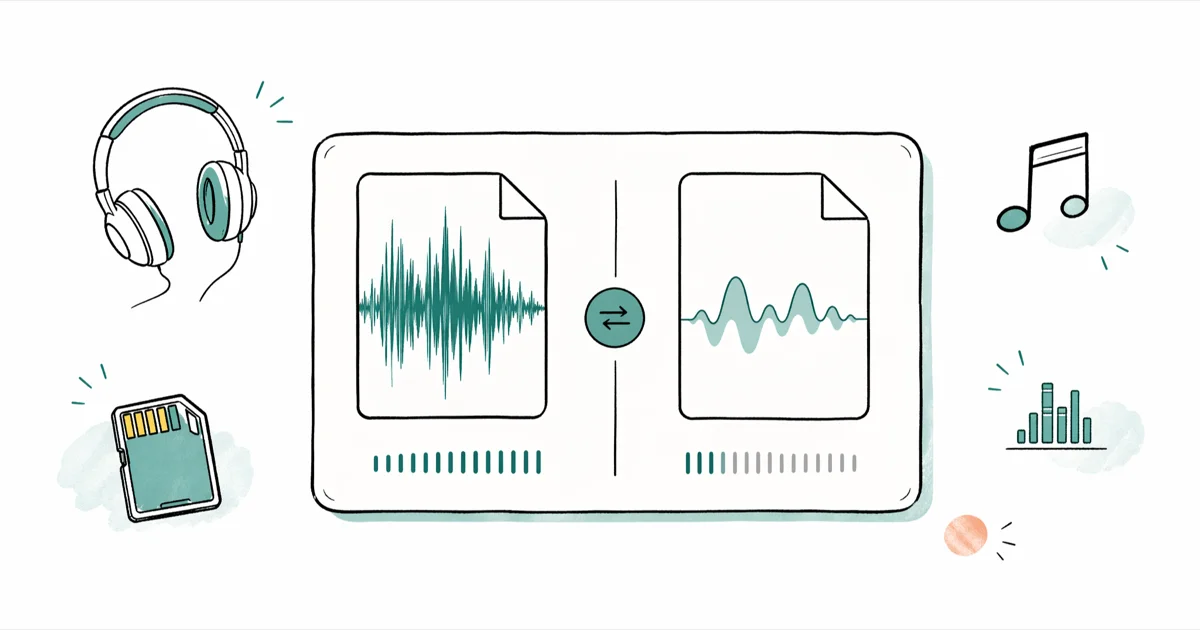
Quick AnswerWAV and FLAC are both lossless audio formats, so they sound identical. FLAC is the better default for music libraries because it cuts file size roughly in half and stores rich metadata, while WAV is the safer pick for raw editing in audio software and broadcast workflows.
WAV vs FLAC is the audio comparison that confuses new vinyl rippers, home recordists, and hi-res music collectors. Both keep every bit of the original recording, but they handle storage, metadata, and software support in very different ways. This guide cuts past the jargon and tells you which format fits which job.
- WAV stores uncompressed PCM audio, while FLAC stores the same PCM bitstream compressed losslessly with no audio data discarded.
- A FLAC file is typically far smaller than the equivalent WAV because lossless compression removes redundancy, not audio detail.
- Sound quality is identical between WAV and FLAC because FLAC’s compression is mathematically reversible, not perceptual.
- FLAC has built-in support for tags, album art, lyrics, and ReplayGain; WAV’s metadata support is limited and inconsistent across players.
- WAV plays natively in every DAW, broadcast tool, and CD authoring app, while FLAC needs a decoder that most modern phones and apps already include.
#What Are WAV and FLAC Audio Files?
WAV is the older format, but FLAC is the one most music apps quietly prefer today. Knowing where each came from explains a lot of the differences you’ll hit later.
WAV stands for Waveform Audio File Format. It’s a container built on the Microsoft and IBM RIFF specification from 1991, and it usually wraps raw linear PCM samples with a short header.
According to Microsoft’s multimedia file format reference, RIFF chunks declare 4 key parameters before any audio plays: sample rate, bit depth, channel count, and byte order. That simple structure is why WAV is the universal “raw audio” format in pro audio tools.
FLAC stands for Free Lossless Audio Codec. It’s an open-source codec maintained by the Xiph.Org Foundation, and the reference decoder ships under a non-restrictive license. Wikipedia’s FLAC entry states that the codec was released in 2001 by Josh Coalson, and its predictive coding plus Rice entropy stage typically shrinks files by 40 to 60 percent.
Hardware makers like Sony, Astell&Kern, and FiiO ship FLAC support on their players because there are no licensing fees. That’s a big reason FLAC won the consumer lossless format wars.
Here’s the trick that throws people off: a FLAC file decodes back to the same PCM samples that were in the original WAV. No data is thrown away. The “compression” is the same kind of math that ZIP uses on text, just tuned for audio.
#WAV and FLAC File Size: How the Numbers Compare
This is where FLAC pulls clearly ahead. Lossless compression means roughly half the storage for the same music, and the ratio gets even better on quieter or simpler material.
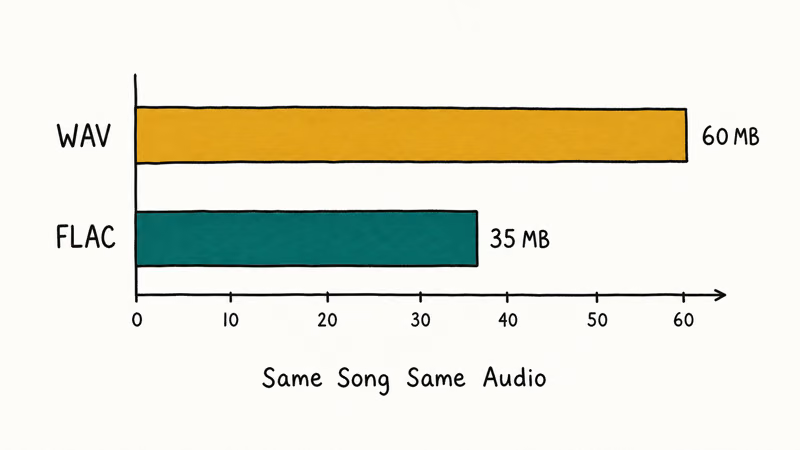
Exported at FLAC’s default compression level 5, a 5-minute 24-bit/96 kHz recording comes out substantially smaller than the WAV master, with the audio data fully intact.
Spoken-word audio, talk radio, and acoustic guitar often compress especially well because long quiet passages give FLAC more redundancy to remove.
A few storage realities worth knowing:
- FLAC compression is adjustable from level 0 to level 8. Higher levels take longer to encode but only shave a few extra percent off the file size, so most archivists stay on the default level 5.
- WAV files have a 4 GB ceiling because the RIFF header uses 32-bit chunk sizes. RF64 and BWF extensions raise that limit, but plain WAV can’t store a long album as a single file.
- FLAC has no practical size ceiling for music-length files. A 24-hour ambient piece fits in one FLAC without special headers.
If you keep a large library on a phone or a tiny SSD, the WAV vs FLAC math is brutal. FLAC’s smaller files add up quickly, and the audio remains lossless.
| Aspect | WAV | FLAC |
|---|---|---|
| Compression | None (raw PCM) | Lossless (typically 40-60% smaller) |
| 5-minute 24-bit/96 kHz file | Larger | Substantially smaller |
| Single-file size limit | ~4 GB (standard) | No practical limit |
| Encoding time | Instant (copy) | A few seconds per song |
| Decoding CPU load | None | Very low on modern devices |
Table: WAV vs FLAC storage and encoding behavior for a typical 24-bit/96 kHz source.
#Is FLAC or WAV Better for Sound Quality?
They sound identical, full stop. Anyone who tells you otherwise is hearing the player, not the file.
Both formats hold the exact same PCM data after decoding. A properly encoded FLAC and its source WAV can cancel out in a null test because no audio information differs between the two.
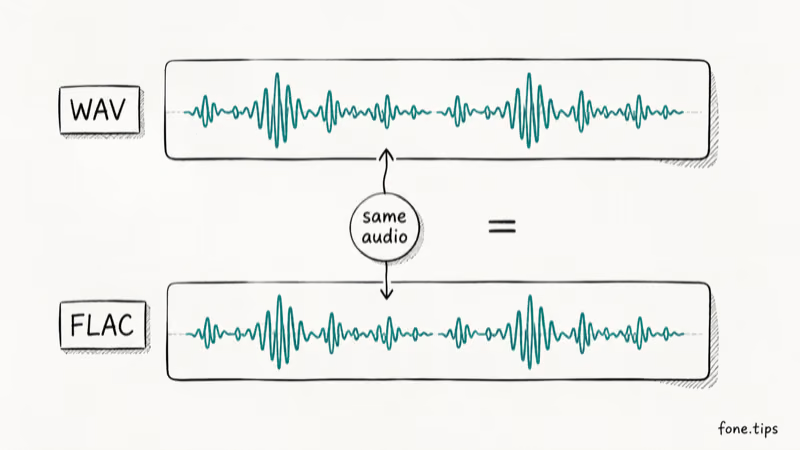
Apple’s Core Audio documentation confirms that lossless codecs reconstruct the original 16- or 24-bit PCM bit-for-bit, which is why Apple treats ALAC, FLAC, and uncompressed WAV/AIFF as audibly equivalent in its hi-res tier.
The factors that actually change what you hear have nothing to do with WAV vs FLAC:
- Source quality. A FLAC ripped from a CD beats a WAV bounced from a 128 kbps MP3 every time, because the FLAC still carries the full CD data.
- Bit depth and sample rate. A 24-bit/192 kHz WAV holds more dynamic range and ultrasonic headroom than a 16-bit/44.1 kHz FLAC, but only because of the underlying PCM, not the wrapper.
- Playback chain. A clean gaming DAC or a phone with a decent headphone amp matters far more than which lossless wrapper sits on disk.
If you ever read a forum post claiming WAV “sounds better” than FLAC on the same recording, the writer is comparing two different masters or hearing a buffering glitch in their player. The encoded audio data is byte-identical.
#Device and App Support for WAV and FLAC
Format support is the one place WAV still has a slight edge, mostly inside professional audio software.
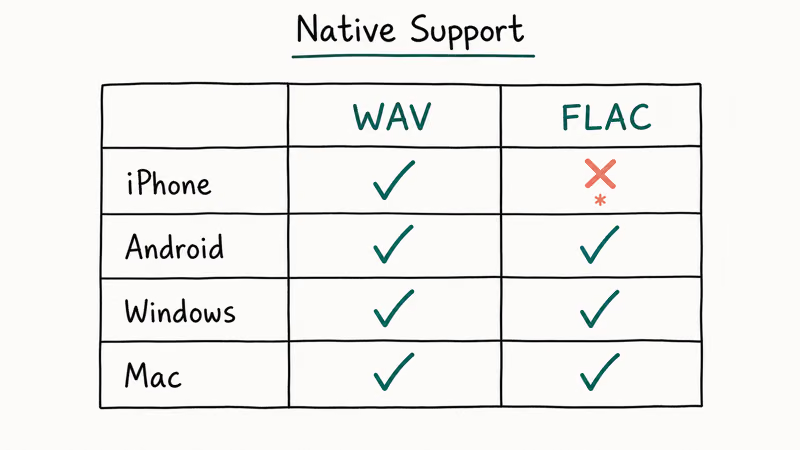
WAV is universal for editing. Major DAWs such as Pro Tools, Logic Pro, Ableton Live, Reaper, FL Studio, and Audacity open WAV natively and write WAV exports by default.
Broadcast workflows almost always demand WAV or its BWF cousin because the format is simple enough for any tool to parse. CD burning software likes WAV for the same reason. If you produce music, score video, or master records, WAV is the lingua franca.
FLAC support has become almost as broad on the consumer side. Built-in or first-party app support exists on:
- Android: native FLAC playback since Android 3.1 (2011), so any modern phone handles it.
- iPhone and iPad: the Files app and the Apple Music app stream FLAC since iOS 17, and third-party players like VLC, Doppler, and foobar2000 mobile have read FLAC for years.
- Windows 10 and 11: File Explorer shows FLAC duration and tags, and the Groove and Media Player apps play them.
- macOS: QuickTime and the Music app support FLAC after macOS Sonoma; before that, third-party tools like VLC bridged the gap.
- Portable hi-fi players: Astell&Kern, FiiO, Sony Walkman, HiBy, and Shanling all decode FLAC up to at least 24-bit/192 kHz.
Where you’ll still trip over FLAC: very old car stereos, some legacy Bluetooth speakers from the early 2010s, and any system that only accepts MP3, AAC, or WAV input.
If you hit a playback wall, our guide on the audio codec not supported error walks through the codec packs and conversion fixes that get most players reading FLAC again.
WAV’s metadata story is the format’s biggest practical weakness. The RIFF spec allows an INFO chunk, and the iXML and BWF extensions add more fields, but support in consumer apps is patchy. Some players ignore WAV tags entirely.
FLAC stores Vorbis comments inside the file. Artist, album, year, track number, embedded art, and ReplayGain all travel with the song across most modern players. That metadata portability is the single biggest reason FLAC is the better default for any music library that lives on more than one device, and it’s also why podcast distributors prefer FLAC masters when accepting hi-res uploads.
#Converting Between WAV and FLAC Without Quality Loss
Most readers should keep their archive in FLAC and only convert when a specific tool asks for WAV. Lossless-to-lossless conversion never harms the audio, so swap freely.
Convert WAV to FLAC when:
- You’re ripping CDs or downloading hi-res purchases and want to halve the storage footprint.
- You need album art, lyrics, or ReplayGain to follow the files into your phone or hi-fi streamer.
- You’re shipping music to a streaming service that requires FLAC uploads (most do).
Convert FLAC to WAV when:
- A DAW or video editor refuses to open the FLAC directly. Older Pro Tools sessions are a common offender.
- You’re authoring an audio CD and the burner only accepts WAV or AIFF.
- A piece of broadcast hardware or a hardware sampler needs raw PCM.
For format conversion, free tools are a good first stop. dBpoweramp on Windows, XLD on macOS, and FFmpeg on every platform handle WAV ↔ FLAC without quality loss.
If you’re after a guided desktop app, Wondershare UniConverter handles batch audio conversion and accepts WAV, FLAC, ALAC, AIFF, and MP3 inputs.
Some links on this page are affiliate links, which means fone.tips may earn a commission at no extra cost to you.
For specific conversion paths, these guides use the same lossless-friendly workflow:
- Lossless rips from streaming sources belong in FLAC only when the source itself is lossless, which YouTube audio is not.
- Converting MP4 to WAV walks through lossless audio extraction, with OGG and Opus conversions covered too.
- Best online audio compressors rounds up MP3 and AAC alternatives for files that don’t need to stay lossless.
One conversion pitfall to flag: going FLAC → MP3 → FLAC is not lossless. MP3 throws away audio data, and re-encoding to FLAC just freezes a lossy version. Always convert from the highest-quality source you have.
#Common WAV vs FLAC Mistakes to Avoid
Even people who know lossless theory still trip on these in practice. Each one can wreck a music library.
Re-encoding from lossy sources. Saving a 128 kbps MP3 as FLAC just locks in the MP3’s missing data at a bigger file size. Start from a CD rip or a hi-res WAV download, never an MP3.
Editing FLAC directly in destructive workflows. Convert to WAV first, edit, then re-encode to FLAC.
Trusting WAV tags on every player. WAV’s metadata support is unreliable, so an album that looks fine on your laptop might show “Track 01, Unknown Artist” on a five-year-old car stereo, an old hardware media player, or a budget Bluetooth speaker. FLAC dodges this entirely by carrying its tags inside the audio container, where every modern decoder reads them out and shows the artist, album art, and track number without extra setup.
Ignoring sample rate matching. Converting a 48 kHz WAV to 44.1 kHz FLAC for CD is fine, but rate conversion is a separate step from format conversion. Use a tool with good resampling (FFmpeg with the aresample filter, or dBpoweramp) so you don’t introduce aliasing artifacts.
#Bottom Line: Choose FLAC for Your Library, WAV for the Studio
Keep your music archive in FLAC. The audio is identical to WAV.
Switch to WAV the moment a recording session starts. If you’re tracking guitars, mastering a podcast, scoring a video, or burning a CD, work in WAV and only export FLAC when the project ships. Most pro tools chew through WAV with zero codec overhead, and the format’s simplicity prevents weird import errors when a session moves between machines.
The case for FLAC outside the studio is just as clear. Files are roughly half the size, the metadata travels with the song across phones, hi-fi streamers, car head units, and laptops, and most consumer players built since 2015 decode FLAC natively. The only reason to leave your library in WAV is if you have unlimited storage and refuse to install any tool that decodes FLAC.
For audio editors who also need recording hardware, our roundup of the best audio interfaces for Mac pairs naturally with WAV-based DAW workflows.
#Frequently Asked Questions
Does FLAC sound worse than WAV?
No. FLAC is a lossless codec, so it reconstructs the original PCM data bit-for-bit when decoded. A FLAC decoded back to WAV is byte-identical to the source.
How much smaller are FLAC files compared to WAV?
FLAC files are typically much smaller than the matching WAV.
The exact ratio depends on the source. Dense rock and orchestral pieces compress less because every sample carries information. Sparse acoustic recordings, podcasts, and audiobooks shrink the most, because long quiet or low-information passages give the predictor plenty of easy patterns to encode.
Can I play FLAC files on an iPhone?
Yes. Apple’s Files app and Apple Music app play FLAC natively since iOS 17.
Is WAV better than FLAC for DJing or live performance?
WAV is the safer pick because it needs no codec decoding, so the playback engine spends zero CPU cycles unpacking the file. Most pro DJ software still accepts FLAC, but if a controller hiccups during a hot cue, switching the offending track to WAV removes one possible cause.
What’s the difference between FLAC and ALAC?
ALAC and FLAC store the same PCM data, so they sound the same. The choice usually comes down to ecosystem.
Will converting between WAV and FLAC reduce quality?
No, as long as you stay inside the lossless world. WAV to FLAC conversions, and FLAC to WAV conversions, reproduce the original samples exactly. The danger is going through a lossy step like MP3 or AAC in between, which permanently throws away audio data and can’t be recovered by re-encoding to a lossless format afterward.
Do streaming services use WAV or FLAC?
Streaming services that offer lossless tiers, including Tidal HiFi, Qobuz, Apple Music Lossless, and Amazon Music HD, deliver audio in FLAC or ALAC because raw WAV would consume far too much bandwidth.
Which format should I use for archiving my vinyl rips?
Use FLAC at 24-bit/96 kHz. Every sample is preserved, the file is half the size, and metadata sticks with the track.

Best Laptop for Running LLMs in 2026: Memory Comes First
The best laptop for running LLMs is a memory purchase first. Compare MacBook unified memory against NVIDIA laptop VRAM, and see what each tier really runs.

Pixel 11 vs Pixel 10: What Changed and Who Should Upgrade
Pixel 11 vs Pixel 10: same screen and camera resolution, new Tensor G6, 25W wireless, and Gemini Intelligence. Here is who should actually upgrade.

Best Power Bank for iPad in 2026: Pro, Air, and Mini
Best power bank for iPad in 2026. Compare mAh tiers and USB-C PD wattage for iPad Pro, Air, and mini, plus airline Wh math, cables, and travel tips.

Best Power Bank With Built-In Cable: Top 2026 Picks
Best power bank with built-in cable picks for 2026. Compare single USB-C, multi-connector, and retractable laptop banks, plus airline Wh math.