GFaker Review 2026: Honest Take on the iOS GPS Dongle
2026 GFaker review: how the $279 iOS GPS dongle compares to software like iAnyGo, plus the Niantic ban risk and legal limits to know before you buy.
Quick AnswerGFaker is a $279 hardware dongle that spoofs iPhone GPS through Apple's External Accessory Framework, on iOS devices you own, with no jailbreak. It is a niche pick for iOS developers and privacy testing, but software like iAnyGo at $6.95 a month covers the same legitimate use cases for most readers, and any spoofer inside Pokemon GO or other apps that forbid GPS modification still triggers documented account bans.
GFaker keeps surfacing in iOS spoofer roundups as the only hardware option in a category dominated by desktop software. The pitch is short: a wireless dongle that pairs with an iPhone over Apple’s External Accessory Framework and feeds a substitute GPS coordinate, no jailbreak, no laptop tether, no developer profile that an iOS update can break.
This review walks through Apple’s free first-party paths first, then breaks down what this $279 dongle does, does not do, and where it gets you in legal trouble.
This review only covers spoofing on a personal iPhone or iPad you legally own. Plugging GFaker into a borrowed phone, a partner’s device, or a child’s iPhone without explicit consent is a separate question that crosses into stalking and surveillance territory, and we lay out the legal limits and Niantic ban consequences below.
- GFaker is a $279 hardware dongle from Phantom Geek that overrides iPhone GPS through Apple’s External Accessory Framework, with no jailbreak on iOS 9 and newer
- The hardware approach beats software spoofers on isolation, since the spoofed coordinate never touches a developer profile or USB tether, but you lose route playback, joystick control, and multi-device licensing
- Legitimate use cases are narrow: iOS app development on devices Xcode can’t reach, privacy testing against over-collecting apps, and offline AR-game route scouting on titles that permit modified GPS
- Pokemon GO, Pokemon GO Plus+, and every other Niantic title forbid third-party GPS spoofing and enforce a three-strike policy that escalates to permanent account bans
- Software competitors like Tenorshare iAnyGo start at $6.95 a month and ship instantly, which covers the same legitimate use cases for most readers without the hardware shipping wait
#Before You Plug a GFaker Into Anything
Three conditions need to be true before you should even unbox a GFaker dongle. They apply to every iOS spoofer, not just this one.
You must own the iPhone or iPad. A purchase receipt, an Apple invoice, or a written handover from a family member counts. GFaker’s own product documentation sells the dongle for use on personal iOS devices, and the same use-on-devices-you-own clause appears in every reputable spoofer’s license. Plugging the dongle into a borrowed phone, a partner’s iPhone, or a child’s device without explicit consent crosses into stalking territory under most U.S. state statutes.
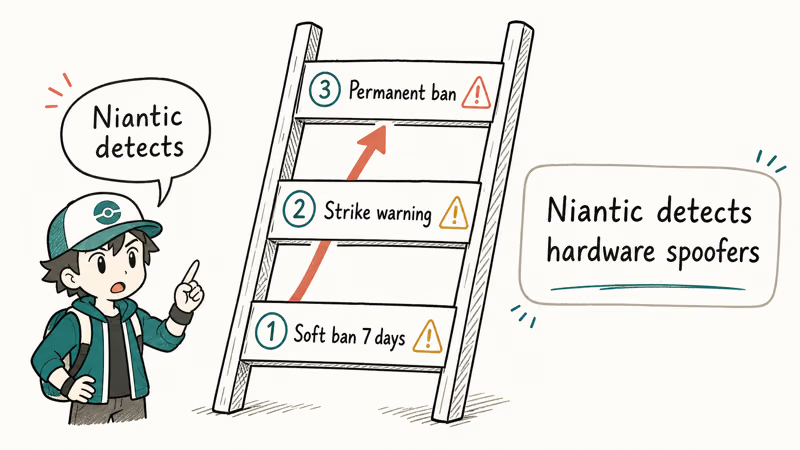
The target app must permit GPS modification, or you accept the ban risk. Most location-based apps treat spoofing as a terms-of-service violation. According to Niantic’s three-strike discipline policy, Pokemon GO accounts caught using third-party location tools get a warning on the first strike, a 30-day suspension on the second, and a permanent ban on the third. Niantic confirms that the ban applies across every Niantic title attached to the device.
Apple’s official tools come first, and they’re free. Use Apple’s Xcode location simulator for development testing, and iOS Location Services at Settings > Privacy & Security > Location Services for privacy hygiene.
#What Is GFaker and How Does It Work?
GFaker is a small wireless dongle built by Phantom Geek that pairs with an iPhone or iPad through Apple’s official External Accessory Framework and feeds the device a substitute GPS coordinate. The hardware ships in two trim levels, the GFaker Phantom and the GFaker Pro, and both use a chipset that Apple has authorized for accessory-grade location data.
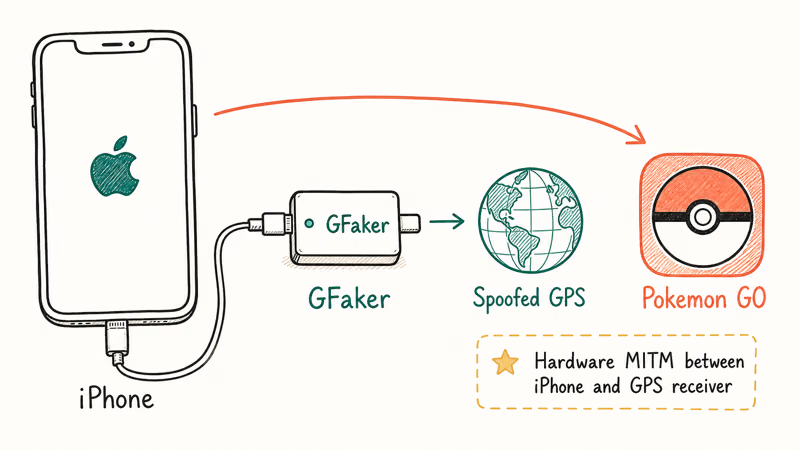
Because the dongle talks to iOS over the External Accessory Framework instead of injecting code through a developer profile, GFaker behaves like an external GPS receiver from the operating system’s perspective. iOS sees the dongle and treats it as a higher-priority location source than the internal GPS chip.
Every Core Location app on the iPhone reads the substitute coordinate. The product page states iOS 9 and newer is supported.
The companion app is the part that surprises new buyers. GFaker’s iOS app is not on the App Store. The manufacturer distributes it through Apple’s TestFlight beta channel and asks you to redeem an invitation code that ships in the dongle’s box. A second module called Phantom is listed on the App Store but offers slightly less accurate spoofing, since it can’t use the dongle’s hardware chipset for fine positioning.
The practical workflow looks like this:
- Charge the GFaker Pro through its bundled cable, since the battery ships near empty.
- Plug the dongle into the iPhone’s Lightning port and approve the External Accessory pairing prompt.
- Open the TestFlight-installed companion app and pick a destination on the map or paste a coordinate.
- Switch the iPhone to use the dongle as its location source, which the app handles in one tap.
- Open any Core Location app and confirm the spoofed coordinate is what the app sees.
Unlike software spoofers, GFaker does not require a desktop PC, a USB cable to a laptop, or a developer profile that an iOS update can break. The trade-off is that you only get one device at a time and you can’t replay a GPX file or drive a joystick.
#GFaker Hardware Models and Pricing in 2026
Phantom Geek lists two dongles, both at the same $279 USD price point with different feature sets.
- GFaker Pro: The flagship dongle with a 3.5mm headphone passthrough, a charging port, and the full External Accessory Framework integration. Tied to a single iPhone or iPad per license.
- GFaker Phantom: The companion model that pairs with the App Store Phantom app for a slightly lower-accuracy spoof. Same $279 price, same single-device restriction.
Both dongles accept one-time payment only, with no subscription tier, no software updates after purchase, and no multi-device pooling. Shipping runs through Phantom Geek’s own fulfillment, which adds a wait of several days before the dongle reaches the door. Software competitors like Tenorshare and iToolab ship instantly through a download link, and our Tenorshare iAnyGo review walks through how the monthly tier compares on cost.
For readers weighing the up-front cost, GFaker’s $279 list price is a one-time spend with no recurring fee, while iAnyGo’s yearly tier is about $39.95 a year. Break-even sits around the seven-year mark, which assumes the GFaker hardware keeps working through that many iOS major releases.
Some links on this page are affiliate links, which means fone.tips may earn a commission at no extra cost to you.
#Where GFaker Beats Software, and Where It Loses
Comparing GFaker Pro against software spoofers like iAnyGo and Foneazy MockGo shows where the hardware approach earns its premium, and where it does not.
Where GFaker wins. The dongle’s location override survives reboots without reinstalling a developer profile, and the spoofed coordinate stays clean when iOS pushes a minor update. Because there is no USB tether, you can keep the iPhone in your pocket and walk around freely while the GFaker handles the location feed. The External Accessory pairing also means apps with anti-cheat layers that look for the iAnyGo-style developer profile can’t detect the dongle as easily.
Where GFaker loses. No GPX import. No joystick mode. No multi-spot route playback. No Wi-Fi or IP fingerprint masking, and no multi-device licensing.
Where both approaches still get caught. Apps that combine Core Location with secondary signals will flag the spoof regardless of hardware or software. Ride-hailing apps like Uber may accept a spoofed pickup coordinate at first, then cancel the trip when their fraud-detection layer sees that the IP geolocation does not match. Content apps like TikTok often lean on additional fingerprinting beyond GPS, so a spoofed coordinate alone may not change the feed.
If you want the multi-spot routes, joystick mode, and free trial that iAnyGo offers, software wins. If you want a tether-free spoof that survives a reboot on an iPhone you own, GFaker earns its $279. Readers comparing GFaker against retired sideload tools should also read our Fly GPS for iOS status update, since the IPA model that powered older free spoofers is effectively extinct on modern iOS.
#Pokemon GO and Niantic Ban Risk With GFaker
This is the part you should not skim, because the wrong assumption ends in a permanent ban.
According to Niantic’s Pokemon GO Terms of Service, users agree not to use any unauthorized third-party software or hardware that modifies the game’s GPS data. That language explicitly covers tools like GFaker when used inside Pokemon GO. The same clause appears in Pokemon GO Plus+, Monster Hunter Now, and Pikmin Bloom terms.
According to Niantic, anti-cheat enforcement runs in three stages: a 7-day warning on the first strike, a 30-day suspension on the second, and a permanent ban on the third. The Pokemon GO soft ban is the related shorter cooldown that fires within minutes of an impossible GPS jump and lasts 4 to 12 hours, stripping PokeStop loot and raid rewards even on what looks like a legitimate route.
GFaker’s hardware path doesn’t hide from Niantic’s anti-cheat. The detection engine reads GPS jump velocity regardless of source. Our Pokemon GO fake GPS guide covers the velocity patterns. The iSpoofer Pokemon GO retrospective explains why the 2021 Niantic ban wave killed that tool.
If you plan to use any spoofer inside any Niantic title, treat the eventual permanent ban as a documented endpoint rather than a hypothetical risk. A long teleport jump can trip a soft ban within minutes, and the same velocity-based detection applies to software competitors like iAnyGo, since Niantic reads the GPS jump regardless of whether the spoof came from hardware or software.
#Is Using GFaker Legal?
The legality depends on where you spoof, what app you spoof inside, and whose device the dongle is plugged into.
On a device you own, for purposes the target app permits, GFaker is legal in the U.S. and most jurisdictions. Apple’s developer documentation explicitly supports location simulation for legitimate testing, and there is no federal statute against changing the GPS coordinate your own iPhone reports.
Inside an app whose terms forbid spoofing, GFaker crosses into a terms-of-service violation. That is a contractual breach, not a crime in itself, but it triggers account bans, and when combined with paid in-game purchases it can fall under fraud statutes. According to the U.S. Department of Justice’s Computer Fraud and Abuse Act guide, unauthorized access combined with intent to defraud is a federal offense, and a handful of mobile-game cheating cases have been prosecuted on that basis since 2020.
On someone else’s iPhone, or to deceive a person tracking your location, the legal exposure jumps. Plugging GFaker into a partner’s phone, deceiving an employer’s mileage tracker, or feeding a fake location to a court-ordered monitoring app all fall into stalking, fraud, or contempt-of-court territory.
For privacy-driven use on your own iPhone, iOS’s Privacy and Location Services controls cover most cases without any hardware or software spoofer. Apple recommends Approximate Location and per-app revocation as the first line of defense, and we agree with that recommendation for casual users. Reach for GFaker only when you have verified the target app permits modified locations or you accept the consequences.
#GFaker vs iAnyGo vs MockGo Compared
For most readers, software wins on price, time-to-value, and feature depth.
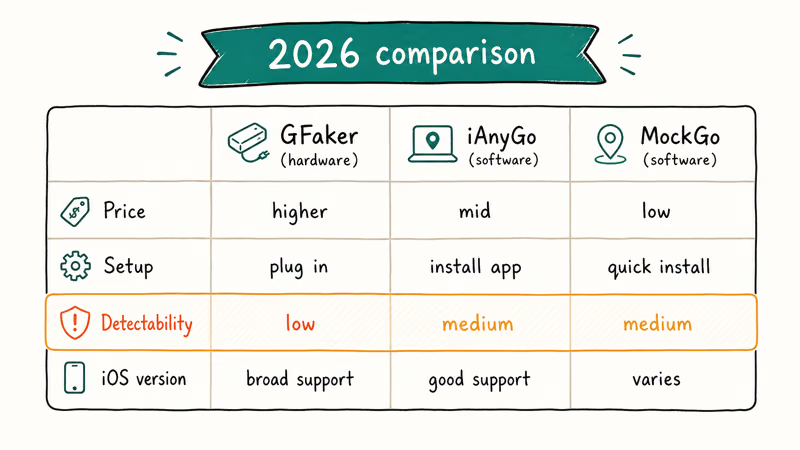
| Feature | GFaker Pro | Tenorshare iAnyGo | Foneazy MockGo |
|---|---|---|---|
| Type | Hardware dongle | Desktop software | Desktop software |
| Jailbreak required | No | No | No |
| Starting price | $279 one-time | $6.95 / month | About $9.95 / month |
| Free trial | None | Limited preview | Limited preview |
| Multi-device | One device per dongle | Up to 5 iOS devices | Up to 5 iOS devices |
| GPX route playback | No | Yes | Yes |
| Joystick mode | No | Yes | Yes |
| Reboot-survival | Yes | No (re-pair after reboot) | No |
| Time to first spoof | After shipping wait | Instant download | Instant download |
Our change iPhone location without jailbreak guide walks through the software competitors in more depth, and our category lead at the iOS location spoofer hub covers the broader ecosystem.
For the legitimate-use buyer, the decision usually shakes out like this:
- Buy GFaker if you specifically need tether-free spoofing on a single iPhone you own, you are testing accessory-driven location workflows, or you want the hardware to survive iOS major updates without re-installing a developer profile each time.
- Buy Tenorshare iAnyGo if you want the most polished software experience with joystick control, GPX import, and a license that covers up to five iPhones for the cost of one month of GFaker shipping.
- Buy Foneazy MockGo if you already use Foneazy tools and want a similar feature set at a slightly different price point.
If none of those fit and your real need is privacy on your own device, our change iPhone location guide covers the free Apple Location Services controls that handle most privacy scenarios without any paid tool.
#Bottom Line
GFaker delivers what the product page promises: a hardware GPS spoofer for iPhones and iPads you own, wireless, jailbreak-free, with an External Accessory pairing that survives reboots and minor iOS updates. Because the dongle reports through the External Accessory Framework, Apple Maps and other Core Location apps accept the new coordinate without a developer profile, and the pairing is designed to hold through iOS point releases.
The catch is the use case. At $279 one-time, GFaker only pays off for the narrow set of buyers who specifically need tether-free hardware spoofing on a single iPhone, and who plan to keep the dongle running through several iOS major releases. For everyone else, especially readers tempted by Pokemon GO marketing, the eventual Niantic ban makes the $279 a sunk cost.
Buy GFaker only if you are an iOS developer doing accessory-driven location testing, you want a tether-free spoof on a single iPhone you own, or you specifically need the dongle’s reboot-survival behavior.
Skip GFaker if you want multi-device support, GPX route playback, or joystick control, in which case Tenorshare iAnyGo at $6.95 a month is the better entry point. Don’t buy any spoofer if your real plan is to cheat Pokemon GO, deceive a partner, or run any spoof on a device you don’t own.
#Frequently Asked Questions
Does GFaker work without jailbreaking my iPhone?
Yes. GFaker pairs through Apple’s official External Accessory Framework, the same mechanism that licensed hardware accessories use. No jailbreak is needed, and the dongle does not install a developer profile on the iPhone.
Can I get banned from Pokemon GO for using GFaker?
Yes, and the ban is documented. Niantic’s three-strike discipline policy applies a warning on the first detection, a 30-day suspension on the second, and a permanent ban on the third. The hardware approach does not make GFaker invisible to Niantic’s velocity-based detection.
Is using GFaker legal in the United States?
It depends on whose device you use and which app you spoof inside. On an iPhone you own, for app testing or privacy on apps that permit modified locations, GFaker is legal. Spoofing inside an app whose terms forbid it counts as a contract breach. Spoofing on someone else’s iPhone, or to deceive a person tracking your location, can cross into stalking or fraud statutes depending on the jurisdiction.
Does GFaker work with the latest iOS versions?
Yes. Because GFaker pairs through the External Accessory Framework rather than an exploit or a developer profile, it survives iOS major updates as long as Apple keeps the framework in place. The product page lists support from iOS 9 onward, and customer reports cover iOS 12.4.1 and later.
How is GFaker different from Tenorshare iAnyGo or MockGo?
GFaker is hardware. iAnyGo and MockGo are desktop software. GFaker wins on reboot-survival and tether-free use on one device. The software tools win on multi-device licensing, GPX route playback, joystick control, free trials, and time to first spoof, since there is no shipping wait.
Is there a free way to do what GFaker does?
Apple’s Xcode location simulator is free for development testing, and iOS Location Services revocation at Settings > Privacy & Security > Location Services handles privacy at no cost.
Can I use one GFaker dongle on multiple iPhones?
No. The license ties each GFaker Pro or GFaker Phantom dongle to one iOS device. If you want to spoof across a personal iPhone, a development iPhone, and an iPad, you need three dongles or a software competitor that supports up to five iOS devices on a single license.
What happens if I plug GFaker into someone else’s iPhone?
The dongle will pair if the device owner taps Allow on the External Accessory prompt, but doing so without the owner’s consent crosses into surveillance territory under most U.S. state stalking statutes. The Phantom Geek license, like every spoofer’s terms, restricts GFaker to devices you legally own or have explicit written authorization to use.

Mac mini M6 vs M5 Pro: Which Model Should You Buy?
Mac mini M6 vs M5 Pro compared on price, memory, ports, displays, and real workloads. Find the better 2026 Mac mini for your desk and budget.

Apple Siri Settlement: Who Qualifies and How to Claim
Apple's $250 million Siri settlement covers iPhone 15 Pro and iPhone 16 models bought June 2024 to March 2025. See who qualifies and how claims work.

iOS 26.6.1 Security Update: What Apple Fixed and Who Gets It
Apple released iOS 26.6.1 on August 17 with 29 security fixes, including an IPSec interception bug. See what it patches, who gets it, and how to update.

iPhone Adaptive Power: How It Works and When to Use It
Learn how iPhone Adaptive Power works, which models support it, what it changes, and when Low Power Mode is still the better battery-saving choice.