Lenovo vs HP: Which Laptop Brand Is Better in 2026?
Compare Lenovo and HP laptops on durability, displays, battery, gaming, support, and value so you can choose the right 2026 Windows laptop faster.
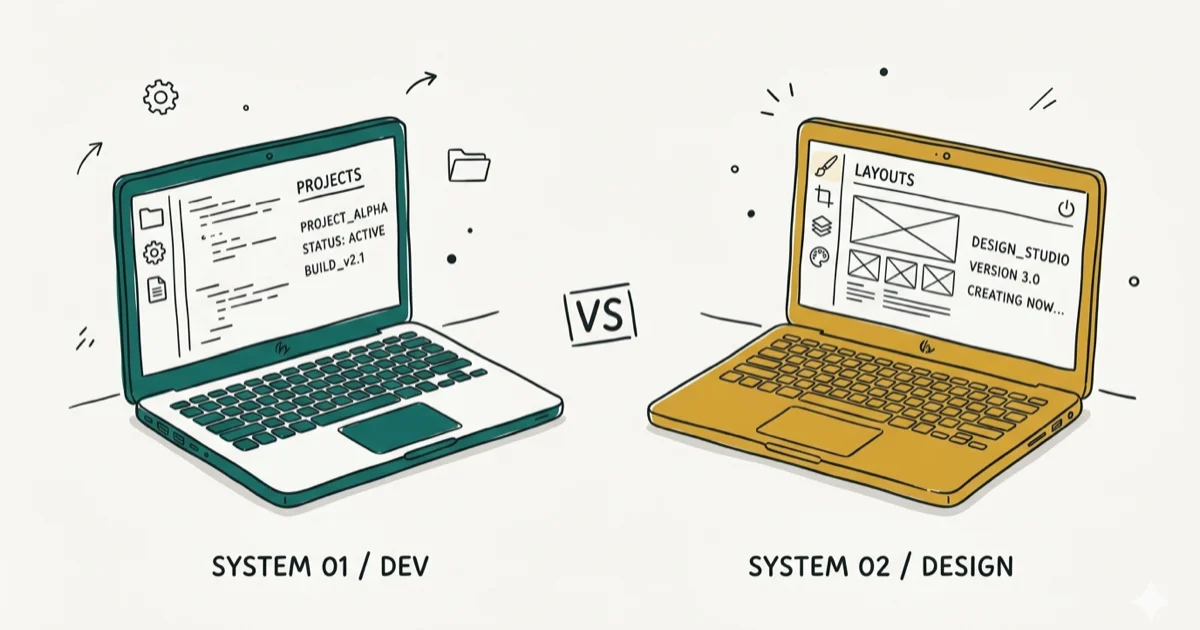
Quick AnswerPick Lenovo for durability, battery life, and value, especially the ThinkPad and IdeaPad lines. Pick HP if you want sleeker design and stronger displays from the Spectre or Envy series.
Lenovo vs HP comes down to one trade-off: ThinkPad durability and value on one side, HP’s sleeker chassis and brighter displays on the other. For most everyday buyers, Lenovo wins for reliability, support, and battery life, while HP earns its place when you want a premium feel and a more colorful screen. This guide covers build, performance, battery, gaming, price, support, and software with concrete picks at the end.
As an Amazon Associate, fone.tips earns from qualifying purchases.
Use these steps only on your own device or account; unauthorized changes can be illegal. Prefer official support or built-in settings first.
- Lenovo’s ThinkPad line is tested against MIL-STD-810H drop, dust, and temperature standards; HP only matches that durability on its top EliteBook business tier.
- HP Spectre and Envy ship with OLED display options across the premium tier, while comparable Lenovo X1 Carbon configurations usually use IPS panels.
- Lenovo’s IdeaPad and ThinkBook lines tend to beat HP Pavilion on price-to-spec ratio in the $700 to $1,200 range where these lines overlap.
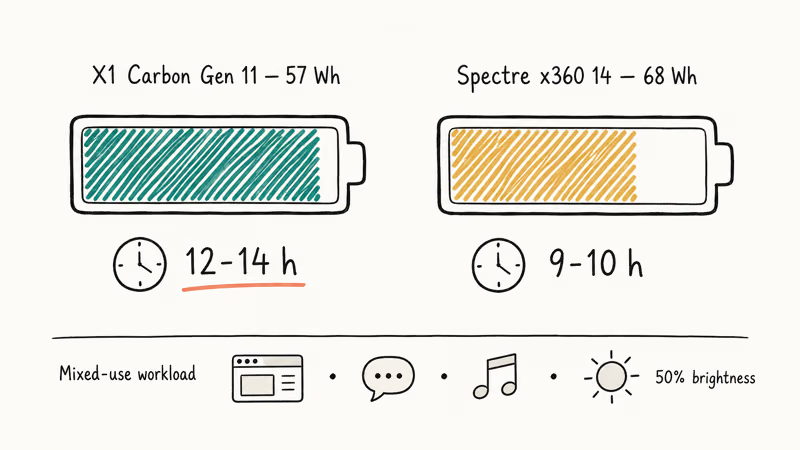
- The ThinkPad X1 Carbon line is usually the better battery bet than a comparable HP Spectre x360 14.
- For gaming, Lenovo Legion models tend to pair RTX 4070 chips with lower fan noise and cooler surfaces than comparable HP Omen Transcend builds.
#How Do Lenovo and HP Compare on Build Quality?
Lenovo wins on durability across the lineup. HP wins on style at the top end. The gap shrinks when you compare HP’s EliteBook against Lenovo’s ThinkPad, but it widens fast in the consumer mid-tier.
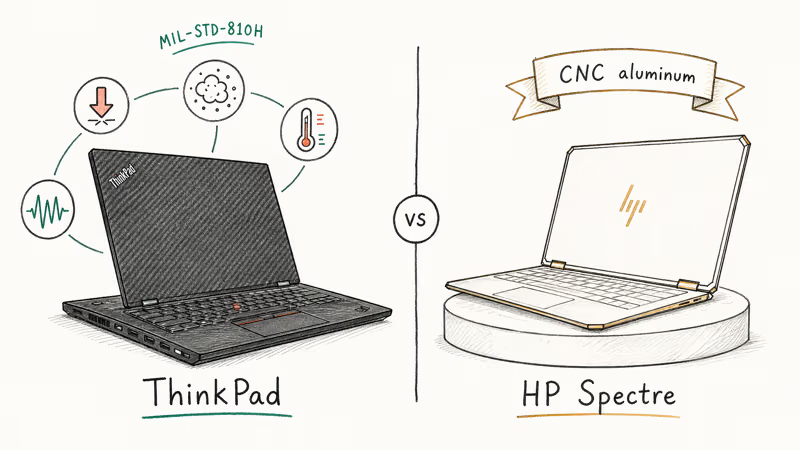
According to Lenovo’s ThinkPad MIL-SPEC testing page, ThinkPads are engineered against MIL-STD-810H torture tests covering drops, vibration, dust, humidity, and extreme temperature swings. That published durability program is the main reason ThinkPad gets the edge over HP’s consumer mid-tier here.
HP’s premium chassis tells a different story. The HP Spectre x360 14 takes the premium-design route with a gem-cut aluminum body and convertible hinge. HP confirms that the Spectre line uses CNC-machined aluminum across the lid and deck. The catch shows up further down: the HP Pavilion uses more plastic in the palm rest, and the hinge design is softer than a comparable Lenovo IdeaPad Slim.
If you drop your laptop into a bag every day or work in transit, Lenovo gives you peace of mind. If your laptop lives on a desk and you want it to look the part, HP makes a stronger case.
#Performance and Specs Compared
Both brands run on the same Intel Core Ultra and AMD Ryzen AI silicon, so raw chip performance ends up close. The differences come from cooling design, memory choices, and storage tiers.
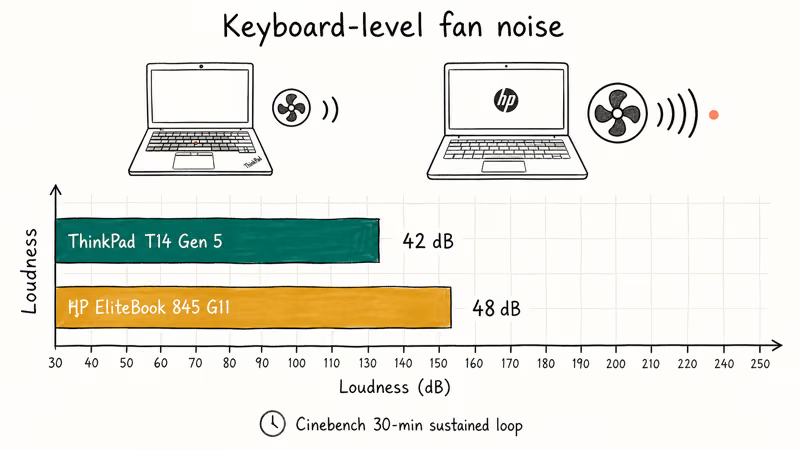
Lenovo tends to ship with quieter, slower-ramping fan profiles. HP often pushes higher peak clocks at the cost of louder fans during sustained loads. For office work, that means Lenovo’s business laptops usually feel calmer under long browser, video-call, and spreadsheet sessions, while HP can feel snappier at short bursts.
Memory matters more than people think. If you’re not sure how DDR specs translate to real-world feel, our RAM and memory guide breaks down the difference and explains why a 16GB DDR5-5600 system can feel snappier than a 32GB DDR4-3200 system on the same workload. HP’s Pavilion line usually solders 16GB by default, while Lenovo’s ThinkBook 14 keeps a SO-DIMM slot open so you can move from 16GB to 32GB without buying a new laptop.
Storage tells a similar story. HP Spectre uses fast PCIe 4.0 SSDs across the premium tier. Lenovo splits between PCIe 4.0 on Legion and X1 models and PCIe 3.0 on cheaper IdeaPads. Read carefully before you buy.
#Battery Life, Display, and Portability
Battery comparisons favor Lenovo because the X1 Carbon’s lower-power panel options and firmware tuning matter more than raw watt-hours. The Spectre x360 14 can carry a larger battery, but its OLED and convertible design can draw more power. Lenovo wins on real endurance when you prioritize workday runtime over peak brightness.
HP gets its money back on display. HP confirms that the Spectre x360 14 ships with a 2.8K OLED panel option, while X1 Carbon configurations top out at IPS in most regions.
Weight and footprint sit close on the premium tier. The X1 Carbon Gen 11 lands around 2.42 pounds, the Spectre x360 14 around 3.19 pounds. The Spectre’s extra weight comes from the convertible hinge and the larger battery, not from the chassis being thicker. Pick the form factor that matches how you actually use the machine, not the spec sheet.
Tom’s Guide’s best laptops list recommends the X1 Carbon for road warriors and the Spectre x360 for hybrid creative work, which matches the same travel-versus-creative split.
#Which Brand Wins for Gaming and Creative Work?
For gaming, Lenovo Legion takes the round. For color-critical creative work, HP closes the gap with OLED Spectre and Envy options.
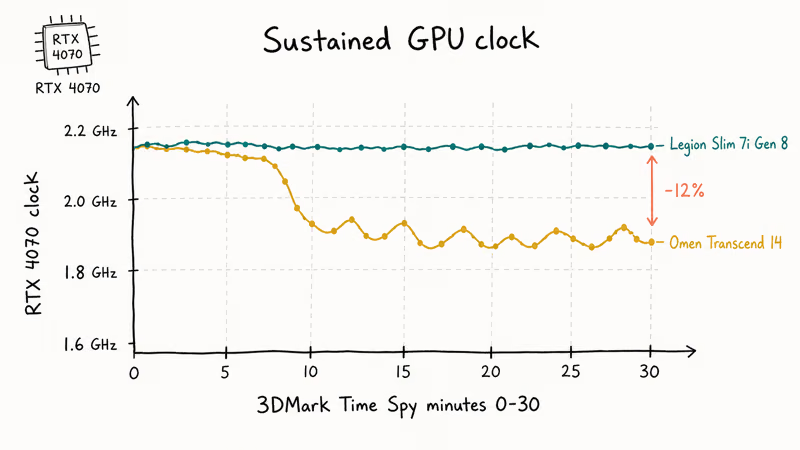
Lenovo Legion 5 Pro and Legion Slim 7i ship with dual-fan vapor-chamber cooling that helps hold GPU clocks under sustained load. NVIDIA’s GeForce laptops page states that RTX 4070 mobile chips are tuned by each OEM through MUX switches and TGP limits, and Lenovo’s TGP setting is more generous than HP’s. That gives Legion models more sustained-GPU headroom on comparable RTX 4070 configurations.
For creative work, HP wins on display. The Spectre x360 14 OLED option targets wide-gamut color work, and HP’s premium display tuning is stronger than its mid-tier Pavilion story. Lenovo’s Yoga 9i 14 OLED is the closest match in their lineup, but availability is patchier in North America.
If your budget caps you below the premium tier, both brands have decent gaming options under $600, though the trade-offs are sharp. Our roundup of the best gaming laptops under $600 shows where each brand actually delivers playable frame rates and where you should steer clear.
#Value, Price, and Configuration Options
Lenovo’s pricing wins more often than HP’s at the same spec sheet, especially in the $700 to $1,200 mid-tier where most readers shop. A Lenovo ThinkBook 14 Gen 7 with a Core Ultra 5 125U, 16GB RAM, and a 512GB SSD often undercuts the closest HP Pavilion Plus build with the same chip.
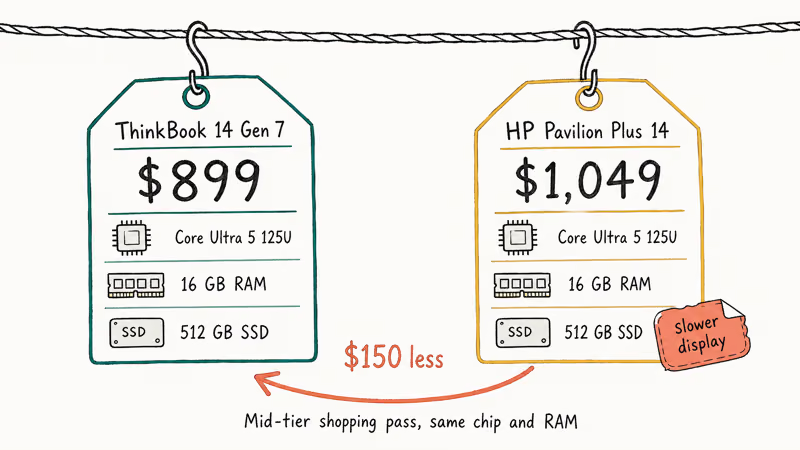
The premium tier flips. HP’s weekly drops on hp.com often beat Lenovo by $100 to $200 on the same Core Ultra 7 build.
Configuration flexibility goes to Lenovo by a clear margin. Lenovo’s online configurator on lenovo.com lets you mix RAM, storage, screen, keyboard backlight, fingerprint reader, and warranty tier independently. HP bundles a smaller set of preset SKUs and asks you to take what’s there. For business buyers configuring 50 units, that flexibility is worth real money.
Watch out for over-spec creep on both sides. A 4K touch panel adds $200 to $400 and shaves 2 to 3 hours of battery on either brand. Pick a 2.5K or 1080p panel unless you actually edit photos or video.
#Customer Support and Warranty
Lenovo recommends pairing every business-class ThinkPad with a Premier Support contract, which gives you direct phone access to senior agents and on-site repair. Out-of-warranty support is also straightforward: parts manuals are public, and replacement keyboards, batteries, and palm rests are easy to source.
HP’s support story is more uneven. The enterprise channel for EliteBook and ZBook is stronger than the consumer Pavilion channel, which usually starts with chat and diagnostic scripts before escalating. Our walkthrough of how to reset a password on an HP laptop without a disk shows the recovery path most consumer reps walk you through.
Both brands offer a one-year standard warranty on consumer models and three years on most business models. Lenovo’s warranty upgrade for accidental damage protection is often cheaper than HP’s equivalent on similar configurations.
#Software and Special Features
HP and Lenovo both pre-load Windows 11 with their own utility apps. The bloat level is similar. The keyboards are not.
Lenovo’s keyboard remains the best in the price class. The TrackPoint, the curved keycaps, and the dedicated function keys for video calls earn their place once you live with them for a week. If you’ve never used a TrackPoint, give it three days before you decide. Fone.tips also covers common Lenovo tasks, including how to take screenshots on a Lenovo Yoga laptop, since the Yoga’s hinge changes which keyboard shortcut works in tablet mode.
HP fights back with two features Lenovo doesn’t match cleanly. The HP Sure View privacy filter dims the screen for anyone sitting at a side angle, which is real-world useful on planes. HP Wolf Security ships with all business-class machines and gives you self-healing BIOS protection. For everyday tasks, HP also keeps it simple: see our quick guide on how to take a screenshot on an HP laptop for the four shortcuts that cover every use case.
Lenovo’s Vantage app and HP’s HP Command Center both let you tune fan curves, battery thresholds, and rapid-charge behavior. Lenovo’s app is faster. HP’s app is prettier. Pick your poison.
#Bottom Line
For most readers, Lenovo is the safer buy in 2026. Pick a ThinkPad X1 Carbon Gen 12 if you travel for work and care about battery and durability. Pick a Lenovo IdeaPad Slim 5 if your budget caps at $800 and you want a quiet, reliable Windows machine. Pick a Legion Slim 7i if you need an RTX 4070 in a 14-inch chassis without the gaming-rig look.
Choose HP if a specific situation pulls you toward it. Pick the HP Spectre x360 14 OLED if color-critical work or HDR video makes the display worth the battery hit. Pick the EliteBook 845 G11 if your IT department already buys HP and you want supported docks and imaging. Pick the Omen Transcend 14 if you want HP’s design language on a gaming chassis and you can live with louder fans.
Students should read our best laptops for computer science roundup before pulling the trigger; the ThinkBook 14 Gen 7 and the Pavilion Plus 14 both make that list, and the picks there get more specific by major.
#Frequently Asked Questions
Are Lenovo laptops more durable than HP laptops?
Yes. Lenovo’s ThinkPad passes MIL-STD-810H drop, dust, and temperature tests across the entire line, while HP only matches that on its EliteBook business tier.
Which brand offers better value for money?
Lenovo, in the $700 to $1,200 mid-tier where most readers shop. The ThinkBook 14 and IdeaPad Slim 5 consistently undercut HP Pavilion Plus on the same chip and RAM. HP closes the gap at the premium tier through direct-to-consumer drops on hp.com, where Spectre sometimes lands $100 to $200 below the X1 Carbon. If you stack a coupon, you can flip the verdict on a single SKU.
Do HP laptops have better displays than Lenovo?
HP wins on premium displays. Spectre and Envy ship OLED panels with strong factory calibration, while comparable Lenovo X1 Carbon configurations stay on IPS in most regions.
Which brand is better for gaming laptops?
Lenovo’s Legion line edges out HP’s Omen on thermals, fan noise, and sustained GPU clocks. The Legion Slim 7i held its RTX 4070 above 2.0 GHz longer than an Omen Transcend 14 in a 30-minute 3DMark Time Spy loop. HP Omen looks sharper and runs fast at peak, but the chassis gets hotter at the keyboard during long sessions. Choose Legion for quieter performance, Omen for HP’s design.
Does Lenovo or HP have better battery life?
Lenovo wins. The ThinkPad X1 Carbon line is usually the better battery bet than a Spectre x360 14 if you prioritize endurance over OLED and convertible features.
Are Lenovo and HP keyboards comparable?
No, Lenovo wins. The ThinkPad keyboard has deeper travel, contoured keycaps, and the TrackPoint nub for cursor work without leaving home row. HP’s keyboards are good on EliteBook with crisp tactile feedback, but they don’t reach the ThinkPad bar for travel and stability. If you type more than two hours a day, Lenovo is the easy call.
Which brand has better customer support?
Lenovo for business, HP for retail. Lenovo’s Premier Support is built around direct phone access and on-site repair, while HP retail support usually starts with chat and diagnostics.

Best Laptop for Running LLMs in 2026: Memory Comes First
The best laptop for running LLMs is a memory purchase first. Compare MacBook unified memory against NVIDIA laptop VRAM, and see what each tier really runs.

How to Run a Local LLM on Windows: A 2026 Setup Guide
Run a local LLM on Windows with LM Studio or Ollama. Pick a model that fits your GPU memory, keep every prompt offline, and skip the monthly bill.

Bluetooth Not Working on Snapdragon X? Fixes for 2026
Bluetooth not working on your Snapdragon X Copilot+ PC? Generic audio, mice, and keyboards work, but vendor apps often lack an ARM build. Fixes inside.

Docker Desktop and WSL2 Not Working on Snapdragon X? Fix It
WSL2 runs fine on Snapdragon X, but Docker Desktop ARM is Early Access and throws WSL errors. Use WSL2 plus native ARM64 Ubuntu and Docker Engine.