Killer E2200 Gigabit Ethernet Controller: Driver Fix Guide
Fix Killer E2200 driver problems on Windows in under 10 minutes. Manual Device Manager steps, Rivet Networks installer, and an automatic option.
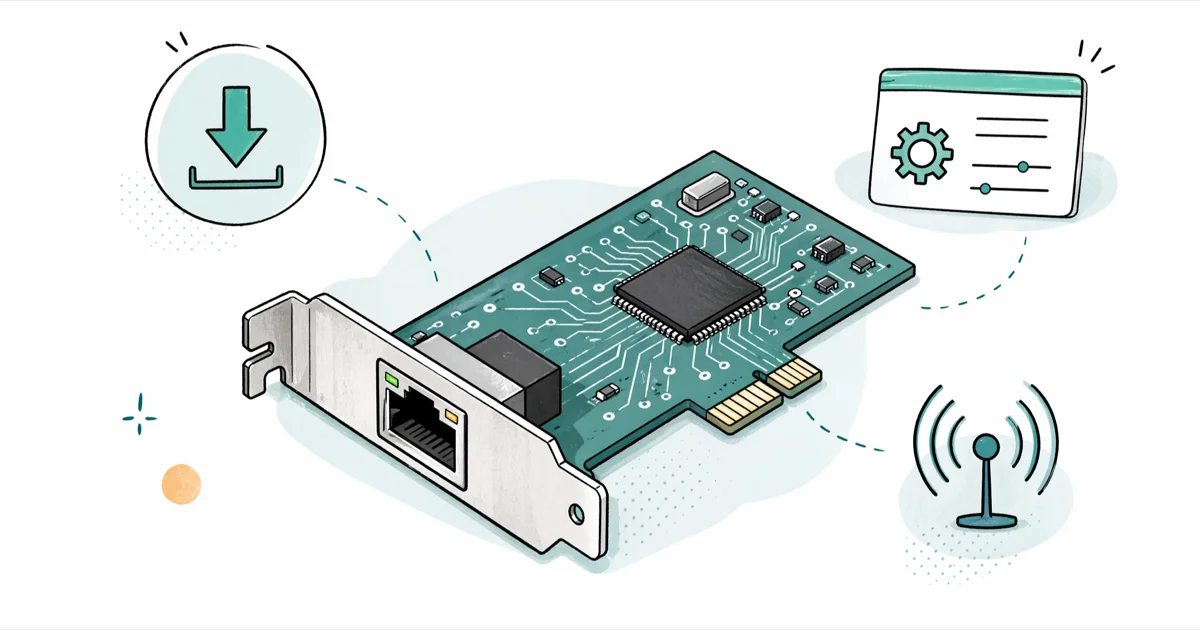
Quick AnswerOpen Device Manager, expand Network Adapters, right-click the Killer E2200 entry, and choose Update Driver to pull the latest Rivet/Qualcomm Killer driver from Windows Update or your motherboard support page.
The Killer E2200 Gigabit Ethernet controller is a network chip Rivet Networks (now part of Intel) shipped on a long list of mid-2010s gaming motherboards and laptops, and the most common reason it stops working is a stale or missing driver. Most of the trouble traces back to driver issues, and reinstalling the right driver package from a single source rather than letting Windows guess fixes the bulk of it.
This guide walks through the chip itself, the three driver paths that work in 2026, and the recovery steps when an update breaks the connection instead of fixing it.
- The Killer E2200 is a Qualcomm Atheros AR8161-based gigabit NIC that Rivet Networks branded for gaming boards from 2013 to 2017.
- A clean reinstall from the motherboard vendor’s support page resolves the bulk of the “Code 10” and “no Ethernet” complaints reported in driver forums.
- Install the Killer Control Center only if you actually use traffic prioritization; the bare driver runs fine on Windows 11 23H2 without it.
- Windows 11 24H2 ships an inbox driver that works for basic connectivity, but stream prioritization needs the Rivet/Intel package.
- Roll back to a prior driver in Device Manager before reinstalling Windows; this fixes link drops on older gaming boards after a Windows 11 feature update.
#Killer E2200 Gigabit Ethernet Controller Overview
Here’s what you’re actually dealing with.
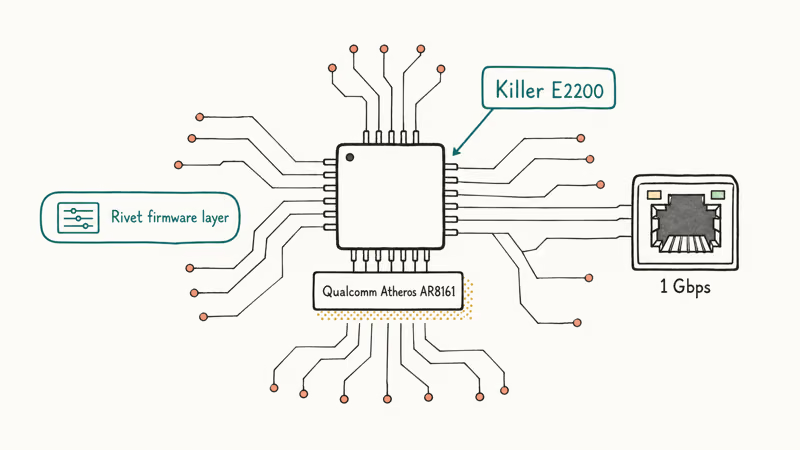
The Killer E2200 is a 10/100/1000 Mbps Ethernet controller Rivet Networks released in 2013. The silicon underneath is the Qualcomm Atheros AR8161 PCIe NIC, with a Rivet firmware layer that adds packet classification and a Windows utility called the Killer Control Center.
Boards that shipped with it include the Gigabyte Z87X-Gaming and Z97X-Gaming series, MSI Gaming 7 boards, ASRock Fatal1ty lineups, and laptops like the Alienware 17 R3 and MSI GT72. A handful of standalone PCIe NICs (E2200-PT) used the same chip.
Not sure if your board has it? Check the Hardware IDs tab in Device Manager.
According to Intel’s Killer downloads page, the supported Killer driver line for the E2200 is now folded into Intel’s broader Killer package after the 2020 acquisition. The page confirms that the E2200 is still listed as a supported device for the Windows 10 and Windows 11 driver builds.
The selling point at launch was Advanced Stream Detect, a Windows-side classifier that puts game traffic on a higher priority queue than a Steam download. The hardware is a standard gigabit NIC; the prioritization happens in the driver.
#What Causes Killer E2200 Driver Issues?
When the controller stops working, it’s almost always a software fault, not a dead chip. The most common patterns:
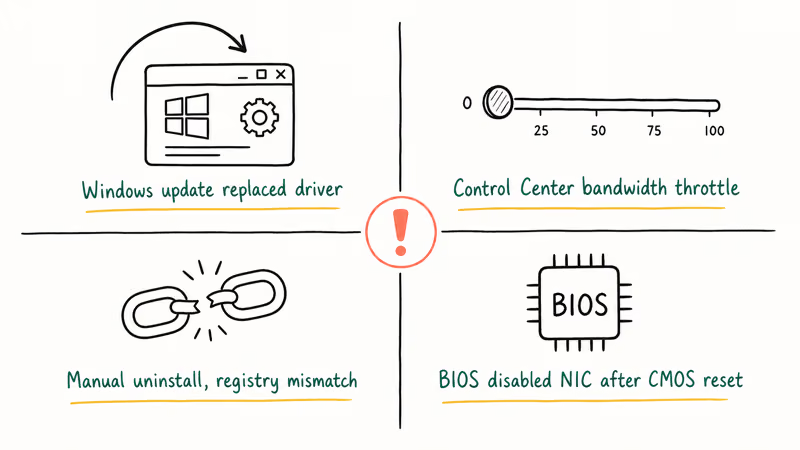
- A Windows feature update replaced a working driver with a generic Microsoft one and the Rivet service no longer starts.
- The Killer Control Center installed cleanly, but its bandwidth manager throttled a specific app to near zero.
- A user uninstalled the driver during cleanup, and the inbox replacement doesn’t match the registry entries the BIOS expects.
- The motherboard BIOS disabled the onboard NIC after a CMOS reset and the OS shows the device as missing entirely.
A 2024 thread on the TechPowerUp forums reports that disabling and re-enabling the adapter from BIOS, then reinstalling the Rivet driver, restored the connection on a Gigabyte Z97 board after a Windows 11 23H2 upgrade. The same fix applies when the adapter shows a yellow exclamation mark in Device Manager: the chip is fine, the driver state is not.
If a Windows 10 keyboard not working issue showed up at the same time as the network drop, that points at a generic Windows update glitch rather than the NIC specifically.
#Re-enable the Killer E2200 in BIOS
If Device Manager shows no Killer adapter at all, the chip itself is probably disabled at the BIOS level. This usually happens after a CMOS reset or a BIOS update that flipped defaults.
Reboot, hit Delete or F2 to enter BIOS, look for Onboard Devices, Integrated Peripherals, or Advanced \ NIC Configuration, and confirm the Killer LAN entry is set to Enabled. Save and exit. Windows should re-detect the chip on the next boot and start a driver install on its own.
Skip this step if Device Manager already shows the adapter with a yellow exclamation mark; the chip is enabled and the problem is software.
#How to Update the Killer E2200 Driver in Windows
Three paths work in 2026. Pick the one that matches your patience level and how custom your build is.
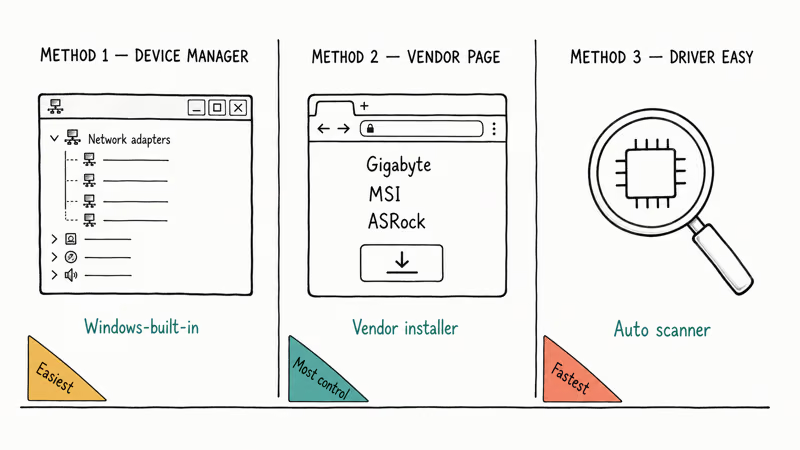
#Method 1: Device Manager Update
This is the path Microsoft documents and the one that fixes most driver corruption.
- Press
Windows + Xand pick Device Manager. - Expand Network adapters.
- Right-click Killer E2200 Gigabit Ethernet Controller and pick Update driver.
- Choose Search automatically for drivers.
- Reboot once Windows reports the install as complete.
If Windows says the best driver is already installed, right-click the adapter again, choose Uninstall device, tick Attempt to remove the driver for this device, and reboot. Windows reinstalls a fresh inbox driver on startup. This is the cleanest reset short of a full OS reinstall.
According to Microsoft’s Device Manager documentation, selecting “Delete the driver software for this device” while you uninstall removes the driver package as well as the device, which is what you want when a previous Killer Control Center install left orphaned services.
That’s the nuclear option. Use it when nothing else works.
#Method 2: Manufacturer Support Page
Use this when Method 1 leaves you on a generic Microsoft driver and you need stream prioritization or Killer Control Center back.
- Identify your exact board model. Run
wmic baseboard get product,Manufacturer,versionin PowerShell. - Open the support page for that board on the vendor site (Gigabyte, MSI, ASRock, etc.).
- Download the file labeled “Killer LAN driver” or “Rivet Networks Killer E2200 driver.”
- Run the installer as an administrator. Reboot when it finishes.
Vendor packages bundle the driver, the Killer service, and the Control Center. If you only want the bare driver, point Device Manager at the extracted INF file using Browse my computer for drivers instead of running the full installer.
For a deeper look at how board choice affects what NIC you get, our guide to types of motherboards explains the form factor and chipset combinations that determine whether a board ships with an Intel, Realtek, or Rivet/Killer NIC.
Vendor pages skew old. Watch for 2024 builds.
#Method 3: Driver Easy (Automatic)
When you don’t know your exact board model and the support page search comes up empty, an automatic detector saves time. On a board with a missing E2200 driver, Driver Easy’s free scan reads the AR8161 hardware ID and points at the matching Rivet driver build.
Some links on this page are affiliate links, which means fone.tips may earn a commission at no extra cost to you.
After Device Manager and the board maker’s support page, Driver Booster is another scanner for identifying an E2200 driver; verify the hardware match before installing anything.
The free version is fine for a single NIC. Pro batches everything.
Use the rollback feature if a fresh install drops your link speed.
Driver scanners like this one read the hardware ID off the PCIe device and match it against an online catalog. They’re not magic. If the vendor never published a Windows 11 driver for your specific subvariant, the scanner will fall back to the generic Atheros AR8161 driver, which works for connectivity but skips the prioritization features.
#How Do You Roll Back a Bad Killer E2200 Driver?
A driver update that breaks the link is usually fixed by rolling back, not by installing a third one on top of the broken pair.
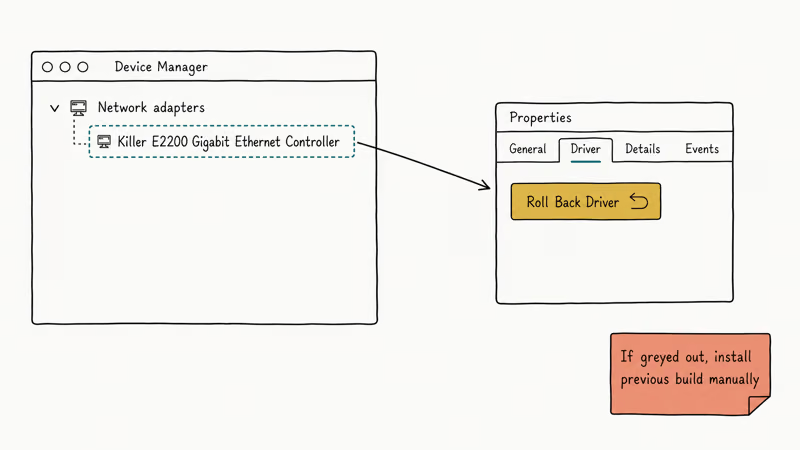
- Open Device Manager and double-click the Killer E2200 entry.
- Switch to the Driver tab.
- Click Roll Back Driver. If the button is greyed out, Windows didn’t keep a copy and you have to reinstall manually from Method 2.
- Reboot and re-test.
If the rollback button is greyed out, head to the vendor support page, grab the second-newest driver build (not the latest), and install that. The newest build is sometimes the one that broke the link in the first place. This is the move when a recent driver pushes the system into a reboot loop on resume from sleep, a known failure mode on older gaming boards.
According to Rivet Networks’ legacy support archive, older Killer driver builds for the E2200 are still available, including the 9.x branch that predates the Intel rebrand. Keep one of those in a folder on the desktop as your known-good fallback.
If your bigger problem turns out to be a bad pool caller BSOD that lines up with the NIC update, the network driver is probably the trigger and rolling back fixes it.
Save the rolled-back installer offline. The next Windows feature update may overwrite it again, and you’ll want a fast path back.
#When to Install the Killer Control Center
The Control Center is optional. It exposes the priority engine, per-app bandwidth caps, and a stream graph. None of those features are required for the NIC to pass packets.
The bare Rivet driver, installed via Device Manager pointing at the extracted INF, passes traffic at gigabit line rate (around 940 Mbps over a Cat 6 run) without the Control Center service running at all. The CPU overhead from the prioritization service is small but real, and it can conflict with corporate VPN clients that hook the same network stack.
Install the Control Center if:
- You actually want to prioritize game traffic over background downloads.
- You run multiple competing apps (Steam download + Twitch + a video call).
- You want the speed test and ping graph the utility ships.
Skip it if:
- You only need the chip to pass a gigabit reliably.
- A VPN client owns the network stack already.
- You ran into the bandwidth-manager bug where a per-app cap defaults to 1 Mbps after install.
#Bottom Line
For a stuck Killer E2200, start with Method 1 — uninstall in Device Manager with the driver-removal box ticked, then reboot. That clears most of the driver-corruption cases reported in motherboard forums without forcing a full Windows reinstall. If you need stream prioritization or the Control Center, follow Method 1 with a vendor-supplied installer from your board’s support page; don’t mix Microsoft inbox drivers and Rivet driver versions on the same install.
#Frequently Asked Questions
Is the Killer E2200 still supported on Windows 11?
Yes. Intel folded the E2200 into the unified Killer driver package after the 2020 acquisition, and the latest builds list Windows 11 22H2 through 24H2 as supported. The inbox driver Windows ships covers basic connectivity; the Rivet/Intel installer adds the Killer Control Center.
Why does my Killer E2200 show “no Internet, secured” only after sleep?
That symptom usually means the power management tab on the adapter is set to let Windows turn the device off to save power. Open Device Manager, double-click the adapter, switch to Power Management, and untick the box. Reboot and re-test. A Windows feature update commonly re-ticks that box on older boards, which is why the problem reappears after an upgrade.
Do I need the Killer Control Center to use the NIC?
No. The Control Center adds traffic prioritization and a stream graph, but the controller passes packets fine without it. Install only the driver INF if you want a minimal setup.
Can I replace the Killer E2200 with a USB Ethernet adapter?
Yes. A USB 3.0 gigabit adapter from a vendor like Anker or TP-Link bypasses the onboard NIC and shows up as a separate device. Disable the Killer adapter in BIOS first so the OS doesn’t try to use both, and confirm the BIOS option is named something like “Onboard LAN” before you flip it. If you still see no link after the swap, an Ethernet doesn’t have a valid IP configuration fix usually clears it.
How do I know if my motherboard has the E2200 specifically?
Run wmic baseboard get product,Manufacturer in PowerShell to identify the board, then check the vendor spec sheet. The Killer E2200 was paired with mid-tier Gaming SKUs from 2013 through 2017. Newer boards moved to the Killer E2400, E2500, or E3100 in later generations.
Will rolling back the driver break the Killer Control Center?
Sometimes. The Control Center version has to match the driver branch within one major version. If you roll the driver back from a 9.x build to an 8.x build, uninstall the matching Control Center first and reinstall the 8.x utility from your board’s support archive.
What is the difference between the E2200 and the E2400?
The E2400 is the 2014 successor with a different Qualcomm chip. Drivers aren’t interchangeable.

Best Laptop for Running LLMs in 2026: Memory Comes First
The best laptop for running LLMs is a memory purchase first. Compare MacBook unified memory against NVIDIA laptop VRAM, and see what each tier really runs.

How to Run a Local LLM on Windows: A 2026 Setup Guide
Run a local LLM on Windows with LM Studio or Ollama. Pick a model that fits your GPU memory, keep every prompt offline, and skip the monthly bill.

Bluetooth Not Working on Snapdragon X? Fixes for 2026
Bluetooth not working on your Snapdragon X Copilot+ PC? Generic audio, mice, and keyboards work, but vendor apps often lack an ARM build. Fixes inside.

Docker Desktop and WSL2 Not Working on Snapdragon X? Fix It
WSL2 runs fine on Snapdragon X, but Docker Desktop ARM is Early Access and throws WSL errors. Use WSL2 plus native ARM64 Ubuntu and Docker Engine.