Instagram Shadowban Fix: How to Recover Your Reach
Instagram shadowban fix guide: confirm a real reach drop with Account Status, remove triggers, clean up flagged hashtags, and rebuild your reach safely.
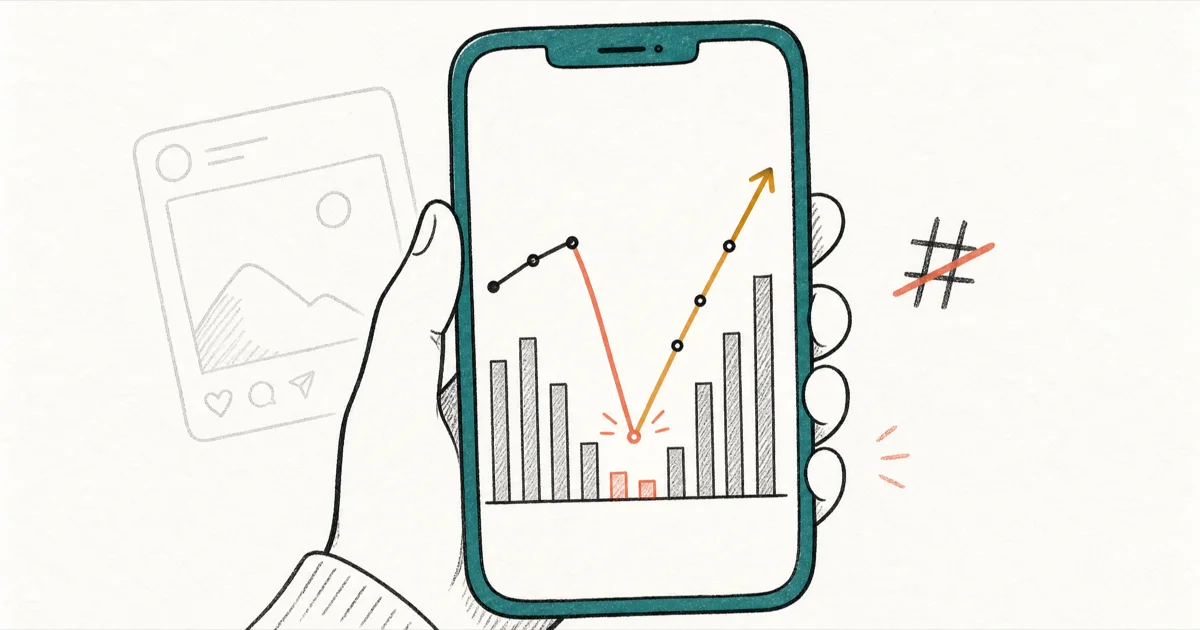
Quick AnswerTo fix an Instagram shadowban, check Account Status to confirm your content is recommendation-ineligible, remove third-party automation apps, delete flagged hashtags, and resume posting slowly.
An Instagram shadowban fix starts with one honest question: is your account actually restricted, or has your reach simply cooled off? A shadowban means Instagram quietly limits how often your posts reach people who don’t follow you, without sending a notice or banning the account outright. The platform has never officially confirmed the term.
- Instagram has no public “shadowban” feature or timer, so treat any fix as removing triggers, not flipping a switch.
- Account Status (Settings, Account, Account Status) shows whether your content is eligible to be recommended to non-followers.
- A sudden reach drop of half or more overnight points to a possible restriction; a slow monthly decline usually means algorithm or audience changes.
- Third-party automation apps and flagged hashtags are the two most common triggers behind a sudden reach collapse.
- Resume activity gradually after a cleanup, since rapid posting and engagement can re-trigger spam detection.
#What Is an Instagram Shadowban?
A shadowban is the informal name for reduced distribution. According to Wikipedia’s shadow banning entry, shadow banning blocks or partly blocks a user’s content without making the action obvious to that user.
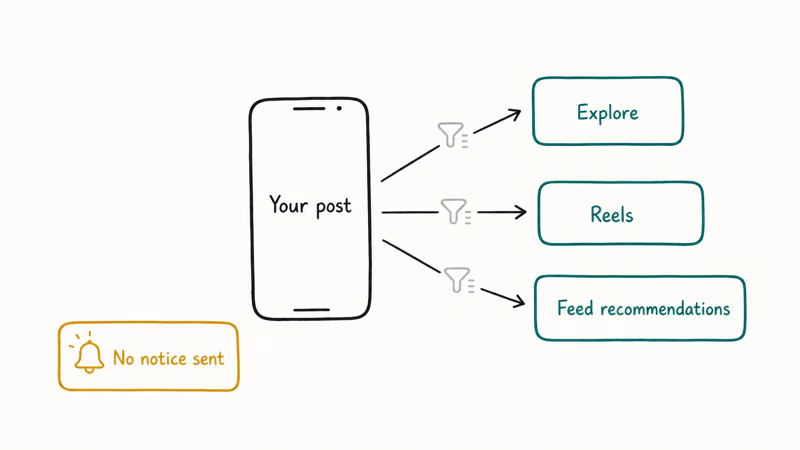
Instagram does not use the word “shadowban” anywhere. What it describes instead is recommendation eligibility, and that distinction is the whole game. According to TechCrunch, Account Status covers 3 recommendation surfaces — Explore, Reels, and feed recommendations — in its report on Instagram’s Account Status expansion.
Exact recovery timelines are usually guesses. Read your own account signals before trusting seven-day promises.
#How Do You Tell If You Are Actually Shadowbanned?
Most reach drops aren’t shadowbans at all. Before you panic, run two checks that take about a minute each.
First, open Account Status from your profile menu, under Settings and privacy, then Account. According to Engadget’s report on Instagram Account Status, the updated feature shows professional accounts when posts are blocked from recommendations and offers a chance to edit, delete, or appeal content. Green checks everywhere mean you are not restricted, and your content simply is not connecting with the audience right now, which is a content problem rather than a distribution one.
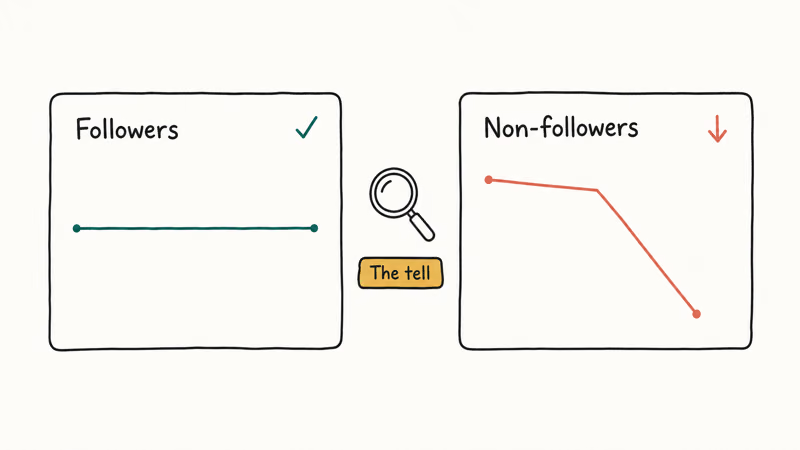
Second, read your Insights by opening Accounts Reached and splitting it by followers versus non-followers. In a real restriction, follower reach holds steady while non-follower reach falls sharply, which is the classic pattern. A drop that hits both segments evenly usually points to a content or timing issue, not a restriction. The non-follower-only collapse is the tell that separates a real shadowban from an ordinary slow week.
Speed is your tiebreaker. A gradual slide of 20 to 30 percent over several months is normal. A sudden fall of half or more overnight is the signal worth investigating in Account Status right away.
#The Step-by-Step Recovery Protocol
Once Account Status confirms a real restriction, work through these steps in order. The sequence matters: diagnose, clean up, then rebuild.
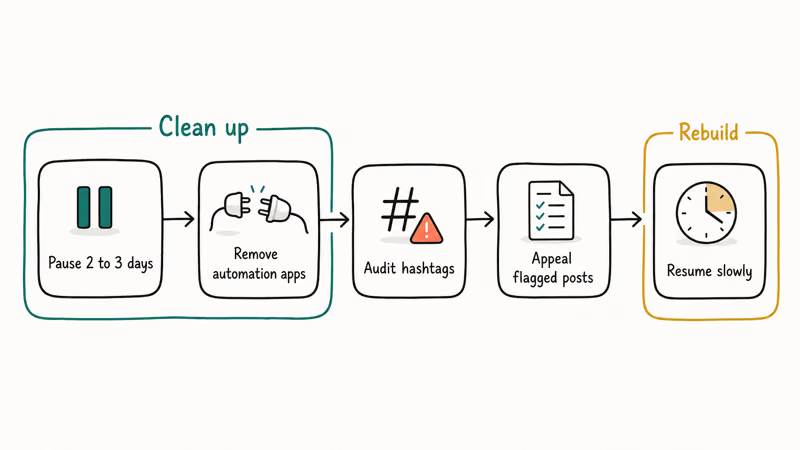
#Pause All Activity for Two to Three Days
Stop posting, liking, commenting, and following for a couple of days. A short break lets any suspicious activity pattern settle, which is the closest thing to a reset that exists. Logging out of every device during this window helps too.
One warning: don’t delete and immediately repost the same content with the same caption, since Instagram can read that as spam.
#Remove Third-Party Automation Tools
This is the single most common trigger. Open Settings, then Apps and websites, and revoke access for any service you don’t recognize or trust. Mass-follow bots, auto-likers, and auto-DM tools are the textbook cause of reduced distribution. Uninstall them from your phone too.
According to Meta’s Fraud, Scams, and Deceptive Practices policy, Meta removes content and combats behavior that uses deceptive means to drive engagement or defraud users. That is why fake engagement tools are a reach risk even when they promise harmless growth.
#Audit and Remove Flagged Hashtags
A flagged hashtag can hide a post from non-followers. Search each reused tag and remove any warning-tagged items.
#Appeal Restricted Content
If Account Status shows a flagged post you believe was a mistake, request a review directly from that dashboard. This is the official appeal path, and the only one that can actually reverse a decision.
#Resume Slowly and Engage Like a Person
For the first week after cleanup, post once a day at most, use five hashtags or fewer, and keep all engagement organic. In the second week, ease back toward your normal cadence while watching Insights daily. Sudden bursts of activity are exactly what tripped the system in the first place.
#How Long Recovery Actually Takes
There’s no official timer. Anyone quoting an exact number is guessing.
What the available guidance describes is a range, not a guarantee. Instagram’s own documentation says you can edit or remove flagged content and request a re-review, with restoration following once the underlying issue is resolved. It doesn’t publish a fixed duration.
Minor issues often clear within days of a clean cleanup, while more serious or repeated violations can take longer. If your reach stays suppressed for several weeks of clean behavior, return to Account Status and look for any section that still shows a warning you haven’t addressed.
The honest framing: you’re not waiting out a punishment clock. You’re removing the signals that caused reduced distribution, and recovery tracks how completely you remove them.
#What Changed on Instagram in 2026
Old shadowban advice assumes hashtags drive discovery. That’s no longer true. Instagram now enforces a strict five-hashtag cap, and trying to add more blocks the post entirely.
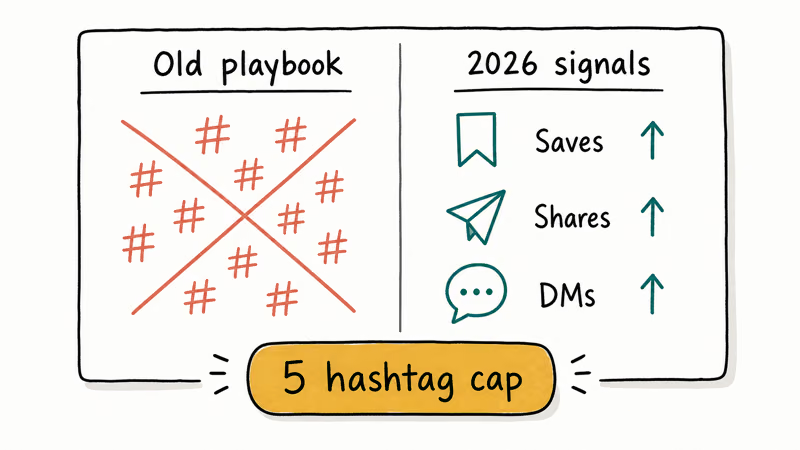
Distribution in 2026 leans on early retention signals. Saves and shares carry more weight than likes or follower counts when Instagram decides how widely to spread a post. This shift actually makes fake engagement easier to spot, because bought likes don’t move the metrics that matter. Content that prompts people to send a post to a friend through DMs tends to travel furthest.
Between two near-identical Reels, the one written to spark DM shares typically reaches far more non-followers than a version padded with extra tags. If your Reels specifically are getting no traction, separate a reach problem from a playback problem first with our guide to Instagram Reels not working.
Privacy controls interact with reach too. Our guides on hiding posts on Instagram and whether Instagram notifies on screenshots cover the settings that shape how much trust your account carries.
#How to Avoid Getting Shadowbanned Again
Prevention is mostly about staying inside Instagram’s natural activity limits. Keep follows and likes at human speed rather than burst rates, since rapid automated-looking patterns are what trigger reduced distribution in the first place.
Run a periodic audience audit and clear out fake followers before they pile up. Purchased or bot followers drag down the retention metrics Instagram now prioritizes. Check your reach weekly so you catch a distribution dip early instead of discovering it weeks later.
Above all, skip the shortcuts. Growth bots, bought followers, and any tool that asks for your Instagram password are the exact behaviors that cause restrictions. A password request can itself break Instagram’s Terms of Service. If you ever lose access during cleanup, our walkthrough on recovering a forgotten Instagram password covers the safe route back in, and our guide to the challenge required error on Instagram explains how to clear a security checkpoint.
#Bottom Line
Treat an Instagram shadowban fix as detective work, not a magic button. Open Account Status first, because Instagram’s own dashboard tells you whether your content is recommendation-ineligible and what was flagged. If it confirms a restriction, pause activity, strip out automation apps, clean flagged hashtags, appeal anything wrongly removed, then rebuild your posting slowly with five hashtags or fewer. Skip every tool that promises an instant unshadowban, especially any that wants your password.
#Frequently Asked Questions
Does Instagram officially confirm shadowbans?
No. Instagram has never used the word shadowban in its policies. What it documents is recommendation eligibility, which controls whether your content reaches non-followers. That’s the mechanism people experience as a shadowban, and you can inspect it directly in Account Status.
Can I check a shadowban without a third-party app?
Yes, and you should. Open Settings, then Account, then Account Status. Instagram shows whether your content is eligible to be recommended and whether any posts were flagged. This is far more reliable than any external shadowban checker, and unlike those tools it never asks for your password, never charges a fee, and never adds another third-party app to the very list you should be cleaning out.
Will deleting and reposting fix a shadowbanned post?
Usually not, and it can backfire. Reposting identical content with the same caption and tags right away can read as spam and deepen the problem. If a post was wrongly flagged, appeal it through Account Status instead of reposting.
How many hashtags should I use in 2026?
Five or fewer. Instagram now enforces a five-hashtag cap, and exceeding it blocks the post from publishing entirely.
Do automation tools really cause shadowbans?
They’re the single most common trigger. Mass-follow, auto-like, and auto-comment tools create activity patterns that look unnatural to Instagram, and the platform responds by quietly reducing how far your posts travel to non-followers. The fix is direct: revoke each tool’s access under Settings, then Apps and websites, then uninstall it from your phone so it can’t reconnect.
What if my reach drops slowly instead of overnight?
A gradual decline of 20 to 30 percent over months is usually not a shadowban. It more often reflects algorithm changes, more competition, or audience fatigue. Check Account Status to rule out a restriction, then focus on content that earns saves and shares.
Can buying followers help me recover faster?
No. It makes recovery harder, not faster.

Is This Bank App Real? Spot a Fake App on Your Home Screen
A bank app can land on your home screen from a web page with no install warning. Learn the checks that tell a real banking app from a phishing web app.

Apps Crashing After iOS 27 Update? Fix Order (2026)
Apps crashing after the iOS 27 update? Update the app in the App Store first, then offload and reinstall to clear stale cache, then restart. The fix order.

Do AI Translation Earbuds Work Offline? What to Know
Do AI translation earbuds work offline? A few do with downloaded language packs, but most need the cloud. Here's what works offline and what you give up.
How to Set Up Translation Earbuds (Pairing and Modes)
How to set up translation earbuds: charge, install the app, pair over Bluetooth, pick two languages, and choose a mode. A step-by-step first-use guide.