How to Set Up Donations on Twitch in 2026: A Streamer Guide
Set up Twitch donations in 2026 the right way. PayPal, Streamlabs, Donorbox, and Bits, step by step, with payout, panel, and tax tips for streamers.
Quick AnswerTo accept donations on Twitch, add a PayPal.me link or a Streamlabs or Donorbox donation page to a channel panel, then enable Bits and Cheering once you reach Affiliate status. Bits are the only in-platform tip option; everything else routes through a third-party processor you control.
Setting up donations on Twitch sounds like a single switch in the dashboard, but it’s actually two separate systems stitched together: Twitch Bits (the only native tipping option, and only for Affiliates and Partners) and an external donation processor like PayPal, Streamlabs Tips, or Donorbox. New streamers usually start with the external link because it works on day one. Once you hit Affiliate, you add Bits on top so viewers can cheer inside chat.
This guide walks through both halves, the panel setup that ties them to your channel, and the donor-side rules around refunds and taxes that surprise most first-time streamers.
- Twitch Bits are the only in-platform tip system, and they’re gated to Affiliate or Partner accounts; everyone else needs an external donation link from day one.
- Affiliates earn one US cent per Bit cheered, so a 100-Bit cheer pays the streamer one US dollar and Twitch keeps the rest of the purchase price.
- PayPal.me is the fastest no-cost option to start receiving tips, but a personal account flagged as a “donation” can be frozen, so most streamers use a business account.
- Streamlabs Tips and Donorbox add on-screen alerts, a hosted donation page, and currency conversion that a raw PayPal link can’t do.
- US streamers should treat tips as taxable income from the first dollar; the IRS doesn’t exempt Twitch tips just because viewers call them donations.
#The Three Ways to Accept Donations on Twitch
There are three lanes. Most streamers use two of them rather than picking just one.
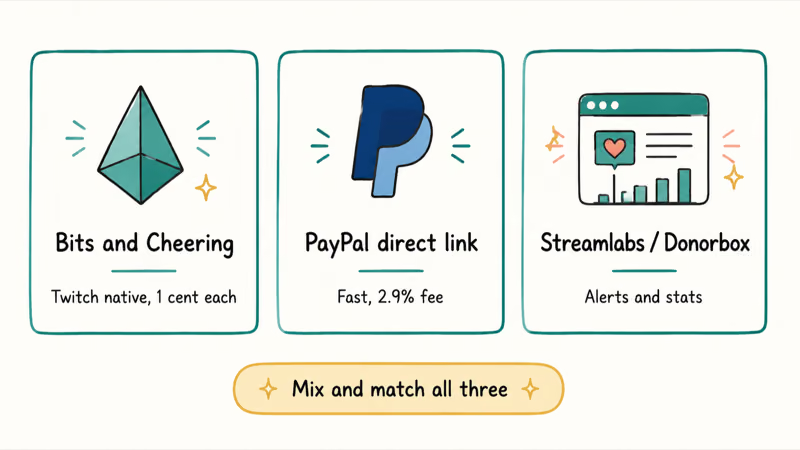
The first lane is Twitch Bits, the only system that lives inside Twitch itself.
Viewers buy Bits with real money on Twitch and then cheer them in chat using animated emotes. Twitch sells the Bits, takes a platform fee, and pays you the streamer share through your monthly payout once you cross the minimum threshold. According to Twitch’s Bits and Cheering help article, Bits are restricted to Affiliates and Partners, so a brand-new account can’t enable Cheering until it qualifies for the program.
The second lane is a direct PayPal link.
PayPal.me has no processor in the middle. Viewers click the link, type an amount, and the money lands in your PayPal balance. It’s free, fast, and works the day you create a Twitch account. But it has two real costs: no on-screen alert when a tip lands, and PayPal can freeze a personal account that takes regular “donations” because the personal product isn’t built for revenue collection.
The third lane is a hosted donation page.
Streamlabs Tips, StreamElements Tips, and Donorbox give you a custom donation URL, branded checkout, on-stream alerts that play a sound and animation when a tip arrives, and a dashboard for tracking totals. Streamlabs includes OBS-friendly alert widgets, while Donorbox is stronger for hosted forms and recurring support.
Many streamers run PayPal or Streamlabs for tips and add Bits on top once they qualify for Affiliate. Picking just one means you either lose tips from viewers who refuse to use Bits, or you lose tips from viewers who don’t have PayPal. For a fuller comparison of Twitch against other platforms, The Verge’s Twitch coverage tracks platform changes that affect monetization rules, and our Discord vs Twitch breakdown covers the streaming-versus-community split.
#How Do You Enable Bits and Cheering?
Bits are the simplest piece to flip on because Twitch handles every step server-side. You only have to confirm that your account qualifies and then enable the feature.
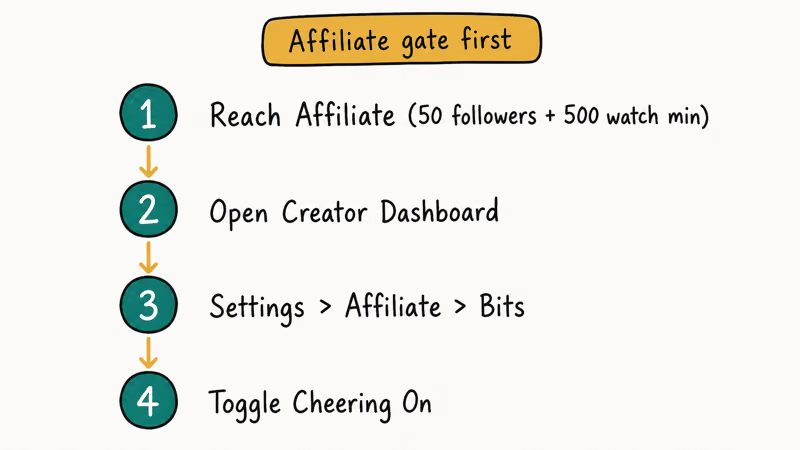
- Open the Twitch Creator Dashboard, then go to Settings > Affiliate or Settings > Partner, depending on your status.
- Scroll to the Cheermotes section and toggle Enable Cheering with Bits on.
- Decide whether you want to upload custom Cheermotes. Custom ones are a Partner-only perk; Affiliates use the default Twitch Cheermotes.
- Set the minimum Bits required to trigger a chat highlight and an on-screen alert. The default is one Bit, but a higher floor (such as 100) cuts down on single-Bit chat spam.
- Save and reload your channel to confirm the Cheer button appears next to the chat input.
Twitch states that the streamer revenue share for Bits is one US cent per Bit cheered, so a 100-Bit cheer pays the streamer one US dollar regardless of what the viewer paid Twitch for the Bits bundle.
That payout aggregates into your monthly Twitch payment once your balance crosses the threshold (which is one hundred US dollars in most regions). For deeper coverage on what cheering actually does and the etiquette that comes with it, see our how to cheer on Twitch walkthrough and the companion guide on how to give Bits on Twitch.
One caveat: Cheering doesn’t auto-route to your bank account. Twitch pays through ACH, PayPal, or wire transfer depending on country, and the payout method is configured separately under Settings > Revenue > Payouts. If you set up Bits but never finish payout setup, the money accrues on your Twitch balance and goes nowhere.
#Setting Up a PayPal Donation Link in Five Steps
PayPal.me is the simplest external path. You don’t need a website, you don’t need a checkout page, and you don’t pay any setup cost.
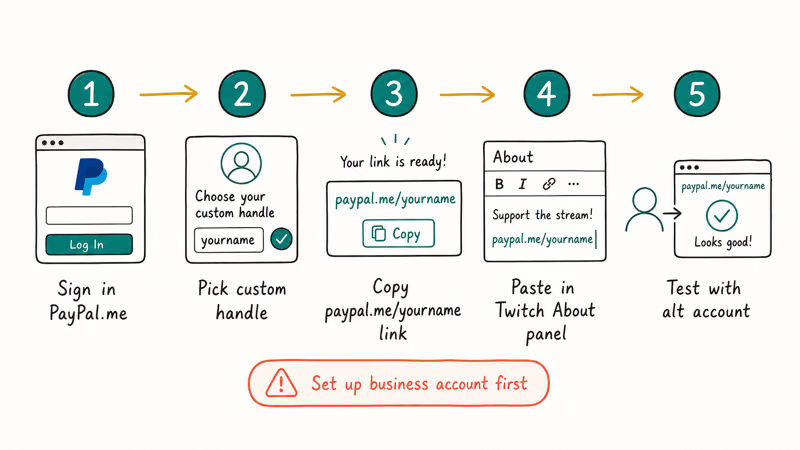
- Sign in at paypal.com and confirm your account is in good standing. If it’s currently a personal account, consider upgrading to a business account before you accept regular tips. PayPal’s acceptable use policy confirms that personal accounts aren’t designed for ongoing donation collection.
- Open PayPal.me and claim a short link such as
paypal.me/yourstreamname. PayPal.me lets you optionally pre-fill an amount, but leaving it blank lets viewers tip what they want. - Test the link in a private browser window. You should see a “Pay” or “Send” button, not a “Sign in” wall. If viewers hit the sign-in wall, your link isn’t public yet.
- Add the link to your Twitch profile by going to Channel > Edit Panels > Add a Text or Image Panel under your stream player. Paste the URL into the Image Links To field and label the panel “Support the Stream” or “Buy Me a Coffee” so viewers know what to expect.
- (Optional) Disable the option that adds a note field. PayPal asks donors to leave a message, which slows down the flow and discourages mobile users.
PayPal’s standard rate for personal transfers is 2.9 percent plus a fixed fee per transaction in the US (the fixed fee varies by currency); it’s worth checking the PayPal fees page for current numbers because PayPal has changed the structure several times since 2023. The fee comes out of the donation, not on top of it.
One practical warning: don’t label the PayPal link a “Donation” in the panel title if you aren’t a registered nonprofit. PayPal’s terms reserve the donation product for charities, and using it on a personal account is a known cause of holds. Call it a tip or a contribution instead.
#Setting Up a Streamlabs or Donorbox Donation Page
Streamlabs Tips is the most common hosted donation page on Twitch because the alert widget integrates directly into OBS.
The Streamlabs setup runs like this:
- Sign up at streamlabs.com using your Twitch login.
- From the dashboard, open Settings > Tip Settings and connect a payout method. Streamlabs supports PayPal, credit cards via Stripe, Skrill, and cryptocurrency on the higher Ultra tier.
- Customize your tip page URL. The default looks like
streamlabs.com/yourname/tip. Set a minimum tip floor (most streamers use a one US dollar minimum to cut chargebacks). - Open Alert Box in the Streamlabs dashboard and copy the browser source URL.
- In OBS, add a new Browser source and paste the alert URL. Set the resolution to 1920 by 1080 to match a standard stream output.
- Send yourself a test tip from the Alert Box > Test Widgets menu to confirm the alert plays on stream.
Streamlabs alerts are designed for live chat timing, but you’ll want to leave the donation goal-bar polling interval on its default rather than dropping it lower.
Donorbox is the alternative.
The flow is similar to Streamlabs, but the strength is the embeddable donation form and the recurring-donation logic that Streamlabs Tips doesn’t handle as cleanly. Donorbox is closer to a nonprofit toolkit. Their pricing page confirms that the standard plan fee is 2.95 percent of donations, on top of the payment processor’s own fee, so a 10 US dollar tip costs about 30 cents in platform fee plus whatever your processor takes.
Both tools let you add a custom message thanking the donor, set goal bars for a target amount, and embed a panel button on your Twitch channel. Streamlabs recommends keeping the on-stream sound under three seconds in their donation alert guide so a flurry of small tips doesn’t derail your audio.
#Displaying the Donation Panel on Your Channel
The donation system is only half the work. The other half is making sure new viewers actually see how to tip you within their first thirty seconds on your page. Most streamers put a donation panel directly below the video player.
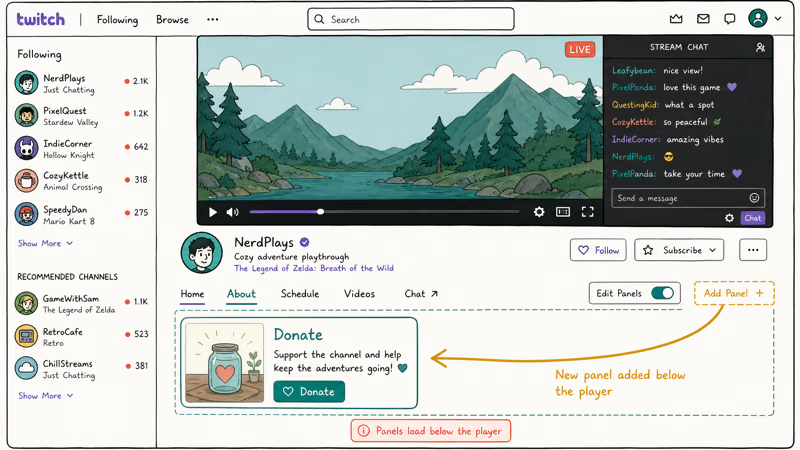
To add a panel:
- Go to your channel page on Twitch and toggle Edit Panels on under the stream player.
- Click the plus icon to add a new panel.
- Choose Add a Text or Image Panel.
- Upload a custom image (200 by 200 pixels works well) labeled “Tip the Stream,” “Support Me,” or “Donate.”
- Paste the URL (PayPal.me, Streamlabs Tips, Donorbox, or wherever you set up the donation page) into the Image Links To field.
- Write a short description below the image. Keep it under three lines so it fits on mobile.
- Save the panel and toggle Edit Panels off.
Most working streamers place the donation panel either first (left-most) or second. Putting it last buries it on mobile because Twitch mobile collapses panels below the fold.
If you stream regularly, you probably also want a clean overlay design that calls out the donation panel mid-stream. Our roundup of Twitch overlay makers covers reliable free and paid tools, and the how to clip on Twitch guide is worth bookmarking for the clips your donors will share back.
#What Should You Tell Donors About Refunds and Taxes?
This section is the one most streamers skip until they get audited or chargebacked, and both surprises are avoidable.
Chargebacks come up first.
PayPal and Streamlabs both allow donors to dispute a tip through their bank or PayPal directly, and the chargeback success rate on small tips is high because banks usually side with the cardholder. The most common pattern is a viewer disputing a 50 US dollar tip a week later, claiming unauthorized use.
To reduce risk, set a one US dollar minimum on your donation page, keep your donation panel labeled “Tip” and not “Service Payment,” and never agree to anything in exchange for a tip (custom shoutouts on demand, gameplay favors, or paid promo). The moment money buys a service, you’re running an unregistered storefront and the protections on a “tip” disappear. See our guide on how to avoid chargebacks on PayPal for how claims are decided.
Taxes are the second piece. The IRS classifies streamer income under either business income or hobby income depending on whether you’re pursuing it for profit, and it confirms that this distinction has real consequences for deductions. Both categories are taxable from the first dollar. The donation label doesn’t change that.
Form 1099-K kicks in once a single payment processor (PayPal, Streamlabs, Stripe) pays you more than 600 US dollars in a year. The IRS receives a copy too. The 2024 reporting threshold change has been delayed multiple times, so check the current rule before filing.
On-stream behavior is the third piece. A “donation goal” bar that promises a specific outcome at a specific dollar amount (such as “I will dye my hair pink at 500 US dollars”) is functionally a sale of services in many jurisdictions and can trigger refund obligations if you don’t follow through. Streamlabs and Donorbox both let you display a goal bar without making explicit promises; keep the goal aspirational, not contractual.
A clean pattern is a community-milestone goal bar paired with a thank-you slide rather than a personal stunt or contractual promise.
#Bottom Line
For a new streamer, the recommendation is concrete: start with a PayPal.me link and a Streamlabs Tips page on day one, label the panel “Tip the Stream” rather than “Donation,” and add Twitch Bits the moment you hit Affiliate. PayPal handles the no-friction case for casual viewers, Streamlabs gives you alerts and the chargeback-resistant minimum tip floor, and Bits captures the chat-side viewers who want to cheer without leaving the platform.
Three layers, three different motivations, one channel. At no point does any of it depend on a third-party “donation bot” or browser extension. If you stream long enough to outgrow this setup, you’ll know because Streamlabs starts feeling rigid around recurring donors and merch. That’s the point to look at a hosted membership platform or a creator-focused payment processor, not before.
#Frequently Asked Questions
Can anyone receive donations on Twitch?
Anyone with a verified Twitch account can post a PayPal or third-party donation link in a channel panel. Twitch Bits and Cheering, however, are restricted to the Affiliate and Partner programs.
Are donations on Twitch taxable in the US?
Yes. The IRS treats tips as taxable income whether the viewer calls them donations or not. If a single processor pays you more than 600 US dollars in a year, you’ll likely receive a Form 1099-K, and the IRS gets a copy. Set aside 15 to 25 percent for quarterly estimated taxes and keep your processor exports for three years in case of audit.
How do I avoid donation scams and fake-tip chargebacks?
Set a minimum tip floor (one US dollar is standard), require completed payment before any on-stream shoutout, and never refund directly off-platform. Watch out for “fake tip” Twitch chat extensions that show a fake on-stream alert with no money attached, then ask you to reciprocate.
Can I set a minimum donation amount on Twitch?
Yes, but only through your external donation page, not Twitch itself. Streamlabs Tips, Donorbox, and StreamElements all expose a minimum-amount field in the donation page settings.
Can viewers see how much money I have received in donations?
Only if you choose to show it. Streamlabs and Donorbox both have a goal-bar widget that’s optional. Twitch Bits cheered are visible in chat; total Bit revenue is private.
Do I need to be 18 to accept donations on Twitch?
Twitch requires you to be 13 or older to use the platform and 18 or older to receive payouts. A minor can’t legally accept Twitch Bits revenue or sign up for Streamlabs Tips without a parent or guardian on the payment account.
Does fone.tips earn a commission from Twitch tools mentioned here?
No. None of the donation services in this guide use the fone.tips affiliate redirect system, and fone.tips has no business relationship with Twitch, Streamlabs, Donorbox, or PayPal.

Google Messages Error 3100: Why RCS Is Broken on Galaxy
Google Messages RCS error 3100 hits Galaxy owners after phone or carrier switches. Google told 9to5Google a fix is coming. Here's what actually helps.

Is This Bank App Real? Spot a Fake App on Your Home Screen
A bank app can land on your home screen from a web page with no install warning. Learn the checks that tell a real banking app from a phishing web app.

Apps Crashing After iOS 27 Update? Fix Order (2026)
Apps crashing after the iOS 27 update? Update the app in the App Store first, then offload and reinstall to clear stale cache, then restart. The fix order.

Do AI Translation Earbuds Work Offline? What to Know
Do AI translation earbuds work offline? A few do with downloaded language packs, but most need the cloud. Here's what works offline and what you give up.