Figure Out Someone's Instagram Password: Honest 2026 Guide
There's no legal way to figure out someone's Instagram password. Use Instagram's official recovery for your own account, plus 4 ethical alternatives.
Quick AnswerThere is no legitimate way to figure out someone else's Instagram password. Use Instagram's official account recovery flow at instagram.com/accounts/password/reset to recover your own account, and have an honest conversation when you're worried about a loved one's online activity.
If you searched “how to figure out someone’s Instagram password,” this guide is going to disappoint you and protect you at the same time. There is no working shortcut. Every “method” advertised online is either a scam, malware, or a fast track to a criminal charge, and we’ll show you why. Then we’ll walk through the legitimate path: recovering your own account through Instagram’s official tools, plus the ethical alternatives when a real safety worry drives the search.
- No legitimate tool can reveal another person’s Instagram password, and every “Instagram password finder” site is a phishing or malware page.
- Use Instagram’s official account recovery at instagram.com/accounts/password/reset to recover your own password through email, SMS, or a linked Facebook profile.
- Unauthorized account access in the US can trigger Computer Fraud and Abuse Act charges, with penalties of up to 5 years in prison for a first offense.
- Two-factor authentication blocks most password guesses outright, which is why Meta pushes every account to enable it during the security checkup.
- For safety worries about a child or partner, open conversation and Instagram’s official Supervision tools work better and stay on the right side of the law.
#Why No Real Way Exists to Figure Out Someone’s Password
Instagram passwords sit on Meta’s servers as salted hashes, meaning Meta employees can’t read them as plain text and neither can anyone who breaches the database. The platform also rate-limits login attempts, locks accounts after a small number of wrong tries, and flags new-device logins for a second verification step.
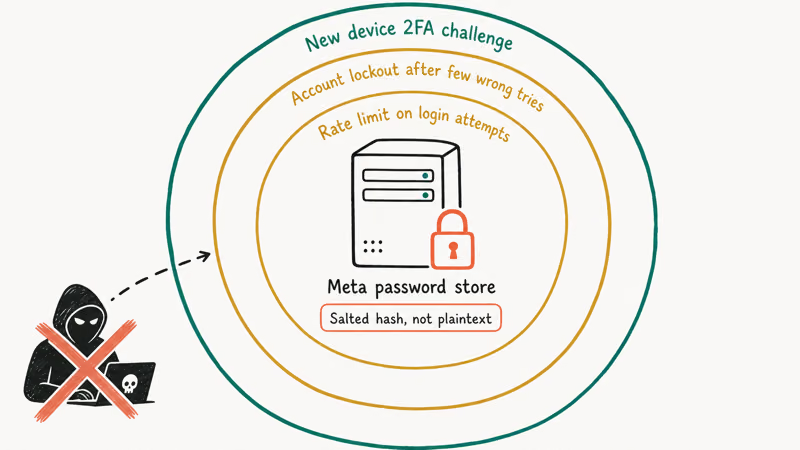
That alone rules out every “leak the password” claim.
Brute force, dictionary attacks, and “password finder” tools all run into the same wall the moment they touch the real login endpoint, and the limit fires long before any meaningful guess space gets covered.
The top-ranked “Instagram password hack” sites all follow the same playbook: a fake login form, a human-verification survey that never ends, or a redirect to a download with a flagged executable. None produce a password.
The whole category is bait.
According to the FTC’s guide on phishing scams, the 3 strongest signs of a credential-theft page are urgency, fake brand assets, and surveys that demand personal data before showing any result. Most “password finder” pages hit at least 2 of those 3 signals, and many hit all 3 within the first two clicks. The pattern is consistent because the underlying business model is the same.
If your own account is locked, jump to the official Instagram recovery flow below. Worried about someone else? Skip to the ethical alternatives section, which solves the underlying problem without the legal exposure of grabbing a password.
#What Counts as Legal Authorization for Account Access
Legal account access starts and ends with one rule. You can only sign into an account you own, or one you have explicit, documented permission to access. There’s no “she’s my partner” exception, no “they gave me their password once” loophole, and no “I’m just checking on my teen” defense for an adult child’s account.
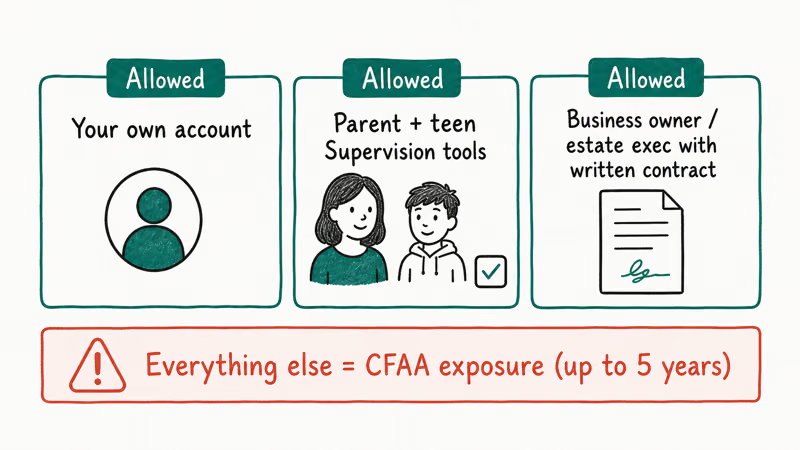
PCMag’s Computer Fraud and Abuse Act explainer confirms that the CFAA covers unauthorized access to any “protected computer,” which includes every server reachable over the internet. The statute carries penalties of up to 5 years for a first offense and up to 10 years for repeat offenses. Civil suits from the account owner can stack on top.
There are 3 legitimate scenarios where Instagram account access is fine:
- It’s your own account, and you’re signing in with your own credentials.
- A parent is using Instagram’s official supervision tools on a teen account, with the teen aware.
- A business owner or estate executor is operating under a documented written agreement, such as a social-media manager contract or letters of testamentary.
Anything outside those 3 is exposure you don’t want.
#How to Recover Your Own Instagram Password the Legitimate Way
This is the path most searches actually want. Instagram’s official password reset page walks you through recovery in under 5 minutes if you still have access to the email or phone number on the account.
#Step-by-step using “Forgot password”
- Open the Instagram app or go to instagram.com.
- Tap Forgot password? under the login fields.
- Enter your username, email, or phone number.
- Choose where you want the reset link or 6-digit code sent.
- Open the link or enter the code, then set a new password of at least 12 characters.
Lost the linked email or phone too? Meta’s hacked-account help page confirms that you can submit an identity-verification request, including a short video selfie that the review team matches to existing photos on the account. Recovery decisions usually arrive within 24 to 48 hours.
#Recover through a linked Facebook account
If your Instagram is linked to Facebook, this path is the fastest.
Tap Log in with Facebook on the Instagram sign-in screen and enter your Facebook credentials. You’ll land inside Instagram. Open Settings > Accounts Center > Password and security and reset the Instagram password to something you control.
For the bigger recovery picture, see our deep dive on what to do if you’ve forgot your Instagram password, or the matching guide on Instagram suspicious login attempt prompts that often appear during a recovery attempt and confuse people into thinking they’ve been hacked when it’s actually a normal new-device check by Meta’s risk engine, which deliberately errs on the side of flagging anything unusual to keep account takeovers rare.
#The Real Risks of Trying to Hack Someone’s Instagram
Set the legal angle aside for a moment. The practical risk profile is brutal, and the person searching for hacking tools is almost always the one who ends up worse off, either losing money to a scam, losing their own account to a phishing pull, or installing spyware on their own phone without realizing it.
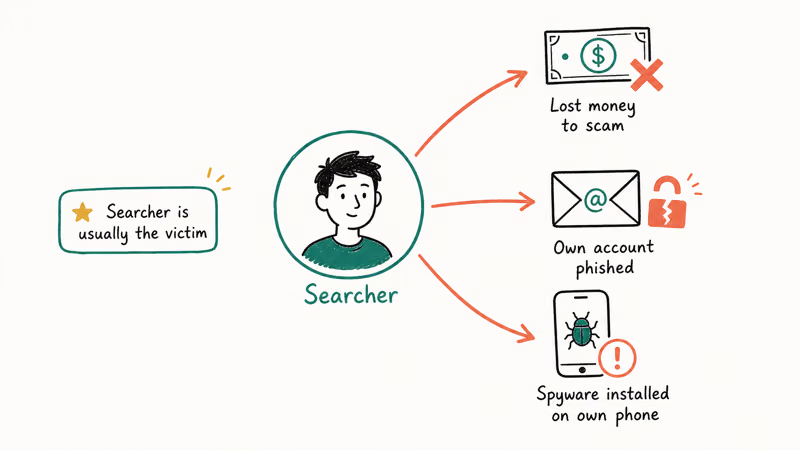
Here’s what typically happens, drawn from Instagram Hack recovery cases and the broader Instagram Hack Tool scam ecosystem.
- Phishing pages harvest the searcher’s own Instagram credentials, then sell or use them to take over the searcher’s account.
- Survey gates never finish. Each step asks for an email, a phone number, or a card number, and the data feeds spam and identity-theft databases.
- Malware downloads marketed as “Instagram hack APK” install spyware on the searcher’s own phone, including keyloggers that capture every account login.
- Social engineering services on Telegram demand cryptocurrency upfront, then vanish without delivering anything.
- Account-recovery scams target people who already lost access, charging hundreds of dollars to “restore” an account using nothing but Instagram’s free recovery flow.
Meta confirms that 2FA supports 3 verification methods (authenticator app, SMS text codes, or WhatsApp) on its two-factor authentication help page, and recommends enabling at least one because credential theft is now the dominant threat vector for the platform.
#What Are the Ethical Alternatives When You’re Worried About Someone?
Most readers who search this query aren’t bad actors. They’re parents worried about a teen, partners who suspect a problem, or family members trying to help someone in crisis. Each concern has a legitimate path that works better than trying to grab a password behind the account owner’s back.
#For parents of a teen
Use Instagram’s official Family Center supervision tools, which let parents and teens set time limits, view who the teen follows, and get notifications when the teen reports something.
Setup happens with the teen’s awareness, which Meta states is required for the supervision link to activate. Visible, agreed-upon supervision outperforms covert monitoring for long-term safety.
#For partners and adult relationships
Suspecting a partner is using Instagram in a way that worries you is a relationship conversation, not a password problem. Covert account access is a trust violation that almost always makes the underlying issue worse, not better.
Talk first.
A 30-minute honest conversation moves faster than any monitoring workaround, and it doesn’t leave you open to criminal charges if the relationship sours later.
#For elderly or vulnerable family members
Sit with them.
Walk through their followers, message requests, and recent logins together, then enable two-factor authentication on their account with their consent. Going through the screens together is more useful than any monitoring app, because it teaches the patterns rather than just catching one incident.
The FTC’s consumer guidance on social media scams lists romance scams, fake giveaway scams, and account-hijack scams as the top 3 patterns targeting older users on platforms like Instagram, and the agency’s guidance describes the recognizable openers each one uses. Walk through each pattern with them during the same sit-down so they can recognize the signals from memory next time, rather than depending on you to spot the next attempt.
#How Can You Protect Your Own Instagram Account?
The other side of this topic is making sure no one can figure out your password either. Enabling the 4 settings below hardens your account against credential-stuffing attempts.
- Turn on two-factor authentication. Open
Settings>Accounts Center>Password andsecurity > Two-factor authentication, then pick an authenticator app like Authy or Google Authenticator over SMS where possible. - Use a unique 16-character password generated by a password manager, not anything reused from another site. Credential stuffing relies entirely on reused passwords from older breaches.
- Review login activity monthly. Under
Settings>Accounts Center>Password andsecurity > Where you’re logged in, you can see every session and revoke any you don’t recognize. - Enable login alerts so any new-device sign-in triggers an immediate email and push notification.
- Bookmark Instagram’s security tips page and revisit the checklist every quarter.
If you start getting unexpected verification codes, our walk-through on Instagram not sending SMS code covers the recovery sequence for when SMS itself becomes the weak link in the chain.
The other piece worth understanding is credential stuffing.
Wikipedia’s overview of credential stuffing describes how attackers feed billions of leaked username and password pairs through automated tools against major platforms. Unique passwords plus 2FA neutralize both stages of that attack.
#Bottom Line
There is no working way to figure out someone else’s Instagram password.
Every tool that claims otherwise puts the searcher at risk rather than the target, which is exactly backwards from what most people expect when they start the search, and is the single most important thing to internalize before you click on any “Instagram password finder” result that ranks for this keyword.
The honest answer here is twofold.
If it’s your own account, run Instagram’s official password reset at instagram.com/accounts/password/reset and turn on two-factor authentication afterward. Worried about someone else? Use Family Center supervision for a teen, an honest conversation for a partner, and the FTC’s scam-recognition guidance with an elderly relative. Those paths actually solve the underlying problem instead of trading legal trouble for a temporary peek.
Instagram Tips & Tricks
#Frequently Asked Questions
Can the “Forgot password” feature show me someone else’s password?
No. The reset flow sends a code or link to the account’s registered email or phone number, never to the person initiating the reset from a different device. If you don’t control that email or phone, you don’t get the code.
Is it illegal to try to figure out someone’s Instagram password in the US?
Yes. Unauthorized access to an online account is covered under the federal Computer Fraud and Abuse Act, plus parallel state computer-misuse statutes in all 50 states. Even attempting access can trigger charges, and the account owner can sue separately for civil damages on top of the criminal exposure. The risk profile is far worse than most searchers realize.
Why do “Instagram password hack” websites still exist if none of them work?
They make money from ads, surveys, malware installs, and stolen credentials, not from delivering passwords.
What should I do if someone else gets into my Instagram account?
Go to Instagram’s hacked-account help page immediately, request a security code via your email or phone, and submit the identity-verification video selfie if the standard flow fails. Then change your password, sign out of all sessions, and enable two-factor authentication before doing anything else. Don’t skip the 2FA step — without it, the attacker often comes back within a day.
Can I monitor my teenager’s Instagram without breaking the law?
Yes, by using Instagram’s official Family Center supervision feature. Both you and your teen consent to the link, and you can see the following list, set time limits, and get reports on flagged content.
Can my partner and I share an Instagram password?
You can share your own password with anyone you trust, and that’s legal. What’s not legal is one partner accessing the other’s account without consent, even if you’ve shared passwords in the past. Consent can be revoked at any time, and after that, any further access becomes unauthorized under federal computer-misuse law.
What’s the safest way to recover an account when I’ve lost the email and phone?
Use the video-selfie identity verification on Instagram’s hacked-account help page. The review team matches your face to existing photos on the account, and Meta states most decisions arrive within 24 to 48 hours. Never pay a third-party “recovery service” promising a faster path.
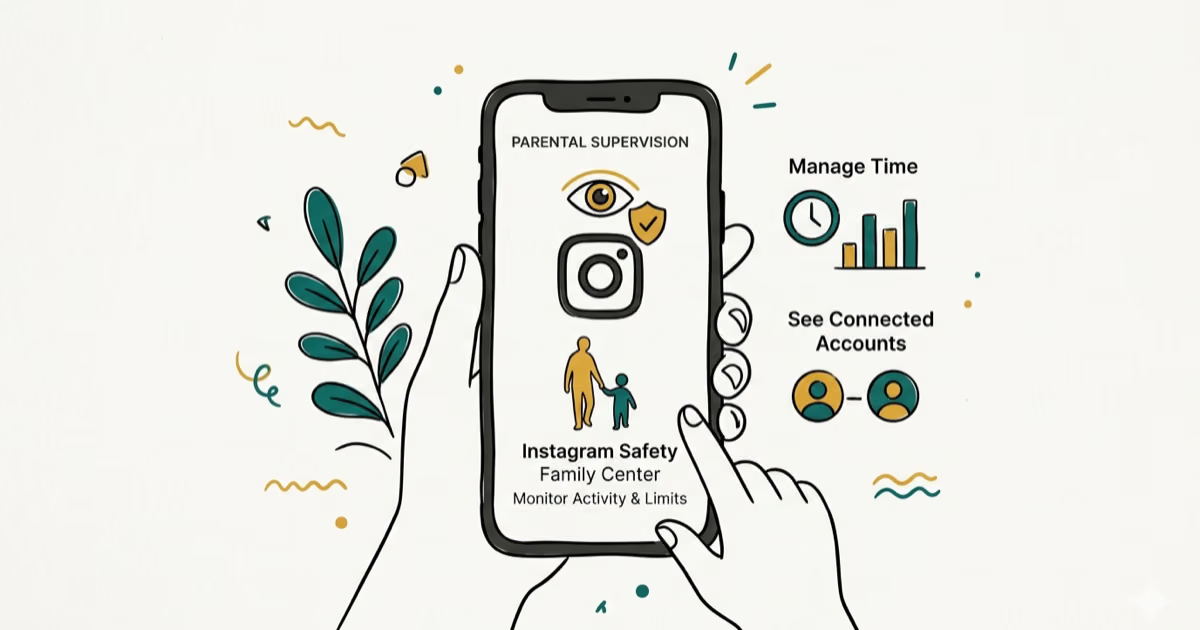
Instagram Parental Controls: Family Center Setup (2026)
Set up Instagram Family Center, privacy settings, Hidden Words, content filters, and time limits with your teen's consent on iPhone or Android.
Instagram Notifications Not Working? Quick Fixes (2026)
Instagram notifications not working? Fix push alerts, DMs, likes, and Stories on iPhone and Android in under 5 minutes with proven 2026 steps.
Instagram "We Limit How Often" Error: How to Fix It 2026
Instagram says "we limit how often you can do certain things"? Wait 24-48 hours, slow down likes and follows, then appeal through Help Center.
Instagram Name Checker: Find Available Usernames Fast
Check Instagram username availability instantly with free tools like Namechk and KnowEm. Find perfect handles and avoid the frustration of taken names.