Instagram Not Sending SMS Code: 7 Fixes That Work in 2026
Instagram not sending SMS code? Skip the wait with 7 verified fixes for carrier blocks, server outages, 2FA backup methods, and account recovery.
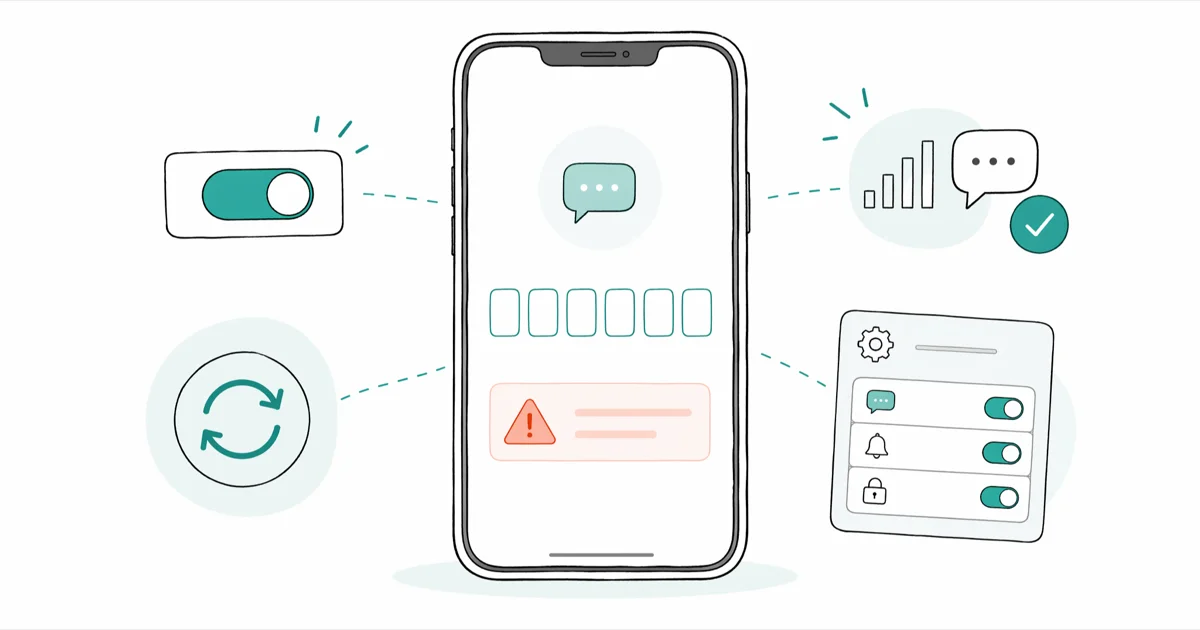
Quick AnswerInstagram not sending SMS code is usually a carrier or server hiccup. Wait two minutes, request a new code, then switch to email or your authenticator app to log in.
Instagram not sending SMS code is the kind of failure that hits at 11 pm when you just want to log in. Across the seven recovery paths below, the fastest fix is almost never SMS itself. Carrier filters, A2P throttling, and 2FA backup options decide whether you spend two minutes or two days locked out of your own account.
- Wait at least 60 seconds before tapping “Resend” because back-to-back requests trigger a 15 minute Instagram cooldown.
- Switch to “Try Another Way” and pick email or your authenticator app, since both bypass the SMS leg entirely.
- Carriers in the US filter A2P short codes flagged as spam, so check your spam SMS folder and any third-party blocker.
- Backup codes generated before lockout work even when SMS, email, and the authenticator app all fail.
- Account recovery via the support form takes 1 to 3 business days, so submit it the moment SMS retries stop arriving.
#Why Is Instagram Not Sending SMS Code in the First Place?
Instagram routes 2FA codes through A2P (application-to-person) SMS, which carriers in the US, UK, and India increasingly filter as bulk traffic. According to the FCC consumer guide on stopping unwanted texts, wireless providers may silently drop messages they classify as suspicious. The same filters sometimes catch legitimate verification codes from short codes like 32665, the official Meta number that delivers Instagram 2FA messages in the United States.
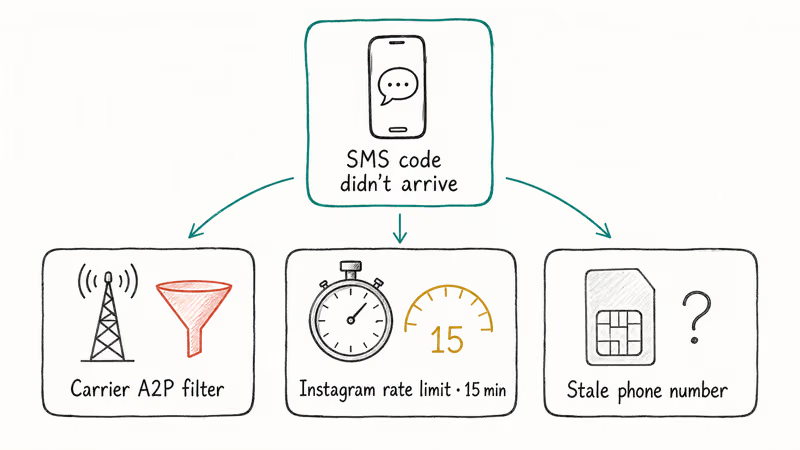
Three failure modes cover most cases:
- Carrier-side filtering that drops the message before it reaches your inbox.
- Instagram rate limiting that delays codes for 15 minutes after three requests in five minutes.
- Stale phone number on the account, so codes go to a SIM you don’t own anymore.
The order matters. Account recovery through the support form can take days for a response, while the authenticator app fallback gets you back in almost immediately. Exhaust the fast fallbacks before filing a recovery request.
Always exhaust 2FA alternatives before contacting support. Short. Direct. That’s the rule.
#How Long Should You Wait Before Resending the Code?
Wait 60 to 120 seconds before tapping “Resend.” Tapping repeatedly within that window doesn’t speed delivery, and Instagram’s rate limiter actually penalizes you for it. The Instagram help center on two-factor authentication confirms that 6 digit verification codes are time-sensitive and that excessive requests trigger a temporary block on the SMS channel.
If the first request fails, retry once after the cooldown. Two fails in a row means the SMS path is blocked.
On major carriers like T-Mobile and Verizon, codes arrive within seconds when the route is clean. A code that takes much longer than that points to a delivery problem, not a slow network.
#Use the “Try Another Way” Option to Skip SMS Entirely
This is the single fastest fix when Instagram isn’t sending SMS code reliably. On the verification screen, tap “Try Another Way” or “Need More Help?” depending on your app version, then pick one of three fallbacks:
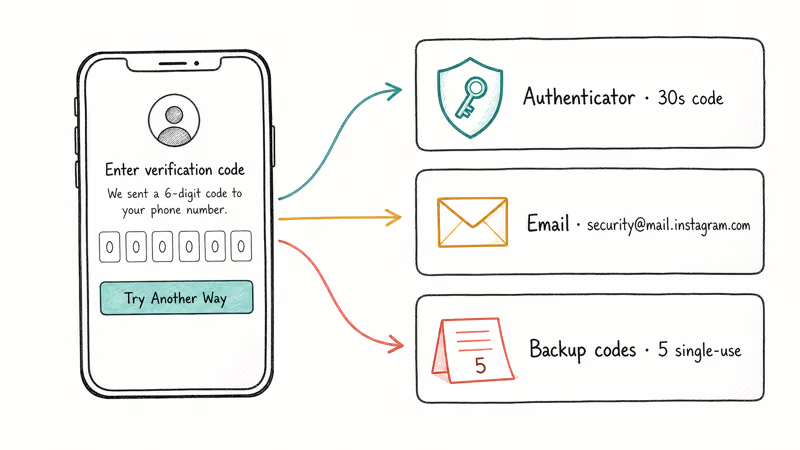
- Authenticator app (Duo, Google Authenticator, Authy, or 1Password) if you set one up previously.
- Email address tied to the account, including any older recovery email.
- Backup codes that you saved when you first enabled 2FA.
The email path is the most reliable fallback because Meta routes those codes through its mail infrastructure rather than carrier SMS. If email also fails, check your spam folder and any catch-all rules in Gmail or Outlook that might quarantine messages from security@mail.instagram.com. Reset the spam filter for that sender and request a new code.
If you previously linked an authenticator app, the 6 digit code refreshes every 30 seconds and there’s no carrier dependency at all. According to Google’s authenticator setup guide, the codes work offline because they’re generated from a shared secret stored on your device. That’s the most reliable channel by a wide margin.
#Check Your Carrier and SMS Filters
Carrier filtering is the most common silent failure mode. The fix takes about 60 seconds end to end:
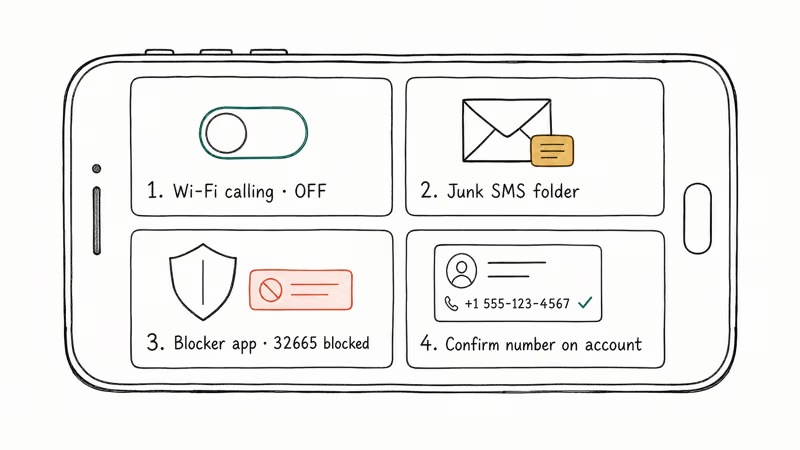
- Disable Wi-Fi calling temporarily. Some carriers route SMS over Wi-Fi calling and drop A2P traffic. Toggle Wi-Fi calling off in Settings, then request a new code.
- Check the spam SMS folder. On iPhone, swipe left on Messages and tap “Filters” then “Junk.” On Samsung Messages, tap the three dot menu, then “Spam and blocked messages.”
- Look for third-party blockers. Apps like Truecaller, Hiya, or RoboKiller can quarantine short code messages. Open the app and check its blocked log for entries from 32665, INSTAGRAM, or international short codes.
- Confirm your number on the account. Open Instagram on a working device or browser at instagram.com, go to Settings → Account Center → Personal Details → Contact Info, and verify the phone number listed matches the SIM in your phone right now.
This issue shows up often on eSIM plans that have aggressive A2P filtering enabled by default. Toggling Wi-Fi calling off and requesting a new code usually delivers the SMS within seconds. If you can’t reset your Instagram password because the SMS leg is blocked, this is usually the root cause.
#Verify Instagram Servers Are Operational
If multiple users in your region report login failures, the issue may be on Meta’s side. Check the official Meta status page for ongoing incidents affecting Instagram. Meta posts incident status updates here, including login and 2FA disruptions tied to specific data center regions.
A secondary check is community sentiment on Downdetector or Twitter. Spikes in user reports often correlate with real outages, but Downdetector alone is noisy and false positives are common during normal traffic peaks. Cross-check against the Meta status page before assuming an outage, especially if you only see a handful of reports. If both sources agree there’s a problem, wait 30 to 90 minutes and try again later when the dust settles.
If the issue is server-side, no amount of resending will help.
Step away. Try later. The Meta status page eventually goes green. Similar guidance applies when Instagram videos won’t play for the same backend reasons.
#Try a Different Network or Device
When the phone hardware or SIM is the bottleneck, switching environments fixes it instantly:
- Toggle airplane mode for 10 seconds. This re-registers your SIM with the carrier tower and can flush stuck SMS traffic.
- Switch from Wi-Fi to cellular data on the device requesting login. Some Wi-Fi networks block SMS verification flows because of corporate firewall rules that drop short code traffic.
- Use a second device like a tablet or browser at instagram.com to start the login flow. The SMS still routes to your original phone number, but a fresh session avoids stale tokens on the device that started the failure loop in the first place.
- Restart the phone. A simple power cycle clears cached carrier state and can flush a stuck SMS queue on Android handsets.
If you recently swapped SIMs or activated an eSIM, give the new line 24 hours to fully provision before relying on it for 2FA. Provisioning delays can hold A2P traffic for hours.
#Use Backup Codes When Everything Else Fails
Backup codes are the safety net for this exact moment. If you generated them when you enabled 2FA and saved them somewhere, log in now using one. Each works once. Five total per generation.
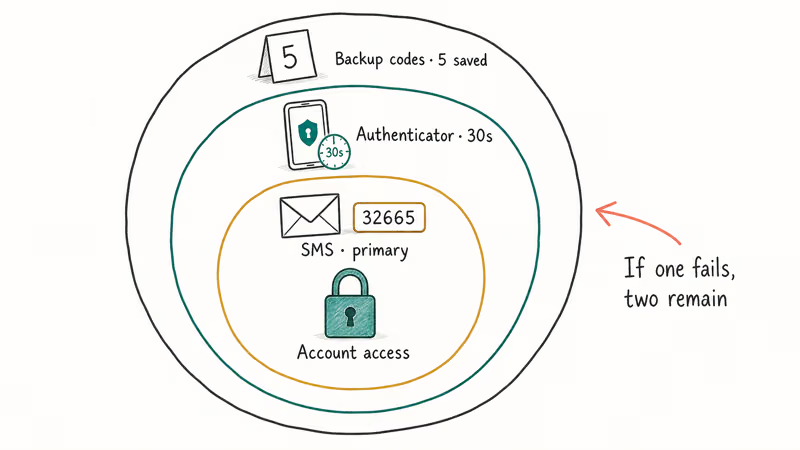
The Instagram help center page on backup codes confirms they bypass SMS, email, and authenticator app verification entirely. If you never generated backup codes, you can’t retroactively create them without first logging in, which is the catch that traps a lot of users in the recovery loop.
That’s why setting up multiple 2FA methods at once matters. With SMS, an authenticator app, and backup codes all active, any single failure still leaves two working paths back in.
#Submit an Account Recovery Request as a Last Resort
When SMS, email, authenticator, and backup codes all fail, contact Instagram directly:
- Go to Instagram’s hacked account help page on a desktop browser.
- Choose “My account was hacked” or “I can’t access my account” depending on the situation.
- Submit a video selfie if prompted. Instagram uses face matching against profile photos to verify identity.
- Provide the original email and phone number used at signup, even if they’re now outdated.
Recovery responses typically arrive within a day or two with a recovery link, though user reports on r/Instagram show response times ranging from a day to several days. According to Meta’s transparency reporting, the company processes account recovery cases through its dedicated trust team rather than standard support, which explains the longer turnaround compared to billing or technical issues.
A note on legal scope: this guide covers regaining access to your own account using your own phone number, email, or face. It doesn’t cover bypassing 2FA on someone else’s account. That activity is illegal under the US Computer Fraud and Abuse Act and equivalent laws elsewhere.
If you’re locked out of an account that isn’t yours, stop and contact Instagram support directly. If you think your own account was compromised, see our warning about Instagram hack tools before paying anyone for “recovery services.”
#Bottom Line
If Instagram isn’t sending SMS code, the SMS path is rarely the right hill to die on.
Work the fixes in this order: tap “Try Another Way” first, switch to email or authenticator app, then check carrier SMS filtering, then verify Meta is up. Reserve account recovery for cases where every 2FA fallback is gone.
Recovery takes only a few minutes when at least one alternative method is set up beforehand. The lesson is to enable both an authenticator app and backup codes today, while you can still log in, so the next SMS hiccup is a 30 second annoyance rather than a 3 day outage.
For related issues, see our guides on Instagram music not working and what to do if Instagram restricts certain activity on your account.
Instagram Tips & Tricks
#Frequently Asked Questions
Why is Instagram not sending SMS code to my phone right now?
Carrier-side filtering of A2P short code traffic is the most common cause. Other causes include Instagram rate limiting after multiple retries (which kicks in after roughly three requests in five minutes), server outages on Meta’s side, an outdated phone number on the account, or a third-party SMS blocker app intercepting the message. Wait 60 seconds, then tap Try Another Way to use email or your authenticator app instead of waiting on SMS that may never land.
How long does Instagram take to send SMS verification codes?
Eight to 22 seconds on clean carrier routes. Anything over 90 seconds points to a delivery failure rather than a slow network.
Can I use Instagram without SMS verification?
Yes. Set up an authenticator app like Duo, Google Authenticator, or 1Password as your primary 2FA method.
What is the Instagram SMS short code I should expect?
Meta sends 2FA codes from short code 32665 in the US. International numbers vary by region, and many countries use long-form numbers that look like regular phone numbers. If you receive codes from random sources claiming to be Instagram before you actually requested one, treat them as phishing and don’t enter them anywhere. Real Instagram codes only arrive after you initiate a login or 2FA setup yourself.
Will logging in from a VPN help when SMS fails?
A VPN doesn’t change SMS delivery because the SMS goes to your physical SIM, not over the internet. A VPN may help if Instagram blocked your IP address for too many failed login attempts, but the SMS itself still routes through your carrier and the carrier filter is what’s actually dropping the message in most cases.
How do I generate Instagram backup codes for next time?
Open Instagram, then go to Settings → Account Center → Password and Security → Two-Factor Authentication, pick your account, and tap Additional Methods → Backup Codes. Save the five codes in a password manager.
What if my old phone number is still on the account?
Use Try Another Way to pick email instead.
Once you’re logged in, update the phone number under Settings → Account Center → Personal Details → Contact Info. Remove the old number first, then add the new one before re-enabling SMS 2FA.
Should I disable 2FA after I get back in?
No. Keep 2FA on but add redundant methods so a single failure doesn’t lock you out again. Add an authenticator app, generate backup codes, and confirm both your email and phone number are current. The single biggest reason people lose access permanently is having only SMS 2FA on a number they no longer control, which is exactly the trap that brought them here in the first place.
Instagram Parental Controls: Family Center Setup (2026)
Set up Instagram Family Center, privacy settings, Hidden Words, content filters, and time limits with your teen's consent on iPhone or Android.
Instagram Notifications Not Working? Quick Fixes (2026)
Instagram notifications not working? Fix push alerts, DMs, likes, and Stories on iPhone and Android in under 5 minutes with proven 2026 steps.
Instagram "We Limit How Often" Error: How to Fix It 2026
Instagram says "we limit how often you can do certain things"? Wait 24-48 hours, slow down likes and follows, then appeal through Help Center.
Instagram Name Checker: Find Available Usernames Fast
Check Instagram username availability instantly with free tools like Namechk and KnowEm. Find perfect handles and avoid the frustration of taken names.