How to Delete Your Kik Account Temporarily or Permanently
Delete your Kik account in about 3 minutes. Step-by-step temporary deactivation and permanent deletion using Kik's official deletion portal.
Quick AnswerTo delete a Kik account, go to ws.kik.com/delete and enter the email tied to your account. Kik then emails a confirmation link. Temporary deactivation lets you sign back in later, while permanent deletion wipes the username for good.
Deleting a Kik account takes about three minutes once you know which of two paths you want: a temporary deactivation that you can undo by signing back in, or a permanent deletion that scrubs the username from Kik’s network. Both start at the same official deletion page, but they end in very different places.
The permanent path can’t be undone.
Both flows run through Kik’s official deletion portal, so the screens and emails below match what Kik sends today on current iOS and Android builds.
- Both temporary deactivation and permanent deletion start at the same official URL: ws.kik.com/delete.
- Temporary deactivation keeps your username reserved and lets you sign back in any time you want.
- Permanent deletion is irreversible, releases your username back into the pool, and wipes the profile from your contacts’ rosters.
- Kik does not retain message history on its servers, so chats vanish the moment you sign out or uninstall the app.
- Closing a child’s Kik account requires the email used at signup; without it, you have to contact Kik support and prove guardianship.
#What Happens When You Delete a Kik Account?
Two things happen at once. Your username drops out of Kik’s directory, and you stop receiving messages on that profile. Anyone who tries to find you by username or scan your old Kik code gets a “not found” result.
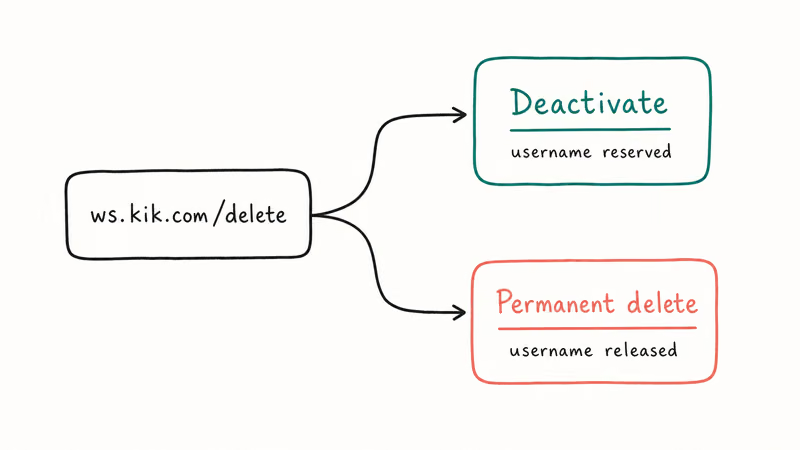
According to Kik’s help center, the 30-day cooldown is the window during which a permanently deleted username sits unused before cycling back into the public pool. Until that window closes, nobody else can claim the handle. After it closes, the name is fair game for any new signup.
Deactivation works differently.
A temporary deactivation parks the account without ever releasing the username. You can sign back in any time you want and pick the profile up exactly where you left off. Signing back into a deactivated account works as soon as you re-enter your username and password, even after a day or more away.
One detail surprises most people.
Deletion doesn’t reach back into your friends’ phones. Messages already on their devices stay there because Kik never stored those chats on its servers. The only copies that exist after deletion are the ones already sitting in other people’s apps.
Quick reality check before you proceed.
If you are deleting for privacy reasons, scrubbing the account on Kik’s side is only half the job. The other half is wiping the local app data on your phone, which we cover further down.
#How to Temporarily Deactivate Kik
Deactivation is the right choice if you want a break but might come back, or if you’re troubleshooting a glitch and want to start fresh without losing your handle.
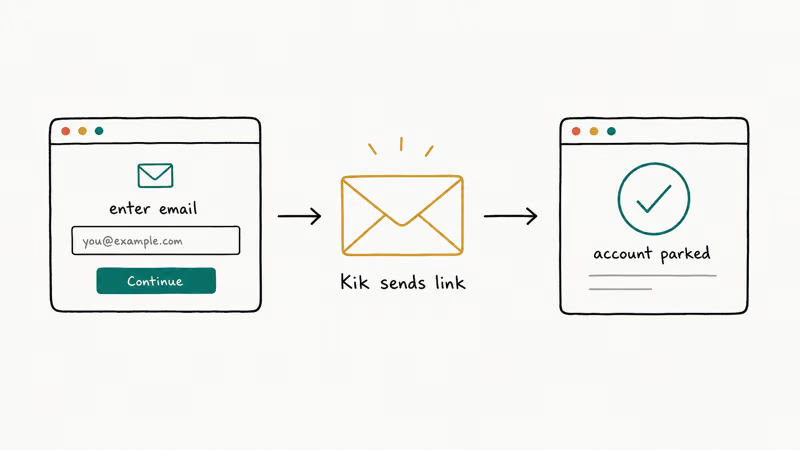
The whole flow usually takes only a few minutes, including the email round-trip.
- Open a browser and go to ws.kik.com/delete. Phone or computer both work.
- Pick Deactivate when the page asks why you’re here.
- Type the email address tied to your Kik account.
- Solve the CAPTCHA, then tap Go.
- Check the email inbox you used. Kik sends a confirmation link from noreply@kik.com within about 60 seconds.
- Click the Deactivate Account link inside the email. The browser opens a confirmation page, and your account is parked.
Reactivating later is simple. Open the Kik app and sign in with the same username and password. If you forgot the password while you were away, reset your Kik password before trying to sign in again.
The account and groups reappear once you log in.
If you originally signed up with an email you no longer use, deactivation gets messy. The confirmation link only arrives at the address on file. You have to recover that inbox first, or contact Kik support and prove ownership of the account before they will help.
#When Deactivation Is the Smarter Choice
Pick deactivation if any of these apply: you want a one-month digital break, you’re switching phones and worried about chat handover, you’re testing whether a Kik vs WhatsApp switch sticks, or you want to silence message notifications while keeping the username locked to you.
The username stays reserved while you are away.
Some people deactivate to break a habit loop, then quietly reactivate a week later. That is fine.
#How to Permanently Delete Your Kik Account
Permanent deletion is the right choice when you have decided you’re done with Kik and want the username gone.
It uses the same portal as deactivation.
You pick a different option, the email body says “permanent,” and once you click the link, Kik treats the request as final.
- Visit ws.kik.com/delete in any browser.
- Choose Permanently Deactivate when the page asks the deletion type.
- Enter the email tied to your account, complete the CAPTCHA, and tap Go.
- Open the confirmation email Kik sends within about a minute.
- Click Permanently Deactivate inside the email. The browser shows a final confirmation page.
After permanent deletion, the username and the email it was paired with both stop working in their old pairing. The same email can still be used to create a new Kik account with a fresh username, since deletion releases the old handle rather than blocking the address.
The old username is not coming back.
It belongs to whoever claims it next, once the cooldown ends. If you cared about that handle, choose deactivation instead.
A few details to know before you click the final link.
Friends will see your username greyed out in their chat lists once the deletion processes. Group chats you created stay alive, but your handle is removed and any admin rights pass to whoever Kik’s system picks next.
Photos and videos you sent in one-on-one chats still live on the recipients’ devices because the Kik service never had a copy in the first place. Ask the recipients to clear those chats on their end if it matters to you.
Don’t stop at the account level.
If you’re scrubbing a phone before a sale, account deletion alone is not enough. The Kik cache on the device can still hold thumbnails. Uninstall the app after the deletion completes, then run a factory reset before handing the phone to a buyer.
The same advice applies if you’re closing several accounts in a row. You might also want to delete your Bumble account or delete your OnlyFans account in the same session.
#Can You Delete Your Child’s Kik Account?
Yes, but only with the right access.
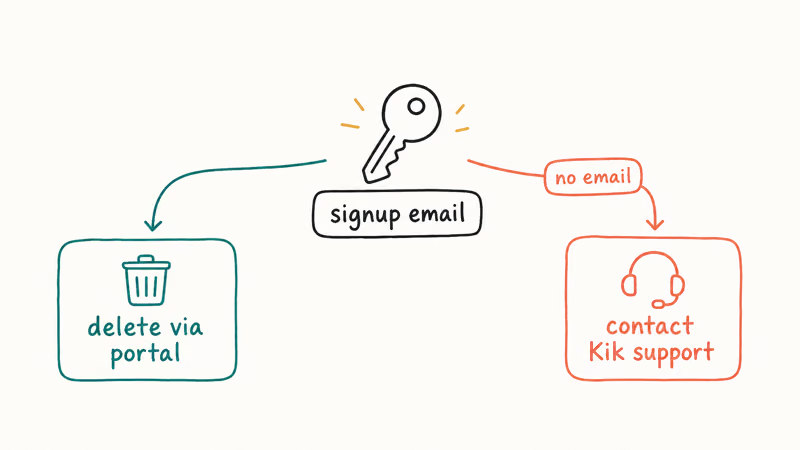
Kik’s deletion portal needs the email tied to the account, not the parent’s email, and not the child’s phone number. If your kid set the account up using a school address or an old Gmail you didn’t know about, you have to recover that inbox first, or go through Kik’s support team.
The cleanest path is to ask the child to sign in, open Settings inside the app, and confirm the email under Your Account.
Once you have that email, follow the permanent deletion steps above.
The whole conversation tends to go better than fighting over the phone.
When you don’t have email access, Kik’s support team can help. Common Sense Media’s Kik parental review recommends that parents contact Kik directly at support@kik.com with documentation that the child is a minor.
The Federal Trade Commission’s children’s privacy guidance confirms that operators of services aimed at kids under 13 must honor deletion requests from a parent or legal guardian. Provide your child’s username, your relationship, and a statement that you’re acting as the parent. Kik typically responds within a few business days.
A heads-up about boundaries.
This guide is about closing accounts on your own device or your own child’s account. It’s not about reading someone else’s messages or signing in as another person.
If you’re a teen reading this and worried someone may have accessed your account, deactivate first, then investigate. Kik does not let you rename a compromised handle, so if you decide to walk away from it entirely, our guide on whether you can change your Kik username explains your options. If your concerns are about scams or strangers messaging you, our roundup of common Kik scams covers what to look out for.
#Cleaning Up Chat History Left on Your Phone
Account deletion handles Kik’s side of the equation. It doesn’t touch the cached messages, photos, or videos that live on your phone.
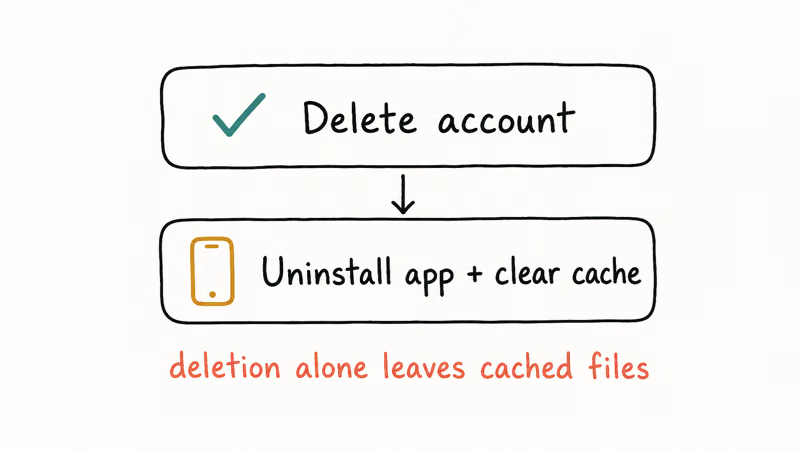
Those files only disappear when you uninstall the app.
For iPhone users, the simplest cleanup is to long-press the Kik icon on the Home Screen, tap Remove App, then choose Delete App.
On Android, open Settings > Apps > Kik > Storage and tap Clear Storage before uninstalling. After months of moderate use, the Kik cache can hold a sizable amount of photos plus a smaller chunk of audio messages. Those files are gone after a full uninstall.
Selling or donating the phone changes the math.
If you’re handing the phone to someone else, do a factory reset on top of the uninstall. Apple recommends erasing all content and settings before selling or donating a device. Cache clearing alone leaves data that recovery tools can sometimes pull back. The factory reset path closes that gap.
Worth noting briefly.
If your Kik was acting up before deletion, image previews failing or messages stuck on “S,” you might want to fix stuck messages on Kik first. Some of those issues clear on their own after the account is gone.
#Recovering Access to the Signup Email
You can’t delete a Kik account from the official portal without the email on file.
That single rule trips up a lot of people.
Step one is to find the email. Look in the Kik app under Settings > Your Account if you can still sign in. The address is shown there.
If you can’t sign in, try every old Gmail, Hotmail, or school address you used.
The signup email is the only address Kik recognizes — there is no SMS recovery for account deletion.
If you have lost access to that email entirely, log a ticket with Kik support at support@kik.com. Describe what you remember about the account, the rough date you signed up, and the username.
Support requests of this kind take a few business days.
For accounts that were never linked to a working address, contact support first. Don’t waste time at the deletion portal if no link will reach you.
#Bottom Line
Pick deactivation if you want a break and might return, and pick permanent deletion if you’re done and want the username released. Both paths start at ws.kik.com/delete, both take under three minutes, and both rely on the email address you signed up with. If you don’t have that email anymore, contact support@kik.com before doing anything else, because the deletion link only goes to the address on file.
#Frequently Asked Questions
Can I reactivate my Kik account after a temporary deactivation?
Yes. Open the Kik app and sign in with your original username and password. The account reappears immediately, with contacts and group memberships restored.
What happens to my messages when I delete my Kik account?
Server-side, there is nothing to remove. Kik does not retain message history on its servers, so deletion just confirms what was already the case. Messages already delivered to your friends’ phones stay on their devices, since those copies live locally and outside Kik’s reach. The only way to clear them is to ask each friend to delete the chat on their end.
Can I create a new Kik account with the same email after permanent deletion?
Yes. The email is reusable for a brand-new account.
Will people still message me if I temporarily deactivate my Kik account?
No. Your username drops out of search and chat lists during deactivation. Friends who try to reach you see a “user not found” state.
If I delete the Kik app, will it delete my account?
No. Uninstalling the app removes the cache on your phone but leaves the account active on Kik’s network. Other people can still find your username and try to message you. To actually stop that, you have to go through ws.kik.com/delete first, confirm the email link, and only then uninstall the app from your phone.
Does Kik keep my account data after I delete it?
Kik states that profile data is removed from the active system once a deletion is confirmed. If you want a copy of anything, take screenshots before you start.
How long does it take Kik to process the deletion?
The confirmation email typically lands quickly, and the username disappears from search shortly after. Kik’s help center states that account removal happens soon after confirmation, with the 30-day cooldown applied before the username is released back into the public pool.
What if I changed my mind after a permanent deletion?
You can’t recover it. Create a new account with a different username, or pick deactivation next time.

Google Messages Error 3100: Why RCS Is Broken on Galaxy
Google Messages RCS error 3100 hits Galaxy owners after phone or carrier switches. Google told 9to5Google a fix is coming. Here's what actually helps.

Is This Bank App Real? Spot a Fake App on Your Home Screen
A bank app can land on your home screen from a web page with no install warning. Learn the checks that tell a real banking app from a phishing web app.

Apps Crashing After iOS 27 Update? Fix Order (2026)
Apps crashing after the iOS 27 update? Update the app in the App Store first, then offload and reinstall to clear stale cache, then restart. The fix order.

Do AI Translation Earbuds Work Offline? What to Know
Do AI translation earbuds work offline? A few do with downloaded language packs, but most need the cloud. Here's what works offline and what you give up.