How to Change Spotify Country: Step-by-Step Guide (2026)
Change your Spotify country the right way after relocating: official steps for Free and Premium, payment method rules, and what happens to your library.
Quick AnswerOpen Spotify on the web, go to Account > Edit profile, change the Country or region field to your new location, and save. Spotify will ask you to add a payment method registered in that country before the change takes effect.
You can change your Spotify country directly from the Account page of your own Spotify account on the web in about two minutes, but the change only sticks if Spotify can confirm you actually live in the new country. That confirmation almost always comes from a billing address and payment method registered there. It’s the step that trips most people up.
- Spotify locks your account to one country at a time, and you change it from the web Account page under Edit profile, not from the mobile app.
- Premium subscribers usually need to add a payment method with a billing address in the new country before the update saves.
- Free users can listen outside their home country for 14 days before Spotify forces them to switch the account country or stop streaming.
- Changing your country does not delete your playlists, liked songs, or followed artists, but some specific tracks may grey out due to regional licensing.
- Using a VPN or GPS-spoofing app to fake a country breaks Spotify’s End User Agreement and can lead to suspension, especially on Premium accounts.
#Why Spotify Locks Your Account to One Country
Spotify licenses music country by country. The deal it has with a label in Germany isn’t the same as its deal in the United States or Brazil. Catalogs, podcast lineups, audiobook hours, and Premium prices all shift across borders. Your account country is the lever that tells Spotify which catalog and which currency to serve you, and that single field controls almost every regional detail you experience inside the app.
According to Spotify’s official support article on country or region mismatch, the country saved on your account has to match where you actually live, and the company explicitly states that travel doesn’t count as a permanent move.
There’s a second reason that matters: revenue routing.
Your account country sets the currency on your invoice, so a Brazilian Premium account still pays in BRL even after you fly to the US for a year. It also controls which regional editorial playlists, podcast exclusives, and audiobook hours show up in the app.
#How Do You Change Your Country on Spotify Free?
Free accounts have the simplest path. They also have the strictest deadline.
Spotify confirms that free users can stream outside their account country for up to 14 days, after which the app blocks playback until the country is updated or the user returns home.
The country dropdown may stay unavailable if Spotify can’t confirm that your current connection matches the country you’re trying to set.
The steps below work, but skip them if you’re traveling for a holiday rather than actually moving; the 14-day grace period covers ordinary trips without any changes on your part.
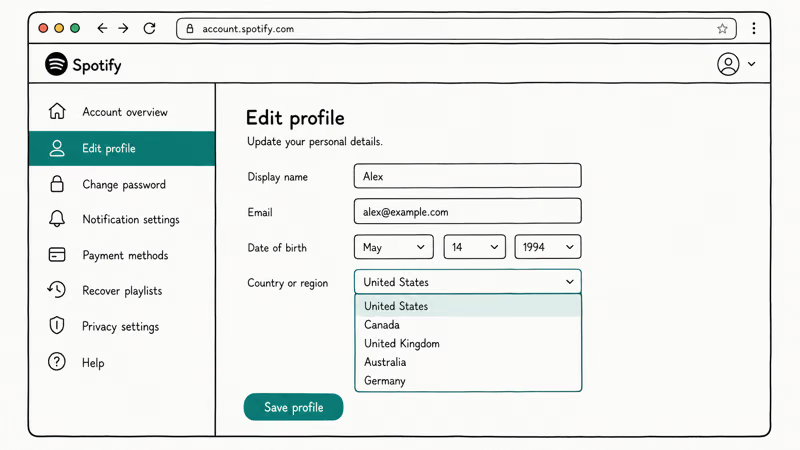
- Open spotify.com in a desktop browser and sign in with your email, Facebook, Google, or Apple credentials.
- Click your profile name in the top-right corner and choose Account.
- In the left sidebar, click Edit profile.
- Scroll to the Country or region field and choose your new country from the dropdown.
- Click Save profile at the bottom of the page.
If the dropdown won’t let you save, you’re almost certainly outside the country you’re trying to set. Spotify’s support team has stated that the platform reads your IP address at the moment of saving, so the change has to be made from an internet connection physically located in the destination country. No save = wrong network.
Free users don’t need a payment method to switch country, which is the one place this process is less painful than Premium. The trade-off is that Free is region-bound much more strictly: try to stream from Country A while the account says Country B, and you’ll see a “Spotify isn’t available in your country yet” message after the 14-day grace period runs out.
The catalog also reverts to whatever’s licensed locally during travel, so a song you saved at home may stop playing partway through a trip even before the limit kicks in.
#Changing Your Country on Spotify Premium
Premium accounts can move too, but Spotify uses your billing address as the source of truth. Spotify’s country or region mismatch help page is explicit on this point: you need a valid payment method registered to an address in the destination country before the Country or region field will save.
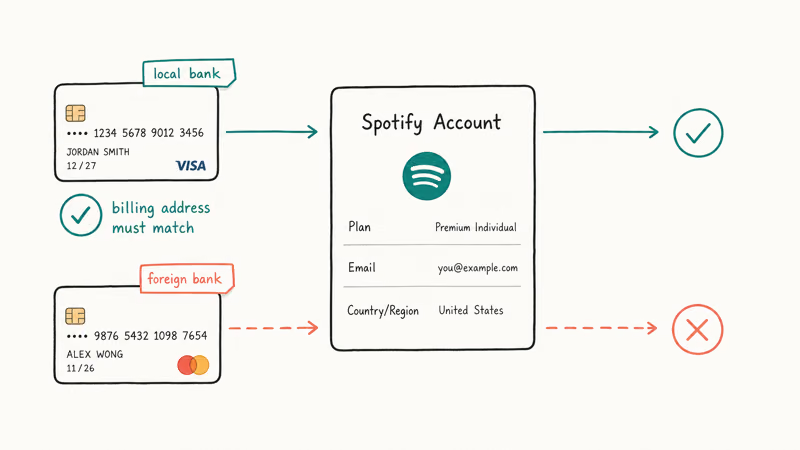
The flow itself looks identical to the Free path, but with an extra payment step:
- Go to spotify.com, sign in, and open Account.
- Click Manage your plan or Update payment details.
- Add a new payment method with a billing address in the new country. Credit cards, debit cards, and most local payment options work, as long as the issuing bank’s address matches.
- Save the payment method, then return to Edit profile.
- Change the Country or region field and click Save profile.
A card with a local shipping address may still fail if the issuing bank country does not match the destination country. After a successful change, future billing should switch to the local Premium price and currency.
A few edge cases trip people up. Family Plan owners have to change the manager’s country first, and every member’s address has to be in the same country. Bought Premium through Apple or Google Play? The subscription is tied to your store country, not Spotify’s, and you can’t change it from Spotify’s settings.
Partner billing is the other wrinkle. If your existing Premium subscription was paid through a phone carrier or a gym, Spotify says you usually have to cancel that bundle before you can move country, because the partner’s contract is tied to that country’s operator and Spotify can’t unilaterally re-route the billing. Cancel first, wait for the next renewal date, then re-subscribe to Spotify directly from the new country with a local card.
#What if Spotify Won’t Let You Change Country?
This is the most common dead end.
The “Spotify can’t change country” error almost always traces back to one of four reasons.
No matching payment method. Premium accounts can’t change country without a card or local payment option issued in the destination country. A foreign card with a local shipping address won’t work.
Wrong IP at the moment of saving. Spotify reads your connection when you click Save.
An active subscription is still tied to a partner. Carrier bundles, gym partnerships, and student plans verified through a third party often block the country change until you cancel.
An ongoing trial or promotional period. Some new-user promos can only be redeemed once per country, and switching while a discount is active can either fail silently or strip the discount when the country saves. Student and Duo trials are the two that catch people most often, because verification locks them to the issuing country for the full trial window.
If none of those apply, Spotify’s contact form is the right next step. Their support team can manually update the country on your account once you provide proof of move, like a utility bill, lease, or local bank statement. Plan for at least a few business days, because agents won’t make the change live in chat unless your billing setup already matches.
Send a sharp PDF of a recent utility bill, include your account email and a partial payment method ID in the message, and expect a back-and-forth of a few days.
#How the 14-Day Travel Rule Actually Works
Spotify’s End User Agreement and several of its support pages explain a single travel allowance: free or Premium, you can use Spotify outside your account country for up to 14 days in a row. After that, the system will either limit playback (Free) or ask you to confirm where you live (Premium). According to Spotify’s terms, repeated travel back and forth doesn’t reset the clock indefinitely; the company watches the pattern over months.
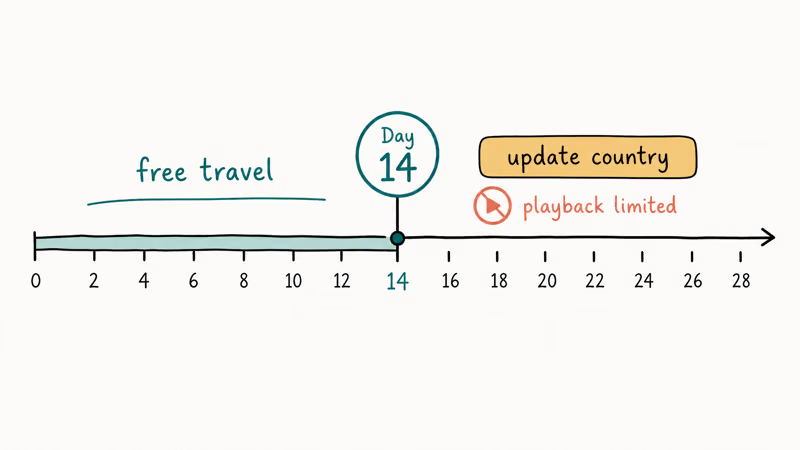
Short trips usually don’t require an account-country change. Once Spotify treats the account as being outside its saved country for longer than the travel allowance, it can ask you to update the country, limit playback, or require matching local billing before Premium renews.
So the takeaway is simple. The 14-day rule isn’t there to stop you from going on vacation. It’s there to stop one account from permanently using cheaper Premium pricing from a country the listener doesn’t actually live in.
#What Changes (and What Doesn’t) When You Switch Country
The short answer: very little of your library breaks. Your saved playlists, liked songs, followed artists, podcast subscriptions, and listening history all move with the account, not the country.
A few things do shift:
- Track availability. Some songs and podcast episodes carry country-specific licenses, so a track that played fine in your old country may grey out in the new one, and vice versa. Liked songs that get grey-listed will reappear if you move back.
- Premium price. Your renewal price changes to the new country’s Premium tier in local currency. Some countries are cheaper, some are more expensive, and your next invoice reflects the new rate.
- Editorial picks. Daily Mix, Discover Weekly, and Release Radar will gradually shift toward what listeners in the new country play. This rebalances over a couple of weeks rather than overnight.
- Audiobook hours. Premium audiobook hours are also region-specific, with the US, UK, and Australia having the most generous allotments at the time of writing. Moving accounts can change the hours available.
If you rely on highly curated playlists or specific podcast access, run a quick check on a handful of favorites before you commit. If a key album greys out, you can find friends on Spotify in your old country and see what they’re listening to, or troubleshoot Spotify songs that won’t play before assuming the issue is regional.
#VPNs and Location Spoofers: Why They’re a Bad Idea
A lot of older guides on the web tell you to use a VPN or a GPS-spoofing app to fake your Spotify country. Don’t. Spotify’s End User Agreement prohibits using technology to misrepresent your location or to access content not licensed for your country. The company has stated that accounts caught doing this can be suspended or terminated.
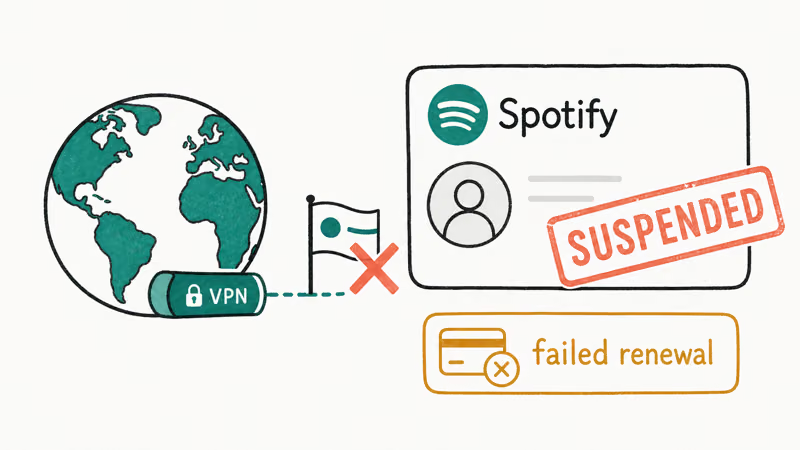
Three specific risks are worth knowing about:
- Account termination. Spotify’s terms of use are clear that abuse of geographic restrictions can result in a closed account, with no refund of prepaid Premium time. Reports surface regularly on Reddit’s r/spotify of accounts being locked after long VPN runs from cheap-Premium countries.
- Failed renewals. Even if Spotify doesn’t catch the IP, the renewal will fail if the payment method’s country doesn’t match the account’s country. The subscription drops back to Free until you fix it.
- Security trade-offs. Free VPNs and “GPS spoofer” apps often request invasive permissions or sell traffic data. As The Verge and other tech outlets have repeatedly warned, a working Spotify country swap isn’t worth handing over your microphone or browsing history.
Live somewhere Spotify doesn’t operate? The legitimate answer is either to wait until Spotify launches there (the service has expanded coverage steadily since 2018) or to pick a Spotify alternative like YouTube Music, Apple Music, or a local provider that does operate in your region.
If your goal is to access region-locked podcasts or albums while staying in your home country, the honest answer is you can change your Spotify location only by actually relocating and updating payment details, not by tricking the app. That’s the constraint to plan around.
#Bottom Line
If you’ve actually moved, change your Spotify country from the web Account page and add a payment method issued in the new country before you save. The flow takes minutes once your bank card is in place. If Spotify rejects the change, the reason is almost always a mismatched payment method, the wrong IP at the moment of saving, or a partner-billed subscription that has to be cancelled first.
Haven’t moved? Skip the VPN.
Spotify is actively enforcing its country rule, and a suspended account loses everything you’ve built up. Either wait until Spotify launches in your country, or pick a music service that already serves it. For housekeeping after your country switch, you can clear your Spotify queue to start fresh with the new regional recommendations, or check whether Spotify keeps skipping songs if playback gets glitchy on the new account country.
#Frequently Asked Questions
Can I change my Spotify country from the mobile app?
No. The Country or region field is read-only on iOS and Android. Spotify only lets you edit it from the web Account page on a desktop browser.
How long does it take for the Spotify country change to apply?
The text field saves immediately. The catalog, currency, and recommended playlists can take a few minutes to fully refresh, and logging out and back in usually forces the change. New invoices in the local currency start with the next billing cycle, not retroactively, so a change made mid-month will still be charged at the old country’s rate for the days remaining in that cycle. After the renewal date you’ll see the new currency and price.
Will I lose my Premium subscription if I change countries?
You won’t lose access. Your existing Premium plan continues until the end of the current billing period. After that, Spotify charges the new country’s Premium rate in local currency on your new payment method, and if the change fails because of a payment mismatch, the account simply reverts to Free without any data loss.
Can a Spotify Family Plan span multiple countries?
No. Spotify requires every Family Plan member to have an address in the same country as the plan manager. If you move and your family members don’t, you’ll need to either move the manager role to someone still in the original country or split into separate plans.
What happens to my Spotify country if I subscribed through Apple or Google?
Subscriptions purchased through the App Store or Google Play are tied to your store country, not Spotify’s. According to Apple Support, changing the App Store or Apple ID country requires cancelling active subscriptions first, then setting a new payment method in the destination region. After the store country is updated, you re-subscribe to Spotify Premium in the new region. Google Play follows a similar pattern, with a 12-month cool-down before you can change Play Store country again.
Does my Spotify Wrapped still work if I change country mid-year?
Yes. Wrapped pulls from your full listening history regardless of the country your account is set to, so the December summary reflects what you actually played all year.
Can I keep my Spotify account if I move to a country where Spotify isn’t available?
If Spotify isn’t licensed in your destination country, you can’t update the country field to that location. You can keep streaming for up to 14 days under the travel rule, but after that the account will be limited. The official path is either to keep a billing address and payment method in a country where Spotify operates, or to pause the subscription and pick a service available in the new region.

Google Messages Error 3100: Why RCS Is Broken on Galaxy
Google Messages RCS error 3100 hits Galaxy owners after phone or carrier switches. Google told 9to5Google a fix is coming. Here's what actually helps.

Is This Bank App Real? Spot a Fake App on Your Home Screen
A bank app can land on your home screen from a web page with no install warning. Learn the checks that tell a real banking app from a phishing web app.

Apps Crashing After iOS 27 Update? Fix Order (2026)
Apps crashing after the iOS 27 update? Update the app in the App Store first, then offload and reinstall to clear stale cache, then restart. The fix order.

Do AI Translation Earbuds Work Offline? What to Know
Do AI translation earbuds work offline? A few do with downloaded language packs, but most need the cloud. Here's what works offline and what you give up.