Spotify Not Playing Songs: 9 Fixes That Work in 2026
Spotify not playing songs? Nine fixes for iPhone, Android, Mac, and Windows. Clear cache, reset audio output, or reinstall to get music back fast.
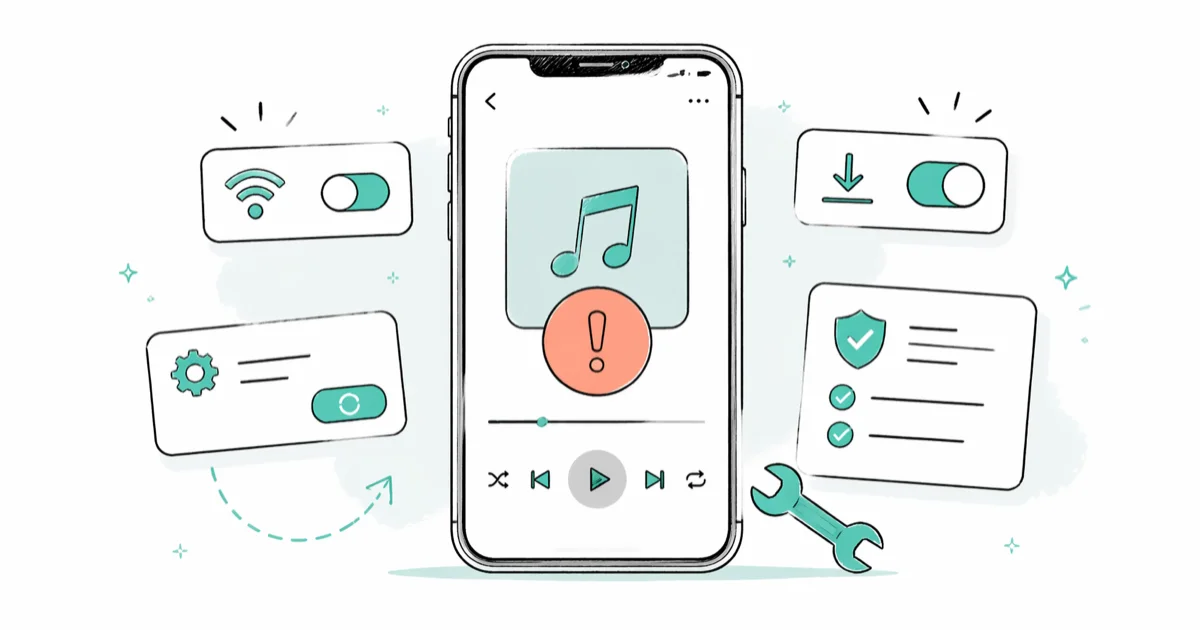
Quick AnswerSpotify usually stops playing songs because of a stale local cache, a wrong audio output, or an outdated app. Restart Spotify, clear the cache, and switch your audio output device, and music returns in most cases.
Spotify not playing songs is one of the most reported playback problems in streaming, and the fix is usually faster than people expect. Nine fixes cover the stall across iPhone, Android, Mac, and Windows, from quick taps to a full reinstall. This guide walks through them in a sensible order, starting with the 30-second checks and ending with the heavy hammer.
- Stale local cache is the most common trigger across iOS, Android, Windows, and Mac when songs refuse to start.
- Spotify keeps using your last-selected audio device, so a Bluetooth speaker that drifted out of range can silently mute playback.
- Free-tier playlists default to Shuffle, and the app can swap your selected track for a queue suggestion when Shuffle is on.
- Logging out, deleting the app, and reinstalling forces a clean download of cached files and clears most stubborn cases.
- Offline Mode and Data Saver block streaming when toggled on by accident, so always check both before deeper fixes.
#Why Does Spotify Keep Failing to Play Songs?
Spotify playback breaks for a short list of reasons, and recognising the pattern saves time before you start deleting the app.
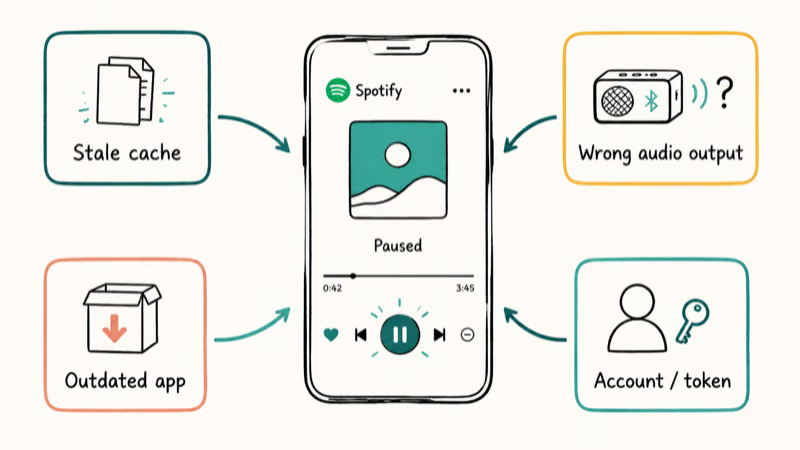
The most common cause is a corrupted local cache that the client never refreshes on its own. According to Spotify’s clear-cache support article, the cache grows continuously and only resets when you tap Clear cache manually or reinstall the app. Other recurring causes include outdated app versions, wrong audio-output routing, network throttling, and account state issues that resolve only after a fresh sign-in.
If your songs play for a few seconds and then drop out, our Spotify keeps skipping songs guide is the better fit. If the desktop client opens but never launches a track, Spotify not responding covers that hang directly.
#Quick Audio and Network Checks Before You Open Settings
Run these three 30-second checks first; they fix more cases than any deep troubleshoot.
- Test the speaker with another app first.
- Open a website in your browser to confirm the network is up; Spotify needs roughly 0.5 Mbps for Normal streaming and about 1.5 Mbps for Very High on Premium, so a slow connection alone can stall the player without throwing any visible error message on screen.
- Toggle airplane mode on for five seconds, then off again.
#How to Restart Spotify and Switch the Audio Output
A clean restart plus the right audio device clears a large share of playback stalls.
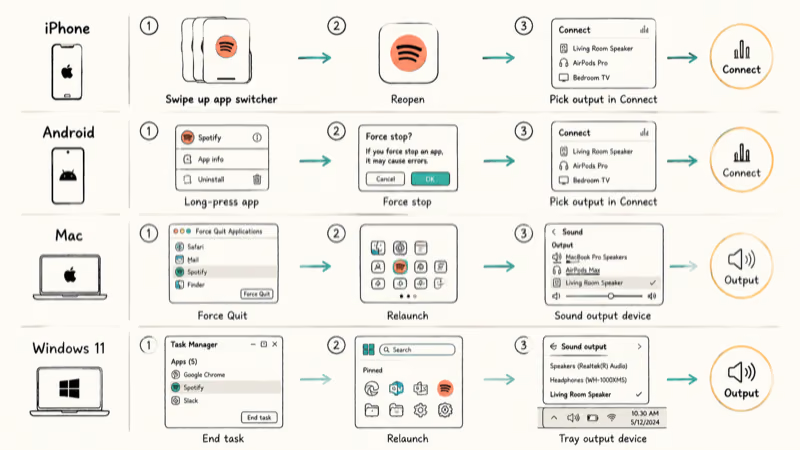
On iPhone or iPad: swipe up from the bottom (or double-press Home on older devices), flick the Spotify card off the top of the screen, then reopen Spotify. Tap the Connect icon at the bottom-left of the Now Playing screen and pick your phone speaker explicitly instead of letting the app auto-select.
On Android: open the app drawer, long-press Spotify, tap App info, then tap Force stop. Reopen Spotify and use the same Connect picker to lock the audio output to your phone.
On Mac: press Command + Option + Esc, choose Spotify, click Force Quit, and relaunch from Launchpad. Apple’s official Force Quit guide walks through the same shortcut. Open System Settings, click Sound, and confirm the output device matches the speaker you actually want. On Macs running macOS Sonoma or later, also check Audio MIDI Setup under Applications → Utilities to confirm Spotify isn’t pinned to a virtual audio device left over from screen-recording software, video-conferencing apps, or audio routing tools.
On Windows 11: right-click the taskbar, choose Task Manager, end the Spotify task, and relaunch from the Start menu. Open the system tray volume icon and pick your active playback device from the dropdown.
On a phone with misrouted audio output, the Connect picker usually fixes playback instantly.
#Clear the Spotify Cache on iPhone, Android, Mac, and Windows
Cache corruption is the heaviest hitter across both desktop and mobile platforms. Spotify’s support documentation confirms that the local cache holds streamed audio chunks and metadata so the app can replay tracks quickly without re-downloading them, and that this cache can grow without an upper limit until you clear it manually or reinstall. Old or corrupted cache entries often surface as the same “song won’t play” symptom most users see.
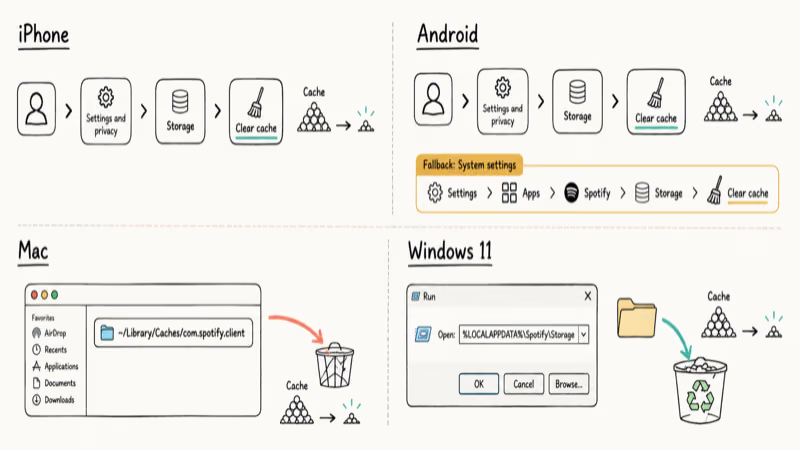
- iPhone and iPad: open Spotify, tap your profile picture, choose Settings and privacy → Storage → Clear cache.
- Android: open Spotify, tap your profile picture, go to Settings and privacy → Storage → Clear cache. If that fails, open your phone’s Settings → Apps → Spotify → Storage → Clear cache (system-level).
- Mac: quit Spotify, open Finder, press Command + Shift + G, paste
~/Library/Caches/com.spotify.client, drag the folder to Trash, then relaunch. - Windows 11: quit Spotify, press Windows + R, paste
%LOCALAPPDATA%\Spotify\Storage, delete everything inside, then relaunch.
Cleared caches rebuild on the next play, so the first track may take a few extra seconds to start. Don’t worry; offline downloads sit in a separate folder and stay intact.
#Reset Account State by Logging Out and Back In
Account state issues, expired tokens, and lingering Premium-trial flags all clear with a sign-out cycle.
In the Spotify mobile app, tap your profile picture, scroll to the bottom of Settings, and tap Log out. On the desktop client, click your profile name in the top-right corner and choose Log out. Sign back in with your password instead of the saved Apple or Google sign-in shortcut, which sometimes restores the same broken token.
If multiple devices are listed in your account and one shows your name playing music elsewhere, sign out of every device first. Spotify’s account dashboard explains that one Free account can stream from only one device at a time, so a second active session can pause the device you actually want.
#Update or Reinstall Spotify
Spotify ships frequent client updates, and stalled installs are a common cause of “won’t play” reports.
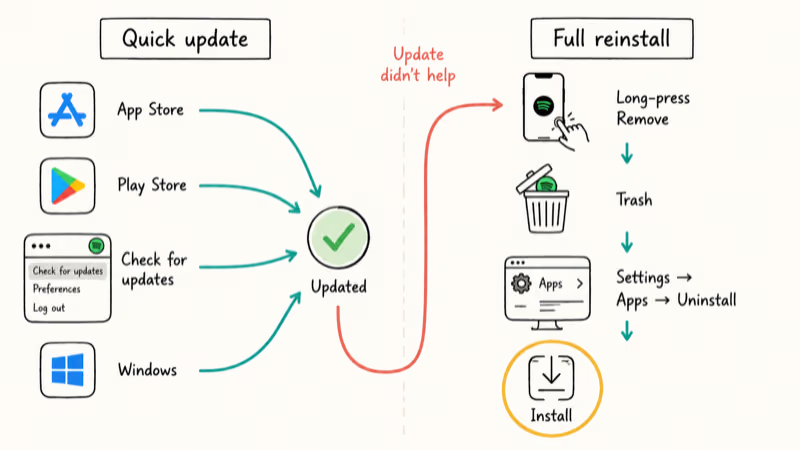
- iOS and iPadOS: open the App Store, tap your profile picture, scroll to Spotify under available updates, and tap Update.
- Android: open the Play Store, tap your profile picture, choose Manage apps and device, then update Spotify if it’s listed.
- Mac: Spotify auto-updates in the background, but you can force a check from the menu bar via Spotify → Check for updates.
- Windows: the app updates itself when launched; if it’s stuck, uninstall from Settings → Apps and grab a fresh installer from spotify.com.
If updating doesn’t help, the cleanest fix is to uninstall and reinstall. Our Spotify uninstall guide for Mac and Windows walks through the desktop steps; on phones, long-press the icon and choose Remove. Reinstalling rebuilds the local database and discards every queue conflict, which is what makes it so effective on stubborn cases.
#Check Offline Mode and Data Saver Before Going Deeper
Both toggles silently block streaming when they’re on, and both end up enabled by accident more often than people realise.
Open Spotify, tap your profile picture, choose Settings and privacy, and check two switches: Playback → Offline mode must be off if you want to stream, and Data Saver in the same settings panel must be off if you want Very High quality on cellular. According to Spotify’s offline mode documentation, downloaded tracks require a periodic online check-in to stay valid, so an old offline session can also expire and stop playing.
If you do want offline listening, download playlists for offline use first, then turn Offline mode on. Trying to play a track that was never downloaded while Offline mode is on produces an “unavailable” greyed-out state that looks identical to a bug.
#Manage Your Downloads and Audio Quality
A bloated downloads folder and an aspirational quality setting are two quiet causes that come up often.
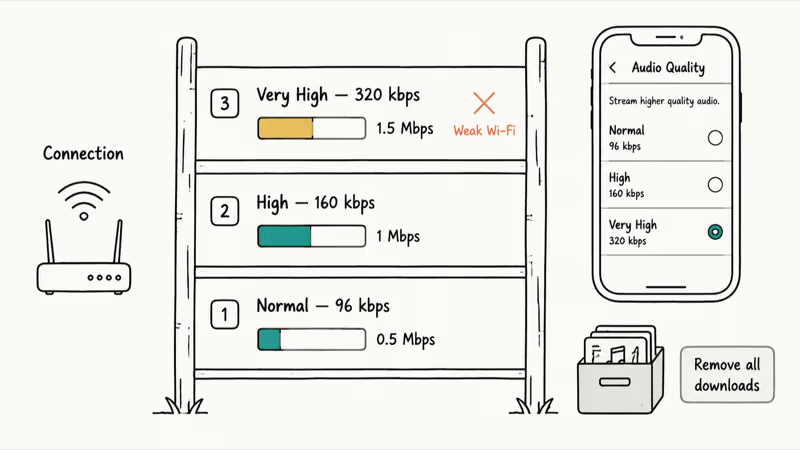
Open Settings and privacy → Storage and tap Remove all downloads if your device is short on space.
According to Spotify’s documentation, Premium streams Very High quality at 320 kbps Ogg Vorbis on supported clients. The full bitrate breakdown lives in Spotify’s audio quality article, which lists Normal at 96 kbps and High at 160 kbps.
Set Very High on a slow Wi-Fi connection and the app can stall mid-track.
Drop streaming quality to High temporarily, restart playback, and see if the issue clears. You can also use our guide to clearing the Spotify queue to remove a stuck track that’s blocking the queue from advancing.
#When Should You Contact Spotify Support?
If you’ve worked through every fix above and songs still won’t play on any device, the issue is likely on the account side and only Spotify support can resolve it.
Spotify’s official help portal at support.spotify.com has a Contact Us link that opens a chat with a support agent for Premium users and a community-forum entry for Free users. According to Spotify’s published support flow, agents can see your active sessions and recent payment status, which is exactly what’s needed to diagnose locked accounts, payment-related Premium suspensions, or region-mismatch errors.
If your country recently changed and tracks are now greyed out, our change Spotify location guide covers the supported workflow. If you’re considering switching services, our roundup of Spotify alternatives compares Apple Music, YouTube Music, and Tidal head-to-head.
#Bottom Line
Force Quit, Clear Cache, and reselect the audio output in Connect.
Reinstall is the heavy hammer for edge cases like corrupted local databases or expired offline sessions, but only pull it out after cache reset and audio-output recheck come up empty. The audio-output recheck is one of the single most overlooked causes on both phones and laptops.
#Frequently Asked Questions
Why does Spotify say a song is unavailable?
A track turns grey when Spotify has lost the rights to stream it in your country, when the artist or label removed it from the platform, or when your account region no longer matches the licensing zone where the track is published. Switch regions in your account settings only if you actually moved; otherwise, the song won’t return until the rights holder restores it. Spotify also occasionally pulls tracks during ongoing licensing disputes, which can resolve weeks later without warning.
Will clearing the cache delete my downloaded playlists?
No. Offline downloads sit in a separate storage folder and stay intact.
Why does Spotify play the wrong song when I tap a track?
Shuffle mode overrides single-track selection. Tap the Shuffle icon to turn it off, then tap your track again.
Can a slow internet connection stop Spotify from playing?
Yes. Streams below about 0.5 Mbps drop out, and Very High quality on Premium needs roughly 1.5 Mbps sustained. Drop streaming quality to Normal or High in Settings if your connection wobbles. On cellular, Data Saver also throttles bitrate aggressively, so disable it on Wi-Fi if you want full quality back; many users forget Data Saver was ever turned on, then assume the playback issue is unrelated.
Why does Spotify keep pausing every few minutes on my phone?
Battery saver settings on Android and iOS aggressively suspend background apps. Add Spotify to the protected-apps list on Android, or allow background app refresh in iOS Settings, and the auto-pause stops.
Is reinstalling Spotify safe? Will I lose my playlists?
Your library lives on Spotify’s servers.
Reinstalling only deletes the local cache and downloads, so playlists, follows, saved albums, and listening history reappear once you sign back in.
Why won’t Spotify play through my Bluetooth speaker?
The connection probably dropped out of range or paired silently to a different device, like a TV soundbar in the next room. Open Bluetooth settings, forget the speaker, re-pair from scratch, then use Spotify Connect to lock the audio output back to that speaker. If the speaker still doesn’t show up, restart Bluetooth on the phone, then try again.
Does Spotify Free have playback limits?
Yes. Free accounts shuffle most playlists, run ads, and cap mobile skips. Upgrade to Premium for on-demand playback.

Google Messages Error 3100: Why RCS Is Broken on Galaxy
Google Messages RCS error 3100 hits Galaxy owners after phone or carrier switches. Google told 9to5Google a fix is coming. Here's what actually helps.

Is This Bank App Real? Spot a Fake App on Your Home Screen
A bank app can land on your home screen from a web page with no install warning. Learn the checks that tell a real banking app from a phishing web app.

Apps Crashing After iOS 27 Update? Fix Order (2026)
Apps crashing after the iOS 27 update? Update the app in the App Store first, then offload and reinstall to clear stale cache, then restart. The fix order.

Do AI Translation Earbuds Work Offline? What to Know
Do AI translation earbuds work offline? A few do with downloaded language packs, but most need the cloud. Here's what works offline and what you give up.