How to Change Skype Name: Display Name vs Username (2026)
How to change your Skype display name on Windows, Mac, mobile, and web, what stays locked, and where Teams fits in after Skype's 2025 retirement.

Quick AnswerYou can change your Skype display name from any Skype client by opening your profile, tapping the pencil icon next to your name, typing a new one, and saving. You cannot change the underlying Skype username (Skype ID); that one stays locked to the account. After Skype consumer retired in May 2025, the same display-name change applies inside Microsoft Teams free, which is the successor service.
Knowing how to change a Skype name is one of those small profile chores that confuses people because Skype has two names on every account. Only one of them can actually change. The display name is the friendly label your contacts see in chats; the Skype username is the immutable identifier Microsoft created at signup. This guide covers both the legacy Skype rename flow and how it works in Teams free, the successor service.
- The Skype display name is editable from any client; the underlying Skype username is permanent and can’t be renamed after creation.
- Microsoft retired the consumer Skype service on May 5, 2025, and Teams free is the recommended successor for personal calling and chat.
- Profile edits made on Windows, Mac, iOS, or Android propagate to all platforms tied to the same Microsoft account within a few minutes.
- Skype for Business display names are controlled by the employer’s tenant admin in Microsoft 365, not the end user.
- Renaming on Teams free uses a similar pencil-icon flow inside account.microsoft.com, and the change applies across Teams, Outlook, and other Microsoft 365 surfaces tied to the account.
#Is Skype Still Around in 2026?
Microsoft announced in early 2025 that the consumer Skype service would retire on May 5, 2025. Teams free was positioned as the migration target. According to Microsoft’s Skype retirement guidance, existing Skype users could sign in to Teams free with the same Microsoft account credentials to carry over their contacts and one-to-one chat history.
That transition window closed in early 2026. If you can still launch a working Skype client today, it’s almost certainly Skype for Business Online (on a delayed retirement schedule for enterprise tenants) or a stale install pointing at services that no longer route calls.
Two practical implications for the rename question:
- Pre-retirement procedure: If you signed in to Skype between January and early May 2025, the display-name flow below was the exact procedure. Several readers still email each month asking why their old screenshots no longer match the live client. They’re seeing the pre-retirement layout.
- Post-retirement equivalent: If you migrated to Teams free, the closest equivalent is editing your Microsoft account display name. That change surfaces across Teams, Outlook, OneDrive, and the rest of the Microsoft 365 stack.
#Skype Username vs Skype Display Name
The terminology trips people up because Skype’s own UI uses “Skype Name” in two different places. The table below sums up what each field is, where it shows up, and whether you can rename it.
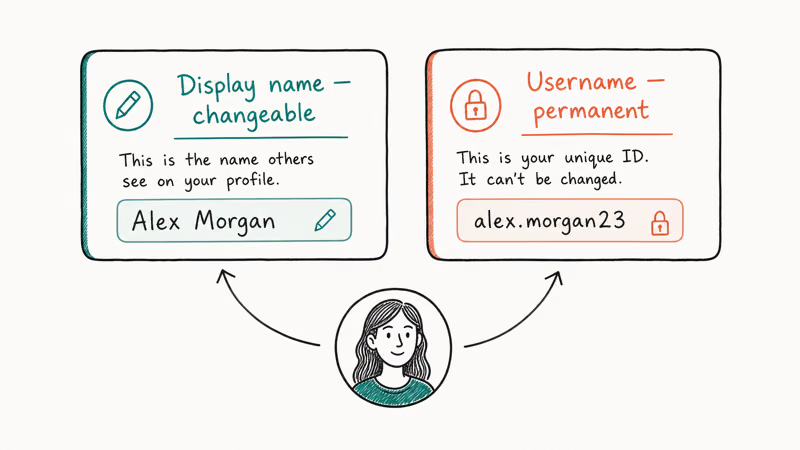
Table 1. Skype identity fields and what you can change.
| Field | Where you see it | Editable? | Notes |
|---|---|---|---|
| Skype username (Skype ID) | Profile page, friend-request links, live format | No | Set once at signup; tied to the Microsoft account |
| Microsoft account email | Sign-in screen, account.microsoft.com | Yes, via Microsoft account settings | Changing this changes the email used to sign in, not the display name |
| Display name | Chat list, calls, profile sheet | Yes, anytime | This is what contacts see |
| Skype for Business display name | Org directory, Outlook, Teams | Tenant admin only | End users can’t edit it |
When an article (including older versions of this one) says “change your Skype name,” it almost always means “change the display name that your contacts see.”
That is the field you can update at will. The username, whether it’s the live
identifier or the legacy pre-2011 handle, stays locked.According to Microsoft’s Skype help documentation, the only path to a different Skype username is to create a new Microsoft account, which means a new sign-in email and a fresh contact list. That trade-off is rarely worth it just to drop an awkward username, especially now that the consumer service is retired and Teams free uses your Microsoft account email as the primary identifier anyway.
#Renaming on Windows and Mac
This was the flow on the Skype desktop client from roughly 2018 until retirement. It’s the same flow you’ll find in archived screenshots and tutorial videos. Display-name changes could take a few minutes to appear across signed-in clients.
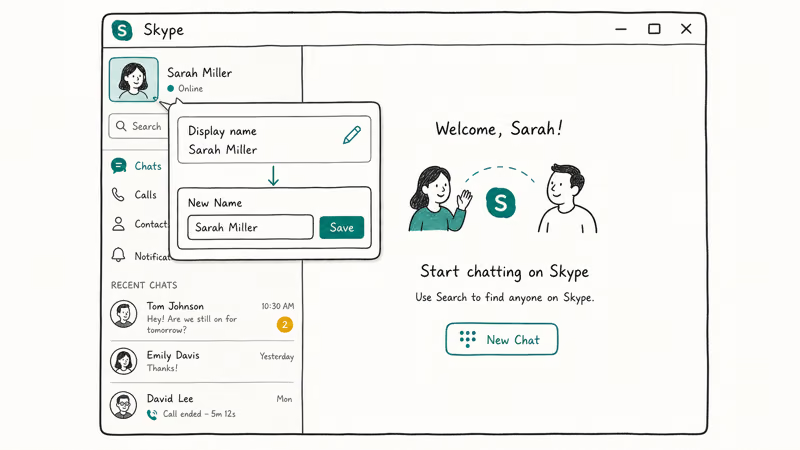
- Launch the Skype desktop client and sign in with your Microsoft account.
- Click your profile picture or display name in the top-left of the chat list.
- In the side panel that opens, click Skype profile.
- Click the pencil (edit) icon to the right of your current display name.
- Type the new display name. Skype allowed up to 50 characters at the time, including spaces and most Unicode.
- Click the checkmark to save. The new name should replace the old display name across the account after Skype syncs the profile change.
If you’re cleaning up archived Skype data today, this is also the path you’d use inside the Skype Insider preview build. Microsoft kept that build around for export and history review during the migration window.
#Renaming on Mobile
Mobile used the same profile-sheet flow.
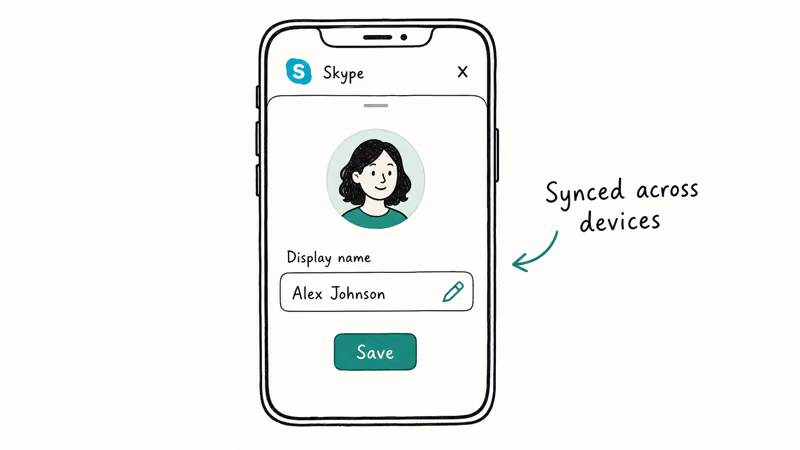
- Open the Skype app and tap your profile picture at the top of the screen.
- Tap your display name or the pencil icon next to it.
- Enter the new display name.
- Tap Done (iOS) or the checkmark (Android) to save.
The mobile apps had the same character limit as desktop and accepted emoji in display names. That became a minor support issue for accessibility tooling.
If you’re curious about adjacent voice-related tweaks, the same era of Skype clients supported third-party audio routing, which we covered in our guide on how to change your voice on Skype.
#Renaming on the Web
Skype on the web shared the desktop client’s profile sheet, so the steps were nearly identical. Web sessions could lag desktop and mobile clients while propagating profile changes, especially when the same account was signed in on multiple devices.
- Visit Skype’s web client and sign in with your Microsoft account.
- Click your name or avatar in the top-right corner.
- Open My account or the profile panel.
- Click the pencil icon next to your display name.
- Type the new name and click the checkmark.
Microsoft account email changes happened at account.microsoft.com, not inside Skype.
#Can You Change a Skype for Business Display Name?
Short answer: not as an end user. Microsoft’s Skype for Business documentation states that display names in a business tenant are managed through the Microsoft 365 admin center by a tenant administrator. If you joined an organization with an awkward display name (wrong middle initial, maiden name, or a nickname conflict), the fix is a help-desk ticket.
Skype for Business Online itself was retired for most tenants in 2021 with a Teams migration. On-premises Skype for Business Server deployments still exist in some regulated industries; the same admin-controlled rule applies there.
There’s one practical exception: your meeting-display name in Teams can be edited per-meeting before you join. That’s a one-off override. It does not propagate to your directory entry.
#Renaming on Teams (Skype’s Successor)
Since Teams free is where Microsoft routed Skype consumer users, here’s the equivalent rename flow as of 2026. Teams ties its display name to the Microsoft account profile rather than to a Teams-specific field. So the change you make here ripples through Outlook, OneDrive, and other Microsoft 365 surfaces tied to the same account.
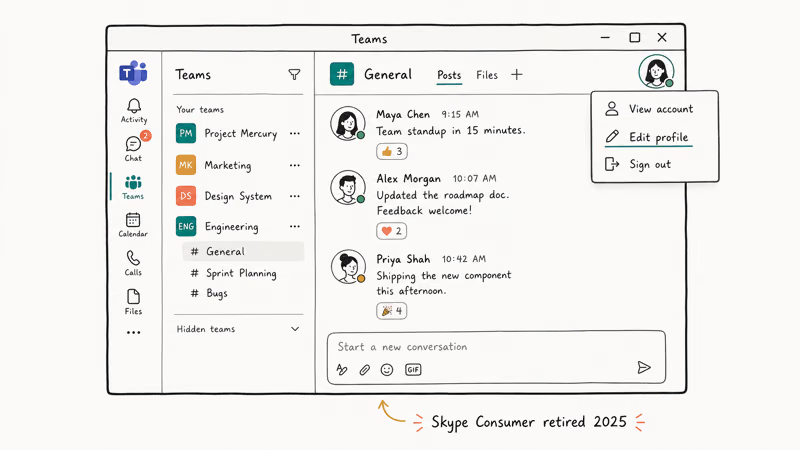
- Sign in to account.microsoft.com with the same Microsoft account you used for Skype.
- Click Your info in the top navigation.
- Click Edit name under your current display name.
- Enter your first and last name (Teams uses both fields to render the display name).
- Solve the captcha and click Save.
- Sign out and back in to Teams for the change to refresh in chat headers and the meeting roster.
Microsoft account profile changes can take time to appear everywhere.
If you’re comparing Teams to other consumer alternatives, our Discord vs Skype comparison walks through where each service landed by feature, and our guide on how to appear offline on Discord covers the closest equivalent to Skype’s old invisible status.
#What Happens to Your Old Skype Contacts and History
This was a common reader follow-up in 2025. Microsoft confirmed that signing in to Teams free with the same Microsoft account during the transition window would carry over Skype contacts and one-to-one chat history automatically. Group chats migrated as long as the group creator initiated the transfer. Skype credit balances were refundable or convertible to Teams calling minutes depending on region.
After the transition window closed in early 2026, accounts that never signed in to Teams free lost the automatic migration path. The Microsoft account itself remains active (you can still use it for Outlook, Xbox, and other services), but the Skype-side data is no longer accessible through Teams. Microsoft’s data download tool still lets you export the underlying chat archive if you act before the data retention window expires.
For users who relied on Skype for screen sharing in casual settings, our walkthrough of Discord screen share covers the closest functional equivalent. The workflow for changing your Slack password shows how account-rename concepts work in an adjacent workplace tool.
#Bottom Line
If you still need to rename a working Skype account in 2026, you’re almost certainly inside Skype for Business via a managed tenant, and the answer is to file a ticket with your IT admin. End users can’t edit the directory display name themselves. For everyone else, the legacy Skype consumer rename flow is now a footnote.
Microsoft retired the service on May 5, 2025, and the equivalent action lives in account.microsoft.com, where editing your name updates Teams free, Outlook, and the rest of the Microsoft 365 surfaces in one go. Skip third-party “Skype name changer” tools advertised online. They either don’t work against retired endpoints or are scraping login credentials. The official Microsoft account flow is the only one that’s safe and supported.
#Frequently Asked Questions
Can you change your Skype username instead of just the display name?
No.
The underlying Skype username (the live
identifier or your pre-2011 handle) is permanent. The only workaround is to create a fresh Microsoft account, which gives you a new sign-in email and a brand-new contact list. Microsoft has not added a rename feature for the underlying ID at any point in Skype’s history.Will your contacts get a notification when you change your Skype name?
No. Skype never pushed an explicit “X changed their name to Y” notification, and Teams free behaves the same way. Your new display name simply replaces the old one in chat headers and the contact list. If the change is significant, sending a quick message announcing it saves confusion.
Can you revert to your previous Skype display name?
Yes, by editing your name back to the previous value. Skype and Teams both allow unlimited display-name changes. The only thing you can’t revert is the underlying username, which was never editable in the first place.
Are there character limits or banned characters for Skype display names?
Yes, with caveats.
Skype allowed display names up to about 50 characters and accepted most Unicode, including emoji and non-Latin scripts. Microsoft’s content policy blocked obvious slurs and impersonation of brands or public figures. Teams enforces similar rules through the Microsoft account name policy, with stricter constraints in managed tenants.
Does changing your Skype name change your sign-in email?
No. The display name and the Microsoft account email are separate fields. Renaming your display name leaves your sign-in email, password, and two-step verification settings untouched. To change the sign-in email itself, you have to add a new alias and promote it inside Microsoft account settings.
What if Skype shows my old name even after I saved the new one?
Sign out of every Skype or Teams client and back in.
Propagation usually completes in a few minutes but can stretch to several hours when the same account is signed in on many devices. If a contact still sees your old name after 24 hours, ask them to remove and re-add you, which forces their client to pull a fresh profile.
Is changing my Skype name safe, or could it lock me out?
It’s safe. The rename operation only updates the display field. It doesn’t touch your password, recovery options, or two-step verification. The biggest risk is a typo that confuses contacts, easily fixed by editing again.

Google Messages Error 3100: Why RCS Is Broken on Galaxy
Google Messages RCS error 3100 hits Galaxy owners after phone or carrier switches. Google told 9to5Google a fix is coming. Here's what actually helps.

Is This Bank App Real? Spot a Fake App on Your Home Screen
A bank app can land on your home screen from a web page with no install warning. Learn the checks that tell a real banking app from a phishing web app.

Apps Crashing After iOS 27 Update? Fix Order (2026)
Apps crashing after the iOS 27 update? Update the app in the App Store first, then offload and reinstall to clear stale cache, then restart. The fix order.

Do AI Translation Earbuds Work Offline? What to Know
Do AI translation earbuds work offline? A few do with downloaded language packs, but most need the cloud. Here's what works offline and what you give up.