Google Hangouts Screen Share: Use Google Meet Instead
Google Hangouts retired in November 2022. Share your screen in Google Meet on desktop or mobile, fix black screens, and learn host controls.

Quick AnswerClassic Google Hangouts retired in November 2022 and screen sharing moved to Google Meet. Start a Meet call, click Present now, then pick your tab, window, or full screen to share.
Classic Google Hangouts ended on November 1, 2022, and the screen-sharing feature most people used moved to Google Meet. If you came here for the old “Hangout screen share” button, this guide shows you exactly where it went, how to share in Meet from a desktop or phone, and what to do when your screen turns black.
The steps below cover desktop Meet, mobile sharing, permissions, and host controls without treating legacy Hangouts as still available.
- Classic Hangouts retired on November 1, 2022 and Google Meet replaced its video calls
- Click Present now in Meet to share a tab, a window, or your full screen in two clicks
- Chrome tab sharing carries audio; window or full-screen sharing on desktop sends video only
- iPhone and Android share the entire screen only and need permission in iOS Control Center or Android system dialog
- Host management lets a meeting host stop, replace, or block participant screen sharing mid-call
#Why Did Google Retire Classic Hangouts?
Google split classic Hangouts into two products. Group video calls became Google Meet, and text messaging became Google Chat. Google’s transition support page confirms that classic Hangouts retired on November 1, 2022, with existing conversations upgraded to Chat. The Hangouts brand still appears in some legacy Gmail menus, but the screen-sharing button now lives inside Meet.
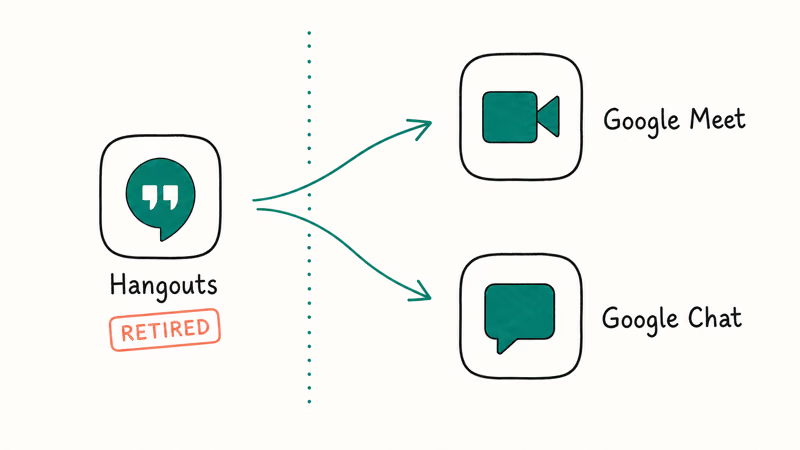
The shift was driven by Workspace consolidation. Meet had stronger encryption, full mobile parity, and a faster ship cadence than the aging Hangouts stack. Google merged the messaging features into Chat and rebuilt the video layer as Meet. You’ll see this same pattern on older Calendar invites: any “Hangouts link” added before late 2022 now redirects you to a Meet room when you click it.
#How Do I Share My Screen in Google Meet?
Sharing in Meet takes two clicks on desktop. The desktop flow starts with Meet’s Present now button and then asks you to choose a tab, window, or entire screen.
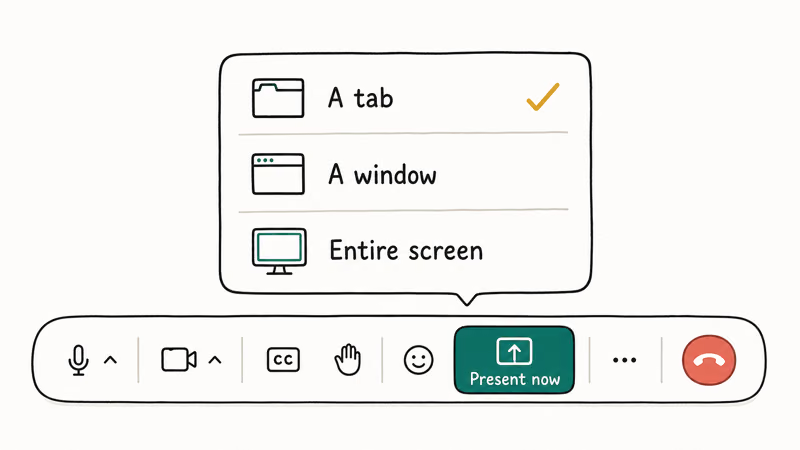
- Start or join a meeting at meet.google.com.
- At the bottom of the call window, click the Present now icon (an upward arrow inside a rectangle).
- Pick one source: A tab, A window, or Your entire screen.
- Select the tab or window in the picker and click Share.
- To stop, click Stop sharing in the floating Meet toolbar or in the Chrome share notification.
A tab share carries audio from that tab, so it’s the right pick for video clips, slide decks with embedded video, or a music playlist. According to Google Meet’s presentation help page, audio from a window share or full-screen share is not transmitted on desktop, which is the number-one reason people think their Meet is broken when nothing is actually wrong.
Slides, Sheets, or Docs can launch a Meet share directly from their document toolbars. The file lands inside the call as a high-quality tab share with full audio.
#Sharing From Android and iPhone
The mobile flow works but with one limit. Phones share the entire screen only, never a single tab or window. Google’s mobile Meet help page states that mobile screen sharing relies on the system broadcast API, which captures the whole device output because of iOS and Android sandboxing rules.
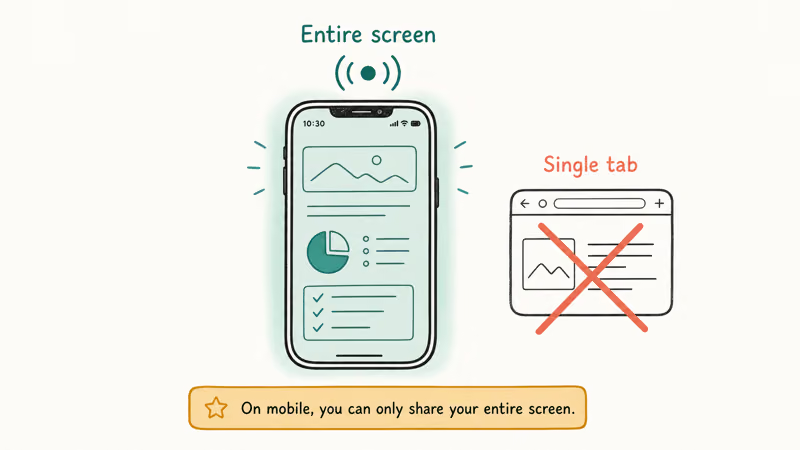
On Android:
- Open the Meet app and join a call.
- Tap the three-dot menu in the bottom right corner.
- Tap Share screen, then Start sharing.
- Approve the Android system permission that pops up.
On iPhone:
- Open Meet, join the call, then tap the three-dot menu.
- Tap Share screen.
- iOS opens its broadcast picker. Tap Meet, then Start Broadcast.
- The three-second countdown gives you time to swap apps before the share begins.
On iPhone, you may need to add Screen Recording to Control Center first. Go to Settings, then Control Center, and add the Screen Recording toggle from the More Controls list. Without it, iOS still works through Meet’s in-app share, but Control Center won’t show the recording dot that confirms a broadcast is live.
#Fix Screen Sharing Not Working
When Meet won’t share, the cause is almost always one of four things. Work through them in this order.
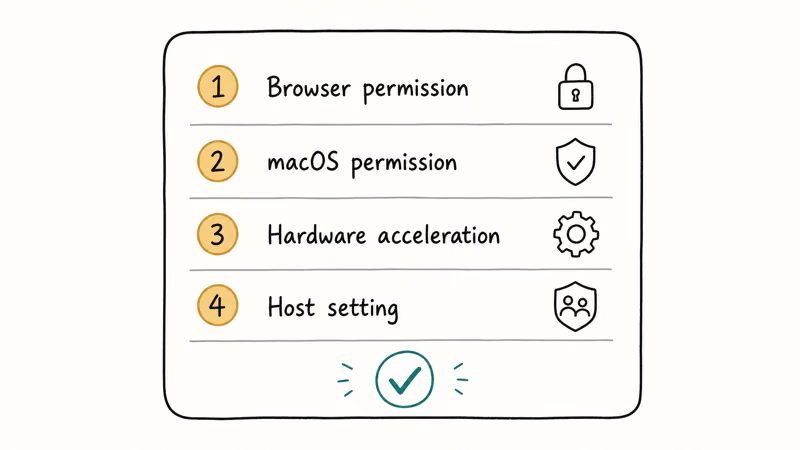
Browser permission missing. Chrome may have blocked screen capture from a previous session. Click the lock icon next to the URL, expand site settings, and reset Screen Recording to Allow. Reload the meet.google.com tab afterward.
Wrong macOS permission. Open System Settings > Privacy & Security > Screen Recording. Check Chrome, then relaunch it fully.
Hardware acceleration glitch. Chrome’s GPU compositing sometimes breaks screen sharing after your laptop wakes from sleep. Go to chrome://settings/system, turn off “Use hardware acceleration when available,” then restart Chrome. This can clear black-screen cases after a wake-from-sleep glitch.
Host disabled sharing. According to Google’s host management page, the host or co-host needs to enable Share their screen in the meeting safety controls before guests can present. If the toggle is off, the Present now button is grayed out.
If your share works but the picture lags, lower send resolution. Open the three-dot menu, tap Settings, then Video, and switch send quality to 360p. Lower send quality reduces the work Meet has to encode. For deeper screen-sharing failures on other apps, our guide to Discord stream no sound covers similar audio-routing issues, and our FaceTime screen share fix walks through the iOS variant.
#Host Controls and Privacy
Google Meet treats screen sharing as a host-managed feature. The meeting host can stop another participant’s share, lock sharing entirely, or remove someone who shares unwanted content. Open the host management panel from the meeting safety shield icon, then toggle Share their screen under “Let everyone.”
Two privacy reminders that catch even experienced users:
- Close personal tabs before a full-screen share. Browser notifications, password manager popups, and Slack DMs all render visible to the room. A tab share is safer when the meeting is external.
- Silence pop-up notifications first. On macOS, use Focus mode. On Windows, enable Focus from Quick Settings. Meet doesn’t suppress system notifications during a share, so they’ll appear in the screen feed.
Recording rules also apply. Meet announces recording to all participants, and recordings save to the host’s Google Drive. If you’re sharing sensitive information on someone else’s call, ask whether the session is being recorded before you present.
#Alternatives When Meet Doesn’t Fit
Meet falls short in a few cases. Two alternatives fit common cases:
- Zoom has a higher participant cap on the paid tier and supports remote control during a share, which makes it the better pick for IT support sessions. Our walkthrough on installing Zoom on Amazon Fire TV covers the living-room scenario.
- Discord is the right pick for sharing inside a gaming or community server. Discord’s “Go Live” feature lets you stream gameplay to friends without leaving the server, and our Disney Plus on Discord screen-share guide covers the media-sharing case.
If you only need to mirror a phone screen for a quick demo, our roundup of the best screen mirroring apps compares wired and wireless tools that skip the meeting software entirely. For Samsung-specific mirroring, our walkthrough on mirroring a Samsung phone to PC is the place to start.
To add the Meet itself to a calendar invite, see our Google Calendar invitation guide.
#Bottom Line
Use Google Meet’s Present now button on desktop for the cleanest share, and pick A tab when you need audio. On mobile, expect full-screen sharing only. If the share fails, fix screen recording permissions in your OS settings first, browser permissions second, and host controls third. That order keeps the highest-probability permission failures first.
#Frequently Asked Questions
Can I still use the classic Google Hangouts?
No. Google retired the consumer Hangouts service on November 1, 2022, and the web app no longer loads. Existing chats migrated to Google Chat, and video calls moved to Meet. The hangouts.google.com URL now redirects to Chat.
Does Google Meet need a paid account for screen sharing?
No. A free Google account can share screens in Meet. The 60-minute call cap on the free tier applies to groups, not to sharing.
Why is my screen black when I share in Meet?
This is almost always a macOS screen-recording permission. Go to System Settings, then Privacy & Security, then Screen Recording, and check the box for Chrome (or whichever browser you use). Relaunch the browser after toggling the permission, then try the share again.
How do I share audio along with my screen?
Pick A tab in the Present now menu instead of a window or full screen. Tab sharing carries audio for that tab only. If you need system audio from a non-browser app, you’ll need a separate tool like Loopback on macOS or Voicemeeter on Windows, because Meet’s window share strips audio out by design.
Can I share my iPhone screen in Google Meet?
Yes. Open Meet, tap the three-dot menu, then tap Share screen. iOS opens its broadcast picker; tap Meet, then Start Broadcast to begin streaming.
How do I stop someone else from sharing in my meeting?
As host, open the meeting safety shield in the bottom toolbar. Find Share their screen under host controls and toggle it off to block all participants from presenting. To stop one person mid-share, tap the three-dot menu next to their tile in the people panel.
What’s the difference between Meet and Google Chat?
Meet handles video calls and screen sharing. Chat handles text messaging and threaded rooms. Classic Hangouts merged into both products in November 2022.

Google Messages Error 3100: Why RCS Is Broken on Galaxy
Google Messages RCS error 3100 hits Galaxy owners after phone or carrier switches. Google told 9to5Google a fix is coming. Here's what actually helps.

Is This Bank App Real? Spot a Fake App on Your Home Screen
A bank app can land on your home screen from a web page with no install warning. Learn the checks that tell a real banking app from a phishing web app.

Apps Crashing After iOS 27 Update? Fix Order (2026)
Apps crashing after the iOS 27 update? Update the app in the App Store first, then offload and reinstall to clear stale cache, then restart. The fix order.

Do AI Translation Earbuds Work Offline? What to Know
Do AI translation earbuds work offline? A few do with downloaded language packs, but most need the cloud. Here's what works offline and what you give up.