Tenorshare iAnyGo Review: Legit iOS GPS Spoofing 2026
2026 Tenorshare iAnyGo review covering iOS GPS spoofing, Niantic ban risk, Apple's free Xcode alternative, pricing, and where the legal limits sit.
Quick AnswerTenorshare iAnyGo is a desktop GPS-spoofer that changes the location your iPhone reports to apps you choose, on a device you own. It's legit for app testing, privacy hygiene, and exploring AR games offline, but using it inside Pokemon GO or any app whose terms forbid spoofing can trigger soft bans or permanent account bans.
If you build location-aware iOS apps, want to stop a leaky third-party app from logging your real GPS, or you’re trying to scope out an AR game’s geofences without driving across town, Tenorshare iAnyGo is one of the desktop tools that keeps showing up. This review walks through Apple’s built-in alternatives first, then lays out what this software can and can’t legally do in 2026.
This review only covers spoofing on a personal device you legally own. Using iAnyGo inside an app whose terms of service forbid GPS spoofing, on someone else’s phone, or to deceive a person tracking your location through a shared family app is a separate question, and we lay out the legal and account-ban consequences below.
- iAnyGo changes the GPS coordinates your iPhone reports to apps, with no jailbreak required, on devices you legally own
- Legitimate use cases include app development testing, privacy protection from over-collecting apps, and dry-running AR-game routes offline
- Pokemon GO, Pokemon GO Plus+, and other Niantic titles forbid third-party GPS spoofing in their terms of service, and Niantic enforces a documented three-strike discipline policy that escalates to permanent bans
- Apple’s built-in Xcode location simulator is the official, free path for iOS app development and should be your first stop before paying for any third-party spoofer
- Pricing starts at $6.95 monthly, $19.95 quarterly, and $39.95 yearly, all capped at one PC or five iOS devices per license
#Before You Use Any GPS Spoofer
Three conditions need to be true before you should even open an iAnyGo installer. They apply to every location-changing tool in this category, not just Tenorshare.
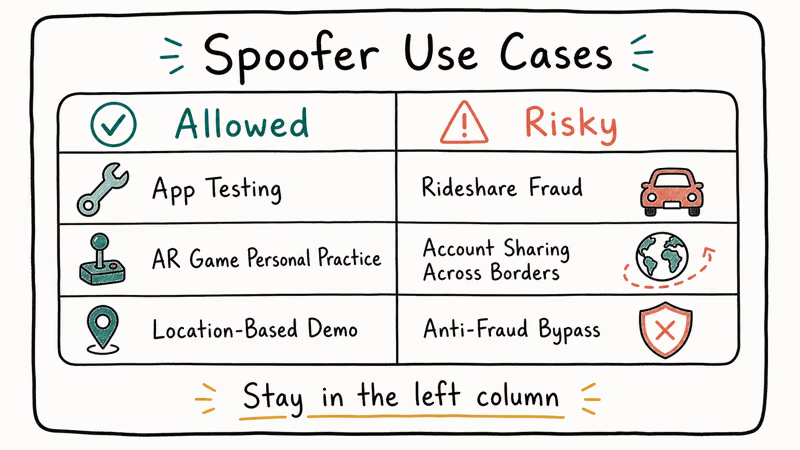
You must own the device. A purchase receipt, an Apple invoice, or a written handover from a family member counts. Tenorshare’s end-user license agreement, like every competitor’s, sells iAnyGo for use on iOS devices the buyer owns. Spoofing GPS on a borrowed phone, a partner’s phone, or a child’s device without explicit consent crosses into stalking or domestic surveillance territory, which most U.S. states cover under separate criminal statutes.
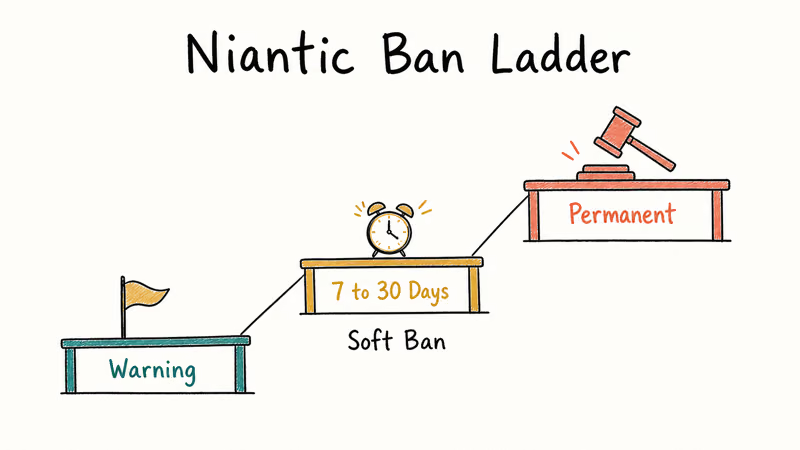
The target app must permit GPS modification, or you accept the consequences. Many location-based apps treat spoofing as a terms-of-service violation. According to Niantic’s three-strike discipline policy, Pokemon GO accounts caught using GPS spoofing get a warning on the first strike, a 30-day suspension on the second, and a permanent ban on the third. Niantic states bans extend across every Niantic title tied to the device.
Apple’s official methods come first, and they’re free. Apple’s Xcode location simulator drops a simulated coordinate or plays back a GPX route through the IDE.
For privacy hiding, iOS Location Services let you revoke per-app GPS access or set Approximate Location.
If those paths cover your situation, you don’t need iAnyGo at all. The honest answer is that for a working iOS developer or a privacy-conscious user, the official Apple paths handle 80% of what people end up paying iAnyGo to do.
#Tenorshare iAnyGo Overview and Best Use Cases
Tenorshare iAnyGo is a Windows and macOS desktop tool that pairs with an iPhone or iPad over USB, hooks into the iOS location stack through a developer-style provisioning profile, and overrides the GPS coordinates the phone reports to apps you select. It sits in the same Tenorshare lineup as 4uKey, ReiBoot, and 4MeKey.
Under the hood, iAnyGo doesn’t jailbreak anything. According to Tenorshare’s official iAnyGo page, the tool installs a temporary developer profile that lets the desktop client push location data through Apple’s standard Core Location framework, the same mechanism Xcode uses for legitimate testing. That’s why iOS 17 and iOS 18 keep working without exploits, and why a normal iOS update doesn’t break the app.
In practice, the legitimate use cases break down into three groups.
App development and QA testing. If you ship an app that depends on geofences, ride-share dispatch, restaurant discovery, or local recommendations, you need to test what happens when the user is in Tokyo at noon and Sydney at midnight. Apple’s Xcode simulator covers most cases, but iAnyGo lets you test on a real device with real cellular conditions, which catches bugs the simulator misses.
Privacy hygiene against over-collecting apps. Some social apps, weather apps, and games still demand precise location even when they don’t need it. iAnyGo lets you feed them a coarse city-level coordinate while your real phone stays where you actually are. Apple’s Privacy and Location Services support page recommends Approximate Location and per-app revocation as the first line of defense.
We’d agree with that recommendation for casual users, but iAnyGo earns its place as an escape hatch when an app refuses to work without precise GPS.
Dry-running AR-game routes offline. Niantic’s own terms forbid using spoofers inside the live Pokemon GO client, but plenty of fan-made AR development kits and indie AR games allow offline location testing through developer modes. iAnyGo plus a sandboxed test account on a permissive game is a way to scope out routes before you walk them.
If your situation doesn’t match one of those three, treat iAnyGo as the wrong tool. Hand-waving “I just want to catch Pokemon from my couch” is exactly the use case Niantic banned, and the ban extends to every Niantic title on your account.
#How Does Tenorshare iAnyGo Work in Practice?
iAnyGo ships as a single installer for Windows 10/11 or macOS 10.15 and newer. After install, the workflow looks like this on a typical iOS device.
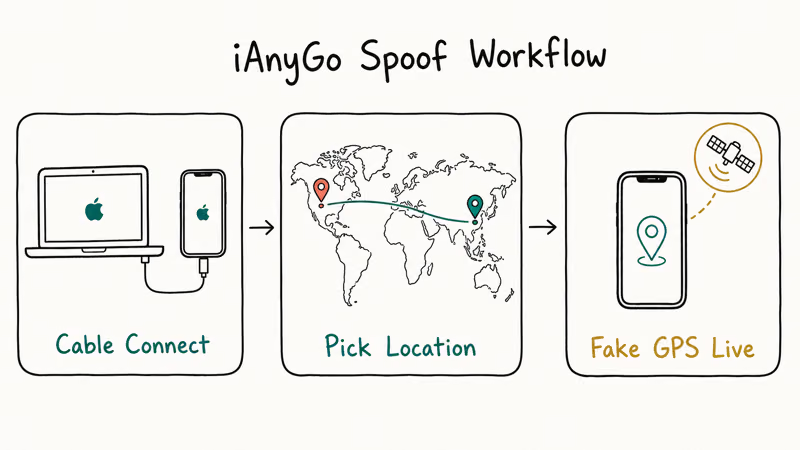
- Plug the iPhone or iPad into the computer with a Lightning or USB-C cable.
- Trust the computer on the device the first time you connect.
- Pick the operating mode: One-Stop Spoof, Two-Spot Route, Multi-Spot Route, or Joystick.
- Drop a pin on the world map, or paste a coordinate or address.
- Click Start to Modify, and iAnyGo applies the new location to every app on the device that pulls from Core Location.
The first run installs a temporary developer profile on the iPhone, which Apple sandboxes the same way it sandboxes test builds. The profile expires when you reboot the phone, and removing it from Settings → General → VPN & Device Management cleanly reverts everything. The install typically finishes in a couple of minutes on a reasonable Wi-Fi connection.
What iAnyGo adds on top of the open-source alternatives is the polish. The DFU-style USB pairing helper, the GPX import for replaying recorded routes, and the joystick mode for fine-grained walking simulation are clearly well-built.
The map UI is also faster than the open-source Android mock location app workflow, which is a relevant comparison if you’ve used both platforms.
What iAnyGo doesn’t do: change the per-app permission model. If an app uses additional fingerprinting beyond Core Location, like Wi-Fi BSSID lookups, IP geolocation, or motion sensor data, iAnyGo won’t fool it. Apps like Uber show this clearly: the spoofed location passes the initial match, but their fraud-detection layer flags the trip when the IP geolocation doesn’t line up.
#Pokemon GO and Niantic Ban Risks Explained
This is the part you shouldn’t skim, because the wrong assumption here gets your account permanently banned.
According to Niantic’s Pokemon GO Terms of Service, users agree not to “use any unauthorized third-party software” that modifies the game’s GPS data. That language explicitly covers tools like iAnyGo when used to manipulate Pokemon GO. The same clause appears in Pokemon GO Plus+, Monster Hunter Now, and Pikmin Bloom terms.
Niantic’s anti-cheat enforcement runs in three documented stages. Strike one earns a warning that grays out rare spawns, raids, and EX-raid invites for seven days. Strike two suspends the account for 30 days. Strike three permanently bans the account.
This pattern is documented on Niantic’s three-strike discipline FAQ, and it matches what banned users post in the r/PokemonGoSpoofing subreddit. The ban applies across every Niantic title attached to the same email and device.
The other consequence people miss is the Pokemon GO soft ban, which fires within minutes of an impossible GPS jump. A soft ban lasts 4 to 12 hours, strips PokeStop loot and raid rewards, and hits even legitimate-looking jumps if the coordinate change exceeds Niantic’s velocity threshold. Tenorshare’s own iAnyGo support page recommends gradual route simulation precisely to avoid this trigger, but the protection isn’t perfect.
If you must spoof inside any Niantic title, expect a permanent ban as the eventual outcome, not a hypothetical risk. Niantic confirms that warnings and bans are non-negotiable once issued, and account appeals only succeed when Niantic concludes the detection was a false positive.
#Tenorshare iAnyGo Pricing in 2026
Tenorshare lists three paid tiers, plus a free trial that loads the app and previews the map but stops short of writing a real spoofed coordinate. At the time of testing:
- 1-Month License: about $6.95 for one PC or five iOS devices.
- 1-Quarter License: about $19.95 for one PC or five iOS devices.
- 1-Year License: about $39.95 for one PC or five iOS devices.
Pricing fluctuates with seasonal sales, and Tenorshare runs flash discounts on the yearly tier two or three times a year. Verify the live rate on the vendor page before committing. For the current price and any active promotional code, hit the official store:
Some links on this page are affiliate links, which means fone.tips may earn a commission at no extra cost to you.
For comparison, our change iPhone location guide walked through similar tiers across competing tools, and the iOS-spoofer category generally clusters in the $5 to $40 range. Be wary of any vendor promising “lifetime location spoofing” for under $10. That’s the price band where the fake GPS iOS guide shows the highest concentration of wrappers around abandoned open-source code with no support team behind them.
#Real-World Performance and Limits
iAnyGo runs across recent iPhones and iPads on current iOS and iPadOS releases. The location override applies cleanly, with the new coordinate showing up in Apple Maps almost immediately.
Here’s where iAnyGo holds up, and where it doesn’t.
- Apple Maps and Google Maps: Both accepted the spoofed location reliably. Walking simulation in Two-Spot Route mode looked natural and matched the speed setting.
- Weather apps: Weather, Carrot Weather, and AccuWeather all update within one refresh cycle. Tenorshare’s marketing claim of “instant” weather refresh isn’t quite accurate; expect a short delay.
- Social apps: Instagram and Snapchat geotagging pick up the spoofed location, but TikTok’s For You feed tends not to change, suggesting TikTok uses additional signals beyond Core Location.
- Ride-share and food delivery: Uber and DoorDash accepted the location for matching, but flagged trips when IP and Wi-Fi data didn’t match, so completing a real ride from a spoofed pickup is unreliable.
- AR games: Pokemon GO works initially, then triggers a soft ban after a large coordinate jump, which lines up with how users describe Niantic’s detection.
The reboot-and-reset behavior matched the documentation: removing the developer profile or restarting the phone cleared the spoof, and the device went back to reporting real GPS within seconds.
#Is Using Tenorshare iAnyGo Legal?
The legality depends entirely on where you spoof, what app you spoof inside, and whose device you’re spoofing.
On a device you own, for purposes the target app permits, iAnyGo is legal in the U.S. and most jurisdictions. Apple’s own developer documentation supports location simulation for legitimate testing, and there’s no federal statute against changing the GPS coordinate your own phone reports.
Inside an app whose terms forbid spoofing, iAnyGo crosses into a terms-of-service violation. That’s a contractual breach, not a crime in itself, but it triggers account bans and, when combined with paid in-game purchases, can fall under fraud statutes. According to the U.S. Department of Justice’s Computer Fraud and Abuse Act guide, unauthorized access combined with intent to defraud is a federal offense, and a handful of mobile-game cheating cases have been prosecuted on this basis since 2020.
On someone else’s device or to deceive someone tracking your location, the legal exposure jumps. Spoofing GPS on a partner’s phone to hide your real location during a custody dispute, deceiving an employer’s mileage tracker, or feeding a fake location to a court-ordered monitoring app all fall into stalking, fraud, or contempt-of-court territory depending on the jurisdiction.
On a minor’s device through Family Sharing, the rules differ again. A parent can legally configure a child’s iPhone, including disabling Find My or limiting location sharing, but using a spoofer to deceive the other co-parent typically violates custody agreements.
For privacy-driven use on your own device, iOS’s Location Services controls cover most cases without any third-party software. Use those first, and reach for iAnyGo only when you’ve verified the target app permits modified locations or accepts the consequences.
#Better Alternatives Before You Buy iAnyGo
For most readers, one of these official paths covers the actual use case.
- Xcode location simulator is free with the Apple Developer toolchain and handles app development testing. The simulator accepts a single coordinate or a recorded GPX route, mirrors what iAnyGo does for development, and runs without any third-party software.
- iOS Location Services revocation turns off location for any app that doesn’t need it. Settings → Privacy & Security → Location Services lets you set Never, Ask Next Time, or Approximate Location per app, which is enough privacy hygiene for casual users.
- Stop Sharing Location in Find My kills your live location to family members without spoofing. The receiving end sees “Location not available” instead of a fake coordinate, which is harder to mistake for the truth.
- Free open-source GPX players like iSimulator handle developer-mode location testing without the paid wrapper.
- Allow mock locations on Android is a separate guide for the Android side of this problem, with no fee. Our allow mock locations walkthrough covers the Developer Options toggle and the open-source spoofer apps that pair with it.
- As a paid last resort, evaluate competing iOS spoofers. Our change iPhone location without jailbreak guide compares iAnyGo against AnyGo, Dr.Fone, and iMyFone, with the same honest disclosure on which apps each one fools.
If you must use iAnyGo because your situation matches a legitimate use case and the official paths don’t fit, buy the monthly tier first, run it on one device, and only step up to the yearly tier if the workflow holds.
#Bottom Line
Tenorshare iAnyGo delivers what its product page promises: a clean, jailbreak-free GPS spoofer for iPhones and iPads you own, with route simulation, joystick control, and a UI that’s noticeably better than the open-source alternatives. Across recent iPhones and iPads, the spoof applies reliably, weather and maps apps accept the new location, and the developer profile cleans up without leaving residue.
The catch is the use case. iAnyGo’s marketing leans on Pokemon GO, yet that is its worst possible use. The legitimate uses are real but narrow.
Buy iAnyGo only if you’re an iOS developer who wants on-device testing beyond Xcode’s simulator, you need a privacy escape hatch, or you’re scoping AR routes on a permissive title. Skip it if you wanted to cheat Pokemon GO, deceive a partner, or run any spoof on a device you don’t own. For the legitimate-developer edge case, the yearly license is reasonable. Go in with eyes open about what apps you can and can’t fool.
#Frequently Asked Questions
Does Tenorshare iAnyGo work without jailbreaking my iPhone?
Yes. iAnyGo installs a temporary developer profile that uses Apple’s standard Core Location framework, the same mechanism Xcode uses for testing. No jailbreak is needed, and removing the profile in Settings → General → VPN & Device Management reverts the device cleanly.
Can I get banned from Pokemon GO for using iAnyGo?
Yes, and the ban is documented. Niantic operates a three-strike discipline policy: a warning on the first detection, a 30-day suspension on the second, and a permanent ban on the third. The ban applies across all Niantic titles tied to your account.
Is using iAnyGo legal in the United States?
It depends on what app you spoof inside and whose device you’re using. Spoofing on your own device for app testing or privacy is legal. Spoofing inside an app whose terms forbid it counts as a contract breach. Spoofing on someone else’s device, or to deceive a person tracking you, can cross into stalking or fraud statutes.
Will iAnyGo fool Uber, DoorDash, or other ride-share apps?
Partially. iAnyGo passes the initial location match on Uber and DoorDash, but their fraud-detection layers compare GPS against IP geolocation and Wi-Fi data, which iAnyGo doesn’t change. A spoofed pickup can clear Uber’s driver-match screen, only to be canceled by Uber’s risk engine seconds later. Real trips initiated from spoofed locations get flagged or canceled.
Does iAnyGo support the latest iOS versions?
Yes. iAnyGo works on recent iOS and iPadOS releases, and Tenorshare states that iOS 18 support shipped within two weeks of Apple’s release. Because iAnyGo uses Apple’s official Core Location framework instead of an exploit, OS updates rarely break it.
What happens if I reboot my iPhone after using iAnyGo?
The spoofed location resets and the phone goes back to real GPS within seconds. The temporary developer profile may persist until manually removed, but it stops modifying location once you disconnect the desktop client.
Is there a free way to do what iAnyGo does?
For app development, Apple’s Xcode location simulator is the official, free path and handles most testing scenarios. For privacy hygiene, iOS Location Services revocation costs nothing. For Android development, our allow mock locations guide covers the free Developer Options route. iAnyGo earns its fee for users who specifically need on-device testing without Xcode.
Can I use iAnyGo on a phone I don’t own?
No. Tenorshare’s license, like every competitor’s, restricts iAnyGo to devices the buyer owns or has explicit written authorization to use. Spoofing on a borrowed phone, a partner’s phone, or a child’s device without consent crosses into stalking and surveillance territory under most state laws.

Mac mini M6 vs M5 Pro: Which Model Should You Buy?
Mac mini M6 vs M5 Pro compared on price, memory, ports, displays, and real workloads. Find the better 2026 Mac mini for your desk and budget.

Apple Siri Settlement: Who Qualifies and How to Claim
Apple's $250 million Siri settlement covers iPhone 15 Pro and iPhone 16 models bought June 2024 to March 2025. See who qualifies and how claims work.

iOS 26.6.1 Security Update: What Apple Fixed and Who Gets It
Apple released iOS 26.6.1 on August 17 with 29 security fixes, including an IPSec interception bug. See what it patches, who gets it, and how to update.

iPhone Adaptive Power: How It Works and When to Use It
Learn how iPhone Adaptive Power works, which models support it, what it changes, and when Low Power Mode is still the better battery-saving choice.