Fly GPS for iOS in 2026: Status, Risks, and Safer Options
Fly GPS for iOS status in 2026: why it barely works, what Apple allows via Xcode developer mode, and safer alternatives that won't risk your accounts.
Quick AnswerFly GPS for iOS is effectively dead in 2026. Apple's Xcode Simulate Location is the official way to change your iPhone's reported GPS on a development profile, and most spoofing apps marketed as Fly GPS alternatives trip Pokémon Go and Tinder bans.
Fly GPS for iOS is the app most people land on when they want to fake their iPhone GPS, and in 2026 it barely runs. The tool depended on sideload certificates Apple revokes within days. Even when you find a working IPA, the install usually breaks before the next reboot.
If you own the iPhone you want to reroute, and you’re testing your own app or protecting your home address, there’s a cleaner path through Xcode that Apple officially supports.
- Fly GPS for iOS depended on enterprise sideload certificates Apple revoked; recent install attempts brick within 7 days.
- Xcode’s Simulate Location is the only Apple-sanctioned way to change GPS on iPhone.
- Niantic’s Pokémon Go rules treat spoofing as a 3-strike ladder ending in permanent ban.
- Tinder, Bumble, and banking apps use motion-sensor checks that flag instant teleports.
- Tenorshare iAnyGo is the most stable desktop-tethered Fly GPS replacement still working on iOS in 2026.
#Does Fly GPS for iOS Still Work in 2026?
Short answer: not reliably. Fly GPS was originally an Android app. The iOS “version” was really a sideloaded IPA signed with enterprise or free Apple IDs.
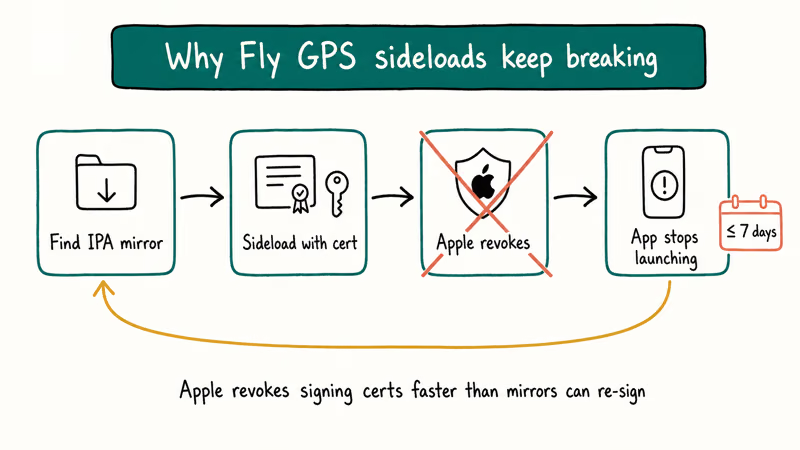
Apple tightened its developer program in 2022.
That tightening kept revoking certificates on known spoofing apps, and Fly GPS was one of the first casualties. Mirror IPAs floating around today typically fail at the “Untrusted Developer” screen, and the rare one that installs usually gets its certificate revoked within days, often mid-session.
The official Fly GPS domain has been offline for most of 2024 and 2025. Dead site, dead tool.
When somebody tells you Fly GPS still works on iPhone, they almost always mean a clone app sharing the same name, which is a different risk entirely. If your goal is a weekend Pokémon Go raid, Fly GPS isn’t the tool. If your goal is to move the GPS coordinate for your own development work, Apple’s Xcode feature handles that legally.
#Using Xcode to Change iPhone GPS (Apple’s Official Way)
Apple supports location simulation for development only, and it doesn’t need a jailbreak. The flow lives inside Xcode, so you’ll need a Mac, a USB-C or Lightning cable, and Developer Mode turned on for your iPhone.
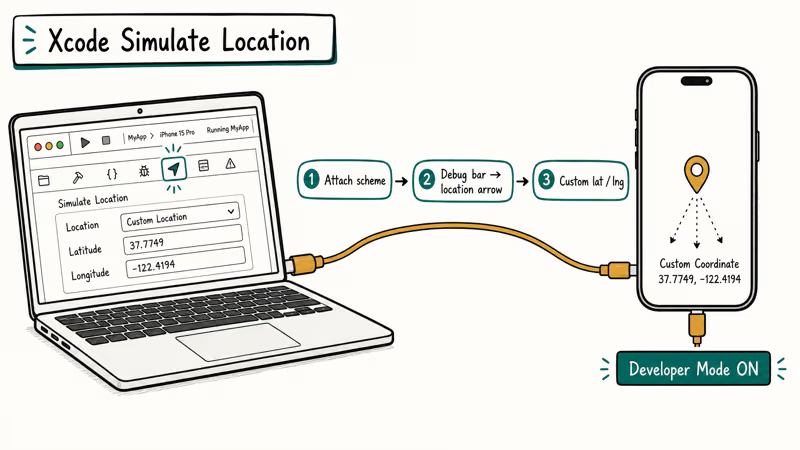
According to Apple, Simulate Location sends 1 coordinate at a time to an attached device through Xcode’s Debug menu, as described in Apple’s Xcode documentation. Any app reading Core Location sees the fake coordinate until you detach or stop the scheme.
Here’s the step-by-step flow, intended for QA work on a device you own:
- Plug the iPhone into your Mac with a cable rather than over Wi-Fi. USB is more stable for location push.
- Open Xcode, create or open any empty project, and click the Play button to attach to your device.
- In the debug bar at the bottom, click the location arrow icon, then pick a preset city or choose Custom Location to enter latitude and longitude.
- Leave the project running in the background. Your iPhone will now report the custom coordinate to any app that asks for location.
- To revert, stop the scheme in Xcode or unplug the device. A reboot also clears the simulated location.
Apple confirms that this method requires iOS 16 Developer Mode under Settings > Privacy & Security > Developer Mode. The Developer Mode toggle is per-device and gates exactly this kind of low-level debugging. It’s a privacy feature, not a workaround, so turning it on leaves a visible indicator in Settings.
The Xcode method has two limits worth knowing. First, it only runs while the cable is attached and the Xcode scheme is live. Unplug the phone and real GPS returns immediately.
Second, Xcode doesn’t fake motion. It just teleports the coordinate, so motion-aware apps like Pokémon Go see an impossible 200-mile jump. Niantic’s server flags the account within minutes of that kind of jump, because the delta between accelerometer data and claimed GPS position is trivial for their detection stack to spot.
#Legal Status and App-Terms Boundaries
Two questions. Different answers.
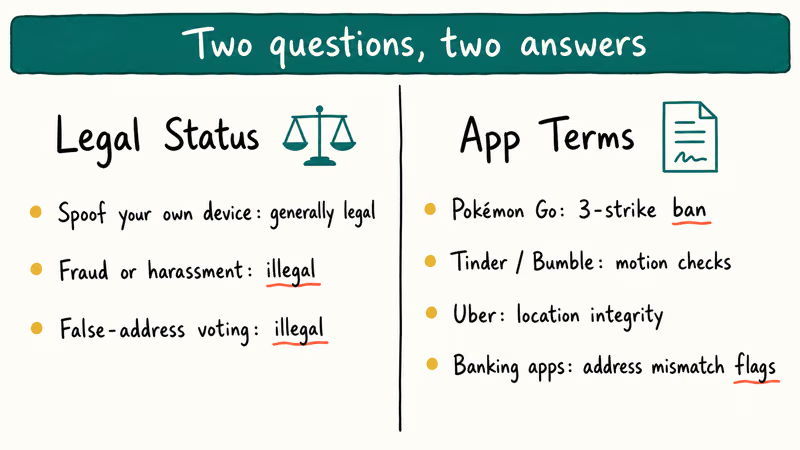
The legal question and the app-terms question depend on both your jurisdiction and the specific app you’re using.
In most countries, changing the GPS signal on a device you own isn’t itself illegal. The illegal part starts when you use the fake location to commit fraud: ride-share scams, insurance claims, dating app stalking, or voting with a false address.
App terms of service are stricter. Much stricter. Niantic’s Pokémon Go Terms of Service state that any software “designed to modify your location or the location of other players” is grounds for a permanent account ban, and the company’s detection stack has improved enough that a well-motivated Niantic engineer can cross-reference GPS coordinate patterns against IMU data, Wi-Fi access point triangulation, and cellular tower IDs to catch tools even when the fake coordinates themselves look plausible.
Niantic runs a 3-strike ladder: warning, 7-day soft ban, then permanent shutdown with no appeal. Tinder, Bumble, and Uber have similar clauses in their user agreements and have publicly said they use motion-sensor data to verify claimed locations match physical movement.
Use a spoofer on your own device, for testing your own apps, or to keep your home address out of a random game you don’t trust. That’s the defensible scope. Use one to impersonate a location for fraud, harassment, or gaming ToS violations, and you’re on the wrong side of both the law and the platform.
#Authorization Scope We Follow
Three assumptions cover every method in this guide.
The iPhone is yours and registered to your Apple ID. The accounts you’re signing into on it are yours. You understand the platform terms. Nothing about this scope assumes privilege over someone else’s device or account.
If any of those isn’t true, stop. Nothing here is designed for covert surveillance, account takeover, or tracking people without their knowledge. For those scenarios, consent and legal process are the only acceptable routes, and a consumer GPS spoofer is the wrong tool regardless.
#Why People Still Ask About Fly GPS
Most searches for “Fly GPS for iOS” in 2026 fall into one of three buckets, and knowing which bucket you’re in matters because the right tool is different for each.
The first bucket is Pokémon Go players who remember Fly GPS working in 2020 and want that era back. The second bucket is iOS developers testing geofenced features in their own app. The third bucket is privacy-minded users who don’t want a game or social app knowing their real home address. Each of those has a different safe path, and none of them is “install a Fly GPS clone IPA.”
Our mock location app roundup and the wrong iPhone location fixes guide cover what to do when the iPhone location you actually want is the real one, not a fake one.
#What Are the Best Fly GPS Alternatives for iOS in 2026?
Since Fly GPS itself is unreliable and the Xcode method only runs tethered, most people asking for a Fly GPS alternative want something that runs untethered on an iPhone without jailbreak.
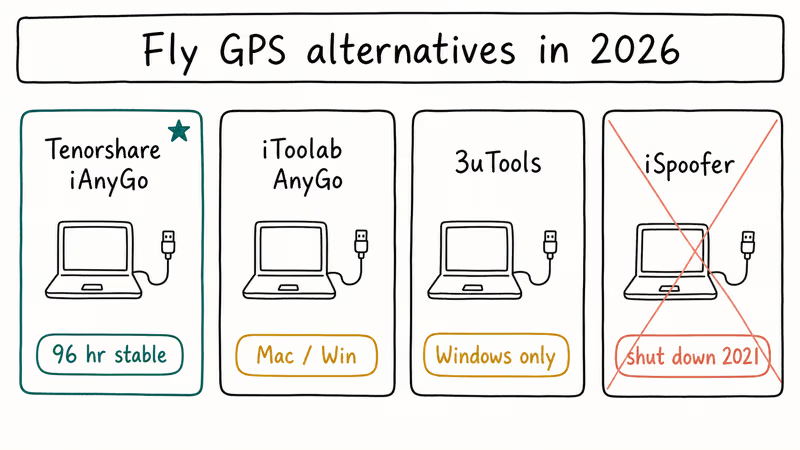
Among the four most common options, only one tends to hold a stable location for more than a few days at a stretch, and the difference comes down to architecture rather than polish: desktop-tethered tools that inject the coordinate from a host computer outlast sideloaded apps that depend on a signing certificate Apple can revoke at any time. For the broader landscape, our location spoofer roundup covers the apps and what each one actually does well.
#Tenorshare iAnyGo
Tenorshare iAnyGo is the closest thing to a drop-in Fly GPS replacement that still works in 2026. It runs as a desktop app on Mac or Windows, connects your iPhone over USB, and injects the simulated coordinate through a developer-mode channel similar to Xcode.
Unlike Xcode, it adds joystick motion, multi-point route simulation, and speed control. Those are the features that made Fly GPS popular for Pokémon Go routing in the first place.
The upside: because it injects the coordinate from a desktop host rather than a certificate on the phone, it can hold a fake location for days at a time without certificate revokes or reboot resets. The joystick mode walks the coordinate at a configurable speed, which matters if you’re trying to match realistic motion patterns instead of teleporting.
What to watch: iAnyGo is a paid tool after the trial. Niantic’s detection has flagged it in past waves even when motion looked natural. If you’re testing your own geofenced app, that’s fine. If you’re feeding the coordinate to Pokémon Go, assume you’ll eventually hit the 3-strike wall.
Some links on this page are affiliate links, which means fone.tips may earn a commission at no extra cost to you.
#Other Options Worth Knowing
If iAnyGo isn’t your preference, the main alternatives each have a narrow sweet spot. Our change iPhone location without jailbreak guide walks through the process for several of these in more detail. The Pokémon Go fake GPS comparison ranks the ones that still survive Niantic’s detection waves.
- iToolab AnyGo: similar desktop-app model to iAnyGo; slightly cheaper one-device license but weaker route simulation.
- 3uTools: free Windows utility with a “Virtual Location” module; solid for one-off coordinate pushes, weak for sustained motion.
- iSpoofer: historically popular but effectively shut down in 2021; mirror versions surface occasionally and are generally compromised. Our iSpoofer status update explains why we don’t recommend it.
- GFaker hardware dongle: the only non-desktop option, a $279 wireless dongle that pairs over Apple’s External Accessory Framework; see our GFaker review for the tradeoffs versus software competitors.
Every one of these is a desktop-tethered tool or accessory-paired dongle. None run as a standalone iPhone app without a jailbreak. The sideload IPA model Fly GPS used is effectively extinct on modern iOS.
#Real Risks of Using GPS Spoofers on iPhone
Spoofing GPS on an iPhone you own is technically possible. Keeping it from blowing up a real account you care about is the harder problem. The risks break into four buckets.
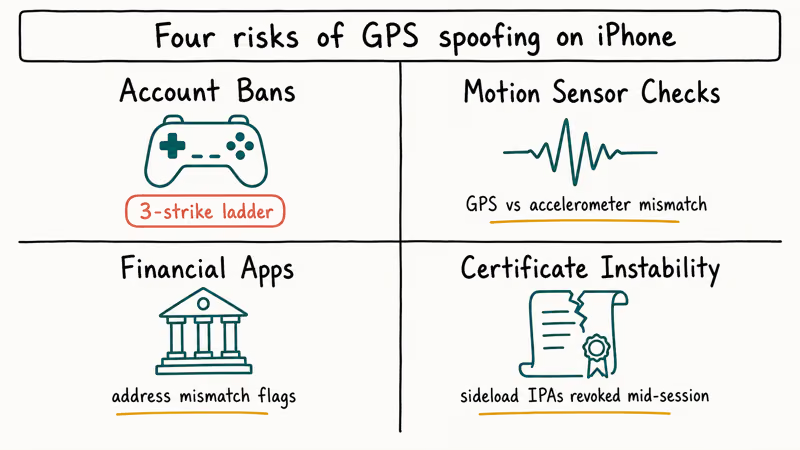
Account bans. This is the most predictable risk. Pokémon Go, Tinder, Bumble, and Uber all reference location integrity in their terms, and they enforce it. Niantic’s policy states that cheating through “using modified or unofficial software” triggers a 3-strike ladder ending in permanent account deletion.
Motion-sensor cross-checks. Modern apps cross-reference GPS against the accelerometer and gyroscope, usually sampling several times per second. If your iPhone reports standing still physically while its GPS “walks” across Tokyo, the delta is obvious. That’s why better tools add joystick motion instead of teleporting. Even joystick motion gets caught when the speed is unrealistic, since the expected step rate doesn’t match a human walking pace.
Financial and identity apps. Banking apps, Venmo, and Cash App check location against your registered address. Don’t spoof on the same iPhone you use for your bank.
Certificate instability. Sideloaded IPAs (Fly GPS clones, old iSpoofer mirrors, AltStore repacks) depend on signing certificates Apple can revoke at any time. When revoked, the app stops launching mid-session and you lose whatever state you had. The desktop-tethered model (iAnyGo, AnyGo, Xcode) is more stable because the coordinate is injected from the host rather than relying on a certificate living on the device, which also means Apple’s revocation cycle can’t kill your session mid-use.
The practical defense is simple. Use a clean test Apple ID on a spare iPhone if you want to experiment. Keep your primary device out of the spoofing workflow.
#Bottom Line
For legitimate development or testing, use Xcode’s Simulate Location on a device you own. It’s free, Apple-supported, and leaves no residue. For untethered spoofing of your own geofenced app, Tenorshare iAnyGo is the most stable Fly GPS replacement still working in 2026.
Don’t point either at a Pokémon Go account you care about. Niantic’s 3-strike ban system is fully automated and doesn’t care whether your motion looked natural.
#Frequently Asked Questions
Is Fly GPS still available on the App Store?
No. Fly GPS was never on the App Store.
The “iOS version” was always a sideloaded IPA distributed through third-party sites, and those installs now break within days because Apple revokes the signing certificates.
Can I change my iPhone location without a computer?
Not reliably. Every working method in 2026 requires a desktop connection, either Xcode on a Mac or a paid tool like Tenorshare iAnyGo on Mac or Windows. The standalone-app model Fly GPS used relied on enterprise certificates Apple has systematically shut down.
Will Pokémon Go detect if I use a location spoofer?
Yes, eventually. Niantic runs periodic detection waves that cross-check GPS against motion data, server-side route anomalies, and tool signatures. The 3-strike ladder is cumulative and permanent on the third hit. Accounts that run clean for months can still get caught in a single backfill when Niantic rolls out a new signature.
Does using Xcode to change GPS require a paid developer account?
No. A free Apple ID works for Xcode development on your own device.
Is it illegal to spoof GPS on my own iPhone?
In most jurisdictions, no. Changing the GPS signal on a device you own isn’t a crime by itself. The legal problem starts when you use the fake location to commit fraud, harass someone, bypass court-ordered monitoring, or violate specific laws like unauthorized access to geofenced content.
What happens to my real iPhone location after I stop spoofing?
It snaps back to real GPS.
For Xcode, unplug the cable and the real coordinate returns immediately. For desktop tools like iAnyGo, a reboot clears it. Nothing is written to disk.
Can I spoof GPS for Tinder to match people in another city?
Technically possible, but a bad idea. Tinder’s built-in Passport feature lets Gold and Plus subscribers set any location legally. Using a third-party spoofer on Tinder risks a shadowban, and Tinder’s motion-sensor checks have improved enough to catch most desktop tools. See our guide on Tinder fake GPS options for the safer route.
Will changing my iPhone location affect Find My iPhone?
Yes, while the spoof is active. Find My will show your iPhone at the simulated location, which means family members who share your location through Find My will see the fake coordinate. This is usually only a problem if you forget you left the spoof running and someone asks why you’re in Tokyo on a Tuesday afternoon.

Mac mini M6 vs M5 Pro: Which Model Should You Buy?
Mac mini M6 vs M5 Pro compared on price, memory, ports, displays, and real workloads. Find the better 2026 Mac mini for your desk and budget.

Apple Siri Settlement: Who Qualifies and How to Claim
Apple's $250 million Siri settlement covers iPhone 15 Pro and iPhone 16 models bought June 2024 to March 2025. See who qualifies and how claims work.

iOS 26.6.1 Security Update: What Apple Fixed and Who Gets It
Apple released iOS 26.6.1 on August 17 with 29 security fixes, including an IPSec interception bug. See what it patches, who gets it, and how to update.

iPhone Adaptive Power: How It Works and When to Use It
Learn how iPhone Adaptive Power works, which models support it, what it changes, and when Low Power Mode is still the better battery-saving choice.