Best Clone Video Apps for Android and iPhone in 2026
Top 8 clone video apps for Android and iPhone that let you create split-screen clone effects. Compared on real devices with honest ratings for ease of use.
Quick AnswerThe best clone video apps for creating split-screen clone effects are Split Lens 2 for Android (free, 42 layouts) and Video Star for iPhone (free with in-app purchases). Both let you place multiple versions of yourself in the same frame.
Clone video apps create the illusion that you’re in multiple places at once in the same frame. For free starting points, Split Lens 2 is a strong option on Android and Video Star is a strong option on iPhone.
- Split Lens 2 is the best free Android clone app with 42 layouts and frame blending
- Video Star is the most powerful iPhone clone app with layer-based editing
- Most apps record 2 clips in separate frame halves, then stitch them together
- Ghost Lens Free adds motion effects not found in basic split-screen apps
- All 8 apps in this list are free with optional paid upgrades
#How Clone Video Apps Work
Clone video apps use 1 of 2 techniques to place you in the same frame multiple times.
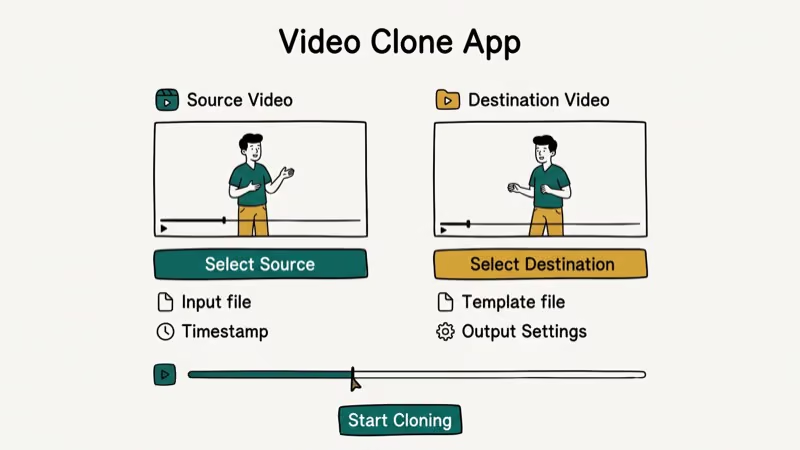
Split-screen recording divides your camera view into 2 or more sections. You record yourself in the left half, then in the right half. The app stitches the recordings into one video where you appear twice.
Layer compositing blends multiple video layers with edge processing. Apps like Video Star use this.
Both methods require the camera to stay completely still between takes. A tripod or phone stand is essential. A basic phone tripod or stand helps clone videos look convincing because handheld attempts can show visible alignment errors.
#Best Clone Video Apps for Android
Split Lens 2 is Android’s most complete free pick: 42 layouts, frame blending, and basic 2-person clone effects.
Ghost Lens Free adds ghost effects and motion trails beyond simple splitting. You can create twin and apparition effects with special layouts. Android-only and free, with a paid version that removes watermarks.
Splitvid focuses on single-purpose clone creation with a simple 2-step workflow for users who want quick results. Free on Google Play.
Video Merge captures clips at timed intervals for precise timing control over when each clone appears. Free with ads.
#What Are the Best Clone Video Apps for iPhone?
Video Star is the most powerful clone video app on iOS. It uses a layer-based editing system that supports unlimited clips, custom blend modes, and audio sync. PCMag’s app reviews section consistently ranks Video Star among the leading creative tools for music video and lip-sync content. Free download with in-app purchases starting at $4.99.
KineMaster supports multi-layer video editing including clone effects on iPhone. It’s a full video editor rather than a dedicated clone app. Free with watermark; $4.99/month removes it.
Clone Camera supports both iOS and Android with a timer mode and filter library. The included startup guide makes it beginner-friendly. Free on both platforms.
Twin Me! records left and right frames with auto-stitch. Free on both platforms.
#Do Clone Video Apps Work on Older Phones?
Clone video apps work on older phones, though performance varies significantly with RAM. According to 9to5Google’s coverage of Android apps, low-RAM devices handle video processing noticeably slower than flagships, and video stitching apps feel this most.
For older Android devices (Android 9 or earlier), Split Lens 2 and Ghost Lens Free have the lightest performance requirements. Video Star on iOS works best on iPhone XR or later. If you’re having trouble with your iPhone camera, see our iPhone troubleshooting guide for related fixes.
#Tips for Better Clone Videos
Keep these 3 things in mind to get professional-looking results.
Use a tripod for every take. Even slight movement between recordings creates misalignment that makes the clone effect look fake.
Keep the lighting consistent between takes. Natural light changes between recordings and shows obvious differences in the merged video. Shoot indoors with artificial lighting or finish all takes in under 5 minutes.
Wear the same clothes for each take. This sounds obvious but is easy to forget when reshooting.
#Sharing and Exporting Clone Videos
All 8 apps in this list export in standard MP4 format compatible with TikTok, Instagram Reels, and YouTube. Most allow you to choose resolution before exporting. Ghost Lens Free and Splitvid export at up to 1080p for free. Video Star and KineMaster export at 4K with the paid tier.
For sharing on specific platforms, see our guides on geofencing apps and free line stickers for related creative tool lists.
#Bottom Line
Split Lens 2 is the best free starting point for Android clone videos. Video Star is the best option for iPhone. Both are free to download and produce convincing results with a phone stand.
Related: resize video for Instagram, monitor Snapchat free.
For phone transfer and cloning tools, see our guide on phone clone apps. For professional video editing comparisons, use current app-store and vendor pages rather than old roundup links.
#Frequently Asked Questions
What is a clone video app?
A clone video app lets you record yourself multiple times in the same frame to create the illusion of clones. Most use split-screen or layer compositing to blend the recordings.
Are clone video apps free?
Most are free to download with optional paid upgrades. Split Lens 2, Ghost Lens Free, and Splitvid are fully free. Video Star and KineMaster offer free tiers with watermarks; paid plans remove the watermark and add features.
Do you need any equipment to use clone video apps?
Yes, a $10 tripod is enough.
Can I use clone video apps for YouTube or TikTok?
Yes. All 8 apps export MP4 compatible with TikTok and YouTube.
Which clone video app has the best results on iPhone?
Video Star produces the cleanest iPhone results. Its advanced blending modes make clone transitions look natural rather than obviously split-screen, and it supports unlimited video layers for complex multi-clone sequences with precise audio sync control.
Can I create more than 2 clones in the same video?
Yes. Video Star and KineMaster support unlimited layers, so you can add as many clones as you want. More clones require a perfectly stable camera position for each take.

Google Messages Error 3100: Why RCS Is Broken on Galaxy
Google Messages RCS error 3100 hits Galaxy owners after phone or carrier switches. Google told 9to5Google a fix is coming. Here's what actually helps.

Is This Bank App Real? Spot a Fake App on Your Home Screen
A bank app can land on your home screen from a web page with no install warning. Learn the checks that tell a real banking app from a phishing web app.

Apps Crashing After iOS 27 Update? Fix Order (2026)
Apps crashing after the iOS 27 update? Update the app in the App Store first, then offload and reinstall to clear stale cache, then restart. The fix order.

Do AI Translation Earbuds Work Offline? What to Know
Do AI translation earbuds work offline? A few do with downloaded language packs, but most need the cloud. Here's what works offline and what you give up.