Can You Track a SIM Card? What's Real and What Isn't
Tracking a SIM card isn't what spy ads claim. We explain what carriers, police, and Find My can actually do, plus how to lock down a stolen SIM fast.
Quick AnswerYou can't track a bare SIM card from a consumer app. What you can do is locate the phone the SIM is in through Find My iPhone, Find Hub, or your carrier's lost-phone service, then have the carrier suspend the SIM if it's stolen.
Can you track a SIM card the way late-night ads suggest? No. A SIM is a tiny chip that authenticates your phone to the carrier network and has no GPS of its own. What can be tracked is the phone the SIM lives in, and only you, your carrier, or law enforcement have legitimate ways to do that.
- A SIM card has no GPS; tracking always means tracking the phone, not the chip.
- Find My iPhone and Find Hub are the only consumer tools that show real-time phone location, and they keep working if the SIM is removed.
- Your carrier can locate a registered phone only on your own account, by your request or law enforcement warrant, not for tracking a stranger.
- A stolen SIM should be suspended within minutes by calling your carrier; report the IMEI to police, not the SIM number.
- Most “SIM card tracker” apps online are lead-gen pages or spyware that needs to be installed on the target phone first.
#What Does Tracking a SIM Card Actually Mean?
Most people who search “can you track a SIM card” want one of two things: find their own missing phone, or check on a family member’s whereabouts. Neither task tracks the SIM. They track the phone.
Here’s why a SIM doesn’t carry GPS. The card stores three things: your IMSI (subscriber ID), your authentication keys, and your phone number mapping. The cellular network knows which tower your phone last pinged because the phone registered with that tower, not the SIM. The chip just answered the carrier’s “who are you?” question during registration.
When carriers locate a phone for emergencies, they triangulate the phone’s radio signal across two or three nearby towers, which usually puts the device within 50 to 500 meters in a city and worse in rural areas. According to the FCC’s guide on stolen or lost wireless devices, the carrier itself can deactivate service tied to a SIM and block the device’s IMEI on shared industry databases, but consumer-grade live tracking isn’t a service carriers offer over the phone.
So when someone advertises a “SIM card tracker,” they’re either reselling phone-number lookups, repackaging Find My, or pushing spyware that needs installation on the target phone first. None of those track the SIM as a piece of hardware.
#Find My iPhone and Find Hub: The Real Way to Track Your Own Phone
If the phone is yours, the official tools work without involving the SIM at all. Pull the SIM tray and connect only to Wi-Fi, and Find My still shows the device’s location on iCloud.com/find, because Apple’s offline finding network uses encrypted Bluetooth pings from nearby Apple devices rather than the cellular line.
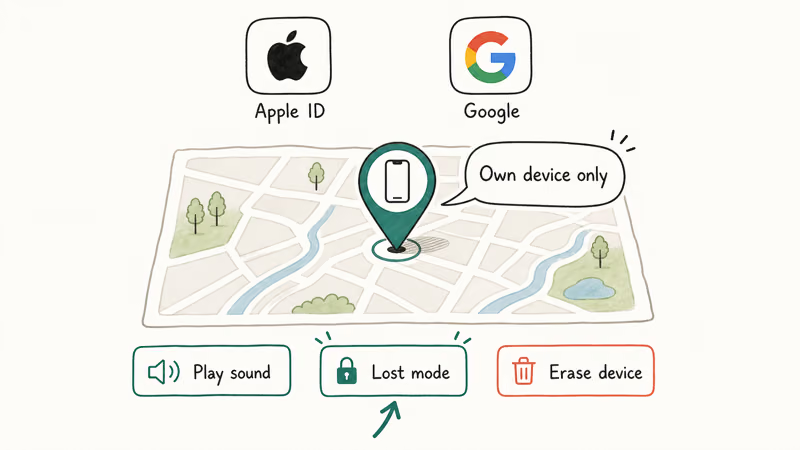
For Apple users, the path is short:
- Go to iCloud.com/find on any browser, or open the Find My app on another Apple device.
- Sign in with the same Apple ID. Pick the missing device from the list.
- Use Play Sound, Mark as Lost (locks the screen and shows a callback number), or Erase iPhone if you’ve given up hope.
According to Apple’s support article on lost or stolen iPhones, Find My iPhone keeps working even after a thief removes the SIM, because the location signal doesn’t depend on the cellular line at all. The phone has to be powered on, and the Find My toggle must have been enabled before the loss, so it’s worth confirming that setting now rather than after a device goes missing and there’s nothing you can do to switch it on remotely.
For Android users, Google’s Find Hub is the equivalent. The location refreshes periodically while the phone has Wi-Fi, then drops to “last known location” once it loses both Wi-Fi and cellular. Samsung’s SmartThings Find layer adds nearby Galaxy-device crowdsourcing on top of Google’s stack, which helps when a phone goes indoors and loses satellites.
Both ecosystems also offer remote-lock and remote-wipe; our lost phone walkthrough covers that flow step by step.
#What Can Your Carrier Do When You Lose Your Phone?
Your carrier can do four things, and only if you call them or law enforcement requests it officially:
- Suspend the SIM in real time, blocking calls, texts, and data on your line. This costs nothing.
- Add the IMEI to the carrier and CTIA stolen-phone database, which prevents the phone from being activated on any major US carrier.
- Ping the phone’s last known cell sector for E911 or court-order situations.
- Issue a replacement SIM (or provision a new eSIM) with the same phone number, so your two-factor codes and contacts keep flowing.
Verizon, AT&T, and T-Mobile each have lost-phone hotlines and account self-service pages. T-Mobile’s lost-phone line can suspend a SIM during the call once you verify your account. AT&T’s device protection center is the equivalent, and Verizon’s lost or stolen device FAQ walks you through the same steps online.
What they won’t do is read you the live coordinates of a phone over a normal support call. That’s a privacy guardrail every major US carrier enforces, even on your own line, because phone agents can be social-engineered by an attacker posing as you. For active location updates you’ll need to use Find My or Find Hub instead, since those tools authenticate against your account directly rather than relying on a support representative’s judgment.
#The IMEI: How Police and Carriers Track Stolen Phones
The IMEI (International Mobile Equipment Identity) is a 15-digit serial number burned into the phone itself, not the SIM. It survives factory resets, SIM swaps, and operating-system reinstalls, which is why police reports ask for it.
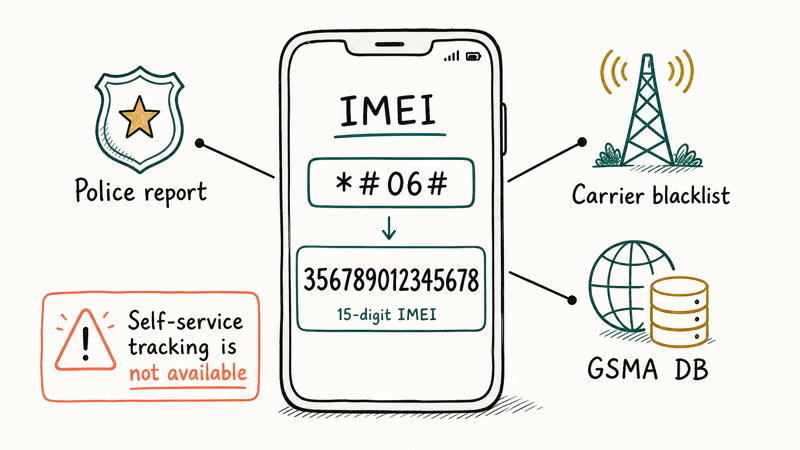
How to find your IMEI before you lose the phone:
- iPhone:
Open Settings>General>About, scroll to IMEI. Or dial*#06#from the phone app. - Android:
Open Settings>Aboutphone > IMEI. Same dial code works. - Already lost the phone? Sign into your Apple ID at appleid.apple.com or your Google account; both show registered device IMEIs.
For an Apple user, our companion guide on iPhone IMEI checks walks through the carrier-lookup tools that confirm whether a phone is reported lost or clean.
According to CTIA, the 15-digit IMEI is the identifier carriers cross-check against the GSMA Device Registry’s global stolen-device block list before activating any used phone, a status you can query at CTIA’s Stolen Phone Checker. That’s why the IMEI is the single most useful number on your police report, far more useful than the SIM’s ICCID, which a thief will discard with the SIM tray.
#Why “SIM Card Tracker” Apps Don’t Work the Way Ads Claim
Walk through any “free SIM card tracker” search result and you’ll see the same pattern: a phone number lookup field, vague promises of “live tracking,” and a checkout page. These products fall into three buckets, and none of them track the SIM as advertised.
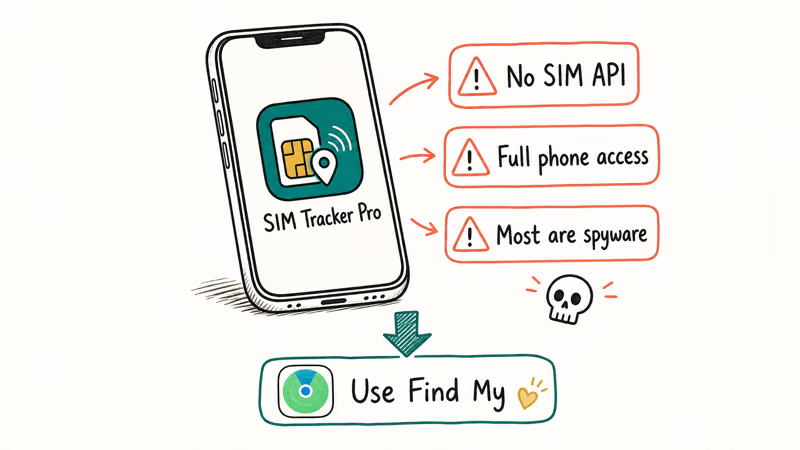
- Phone-number lookup directories that scrape public records and return owner names, not real-time locations. Useful for screening unknown callers, useless for finding a missing phone.
- Family-locator apps like Life360, Apple’s Find My Friends, or Google Family Link. These work, but only after the person installs them, signs in, and agrees to share location. That’s consent, not tracking.
- Stalkerware disguised as parental or productivity tools. These need physical access to the target phone to install, and their use against another adult without consent is a crime in the US, UK, EU, and most other jurisdictions.
None of these track the SIM.
If you suspect someone has installed monitoring software on your own phone, our walkthrough on detecting phone surveillance covers the signs and the removal steps. If the person trying to track you is a partner or ex-partner, contact a domestic-violence hotline (in the US, the National Domestic Violence Hotline is 1-800-799-7233) before changing any settings. Abrupt changes can escalate dangerous situations.
#What to Do in the First 30 Minutes After Losing Your Phone
Order matters. This is the sequence that minimizes damage, whether the lost device is an iPhone or an Android phone:
- Open Find My or Find Hub from any browser. Mark the device as lost. This locks the screen, displays a callback number, and starts logging location pings.
- Call your carrier and ask to suspend the SIM. Have your account PIN ready. This stops criminals from running up international calls or intercepting your two-factor SMS codes.
- Change passwords for your bank, email, and any account that uses SMS-based 2FA. Move those accounts to an authenticator app like Google Authenticator, Authy, or your password manager’s built-in TOTP feature.
- File a police report with the phone’s IMEI, your name, and the time and location of loss. The case number lets your insurance or carrier protection plan process a replacement.
- Order a replacement SIM or eSIM in your carrier’s app. Same phone number, new chip, contacts and 2FA restored.
If your phone is an iPhone and the battery has died, our guide on how to find an iPhone that’s dead or offline covers the last-location feature that keeps showing data after the device powers off.
#Legal Limits on Tracking Someone Else’s SIM
This part isn’t optional. You may only track a phone or SIM that you own, that’s on your own carrier account, or that belongs to a minor child under your guardianship. Tracking another adult without their explicit, ongoing consent is illegal in most countries, including spouses, ex-partners, roommates, and coworkers.
In the US, federal statutes 18 USC § 2511 (the Wiretap Act) and 18 USC § 1030 (the Computer Fraud and Abuse Act), plus state stalking laws, cover unauthorized location tracking. Penalties range from civil damages to felony charges. Employers can track company-owned phones, but only after disclosing the policy in writing and respecting state-specific employee-privacy laws.
Consent is the legal trip-wire.
If you suspect someone has cloned your number or executed a SIM swap on your account, contact your carrier immediately and ask for a port-out and SIM-swap freeze. According to the FCC’s cell phone fraud consumer guide, carriers must use secure methods to verify your identity before transferring your number or issuing a new SIM, which is your single best defense against account-takeover attacks.
For deeper detection, our guide to tracking an iPhone without iCloud covers what’s possible (and what isn’t) when you don’t have Apple’s stack available.
#Bottom Line
If you’ve lost your own phone, open Find My or Find Hub first, then call your carrier to suspend the SIM and file an IMEI-based police report. That three-step sequence is the only consumer-accessible method we trust, and it works whether the thief keeps the original SIM or swaps in a new one. Skip every “SIM card tracker” product advertised online; they’re phone-number lookups or stalkerware, and neither does what the ad claims.
#Frequently Asked Questions
Can you really track a SIM card by its serial number?
No. The ICCID printed on the SIM is a billing-system identifier; it doesn’t broadcast location and isn’t queryable by consumers at all.
What’s the difference between IMEI and SIM tracking?
The IMEI tracks the phone hardware; the SIM authenticates your line. If a thief swaps your SIM, the IMEI stays the same, which is why police flag stolen phones globally by IMEI. If you swap phones but keep the SIM, your phone number follows you to the new IMEI. Both numbers matter for different reasons, and your police report should include the IMEI.
Does Find My work if the thief removes my SIM?
Yes. Both iPhone and Android keep reporting locations with Wi-Fi only and no SIM installed, because the location signal doesn’t depend on the cellular line.
Can my carrier give me my phone’s live location?
Not over a regular customer-support call. Every major US carrier reserves live location for E911 calls and warrant-backed law enforcement requests, even on your own line, because phone agents can be social-engineered by attackers. Carriers will lock the SIM, blacklist the IMEI, and issue a replacement, and they’ll cooperate with police once a report is filed, but reading you live coordinates isn’t a service you can request.
How fast should I report a stolen SIM?
Within 30 minutes if possible. SIM-based 2FA interception is the most damaging post-theft attack, and minutes matter.
Are family-locator apps the same as tracking?
Not really. Family-locator apps like Life360, Google Family Link, and Apple’s Family Sharing only work after the person installs them and explicitly agrees to share location. The moment they revoke permission or delete the app, sharing stops, which is the legal line between consent-based sharing and covert tracking.
Is it legal to track my child’s SIM?
Yes, if the child is a minor on your account. Family Link on Android and Screen Time on iPhone are free and don’t need any third-party app.
Can police track a SIM card after I report it stolen?
Police request location data by IMEI, not by SIM. Once you file a report and the carrier blacklists your IMEI on the GSMA and CTIA databases, the phone can’t be activated on any major US, UK, or EU network. Recovery rates depend on whether the thief leaves the device on long enough for Find My or carrier records to log a location. A phone can resurface later if it pings a public Wi-Fi network or reconnects to a cell tower.

Apple Siri Settlement: Who Qualifies and How to Claim
Apple's $250 million Siri settlement covers iPhone 15 Pro and iPhone 16 models bought June 2024 to March 2025. See who qualifies and how claims work.

iOS 26.6.1 Security Update: What Apple Fixed and Who Gets It
Apple released iOS 26.6.1 on August 17 with 29 security fixes, including an IPSec interception bug. See what it patches, who gets it, and how to update.

iPhone Adaptive Power: How It Works and When to Use It
Learn how iPhone Adaptive Power works, which models support it, what it changes, and when Low Power Mode is still the better battery-saving choice.

How to Transfer Data to a New iPhone Without iCloud
Move everything to your new iPhone without iCloud: Quick Start device-to-device transfer, wired migration, and encrypted Finder or iTunes backups.