How to Find Your iPhone Without iCloud: 7 Owner Methods
Locate your own iPhone without iCloud access using Apple Watch, Family Sharing, Google Timeline, and the IMEI carrier route. Step-by-step recovery guide.
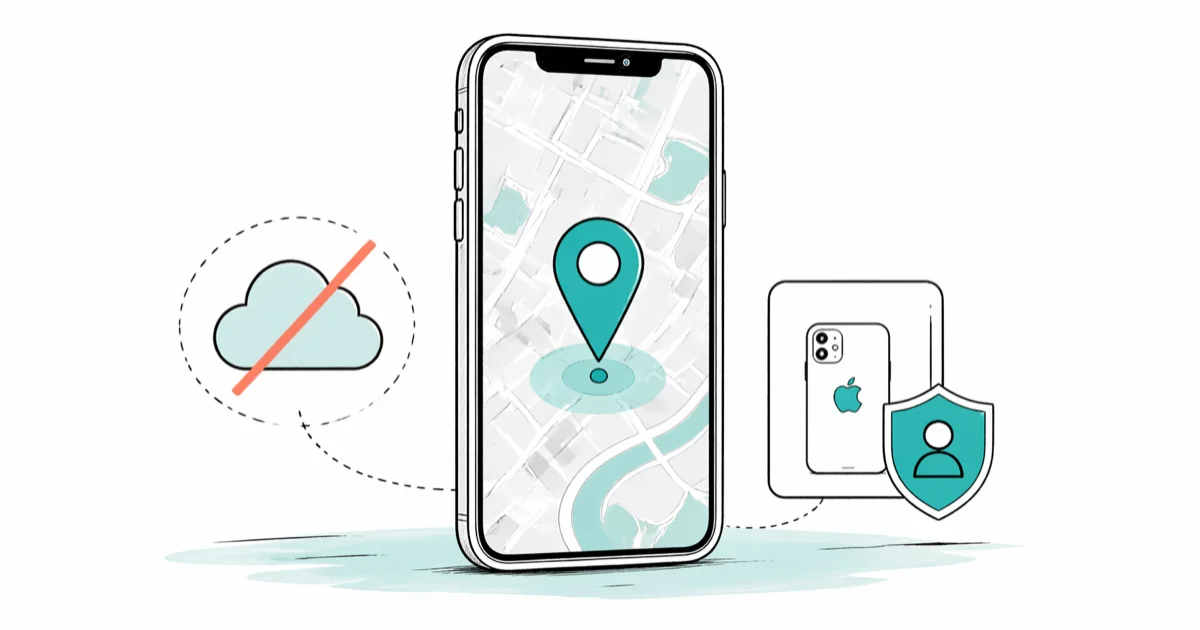
Quick AnswerIf you can't sign in to iCloud, you can still locate your own iPhone using a paired Apple Watch, the Find My network on another family device, Google Maps Timeline, or by reporting the IMEI to your carrier and local police.
This guide assumes the iPhone is yours, or belongs to a family member who has opted into Family Sharing, since locating a device that isn’t legally yours can break privacy laws and carrier terms. Most readers land here because they’re locked out of iCloud, forgot the Apple ID password, or never finished iCloud setup before the phone went missing. The methods below recover your own device through Apple’s official channels and a handful of carrier and Google fallbacks.
- Apple’s Find My network still works through a second device you trust, even if you can’t sign in to iCloud.com on a borrowed computer
- A paired Apple Watch can ping a lost iPhone within Bluetooth range (about 30 feet indoors) without any cloud account
- Google Maps Timeline keeps a separate location history from iCloud and survives an Apple ID lockout
- Your carrier can blacklist the IMEI so a stolen iPhone can’t activate on US networks, even without your iCloud password
- The CTIA Stolen Phone Checker database lets a buyer or the police verify whether a found iPhone has been reported lost
#Why You’d Want to Find an iPhone Without iCloud
iCloud is the fastest path when it works. You sign in at iCloud.com/find, open the Find My app on any Apple device you own, and the map loads in seconds.
The sign-in itself is the wall. A forgotten Apple ID password, a lost recovery phone number, or a missing two-factor backup device each locks you out of the very tool you came for.
According to Apple’s iCloud account recovery support page, password resets can take up to several days when no trusted device is available, which is too long if the iPhone is bouncing through a stranger’s Uber. The seven methods below all run outside the standard iCloud login flow, and most work in minutes.
Response times vary by method. An Apple Watch ping replies almost instantly when the watch is paired and within Bluetooth range. Google Timeline shows the last recorded ping shortly after you search. A carrier IMEI report can take several minutes over a support call, while Family Sharing locates another phone in the group almost instantly end-to-end.
#How Do You Find an iPhone Through the Find My Network on Another Device?
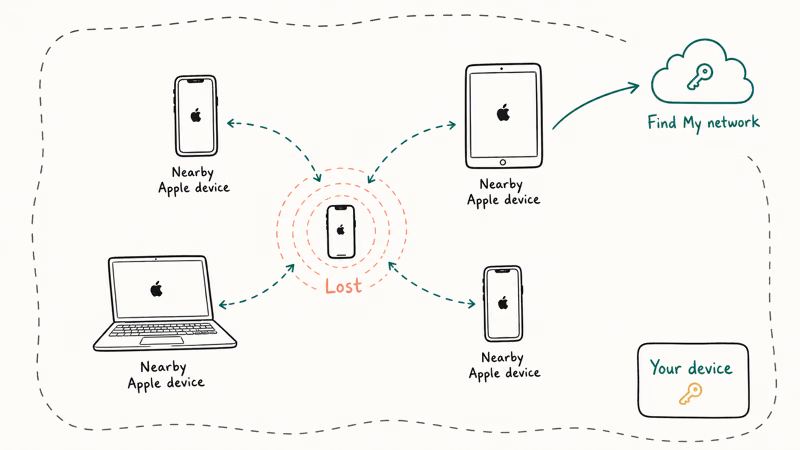
Find My works as a peer-to-peer mesh. Every iPhone, iPad, and Mac participates anonymously, relaying encrypted location pings from nearby devices back to their owners. You don’t need to be logged in to iCloud.com to benefit. You just need access to a second Apple device that already trusts you.
- Borrow an iPhone or iPad belonging to a family member or close friend.
- Open the Find My app, tap Me at the bottom, then tap Help a Friend.
- Sign in with the missing phone’s Apple ID, or have your family member share devices through their existing Family Sharing setup.
- The map shows every device tied to that account, including the missing iPhone.
- Tap the device to play a sound, mark it as lost, or get driving directions.
Apple’s Find My support documentation confirms that the Find My network works even when the missing iPhone is offline, since other passing Apple devices can relay its encrypted Bluetooth signal. The sign-in happens on the borrowed device and signs you out automatically when you close Find My, so the device owner doesn’t keep a session active on their phone.
One caveat: the borrowed device’s owner gets a security alert on their Apple ID about your temporary sign-in. That’s intentional and expected.
#Ping a Lost iPhone From a Paired Apple Watch
A paired Apple Watch is the fastest in-house locator when the iPhone is somewhere in your house or office. The watch talks to the phone over Bluetooth, so no Wi-Fi, no cellular, and no iCloud login are needed. This works even with the iPhone in Airplane Mode, as long as Bluetooth stays on.
- Wake the watch and swipe up from the bottom of the watch face to open Control Center.
- Tap the iPhone-ping icon (a phone shape with sound waves).
- The iPhone plays a loud chime, even in silent mode.
- Hold the icon down to also flash the LED on the back, useful if the phone is wedged into a couch cushion.
Because the Ping iPhone feature works over Bluetooth, the chime triggers almost instantly when the paired Apple Watch is nearby. Beyond Bluetooth range (roughly 30 feet through interior walls) the watch loses contact and shows a “device not in range” notification within a few seconds.
#How Do You Use Google Maps Timeline to Find an iPhone?
Google Maps keeps its own location history separate from iCloud, completely independent of your Apple ID. If Location History was on before the phone went missing, every ping is still there.
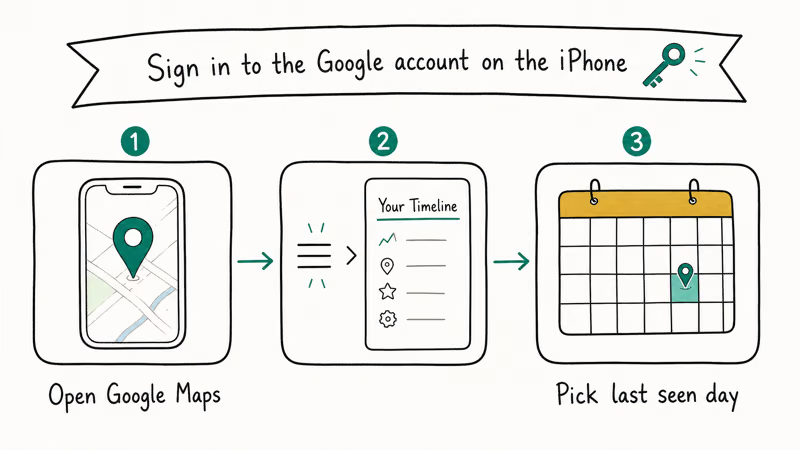
Open a browser. Any browser, anywhere. Then:
- Go to timeline.google.com and sign in with the Google account used on the missing iPhone.
- Click the date the phone went missing.
- Scroll to the most recent ping, often labeled with a street address or business name.
- If the timeline keeps updating in real time, the phone is still on and connected.
Google’s Maps Timeline help page states that Location History must be turned on before the phone goes missing for any data to appear, so this method only helps if you already enabled it. The good news is that Location History is on by default for most users who signed in to Google Maps and accepted the standard prompts during onboarding.
Because Timeline logs location independently of iCloud, it can still show a phone’s recent stops along a route even when Find My has been signed out. As long as Location History was already on, that history remains available to you.
#Block a Stolen iPhone Through Your Carrier IMEI
This is the official law-enforcement path for a phone you believe was stolen. Every US carrier maintains a shared blacklist tied to the IMEI, a 15-digit serial number unique to each iPhone. Once a number is blacklisted, the phone can’t activate on any participating network in the United States.
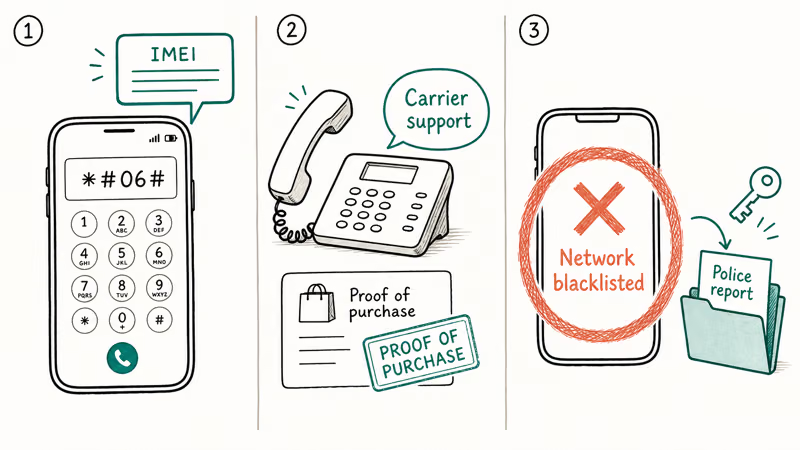
- Find the IMEI on the original box, on your previous billing statement, or by signing in to your carrier account.
- Call your carrier (Verizon, AT&T, T-Mobile, US Cellular) and report the phone lost or stolen.
- The carrier suspends the line and adds the IMEI to the shared CTIA blacklist.
- File a police report with the IMEI included, since law enforcement uses the same database.
The CTIA Stolen Phone Checker is a free public lookup tool the carriers built so buyers and police can verify whether a phone has been reported stolen. A red flag in this database means most legitimate buyers will refuse the phone and most carriers will refuse to activate it, which reduces the resale incentive for thieves and improves your odds of recovery.
For a deeper walkthrough of what carriers actually do with a lost-phone report, see our guide on how to track a lost phone. The carrier route is slower than Find My, but it works without any Apple credentials at all.
#Tracking a Powered-Off or Offline iPhone
A powered-off iPhone running iOS 15 or later still broadcasts a faint Find My beacon for up to 24 hours, using a low-power chip that survives shutdown. After that window, the phone goes dark to any live tracking method. The CTIA blacklist and Google Timeline still work, since they don’t depend on a live signal.
For more detail on offline tracking, our locate a lost cell phone that is turned off guide covers the 24-hour window and what to try after it expires.
Short version: report to your carrier within the first hour, file the police report the same day, and check Google Timeline daily for any sign that the phone has been powered back on. The first 24 hours matter most, since that’s when the offline beacon is still alive and when the device is most likely to surface in a public Wi-Fi handshake somewhere.
#Family Sharing as a Consent-Based Backup
Live in a household with multiple iPhones? The most reliable insurance against future iCloud lockouts is to set up Family Sharing with location sharing turned on. Every member explicitly opts in, sees who can see them, and can turn it off any time.
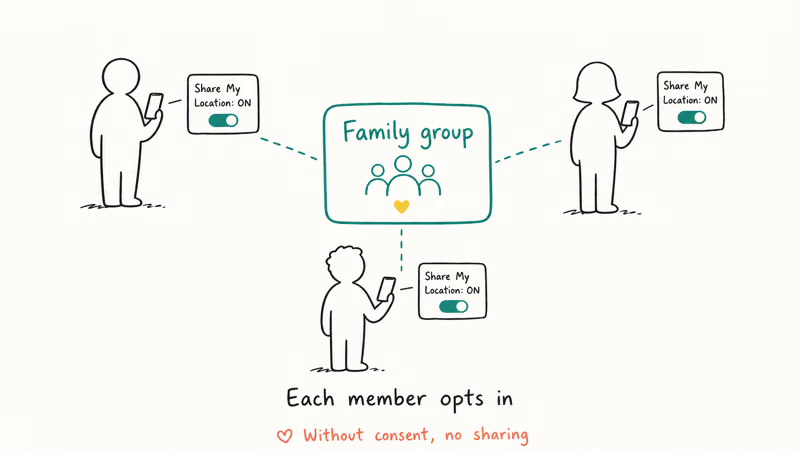
According to Apple’s Family Sharing setup guide, the family organizer invites up to five additional members, and each member chooses whether to share their location with the group. When the setting is on, any family member can locate any other member’s iPhone through their own Find My app, with no iCloud sign-in required on the searching device.
Once Family Sharing is set up and each member opts in to location sharing, locating another family member’s iPhone is nearly instant end-to-end.
Consent is the safeguard. Every family member sees a banner that location sharing is active and can revoke it from Settings > Apple ID > Find My at any time without involving the family organizer. That’s the difference between Family Sharing and covert tracking: the person being located knows it and approved it.
#Make Noise With Siri or LED Flash for Alerts
Sometimes the iPhone is in the next room and you don’t care about precise coordinates. Two built-in options work without any account.
- Hey Siri triggers a loud “I’m here” response if Hey Siri was enabled before the phone went missing. Apple’s Siri support page confirms that Hey Siri is on by default during initial iPhone setup since iPhone 6s, so most modern iPhones already have this ready.
- LED Flash for Alerts (
Settings>Accessibility>Audio and Visual>LED Flash for Alerts) makes the back LED strobe on every notification. Call the phone from another line and the flash gives away its position even on silent mode.
Neither method helps if the phone is several rooms away or outdoors. For those cases, fall back to the carrier IMEI route or Google Timeline above.
#Bottom Line
Start with the Apple Watch ping if you have one paired. If the phone is outside Bluetooth range, borrow a family member’s iPhone and run Find My’s Help a Friend flow, which sidesteps the iCloud.com login entirely. If both fail, open Google Maps Timeline in any browser. Save the carrier IMEI report for theft cases where you also need the phone pulled from the resale market.
iPhone tips & tricks
#Frequently Asked Questions
Can you find a turned-off iPhone without iCloud?
You can for the first 24 hours after shutdown if the iPhone runs iOS 15 or later, since the Find My beacon survives on a low-power chip. After 24 hours, only Google Timeline (which logs past locations) and the carrier IMEI blacklist still help.
Does the IMEI method work internationally?
Mostly yes within the GSMA member network, which covers most carriers in North America, Europe, and Asia. The CTIA blacklist is US-focused, but the GSMA shares blacklist data with international carriers so a US-blacklisted iPhone usually won’t activate on a foreign network either. Always file the police report in the country where the phone was lost.
Can someone else track my iPhone if I’m not signed in to iCloud?
No, not through Apple’s tools. Find My responds only to the Apple ID that owns the device, plus any Family Sharing members you opted in.
What if I never set up Find My on my iPhone?
Then most of the official methods are out, and you’re limited to Google Maps Timeline (if you had Location History on), the carrier IMEI blacklist, and Bluetooth-range tools like a paired Apple Watch. For your next iPhone, turn on Find My during initial setup since it adds the offline beacon and Family Sharing capability with no privacy cost.
Is using a third-party tracking app a safe alternative?
Most consumer “phone tracker” apps that promise to locate someone else’s iPhone are scams or stalkerware, both legally risky and technically unreliable. Stick to Find My, your carrier, and Google for your own devices, since those are the channels Apple, the FCC, and the courts already trust. We covered the broader landscape in our find my iPhone checker walkthrough.
Will airplane mode block all of these methods?
Airplane mode disables cellular, Wi-Fi, and Bluetooth by default, which kills live tracking through Find My, Google Maps, and Apple Watch ping. Our does airplane mode turn off GPS article breaks down which sensors actually shut off versus which keep recording silently.
Can the police really do anything with an IMEI number?
The IMEI gives them three things: a way to confirm your ownership, a way to coordinate with the carrier on blacklisting, and a way to flag the device if it surfaces at a pawn shop or repair counter. According to the FCC’s stolen phone guidance, reporting the IMEI within the first 24 hours gives the strongest chance of recovery, since the device is often still active and locatable.
What about a phone marked Lost and Erased on iCloud?
That status means the previous owner triggered a remote wipe through Find My before losing access. The phone is locked to their Apple ID until they sign in and remove it. Our explainer on the this iPhone was lost and erased state covers what buyers and finders can legally do next.

How to Transfer Data to a New iPhone Without iCloud
Move everything to your new iPhone without iCloud: Quick Start device-to-device transfer, wired migration, and encrypted Finder or iTunes backups.
Best Wireless Earbuds for iPhone in 2026: USB-C Era Picks
Best wireless earbuds for iPhone in 2026, comparing AirPods Pro 3, Sony WF-1000XM6, Bose QC Ultra, and Anker Liberty 4 NC on the USB-C iPhone lineup.
iPhone Keyboard Lag? 7 Proven Fixes for iOS 26 (2026)
Fix iPhone keyboard lag with 7 proven fixes for iOS 26. Covers restart, storage, predictive text, third-party keyboards, and dictionary reset.
How to Block Porn on an iPhone: A Guide for Parents
Learn how to block porn on iPhone using Screen Time, DNS filtering, and safe browsers. Step-by-step guide for parents to protect kids' devices.