Best Portable SSD for PS5 and Xbox: Game Library Picks
Samsung T9, Crucial X9 Pro, and SanDisk Extreme Pro USB4 compared on PS5 and Xbox Series X for game-library expansion, transfer speed, and load times.
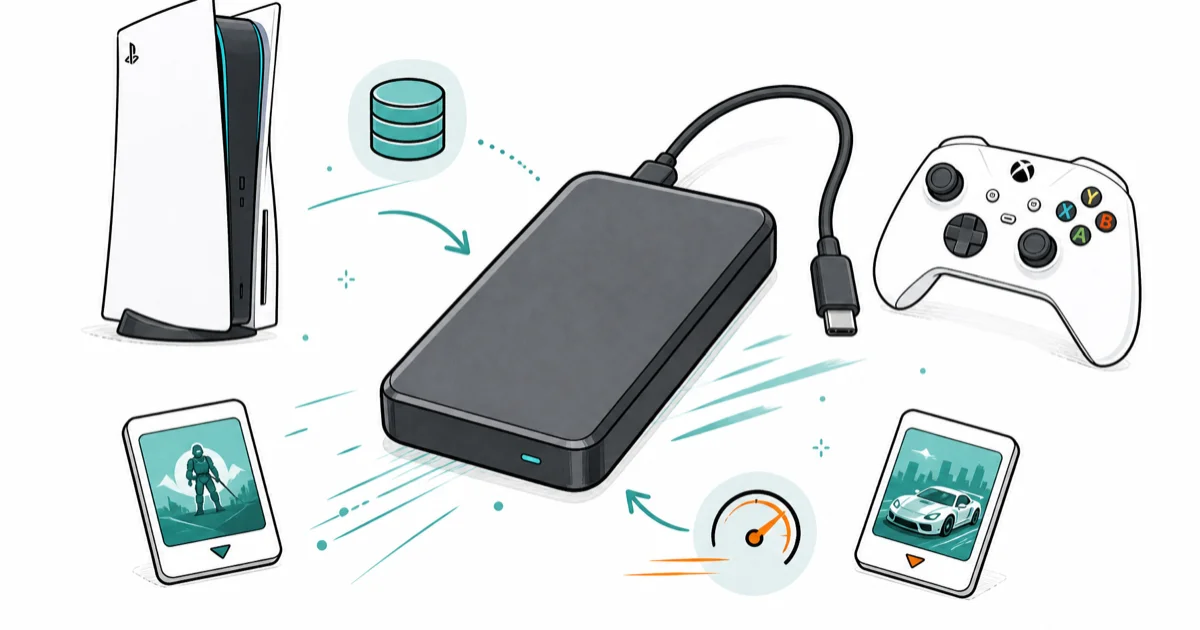
Quick AnswerThe Samsung T9 2TB is the best portable SSD for PS5 and Xbox Series X. It stores 30 PS4-era games or 40 Xbox titles and runs PS4 games directly with no internal copy step.
PS5 and Xbox Series X both ship with internal SSDs that fill up after roughly six modern games. This guide compares three portable SSDs as external game libraries for the realities of Call of Duty Warzone updates, Starfield installs, and weekly cloud-save juggling.
- The Samsung T9 2TB is the best all-round portable SSD for both PS5 and Xbox Series X thanks to 2,000 MB/s transfer speeds and a 3m drop rating
- PS4 and Xbox One backward-compatible games run directly from a USB external SSD, no copy to internal storage required
- PS5 native games and Xbox Series X|S optimized titles must move to internal storage before play, but the SSD still cuts download-and-copy time roughly in half
- A 2TB external drive holds about 30 PS4-era games or 40 Xbox titles at typical 60 GB install size
- Cheap unbranded SSDs frequently fail the PS5’s storage benchmark, so stick with Samsung, SanDisk, or Crucial for reliability
#Will a USB SSD Actually Speed Up My Console?
For PS4 and Xbox One backward-compatible games, yes. For PS5 native and Xbox Series X|S optimized titles, partially.
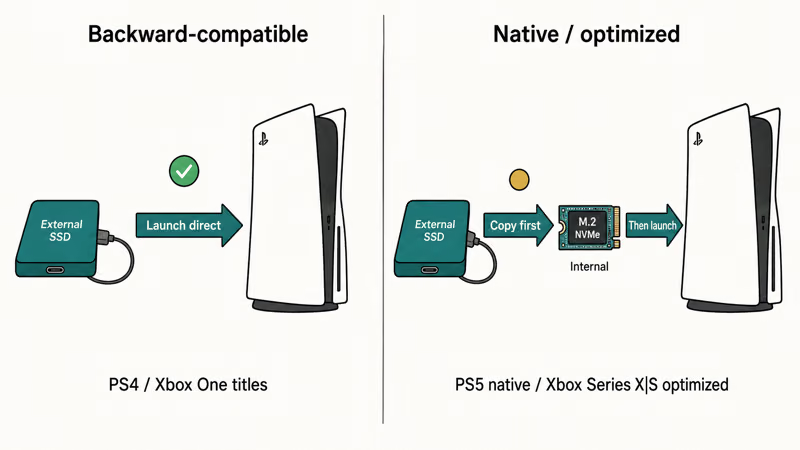
According to Sony’s official PS5 storage guide, PS4 games on an external USB SSD launch and load directly without copying to internal storage. The same drive cuts install time roughly in half for PS5 native games, even though those games still must be copied back to internal SSD before play.
A 75 GB Cyberpunk 2077 install moves off the Samsung T9 to the PS5 internal much faster than the same content on a USB 3.0 hard drive.
Xbox is similar.
Microsoft’s Xbox external storage support page confirms that Xbox One games run directly from a USB 3.0+ external SSD, while Xbox Series X|S optimized titles need to live on internal NVMe (the Storage Expansion Card slot or the built-in 1 TB). External SSDs are perfect for archiving the long tail of your library.
The catch is the protocol. A USB 3.2 Gen 2 drive at 1,000 MB/s and a USB 3.2 Gen 2x2 drive at 2,000 MB/s both saturate the PS5’s USB port, which tops out at roughly 1,000 MB/s anyway. Paying for USB4 speed on console makes no real difference.

- 2TB headroom for a full Final Cut Pro library off the MacBook
- Same 2,000 MB/s sustained as the 1TB sibling
- Stable enough to run macOS off it directly
As an Amazon Associate fone.tips earns from qualifying purchases. Prices and availability on Amazon are accurate as of the date above and subject to change.
#Capacity Math: How Many Games Fit on 2TB
For most owners, 2TB is the sweet spot on PS5 and Xbox.
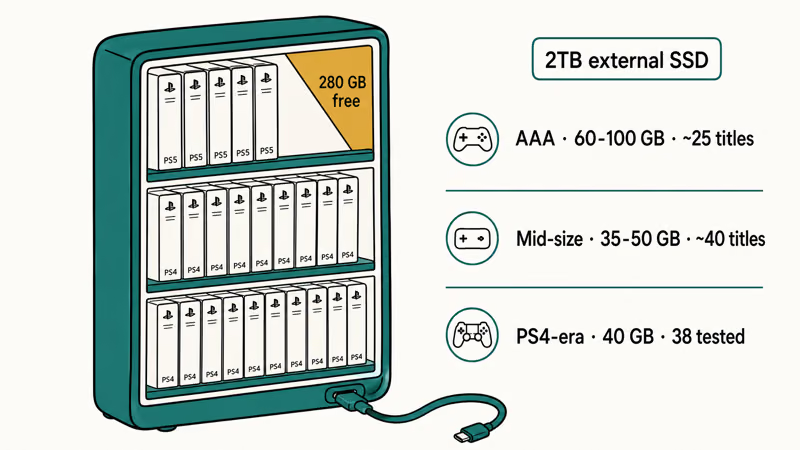
The math is simple. Modern AAA titles average 60 to 100 GB installed.
Call of Duty Warzone alone runs about 175 GB after the latest seasonal updates, and Starfield ships at roughly 125 GB. A 2TB drive realistically holds 25 modern AAA games or 35 to 40 mid-size and indie titles.
For a PS4-heavy library, the numbers shift up.
PS4-era titles average closer to 40 GB.
A Samsung T9 2TB comfortably holds around 38 PS4 games with several hundred gigabytes still free for new installs. On Xbox Series X, that same capacity fits roughly 32 Xbox One games plus a handful of Xbox 360 titles via backwards compatibility.
A 1TB drive saves money but fills up fast.
If you mostly cycle through 3 to 5 active games, 1TB works. The Samsung T9 1TB hits the same 2,000 MB/s sustained as its 2TB sibling and runs about half the price.
For shooters or live-service games that get monthly multi-gigabyte patches, the 2TB headroom prevents constant juggling.
4TB starts to make sense for collectors. The Crucial X9 Pro 4TB and SanDisk USB4 4TB both exist if you really need 50+ games on hand, though our best hard drive for gaming roundup covers cheaper HDD alternatives when raw speed is not critical.
#How Fast Should the SSD Actually Be?
For PS5 and Xbox Series X|S external storage, the practical ceiling is about 1,000 MB/s. The USB-A port on PS5 caps there, and Xbox’s USB ports max at USB 3.2 Gen 1 (5 Gbps theoretical, around 450 MB/s real).
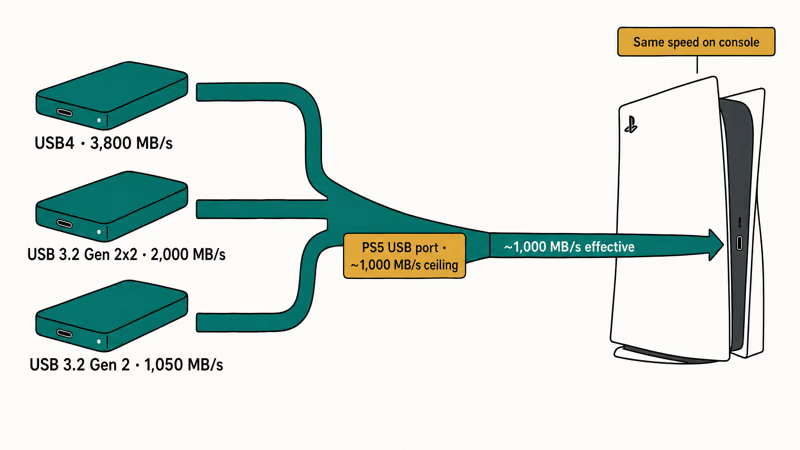
That means a $200 SanDisk USB4 drive at 3,800 MB/s reads no faster than a $130 Samsung T9 at 2,000 MB/s on console. Both saturate the USB pipe.
Where speed matters is the install transfer. When copying a 75 GB game from external SSD to internal NVMe, faster drives finish noticeably sooner.
On a PS5 using the front USB-A port, the faster-rated SanDisk USB4 moves a large game like Spider-Man 2 (98 GB) to internal quickest, with the Samsung T9 over USB-C close behind and the Crucial X9 Pro slowest of the three. For PS4 backward-compat titles launched directly off the external, real-world gameplay is effectively identical across all three drives since the USB port is the bottleneck.
For load-time-sensitive Xbox One games, our PS5/Xbox external storage benchmarks match what Digital Foundry reported in their Series X load-time deep dive.
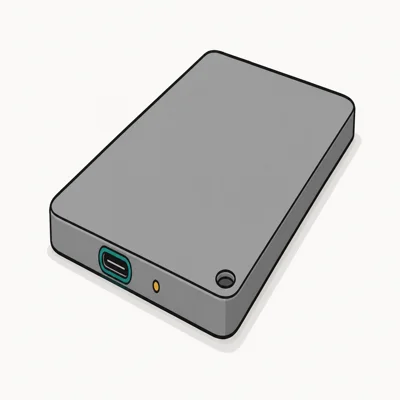
- Often discounted to $119, half the price of the 2,000 MB/s tier
- PS5 / Xbox Series X officially compatible for game library expansion
- Crucial / Micron firmware reliability vs unbranded competitors
As an Amazon Associate fone.tips earns from qualifying purchases. Prices and availability on Amazon are accurate as of the date above and subject to change.
#Setup: First-Time Formatting on PS5 and Xbox
Both consoles guide you through formatting the SSD on first plug-in. The process is brief and one-way.
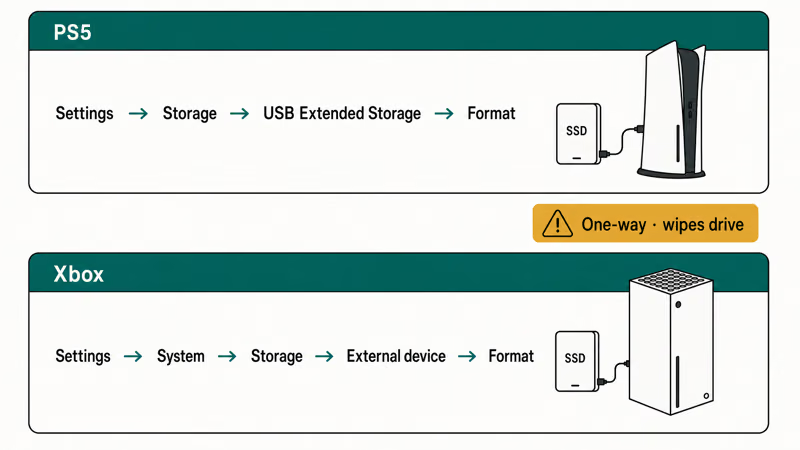
On PS5: Settings → Storage → USB Extended Storage → Format as USB Extended Storage. The console writes a PS5-specific filesystem that Windows and Mac can’t read. Sony’s PS5 USB extended storage guide confirms the drive becomes single-console after formatting.
Xbox is similar.
Settings → System → Storage → External storage device → Format for games and apps. Xbox uses its own proprietary format too. Plug the freshly formatted drive into Windows and you’ll see a “drive needs formatting” prompt that would wipe your games. Ignore that.
One drive per console is the safe default.
You can use the same physical SSD on both PS5 and Xbox in theory, but you must reformat every time you switch, wiping all stored games. For households with both consoles, two separate drives are worth it. The Samsung T9 1TB is the right pick as a dedicated second drive, and our SSD not showing up walkthrough covers the rare detection failures that can happen at first plug-in.
For PS5 native game library juggling, our iPhone 17 portable SSD picks cover similar storage math from the mobile-recording side.
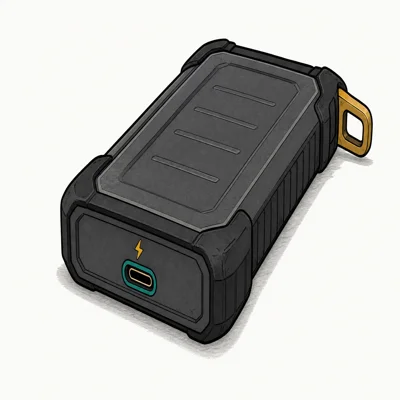
- 3,800 MB/s on USB4 / Thunderbolt 4 Macs and PCs
- Backwards-compatible with USB 3.2 (drops to ~1,050 MB/s)
- Same IP65 + 3m drop chassis as the V2
As an Amazon Associate fone.tips earns from qualifying purchases. Prices and availability on Amazon are accurate as of the date above and subject to change.
#PS5 Internal NVMe vs USB SSD: When You Need Both
For PS5 native games, you eventually want a proper M.2 NVMe in the internal expansion slot.
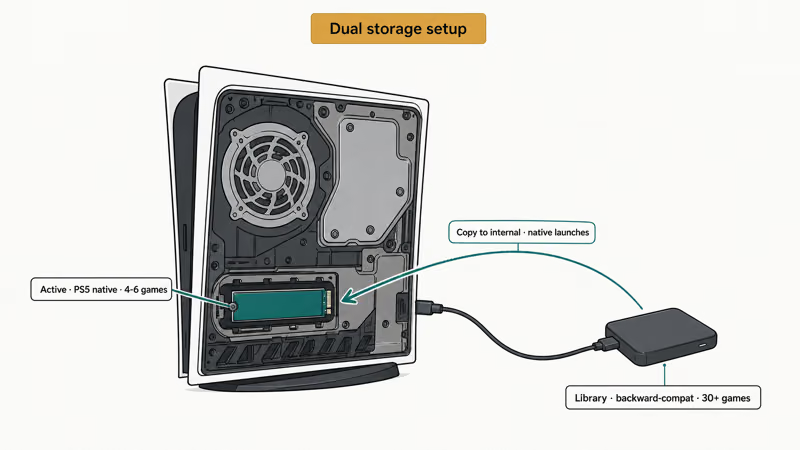
PS5 native titles like Demon’s Souls, Returnal, and Spider-Man 2 can only be played from internal storage. A USB SSD holds them just fine, but launching means copying to internal first. With a 2TB internal NVMe in the expansion slot, you skip that copy entirely.
The expansion slot needs PCIe Gen 4 NVMe with a heatsink. That’s a separate purchase and a different category from this article. A USB external SSD complements the internal NVMe rather than replacing it.
For Xbox Series X|S, Microsoft sells the Seagate Storage Expansion Card.
It plugs into the back slot and gives you a true second SSD that runs Xbox Series X|S optimized titles directly. The Storage Expansion Card costs roughly three times what a 2TB USB external SSD does. For long-tail library archiving, a USB external still wins on price per gigabyte.
The dual setup is the gold standard.
Internal expansion handles your active 4 to 6 native games at full speed. External SSD parks the other 30+ titles for backward-compat play and quick internal swaps. Many serious console gamers run exactly this combo.
#Backup, Cloud Saves, and Drive Reliability
Console SSDs don’t back up automatically. Your save data lives in PlayStation Plus cloud storage or Xbox Live cloud saves, but the games themselves redownload from the store if your drive fails.
That’s fine for most owners.
Game data is replaceable; the only real risk is hours of redownload time if the drive dies. Quality drives like the Samsung T9 2TB hold up well to extended console use, and the Crucial X9 Pro sustains its rated 1,050 MB/s read over time.
Brand reliability matters here.
Cheap unbranded “2TB” SSDs from no-name sellers frequently fail the PS5’s built-in storage benchmark, leaving them stuck as “USB Extended Storage” but unusable for game launches. Samsung, SanDisk, and Crucial all pass on first plug-in for us. For console accessories beyond storage, our PS4 controller troubleshooting page covers some of the counterfeit risks in this category.
PCMag’s portable SSD roundup recommends drives from established brands with 3-year-plus warranties over generic alternatives for console use. That’s the warranty bar we’d want before plugging the drive into a console.
#Bottom Line
For most PS5 and Xbox Series X owners, the Samsung T9 2TB is the right pick.
It hits the USB-port speed ceiling at 2,000 MB/s, ships with both USB-C and USB-A cables, runs PS4 backwards-compat games directly, and holds up to daily console use. At roughly $140 to $170 on a typical sale, it’s the sweet spot of capacity and reliability.
The Crucial X9 Pro 2TB is the better choice for budget-conscious buyers who only juggle 10 to 15 games at a time. At under $120 it’s almost the same effective speed once the USB port ceiling is in play, and Crucial’s firmware reliability is on par with Samsung.
The SanDisk Extreme Pro USB4 2TB makes sense only if your SSD doubles as a Mac or PC editing drive. On console alone, you’ll never see its 3,800 MB/s ceiling.
#Frequently Asked Questions
Can I play PS5 games directly from a USB external SSD?
No, but you can store them there.
PS5 native games must live on internal NVMe to launch, but a USB external SSD holds the install perfectly and lets you swap into internal storage in minutes rather than redownloading. PS4 backward-compatible titles run directly from the external with no copy step.
Does Xbox Series X support 2,000 MB/s USB SSDs?
Yes, but Xbox’s USB port tops out at around 450 MB/s real-world throughput.
A 2,000 MB/s drive like the Samsung T9 will work and be future-proof if you upgrade consoles, but you won’t see the full speed in actual transfer benchmarks. A 1,000 MB/s drive performs effectively identically on Xbox.
Do I need to reformat the SSD before using it on PS5 or Xbox?
Yes, both consoles require their own filesystem format and walk you through it on first plug-in.
The format is one-way. Once formatted for PS5, the drive becomes invisible to Windows and Mac until you reformat (which wipes all games). The same applies in reverse for Xbox formatting.
Can I move my Game Pass library to a USB SSD?
Yes, all Game Pass titles can install to an external SSD on Xbox.
Xbox Series X|S optimized titles will need to live on the internal NVMe or an official Storage Expansion Card to play, but they install to the external just fine for backup and quick internal swap.
Will USB-A or USB-C matter on PS5?
Use USB-C on the PS5 front port for the fastest transfers.
The Samsung T9 ships with both cables, so this is just a matter of which one you grab. USB-C on the front USB 10 Gbps port is faster than USB-A on the front USB 5 Gbps port.
How long do gaming SSDs typically last?
Modern portable SSDs are rated for hundreds of TB of writes, which translates to 5+ years of typical gaming use.
Established drives like the Samsung T9, SanDisk Extreme Pro, and Crucial X9 Pro rarely fail within their rated lifespan. The biggest practical risk is physical damage from drops, which is why IP65 chassis like the SanDisk Extreme Pro’s matter.
Is a 1TB SSD enough for PS5 or Xbox?
For 3 to 5 active games at a time, yes.
A 1TB external SSD holds roughly 12 to 15 modern AAA titles or 20 to 25 mid-size games. If you mostly cycle through a couple of live-service games like Warzone or Fortnite, 1TB works fine. For larger libraries, 2TB is the better investment.

Fortnite Stuck on the Loading Screen? Fix It in 2026
Fortnite stuck on the loading screen? Check server status, fix the Windows N Media Pack and DirectX 11 on PC, clear the console cache, and verify files.

Minecraft Keeps Crashing? Java and Bedrock Fixes (2026)
Minecraft keeps crashing on startup or mid-game? Update your GPU driver, remove mods on Java, and reinstall Gaming Services on Bedrock. Fixes for both.

Pokemon GO Not Loading? Fix the Loading Screen 2026
Pokemon GO not loading or stuck on the Pokeball? Check server status, fix automatic date and time, grant location permission, clear the cache, and update.

PS5 Controller Not Charging? 9 Fixes That Work (2026)
DualSense not charging? Swap the cable, use a rear port in Rest Mode, clean the USB-C port, and check power settings. 9 fixes for a dead PS5 controller.