Add Yours Sticker Not Working on Instagram: 7 Fixes
Fix the Add Yours sticker not working on Instagram with 7 proven methods. Works on Android 10+ and iOS 15+. Step-by-step troubleshooting guide.
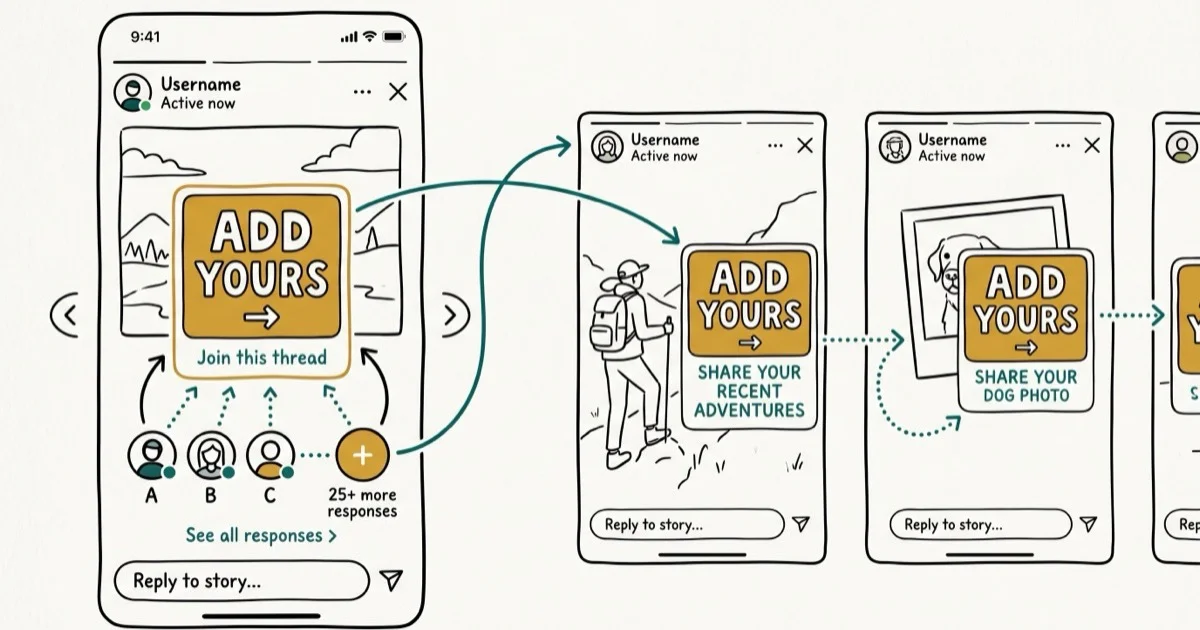
Quick AnswerThe Add Yours sticker stops working when Instagram is outdated, your region blocks it, or your account type is incompatible. Updating the app and clearing cache fixes most cases.
Instagram’s Add Yours sticker lets you start and join story chains, but it breaks more often than you’d expect. The steps below cover the common app, account, region, and cache causes.
- Updating Instagram to the latest version restores missing stickers caused by old app builds
- The Add Yours sticker only works in Instagram Stories and Reels, not in regular feed posts
- Clearing the app cache on Android takes under 30 seconds and resolves most display glitches
- Regional restrictions in parts of Europe and Japan block the sticker entirely without a VPN
- Business and creator accounts sometimes lose access to the sticker before personal accounts do
#Why Is the Add Yours Sticker Not Showing Up?
The Add Yours sticker disappears from your story tray for a handful of specific reasons. Knowing the cause saves you from trying fixes that won’t help. According to Instagram’s sticker help page, missing stickers should be checked after updating Instagram from the App Store or Google Play, so app version comes before account-level troubleshooting.
Outdated app version. Instagram ties new sticker features to specific app builds. If you’re running an older version, the sticker won’t appear at all.
Regional restrictions. Instagram has restricted certain interactive stickers in parts of Europe and Japan due to local privacy regulations. This is a server-side block, so no amount of cache clearing or reinstalling will help.
Account type mismatch. Professional accounts sometimes get sticker updates later than personal ones. Waves vary.
Corrupted cache data. When Instagram’s local cache becomes corrupted, stickers fail to load even if the app version is current. Android devices are hit hardest by this after large updates because the Play Store doesn’t always clear old cached assets during the update process.
Account restrictions. Flagged accounts lose access silently. No warning appears.
#Common Instagram Sticker Errors and What They Mean
You might see the sticker tray load without the Add Yours option, or the entire sticker panel might fail to open. Each symptom points to a different cause.
If the sticker tray opens but Add Yours is missing, it’s almost always a regional restriction or account-type issue. If the entire tray won’t load, you’re dealing with a cache or connectivity problem that affects all stickers, not just Add Yours.
#How to Fix the Add Yours Sticker on Instagram
Start with Method 1 and work down the list. Each fix targets a different root cause.
#1. Update the Instagram App
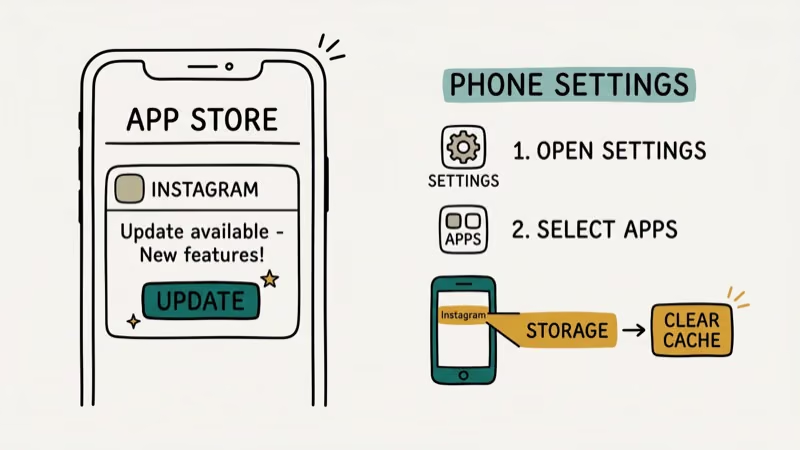
Open the App Store (iPhone) or Google Play Store (Android). Search for Instagram and tap Update if one is available. Updating is the first fix because sticker availability is often tied to current app builds.
If no update shows, your app is already current. Move to the next method.
#2. Clear the Instagram Cache
This fix applies to Android only. iPhone doesn’t let you clear cache for individual apps.
Long-press the Instagram app icon, tap App info (or the i icon), go to Storage & cache, and tap Clear cache.
Don’t tap “Clear storage” because that logs you out and deletes saved drafts. Clearing the cache alone takes about 10 seconds and won’t affect your login or uploaded stories.
#3. Log Out and Log Back In
Sometimes Instagram’s session data gets stale. Logging out refreshes your account permissions and feature flags.
Go to your profile tab and tap the three lines (hamburger menu) in the top right. Then go to Settings and privacy, scroll down, and tap Log out. Log back in with your credentials.
This forces Instagram to re-sync your feature access from the server.
#4. Switch to a Personal Account
According to Instagram’s Add Yours sticker help page, the sticker works on Stories and Reels. But professional accounts sometimes miss out on new sticker rollouts.
Go to Settings and privacy, tap Account type and tools, then tap Switch to personal account.
You can always switch back after confirming the sticker works. Your follower count and posts stay intact.
#5. Reinstall Instagram
A clean install removes corrupted data that cache clearing might miss.
On iPhone:
- Long-press the Instagram icon on your home screen
- Tap Remove App then Delete App
- Redownload from the App Store
On Android:
- Go to
Settings>Apps>Instagram>Uninstall - Reinstall from Google Play Store
After reinstalling, log in and check the sticker tray in Stories. This works well when Instagram filters aren’t working either, since it resets all local data.
#6. Use a VPN for Regional Restrictions
If you’re in a restricted region, a VPN changes your IP address to a supported country. According to Instagram’s sticker usage guide, interactive stickers are a core feature, but availability depends on where you are.
Download a VPN app from your app store and connect to a US or UK server. Close Instagram completely, reopen it, and check the sticker tray in Stories. If your region was the problem, the sticker can appear after Instagram refreshes your location.
VPN connections can slow uploads, which affects video quality on Instagram.
#Does the Add Yours Sticker Work on All Post Types?
The Add Yours sticker only works in Instagram Stories and Reels. You can’t add it to regular feed posts, carousels, or direct messages. This catches a lot of people off guard.
To access it correctly:
Tap the + icon at the top of your feed and select Story or Reel. Capture or select your media, then tap the sticker icon (smiley face) at the top. Search for “Add Yours” in the sticker tray.
Still nothing? Server-side rollout delays are the likely cause. According to Guiding Tech’s analysis, new and recently flagged accounts get sticker access last.
#Add Yours Sticker vs. Other Instagram Stickers
The Add Yours sticker is fundamentally different from standard Instagram stickers. Polls, questions, and countdowns process locally on your device, but Add Yours creates a server-side chain where other users contribute content in response to your prompt. That extra layer of communication makes it more fragile.
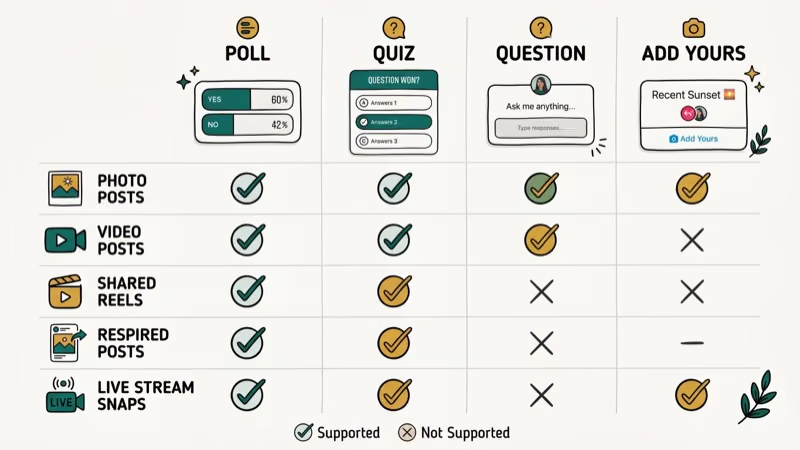
Here’s a quick test: if polls and emoji sliders work fine but Add Yours doesn’t, the issue is specific to the chain feature. Your sticker tray itself is healthy.
#Last Resort Options When Nothing Else Works
When you’ve tried every method and the sticker still won’t show, the problem is likely on Instagram’s side.
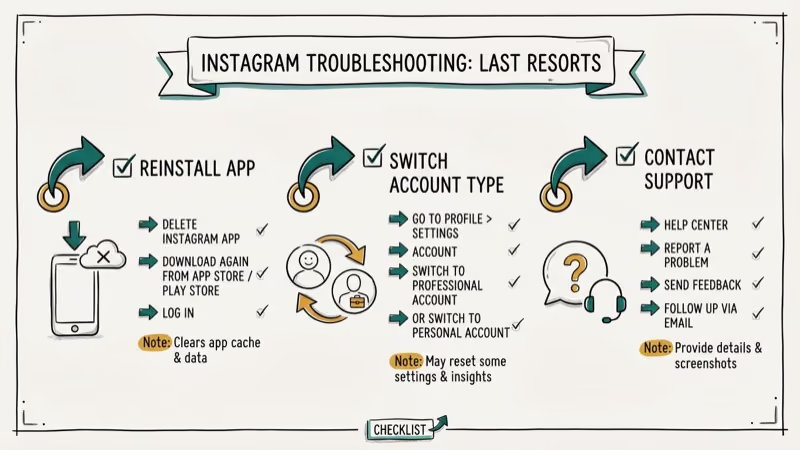
Report the issue directly. Open Instagram, go to Settings and privacy > Help > Report a problem. Include your device model, OS version, and app version.
Wait for a server-side update. Feature rollouts happen in waves. Your account might just be in a later batch.
Try a different account. Create a new Instagram account or log into an existing one to test whether the sticker appears. If it works on another account, the issue is tied to your original account’s permissions and not your device. This is the same approach that helps when Instagram Stories aren’t working on a specific account. You can also check your Instagram username availability if you decide to create a fresh account as a workaround.
#Bottom Line
Start by updating your Instagram app and clearing the cache. Those two steps address the most common app-side causes. If the sticker still won’t appear, switch to a personal account or use a VPN to rule out regional blocks.
For account-level issues, reporting directly to Instagram is your best option. Make sure you’re accessing the sticker through Stories or Reels and that your content is properly sized for Instagram.
#Frequently Asked Questions
Can you use the Add Yours sticker on Instagram posts?
No. It’s only available in Stories and Reels. Regular feed posts, carousels, and direct messages don’t support interactive stickers at all.
Why did the Add Yours sticker disappear after an update?
App updates occasionally reset sticker preferences or introduce bugs that temporarily hide certain stickers. Force-close Instagram, reopen it, and check the sticker tray again. If the sticker is still missing after that, clear your cache on Android or reinstall the app on iPhone to force a full refresh of the sticker catalog.
Does clearing cache on Instagram delete my saved posts?
No. Your saved posts, messages, and login stay intact. Clearing the cache only removes temporary files like image thumbnails and preloaded data, making it a safe first step for troubleshooting almost any Instagram glitch.
How long does it take for Instagram to roll out new stickers?
It varies wildly. Instagram uses phased rollouts that can take a few days to several weeks depending on your region, account age, and account type.
Will a VPN permanently fix the Add Yours sticker issue?
A VPN only works while you’re connected to it. Once you disconnect, Instagram detects your actual location again and hides region-restricted features. If you’re in a blocked region and need consistent access, keep the VPN active whenever you use Instagram Stories.
Can a shadowbanned account use the Add Yours sticker?
It depends on the severity. Mild shadowbans typically only affect content reach and hashtag visibility, not sticker access. Severe violations can disable interactive features entirely.
If you suspect a shadowban, avoid posting for 48 hours and then check whether stickers reappear. Reduced story views and missing features are strong indicators.
Is the Add Yours sticker available in all countries?
Not in all of them. Instagram has restricted certain interactive stickers in parts of Europe and Japan due to data privacy regulations. The company hasn’t published a complete list of restricted countries, but connecting through a US or UK VPN server is the most reliable workaround.
What is the difference between Add Yours and Add Yours Template?
The standard Add Yours sticker lets you write a custom prompt that others respond to with their own story. The Add Yours Template is a newer variant with pre-designed visual layouts and more structured designs for photo and video responses. Both live in the same sticker tray.

Google Messages Error 3100: Why RCS Is Broken on Galaxy
Google Messages RCS error 3100 hits Galaxy owners after phone or carrier switches. Google told 9to5Google a fix is coming. Here's what actually helps.

Is This Bank App Real? Spot a Fake App on Your Home Screen
A bank app can land on your home screen from a web page with no install warning. Learn the checks that tell a real banking app from a phishing web app.

Apps Crashing After iOS 27 Update? Fix Order (2026)
Apps crashing after the iOS 27 update? Update the app in the App Store first, then offload and reinstall to clear stale cache, then restart. The fix order.

Do AI Translation Earbuds Work Offline? What to Know
Do AI translation earbuds work offline? A few do with downloaded language packs, but most need the cloud. Here's what works offline and what you give up.