What Is macOS Gatekeeper and How Does It Protect You?
Gatekeeper checks apps before they run on your Mac to block malware. Here's what it does, why it blocks unidentified-developer apps, and how to allow one.
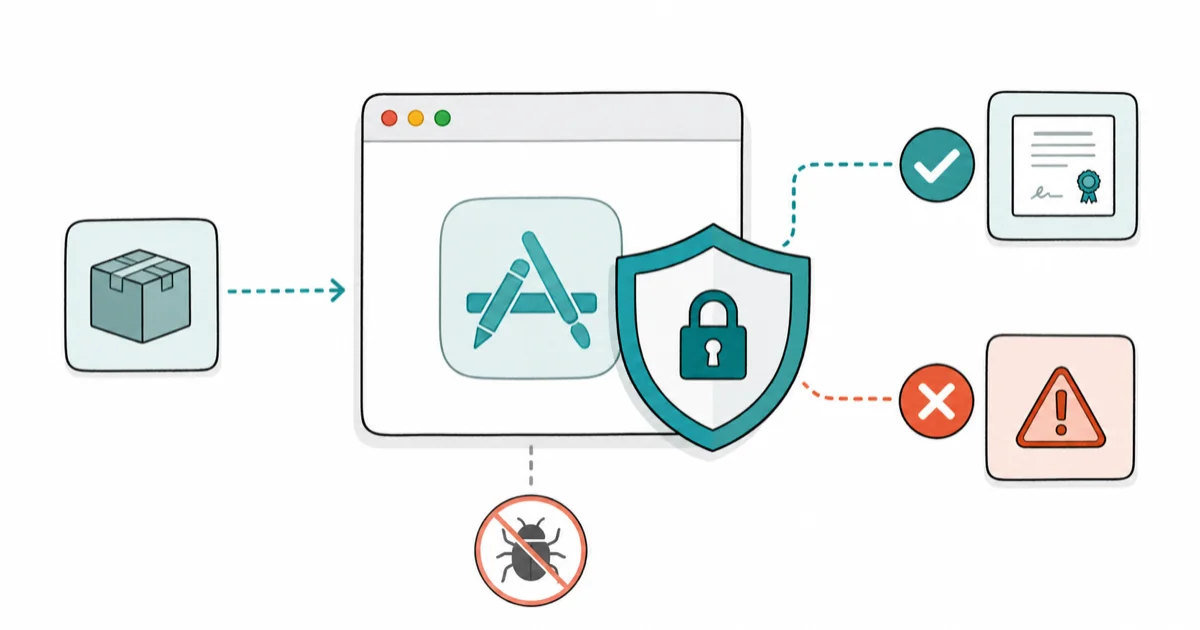
Quick AnswerGatekeeper is the macOS security feature that checks apps for an Apple Developer signature and notarization before letting them run, blocking unverified software by default. You can still open a trusted blocked app by right-clicking it and choosing Open, or allowing it in Privacy and Security settings.
If your Mac has ever refused to open an app because it’s “from an unidentified developer,” you’ve met Gatekeeper doing its job. It’s the macOS bouncer that vets software before it runs, blocking anything Apple hasn’t verified. Understanding what it checks, and how to safely wave a trusted app through, turns that frustrating block into a useful warning. The safe path is to allow one trusted app without disabling protection for everything else.
- Gatekeeper checks every app for an Apple Developer signature and notarization before it runs
- The “unidentified developer” warning means the app lacks Apple’s verification, not that it’s definitely malware
- You can safely open a trusted blocked app by right-clicking it and choosing Open
- Turning Gatekeeper off entirely is risky and rarely necessary for a single trusted app
- Gatekeeper blocks unverified software, but it isn’t a full antivirus on its own
#What Is Gatekeeper and Why Does macOS Have It?
Gatekeeper is a built-in macOS security layer that inspects apps the first time you open them. Its goal is simple: stop unverified or tampered software from running before it can do harm.
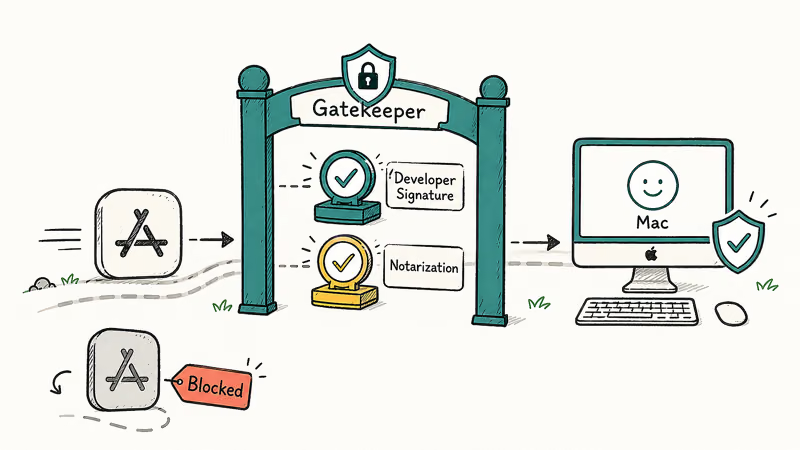
It works by checking 2 things. First, whether the app is signed by a registered Apple Developer, and second, whether Apple has notarized it after an automated malware scan. This is the Mac equivalent of the questions people ask about whether iPhones need antivirus, since both rest on built-in protection rather than a separate app.
According to Apple, 1 core promise drives Gatekeeper: Apple’s Platform Security documentation says it “ensures that only trusted software runs” on your Mac. That single check stops the most common way malware reaches a computer, which is a user double-clicking something they shouldn’t.
#”Unidentified Developer” and Notarization, Explained
These two terms are the heart of Gatekeeper, and they sound scarier than they really should. “Unidentified developer” simply means the app isn’t signed with an Apple Developer ID, so macOS can’t confirm who made it.
Notarization is the deeper check. Apple states that notarization is an automated process that scans software for malicious content, and notarized apps get a ticket that tells Gatekeeper they passed the scan cleanly, which is how a legitimate app from outside the App Store can still earn macOS’s trust without you doing anything.
So an “unidentified developer” warning isn’t an accusation of malware. It often just means a small, legitimate developer didn’t pay for an Apple Developer account or skipped notarization. Plenty of safe open-source tools fall into this bucket, which is why the block is a caution, not a verdict.
#How to Safely Open a Blocked App
If you trust the source, there’s a clean way to open a blocked app without weakening your Mac. Right-click, not just double-click, the app in Finder and choose Open from the menu.
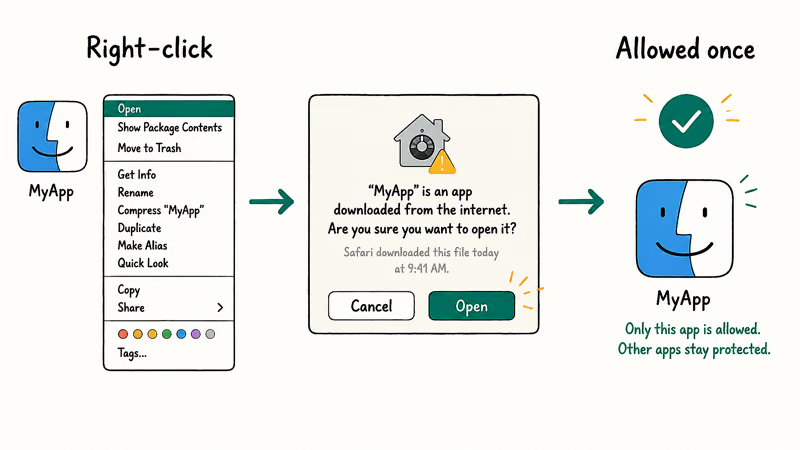
A dialog appears asking if you’re sure, and clicking Open creates a permanent exception just for that app. According to Apple’s guide on opening apps safely, you can also approve it under System Settings, Privacy & Security, where a blocked app shows an “Open Anyway” button after you try to launch it.
Only do this for software you downloaded from a source you trust. The right-click method is far safer than disabling Gatekeeper, because it whitelists one app instead of lowering your guard for everything. If you’re unsure where a download came from, the spotting a fake website guide helps you judge the source first.
#Should You Ever Turn Gatekeeper Off?
For almost everyone, the answer is no. Disabling Gatekeeper removes the warning for every app, which trades a minor annoyance for a real security hole.
The per-app override above handles the legitimate case. You allow the one tool you trust and leave the protection on for everything else, which is the smart middle ground.
There are narrow exceptions, like developers testing many unsigned builds, but even they usually use the per-app method. If you truly need the system-wide change, the disabling Gatekeeper guide covers the steps and the risks, but treat it as a last resort you re-enable afterward.
#Gatekeeper vs Malware: What It Does and Doesn’t Catch
Gatekeeper is a gate, not a guard dog. It checks credentials at launch, not behavior afterward.
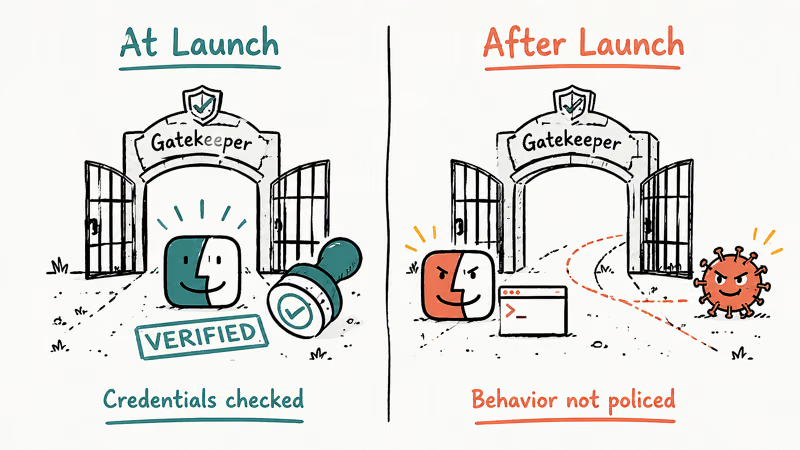
That distinction matters. A notarized app could still misbehave after launch, and a brand-new threat might slip through before Apple flags it. Gatekeeper raises the bar, but it isn’t a complete antivirus, so unexplained trouble like a Mac that keeps crashing can still come from software that passed the initial check.
macOS has other layers, like XProtect for known malware signatures, working behind it. Still, the same logic applies as on other platforms, which is why the Windows Defender debate about “is the built-in protection enough” echoes here. Combine Gatekeeper with careful downloads, and you cover the vast majority of real risk.
#How Gatekeeper Fits Apple’s Security Stack
Gatekeeper doesn’t work alone. It’s one of several macOS defenses that overlap, each covering a different moment in an app’s life.
The stack has roughly 3 layers: Gatekeeper vets an app at first launch, XProtect scans for known malware, and notarization pre-screens software before it reaches you. According to Apple’s developer documentation on notarization, notarized software gets a ticket that Gatekeeper reads to confirm the scan found nothing malicious.
A blocked unsigned app can be allowed through right-click Open while Gatekeeper stays active for other apps. That’s the layered design working as intended.
#Bottom Line
Gatekeeper is a quiet, valuable layer that vets apps before they run, and the “unidentified developer” block is a caution worth respecting, not a bug to silence. When you trust the source, use the right-click Open method to allow that single app, which keeps your protection intact for everything else.
Resist the urge to disable Gatekeeper entirely, since the per-app override does the same job without the risk. Just remember it checks credentials at launch rather than policing behavior afterward, so pair it with smart download habits for real safety.
#Frequently Asked Questions
What does Gatekeeper do on a Mac?
It checks apps for an Apple Developer signature and notarization before they run, blocking anything unverified.
Why does my Mac say an app is from an unidentified developer?
Because it isn’t signed with an Apple Developer ID, so macOS can’t confirm who made it. This is common with small or open-source apps whose makers never registered with Apple, and it’s a caution about verification rather than proof that the app is actually dangerous in any way.
How do I open an app Gatekeeper blocked?
Right-click it in Finder and choose Open, then confirm. That creates a permanent exception for just that one app.
Is it safe to allow apps from unidentified developers?
It depends entirely on the source. If you downloaded the app from the developer’s official site or a reputable repository, allowing it usually carries little risk. If the download came from a sketchy link, email, or pop-up, don’t override the block, because that’s exactly the situation Gatekeeper exists to catch.
Should I disable Gatekeeper completely?
No, not for normal use. Turning it off removes the protection for every app you ever open, not just the one you want to run right now, and the per-app right-click override already handles trusted software while keeping your Mac fully guarded against everything else you didn’t deliberately approve.
Does Gatekeeper protect me from all malware?
No. Gatekeeper checks credentials at launch, not behavior afterward, and a brand-new threat can slip through before Apple flags it. Pair it with safe download habits.

macOS 27 Compatible Macs: Every Supported Model (2026)
macOS 27 Golden Gate runs only on Apple Silicon Macs. Here is the full list of supported M-series models and the four Intel Macs that lose support.

macOS 27 Golden Gate: Every Major New Feature Confirmed
macOS 27 Golden Gate goes Apple Silicon only, adds a Gemini-powered Siri, refines Liquid Glass, and rebuilds Spotlight. Here is every confirmed change.

macOS 27 Liquid Glass: Every Readability Fix Explained
macOS 27 Golden Gate refines Liquid Glass with an intensity slider, better contrast, cleaner window corners, and edge-to-edge sidebars to fix readability.

macOS 27 Performance: What Golden Gate Makes Faster
macOS 27 Golden Gate speeds up AirDrop, network file browsing, Safari, and Spotlight, with core system improvements on the Apple Silicon-only release.