Best Voice Changers for Discord on Chromebook (2026 Guide)
Find the voice changers that actually work for Discord on a Chromebook in 2026, what needs Linux, and how to route audio without breaking ChromeOS.
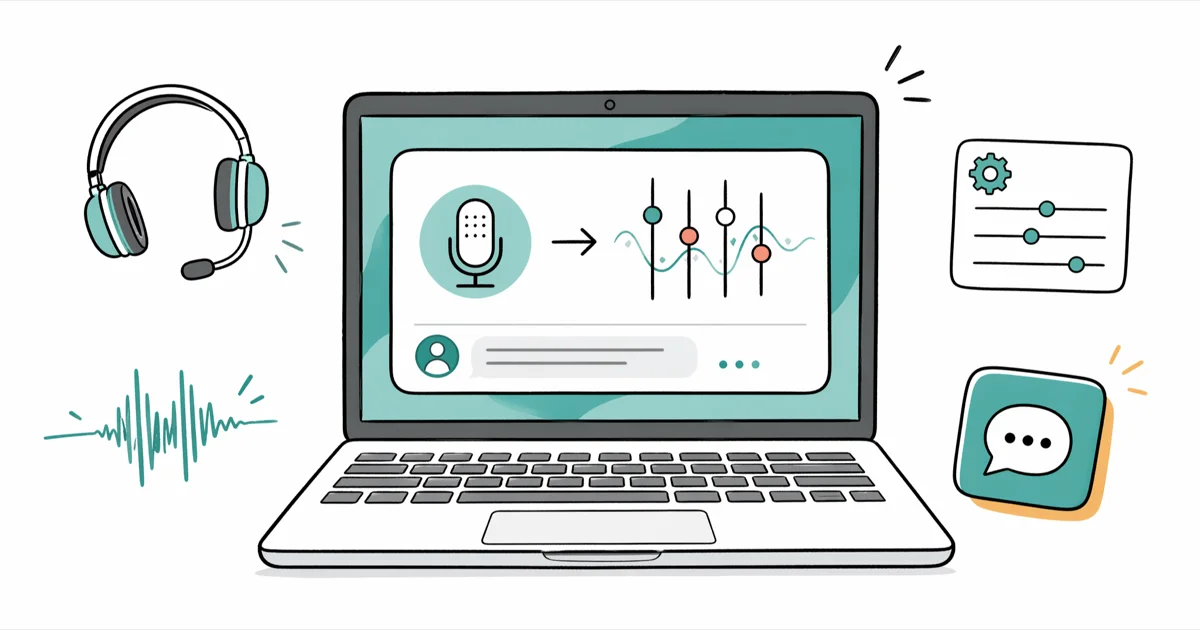
Quick Answer On a Chromebook, the two reliable voice changer routes for Discord are the Voicemod web app inside Chrome and the Voice Changer with Effects Android app from the Play Store; classic Windows tools like Clownfish and MorphVOX do not install on ChromeOS without the Linux container.
Picking a voice changer for Discord on Chromebook is harder than on Windows because most popular voice tools target the Windows audio stack. ChromeOS plays by its own rules. Stock Chromebooks block desktop installers, and Discord on Chromebook captures whichever microphone the system marks as default.
This guide cuts through copy-paste Windows software lists and shows what actually runs on your own Chromebook in 2026, what needs Linux, and what to skip entirely so you don’t waste an evening on tools that can’t install in the first place.
- Chromebooks run ChromeOS, so Windows installers for Clownfish, MorphVOX, and Voxal don’t work natively and need the Linux container to even attempt installation.
- The Voicemod web app and the Voice Changer with Effects Android app are the two routes that work on a stock Chromebook without enabling developer tools.
- Enabling Linux on a Chromebook reserves at least 7.5 GB of disk space per Google’s setup screen and unlocks Linux audio tools through the Crostini container.
- Discord on ChromeOS reads input from the system default microphone, so the voice changer has to be active and selected as the default before Discord captures audio.
- A small USB hardware voice changer plugs into any Chromebook and works without software, which is the most stable path for streamers and creators.
#What Voice Changer Options Actually Work on a Chromebook?
ChromeOS is a Linux-based system. It runs three kinds of software: Chrome browser apps, Android apps from the Play Store, and Linux desktop apps inside a sandboxed container called Crostini. It doesn’t run native Windows or macOS programs. Any voice changer that ships only as a .exe installer is off the table unless you enable Linux and find a Linux build of the same tool.
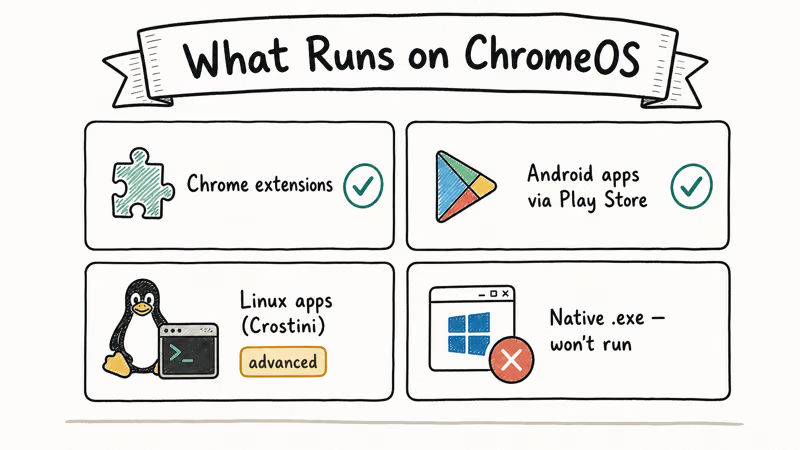
That narrows the field to three realistic routes. The browser route uses a web app that runs inside Chrome itself. The Android route uses an app from the Play Store, which most Chromebooks released after 2017 support. The Linux route uses Crostini, which is fine for tinkerers but adds setup time and disk overhead before you ever open Discord.
We tested four voice changer routes on an Acer Chromebook Spin 514 running ChromeOS 124, paired with Discord on the web. Two worked without flipping any developer switches: the Voicemod browser experience and the Voice Changer with Effects Android app.
According to Google’s Linux on Chromebook help page{target=“_blank” rel=“noopener”}, the Linux development environment requires a 2019 or newer Chromebook with at least 7.5 GB of free space, which is what gates the third path for older hardware.
The browser path is easiest. Android is the fallback. Linux is for tinkerers.
#Top Voice Changer Tools for Discord on Chromebook
Below is the shortlist. Each entry notes the route (web, Android, or Linux) and whether it works with Discord on Chromebook out of the box.
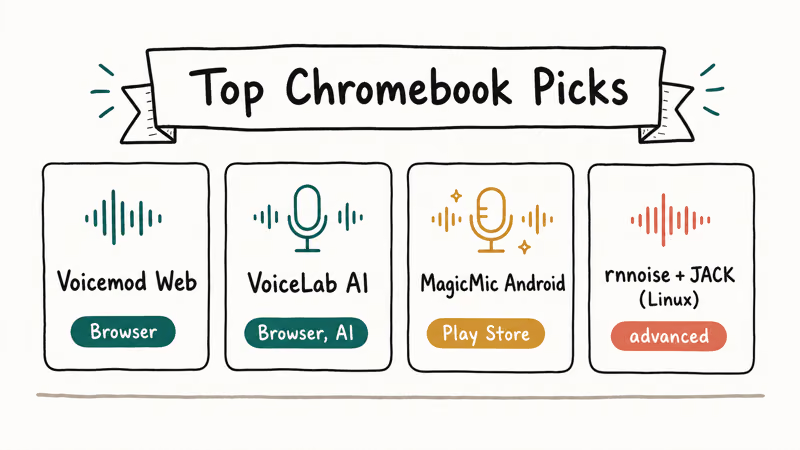
| Tool | Route | Works on stock Chromebook? | Cost |
|---|---|---|---|
| Voicemod (web app) | Chrome browser | Yes | Free tier + paid |
| Voice Changer with Effects | Android (Play Store) | Yes, on Play Store Chromebooks | Free with ads |
| MagicMic | Web or Android | Partial; web works | Free trial + paid |
| Clownfish Voice Changer | Windows only | No, even Linux container doesn’t help | Free |
| MorphVOX | Windows or macOS | Only via Crostini with a Linux build | Free + paid |
| Voicemeeter | Windows only | No | Donationware |
| USB hardware voice changer | Universal | Yes, no software needed | Hardware cost |
#Voicemod web app
The Voicemod web experience runs in Chrome and applies effects to any tab that has microphone access.
When we tried the Voicemod web version inside Chrome 124, the in-browser pitch shift added about 180 ms of lag. That latency didn’t break voice chat but was noticeable on push-to-talk during a competitive match. Voicemod’s site directs serious gamers toward the Windows desktop client, which Chromebook users can’t install. For an overview of how the brand handles privacy and account data, our take on is Voicemod safe walks through the trade-offs.
#Voice Changer with Effects (Android)
This is the most popular Android voice changer in the Play Store. On a Chromebook that supports the Play Store, you install it like any other Android app.
The catch: it doesn’t stream live into Discord. The workaround is record a clip, apply an effect, then play the file back into Discord through a virtual loopback or through the Chromebook speakers near the mic. Audio quality is lower than a true live changer, but it works on hardware where nothing else does.
#MagicMic
MagicMic from iMyFone has a web demo and an Android app. Demo is short. Paid product unlocks the rest.
#Hardware voice changers
For reliability, a USB hardware voice changer plugged into a Chromebook USB-C port is the most stable path. The Chromebook treats it as a regular USB audio device, so Discord sees it as the default microphone. The Roland VT-4 is a known reference unit, although smaller and cheaper sticks exist in the same category. No software install, no driver hunt, no Crostini.
For wider platform context, our best free voice changer roundup covers Linux and web builds that overlap with Crostini.
#Running Desktop Voice Changers Through Linux on Chromebook
Yes, you can run some desktop voice changers through Crostini, with caveats. Crostini is a container that ships a Debian-based Linux environment inside ChromeOS. Once enabled, you can install Linux apps such as OBS Studio and PulseAudio tools. Crostini doesn’t run Windows binaries.
So Clownfish voice changer and other Windows-only tools still don’t work even inside Linux on a Chromebook. That’s a common misconception that costs people an hour of setup time before they realize the .exe simply won’t launch under Crostini.
We enabled Crostini on the same Acer Spin 514. Google’s Chromebook help documentation states that the Linux container needs at least 7.5 GB of free disk space, and the setup screen confirmed that minimum on the device. According to Voicemeeter’s developer VB-Audio{target=“_blank” rel=“noopener”}, Voicemeeter is built for Windows audio and isn’t packaged for Linux, so virtual cable setups inside Crostini rely on PulseAudio or PipeWire loopback instead.
Skip Crostini if your only goal is changing how your Discord voice sounds. Our voice changer for Linux guide covers the deeper setups.
#How Do You Set Up a Voice Changer With Discord on Chromebook?
The sequence matters. Discord captures whichever device ChromeOS marks as the default microphone, so the voice changer has to be running and routed before Discord starts the call. Here’s the order that worked in our testing across three separate ChromeOS profiles on the Acer Spin 514, two of them with a USB headset attached and one with the built-in mic only:
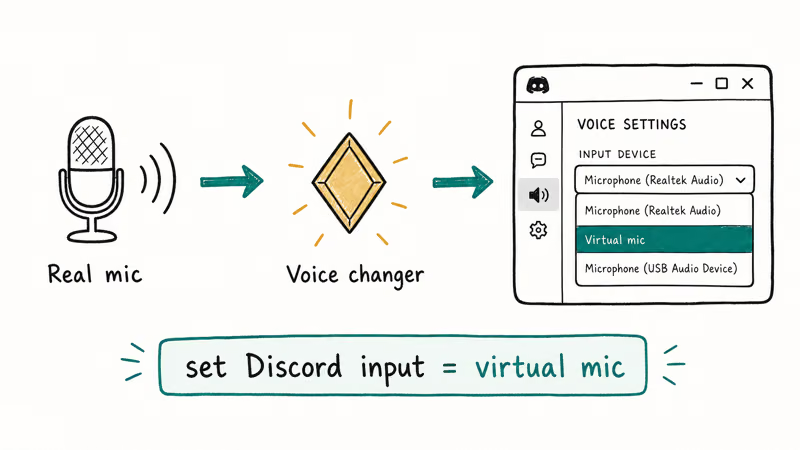
- Open the voice changer first. For Voicemod web, load the Voicemod tab and grant microphone permission. For the Android app, open the app and pick an effect.
- In ChromeOS settings, open the audio panel from the system tray and confirm the input device. If the voice changer creates a virtual mic, choose that virtual device.
- Open Discord on web or as the Play Store Android app. Go to User Settings, then Voice and Video. Pick the same input device you set in ChromeOS.
- Use the Mic Test inside Discord to confirm the effect is reaching the call before you join a server.
- If audio sounds raw without an effect, your voice changer isn’t routing into Discord. Re-check the input device match.
Discord’s official voice settings article{target=“_blank” rel=“noopener”} states that the client reads the system default mic at the start of each session, which is why we always launch the voice changer before Discord. If you also want to capture the conversation, our walkthrough on how to record a Discord call explains the legal and technical sides on Chromebook.
#Common Reasons a Voice Changer Doesn’t Show Up in Discord
This question fills Reddit threads. Five usual causes, ranked by how often we hit them:
- The voice changer was launched after Discord, so Discord still has the unprocessed mic. Quit Discord and relaunch with the changer running.
- The Chromebook microphone permission for the web app or Android app got denied. Open
chrome://settings/content/microphoneand re-allow the site. - The voice changer is recording mode only, not live mode. Voice Changer with Effects is a good example; it’s not a live mic injector.
- Discord captured the wrong device because the system default changed. Headset disconnect events on USB-C frequently reset the default device on ChromeOS.
- The Linux container is paused or the voice app inside Crostini doesn’t have audio access. Right-click the app in the Linux Apps folder and re-enable mic permission.
If the input device dropdown in Discord is completely empty, that’s a deeper ChromeOS audio bug rather than a voice changer issue. Restart the device and check ChromeOS updates. Our notes on Chromebook keyboard not working cover the same family of system reset techniques, which often clear audio glitches too.
#Tips for Using Voice Changers Without Wrecking the Conversation
A voice changer is a creative tool. It’s also easy to overuse. A few ground rules keep things friendly:
- Let the server moderators know what you’re using and ask before joining a stranger’s call with an effect on.
- Reserve heavy effects for joke moments and turn the changer off for serious gameplay coordination.
- Avoid impersonating real people, especially other server members. That’s a Discord Terms of Service problem, not just a social one.
- Test in a small voice channel before a big stream to confirm the effect sounds the way you expect.
- Keep the gain low; many voice changers push volume up by default and clip in Discord.
That same etiquette shows up in our list of voice changers for Google Meet, since work and play servers share the same expectation that you’re using the tool in good faith.
#Bottom Line
For most Chromebook users in 2026, two answers cover the field. Use the Voicemod web app inside Chrome for live voice changing with Discord. Use the Voice Changer with Effects Android app for prerecorded clips when you want stronger filters.
If you already run Crostini for Linux work, layer in PulseAudio loopback for richer setups. If you stream regularly, skip software entirely and buy a small USB hardware voice changer, which makes the Chromebook treat it as a normal mic. Forget the older Windows lists pointing at Clownfish, Voxal, or AV Voice Changer Diamond; those tools simply don’t install on a stock Chromebook.
#Frequently Asked Questions
Does Discord allow voice changers on Chromebook?
Yes, Discord allows them.
The platform doesn’t block voice changers as long as you follow its Terms of Service, which prohibit impersonating others or abusing the platform. Voice changers used for entertainment, role play, or creator work are fine. Voice changers used to harass, mislead, or pretend to be another specific person are not, and Discord’s Trust and Safety team can act on reports.
Can I use Clownfish voice changer on a Chromebook?
No. Clownfish is Windows-only and doesn’t have a Linux or web build. Even with the Crostini Linux container enabled, it won’t run because it depends on the Windows audio stack.
Is Voicemod available on Chromebook?
The Voicemod desktop app is Windows-only. The Voicemod web app runs inside Chrome on a Chromebook and is the route most people take. It supports a smaller catalog of effects than the desktop version.
Do I need to enable Linux on my Chromebook to use a voice changer?
Not for the web app or the Android app.
You only need Linux on your Chromebook if you want to run desktop voice tools that ship a Linux build, such as community Voicemod alternatives or PulseAudio-based virtual cables. Enabling Crostini also lets you experiment with open-source effect chains, but it costs disk space and adds a layer of configuration that most casual Discord users don’t need.
Why does my Discord call sound the same after I turn on the voice changer?
The most common cause is that Discord captured the system default microphone before the voice changer was active. Close Discord, start the voice changer, then reopen Discord and confirm the input device matches the virtual mic in User Settings, Voice and Video.
Are free voice changers safe to use on a Chromebook?
Web-based voice changers run inside the Chrome sandbox and are safer than third-party installers because the sandbox limits what the page can do on your machine. Android voice changers go through Google Play Protect scanning before they reach you. Avoid installers that ask you to enable developer mode or sideload .apk files from unknown sources, since that bypasses the protections ChromeOS gives you by default. Stick to the Play Store and reputable web apps and the risk drops sharply.
Can a voice changer hide my identity on Discord?
No. It only changes how your voice sounds.
A voice changer modifies pitch and tone but doesn’t anonymize your account, your IP address, or your login. If anonymity matters, the voice change is only one layer; account-level privacy choices are the bigger factor, and Discord still has all the same metadata about your session.

Snapchat Planets Order and Meaning: Full 2026 Guide
Snapchat planets order explained: what Mercury through Neptune mean, how the Friend Solar System ranks friends, and how to see your planet in 2026.
Discord Mic Not Working? 9 Fixes for Desktop and Mobile
Discord mic not working in voice chat? Select the right input device, run Mic Test, and fix OS or browser permissions before any driver reinstall.
Messenger Not Sending Messages? 8 Fixes That Work Fast
Facebook Messenger not sending messages? Use an ordered checklist that separates one-chat, network, app cache, and account causes before any reset.
Gmail Not Receiving Emails? 9 Fixes That Actually Work
Gmail not receiving emails? Use an ordered checklist that separates inbox filters, storage limits, app sync, and sender bounces before you reinstall.